

1. Odin3 v1.7 software
2. P1000DXJPE ## firmware taken from SamFirmware
3. Bootloader unlocked - checked with Bootloader Patch
i'm good to go right?

SAMSUNG GALAXY TAB : Official Thread V3, Best and most portable 7" Android tablet
|
|
 Jul 3 2011, 12:58 PM Jul 3 2011, 12:58 PM
Return to original view | Post
#1
|
 
Senior Member
1,661 posts Joined: Oct 2008  
|
ok..i'm about to flash my 1st ROM which is Gingerbread 2.3.3..so i already have these things:
1. Odin3 v1.7 software 2. P1000DXJPE ## firmware taken from SamFirmware 3. Bootloader unlocked - checked with Bootloader Patch i'm good to go right? |
|
|
|
|
|
Jul 3 2011, 02:35 PM
Return to original view | Post
#2
|
|
Senior Member
1,661 posts Joined: Oct 2008
|
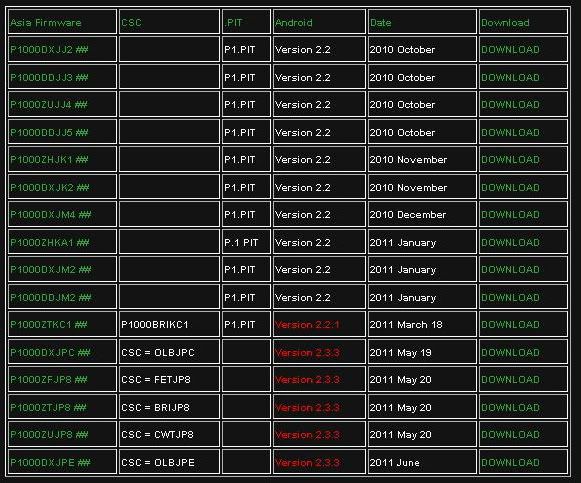
guys, i download the stock 2.3.3 ROM from samfirmware..so if u look at Malaysian firmware [DX], the pit column there is empty. So i dont need pit file is it? How about dbdata?
 |
|
|
Jul 4 2011, 12:01 PM
Return to original view | Post
#3
|
|
Senior Member
1,661 posts Joined: Oct 2008
|
QUOTE(PyOsE @ Jul 3 2011, 12:58 PM) ok..i'm about to flash my 1st ROM which is Gingerbread 2.3.3..so i already have these things: 1. Odin3 v1.7 software 2. P1000DXJPE ## firmware taken from SamFirmware 3. Bootloader unlocked - checked with Bootloader Patch i'm good to go right?  QUOTE(PyOsE @ Jul 3 2011, 02:35 PM) guys, i download the stock 2.3.3 ROM from samfirmware..so if u look at Malaysian firmware [DX], the pit column there is empty. So i dont need pit file is it? How about dbdata? ok...flashed mine to Gingerbread already..  |
|
|
Jul 5 2011, 08:53 PM
Return to original view | Post
#4
|
|
Senior Member
1,661 posts Joined: Oct 2008
|
QUOTE(jhonsonlee @ Jul 5 2011, 05:39 PM) You have updated your Tab via Odin 3 v1.7. yes, the one i downloaded from samfirmware is P1000DXJPE_P1000DXJPE_P1000OLBJPE_HOME.tarCan you please let me know where to get the gt-p1000_mr.pit, modem.bin and csc files? Is it that you download the P1000DXJPE_P1000DXJPE_P1000OLBJPE_HOME from samfirmware and unzip the modem and pit files from it? and do I need repartition. Do I need to patch the bootloader I'm upgrading from Samsung Froyo XME. The gt-p1000_mr.pit, modem.bin and csc files i got from ---> TheGalaxyTab Forum i didn't use modem.bin and csc  btw, just flashed to Overcome ROM v2.0.1...the speed  |
|
|
Jul 5 2011, 09:45 PM
Return to original view | Post
#5
|
|
Senior Member
1,661 posts Joined: Oct 2008
|
QUOTE(dvng @ Jul 5 2011, 09:28 PM) did you just put the whole P1000DXJPE_P1000DXJPE_P1000OLBJPE_HOME.tar eh no la..i put the pit file also, and the ROM...then flash...just like below video:file into the pda slot and flash without pit? |
|
|
Jul 5 2011, 10:58 PM
Return to original view | Post
#6
|
|
Senior Member
1,661 posts Joined: Oct 2008
|
QUOTE(dvng @ Jul 5 2011, 10:27 PM) which pit file, there is a few around. see the link i posted above. . . i get it from the galaxytab forum  Added on July 5, 2011, 11:01 pm QUOTE(vh_20 @ Jul 5 2011, 10:50 PM) i haz one question, kindly help pls. i use the one from android market. . . i cant seems to download or install facebook app to my TAB. there is no facebook apps for TAB? tq This post has been edited by PyOsE: Jul 5 2011, 11:01 PM |
|
|
|
|
|
Jul 25 2011, 11:30 PM
Return to original view | Post
#7
|
|
Senior Member
1,661 posts Joined: Oct 2008
|
anyone flash the modem.bin file other than JPZ? coz mine after flashed to overcome ROM, so hard to get the EDGE connection..
|
|
|
May 11 2012, 06:00 PM
Return to original view | Post
#8
|
|
Senior Member
1,661 posts Joined: Oct 2008
|
QUOTE(khalpowers @ Mar 19 2012, 01:43 AM) guys.. guys,AOSP ICS Galaxy Tab TE4AM. -based on humberos gtab TE4AM ics -fixed on phone and status bar Fc with 240dpi (phone Ui) -240 dpi (default) later can change via dpi setting. -added beats audio&Xloud (superb bass via headphone in a car stereo/home stereo) -init.d tweak(more free ram) -theme framework -flash rom -flash gapps -flash maps -reboot. The latest kernel is included with rom..no need to flash kernel.. enjoys!!  i just flashed to this AOSP ROM but after that it stucks at animation screen during boot up. What seems to be the problem? 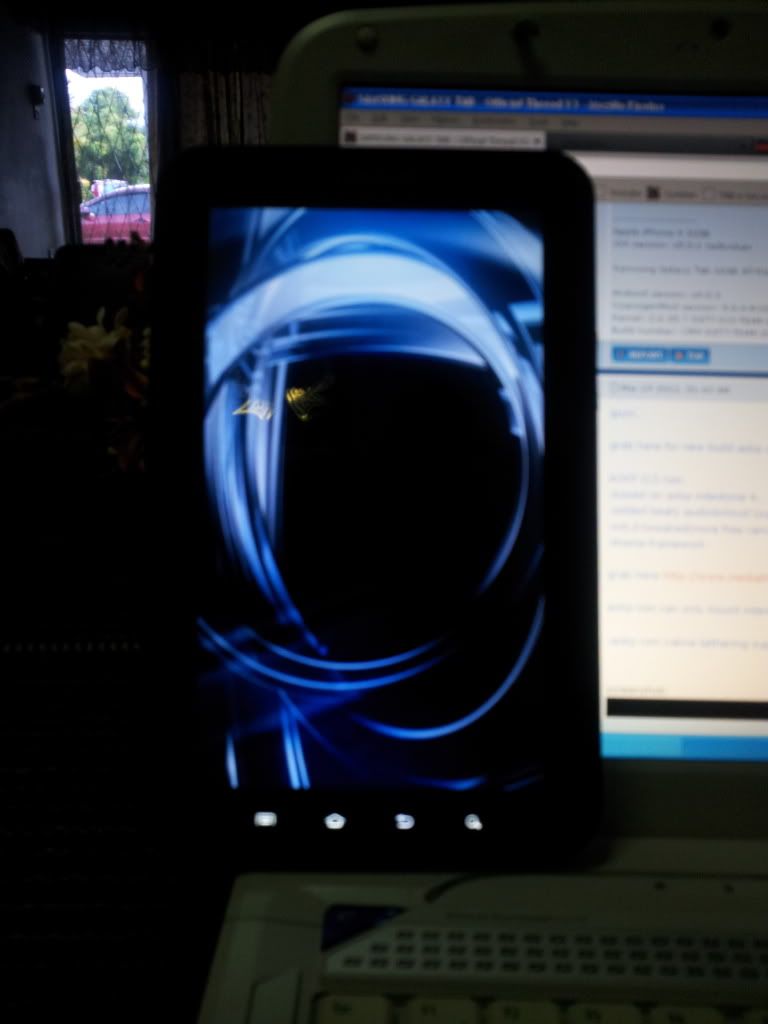 what i did: - put the zip file in the internal storage -reboot in CWM -flash - successfull -stuck at animation  |
|
|
Jan 30 2013, 12:38 PM
Return to original view | Post
#9
|
|
Senior Member
1,661 posts Joined: Oct 2008
|
QUOTE(kim7135 @ Jan 6 2013, 03:54 PM) Hey guys, i need a bit of your help. mine also got unit from Telstra, and i upgraded to 2.3 using the Overcome Installation procedure So i have a Samsung Galaxy Tab, still android 2.2, and it's rooted. i'm trying to flash clockworkmod recovery on it, but the problem is that the tab is a little different from the standard tabs. The tab i have is from my brother, who bought it in Australia from Telstra (i guess Telstra can be seen as the Maxis of Australia), so the model number of my tab is P1000T. Therefore, i can't flash cwm recovery using ROM manager, and I'm having a hard time upgrading the tab to 2.3, as Samsung Kies cannot find any updates for the tab. I try to follow other methods of upgrading on the internet, but i'm not sure if i can follow that as my tab model is P1000T and not P1000. What should i do? Help please :S  |
|
Topic ClosedOptions
|
| Change to: |  0.0197sec 0.0197sec
 0.61 0.61
 7 queries 7 queries
 GZIP Disabled GZIP Disabled
Time is now: 14th December 2025 - 03:08 PM |
 Quote
Quote