Welcome Guest ( Log In | Register )

Bump Topic Topic Closed RSS Feed
126 Pages « < 54 55 56 57 58 > » Bottom

Outline · [ Standard ] · Linear+

Photography The Official Nikon Discussion thread V10, The dark lord continues

views
     
mmohdnor
post Jun 14 2011, 01:57 AM

Regular
******
Senior Member
1,021 posts

Joined: Aug 2006
From: Penang Island, Alor Star


vearn27, i've been using my monitor just fine. (yeah it is an uncalibrated monitor but the pictures looks fine before import if i view it in the mem card ... but once it was imported into library, the color tone becomes warm)
And now, all my pictures looked warm too. I didnt do anything the the rest of the library.
I feel like I messed up with the "default develop settings" or something. (or my kid did something to the presets sad.gif)

summary :
- my monitor looks fine for other non-lightroom stuff
- before import pic looks white enough (during browse in mem card or LR import dialog). but once imported into library, they automatically become warm even though i choose preset as "None".
- ALL & every pic in library also looked warm

How do I properly uninstall and reinstall so that all my edits & library are still intact?

This post has been edited by mmohdnor: Jun 14 2011, 09:36 AM
vincent09
post Jun 14 2011, 09:44 AM

*~ When I was young ~*
******
Senior Member
1,710 posts

Joined: Apr 2006
From: Klang, Selangor D.E.


mmohdnor, I meet this problem before by installing the samsung monitor driver, it change the color management profile under window setting, just remove the profile then fix it for my case.

celciuz
post Jun 14 2011, 09:47 AM

10k Club
********
All Stars
14,037 posts

Joined: Nov 2004
QUOTE(vincent09 @ Jun 14 2011, 09:44 AM)
mmohdnor, I meet this problem before by installing the samsung monitor driver, it change the color management profile under window setting, just remove the profile then fix it for my case.
*
Oh! I had this issue on XP... Vista and 7 no issue. Just change your color profile back to the default srgb.
aldosoesilo
post Jun 14 2011, 10:16 AM

I was like LOL :D
******
Senior Member
1,457 posts

Joined: Nov 2010
From: Bukit Jalil, Kuala Lumpur


QUOTE(Isepunye @ Jun 14 2011, 12:45 AM)
im planning to do photography class handle conducted by professional speaker. i might wanna know from here, how many are interest to join if i conduct?
*
Mind to drop the detail of the event bro? tongue.gif
mmohdnor
post Jun 14 2011, 10:51 AM

Regular
******
Senior Member
1,021 posts

Joined: Aug 2006
From: Penang Island, Alor Star


QUOTE(vincent09 @ Jun 14 2011, 09:44 AM)
mmohdnor, I meet this problem before by installing the samsung monitor driver, it change the color management profile under window setting, just remove the profile then fix it for my case.
*
QUOTE(celciuz @ Jun 14 2011, 09:47 AM)
Oh! I had this issue on XP... Vista and 7 no issue. Just change your color profile back to the default srgb.
*
Really? Same issue like mine ah?

Pic looks OK before transfer (camera LCD & when browsing mem card on PC) ...and then after transfer become warm color/tone. How to fix it?
I'm using Win 7 + Samsung LCD monitor + ATI radeon 5770 card. I' do feel something is wrong with either my default preset during import (overwritten, corrupted or something) OR the color profile of monitor is wrong when opening Lightroom. Bcoz everything else on my screen is fine. No problem.

I tried uninstall + re-installing ...but seems like that doesnt help. I didn't remove my current files though, coz scared i lost the library and my edits.
Googled around some solved the problem by reinstalling the graphics driver, tried that but doesnt help.

Worst case, if I were to make a clean install from start, what files do I need to retain at least?

This post has been edited by mmohdnor: Jun 14 2011, 10:52 AM
celciuz
post Jun 14 2011, 11:05 AM

10k Club
********
All Stars
14,037 posts

Joined: Nov 2004
Google on how to change the color profile on Windows 7. I don't know the method for Windows 7 because mine doesn't have the issue.
0168257061
post Jun 14 2011, 11:14 AM

EimiFukada
********
All Stars
14,242 posts

Joined: Jul 2007
From: JAVABUS


celciuz, upgrade to Flickr Pro leh I want see all your portrait picture cry.gif
celciuz
post Jun 14 2011, 11:21 AM

10k Club
********
All Stars
14,037 posts

Joined: Nov 2004
QUOTE(0168257061 @ Jun 14 2011, 11:14 AM)
celciuz, upgrade to Flickr Pro leh I want see all your portrait picture cry.gif
*
Haha, nothing much at the back tongue.gif. Just view my current pics lah tongue.gif. After next weekend sure upgrade back to Pro. This few days nothing much to upload tongue.gif. After this weekend sure a lot drool.gif
0168257061
post Jun 14 2011, 11:23 AM

EimiFukada
********
All Stars
14,242 posts

Joined: Jul 2007
From: JAVABUS


Oh yeah Super GT right ?
Very nice tongue.gif
From ur flickr can learn at least a lot composition for me.
celciuz
post Jun 14 2011, 11:28 AM

10k Club
********
All Stars
14,037 posts

Joined: Nov 2004
QUOTE(0168257061 @ Jun 14 2011, 11:23 AM)
Oh yeah Super GT right ?
Very nice tongue.gif
From ur flickr can learn at least a lot composition for me.
*
Haha really?

Anyways yes this weekend is SuperGT biggrin.gif. Hope to haul back lots of pics biggrin.gif. Most likely gonna burn shutter as well... gonna load up 8fps this time.
Agito666
post Jun 14 2011, 11:32 AM

10k Club
Group Icon
Elite
11,861 posts

Joined: Oct 2008
From: Bangalasia
QUOTE(celciuz @ Jun 14 2011, 11:28 AM)
Haha really?

Anyways yes this weekend is SuperGT biggrin.gif. Hope to haul back lots of pics biggrin.gif. Most likely gonna burn shutter as well... gonna load up 8fps this time.
*
hell yeah more chicks picture, lesser landscape picture... landscape can give to Bro Aldo to shoot tongue.gif
but then go for GT need how much? haha just wan ask... hmm.gif
aldosoesilo
post Jun 14 2011, 11:36 AM

I was like LOL :D
******
Senior Member
1,457 posts

Joined: Nov 2010
From: Bukit Jalil, Kuala Lumpur


QUOTE(Agito666 @ Jun 14 2011, 11:32 AM)
hell yeah more chicks picture, lesser landscape picture... landscape can give to Bro Aldo to shoot  tongue.gif
but then go for GT need how much? haha just wan ask... hmm.gif
*
u want chicks? I have a nice chicks indeed! hahaha
user posted image
Beautiful Granny. by aldosoesilo, on Flickr

anyway I can't shoot much these days. maybe after exam go for a small trip to hometown. rclxm9.gif
there I might shoot a lot of street type photos. hahaha

This post has been edited by aldosoesilo: Jun 14 2011, 11:38 AM
celciuz
post Jun 14 2011, 11:39 AM

10k Club
********
All Stars
14,037 posts

Joined: Nov 2004
QUOTE(Agito666 @ Jun 14 2011, 11:32 AM)
hell yeah more chicks picture, lesser landscape picture... landscape can give to Bro Aldo to shoot  tongue.gif
but then go for GT need how much? haha just wan ask... hmm.gif
*
tongue.gif

Its ok, I'll spam lots of landscape for u then xD.

Aiming for more shots with exhaust spitting fire this round... 8fps versus 4.5fps back then biggrin.gif.
Agito666
post Jun 14 2011, 11:40 AM

10k Club
Group Icon
Elite
11,861 posts

Joined: Oct 2008
From: Bangalasia
QUOTE(aldosoesilo @ Jun 14 2011, 11:36 AM)
» Click to show Spoiler - click again to hide... «

*
you reminds me this ads..oh gosh i cant eat lunch today sad.gif
» Click to show Spoiler - click again to hide... «

aldosoesilo
post Jun 14 2011, 11:53 AM

I was like LOL :D
******
Senior Member
1,457 posts

Joined: Nov 2010
From: Bukit Jalil, Kuala Lumpur


QUOTE(Agito666 @ Jun 14 2011, 11:40 AM)
you reminds me this ads..oh gosh i cant eat lunch today sad.gif
» Click to show Spoiler - click again to hide... «

*
Sexy granny still sexeh! haha..

here is my lunch treat for you. yesterday was my company birthday celebration. hahaha biggrin.gif
user posted image
Happy Birthday Cake by aldosoesilo, on Flickr

My self note: Narrow DOF is not working for food photography. blush.gif

This post has been edited by aldosoesilo: Jun 14 2011, 11:55 AM
0168257061
post Jun 14 2011, 11:55 AM

EimiFukada
********
All Stars
14,242 posts

Joined: Jul 2007
From: JAVABUS


QUOTE(celciuz @ Jun 14 2011, 12:28 PM)
Haha really?

Anyways yes this weekend is SuperGT biggrin.gif. Hope to haul back lots of pics biggrin.gif. Most likely gonna burn shutter as well... gonna load up 8fps this time.
*
8fps really nice to spam but the numbers of SC keep increasing sad.gif
in 1 month + times i used liao like 5k+ SC wtf sweat.gif shakehead.gif
celciuz
post Jun 14 2011, 12:21 PM

10k Club
********
All Stars
14,037 posts

Joined: Nov 2004
QUOTE(0168257061 @ Jun 14 2011, 11:55 AM)
8fps really nice to spam but the numbers of SC keep increasing sad.gif
in 1 month + times i used liao like 5k+ SC wtf  sweat.gif  shakehead.gif
*
Once a year event, I don't mind spamming for it xD. My hit rate should be better now... hopefully la haha!
0168257061
post Jun 14 2011, 12:31 PM

EimiFukada
********
All Stars
14,242 posts

Joined: Jul 2007
From: JAVABUS


good luck in panning bro,
the 70-200 VR II the VR should work superbly well
vincent09
post Jun 14 2011, 01:18 PM

*~ When I was young ~*
******
Senior Member
1,710 posts

Joined: Apr 2006
From: Klang, Selangor D.E.


QUOTE(mmohdnor @ Jun 14 2011, 10:51 AM)
Really? Same issue like mine ah?

Pic looks OK before transfer (camera LCD & when browsing mem card on PC) ...and then after transfer become warm color/tone. How to fix it?
I'm using Win 7 + Samsung LCD monitor + ATI radeon 5770 card. I' do feel something is wrong with either my default preset during import (overwritten, corrupted or something) OR the color profile of monitor is wrong when opening Lightroom. Bcoz everything else on my screen is fine. No problem.

I tried uninstall + re-installing ...but seems like that doesnt help. I didn't remove my current files though, coz scared i lost the library and my edits.
Googled around some solved the problem by reinstalling the graphics driver, tried that but doesnt help.

Worst case, if I were to make a clean install from start, what files do I need to retain at least?
*
Just check out the color management there is it using a profile which is Samsung own color profile, if yes just delete that profile, I get this problem when using 17" or 19" on window xp.
Reinstall the Lightroom it doesn't help for this.


Redcross
post Jun 14 2011, 01:44 PM

Regular
******
Senior Member
1,680 posts

Joined: Mar 2006
From: Subang
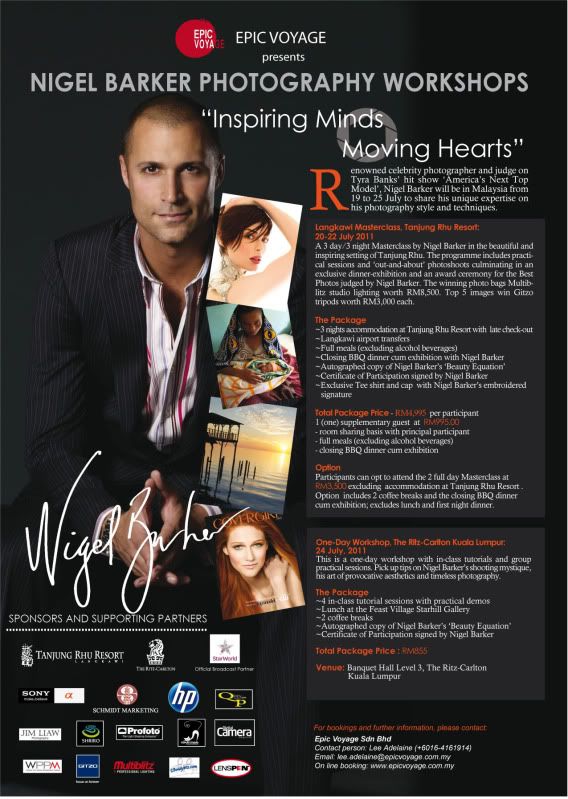
Guys remember i posted about the Nigel Barker Workshop? biggrin.gif

MAJOR UPDATE

The organizers gave me a call again, this time they are reducing the price for his Masterclass workshop!!! rclxm9.gif rclxm9.gif

The new price for his 3 Day Masterclass workshop is RM4995 with accomodation at Tanjung Rhu Resort, OR RM3500 for full 2 day Masterclass workshop without Accomodations at Tanjung Rhu Resort.

user posted image

Details update in my blog smile.gif
Nigel Barker is coming to Town (UPDATE)

Cheap cheap now tongue.gif
those who staying in Langkawi no need accomodation can afford the rm3500 option biggrin.gif

126 Pages « < 54 55 56 57 58 > » Top
Topic ClosedOptions
 

Change to:
| Lo-Fi Version
0.0252sec    0.63    6 queries    GZIP Disabled
Time is now: 15th December 2025 - 04:01 PM