

Em just want to know, is it nowadays all nikon center will be charge for the sensor cleaning ?
Photography The Official Nikon Discussion thread V10, The dark lord continues
Photography The Official Nikon Discussion thread V10, The dark lord continues
|
|
 May 30 2011, 07:48 PM May 30 2011, 07:48 PM
Return to original view | Post
#1
|
 
Senior Member
1,710 posts Joined: Apr 2006 From: Klang, Selangor D.E.  
|
Em just want to know, is it nowadays all nikon center will be charge for the sensor cleaning ?
|
|
|
|
|
|
May 31 2011, 12:36 AM
Return to original view | Post
#2
|
|
Senior Member
1,710 posts Joined: Apr 2006 From: Klang, Selangor D.E.
|
Er, sorry for asking 2nd time, just want to know is it nowadays all nikon service center will be charge on sensor cleaning?
I just getting few dust on my sensor by shooting f22, some more is brand new.... so just want to make sure is it will be charge for the service. It is that I need to bring the warranty card to proof or just walking in ? |
|
|
May 31 2011, 01:26 AM
Return to original view | Post
#3
|
|
Senior Member
1,710 posts Joined: Apr 2006 From: Klang, Selangor D.E.
|
QUOTE(Agito666 @ May 31 2011, 12:41 AM) they will charge anyway. Ok, Thank You for the info.   I appreciate it.  |
|
|
May 31 2011, 09:38 AM
Return to original view | Post
#4
|
|
Senior Member
1,710 posts Joined: Apr 2006 From: Klang, Selangor D.E.
|
QUOTE(Kiki-Lala @ May 31 2011, 01:36 AM) Better bring your receipt in case they ask. RM20 per cleaning. OK I will ~, Thank you for inform about that QUOTE(Everdying @ May 31 2011, 01:44 AM) they will charge, warranty or no warranty. I see, maybe I should check f11 will see the dust or not. just that with warranty its cheaper, iirc rm20 for dx, rm50 for fx...so u still have to bring the card. but f22, i wouldnt worry too much...once it starts appearing at f/11 or more...then only send it in. Is it the Berjaya Time Square Nikon Service Center also provide sensor cleaning service ? ( or I can say all of them also got sensor cleaning service. ) |
|
|
Jun 4 2011, 04:44 PM
Return to original view | Post
#5
|
|
Senior Member
1,710 posts Joined: Apr 2006 From: Klang, Selangor D.E.
|
Just want to know, anyone here have fix the LCD of camera before?
I found that my d7000 LCD there got a black dot, I'm sure not the picture with dust, not screen protector with dust, I can see the black dot stay on there by moving the picture. Is it will take a long time to fix for it? |
|
|
Jun 5 2011, 09:03 AM
Return to original view | Post
#6
|
|
Senior Member
1,710 posts Joined: Apr 2006 From: Klang, Selangor D.E.
|
QUOTE(four_add @ Jun 5 2011, 08:50 AM)  Hi, did you guys use the sharpening, contrast, etc in Picture Control ? whats the best setting for getting optimum picture quality ? found some tips here .. http://forums.dpreview.com/forums/read.asp...essage=37189886 I appreciate it  |
|
|
|
|
|
Jun 6 2011, 09:25 PM
Return to original view | Post
#7
|
|
Senior Member
1,710 posts Joined: Apr 2006 From: Klang, Selangor D.E.
|
Today I when to nikon service center (PJ) for checking the LCD n sensor cleaning, lucky the LCD is not a dead pixel and it just a dust, but it need to charge if want to fix it, warranty like nothing do to on it.
Sensor now is clean n fresh ~~ Is it Berjaya Time Square nikon service center got sensor cleaning service on spot? I get some info say it need to leave the cam there because they send to PJ do clean, is it true ? |
|
|
Jun 7 2011, 12:28 AM
Return to original view | Post
#8
|
|
Senior Member
1,710 posts Joined: Apr 2006 From: Klang, Selangor D.E.
|
QUOTE(Kiki-Lala @ Jun 6 2011, 09:36 PM) Nope, BTS Nikon Centre cleans sensor too. You can just get your camera on the day you send it. I see, ok next time can try at there QUOTE(celciuz @ Jun 6 2011, 09:36 PM) If need sensor cleaning, just wait for photography events But will they rush on their work because of too many ppl looking for FOC LoL~~~. Always FOC during then xD.Ai... just now I checked, got a new dust there.....  ( I have change lens after clean... ) ( I have change lens after clean... ) |
|
|
Jun 10 2011, 07:34 PM
Return to original view | Post
#9
|
|
Senior Member
1,710 posts Joined: Apr 2006 From: Klang, Selangor D.E.
|
QUOTE(lighter @ Jun 10 2011, 02:48 PM) hey guyz.. recently i've replacing my d300s screen protector.. when i remove the old screen protector i saw there dust inside the LCD screen.. knn i thought it's weather sealed? how come dust can go in one? damn dulan.. QUOTE(lighter @ Jun 10 2011, 03:17 PM) okok will try on that.. Same problem as my D7000 which 1 week ago..... I ask for fix and they also charge for it around rm150 ~rm200 because they need open the camera and nothing to do with the warranty ..... actually the dust not obvious la.. just curious why weather sealed still can go in.. Just leave it there until the time you want clean your viewfinder, then just ask them do together with it Because they already open your camera on that time. |
|
|
Jun 14 2011, 01:15 AM
Return to original view | Post
#10
|
|
Senior Member
1,710 posts Joined: Apr 2006 From: Klang, Selangor D.E.
|
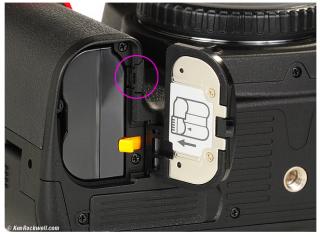
May I know what is this small rubber use for ?
|
|
|
Jun 14 2011, 01:33 AM
Return to original view | Post
#11
|
|
Senior Member
1,710 posts Joined: Apr 2006 From: Klang, Selangor D.E.
|
QUOTE(vearn27 @ Jun 14 2011, 01:27 AM) Did you check your LCD color profile on your LR? Thank you for telling, vearn27, not annoying just it suddenly drop of I though is ... rubber broke already.... Again, check on your software instead of your monitor. Most likely the LCD color profile messed up. Hehe, the rubber keep coming out and annoyed you? Well, check the manual where there's a type of battery to be used on the body with an extension cable out to power source. It can't totally remove 1 is it ? I scare I will pull it out and broke.... |
|
|
Jun 14 2011, 09:44 AM
Return to original view | Post
#12
|
|
Senior Member
1,710 posts Joined: Apr 2006 From: Klang, Selangor D.E.
|
mmohdnor, I meet this problem before by installing the samsung monitor driver, it change the color management profile under window setting, just remove the profile then fix it for my case.
|
|
|
Jun 14 2011, 01:18 PM
Return to original view | Post
#13
|
|
Senior Member
1,710 posts Joined: Apr 2006 From: Klang, Selangor D.E.
|
QUOTE(mmohdnor @ Jun 14 2011, 10:51 AM) Really? Same issue like mine ah? Just check out the color management there is it using a profile which is Samsung own color profile, if yes just delete that profile, I get this problem when using 17" or 19" on window xp. Pic looks OK before transfer (camera LCD & when browsing mem card on PC) ...and then after transfer become warm color/tone. How to fix it? I'm using Win 7 + Samsung LCD monitor + ATI radeon 5770 card. I' do feel something is wrong with either my default preset during import (overwritten, corrupted or something) OR the color profile of monitor is wrong when opening Lightroom. Bcoz everything else on my screen is fine. No problem. I tried uninstall + re-installing ...but seems like that doesnt help. I didn't remove my current files though, coz scared i lost the library and my edits. Googled around some solved the problem by reinstalling the graphics driver, tried that but doesnt help. Worst case, if I were to make a clean install from start, what files do I need to retain at least? Reinstall the Lightroom it doesn't help for this. |
|
|
|
|
|
Jun 16 2011, 09:25 AM
Return to original view | Post
#14
|
|
Senior Member
1,710 posts Joined: Apr 2006 From: Klang, Selangor D.E.
|
hidden830726, I like that distance information meter, it very cool when it move ~~ ngek ngek ~~
Just post out some picture then many ppl here will help you on it |
|
|
Jun 26 2011, 01:32 AM
Return to original view | Post
#15
|
|
Senior Member
1,710 posts Joined: Apr 2006 From: Klang, Selangor D.E.
|
QUOTE(BenSow @ Jun 26 2011, 01:01 AM) followed this tutorial: http://www.flickr.com/photos/rawhead/sets/72157613447137103/ I sat him on a chair, quite fake.... im cracking my brains for a more creative way to use this technique Thank you for sharing the information, must try on it. ~~~ |
|
|
Jul 2 2011, 09:49 PM
Return to original view | Post
#16
|
|
Senior Member
1,710 posts Joined: Apr 2006 From: Klang, Selangor D.E.
|
|
|
|
Jul 3 2011, 12:51 AM
Return to original view | Post
#17
|
|
Senior Member
1,710 posts Joined: Apr 2006 From: Klang, Selangor D.E.
|
QUOTE(gnome @ Jul 3 2011, 12:29 AM) From exif Wow, Thank you for the info. Lens Type G VR Lens 70-200mm f/2.8 So its 70-200mm VR2  I appreciate it. |
|
|
Jul 3 2011, 07:15 AM
Return to original view | Post
#18
|
|
Senior Member
1,710 posts Joined: Apr 2006 From: Klang, Selangor D.E.
|
QUOTE(celciuz @ Jul 3 2011, 03:28 AM) 70200 VRII on D90 Thank you ~~  I like the Bokeh, very smooth ~~~ |
|
|
Jul 3 2011, 11:26 AM
Return to original view | Post
#19
|
|
Senior Member
1,710 posts Joined: Apr 2006 From: Klang, Selangor D.E.
|
QUOTE(celciuz @ Jul 3 2011, 09:56 AM) Having SWM isn't the only advantage of the G to the D, the G is also sharper and render smoother bokeh.  Nikon gold rings, they don't disappoint you! Next time need to think out whether need grab old lens D or top up more go for G if is it same distance and F stop for prime lens. Nikon gold rings, they don't disappoint you! Next time need to think out whether need grab old lens D or top up more go for G if is it same distance and F stop for prime lens. |
|
Topic ClosedOptions
|
| Change to: |  0.0518sec 0.0518sec
 0.10 0.10
 7 queries 7 queries
 GZIP Disabled GZIP Disabled
Time is now: 9th December 2025 - 05:37 AM |
 Quote
Quote
