Welcome Guest ( Log In | Register )

Bump Topic Topic Closed RSS Feed
120 Pages « < 41 42 43 44 45 > » Bottom

Outline · [ Standard ] · Linear+

 Samsung Galaxy TAB Official Thread V2, Best and most portable 7" Android tablet

views
     
cruzzmz
post May 16 2011, 08:41 PM

uh weeee !!!!
*******
Senior Member
6,904 posts

Joined: Jan 2003
QUOTE(darkcroation @ May 16 2011, 07:00 PM)
how to install this

Google Maps v5.4.0 Patched to allow Navigation worldwide - Credit to stian230 for the mod
http://www.multiupload.com/PPS4OOEQGO

i downloaded but duno how to install..cause my papago dun really have the Poi...haiz...so troublesome..
*
if it is .zip .... then flash it via CWM
if not then need to uninstall the old maps.apk using system installer & have to do adb push to the system/app

I flashed mine with the stock GB 2.3.3 rom using odin & then flashed the CF-Root
---> http://forum.xda-developers.com/showthread.php?t=1073854

then uninstalled gmaps and replaced it with gmail 5.4.0 navigation enabled

biggrin.gif

This post has been edited by cruzzmz: May 16 2011, 08:43 PM
DandanBowBow
post May 16 2011, 08:44 PM

New Member
*
Newbie
0 posts

Joined: May 2011
QUOTE(thepittbull @ May 16 2011, 08:36 PM)
If you go to the upper most floor of 1utama... in the middle area that connects the new wing to the old wing... there's this Samsung style kiosk that has a working model for you to test...
*
is there the only place that i can try ? Any other places lets say like Midvalley, Timesquare or Sunway Pyramid. One Utama is quite a long distance from me.
tykenny
post May 16 2011, 08:44 PM

Getting Started
**
Junior Member
179 posts

Joined: Jul 2007
From: Penang


i'm new here, after install Kies into my Windows 7

Kies asked to update it, so i did it . .


but the Q here is : Why i can't finish the update ? coz the status of downloading show 100% long time ago but the updating process till carry on and keep on downloading for another 4 hours and keep downloading till now. . . i tired to cancel it and re-update again, my third time to try on,

but the problem still remain . . . i left it overnite updating since yesterday . .. guess wat ... now it still downloading .... !!!!!!!!!!

WHY ?????

Attached Image

This post has been edited by tykenny: May 16 2011, 08:47 PM
h_bib
post May 16 2011, 08:45 PM

Gadgets Freak
*****
Senior Member
847 posts

Joined: Jan 2003
From: Klang Valley


QUOTE(thepittbull @ May 16 2011, 08:21 PM)
Just flash with CWM... that's it!


Added on May 16, 2011, 8:23 pm

This is real funny! ;-)

He flashed and he doesn't know which version he's on! ;-)
*
I just confuse with this statement in XDA :

1) If you are already running Gingerbread AND have the CF-Root kernel installed you can put the installer on your SD card and flash away. IF YOU ARE NOT ON GINGERBREAD YOU MUST FOLLOW THE GUIDE. FAILING TO DO SO WILL SCREW YOU UP BIG TIME

with the statement in guide :

2)Do note that you should NEVER update Overcome ROMs across different bases, like 1.4.x to 1.6.x or God Forbid, 1.4.x/1.6.x to 2.x! You need to do the full-shebang listed below…

I think my version based on statement 1.. not understand the 2nd statement ><
cruzzmz
post May 16 2011, 09:08 PM

uh weeee !!!!
*******
Senior Member
6,904 posts

Joined: Jan 2003
QUOTE(tykenny @ May 16 2011, 08:44 PM)
i'm new here, after install Kies into my Windows 7

Kies asked to update it, so i did it . .
but the Q here is : Why i can't finish the update ? coz the status of downloading show 100% long time ago but the updating process till carry on and keep on downloading for another 4 hours and keep downloading till now. . .  i tired to cancel it and re-update again, my third time to try on,

but the problem still remain . . . i left it overnite updating since yesterday . ..  guess wat ... now it still downloading .... !!!!!!!!!!

WHY ?????

Attached Image
*
just cancel the KIES update
tykenny
post May 16 2011, 09:10 PM

Getting Started
**
Junior Member
179 posts

Joined: Jul 2007
From: Penang


QUOTE(cruzzmz @ May 16 2011, 09:08 PM)
just cancel the KIES update
*
?? really ?? just cancel it ?

i can still update to Gingerbread without update my Kies rite ? mad.gif mad.gif mad.gif mad.gif mad.gif

I"M GONNNNNNA KILL THIS KIES !!!! vmad.gif vmad.gif
cruzzmz
post May 16 2011, 09:12 PM

uh weeee !!!!
*******
Senior Member
6,904 posts

Joined: Jan 2003
QUOTE(h_bib @ May 16 2011, 08:45 PM)
I just confuse with this statement in XDA :

1) If you are already running Gingerbread AND have the CF-Root kernel installed you can put the installer on your SD card and flash away. IF YOU ARE NOT ON GINGERBREAD YOU MUST FOLLOW THE GUIDE. FAILING TO DO SO WILL SCREW YOU UP BIG TIME

with the statement in guide :

2)Do note that you should NEVER update Overcome ROMs across different bases, like 1.4.x to 1.6.x or God Forbid, 1.4.x/1.6.x to 2.x! You need to do the full-shebang listed below…

I think my version based on statement 1.. not understand the 2nd statement ><
*
I think in a nutshell

if u r in stock 2.2 ... need to flashed via Odin

If u r on GB & flashed CF-Root, do the flash using CWM since it in in the CF-Root


Added on May 16, 2011, 9:13 pm
QUOTE(tykenny @ May 16 2011, 09:10 PM)
?? really  ??  just cancel it ?

i can still update to Gingerbread without update my Kies rite ?  mad.gif  mad.gif  mad.gif  mad.gif  mad.gif

I"M GONNNNNNA KILL THIS KIES !!!! vmad.gif  vmad.gif
*
for GB use Odin better than lousy KIES ...

I ditched it long time ago ...

This post has been edited by cruzzmz: May 16 2011, 09:13 PM
h_bib
post May 16 2011, 09:15 PM

Gadgets Freak
*****
Senior Member
847 posts

Joined: Jan 2003
From: Klang Valley


QUOTE(cruzzmz @ May 16 2011, 09:12 PM)
I think in a nutshell

if u r in stock 2.2 ... need to flashed via Odin

If u r on GB & flashed CF-Root, do the flash using CWM since it in in the CF-Root


Added on May 16, 2011, 9:13 pm

for GB use Odin better than lousy KIES ...

I ditched it long time ago ...
*
Thanks for Gentle Explanation ^^ I feel confident now . Backing up using titanium and clockwork right now ^^
rahuldave
post May 16 2011, 09:17 PM

FAFC 'Forever Android Fan Club'
******
Senior Member
1,241 posts

Joined: Nov 2004
From: Georgetown Penang


QUOTE(rahuldave @ May 16 2011, 06:12 PM)
hi

I'm OC 1.6.1 NOW. What I'm supposed to do to upgrade to OC v2.0.0 Beta 2?

Can someone please be kind enought to simply the process and post it here?
*
Anyone , please?
cruzzmz
post May 16 2011, 09:18 PM

uh weeee !!!!
*******
Senior Member
6,904 posts

Joined: Jan 2003
QUOTE(h_bib @ May 16 2011, 09:15 PM)
Thanks for Gentle Explanation ^^ I feel confident now . Backing up using titanium and clockwork right now ^^
*
good for u
&
best of luck
thumbup.gif

edan1979
post May 16 2011, 09:21 PM

*GruMpy_MoDe*
*******
Senior Member
5,512 posts

Joined: Jun 2006
From: On Earth.


QUOTE(DandanBowBow @ May 16 2011, 08:44 PM)
is there the only place that i can try ? Any other places lets say like Midvalley, Timesquare or Sunway Pyramid. One Utama is quite a long distance from me.
*
lowyat plaza also got one samsung shop with Tab can be tested... on 2nd floor.
cruzzmz
post May 16 2011, 09:23 PM

uh weeee !!!!
*******
Senior Member
6,904 posts

Joined: Jan 2003
taken from overcome
QUOTE
ROM INSTALL INSTRUCTIONS
Download the installation guide attached to this post.
If you are already running Gingerbread AND have the CF-Root kernel installed you can put the installer on your SD card and flash away. IF YOU ARE NOT ON GINGERBREAD YOU MUST FOLLOW THE GUIDE. FAILING TO DO SO WILL SCREW YOU UP BIG TIME
http://forum.xda-developers.com/showthread.php?t=1074759

read the guide 1st

tykenny
post May 16 2011, 09:29 PM

Getting Started
**
Junior Member
179 posts

Joined: Jul 2007
From: Penang


QUOTE(cruzzmz @ May 16 2011, 09:12 PM)
I think in a nutshell

if u r in stock 2.2 ... need to flashed via Odin

If u r on GB & flashed CF-Root, do the flash using CWM since it in in the CF-Root


Added on May 16, 2011, 9:13 pm

for GB use Odin better than lousy KIES ...

I ditched it long time ago ...
*
thanks !~! bro !!

Shi Fu !! Master !! Cikgu !!! yeah !
SonnyCooL
post May 16 2011, 09:36 PM

Web Bastard
*******
Senior Member
5,957 posts

Joined: Sep 2004
From: www.bitching.asia


QUOTE(SonnyCooL @ May 11 2011, 01:21 AM)
yah kind of advance right ???? wait i search the photo for you smile.gif (lazy to unbox and snap)
hehehehe

user posted image

user posted image

user posted image

check this out : http://static.youku.com/v1.0.0152/v/swf/qp...partnerid=XMTI=

best it only cost rm !50 smile.gif hehehheheheh
*
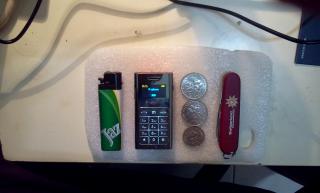
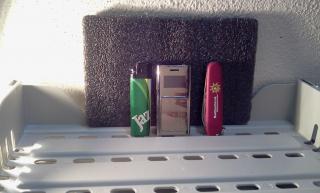
just update my BT phone for galaxy tab smile.gif
Thinner and shorter then a normal lighter, weight slight heavy then normal lighter smile.gif
Attached Image Attached Image
thepittbull
post May 16 2011, 09:38 PM

New Member
*
Junior Member
12 posts

Joined: Apr 2006
From: Selayang


QUOTE(SonnyCooL @ May 16 2011, 09:36 PM)
just update my BT phone for galaxy tab smile.gif
Thinner and shorter then a normal lighter, weight slight heavy then normal lighter smile.gif
Attached Image Attached Image
*
This is chinese only, or does it support other languages?

Edit... been looking for something like this...

This post has been edited by thepittbull: May 16 2011, 09:43 PM
skysaw
post May 16 2011, 09:40 PM

Getting Started
**
Junior Member
104 posts

Joined: Jan 2007


QUOTE(SonnyCooL @ May 16 2011, 09:36 PM)
just update my BT phone for galaxy tab smile.gif
Thinner and shorter then a normal lighter, weight slight heavy then normal lighter smile.gif
Attached Image Attached Image
*
where can get that? how much?
SonnyCooL
post May 16 2011, 09:50 PM

Web Bastard
*******
Senior Member
5,957 posts

Joined: Sep 2004
From: www.bitching.asia


only problem is chinese only .....
i get my cousin send it over from HK to malaysia, rm 150 included shipping ...
pretty nice and cute to use, when my friend saw me using it, they ask what type phone is that smile.gif

fuction : act like a phone, just dial to call, check dial, miss call, answered phone, notify incoming sms (can't read sms), can load phone contact to it (but i haven't discover how to do it yet smile.gif), come with stereo earphone.

Disadvantages : no ringing tone, only one beep when incoming call and custom adapter (slightly wider then micro usb) sad.gif
thepittbull
post May 16 2011, 09:52 PM

New Member
*
Junior Member
12 posts

Joined: Apr 2006
From: Selayang


QUOTE(SonnyCooL @ May 16 2011, 09:50 PM)
only problem is chinese only .....
i get my cousin send it over from HK to malaysia, rm 150 included shipping ...
pretty nice and cute to use, when my friend saw me using it, they ask what type phone is that smile.gif

fuction : act like a phone, just dial to call, check dial, miss call, answered phone, notify incoming sms (can't read sms), can load phone contact to it (but i haven't discover how to do it yet smile.gif), come with stereo earphone.

Disadvantages : no ringing tone, only one beep when incoming call and custom adapter (slightly wider then micro usb) sad.gif
*
LOL! Thanks!
danieloo
post May 16 2011, 09:59 PM

Regular
******
Senior Member
1,434 posts

Joined: Aug 2005


QUOTE(rahuldave @ May 16 2011, 09:17 PM)
Anyone , please?
*
Bro,don't be lazy to read or wait for spoon feeding. Please don't get offended. This is the process you must go thru. It's been mentioned numerous time. Download the guide & go thru it. Its only 13 pages & its simple & easy.

http://forum.xda-developers.com/showthread.php?t=1074759
ameeyn
post May 16 2011, 10:09 PM

Amn85
***
Junior Member
394 posts

Joined: Dec 2007
From: Penang


I just bought jabra easygo bletooth headset for my tab and i have no problem using it to call from my maxis line.

But i cant use it when i try to make a call via mobile voip app?

Does anyone know how to route the voice to my headset when making a voip call?

120 Pages « < 41 42 43 44 45 > » Top
Topic ClosedOptions
 

Change to:
| Lo-Fi Version
0.0314sec    0.32    6 queries    GZIP Disabled
Time is now: 12th December 2025 - 03:50 AM