Welcome Guest ( Log In | Register )

127 Pages « < 119 120 121 122 123 > » Bottom

Outline · [ Standard ] · Linear+

 Asus G-Series Notebooks Thread V3, G74's Pics at Post #483 :)

views
     
Evirober
post Nov 27 2011, 11:43 PM

On my way
****
Junior Member
636 posts

Joined: Mar 2006
From: KL


ian913: notworthy.gif notworthy.gif Thank you so much !! Must have been blind..looking at device manager and control panel.... Thanks again !!

QUOTE(ian913 @ Nov 27 2011, 11:35 PM)
go to start-> creative folder-> and u can find this option
i was like u when i got this laptop looking for this function
*
ian913
post Nov 28 2011, 12:12 AM

Getting Started
**
Junior Member
89 posts

Joined: Mar 2009
QUOTE(Evirober @ Nov 27 2011, 11:43 PM)
ian913:  notworthy.gif  notworthy.gif  Thank you so much !! Must have been blind..looking at device manager and control panel.... Thanks again !!
*
i still noob yet
juz bought this laptop 2 days ago
anyone here can shed some light on those EAX setting?
DoubleU
post Nov 28 2011, 01:58 AM

2k yo!~
*******
Senior Member
2,708 posts

Joined: Oct 2008
From: Johor Bahru


hey any of you guy u5e the JB 5ervice centre before? need to go give them a vi5it
kahtsin
post Nov 28 2011, 02:23 AM

On my way
****
Senior Member
524 posts

Joined: May 2009
why does my windows explorer keeps crashing? sleep.gif
Evirober
post Nov 28 2011, 08:03 AM

On my way
****
Junior Member
636 posts

Joined: Mar 2006
From: KL


kahtsin: No probs so far. Have you installed all the latest updates ?
ian913
post Nov 28 2011, 11:41 AM

Getting Started
**
Junior Member
89 posts

Joined: Mar 2009
QUOTE(DoubleU @ Nov 28 2011, 01:58 AM)
hey any of you guy u5e the JB 5ervice centre before? need to go give them a vi5it
*
what is ur problem doubleU?
riku2replica
post Nov 28 2011, 12:58 PM

Mugi-chan!! 可愛い!!
*******
Senior Member
3,304 posts

Joined: Mar 2006
From: Chicago(Port25)
QUOTE(kahtsin @ Nov 28 2011, 02:23 AM)
why does my windows explorer keeps crashing? sleep.gif
*
Did u forcefully shut down when windows try to install windows update when u shutting down? Or Perhaps downloaded update corrupted

QUOTE(ian913 @ Nov 28 2011, 11:41 AM)
what is ur problem doubleU?
*
DblU wants to sent for repasting. Temps is a bit high on his JW.
kahtsin
post Nov 28 2011, 01:31 PM

On my way
****
Senior Member
524 posts

Joined: May 2009
@Riku : nope. I did not sad.gif

@Evirober : Ok Imma try and update now.
ian913
post Nov 28 2011, 01:51 PM

Getting Started
**
Junior Member
89 posts

Joined: Mar 2009
QUOTE(riku2replica @ Nov 28 2011, 12:58 PM)
Did u forcefully shut down when windows try to install windows update when u shutting down? Or Perhaps downloaded update corrupted
DblU wants to sent for repasting. Temps is a bit high on his JW.
*
what temperature is considered high?
i tried bf3 at ultra setting yday
max gpu temp is 75oC
is it high?
DoubleU
post Nov 28 2011, 02:12 PM

2k yo!~
*******
Senior Member
2,708 posts

Joined: Oct 2008
From: Johor Bahru


well not only that, list of issues i have currently is
-left exhaust making a grinding noise,
-bluray drive working half the time
-keyboard has problems, like S ` 5 all cannot work, but if i wiggle the keyboard ribbon it works something times
- and the thermal paste issue

saw from Asus website there's a new service center... but it just states level 4 IT mall... no idea if its Landmark IT mall, Danga City IT mall, or the newly open, The Store IT Mall (i think it has a new name besides The Store too)

and minor hard drive concerns
trustmeiamlegit
post Nov 28 2011, 02:18 PM

Getting Started
**
Junior Member
295 posts

Joined: Jul 2009
From: Kota Kinabalu


QUOTE(ian913 @ Nov 28 2011, 01:51 PM)
what temperature is considered high?
i tried bf3 at ultra setting yday
max gpu temp is 75oC
is it high?
*
above 85C maybe..

i have never seen an SX go above 85 for gpu...

i even OC mine, and it runs at 81C constantly .. and peaks at 82C for crysis 2..

on stock clocks, u shud see temps < 80C, so u r fine with ur temps.. infact i think its quite low... haha..


Added on November 28, 2011, 2:19 pm
QUOTE(DoubleU @ Nov 28 2011, 02:12 PM)
well not only that, list of issues i have currently is
-left exhaust making a grinding noise,
-bluray drive working half the time
-keyboard has problems, like S ` 5 all cannot work, but if i wiggle the keyboard ribbon it works something times
- and the thermal paste issue

saw from Asus website there's  a new service center... but it just states level 4 IT mall... no idea if its Landmark IT mall, Danga City IT mall, or the newly open, The Store IT Mall (i think it has a new name besides The Store too)

and minor hard drive concerns
*
how long uve been using it?

This post has been edited by trustmeiamlegit: Nov 28 2011, 02:19 PM

kahtsin
post Nov 28 2011, 07:16 PM

On my way
****
Senior Member
524 posts

Joined: May 2009
Updated. But still crash. HMMM.
riku2replica
post Nov 28 2011, 07:22 PM

Mugi-chan!! 可愛い!!
*******
Senior Member
3,304 posts

Joined: Mar 2006
From: Chicago(Port25)
QUOTE(kahtsin @ Nov 28 2011, 07:16 PM)
Updated. But still crash. HMMM.
*
Fresh reinstallation is way to go. Not sure what's wrong with ur windows. Mine still fine.
kahtsin
post Nov 28 2011, 07:42 PM

On my way
****
Senior Member
524 posts

Joined: May 2009
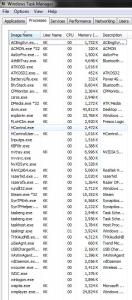
any probs with the task manager? Attached Image
ian913
post Nov 28 2011, 07:55 PM

Getting Started
**
Junior Member
89 posts

Joined: Mar 2009
i juz notice that i have a stretch of light leakage on my left side of my screen
is it normal?
anyone face this issue as wel?
riku2replica
post Nov 28 2011, 08:06 PM

Mugi-chan!! 可愛い!!
*******
Senior Member
3,304 posts

Joined: Mar 2006
From: Chicago(Port25)
QUOTE(kahtsin @ Nov 28 2011, 07:42 PM)
any probs with the task manager? Attached Image
*
try event log what's the crash.
kahtsin
post Nov 28 2011, 08:59 PM

On my way
****
Senior Member
524 posts

Joined: May 2009
QUOTE(riku2replica @ Nov 28 2011, 08:06 PM)
try event log what's the crash.
*
how to check ah? I found event log but don't understand a single shit lol.
Evirober
post Nov 28 2011, 09:30 PM

On my way
****
Junior Member
636 posts

Joined: Mar 2006
From: KL


kahsin: use this command to run the event viewer "eventvwr.msc /s"

basically, click on start then paste above command in the "Search programs and files" and press enter.

The event viewer will then load. You will be able to view all logs that were captured on your notebook prior to the crash.
kahtsin
post Nov 28 2011, 10:16 PM

On my way
****
Senior Member
524 posts

Joined: May 2009
Nt sure if this will help or not..

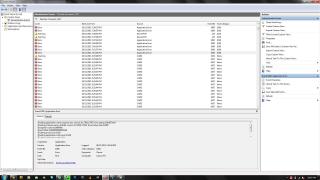
But then now my paint keeps crashing when Im trying to save a print screen -____-

Attached Image
riku2replica
post Nov 28 2011, 10:19 PM

Mugi-chan!! 可愛い!!
*******
Senior Member
3,304 posts

Joined: Mar 2006
From: Chicago(Port25)
QUOTE(kahtsin @ Nov 28 2011, 10:16 PM)
Nt sure if this will help or not..

But then now my paint keeps crashing when Im trying to save a print screen -____-

Attached Image
*
What is that CAPI2 lol, and ur pnp stuff looks fairly dangerous.

Googled CAPI2 - Potential Cause, SQL or AV.

127 Pages « < 119 120 121 122 123 > » Top
 

Change to:
| Lo-Fi Version
0.0290sec    0.19    6 queries    GZIP Disabled
Time is now: 7th December 2025 - 02:47 AM