Welcome Guest ( Log In | Register )

Bump Topic Topic Closed RSS Feed

Outline · [ Standard ] · Linear+

 Sandy Bridge Overclocking V1, 2500K/2600K/2700K | LGA1155 P67.Z68.Z77

views
     
CyntrixTech
post Jun 27 2012, 03:30 AM

Distributor
*******
Senior Member
2,583 posts

Joined: Sep 2011
From: Kuala Lumpur
As mentioned to you that changing the radiator wont make a difference since the third fan is blocked. Any additional decrease in temperature would be temporary until the loop hits equilibrium. You may see 1-3C decrease, that's hardly enough to make or break anything.

Changing the pump may make a bigger difference in the current system as owik pointed out. Again, it's not going to make or break anything.

Adding a Rad and more fans will help you keep the delta smaller but you would require a better pump. Do note that "adding a rad" is not the same as "changing the top rad from EX240 to RX360 and have the third fan blocked". At the end of the day, though, the real difference is the delta. If your chip can't hit 5ghz, no RM10,000 worth of WC equipments can help you in that. LN2 would, but it's not a practical solution for consumers to use their pc 24/7.


Added on June 27, 2012, 3:32 am
QUOTE(kelvin_hata @ Jun 25 2012, 09:38 AM)
wat is the best for i5 2500k ya?? i means how far can go for this?
*
5.1ghz @ 1.51V on Water for over a year. My chip. Currently in a workstation hibernating via aircooling until FT02 project is completed.

This post has been edited by CyntrixTech: Jun 27 2012, 03:33 AM
zain_azmira94
post Jul 9 2012, 08:48 PM

Getting Started
**
Junior Member
107 posts

Joined: Nov 2009
can someone teach me how to overclock my CPU icon_question.gif
can teach me step by step ? icon_question.gif
thank you ! smile.gif
TSowikh84
post Jul 9 2012, 10:35 PM

i7 Clan
Group Icon
Elite
8,711 posts

Joined: Nov 2007
From: Butterworth, PG / Machang, Kelantan


QUOTE(zain_azmira94 @ Jul 9 2012, 08:48 PM)
can someone teach me how to overclock my CPU  icon_question.gif
can teach me step by step ? icon_question.gif
thank you ! smile.gif
*
Then you should let us know what's your PC specs.
ohh there are some OC guides in the post #1 so you should go through it.

This post has been edited by owikh84: Jul 9 2012, 10:38 PM
zain_azmira94
post Jul 10 2012, 02:58 AM

Getting Started
**
Junior Member
107 posts

Joined: Nov 2009
QUOTE(owikh84 @ Jul 9 2012, 10:35 PM)
Then you should let us know what's your PC specs.
ohh there are some OC guides in the post #1 so you should go through it.
*
i gone through all it.. but still dont understand sweat.gif

CPU: Intel Core i5 2500k
MOBO: ASUS P8Z68-V LX
COOLER: V6GT with TX-2 Thermal Compound
RAM: 8 GB Kingston (4GBx2)
GPU: Palit GTX 550 Ti (1024MB GDDR5)
STORAGE: Western Digital 500GB Black
OPTICAL DRIVE: Samsung DVD
PSU: eXtreme Power Plus 550W Cooler Master
CASE: CM Strom Enforcer
CyntrixTech
post Jul 10 2012, 03:42 AM

Distributor
*******
Senior Member
2,583 posts

Joined: Sep 2011
From: Kuala Lumpur
4.6ghz is probably the best your cooler can do. Your PSU is really bad btw. Most info can be found online. If you just want a cheat sheet, this should work for you. The V-LX bios should be quite similar to the M.

http://www.facebook.com/media/set/?set=a.3...67942523&type=3

This post has been edited by CyntrixTech: Jul 10 2012, 03:44 AM
unequalteck
post Jul 10 2012, 11:46 AM

Custom member title
*******
Senior Member
2,690 posts

Joined: Dec 2008
From: Kota Kinabalu Current: Wangsa Maju


QUOTE(CyntrixTech @ Jul 10 2012, 03:42 AM)
4.6ghz is probably the best your cooler can do. Your PSU is really bad btw. Most info can be found online. If you just want a cheat sheet, this should work for you. The V-LX bios should be quite similar to the M.

http://www.facebook.com/media/set/?set=a.3...67942523&type=3
*
im using almost the same spec as him, but my PSU is gigabyte powerock 500w, now im using 4.0ghz, but my vcore still set it as auto.
TSowikh84
post Jul 10 2012, 11:55 AM

i7 Clan
Group Icon
Elite
8,711 posts

Joined: Nov 2007
From: Butterworth, PG / Machang, Kelantan


QUOTE(unequalteck @ Jul 10 2012, 11:46 AM)
im using almost the same spec as him, but my PSU is gigabyte powerock 500w, now im using 4.0ghz, but my vcore still set it as auto.
*

Good for you. Apparently vcore is really depends on the chip. Every CPU has different VID, hence different vcore. It's up to user to try and error the vcore until you found the lowest one stable for that particular clock. I have seen a good chip could do 4.5 with just 1.2v on load. Set it manually instead of auto as you might find a lower vcore than auto set. Thus can shave off some heat.
zain_azmira94
post Jul 10 2012, 02:11 PM

Getting Started
**
Junior Member
107 posts

Joined: Nov 2009
QUOTE(CyntrixTech @ Jul 10 2012, 03:42 AM)
4.6ghz is probably the best your cooler can do. Your PSU is really bad btw. Most info can be found online. If you just want a cheat sheet, this should work for you. The V-LX bios should be quite similar to the M.

http://www.facebook.com/media/set/?set=a.3...67942523&type=3
*
thanks ! but before i do the tweaks, how to detect that the cpu running on stable condition ? what's are the ' symptoms ' that cpu running on unstable mode ? , can damage the cpu ? and regarding temperature, what temperature should i aware after i overclocked it ?

and yeah i liked already your page on facebook ! laugh.gif icon_rolleyes.gif

This post has been edited by zain_azmira94: Jul 10 2012, 02:12 PM
unequalteck
post Jul 11 2012, 10:36 PM

Custom member title
*******
Senior Member
2,690 posts

Joined: Dec 2008
From: Kota Kinabalu Current: Wangsa Maju


QUOTE(zain_azmira94 @ Jul 10 2012, 02:11 PM)
thanks ! but before i do the tweaks, how to detect that the cpu running on stable condition ? what's are the ' symptoms ' that cpu running on unstable mode ? , can damage the cpu  ? and regarding temperature, what temperature should i aware after i overclocked it ?

and yeah i liked already your page on facebook !  laugh.gif  icon_rolleyes.gif
*
BSOD will happen if insufficient vcore, it wont damage the cpu if the temperature don over 90C maybe?
zain_azmira94
post Jul 12 2012, 12:08 AM

Getting Started
**
Junior Member
107 posts

Joined: Nov 2009
QUOTE(unequalteck @ Jul 11 2012, 10:36 PM)
BSOD will happen if insufficient vcore, it wont damage the cpu if the temperature don over 90C maybe?
*
i see.. meaning after i overclocked my cpu then my temp is <90 consider stable right ?
unequalteck
post Jul 12 2012, 12:16 AM

Custom member title
*******
Senior Member
2,690 posts

Joined: Dec 2008
From: Kota Kinabalu Current: Wangsa Maju


QUOTE(zain_azmira94 @ Jul 12 2012, 12:08 AM)
i see.. meaning after i overclocked my cpu then my temp is <90 consider stable right ?
*
ya, but not directly check the temp after adjust the multiplier, run prime95 blend test for 12/24 hours and monitor the temperature
zain_azmira94
post Jul 12 2012, 01:14 AM

Getting Started
**
Junior Member
107 posts

Joined: Nov 2009
QUOTE(unequalteck @ Jul 12 2012, 12:16 AM)
ya, but not directly check the temp after adjust the multiplier, run prime95 blend test for 12/24 hours and monitor the temperature
*
will try what CyntrixTech recommend me the settings, and will run prime95.. will state the what's the result after done with it.. but right now, have to clean inside the rig, found out that the cooler is full of dust sweat.gif ... thank you so much ! smile.gif rclxms.gif
unequalteck
post Jul 12 2012, 01:27 AM

Custom member title
*******
Senior Member
2,690 posts

Joined: Dec 2008
From: Kota Kinabalu Current: Wangsa Maju


QUOTE(zain_azmira94 @ Jul 12 2012, 01:14 AM)
will try what CyntrixTech recommend me the settings, and will run prime95.. will state the what's the result after done with it.. but right now, have to clean inside the rig, found out that the cooler is full of dust sweat.gif ... thank you so much ! smile.gif rclxms.gif
*
no problem rclxms.gif
im blend testing my processor at 4.5ghz now icon_rolleyes.gif

btw, do i need to reapply thermal paste after doing few days for the stress test?
jeff88rey
post Jul 12 2012, 08:38 AM

Getting Started
**
Junior Member
187 posts

Joined: Apr 2011
From: Kota Kinabalu


QUOTE(unequalteck @ Jul 12 2012, 01:27 AM)
no problem rclxms.gif
im blend testing my processor at 4.5ghz now  icon_rolleyes.gif

btw, do i need to reapply thermal paste after doing few days for the stress test?
*
i dont think you need to re-apply.. its an one time job
unequalteck
post Jul 12 2012, 12:14 PM

Custom member title
*******
Senior Member
2,690 posts

Joined: Dec 2008
From: Kota Kinabalu Current: Wangsa Maju


QUOTE(jeff88rey @ Jul 12 2012, 08:38 AM)
i dont think you need to re-apply.. its an one time job
*
okay, even after a long period also no need apply?
blend test last night with 1.350v at 4.5ghz, passed 2 hours without BSOD, then trying to test it for 12 hours
and this morning wake up, computer shut down doh.gif BSOD again
jeff88rey
post Jul 12 2012, 01:01 PM

Getting Started
**
Junior Member
187 posts

Joined: Apr 2011
From: Kota Kinabalu


QUOTE(unequalteck @ Jul 12 2012, 12:14 PM)
okay, even after a long period also no need apply?
blend test last night with 1.350v at 4.5ghz, passed 2 hours without BSOD, then trying to test it for 12 hours
and this morning wake up, computer shut down  doh.gif BSOD again
*
if its of high quality ones i dun think u need..

i have encounter some that will dry after few years.. but those are stock tim provided by intel/amd..
unequalteck
post Jul 12 2012, 06:12 PM

Custom member title
*******
Senior Member
2,690 posts

Joined: Dec 2008
From: Kota Kinabalu Current: Wangsa Maju


QUOTE(jeff88rey @ Jul 12 2012, 01:01 PM)
if its of high quality ones i dun think u need..

i have encounter some that will dry after few years.. but those are stock tim provided by intel/amd..
*
using cooler master but forgot the model smile.gif


Attached Image

my vcore in bios set at 1.355v but during stress test in CPU-z only show 1.280v
but any vcore lower than 1.355v will BSOD
jeff88rey
post Jul 12 2012, 07:51 PM

Getting Started
**
Junior Member
187 posts

Joined: Apr 2011
From: Kota Kinabalu


QUOTE(unequalteck @ Jul 12 2012, 06:12 PM)
using cooler master but forgot the model smile.gif

my vcore in bios set at 1.355v but during stress test in CPU-z only show 1.280v
but any vcore lower than 1.355v will BSOD
*
its normal due to vdroop during stress test.. tats why we got LLC feature to compensate it smile.gif

This post has been edited by jeff88rey: Jul 12 2012, 07:51 PM
unequalteck
post Jul 12 2012, 07:56 PM

Custom member title
*******
Senior Member
2,690 posts

Joined: Dec 2008
From: Kota Kinabalu Current: Wangsa Maju


QUOTE(jeff88rey @ Jul 12 2012, 07:51 PM)
its normal due to vdroop during stress test.. tats why we got LLC feature to compensate it  smile.gif
*
but my LLC level set at lowest, should i increase it? once i increase my temp will go over 80c sometimes
hackcremo
post Aug 7 2012, 06:17 AM

Regular
******
Senior Member
1,299 posts

Joined: Dec 2007
From: Puchong Utama


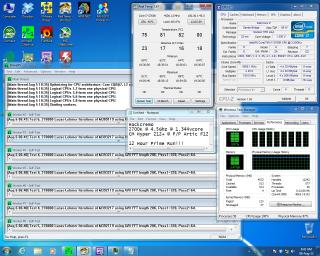
Guys...i need help here...my 2700k need high vcore in order to make it stable when prime...i bought 2700k because thought it are the binned 2600k which can overclock pretty well..

currently i had run 12hour prime @4.5ghz/1.34vcore in BIOS..

when i try to oc 4.6ghz/1.36vcore it BSOD...

can any sifu guide me to overclock this chip..

Attached Image


133 Pages « < 129 130 131 132 133 >Top
Topic ClosedOptions
 

Change to:
| Lo-Fi Version
0.0194sec    1.17    6 queries    GZIP Disabled
Time is now: 1st December 2025 - 02:51 PM