

Nice see seller already have asrock mobo. This board are cheap and overclock well. Come guys, grab it fast!
Sandy Bridge Overclocking V1, 2500K/2600K/2700K | LGA1155 P67.Z68.Z77
Sandy Bridge Overclocking V1, 2500K/2600K/2700K | LGA1155 P67.Z68.Z77
|
|
 Mar 19 2011, 10:38 AM Mar 19 2011, 10:38 AM
Return to original view | Post
#1
|
 
Senior Member
1,299 posts Joined: Dec 2007 From: Puchong Utama  
|
Nice see seller already have asrock mobo. This board are cheap and overclock well. Come guys, grab it fast!
|
|
|
|
|
|
Apr 25 2011, 07:58 PM
Return to original view | Post
#2
|
|
Senior Member
1,299 posts Joined: Dec 2007 From: Puchong Utama
|
for sure any cirucumstances low vdroop is better..include folding..
|
|
|
Sep 7 2011, 05:05 AM
Return to original view | Post
#3
|
|
Senior Member
1,299 posts Joined: Dec 2007 From: Puchong Utama
|
hey guys...i been running prime 95 BLEND nightly at 4.7 GHZ 2500K but wake up this morning saw my screen lock ups..No BSOD but simply hang with no display on screen..i do manually restart it and check back prime log, it hang start from 3am..before sleep, i saw my temp hover around 75-80..is this because of ram??
This post has been edited by hackcremo: Sep 7 2011, 05:07 AM |
|
|
Sep 7 2011, 07:02 AM
Return to original view | Post
#4
|
|
Senior Member
1,299 posts Joined: Dec 2007 From: Puchong Utama
|
QUOTE(owikh84 @ Sep 7 2011, 06:30 AM) Could be a failed OC, CPU usage went down to 0% idle & ur PC turned into sleep mode if it was set to power saving mode with internal CPU PLL overvoltage enabled in BIOS. yup, i enable CPU PLL overvoltage at 1.7V to make sure i can boot into windows..will try your setting later..Windows power option set to "High Performance", re run the prime. Link  my chip require a lot of vcore to make it stable..do still have costa rica 2600K..?? |
|
|
Sep 7 2011, 09:02 AM
Return to original view | Post
#5
|
|
Senior Member
1,299 posts Joined: Dec 2007 From: Puchong Utama
|
QUOTE(owikh84 @ Sep 7 2011, 08:52 AM) CPU PLL OV is either enabled or disabled only. Not that one which u can set value. this my bios template..can you have a look for it which setting i need to change in order to increase my OCOne unit of brand new sealed 2600K Costa is still available on hand. All 2600K's regardless of Costa & Malay i've tested so far could do 5GHz easily. Just that my bad luck is most of them very like to suck voltage so much, vcore 1.5v++. Gotta do with their VID. Costa has higher possibility to get lower VID thus lower vcore and higher OC potential (higher max multi). But this kind of chip is not really have good temps. Golden batch is 3103B3XX. Ai Tweaker Ai Overclock Tuner: Manual BLCK/PCIE Frequency: 100.0 Turbo Ratio: By All Cores By All Cores: 47 Internal PLL Voltage: Enable Memory Frequency: 1333MHZ DRAM Timing Control: 9-9-9-24 EPU Power Saving MODE: Disabled Ai Tweaker\ CPU Power Management > CPU Ratio: Auto Enhanced Intel SpeedStep Technology: Enabled Turbo Mode: Enabled Long Duration Power Limit: Auto Long Duration Maintained: Auto Short Duration Power Limit: Auto Additional Turbo Voltage: Auto Primary Plane Current Limit: Auto Ai Tweaker (in the DIGI+ VRM section) Load-Line Calibration: Ultra High VRM Frequency: Manual VRM Fixed Frequency Mode: 350 Phase Control: Extreme Duty Control: Extreme CPU Current Capability: 140% CPU Voltage: Offset Manual Vcore: 1.44Volt DRAM Voltage: 1.5V VCCSA Voltage: Auto VCCIO Voltage: Auto CPU PLL Voltage: 1.7V PCH Voltage: Auto CPU Spread Spectrum: Enabled Advanced\ CPU Configuration > CPU Ratio: Auto Intel Adaptive Thermal Monitor: Enabled Active Processor Cores: All Limit CPUID Maximum: Disabled Execute Disable Bit: Enabled Intel Virtualization Technology: Enable Enhanced Intel SpeedStep Technology: Enabled Turbo Mode: Enabled CPU C1E: Enabled CPU C3 Report: Auto CPU C6 Report: Auto PM me best price for that procs..in case i want to but can you test/OC first see how the procs capable in overclock..  what is VID..??  This post has been edited by hackcremo: Sep 7 2011, 09:03 AM |
|
|
Sep 8 2011, 05:02 PM
Return to original view | Post
#6
|
|
Senior Member
1,299 posts Joined: Dec 2007 From: Puchong Utama
|
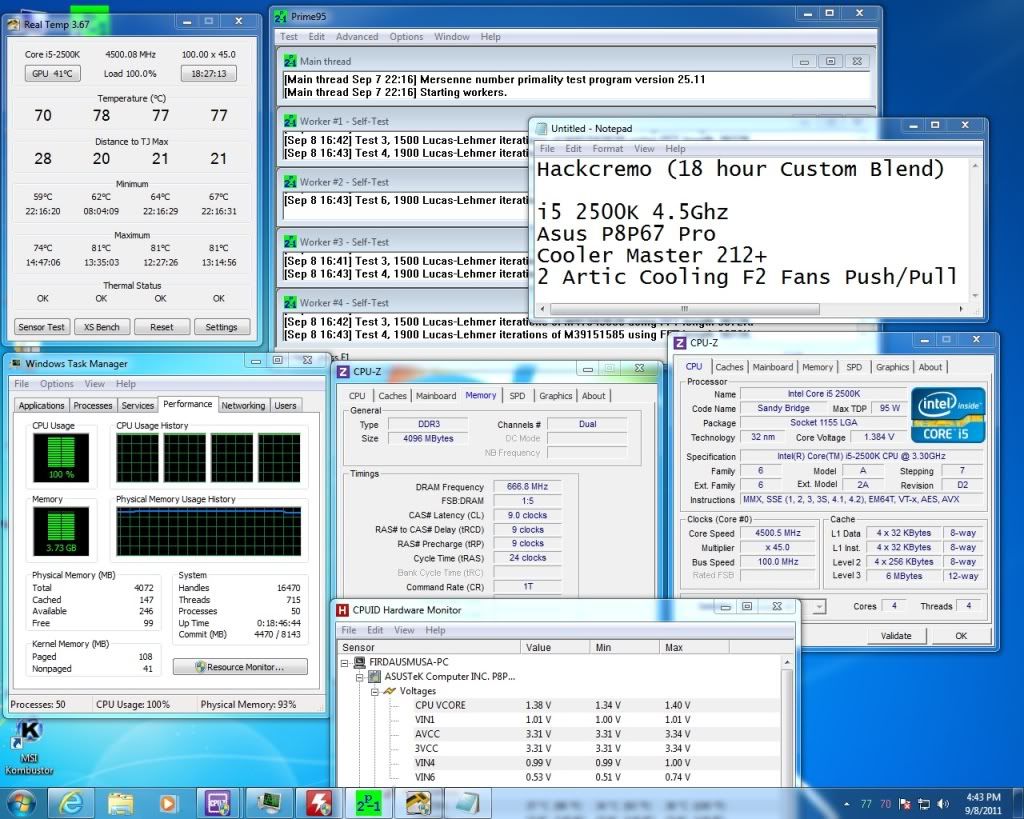 Got my procs stable at 4.5Ghz..wanna go for 4.7ghz after this... |
|
|
|
|
|
Sep 8 2011, 05:04 PM
Return to original view | Post
#7
|
|
Senior Member
1,299 posts Joined: Dec 2007 From: Puchong Utama
|
QUOTE(AlamakLor @ Sep 8 2011, 02:02 PM) Looks like you'd done your homework. However, I'd suggest making these changes: Aiiiyooo bos Ai Tweaker (in the DIGI+ VRM section) VRM Fixed Frequency Mode: 500 Vcore: 1.51 V DRAM Voltage: 1.5125V VCCIO Voltage: 1.15 (1 more step up, I forgot what was the actual voltage) CPU PLL Voltage: 1.71250 CPU Spread Spectrum: Disabled Advanced\ CPU Configuration > Intel Virtualization Technology: Disabled Under CPU Configuration/Control, make sure you enable max power for turbo. Set multi to 50 and boot in. If it works, start to prime blend with v26 prime95 and keep your fingers crossed. If you cannot pass it, then you need to up vcore or lower your OC. Added on September 8, 2011, 2:06 pm 47C with 1% load. your vcore is too high and I doubt you have adequate cooling capacity. Even with my setup and low ambient temp I could hit 90C on IBT, 95% ram. If you run an IBT your PC will shutdown from thermal protection. You need to upgrade your cooling or keep it back down to 4.x ghz.  ...is it safe to boot up at 1.51 vcore with CM hyper 212+...?? ...is it safe to boot up at 1.51 vcore with CM hyper 212+...??your configuration really extreme... anyway, thanks.. |
|
|
Sep 8 2011, 05:48 PM
Return to original view | Post
#8
|
|
Senior Member
1,299 posts Joined: Dec 2007 From: Puchong Utama
|
have run IBT with AVX before but only at 5 runs..can it be assume as stable..?? i afraid of running IBT..it really burn my procs to 90'c..
|
|
|
Sep 8 2011, 10:56 PM
Return to original view | Post
#9
|
|
Senior Member
1,299 posts Joined: Dec 2007 From: Puchong Utama
|
QUOTE(AlamakLor @ Sep 8 2011, 08:00 PM) I have a spare 212+ with 2 blademasters in push pull and from my experience the HSF is very capable. Don't worry too much about the vcore for now, the real vcore would be 1.48, not 1.51 during load. Monitor the temperature and keep your side panel opened. You wanna find out if it's stable at this speed, if it is, well you can decide to maybe get a H100 with 4 gentle typhoon/blademasters my temp seem fluctuate..on the 1 core is lower compared to other 3 core..i think need to repaste and resit.. |
|
|
Mar 21 2012, 09:32 PM
Return to original view | Post
#10
|
|
Senior Member
1,299 posts Joined: Dec 2007 From: Puchong Utama
|
QUOTE(tanghm @ Mar 21 2012, 10:39 AM) Already using H60 now, can't be downgrading to air 212+ right ? wow!! your MAX TEMP same as my 2700k on cm hyper 212+...we need custom water cooling to push this baby up to the sky.. Anyway, here is the picture I mentioned some pages back (2600k instead of 2700k). Sorry couldn't find out which page and don't know who is the poster.   |
|
|
Mar 22 2012, 07:57 PM
Return to original view | Post
#11
|
|
Senior Member
1,299 posts Joined: Dec 2007 From: Puchong Utama
|
QUOTE(tanghm @ Mar 22 2012, 04:28 PM) Same like you ler, I got this processor via "Intel staff price" oooooh, i see...haven't saw your post in his thread.. This post has been edited by hackcremo: Mar 23 2012, 06:39 AM |
|
|
Aug 7 2012, 06:17 AM
Return to original view | Post
#12
|
|
Senior Member
1,299 posts Joined: Dec 2007 From: Puchong Utama
|
Guys...i need help here...my 2700k need high vcore in order to make it stable when prime...i bought 2700k because thought it are the binned 2600k which can overclock pretty well..
currently i had run 12hour prime @4.5ghz/1.34vcore in BIOS.. when i try to oc 4.6ghz/1.36vcore it BSOD... can any sifu guide me to overclock this chip.. 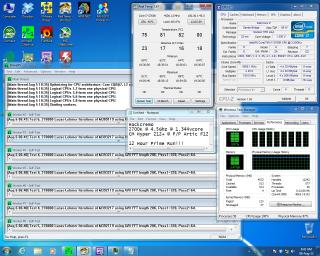
|
|
|
Aug 7 2012, 06:46 AM
Return to original view | Post
#13
|
|
Senior Member
1,299 posts Joined: Dec 2007 From: Puchong Utama
|
QUOTE(owikh84 @ Aug 7 2012, 06:29 AM) Looks like you got a dud chip. Increase vcore to 1.4v if cooling still allowed. ohh..my bad..if i know this thing earlier i will buy 2600k instead..just try prime 4.8 @ 1.4vcore..BSOD 101.. Test then slowly down to 1.39v, 1.38v, 1.37v etc... The 2700K is not really a better binned silicon of 2600K. It is clocked 100MHz faster than the 2600K but might be worse in terms of OCbility and loves voltage.  |
|
|
|
|
|
Aug 7 2012, 08:34 AM
Return to original view | Post
#14
|
|
Senior Member
1,299 posts Joined: Dec 2007 From: Puchong Utama
|
QUOTE(owikh84 @ Aug 7 2012, 06:54 AM) It's all about draw of luck BSOD also..just pass 10 minute prime blend.. 4.7GHz @ 1.4v how? Don't gopoh-gapah. |
|
|
Aug 7 2012, 06:48 PM
Return to original view | Post
#15
|
|
Senior Member
1,299 posts Joined: Dec 2007 From: Puchong Utama
|
QUOTE(owikh84 @ Aug 7 2012, 10:27 AM) No choice have to look for a better chip or upgrade your cooling gear. just try 4.6ghz @ 1.39 vcore...PS: BSOD code 101 & 124 are related to insufficient vCore. so far it had passed 2 hour on prime blend.. but the temp really sky rocket, 97'C peak... it seem my chip are really bad.. 4.5 only require 1.34vcore but, 4.6 need 1.39vcore... |
|
|
Aug 7 2012, 08:10 PM
Return to original view | Post
#16
|
|
Senior Member
1,299 posts Joined: Dec 2007 From: Puchong Utama
|
QUOTE(owikh84 @ Aug 7 2012, 07:10 PM) Seems legit, as vCore increased exponentially over frequency. Before this i think is a linear relationship..97C is near to TJmax of 98C so better don't stress further to avoid chip degradation. yeah, i had stop it 1 hour ago..back to 4.5ghz@1.34v.. owikh, can u explain to me what is hwbot..?? i want to venture into benchmarking world..but i pretty dont understand the system that hwbot used.. i submit some benchmark but only getting 0.X points..  |
|
|
Aug 11 2012, 11:53 AM
Return to original view | Post
#17
|
|
Senior Member
1,299 posts Joined: Dec 2007 From: Puchong Utama
|
QUOTE(sniper69 @ Aug 11 2012, 11:26 AM) NBTD after i get BSOD when BF3 just now. are u sure you proc needs 1.5vcore for 4.8Ghz..?? it seem pretty high...   on TR Venomous Black on push-pull Lian Li stock fan, IIANM, MX4 TIM |
|
|
Aug 11 2012, 12:04 PM
Return to original view | Post
#18
|
|
Senior Member
1,299 posts Joined: Dec 2007 From: Puchong Utama
|
QUOTE(sniper69 @ Aug 11 2012, 12:01 PM) lower than that, BSOD with 0101 or 0124 code oohh man, we are in the same boat...our procs require more vcore than usual..,my 2700k need 1.4 to stable at 4.6ghz..  |
|
|
Aug 12 2012, 08:10 PM
Return to original view | Post
#19
|
|
Senior Member
1,299 posts Joined: Dec 2007 From: Puchong Utama
|
i dont know why before this i cannot run prime blend more than 10 minutes at 4.7ghz@1.41vcore..
but today after i had disable cpu spread spectrum..it run till 1 hour mark..i dont want to continue as hyper 212+ cannot handle the extra heat.. peak temp 98'c...once after raya think wanna change to NH-D14..monster! |
|
|
Aug 12 2012, 10:16 PM
Return to original view | Post
#20
|
|
Senior Member
1,299 posts Joined: Dec 2007 From: Puchong Utama
|
QUOTE(owikh84 @ Aug 12 2012, 10:03 PM) Enabling spread spectrum could cause instability, but sometimes it will make improve vCore. I have p8p67 pro and CM 692 Advanced..i think it can fit nicely inside my case..i intend to go for rasa240 kit but no budget...Rm500 somemore.. Asus advises it to be disabled (auto=disabled), as it will help BCLK OC. NH-D14 is a great air cooler if your mobo & casing has plenty of space. It is huge & powerful |
|
Topic ClosedOptions
|
| Change to: |  0.0430sec 0.0430sec
 0.49 0.49
 7 queries 7 queries
 GZIP Disabled GZIP Disabled
Time is now: 2nd December 2025 - 08:03 AM |
 Quote
Quote