Outline ·
[ Standard ] ·
Linear+
Sandy Bridge Overclocking V1, 2500K/2600K/2700K | LGA1155 P67.Z68.Z77
|
selikatwo
|
 Aug 26 2011, 08:02 PM Aug 26 2011, 08:02 PM
|

|
QUOTE(~funeralofheart~ @ Aug 26 2011, 06:54 PM) new OC'er here..im using P8H67-M and i5 2500K... got guide from THIS SITE..but under Ai Tweaker tab,i cant see Turbo Ratio column...anyone can help me..TQ btw,plz check my rig setup as listed below Proc - i5 2500K 3.3Ghz Mobo - P8H6&-M Ram - 6GB (4GB Corsair / 2GB Transcend) 1333Mhz Case - Storm Scout PSU - Cooler Master Extreme 460 W ** No additional fan.. if i not mistake, H67 can't OC proc. for 1155 only P67 and Z68 can OC proc This post has been edited by selikatwo: Aug 26 2011, 08:03 PM |
|
|
|
|
|
~funeralofheart~
|
Aug 26 2011, 09:10 PM
|
|
|
r u serious bro??erkhh..just brought dz mobo last 2 days...my sabbertooth P67 sent to claim d waranty last week...mean d sabbertooth can OC rite?its P67
|
|
|
|
|
|
selikatwo
|
Aug 26 2011, 10:08 PM
|
|
|
|
|
|
|
|
|
~funeralofheart~
|
Aug 26 2011, 10:51 PM
|
|
|
QUOTE(selikatwo @ Aug 26 2011, 10:08 PM) owh..ok2..thanks for the chart bro..tq |
|
|
|
|
|
selikatwo
|
Aug 26 2011, 10:59 PM
|
|
|
Lol. i just know the theory but don't know how to OC.  |
|
|
|
|
|
TSowikh84
|
Aug 26 2011, 11:51 PM
|
i7 Clan

|
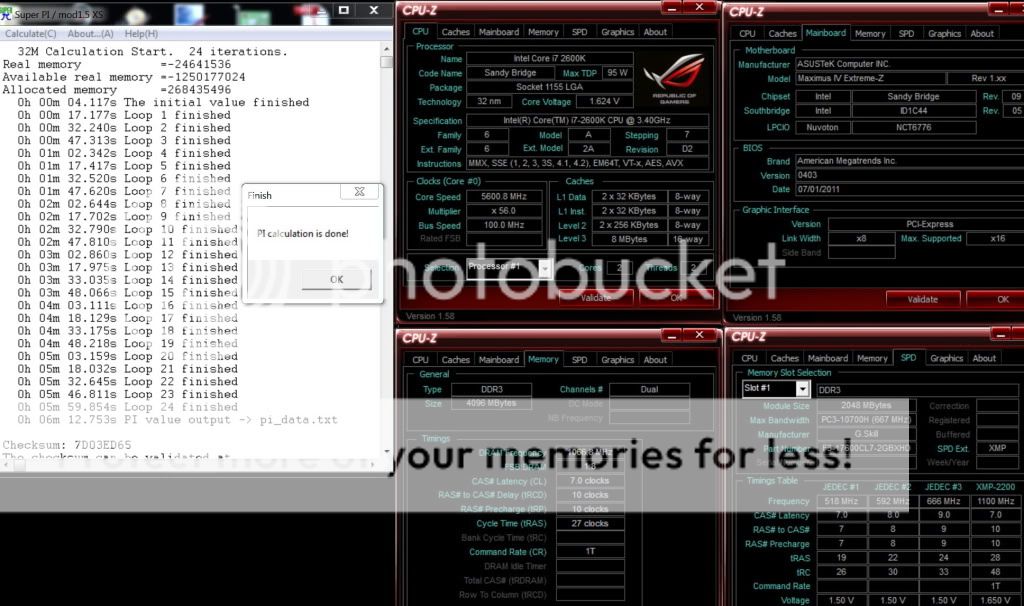
2600K @ 5.6GHz» Click to show Spoiler - click again to hide... «
|
|
|
|
|
|
angrysnail
|
Aug 27 2011, 12:02 AM
|
|
|
QUOTE(~funeralofheart~ @ Aug 26 2011, 09:10 PM) r u serious bro??erkhh..just brought dz mobo last 2 days...my sabbertooth P67 sent to claim d waranty last week...mean d sabbertooth can OC rite?its P67 wow bro,what happen to your Sabertooth?..  i'm running one.. |
|
|
|
|
|
flexus90
|
Aug 27 2011, 12:47 AM
|
|
|
No wonder so many people letting go their Sabertooth.
|
|
|
|
|
|
aeternalis
|
Aug 27 2011, 09:55 AM
|
New Member

|
i also sabertooth user. I know the thermal shield thing is just for show... but it's pretty.
|
|
|
|
|
|
TSowikh84
|
Aug 27 2011, 11:48 AM
|
i7 Clan
|
2600K @ 5.0GHz HT Costa Rica
MIVE-Z
GSkill Ripjaws-X 2200C7 2x2GB @ 2133C7» Click to show Spoiler - click again to hide... «
|
|
|
|
|
|
Dennos
|
Aug 27 2011, 12:01 PM
|
|
|
QUOTE(owikh84 @ Aug 27 2011, 11:48 AM) 2600K @ 5.0GHz HT Costa Rica
MIVE-Z
GSkill Ripjaws-X 2200C7 2x2GB @ 2133C7» Click to show Spoiler - click again to hide... « igpu voltage 1.1 v. any effect to temp?  mine is 0.45v |
|
|
|
|
|
flexus90
|
Aug 27 2011, 03:22 PM
|
|
|
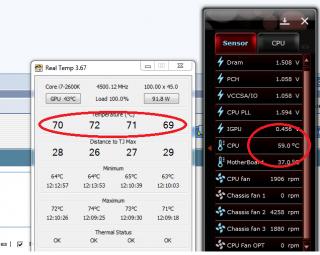
Indeed the the accurate reading is from RealTemp.
|
|
|
|
|
|
TSowikh84
|
Aug 27 2011, 08:30 PM
|
i7 Clan
|
ROG Maximus IV GENE-Z OC Guide» Click to show Spoiler - click again to hide... « BIOS Settings for the easy Overclocking:
- Keep all Turbo Mode Parameters at AUTO or the highest possible value to unlock overclock restrictions due to Intel thermal control.
- Ai Overclock Tuner can be set to Manual to unlock BCLK/PCIE OC related options, set to X.M.P. to load the XMP Profile off the DRAM module.
- Turbo Ratio can be set to Per Core Mode to allow higher CPU multiple supports with the cost of not being able to make CPU Turbo Ratio adjustments under OS. In general applications, it is recommended to part it at All Cores Mode to allow CPU Turbo Ratio adjustment under OS.
- Internal PLL Overvoltage can be set to Enabled to allow more CPU Turbo Ratio overclocking margin with the cost of the S3/S4 resume functionality. i.e. your system will not resume be able to resume from standby with this option enabled.
- Memory Bandwidth Booster can be set to Enabled for better DRAM performance or Disabled for better OC margin.
- EPU Power Saving Mode can to be set to Disabled to prevent additional voltage drop due to EPU power saving scheme.
- Load-Line Calibration can to be set to Extreme to ensure the CPU Vcore is not to drop below the voltage level set by the user regardless of the current consumption of the CPU. This will be useful to achieve the same level of overclocking result with a relatively lower Vcore setting.
- VRM Frequency can to be set to Manual to allow manual selection of a fixed VRM operating frequency. The higher the frequency, the faster the response, which yields a relatively stable delivery of CPU Vcore for the final push to gain just a little more BCLK overclocking capability for the CPU used.
- Phase Control can be set to Extreme to keep the active power phase of the CPU PWM at max for the whole time instead of down-phase when CPU idles down to gain just a little more margin for the CPU when been pushed to its extreme.
- Duty Control can be set to Extreme to force the PWM circuit to function with respect to its maximum possible current delivery instead of a balanced temperature for a better deliver of power to the CPU. This can also help to gain just a little more margin when trying to push the BCLK frequency to its max.
- CPU Current Capability can be set to 140% to override the level of over current protection of the CPU, allowing the CPU to drain more current from the CPU PWM, delivering more margins for the CPU to clock just a little higher.
- iGPU Load-Line Calibration can be set to Extreme to ensure the iGPU Vcore is not to drop below the voltage level set by the user regardless of the current consumption of the iGPU. This will be useful to achieve the same level of overclocking result with a relatively lower Vcore setting.
- iGPU Current Capability can be set to 140% to override the level of over current protection of the iGPU, allowing the iGPU to drain more current from the PWM, delivering more margin for the CPU to clock just a little higher.
- Likewise, the same power options are also available DRAM and VCCSA/VCCIO (DRAM controller). Raise the switching frequency, enable full phase control and disable over-current protection can help to deliver a little more OC margin.
- CPU Spread Spectrum options can be disabled for better OC capability.
It is recommended to keep other options at their default position "Auto" for better OC capability utilizing the OC experience of the ROG OC specialist team.
|
|
|
|
|
|
aeternalis
|
Aug 28 2011, 11:20 AM
|
New Member
|
Great setting by setting explanation! very useful indeed.  |
|
|
|
|
|
TSowikh84
|
Aug 28 2011, 04:44 PM
|
i7 Clan
|
BCLK
measured in MHz
Base Clock Increasing your base clock increases your CPU core clocks, memory speed, QPI frequency, and North Bridge Frequency
-Similar to the older FSB “Front Side Bus”
BCLK x CPU ratio = CPU frequency
Adjust the BCLK frequency to overclock the CPU speed!
Multiplier
-Multiplier is a ratio that determines the clock speed for the CPU based on the multiplication of the BCLK. For example, your CPU multiplier determines what your CPU core clock speed is using this formula: Base clock * multiplier
There are also multipliers for Memory frequency, QPI speed, and North Bridge (UCLK) frequency.
PCIE
measured in MHz
Periferal Connect Interface Express
-Video Graphics communication link
when overclocking, increasing the PCI-E clock can help with stability when above 200MHz BCLK
CPU Voltage
AKA -VCore this is your processor core voltage. Increasing this will supply your CPU cores the power they need to operate at higher frequencies.
Central Processing Unit
-Processor core voltage
DO NOT EXCEED 1.55v
IMC Voltage
"VTT" or "QPI" Increasing this will supply the power needed for the IMC (North Bridge) to operate at higher frequencies.
- L3 shared cache
- memory controller
- processor I/O power rail
Since memory controller frequency is dependent on BCLK, the higher the BCLK, the higher the IMC voltage required. DO NOT Exceed 1.45v
DRAM Voltage
DDR3 Random Access Memory
-Memory Voltage
Since DRAM speed is linked to the BCLK the higher the BCLK the higher the DRAM Voltage is needed
CPU PLL Voltage
PLL: Phase Locked Loop voltage
- Processor/IMC(Integrated Memory Controller)/other internal clock cycles
- Clock multiplying of processor is provided by an internal Phase Locked Loop
Does not have a significant effect on CPU Speed, -DO NOT Exceed 1.90v
PCH Voltage
Platform Controller Hub
- main I/O interface for CPU
- display connectivity
- Integrated Audio
- power management features
- Storage features
The higher the CPU frequency, the harder the I/O (input and output) has to work so there is higher power consumption and more heat is generated, raising the CPU temperature. The PCH voltage needs to be increased in order to stabilize I/O signaling. DO NOT EXCEED 1.25v
|
|
|
|
|
|
AlamakLor
|
Aug 28 2011, 07:35 PM
|
Look at all my stars!!
|
Observation note on LLC (Line Load Calibration), ROG board
I've been observing LLC's behavior very closely recently and I'd like to share my findings.
- Generally, setting LLC at AUTO will work in most cases. The mobo detects the vdroop very accurately. I noticed that it will generally set your LLC to 75% on auto mode
- Using the following example of my OC - 5ghz, vcore bios 1.375, LCC: AUTO
1) AISuite 2 will show a vcore of 1.368 (0.007) less than actual 1.375.
2) If I lower LCC to 50%, vdroop will occur and it would drop to 1.344. Prime will fail immediately.
3) If I lower LCC to 25%, BSOD will occur immediately
4) If I increase LCC to 100% vcore would go up t 1.400 and fluctuate upwards
Therefore,
LCC @ 75%, BIOS 1.375v, Actual 1.368 = 0.5% error (negative)
LCC @ 100%, BIOS 1.375v, Actual 1.400 = 1.8% error (positive)
I am able to obtain 1.376v by setting BIOS to 1.380 with LCC @ 75%, however LCC fluctuates around 1.368 - 1.376
To obtain the same range of 1.368 - 1.376, I would set LCC @ 100% and Vcore at 1.355.
Summary:
- LCC @ 100% would result in higher Vcore than what was set in Bios
- LCC @ 75% would result in lower Vcore than what was set in Bios
- Either LCC still suffers from the same fluctuation, it's just a matter of setting the Vcore in bios to obtain the same fluctuation range
i.e.
Bios Vcore @ 1.355, LCC @ 100% = Actual Vcore of 1.368 - 1.376
Bios Vcore @ 1.380, LCC @ 75% = Actual Vcore of 1.368 - 1.376
Now, I'm basing this on AISuite's sensor/CPUZ, maybe LCC 100% is actually more accurate if I'd taken measurement with a multimeter.
|
|
|
|
|
|
TSowikh84
|
Aug 28 2011, 10:41 PM
|
i7 Clan
|
Asus LLC is a lot better than Giga which has +/- 0.05v vdroop/vdrop
i had hard time to get an optimum vcore on UD7
imagine if my chip needed 1.5v to stable, i have to set 1.55v for LLC 75%.
for 24/7 OC, LLC 75% more recommended. 100% is for short term OC like short benchies only. Degradation...
|
|
|
|
|
|
jeff88rey
|
Aug 28 2011, 11:52 PM
|
Getting Started
|
QUOTE(owikh84 @ Aug 28 2011, 10:41 PM) Asus LLC is a lot better than Giga which has +/- 0.05v vdroop/vdrop i had hard time to get an optimum vcore on UD7 imagine if my chip needed 1.5v to stable, i have to set 1.55v for LLC 75%. for 24/7 OC, LLC 75% more recommended. 100% is for short term OC like short benchies only. Degradation... agree. im having a giga board too, the voltage regulation sucks |
|
|
|
|
|
AlamakLor
|
Aug 28 2011, 11:58 PM
|
Look at all my stars!!
|
And yet they have "24" voltage regulators
|
|
|
|
|



 Quote
Quote








 0.0221sec
 0.41
0.41
 6 queries
 GZIP Disabled