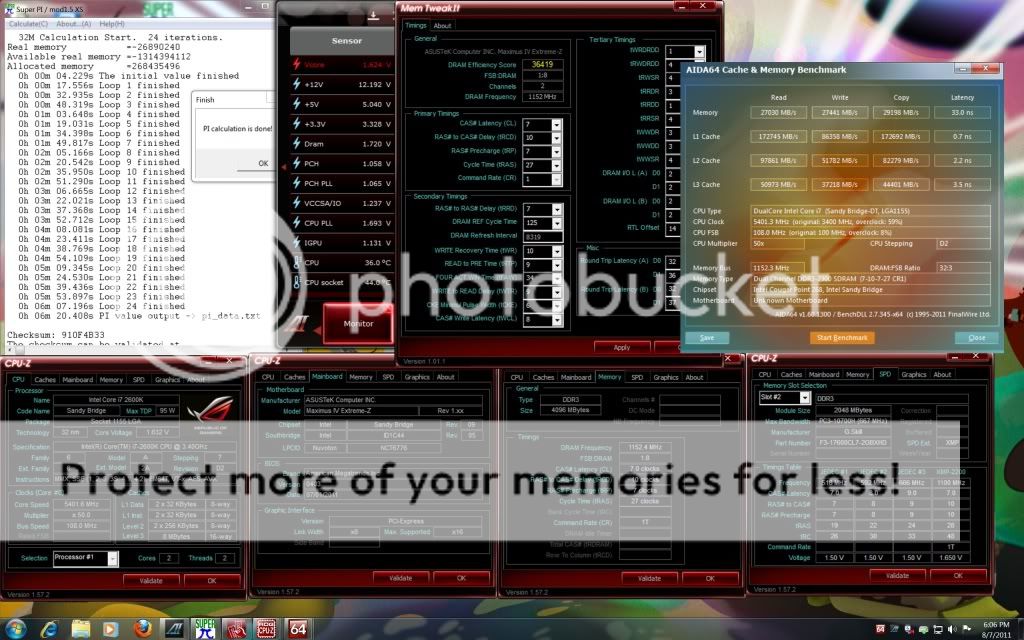
QUOTE(stasio @ Aug 15 2011, 12:58 PM)
Owi,
why tRAS 27?
My is 21 with no problem.

Yaya im awared of that since yesterday.why tRAS 27?
My is 21 with no problem.
For sure 8-9-8-21 is doable just fine with this BBSE kit.
Sandy Bridge Overclocking V1, 2500K/2600K/2700K | LGA1155 P67.Z68.Z77
|
|
 Aug 15 2011, 04:33 PM Aug 15 2011, 04:33 PM
|
 
Elite
8,711 posts Joined: Nov 2007 From: Butterworth, PG / Machang, Kelantan   
|
QUOTE(stasio @ Aug 15 2011, 12:58 PM) Owi, Yaya im awared of that since yesterday.why tRAS 27? My is 21 with no problem. For sure 8-9-8-21 is doable just fine with this BBSE kit. |
|
|
|
|
|
Aug 16 2011, 06:46 AM
|
 
All Stars
18,503 posts Joined: Oct 2007 From: P.Jaya
|
|
|
|
Aug 16 2011, 03:53 PM
|

Senior Member
1,298 posts Joined: Jan 2003 From: utopia
|
just wana ask wat is B3 chipset stepping? alot of diff if compare to B2?
sorry been google till  cus i was comparing Asrock H67M and ECS H67H2-M3 (B3) dunno which 1 to get This post has been edited by chickenducksoup: Aug 16 2011, 03:55 PM |
|
|
Aug 16 2011, 04:13 PM
|

Senior Member
8,686 posts Joined: Mar 2009 
|
QUOTE(owikh84 @ Aug 15 2011, 04:33 PM)  what is the vcore using?  |
|
|
Aug 16 2011, 04:18 PM
|

Junior Member
187 posts Joined: Apr 2011 From: Kota Kinabalu
|
QUOTE(chickenducksoup @ Aug 16 2011, 03:53 PM) just wana ask wat is B3 chipset stepping? alot of diff if compare to B2? b3 version is the updated version.. previous version gt sata 3gb/s issues.. then they fixed it and come out b3 versionsorry been google till cus i was comparing Asrock H67M and ECS H67H2-M3 (B3) dunno which 1 to get |
|
|
Aug 16 2011, 04:45 PM
|
|
Elite
8,711 posts Joined: Nov 2007 From: Butterworth, PG / Machang, Kelantan
|
QUOTE(saturn85 @ Aug 16 2011, 04:13 PM) wow, bro owikh84, core i7 2600k at 5.45GHz. vcore at 1.6v just for short test. what is the vcore using? Not for 24/7 for sure. |
|
|
|
|
|
Aug 16 2011, 06:52 PM
|
|
All Stars
18,503 posts Joined: Oct 2007 From: P.Jaya
|
QUOTE(owikh84 @ Aug 15 2011, 04:33 PM) Yaya im awared of that since yesterday. Yeah,For sure 8-9-8-21 is doable just fine with this BBSE kit. mostly G.Skill memories DDR3-2000 or higher with 9 tRCD are BBSE (or EBSE).  http://www.xtremesystems.org/forums/showth...33;!/page11 This post has been edited by stasio: Aug 16 2011, 06:54 PM |
|
|
Aug 16 2011, 11:03 PM
|

Senior Member
1,745 posts Joined: Aug 2010 From: Kuala Lumpur
|
QUOTE(owikh84 @ Aug 16 2011, 04:45 PM) vcore at 1.6v just for short test. how is ur temp?Not for 24/7 for sure. |
|
|
Aug 16 2011, 11:43 PM
|
|
Elite
8,711 posts Joined: Nov 2007 From: Butterworth, PG / Machang, Kelantan
|
QUOTE(FiragaZ @ Aug 16 2011, 11:03 PM) how is ur temp? Cant really recall its actual temp but confirmed ~90C.  As i just said it is for short term only. 24/7 is still 5.0GHz HT. |
|
|
Aug 18 2011, 09:59 AM
|

Senior Member
757 posts Joined: May 2005
|
QUOTE(owikh84 @ Aug 7 2011, 05:45 PM) 2600K @ BCLK 108 X 50 = 5.4GHz Is this the RAM you're testing F3-17600CL9D-4GBXMD @ http://www.gskill.com/products.php?index=373.. Asus Maximus IV Extreme-Z GSkill RipjawsX 2200C7 2X2GB @ 2300MHz 7-10-7-27-1T » Click to show Spoiler - click again to hide... « Told u how much I love MIVE-Z  Thanks bro.. |
|
|
Aug 18 2011, 10:46 AM
|
|
Elite
8,711 posts Joined: Nov 2007 From: Butterworth, PG / Machang, Kelantan
|
QUOTE(jagged @ Aug 18 2011, 09:59 AM) Is this the RAM you're testing F3-17600CL9D-4GBXMD @ http://www.gskill.com/products.php?index=373.. Actually u could refer to the screenshot in CPU-Z SPD tab, my dram is the 2200MHz 7-10-10-27-1T rated at 1.65v kit model F3-17600CL7D-4GBXHD, which comes with black heatspreader.Thanks bro.. My very first dram for SB, it is also a great & one of the best kit for OC. Too bad u cant find this ram locally, import is the only way. |
|
|
Aug 18 2011, 11:54 AM
|
|
Senior Member
757 posts Joined: May 2005
|
Thanks owikh84..
|
|
|
Aug 18 2011, 12:11 PM
|
|
Senior Member
1,745 posts Joined: Aug 2010 From: Kuala Lumpur
|
hi, i oc my kvr 4gb 1333mhz to 1600mhz for 24/7, since its without heat spreader, will it overheat or reduce lifespan?
|
|
|
|
|
|
Aug 18 2011, 10:36 PM
|
|
Elite
8,711 posts Joined: Nov 2007 From: Butterworth, PG / Machang, Kelantan
|
QUOTE(FiragaZ @ Aug 18 2011, 12:11 PM) hi, i oc my kvr 4gb 1333mhz to 1600mhz for 24/7, since its without heat spreader, will it overheat or reduce lifespan? u should know that KVR is not meant for OC, too risky.  |
|
|
Aug 18 2011, 11:08 PM
|
|
Senior Member
1,745 posts Joined: Aug 2010 From: Kuala Lumpur
|
QUOTE(owikh84 @ Aug 18 2011, 10:36 PM) u should know that KVR is not meant for OC, too risky. hehe, btw if adding custom ram heat spreader ok? |
|
|
Aug 19 2011, 04:48 AM
|
|
Junior Member
14 posts Joined: Aug 2011
|
QUOTE(FiragaZ @ Aug 18 2011, 11:08 PM) hehe, btw if adding custom ram heat spreader ok? I think will be better, i also have use it on value ram and u still need a fan to blow it to get better cooling result and also want to see your chip set good or not.I not very trust the temp show at monitor, sometimes monitor show it 20+ degree, but i cannot touch it over 3 second? The most accurate show at bios, but bios didn't show any NB or SB or Ram temp, and for my opinion is always remember use finger to test the temp, but be careful for shot-circle hehe  This post has been edited by skysim: Aug 19 2011, 04:52 AM |
|
|
Aug 19 2011, 09:29 AM
|
|
Senior Member
1,745 posts Joined: Aug 2010 From: Kuala Lumpur
|
QUOTE(skysim @ Aug 19 2011, 04:48 AM) I think will be better, i also have use it on value ram and u still need a fan to blow it to get better cooling result and also want to see your chip set good or not. i use my finger and touch the ram, not even a little heat i feel?I not very trust the temp show at monitor, sometimes monitor show it 20+ degree, but i cannot touch it over 3 second? The most accurate show at bios, but bios didn't show any NB or SB or Ram temp, and for my opinion is always remember use finger to test the temp, but be careful for shot-circle hehe |
|
|
Aug 19 2011, 09:46 AM
|
 
VIP
9,692 posts Joined: Jan 2003 From: Mongrel Isle
|
QUOTE(FiragaZ @ Aug 18 2011, 12:11 PM) hi, i oc my kvr 4gb 1333mhz to 1600mhz for 24/7, since its without heat spreader, will it overheat or reduce lifespan? At what voltage? It it's at default voltage, I don't see a problem to run it 24/7. |
|
|
Aug 19 2011, 01:54 PM
|
|
Senior Member
1,745 posts Joined: Aug 2010 From: Kuala Lumpur
|
QUOTE(ALeUNe @ Aug 19 2011, 09:46 AM) At what voltage? its stock voltage and timing.It it's at default voltage, I don't see a problem to run it 24/7. |
|
|
Aug 19 2011, 02:47 PM
|
|
Junior Member
14 posts Joined: Aug 2011
|
QUOTE(FiragaZ @ Aug 19 2011, 09:29 AM) i use my finger and touch the ram, not even a little heat i feel? In what status? overclocking? full load?In idle will so cool, my HyperX when overclocking in full load also not so hot |
|
Topic ClosedOptions
|
| Change to: |  0.0238sec 0.0238sec
 0.48 0.48
 6 queries 6 queries
 GZIP Disabled GZIP Disabled
Time is now: 5th December 2025 - 12:55 PM |
 Quote
Quote