Outline ·
[ Standard ] ·
Linear+
Dual Monitor!, Share ur dual-monitor experience!
|
amxpayne67
|
 Jun 12 2013, 11:37 AM Jun 12 2013, 11:37 AM
|

|
QUOTE(ZoidbergFry @ Jun 12 2013, 11:02 AM) but if i do that the display will look blur..any other way? Unless you want to do eyefinity, but i think that you want to extend desktop to second monitor right? Then you have to match the resolution of your 18" monitor because your 18" monitor couldn't match to your 22" monitor. Can you tell me the maximum resolution on both of your monitor? This post has been edited by amxpayne67: Jun 12 2013, 11:38 AM |
|
|
|
|
|
ZoidbergFry
|
Jun 12 2013, 01:49 PM
|
|
|
QUOTE(amxpayne67 @ Jun 12 2013, 11:37 AM) Unless you want to do eyefinity, but i think that you want to extend desktop to second monitor right? Then you have to match the resolution of your 18" monitor because your 18" monitor couldn't match to your 22" monitor. Can you tell me the maximum resolution on both of your monitor? 1600x1200 max on the 20" |
|
|
|
|
|
amxpayne67
|
Jun 12 2013, 01:54 PM
|
|
|
QUOTE(ZoidbergFry @ Jun 12 2013, 01:49 PM) Now how about the resolution on the 18" monitor? For the wallpaper to look good on both monitor, you need same resolution or resolution with same height. Mine using 1440 X 900 on both monitor so i can put 2880 x 900 wallpaper. Try this method first see if can work. First, right click on your desktop and choose personalize. Then click desktop background, you will see on the top that says picture location. Change to your actual picture location and change your picture position to tiles. Good luck~ This post has been edited by amxpayne67: Jun 12 2013, 01:55 PM |
|
|
|
|
|
ZoidbergFry
|
Jun 12 2013, 02:19 PM
|
|
|
QUOTE(amxpayne67 @ Jun 12 2013, 01:54 PM) Now how about the resolution on the 18" monitor? For the wallpaper to look good on both monitor, you need same resolution or resolution with same height. Mine using 1440 X 900 on both monitor so i can put 2880 x 900 wallpaper. Try this method first see if can work. First, right click on your desktop and choose personalize. Then click desktop background, you will see on the top that says picture location. Change to your actual picture location and change your picture position to tiles. Good luck~ woot it works if i change the resolution,but then again the 20" monitor can put lesser icons (expected)..thanks for your help  |
|
|
|
|
|
amxpayne67
|
Jun 12 2013, 02:23 PM
|
|
|
QUOTE(ZoidbergFry @ Jun 12 2013, 02:19 PM) woot it works if i change the resolution,but then again the 20" monitor can put lesser icons (expected)..thanks for your help No problem bro  |
|
|
|
|
|
SUSmenj
|
Jun 14 2013, 08:48 PM
|
|
|
This is mine.  This post has been edited by menj: Jun 14 2013, 08:53 PM This post has been edited by menj: Jun 14 2013, 08:53 PM |
|
|
|
|
|
teng_08
|
Jun 18 2013, 05:20 PM
|
|
|
QUOTE(chaosneo @ May 21 2012, 02:46 PM) just to share my experience. although this is three monitor but i hope some info here helps.

i put the side monitors slightly behind the center one to minimize the bezel effect. as you can see the samsung monitors has huge bezel. if side by side can almost reach up to 3cm. dude, what speaker stand r u using? good for surround sound. heheh... |
|
|
|
|
|
teng_08
|
Jun 18 2013, 05:25 PM
|
|
|
QUOTE(kaiser_falco @ Jan 24 2012, 02:26 PM) my current dual monitor set up and btw gaming is done on my lg 42 lw 570 3d tv( previously was samsung but spoilt after 1 years plus usage) and the second one wall mounted is dell 2707 lcd is for monitoring current pc health,oc and few other stuff like ts3 and such. 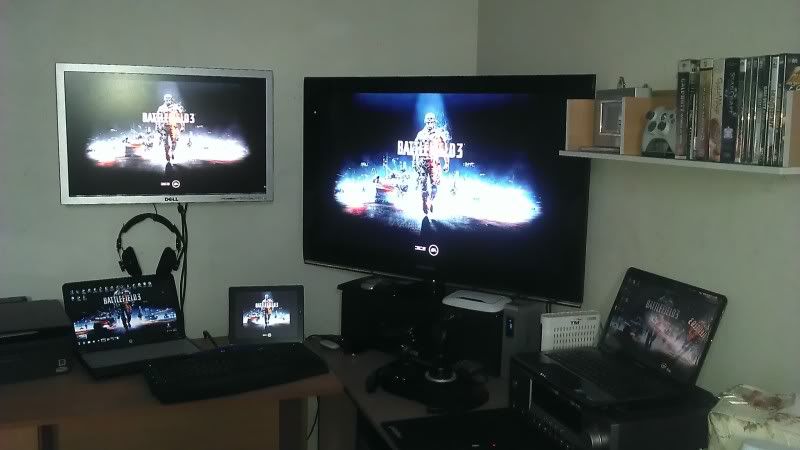 Where did u get the wall mount device for ur Dell 2707? U bought from local store or direct from Dell? Nice setup btw.  |
|
|
|
|
|
ZeroKunz
|
Jun 22 2013, 01:32 AM
|
Getting Started

|
QUOTE(kaiser_falco @ Jan 24 2012, 02:26 PM) my current dual monitor set up and btw gaming is done on my lg 42 lw 570 3d tv( previously was samsung but spoilt after 1 years plus usage) and the second one wall mounted is dell 2707 lcd is for monitoring current pc health,oc and few other stuff like ts3 and such. seriously nice monitors u have there |
|
|
|
|
|
chaosneo
|
Jun 24 2013, 10:52 AM
|
|
|
QUOTE(teng_08 @ Jun 18 2013, 05:20 PM) dude, what speaker stand r u using? good for surround sound. heheh...
speaker stand came from Ikea. It is originally a lamp stand that clamps onto table so it works well here with a little bit of modding. yes it is good for surround, really feel the awesome effects especially in games like BF3 where bullets zipping pass from left to right.
was planning to make it 7.1 or 7.2 but the last two rear speakers i have problem attaching to my chair to position it slightly behind my head. ops... a bit off topic here...  |
|
|
|
|
|
teng_08
|
Jun 24 2013, 11:32 AM
|
|
|
QUOTE(chaosneo @ Jun 24 2013, 10:52 AM) hi bro,
speaker stand came from Ikea. It is originally a lamp stand that clamps onto table so it works well here with a little bit of modding. yes it is good for surround, really feel the awesome effects especially in games like BF3 where bullets zipping pass from left to right.
was planning to make it 7.1 or 7.2 but the last two rear speakers i have problem attaching to my chair to position it slightly behind my head. ops... a bit off topic here... Ohh... smart idea. Yeah, I like ur overall set up. After seeing the way u hook up ur speaker, I cannot imagine the joy of having that kind of surround sound when playing BF3. Syiok giler ! As for me I'm only using headset  |
|
|
|
|
|
Viol3t
|
Jun 28 2013, 12:26 PM
|
New Member
|
QUOTE(kaiser_falco @ Jan 24 2012, 02:26 PM) my current dual monitor set up and btw gaming is done on my lg 42 lw 570 3d tv( previously was samsung but spoilt after 1 years plus usage) and the second one wall mounted is dell 2707 lcd is for monitoring current pc health,oc and few other stuff like ts3 and such. This the real gaming experience ! |
|
|
|
|
|
XeNoGeaR
|
Jul 1 2013, 04:33 PM
|
Getting Started
|
QUOTE(teng_08 @ Jun 24 2013, 11:32 AM) Ohh... smart idea. Yeah, I like ur overall set up. After seeing the way u hook up ur speaker, I cannot imagine the joy of having that kind of surround sound when playing BF3. Syiok giler ! As for me I'm only using headset super cool, |
|
|
|
|
|
yeahh
|
Jul 4 2013, 12:59 PM
|
|
|
just wondering if anyone has tried these 2 softwares for dual display ultramon displayfusion apparently if lets say one monitor's max reso is 1600x1200 and the other monitor is 1920 x 1080 ... by right ... BOTH monitor's reso is supposed to be set maximum as 1600 x 1200 right? these softwares apparently are able to utilise individual monitors' max reso .. meaning one monitor gets their 1600 x 1200 and the other gets their 1920 x 1080 .. i have yet to test this out as I am still surveying my 2nd monitor ... cheers  |
|
|
|
|
|
ZoidbergFry
|
Jul 5 2013, 04:06 PM
|
|
|
got a question here,say i have a dual monitor and i shut 1 down,does the working monitor still takes up gc resources or does the gc oni consumes resources for 1?
|
|
|
|
|
|
amxpayne67
|
Jul 5 2013, 05:11 PM
|
|
|
» Click to show Spoiler - click again to hide... « QUOTE(ZoidbergFry @ Jul 5 2013, 04:06 PM) got a question here,say i have a dual monitor and i shut 1 down,does the working monitor still takes up gc resources or does the gc oni consumes resources for 1? That's easy. Nope. Your GC will detect the monitor that has been shut off. |
|
|
|
|
|
UserU
|
Jul 5 2013, 08:57 PM
|
CSONLINE2.NET - FREE COUNTER-STRIKE

|
QUOTE(ZoidbergFry @ Jul 5 2013, 04:06 PM) got a question here,say i have a dual monitor and i shut 1 down,does the working monitor still takes up gc resources or does the gc oni consumes resources for 1? If you're mentioning switching it off by pressing on the monitor's power button then yes, the GC will still consume some resources as your cursor can move beyond the first monitor's borders. Else if you've turned it off through the power socket, then the resources will be allocated to the first one. |
|
|
|
|
|
ZoidbergFry
|
Jul 8 2013, 09:51 AM
|
|
|
QUOTE(UserU @ Jul 5 2013, 08:57 PM) If you're mentioning switching it off by pressing on the monitor's power button then yes, the GC will still consume some resources as your cursor can move beyond the first monitor's borders. Else if you've turned it off through the power socket, then the resources will be allocated to the first one. QUOTE(amxpayne67 @ Jul 5 2013, 05:11 PM) » Click to show Spoiler - click again to hide... «
That's easy. Nope. Your GC will detect the monitor that has been shut off. i think to be safe when im not using the other monitor i disable it at my control panel, ie let windows only display 1 monitor..then the other one stuts down completely..haha..thanks for the suggestions |
|
|
|
|
|
amxpayne67
|
Jul 8 2013, 11:38 AM
|
|
|
Not to worry bro the GC were smart enough not to use that much resources if shut down. It will use some RAM though, but not by that much, probably in idle mode.
|
|
|
|
|
|
cenation1314
|
Jul 18 2013, 11:10 PM
|
New Member
|
QUOTE(ZoidbergFry @ Jul 5 2013, 04:06 PM) got a question here,say i have a dual monitor and i shut 1 down,does the working monitor still takes up gc resources or does the gc oni consumes resources for 1? well if u're playing games u wun get that 100% efficiency from your gc that's for sure...probably better to just switch back to single display...besides, once u switch automatically the other monitor goes on sleeping mode so u dun even need to press the off switch please correct me if I am wrong |
|
|
|
|



 Quote
Quote


 0.0308sec
 1.06
1.06
 6 queries
 GZIP Disabled