Welcome Guest ( Log In | Register )

26 Pages « < 22 23 24 25 26 >Bottom

Outline · [ Standard ] · Linear+

Streamyx Things to do / Self-investigation (streamyx only), *updated - what to do when mis-capped

views
     
Sky.Live
post Sep 29 2010, 09:06 PM

Proctected Species
*******
Senior Member
4,390 posts

Joined: Oct 2004
From: Cheras, Malaysia


I cant even play my starcraft 2 now, 10pm - 1am being the only time I am free, which is the only time slot it lags..

Anyone have experience on how much to pay for the phone line fix? I afraid that Unifi might not launch that fast and my area not even being covered (Although on the official site they state Q4 of this year).

Noodles, I am having the exact Ip range as you, guess we are near =/

The technician send me a screenshot that he tried to connect few block away from my house, the line status isn't as good as I would have expect, meaning changing the phone line would only result in the modem stats as screenshot he have posted.

Noise Up/Down = 25.3/17.0
Attenuation Up/Down = 43.0/27.5

This post has been edited by Sky.Live: Sep 29 2010, 09:10 PM
ajea
post Oct 3 2010, 06:22 PM

New Member
*
Junior Member
24 posts

Joined: Feb 2007


hai i'm using linksys wag54g2 model... i already go to the status of the modem and cannot find SNR margin.. can someone helpme
Sky.Live
post Oct 4 2010, 09:10 AM

Proctected Species
*******
Senior Member
4,390 posts

Joined: Oct 2004
From: Cheras, Malaysia


You need to see ur modem page, u cant see it from a router page.. meaning you need a direct connection into your modem..
Kerry1136
post Oct 5 2010, 11:38 PM

One Decade Old
******
Senior Member
1,925 posts

Joined: Feb 2006
From: Petaling Jaya


Just upgraded from 1MB to 4MB today.

Is this okay?

user posted image

Went to streamyx.com -> Speedometer today and found my download speed is 215 KB/s
xbbshampoo
post Oct 8 2010, 09:23 PM

AudioPedoPhile : >
*****
Senior Member
869 posts

Joined: Jun 2007
From: Derp Village


Attached Image

My line frequently dc.

Can somebody help me check what is the problem with my connection..

Thanks.

This post has been edited by xbbshampoo: Oct 8 2010, 09:23 PM
Rezuan78
post Oct 13 2010, 02:35 AM

Getting Started
**
Junior Member
144 posts

Joined: Jun 2007
From: Orbit


QUOTE(xbbshampoo @ Oct 8 2010, 09:23 PM)
Attached Image

My line frequently dc.

Can somebody help me check what is the problem with my connection..

Thanks.
*
ur attenuation 54.5 is quite high, make a report to streamyx and ask them to reduce ur attenuation...
xbbshampoo
post Oct 13 2010, 07:34 PM

AudioPedoPhile : >
*****
Senior Member
869 posts

Joined: Jun 2007
From: Derp Village


QUOTE(Rezuan78 @ Oct 13 2010, 02:35 AM)
ur attenuation 54.5 is quite high, make a report to streamyx and ask them to reduce ur attenuation...
*
ok sure xD
TSSnoWFisH
post Oct 15 2010, 12:24 AM

Look at all my stars!!
*******
Senior Member
2,250 posts

Joined: Jan 2003
From: Penang / Bentong, Pahang / Genting


QUOTE(Kerry1136 @ Oct 5 2010, 11:38 PM)
Just upgraded from 1MB to 4MB today.

Is this okay?

user posted image

Went to streamyx.com -> Speedometer today and found my download speed is 215 KB/s
*
Theoritically, for your download speed of 2048 Kbps, your max fastest dl speed would be 256 kBps. Your downloaded speed is 215 kBps, so this is reasonable.

However, you mentioned you upgraded to 4MB, so your ds speed should be 4096 kbps, with a max dl 512 kBps. I don't think this is right. Even if its actual data stream, it shouldn't be that bad.

p/s: Been ages since I last look at this thread lol.

This post has been edited by SnoWFisH: Oct 15 2010, 12:27 AM
SeNnDoh-7
post Nov 17 2010, 02:27 PM

Casual
***
Junior Member
492 posts

Joined: Nov 2008
From: Boleh-Land


Attached Image
this is my router screen cap..i believe my attenuation is quite high..my snr margin also not in healthy shape..
im having frequent disconnection especially during intermediate-heavy rain and night time. Got 2 line port in my house, tested both and got similar attenuation/snr value..so planning to report bout this..

just a question though, is it i need to fork out moneh for this trouble(for tm/tech?)?..apart from telephone bill.. hmm.gif
caspersky
post Nov 17 2010, 02:40 PM

On my way
****
Senior Member
517 posts

Joined: Aug 2007
From: Melaka


Absolutely not if the problem is on their side. I am also experiencing frequent disconnections lately due to very low upstream noise margin (4db). I've called TM yesterday and a fault report was lodged. I am just waiting for a technician to come now.

We have paid for the service and we deserve a lot more better than what this crappy company is providing.
cashboy
post Nov 18 2010, 09:21 PM

Casual
***
Junior Member
455 posts

Joined: Oct 2006

Guys can help me take a look ? is my line ok or not? Because sometimes i play CERTAIN online game and it will very lag, but some others WONT. And last time i used to ping this gateway : 219.93.218.177 , but since last few months cannot already .


» Click to show Spoiler - click again to hide... «


Pls help me take a look. thank you .

and im using 1MB unipack , and sometimes normally get 0.5~0.7mbps download only , is that normal ?

and this is the ping
» Click to show Spoiler - click again to hide... «


This post has been edited by cashboy: Nov 18 2010, 09:41 PM
queenc
post Nov 22 2010, 06:50 PM

Regular
******
Senior Member
1,853 posts

Joined: Feb 2010


» Click to show Spoiler - click again to hide... «


but my download speed juz 40-80kb/sec they capped my line??

i use 1mbps package...
b4 dis problems happen.my speed is 160-190kb/sec
with that speed i downloaded alot of drama n movie 20gb+/-

is tm capped my speed?

This post has been edited by queenc: Nov 23 2010, 09:51 AM
jerm57
post Nov 30 2010, 11:47 PM

Casual
***
Junior Member
405 posts

Joined: Nov 2010
From: Penis ular Bolehland


I've been getting pretty shitty speeds with Streamyx lately too. Just two weeks ago I was downloading at around 100-150kb/s but I've been stuck at 20kb/s for the past week.

ATM, I'm using a TP-LINK TD-W8901G modem/router which is properly set up and as I said was working like a charm up until last week. Anyone know what gives?
hellfried
post Jan 1 2011, 08:28 AM

Casual
***
Junior Member
436 posts

Joined: Oct 2005


2 tmnet technicians came to my house yesterday to upgrade my 512 kbps line to the 1mbps combo package (with free modem and cordless phone). they hooked up my modem to their laptop and did something not sure what. they left without doing any speed testing but assured me that my line has been upgraded. when i tried it in the evening my results on speedtest is as below :


user posted image

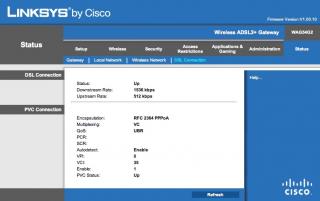
this is definitely lower than what i subscribed to. i am using my own linksys modem and going into the set up this is what i see (see attachment)

i called 100 and the lady confirms that i am subscribed to the 1mbps package. she tried resetting my port but to no avail. she then said that i had better call the technicians to settle my problem.
am i wrongly capped and what can i do in the next few days before i call the guys on monday?


Attached thumbnail(s)
Attached Image
mintoro
post Jan 11 2011, 08:00 PM

New Member
*
Junior Member
29 posts

Joined: Jan 2008
I subscribed for 1M, and this is what i got

user posted image
user posted image


I don't know if I should look at the "Attainable rate" or just the "Rate"
I've been calling streamyx everyday this week. They still haven't completely solve my prob.
Only sometimes my downstream will increase to what I satisfied (850-1000) but it only lasted for few hours and go down again to 4xx.

Can someone help me to have a look what is happening?
ahcheap
post Jan 12 2011, 04:26 PM

TM UniFi/Streamyx Reseller
******
Senior Member
1,466 posts

Joined: Jul 2008
From: Wherever you're


QUOTE(mintoro @ Jan 11 2011, 08:00 PM)
I subscribed for 1M, and this is what i got

user posted image
user posted image
I don't know if I should look at the "Attainable rate" or just the "Rate"
I've been calling streamyx everyday this week. They still haven't completely solve my prob.
Only sometimes my downstream will increase to what I satisfied (850-1000) but it only lasted for few hours and go down again to 4xx.

Can someone help me to have a look what is happening?
*
Your line is definitely been miscapped. Just look at ur Downstream rate, it should be at least 1024Kbps (normally will be 1536Kbps or 2048Kbps)for 1Mb user. You have to keep complaining to 100 and thru here: aduan.skmm.gov.my
thexs
post Jan 13 2011, 10:02 PM

Getting Started
**
Junior Member
202 posts

Joined: Nov 2010


I've just sent an e-mail to TM with a screenshot of my speed test results and a long complaint on why I'm sure they mis-capped me and what trouble has it brought to me:
http://img543.imageshack.us/img543/9053/speedtestresults.jpg

My subsciption is 1Mbps and I've never got speeds over 600kbps which is rather annoying.

Do you think they will care about complaint e-mails?
security1151986
post Jan 15 2011, 01:31 AM

New Member
*
Newbie
1 posts

Joined: Jan 2011


i dont know how to port forward innacomm w3400v for utorrent plz help
BlackGold
post Feb 12 2011, 06:19 PM

Getting Started
**
Junior Member
172 posts

Joined: Jan 2008
From: Kuantan


This information reflects the current status of your DSL connection.

Line Rate - Upstream (Kbps): 511
Line Rate - Downstream (Kbps): 4094
SNR Margin - Upstream (0.1 dB): 305
SNR Margin - Downstream (0.1 dB): 302
Attenuation - Upstream (0.1 dB): 99
Attenuation - Downstream (0.1 dB): 155
LAN IPv4 Address: 192.168.1.1
Default Gateway: ppp0
Primary DNS Server: 202.188.0.133
Secondary DNS Server: 202.188.1.5
LAN IPv6 Address:
Default IPv6 Gateway:

is it ok?..using 4mbps~
flyinairs
post Feb 23 2011, 10:51 AM

New Member
*
Newbie
2 posts

Joined: Feb 2011
This information reflects the current status of your DSL connection.


Line Rate - Upstream (Kbps): 507
Line Rate - Downstream (Kbps): 2048
SNR Margin - Upstream (0.1 dB): 173
SNR Margin - Downstream (0.1 dB): 315
Attenuation - Upstream (0.1 dB): 55
Attenuation - Downstream (0.1 dB): 100
LAN IPv4 Address: 192.168.1.1
Default Gateway: ppp0
Primary DNS Server: 202.188.0.133
Secondary DNS Server: 202.188.1.5
LAN IPv6 Address:
Default IPv6 Gateway:

what about mine? is it ok or not?
also i got a little problem,the tmnet technician just change my router modem last week from D-link (dsl-2640B) to Innacomm W3400V and now when using the wifi it can't seem to get ip address & default gateway the only to to get internet access is by manually sets the TCP/IPv4 settings manually sad.gif

i want to reset the router to factory setting but idk the streamyx id :/
i thought that the technician will give it to my father after he changed the modem but he didn't,the dude just go without telling anything.. mad.gif

26 Pages « < 22 23 24 25 26 >Top
 

Change to:
| Lo-Fi Version
0.0295sec    0.64    6 queries    GZIP Disabled
Time is now: 18th December 2025 - 10:29 PM