Welcome Guest ( Log In | Register )

26 Pages « < 20 21 22 23 24 > » Bottom

Outline · [ Standard ] · Linear+

Streamyx Things to do / Self-investigation (streamyx only), *updated - what to do when mis-capped

views
     
Blackened
post May 7 2009, 10:40 AM

Regular
******
Senior Member
1,068 posts

Joined: Dec 2004
From: Madrid
This sucks. I'm getting disconnected every 10 minutes now :|
Billion chapalang modem:

Downstream Upstream

SNR Margin: 15.3 23.5 db

Line Attenuation: 21.0 10.0 db

Data Rate: 4095 511 kbps
EQs
post Aug 3 2009, 08:07 PM

New Member
*
Junior Member
47 posts

Joined: Aug 2007


I have googling around to find if there anyone have problem like mine.. my problem is strange and i never experience before. I have call streamyx about 5 times try to solve but no solutions till now.

The problem is i can't connect during day time.. but everything just back to normal at night. It like have been setup. Everyday my streamyx will disconnected around 10am and back connected around 7pm. Technician from streamyx have call me and said it such a strange problem.. anyone facing problem just like mine? please share if there any solutions for my problem..
for sure not my modem problem or desktop because i have tried two different modem that worked and different desktop with different OS..
lazyguy91
post Aug 17 2009, 02:33 PM

Getting Started
**
Junior Member
262 posts

Joined: Jul 2007


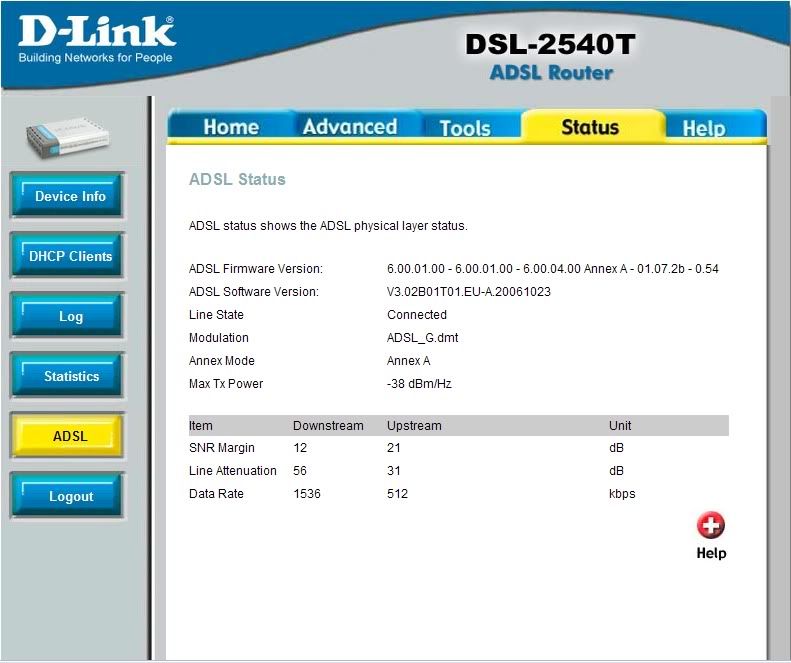
Look at this, am I capped or my modem itself has problems?
How can I settle this?
Attached Image
anangryorc
post Aug 17 2009, 06:44 PM

On my way
****
Senior Member
597 posts

Joined: May 2006


Added on August 17, 2009, 6:49 pm
QUOTE(EQs @ Aug 3 2009, 08:07 PM)
I have googling around to find if there anyone have problem like mine.. my problem is strange and i never experience before. I have call streamyx about 5 times try to solve but no solutions till now.

The problem is i can't connect during day time.. but everything just back to normal at night. It like have been setup. Everyday my streamyx will disconnected around 10am and back connected around 7pm. Technician from streamyx have call me and said it such a strange problem.. anyone facing problem just like mine? please share if there any solutions for my problem..
for sure not my modem problem or desktop because i have tried two  different modem that worked and different desktop with different OS..
*
hi, i am experiencing same prob, during day time when i try to download something, the modem dc and reconnect. which area you are in?

This post has been edited by anangryorc: Aug 17 2009, 06:50 PM
fesick
post Aug 23 2009, 11:36 PM

Serious mode
*******
Senior Member
2,009 posts

Joined: Oct 2006
From: My house
QUOTE(EQs @ Aug 3 2009, 08:07 PM)
I have googling around to find if there anyone have problem like mine.. my problem is strange and i never experience before. I have call streamyx about 5 times try to solve but no solutions till now.

The problem is i can't connect during day time.. but everything just back to normal at night. It like have been setup. Everyday my streamyx will disconnected around 10am and back connected around 7pm. Technician from streamyx have call me and said it such a strange problem.. anyone facing problem just like mine? please share if there any solutions for my problem..
for sure not my modem problem or desktop because i have tried two  different modem that worked and different desktop with different OS..
*
same problem with my friend..
solve after streamyx change her line port < whatever relate to it..
then problem solve..
aizielectreon
post Aug 28 2009, 09:12 PM

where am i???
****
Junior Member
593 posts

Joined: May 2009
From: Taman Astakona


bro i need to ask specific question here..which i duno wth izit actly...my streamyx conn is so slow..i cant go far beyond google..im using RIGER DB102 modem and 8port switch..ive check the modem config and run the diagnostic..heres what i got..

Testing Connectivity to modem
Testing Ethernet connection PASS -
Testing ADSL line for sync PASS -
Testing Ethernet connection to ATM PASS -
Testing Telco Connectivity
Testing ATM OAM segment ping PASS -
Testing ATM OAM end to end ping PASS -
Testing ISP Connectivity
Testing PPPoE server connectivity PASS -
Testing PPPoE server session PASS -
Testing authentication with server PASS -
Validating assigned IP address 60.53.193.165 PASS -
Testing Internet Connectivity
Ping default gateway 219.93.218.177 PASS -
Ping Primary Domain Name Server FAIL -
Query DNS for www.globespanvirata.com PASS -
Ping www.globespanvirata.com FAIL -

what can i do bri plz tell me..do i need to buy another modem?
i ought to upgrade to 1mbps soon... rclxub.gif
stan001
post Sep 20 2009, 08:16 PM

On my way
****
Senior Member
623 posts

Joined: Jan 2003
From: Kuala Lumpur


QUOTE(SnoWFisH @ Jun 15 2005, 01:19 AM)

By the way.. I'm here to let you guys know what to do if you are miscapped. Recently through my own experience of TMNet's crazy mood of purposely downgrading my 1Mbps link to 512Kbps, I've taken some steps that assured my restoration of speed. So here goes:

1) Make a report through 1300-88-9515
2) Call them once a day with the SAME report number that you initially got.
3) Call them till it's the 3rd *working* day.
4) Call them again on the 4th working day and tell them that you've just got "Suruhanjaya Komunikasi dan Multimedia Malaysia's" complain form and if the problem is not fixed by 7th day, you'll post it through POS-DAFTAR.
5) Continue to call them and also write e-mail to custcare@tm.net.my and tell them that you are going to complain to MCMC on the 7th day.
6) On the 7th day if they haven't fixed your problem(which I assure you, they will by now...) Go to http://www.mcmc.gov.my/consumer/complaint.asp and download the form, fill it in and send it to MCMC via POS-DAFTAR (for confirmation purpose).
7) MCMC will write a letter back to you within 3 working days. Scan this letter, attach it to custcare@tm.net.my and call 1300-88-9515 with the MCMC reference and let them know and tell them to update it to your report that you've complained to MCMC (it's part of MCMC's proceedure).

Finally..

Sit back. Continue to call them everyday.. be nice and talk to them nicely. Within 15 days, MCMC will call you and tell you that TMNet is going to send their technician the next working day + refund your lost of speed for that amount of time.. hehe! Personal experience!

Anyway, lesson to learn here is... Complaining at TMNet and LowYat do no good. If you *really* want to complain, go to MCMC!

>>> http://www.mcmc.gov.my <<<

p/s: As for me.. the technician came on a Sunday night and TMNet's senior engineer called me on the same night to confirm with me if my line have been upgraded to 1Mbps package. Took me about 1 month to get them to upgrade my line back + refund!
Thanks for the great tips, I did not know about complaining to MCMC...

Here are my experience going on for about 2 months... since end of May till end of July..

I've been a streamyx since 2003 and have been on a 1Mbps package without any issues. Last years with the new combo package ( voice line + streamyx) , I decide to downgrade my streamyx to 512Kbps and after a few months, I find it is too slow and decide to upgrade it back to 1Mbps..

This is where the problem starts... out of random 5 pppoe logins, I only got one 1Mbps speed ( confirmed by TM speedtest ) and the rest of the time, I was on 512Kbps only even with speedtest.

I called up TM Support almost everyone... gone thru all the basic troubleshooting questions... blah blah blah.. they even un-capped by line to 1.5Mbps, but still it is only 1 in every 5 or 6 times login...

So when I get 1.5Mbps, I can use it for as long as I can until the next disconnect...

I was escalated to level 2 support that will call me usually on Sat when they saw my case was still pending after 2 weeks of unresolved cases...

**** There was a time, this is the best one of all, I was on the call with one of the Support Managers, and the technician assigned to the case just CLOSE the case and told the Support Manager that I said everyone was OKAY... the Support Manager quickly re-open another Support Case but I guess no action was taken against the technician as they were from different department..

**** So beware, if your case was pending for too long, probably one of the technician would have just closed yr case without yr knowledge and TMNET Support people cannot do anything about it as they belongs to different department.

After about 2 months of ding dong without solving my issue, I gave up on TMNET, I went to Clickers, downgraded my line back to 512Kbps and request for a refund for those unused services.. but I guess I had WASTED more time and telephone calls ( luckily I was not with Celcom ) not to mention my patience dealing with the Support people at TMNET.

I would like to congratulate TMNET and their staff for the "Malaysia Boleh" attitude..

My request for refund was approved, now waiting for my this month bill to see if they refunded me or not..



Zaban
post Sep 28 2009, 09:25 PM

New Member
*
Junior Member
17 posts

Joined: Nov 2006
My upload speed is capped to 300kps = around 5-10kbs upload (normally, I get 512kbps=25-30kbs)..both snr margin on upload and download are below 10..well, apparently I do reported this shitty thing so many times to streamyx technical support. They actually fix'd my internet speed but after 2-3 months later, my internet turned shitty again..


oh gawd this is tiring DX, they fix then broke, and call them to fix again and then broke ~_~ btw, can someone link me to a streamyx page where I can report directly through massage posting? because last time I did that kind of procedure but I forgot the url..it's much more effective that way rather than calling their hot-line service.

This post has been edited by Zaban: Sep 28 2009, 09:30 PM
dreamsquall
post Oct 13 2009, 09:31 PM

Getting Started
**
Junior Member
87 posts

Joined: Apr 2006


i'm 1mbps streamyx user and i'm experiencing downstream rate dropping after few hours of connection and i have to reset my modem everything to make my downstream rate back to 1024kbps
anyone got such experience nad mind to share how to fix this?


Attached thumbnail(s)
Attached Image Attached Image
Tanakwagu_noh
post Oct 16 2009, 06:44 AM

Photographer
*****
Senior Member
866 posts

Joined: Jan 2003
From: "Pak Pak Kangku Noh"


QUOTE(dreamsquall @ Oct 13 2009, 09:31 PM)
i'm 1mbps streamyx user and i'm experiencing downstream rate dropping after few hours of connection and i have to reset my modem everything to make my downstream rate back to 1024kbps
anyone got such experience nad mind to share how to fix this?
*
mind to share ure modem setting, i am also using linkysy wag54g2 but failed to connect asdl keep blinking but if i use aztech 600er can connect smoothly... hmm.gif

This post has been edited by Tanakwagu_noh: Oct 16 2009, 06:45 AM
SUSXiia0Ban
post Oct 21 2009, 09:45 AM

Look at all my stars!!
*******
Senior Member
3,657 posts

Joined: Aug 2009
user posted image

is my connection ok??im using 1mbps streamyx
ahcheap
post Oct 22 2009, 06:22 PM

TM UniFi/Streamyx Reseller
******
Senior Member
1,466 posts

Joined: Jul 2008
From: Wherever you're


QUOTE(Xiia0Ban @ Oct 21 2009, 09:45 AM)
user posted image

is my connection ok??im using 1mbps streamyx
*
Line attenuation too high. Download SNR quite low.

Conclusion: line not very good.
SUSXiia0Ban
post Oct 23 2009, 08:55 PM

Look at all my stars!!
*******
Senior Member
3,657 posts

Joined: Aug 2009
QUOTE(ahcheap @ Oct 22 2009, 06:22 PM)
Line attenuation too high. Download SNR quite low.

Conclusion: line not very good.
*
So how???
Call streamyx?smile.gif
ahcheap
post Oct 23 2009, 11:30 PM

TM UniFi/Streamyx Reseller
******
Senior Member
1,466 posts

Joined: Jul 2008
From: Wherever you're


If ur line is not stable and experience slow connection most of the time, then you should complain to them.
SUSXiia0Ban
post Oct 24 2009, 11:11 AM

Look at all my stars!!
*******
Senior Member
3,657 posts

Joined: Aug 2009
QUOTE(ahcheap @ Oct 23 2009, 11:30 PM)
If ur line is not stable and experience slow connection most of the time, then you should complain to them.
*
ok i will if i facing this problem
twilight_fever
post Nov 4 2009, 09:10 AM

On my way
****
Junior Member
660 posts

Joined: Oct 2008
From: sunset valley
guys,wanna ask,if after i complained and the customer service agent said they will send a engineer to troubleshoot d problem at my house,do i need to pay for that service?
mugenz
post Nov 8 2009, 05:51 PM

hmmmm..
******
Senior Member
1,300 posts

Joined: Oct 2006
From: Pee Jay


Modem Status
Modem Status
Connection Status Connected
Us Rate (Kbps) 512
Ds Rate (Kbps) 1536
US Margin 17
DS Margin 12
Trained Modulation ADSL_G.dmt
LOS Errors 0
DS Line Attenuation 53
US Line Attenuation 31
Peak Cell Rate 1207 cells per sec
CRC Rx Fast 361
CRC Tx Fast 1
CRC Rx Interleaved 0
CRC Tx Interleaved 0
Path Mode Fast Path
DSL Statistics
Near End F4 Loop Back Count 0
Near End F5 Loop Back Count 0


today my router acting weird, when it disconnects my computer's LAN will have limited and no connectivity, so i need go downstairs on and off my router then no problem d..
so i think it always d/c then i check the modem status..

so i call tmnet and tell them to come fix my phone line?

This post has been edited by mugenz: Nov 8 2009, 05:54 PM
blacksp
post Nov 14 2009, 12:45 AM

New Member
*
Junior Member
30 posts

Joined: Dec 2007
From: ipoh-perak


my line look not ok ..4 (27% loss),
so what i need to do next?
please help >.<

i try ping gateway
Reply from 219.93.218.177: bytes=32 time=107ms TTL=126
Reply from 219.93.218.177: bytes=32 time=101ms TTL=126
Reply from 219.93.218.177: bytes=32 time=86ms TTL=126
Request timed out.
Reply from 219.93.218.177: bytes=32 time=86ms TTL=126
Reply from 219.93.218.177: bytes=32 time=84ms TTL=126
Reply from 219.93.218.177: bytes=32 time=87ms TTL=126
Reply from 219.93.218.177: bytes=32 time=85ms TTL=126
Reply from 219.93.218.177: bytes=32 time=87ms TTL=126
Reply from 219.93.218.177: bytes=32 time=89ms TTL=126
Reply from 219.93.218.177: bytes=32 time=92ms TTL=126
Reply from 219.93.218.177: bytes=32 time=86ms TTL=126
Request timed out.
Request timed out.
Reply from 219.93.218.177: bytes=32 time=85ms TTL=126

Ping statistics for 219.93.218.177:
Packets: Sent = 484, Received = 350, Lost = 134 (27% loss),
Approximate round trip times in milli-seconds:
Minimum = 84ms, Maximum = 977ms, Average = 103ms
xXxJeremyxXx
post Nov 17 2009, 12:22 PM

Getting Started
**
Junior Member
279 posts

Joined: Oct 2005
Any one encounter this problem before? :

Linksys WAG54G2 ADSL+ Gateway Wireless Router could not run on some certian streamyx area. On of the problem area is near Subang Mewah. But when test this at other area, the system run well.

So conculsion is that the main problem is not from hardware.

Call TM ask them to solve this problem and they reply that the problem is not their problem. WTF.

If anyone have this experince on this and how to solve it please do share with me......
tabs
post Nov 17 2009, 10:36 PM

Gadget Siao @@
*******
Senior Member
2,587 posts

Joined: Oct 2008
From: Malysia


who can teach me how to setup wireless modem in aztech DSL 605EW.. i don't know how to do it .. and keep DC with the dsl link.. who can teach??

26 Pages « < 20 21 22 23 24 > » Top
 

Change to:
| Lo-Fi Version
0.0314sec    0.51    6 queries    GZIP Disabled
Time is now: 17th December 2025 - 04:44 AM