

QUOTE(lichyetan @ Sep 24 2010, 09:28 PM)
check ur QPI multiplier 1st maybe ??? 

Err. I'm kinda confused here. What do you mean by that. Enlighten me please~ 
Intel Core i7 LGA1366 & X58 Overclocking V2, Discussion, Benchmarks, Stabilty, Guides
|
|
 Sep 24 2010, 09:39 PM Sep 24 2010, 09:39 PM
|
 
Junior Member
492 posts Joined: Jun 2008 From: KEDAH (Raja Bolasepak Malaysia)  
|
QUOTE(lichyetan @ Sep 24 2010, 09:28 PM) check ur QPI multiplier 1st maybe ??? Err. I'm kinda confused here. What do you mean by that. Enlighten me please~ |
|
|
|
|
|
Sep 24 2010, 09:41 PM
|

All Stars
10,688 posts Joined: Jan 2005
|
QUOTE(gto87 @ Sep 24 2010, 09:05 PM) OK guys, I have a problem in using bclk 200MHz. Try this:-I can get my 197MHz x 20, Vcore 1.27 Bios (1.31 CPU-z), 1.31 VTT and 1.65Vdimm pass Linx 20 runs no problem. But yesterday I tried 200MHz x20,x19 and x18 but couldn't get it to past limx for more than 50 seconds. I pumped the Vcore until 1.32v but got nothing, then I push the VTT to 1.37 (Vdimm 1.68 constant) but no improvement whatsoever. The thing is, no matter what settings I use, if it involves 200MHz bclk then my screen will freeze after running Linx for 30-50 seconds. I tried one of the bro Cstkl settings but it improves nothing. Again, the screen freezed on my initial run for the first test. It's the same all over again~ Everything done on my DK in diagnostic mode. i7 920 D0 with megashadow Push/pull, 6GB Dominator 1600MHz cl7 ver2.2, DFI DK, HD5870, Acbel M8 750w. Enable "Load-line Calibration" thingy IF avail. in BIOS Set IOH & ICH to 1.2V for both QPI Voltage to 1.32V raise again IF fail by 1 stage, or just shoot for 1.35V..  VDimm just need around 1.64V |
|
|
Sep 24 2010, 09:49 PM
|

Senior Member
2,295 posts Joined: Jan 2005 From: Penang 
|
QUOTE(gto87 @ Sep 24 2010, 09:39 PM) Err. I'm kinda confused here. What do you mean by that. Enlighten me please~ can u show us ur CPU-Z ? just capture the memory and cpu portions. |
|
|
Sep 24 2010, 09:53 PM
|
 
Elite
6,799 posts Joined: Jan 2003 
|
geng use more ram
trust me.. if u run in diagnostic mode with nothing on .. u can linx around 5518 this is like freaking hard.. i can pass like 5400 etc for 100 runs but will hang on this sometimes on 3 run lol.. and normally tweaking minor and ram settings etc.. |
|
|
Sep 24 2010, 09:57 PM
|
|
All Stars
10,688 posts Joined: Jan 2005
|
QUOTE(cstkl1 @ Sep 24 2010, 09:53 PM) geng use more ram I tried previously but I cant wait.. Too long & I need to play BF2 also~ trust me.. if u run in diagnostic mode with nothing on .. u can linx around 5518 this is like freaking hard.. i can pass like 5400 etc for 100 runs but will hang on this sometimes on 3 run lol.. and normally tweaking minor and ram settings etc.. |
|
|
Sep 25 2010, 08:24 AM
|
|
Junior Member
492 posts Joined: Jun 2008 From: KEDAH (Raja Bolasepak Malaysia)
|
QUOTE(gengstapo @ Sep 24 2010, 09:41 PM) Try this:- I don't think there's LLC for DFI mobos. But I did search for it and didn't find it.Enable "Load-line Calibration" thingy IF avail. in BIOS Set IOH & ICH to 1.2V for both QPI Voltage to 1.32V raise again IF fail by 1 stage, or just shoot for 1.35V.. VDimm just need around 1.64V I'm sorry but can you explain to me the logic of pushing the IOH and ICH voltage? Thanks~ QUOTE(lichyetan @ Sep 24 2010, 09:49 PM) can u show us ur CPU-Z ? just capture the memory and cpu portions. 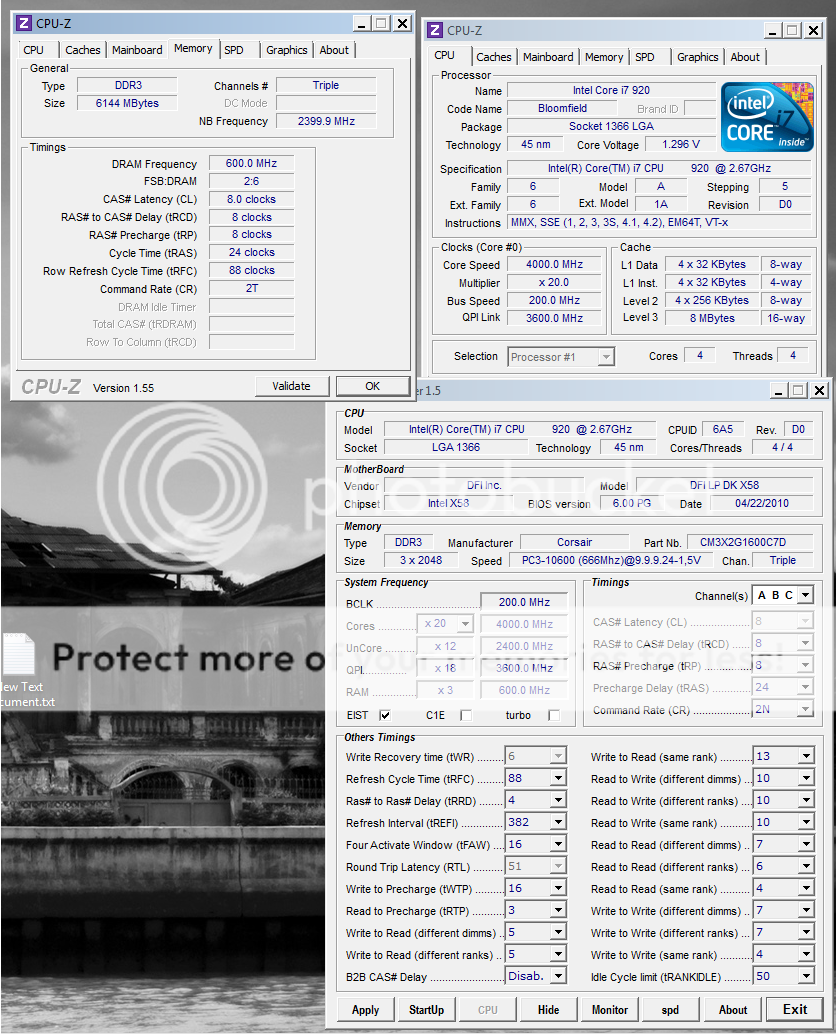 |
|
|
|
|
|
Sep 25 2010, 08:52 AM
|
|
All Stars
10,688 posts Joined: Jan 2005
|
QUOTE(gto87 @ Sep 25 2010, 08:24 AM) I'm sorry but can you explain to me the logic of pushing the IOH and ICH voltage? Thanks~ It helps with overclocking the QPI frequency, that what I know from surfing OC forums  |
|
|
Sep 25 2010, 10:29 AM
|
|
Elite
6,799 posts Joined: Jan 2003
|
until now on 4 different boards
i never hard to raise ioh voltage until 215 even on sli, crossfire etc |
|
|
Sep 25 2010, 10:50 AM
|
|
All Stars
10,688 posts Joined: Jan 2005
|
QUOTE(cstkl1 @ Sep 25 2010, 10:29 AM) until now on 4 different boards i never hard to raise ioh voltage until 215 even on sli, crossfire etc 215??That must be extreme ones~  |
|
|
Sep 25 2010, 07:19 PM
|

Senior Member
2,150 posts Joined: Apr 2009 From: 首尔
|
wow, long time din online, x58 got V2 oredi~~go go i7~~
|
|
|
Sep 26 2010, 04:28 AM
|
|
All Stars
10,688 posts Joined: Jan 2005
|
Test drive in diagnostic mode~
 |
|
|
Sep 26 2010, 11:56 PM
|
 
Staff
10,459 posts Joined: Sep 2005 From: Puchong
|
QUOTE(owikh84 @ Sep 23 2010, 10:50 PM) turn off temp protection on cpu. If it overheats to be dead, probably there would be irremovable marks that can invalidate warranty right? Not a good idea burn mark. clear. good luck.  Bah, bad idea. I'll just live with the faithful i7 920. It is so tough that it can take any abuse. |
|
|
Sep 27 2010, 12:48 AM
|
|
All Stars
10,688 posts Joined: Jan 2005
|
QUOTE(mengsuan @ Sep 26 2010, 11:56 PM) If it overheats to be dead, probably there would be irremovable marks that can invalidate warranty right? Not a good idea Then, OC it with default voltage lorr, sure no burn mark~ Bah, bad idea. I'll just live with the faithful i7 920. It is so tough that it can take any abuse. |
|
|
|
|
|
Sep 27 2010, 01:07 AM
|

Junior Member
470 posts Joined: Jan 2009 From: JB @ PJ
|
@gengstapo
nice clock there,what rams are you using..? try and push your rams too.. are you on wc..? |
|
|
Sep 27 2010, 02:08 AM
|

Senior Member
4,196 posts Joined: Oct 2007
|
@gto87
possible BCLK hole ? it wont be stable not even at any setting u try put . try 201 instead ? |
|
|
Sep 27 2010, 04:04 AM
|
|
All Stars
10,688 posts Joined: Jan 2005
|
QUOTE(kaka_89 @ Sep 27 2010, 01:07 AM) @gengstapo Thanks~nice clock there,what rams are you using..? try and push your rams too.. are you on wc..? Me using only chapo OEM RAM, maker was Samsung. Didnt check what chipset.. Me run on TRUE only~ |
|
|
Sep 27 2010, 09:07 PM
|

Senior Member
1,029 posts Joined: Apr 2008 From: Earth
|
muahaha..
just joining i7 club after 1 year waiting. i7 950 reporting  now just dunt hv proper time to study OC this i7. ~exam mode  |
|
|
Sep 30 2010, 02:50 AM
|

Junior Member
14 posts Joined: Nov 2004
|
Hi all,
I'm new to OC here. Had read few forum about OC'ing i7 and thinking of doing it this weekend. Below are my desktop's components i7 930 (CPU cooler - VX w/ a 12cm cm fan) P6X58D-E (BIOS ver 0303) Corsair (3X2) - CMX6GX3M3C 1600 C7 Casing - CM II 690 Adv first of all, I would like to know are my cpu's cores temp normal. Everything on stock and not inside AC room. realtemp reading (w/ HT) low high 44 45 39 40 43 44 41 42 I did tried to disable the HT but I just can see the difference of 1c for all the cores compare to w/ HT.  is that normal ??? is that normal ??? Need some advise here  |
|
|
Sep 30 2010, 06:31 AM
|

Elite
8,711 posts Joined: Nov 2007 From: Butterworth, PG / Machang, Kelantan
|
QUOTE(??? @ Sep 30 2010, 02:50 AM) Hi all, The core temps look quite normal at idle state.I'm new to OC here. Had read few forum about OC'ing i7 and thinking of doing it this weekend. Below are my desktop's components i7 930 (CPU cooler - VX w/ a 12cm cm fan) P6X58D-E (BIOS ver 0303) Corsair (3X2) - CMX6GX3M3C 1600 C7 Casing - CM II 690 Adv first of all, I would like to know are my cpu's cores temp normal. Everything on stock and not inside AC room. realtemp reading (w/ HT) low high 44 45 39 40 43 44 41 42 I did tried to disable the HT but I just can see the difference of 1c for all the cores compare to w/ HT. is that normal ??? Need some advise here They're relaxing when idle ~0% proc usage be it w/ or w/o HT Once load u will see a huge difference. |
|
|
Oct 1 2010, 12:01 AM
|
|
Junior Member
14 posts Joined: Nov 2004
|
QUOTE(owikh84 @ Sep 30 2010, 06:31 AM) The core temps look quite normal at idle state. Thanks for the input.They're relaxing when idle ~0% proc usage be it w/ or w/o HT Once load u will see a huge difference. So those temp are normal. I have ran prime95 blend test for 10 minutes and the temp were WOW  realtemp w/ HT (full load) 72 70 70 69 I think 75C is the CPU threshold right?  Just want to know is it save for me to OC to 3.2 first on this weekend ? due to the heat |
| Change to: |  0.0494sec 0.0494sec
 0.50 0.50
 6 queries 6 queries
 GZIP Disabled GZIP Disabled
Time is now: 3rd December 2025 - 08:45 PM |
 Quote
Quote