Welcome Guest ( Log In | Register )

56 Pages « < 4 5 6 7 8 > » Bottom

Outline · [ Standard ] · Linear+

 Intel Core i7 LGA1366 & X58 Overclocking V2, Discussion, Benchmarks, Stabilty, Guides

views
     
chinkor
post Oct 8 2010, 06:04 PM

Getting Started
**
Junior Member
75 posts

Joined: Sep 2008
Guys first time overclocker here,

My hardware:
Core i7 930
Asus Rampage II Extreme
Corsair Dominator GT 1600 2x2gb

Stable after running prime for 5 hours.
With Hyper Threading ON ( If turn off I know can get cooler temperature, but any disavantages for gaming?)

Below are my screenshot,
One thing I dont understand is the ram timing, what timing should I use?

Attached Image Attached Image Attached Image


TSowikh84
post Oct 8 2010, 08:24 PM

i7 Clan
Group Icon
Elite
8,711 posts

Joined: Nov 2007
From: Butterworth, PG / Machang, Kelantan


QUOTE(chinkor @ Oct 8 2010, 06:04 PM)
Guys first time overclocker here,

My hardware:
Core i7 930
Asus Rampage II Extreme
Corsair Dominator GT 1600 2x2gb

Stable after running prime for 5 hours.
With Hyper Threading ON ( If turn off I know can get cooler temperature, but any disavantages for gaming?)

Below are my screenshot,
One thing I dont understand is the ram timing, what timing should I use?
*
HT advantage/disadvantage depends on games, but the difference is pretty much negligible ~1% favorably HT off.
For me, I'd turn off HT and OC core clock higher since turning off HT will reduce core temps by huge margin.
But when it comes to 8-thread intensive apps, this HT feature will show its advantage.
From ur 3rd pic, it shows that ur dram is rated at 8-8-8-24 ~1.65v
But where's the 5 hours stability screenshot? hmm.gif
Btw, u can combine all the CPU-Z tabs into one screen by multi launching the app a few times at the same time.
selfdz87
post Oct 9 2010, 02:16 PM

~5Ghz+ Club~
*****
Senior Member
932 posts

Joined: Dec 2008
From: Paris With Love


who has this i7 920 batch# 3931A627
Can do high uncore or not? hmm.gif
TSowikh84
post Oct 9 2010, 02:22 PM

i7 Clan
Group Icon
Elite
8,711 posts

Joined: Nov 2007
From: Butterworth, PG / Machang, Kelantan


QUOTE(selfdz87 @ Oct 9 2010, 02:16 PM)
who has this i7 920 batch# 3931A627
Can do high uncore or not? hmm.gif
*
Played with this batch b4.. core 4.2Ghz HT off, uncore 4.2Ghz @ 1.275v.
For me it performs like any other 920 D0's
selfdz87
post Oct 9 2010, 02:53 PM

~5Ghz+ Club~
*****
Senior Member
932 posts

Joined: Dec 2008
From: Paris With Love


QUOTE(owikh84 @ Oct 9 2010, 02:22 PM)
Played with this batch b4.. core 4.2Ghz HT off, uncore 4.2Ghz @ 1.275v.
For me it performs like any other 920 D0's
*
Ok bro,thanks a lot...im hunting for new 920 that can do 4k uncore w/ low vtt...hehe laugh.gif


Added on October 9, 2010, 2:59 pm
QUOTE(owikh84 @ Oct 9 2010, 02:22 PM)
Played with this batch b4.. core 4.2Ghz HT off, uncore 4.2Ghz @ 1.275v.
For me it performs like any other 920 D0's
*
Ok bro,thanks a lot...im hunting for new 920 that can do 4k uncore w/ low vtt...hehe laugh.gif

This post has been edited by selfdz87: Oct 9 2010, 02:59 PM
TSowikh84
post Oct 9 2010, 04:21 PM

i7 Clan
Group Icon
Elite
8,711 posts

Joined: Nov 2007
From: Butterworth, PG / Machang, Kelantan


QUOTE(selfdz87 @ Oct 9 2010, 02:53 PM)
Ok bro,thanks a lot...im hunting for new 920 that can do 4k uncore w/ low vtt...hehe laugh.gif
*
anyway depends on ur dram and mobo as well bro.. in my case I'm using DomGT 2kc7 and Classy
vcore @ 1.275v, vtt @ 1.425v, altho not as low as my current 920 which requires 1.25vcore and 1.4vtt only.
???
post Oct 10 2010, 12:02 AM

New Member
*
Junior Member
14 posts

Joined: Nov 2004
QUOTE(owikh84 @ Oct 5 2010, 10:35 PM)
Ur vcore also might be insufficient.
*
Had ran 5 hours of prime95 large fft and it was stable so far biggrin.gif
I have to raised the CPU voltage to 1.23125v as suggested by you rclxms.gif rclxms.gif

Attach pic when I started the prime95 test yesterday
Attached Image

forget to screenshot it after I woke up doh.gif
Do I need to run more hours for prime95 to find stability ?


Edit : BSOD after 2 hours of gaming rclxub.gif rclxub.gif
BCcode : a
It seems like it is the same issue with BCcode : 3b I guess.
Should I just adding more Vcore to run next test or keep the Vcore and add some QPI/DRAM voltage to test it out?


This post has been edited by ???: Oct 10 2010, 02:57 AM
TSowikh84
post Oct 10 2010, 07:58 AM

i7 Clan
Group Icon
Elite
8,711 posts

Joined: Nov 2007
From: Butterworth, PG / Machang, Kelantan


Let the 5-hour priming screenshot prove stability,
BSOD means ur OC is not stable yet.. try upping more voltages ie. vCore, vQPI/RAM (vtt) etc.. try and error.
Large FFT is meant to determine ur max heat, power consumption, stress some ram only. Use custom blend on 5400MBs of ram to stress core, uncore & dram entirely. U will fail in 5mins, 30mins, 1 hour, 2, 3 etc...
???
post Oct 10 2010, 11:02 PM

New Member
*
Junior Member
14 posts

Joined: Nov 2004
QUOTE(owikh84 @ Oct 10 2010, 07:58 AM)
Let the 5-hour priming screenshot prove stability,
BSOD means ur OC is not stable yet.. try upping more voltages ie. vCore, vQPI/RAM (vtt) etc.. try and error.
Large FFT is meant to determine ur max heat, power consumption, stress some ram only. Use custom blend on 5400MBs of ram to stress core, uncore & dram entirely. U will fail in 5mins, 30mins, 1 hour, 2, 3 etc...
*
Just finished ran 5 hours of prime95
Attached Image Attached Image

I have added my Vcore up to 1.23750v and lower down the QPI/DRAM Voltage to 1.20625v

CPU ratio 21x
BCLK 191
PCIE 100
DRAM 1531
UCLK 3063
CPU voltage 1.23750v
PLL voltage 1.80v
QPI/DRAM voltage 1.20625v
TSowikh84
post Oct 10 2010, 11:59 PM

i7 Clan
Group Icon
Elite
8,711 posts

Joined: Nov 2007
From: Butterworth, PG / Machang, Kelantan


Good job! so how's the game still crash on u with these latest settings?
Ur temp still allow higher OC good luck

This post has been edited by owikh84: Oct 11 2010, 12:01 AM
???
post Oct 11 2010, 09:27 PM

New Member
*
Junior Member
14 posts

Joined: Nov 2004
QUOTE(owikh84 @ Oct 10 2010, 11:59 PM)
Good job! so how's the game still crash on u with these latest settings?
Ur temp still allow higher OC good luck
*
Haven't try any game yet, but those temp I have posted yesterday were under air-cond room (26C) laugh.gif
I just on AC when I stress test because I scare it burn some how doh.gif

Below are idle temp for 4.0 without AC
Attached Image

I'll try some games today or tomorrow to see is it stable or not. Will update nod.gif
GaryCCW
post Oct 13 2010, 06:29 PM

Getting Started
**
Junior Member
50 posts

Joined: Mar 2007
From: kap thung


user posted image
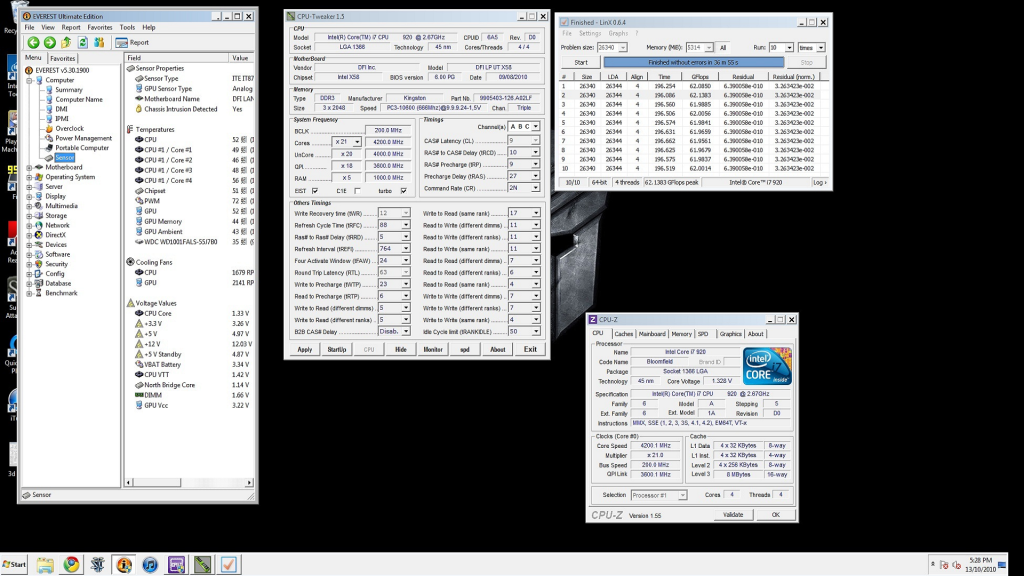
This is my overclock settings, sorry about that SS, it was a bad pic, I just passed 10times linx twice with these settings

4.2ghz i7 920 @ 1.3125v(at bios) 4k uncore Cpu Vtt:1.37v(bios)
Kingston HyperX t1 cl9 2000mhz 2gbx3 @ 2000mhz 9-10-9-27 cr2
Dfi Ut-t3eh8 with latest bios
Cooling - H20
Psu-Corsair tx650
GPU- Palit Gtx 260+

Please comment my overclock settings and pls give me some guide to improve my memory clocking. tq

This post has been edited by GaryCCW: Oct 13 2010, 06:43 PM
kaka_89
post Oct 14 2010, 06:26 PM

Casual
***
Junior Member
470 posts

Joined: Jan 2009
From: JB @ PJ

QUOTE(GaryCCW @ Oct 13 2010, 06:29 PM)
user posted image
This is my overclock settings, sorry about that SS, it was a bad pic, I just passed 10times linx twice with these settings

4.2ghz i7 920 @ 1.3125v(at bios) 4k uncore Cpu Vtt:1.37v(bios)
Kingston HyperX t1 cl9 2000mhz 2gbx3 @ 2000mhz 9-10-9-27 cr2
Dfi Ut-t3eh8 with latest bios
Cooling - H20
Psu-Corsair tx650
GPU- Palit Gtx 260+

Please comment my overclock settings and pls give me some guide to  improve my memory clocking. tq
*
try and increase you cpu/vtt notch by notch..

and for your rams, try 9-9-9-24/88 1T or 2T..do some linx test 20 times..the size of memory should be ALL
cheesycake
post Oct 15 2010, 07:19 AM

Casual
***
Junior Member
302 posts

Joined: Oct 2004
Going to overclock my 930 soon. Thinking of the following combination for watercooling:

EK Supreme HF
XSPC RX 240 (my current case is CM690)
Laing D5

Don't think I'm buying reservoir. Budget kinda tight. Is the reservoir needed? Won't be cooling gpu yet, so this will just be the loop.

What you guys think?
supernothing
post Oct 15 2010, 12:13 PM

super ☆
******
Senior Member
1,343 posts

Joined: Jun 2006
From: Wangsa Maju/TTDI/Ampang


QUOTE(cheesycake @ Oct 15 2010, 07:19 AM)
Going to overclock my 930 soon. Thinking of the following combination for watercooling:

EK Supreme HF
XSPC RX 240 (my current case is CM690)
Laing D5

Don't think I'm buying reservoir. Budget kinda tight. Is the reservoir needed? Won't be cooling gpu yet, so this will just be the loop.

What you guys think?
*
yeah, you can build a setup without reservoir. just use the tube to fill your loop.
clawhammer
post Oct 15 2010, 02:38 PM

///M
Group Icon
VIP
8,788 posts

Joined: Jan 2003
From: Kuala Lumpur


QUOTE(cheesycake @ Oct 15 2010, 07:19 AM)
Going to overclock my 930 soon. Thinking of the following combination for watercooling:

EK Supreme HF
XSPC RX 240 (my current case is CM690)
Laing D5

Don't think I'm buying reservoir. Budget kinda tight. Is the reservoir needed? Won't be cooling gpu yet, so this will just be the loop.

What you guys think?
*
It's best to have a reservoir but of course there are always smart people that tries to do wonders smile.gif Humans can live with one kidney as well but I'm sure you know it's not optimal.
lichyetan
post Oct 15 2010, 03:18 PM

*****
*******
Senior Member
2,295 posts

Joined: Jan 2005
From: Penang


QUOTE(cheesycake @ Oct 15 2010, 07:19 AM)
Going to overclock my 930 soon. Thinking of the following combination for watercooling:

EK Supreme HF
XSPC RX 240 (my current case is CM690)
Laing D5

Don't think I'm buying reservoir. Budget kinda tight. Is the reservoir needed? Won't be cooling gpu yet, so this will just be the loop.

What you guys think?
*
you can build ur loop without reservoir, but good luck on bleeding the thing...
cheesycake
post Oct 15 2010, 04:51 PM

Casual
***
Junior Member
302 posts

Joined: Oct 2004
Or maybe to keep things in budget I should get a cheaper pump and a reservoir? But getting a cheaper pump will mean compromising quite a lot in cooling performance I think.

Is the D5 too strong for a single loop for cpu only?
???
post Oct 16 2010, 01:25 PM

New Member
*
Junior Member
14 posts

Joined: Nov 2004
QUOTE(??? @ Oct 11 2010, 09:27 PM)
Haven't try any game yet, but those temp I have posted yesterday were under air-cond room (26C)  laugh.gif
I just on AC when I stress test because I scare it burn some how  doh.gif

Below are idle temp for 4.0 without AC
Attached Image

I'll try some games today or tomorrow to see is it stable or not. Will update  nod.gif
*
Just have time to test some game yesterday but I got BSOD after 15mins of SC2 vmad.gif vmad.gif
Did some changes and ran another 5 hours of prime95 test.
Attached Image Attached Image

Hope this time wont BSOD again.

Below are the setting: (CPU : i7 930 #Batch 3949B120 | MB : ASUS P6X58D-E)

Ai Overclock Tuner.....................[Manual]
CPU Ratio Setting......................[21.0]
Intel® SpeedStep™ Tech............[Disabled]
Xtreme Phase Full Power Mode...........[Enabled]
BCLK Frequency.........................[191]
PCIE Frequency.........................[100]
DRAM Frequency.........................[DDR3-1531MHz]
UCLK Frequency.........................[3063MHz]
QPI Link Data Rate.....................[Auto]

CPU Voltage Control....................[Manual]
CPU Voltage............................[1.24375]
CPU PLL Voltage........................[1.80]
QPI/DRAM Core Voltage..................[1.21875]
IOH Voltage............................[1.12]
IOH PCIE Voltage.......................[1.50]
ICH Voltage............................[1.20]
ICH PCIE Voltage.......................[1.50]
DRAM Bus Voltage.......................[1.64]
DRAM DATA REF Voltage on CHA...........[Auto]
DRAM CTRL REF Voltage on CHA...........[Auto]
DRAM DATA REF Voltage on CHB...........[Auto]
DRAM CTRL REF Voltage on CHB...........[Auto]
DRAM DATA REF Voltage on CHC...........[Auto]
DRAM CTRL REF Voltage on CHC...........[Auto]

Load-Line Calibration..................[Enabled]
CPU Differential Amplitude.............[800mV]
CPU Clock Skew.........................[Delay 300ps]
CPU Spread Spectrum....................[Disabled]
IOH Clock Skew.........................[Auto]
PCIE Spread Spectrum...................[Disabled]

C1E Support............................[Disabled]
Hardware Prefetcher....................[Enabled]
Adjacent Cache Line Prefetch...........[Enabled]
Intel® Virtualization Tech...........[Disabled]
CPU TM Function........................[Enabled]
Execute Disable Bit....................[Enabled]
Intel® HT Technology.................[Disabled]
Active Processor Cores.................[All]
A20M...................................[Disabled]
Intel® SpeedStep™ Tech............[Disabled]
Intel® C-STATE Tech..................[Disabled]

TSowikh84
post Oct 16 2010, 06:37 PM

i7 Clan
Group Icon
Elite
8,711 posts

Joined: Nov 2007
From: Butterworth, PG / Machang, Kelantan


Passed prime95 but crashed during gaming.
btw what about other games?
From what I heard SC2 will crash on some custom map
Bad GPU driver also can cause BSOD.

CPU Clock Skew.........................[Delay 300ps] <-- 100ps is enuf

56 Pages « < 4 5 6 7 8 > » Top
 

Change to:
| Lo-Fi Version
0.0220sec    0.65    6 queries    GZIP Disabled
Time is now: 8th December 2025 - 01:14 AM