Outline ·
[ Standard ] ·
Linear+
The Solid State Storage Thread
|
iaknesnah
|
 Nov 26 2011, 11:12 PM Nov 26 2011, 11:12 PM
|

|
QUOTE(zzzz52 @ Nov 26 2011, 10:42 PM) As requested. For my intel G2 80gb vs 160gb SSD. It seems that the 160gb part is having a problem. » Click to show Spoiler - click again to hide... « AS SSD:  80gb  160gb Crystalmark: 5x 100MB  80gb  160gb 1x 100mb  80gb  160gb 1x 50mb  80gb  160gb Even though for the 5x 100mb test is almost similar for both ssd, but i can notice during the test that for 160gb ssd the reading would drop to around 3MB/s during the 3 or 4 test point. strange your results are all over the place... you should open up a thread in intel ssd forum and see the feedback from their representative. here is the link http://communities.intel.com/community/tec...iew=discussions |
|
|
|
|
|
zzzz52
|
Nov 27 2011, 12:21 AM
|
|
|
Thanks for the suggestion, already opened a thread there. Link to discussion in Intel CommunityBut anyone here that can provide info on this or have encountered similar issue? |
|
|
|
|
|
C-Note
|
Nov 27 2011, 01:59 PM
|
|
|
eh guys, just wondering. Got SSD slot for netbooks? mine is Acer 1810TZ ultraportable using Pentium processor on Windows 7 Premium
|
|
|
|
|
|
zzzz52
|
Nov 27 2011, 02:09 PM
|
|
|
SSD is just using a normal sata port in the netbook or note book, just check if yours is supporting 2.5" or the 1.8' HDD.
But i think yours is can only support 1 hard disk at 1 time, so you will need to swap your existing hard disk for a SSD.
|
|
|
|
|
|
Shufflerz
|
Nov 27 2011, 02:14 PM
|
|
|
QuestionOne out of four of my buyer complained that the SSD I sold performing damn slow. Please give some advise on what to do. Link : http://forum.lowyat.net/index.php?showtopic=2086253&hl=
|
|
|
|
|
|
zzzz52
|
Nov 27 2011, 02:45 PM
|
|
|
QUOTE(Shufflerz @ Nov 27 2011, 02:14 PM) QuestionOne out of four of my buyer complained that the SSD I sold performing damn slow. Please give some advise on what to do. Link : http://forum.lowyat.net/index.php?showtopic=2086253&hl= My suggestion is that you will need to ask him/her to perform a few test and post it to you to see how is it slow. You can refer to my few previous post( just a few post back) that I have made on the performance of my intel ssd. From there only can you confirm if it is really a performance issue. |
|
|
|
|
|
zs3889
|
Nov 28 2011, 02:41 PM
|
|
|
QUOTE(lingloong @ Nov 26 2011, 03:55 PM) QUOTE(zs3889 @ Nov 26 2011, 01:24 AM) there is a deal going on this website, which ends by the end of the day. the price is $149.99, but it gives a $79.99 mail in rebate, which makes it $70.00 biggrin.gif http://www.newegg.com/Product/Product.aspx...&Tpk=20-167-047i know its super worth it but this is my first ssd and i dont quite know which brand too choose. so far based on customer reviews on these stores, crucial has the best rating, is intel on par with crucial? in terms on quality and reliability. thanks Got problem then send back to US? So how much do you think you need to fork out to claim a single RMA? In the end, the hassle & cost more compared when you buy locally  hehe fortunately i am in the US, i bought it and now i'm waiting it to be sent to me. Hopefully it won't disappoint me  |
|
|
|
|
|
nightshade_nova
|
Nov 28 2011, 10:51 PM
|
|
|
Got rumors that next Xbox is going to be announced at CES in January.
Heres hoping that console SSD adoption will drive the price further down.
|
|
|
|
|
|
jchue73
|
Nov 29 2011, 06:14 PM
|
|
|
QUOTE(C-Note @ Nov 27 2011, 01:59 PM) eh guys, just wondering. Got SSD slot for netbooks? mine is Acer 1810TZ ultraportable using Pentium processor on Windows 7 Premium I'm running a Crucial M4 128GB SSD on my Acer 1410.  |
|
|
|
|
|
zixian96
|
Dec 1 2011, 06:41 PM
|
|
|
is this SSD faulty ,it seems to be quite low speed and this is a Corsair F60, no game installed ,only OS and some small size program...  Uploaded with ImageShack.us |
|
|
|
|
|
kelvin_hata
|
Dec 1 2011, 06:44 PM
|
|
|
QUOTE(zixian96 @ Dec 1 2011, 06:41 PM) is this SSD faulty ,it seems to be quite low speed and this is a Corsair F60, no game installed ,only OS and some small size program... Uploaded with ImageShack.usyou are on wat system ya? spec? it seem like normal to me This post has been edited by kelvin_hata: Dec 1 2011, 06:46 PM |
|
|
|
|
|
zixian96
|
Dec 1 2011, 07:22 PM
|
|
|
QUOTE(kelvin_hata @ Dec 1 2011, 06:44 PM) you are on wat system ya? spec? it seem like normal to me my spec are: i5 2500k@4.3ghz GA-Z68XP-UD3P 8GB veangence low profile sapphire 6950 2GB in crossfire |
|
|
|
|
|
iaknesnah
|
Dec 1 2011, 07:28 PM
|
|
|
how long u been using it..? did u enable TRIM? how full your ssd is?
|
|
|
|
|
|
zixian96
|
Dec 2 2011, 02:49 PM
|
|
|
QUOTE(iaknesnah @ Dec 1 2011, 07:28 PM) how long u been using it..? did u enable TRIM? how full your ssd is? 1)my SSD power-on time is 151days (buyed on febuary this year) 2)wat is TRIM? 3)my SSD is 45% used |
|
|
|
|
|
zzzz52
|
Dec 2 2011, 03:35 PM
|
|
|
Just google enable trim windows 7. But to be sure, are you using ahci or ide for the sata interface
|
|
|
|
|
|
stevenryl86
|
Dec 3 2011, 01:28 AM
|
|
|
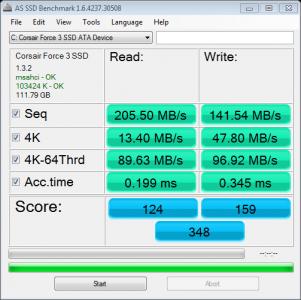
Is my SSD on the right results?? Corsair Force 3 120GB SSD Core i5-650 4GB RAM But the SSD plugged into SATA 2 interface. The speed lower maybe due to SATA connection? 1st pic - no ahci/trim after ahci/trim got huge boost. 2nd pic - no ahci/trim 3rd pic - with ahci/trim After i put Trim and ahci the read/write speed got boosted higher woot nice guide, trim + ahci = perfect ssd speed This post has been edited by stevenryl86: Dec 3 2011, 02:07 AM Attached thumbnail(s)

|
|
|
|
|
|
iaknesnah
|
Dec 3 2011, 07:08 AM
|
|
|
QUOTE(zixian96 @ Dec 2 2011, 02:49 PM) 1)my SSD power-on time is 151days (buyed on febuary this year) 2)wat is TRIM? 3)my SSD is 45% used check whether trim is enabled or not like this » Click to show Spoiler - click again to hide... « The Trim command should be enabled by default on Windows 7, but if you want to check to make sure do this: Run "Command prompt" with adminstrator's right Command prompt > fsutil behavior query disabledeletenotify DisableDeleteNotify = 1 (Windows TRIM commands are disabled) DisableDeleteNotify = 0 (Windows TRIM commands are enabled)  also your ssd is half full that can also slow down your ssd as well u can do this tweak for your system. just follow instruction on this link below http://thessdreview.com/Forums/ssd-optimiz...n-guide/209.htm |
|
|
|
|
|
kembar4
|
Dec 3 2011, 05:41 PM
|
|
|
Read a few post and also from other forums. Learnt a few things on optimizing a ssd drive. Planning to get a Force GT 120GB SSD by next week |
|
|
|
|
|
kelvin_hata
|
Dec 3 2011, 11:52 PM
|
|
|
QUOTE(kembar4 @ Dec 3 2011, 05:41 PM) Read a few post and also from other forums. Learnt a few things on optimizing a ssd drive. Planning to get a Force GT 120GB SSD by next week wat is the price for now ya? |
|
|
|
|
|
nabielz
|
Dec 4 2011, 07:25 AM
|
|
|
QUOTE(kelvin_hata @ Dec 3 2011, 11:52 PM) wat is the price for now ya? rm 749 at viewnet |
|
|
|
|



 Quote
Quote





 0.0272sec
 1.02
1.02
 6 queries
 GZIP Disabled