

Anyone here experienced freezing after completing a mission? It's odd really. No harm done though as the game usually saves right before the game hangs.
Starcraft 2 Troubleshooting thread, Check first post for possible solutions
Starcraft 2 Troubleshooting thread, Check first post for possible solutions
|
|
 Jul 31 2010, 12:06 PM Jul 31 2010, 12:06 PM
|
 
Junior Member
378 posts Joined: Feb 2008 From: Kuching, Sarawak  
|
Anyone here experienced freezing after completing a mission? It's odd really. No harm done though as the game usually saves right before the game hangs.
|
|
|
|
|
|
Jul 31 2010, 12:08 PM
|

Senior Member
3,809 posts Joined: Sep 2007 From: Jakarta
|
QUOTE(Grif @ Jul 31 2010, 12:06 PM) Anyone here experienced freezing after completing a mission? It's odd really. No harm done though as the game usually saves right before the game hangs. Describe your freezing experience. Completely crashes or just slow down during loading. |
|
|
Jul 31 2010, 12:10 PM
|
|
Junior Member
378 posts Joined: Feb 2008 From: Kuching, Sarawak
|
The screen just freeze. Usually happens while loading. (not slowdown, I tried waiting, no luck)
Alt-Tab and the game doesn't respond anymore. |
|
|
Jul 31 2010, 12:12 PM
|
|
Senior Member
3,809 posts Joined: Sep 2007 From: Jakarta
|
QUOTE(Grif @ Jul 31 2010, 12:10 PM) The screen just freeze. Usually happens while loading. (not slowdown, I tried waiting, no luck) The FPS during loading may sometimes drop to less than 10 fps.Alt-Tab and the game doesn't respond anymore. When you do that, do you have to end-task or just wait. |
|
|
Aug 1 2010, 05:39 PM
|

Senior Member
1,872 posts Joined: Mar 2010 From: Malaysia
|
I have problems with the resolution..
My monitor is 1366x768,but StarCraft II only supports 1360x768,so if I put that resolution,there will be a black border on the left side of my screen,and a bit of the right side of the screen will be hidden,causing me to not able to see the supply quantities,and the Tip button properly.. I have tried changing the resolution through the Variables file located in My Documents,Starcraft II folder,but if I change the width to 1366,and I launch the game,the screen will be ok,but the words not very clear.. Pls help  |
|
|
Aug 1 2010, 08:10 PM
|

Senior Member
4,494 posts Joined: Feb 2009 
|
can i know where can i put AI maps? -.-
|
|
|
|
|
|
Aug 1 2010, 10:25 PM
|

Senior Member
3,494 posts Joined: Jan 2003 From: Nosgoth
|
Ah.. .now only I noticed this thread....
Ok for all the nVidia card user, how do u enable AA for this game, from nVidia control panel? I couldn't find any clue abt that. This post has been edited by Vorador: Aug 1 2010, 10:25 PM |
|
|
Aug 1 2010, 10:28 PM
|
|
Senior Member
3,809 posts Joined: Sep 2007 From: Jakarta
|
QUOTE(Vorador @ Aug 1 2010, 10:25 PM) Ah.. .now only I noticed this thread.... Use Rivatuner or Nvidia drivers.Ok for all the nVidia card user, how do u enable AA for this game, from nVidia control panel? I couldn't find any clue abt that. Go to Direct3D tweaks for Rivatuner. |
|
|
Aug 1 2010, 10:29 PM
|
|
Senior Member
3,494 posts Joined: Jan 2003 From: Nosgoth
|
@kianweic,
sorry i have no clues at all, riva tuner is ok, but Nvidia drivers? i'm using it at the moment but where's the setting took place? |
|
|
Aug 1 2010, 10:34 PM
|
|
Senior Member
3,809 posts Joined: Sep 2007 From: Jakarta
|
QUOTE(Vorador @ Aug 1 2010, 10:29 PM) @kianweic, Go to my computer then click on control panel then click on Nvidia Control Panel and finally click on Manage 3D Settings.sorry i have no clues at all, riva tuner is ok, but Nvidia drivers? i'm using it at the moment but where's the setting took place? Click on Global Setting Change AA mode to override any application settings then change AA settings to 4x. |
|
|
Aug 1 2010, 10:38 PM
|

Senior Member
937 posts Joined: Mar 2005 From: malaka
|
anyone know my dvd doesnt comes with map, and when i click join game or play game, it stuck and hang there. anyone know how to solve this problem
|
|
|
Aug 1 2010, 10:58 PM
|

Senior Member
3,090 posts Joined: Dec 2007 
|
QUOTE(ROTiJOHN @ Aug 1 2010, 10:38 PM) anyone know my dvd doesnt comes with map, and when i click join game or play game, it stuck and hang there. anyone know how to solve this problem Congratulations & welcome to the club. Rest assured that you're not the only 1 with this issue:http://sea.battle.net/sc2/en/forum/topic/15471597 SIGH~ |
|
|
Aug 1 2010, 10:59 PM
|
|
Senior Member
3,494 posts Joined: Jan 2003 From: Nosgoth
|
QUOTE(kianweic @ Aug 1 2010, 10:34 PM) Go to my computer then click on control panel then click on Nvidia Control Panel and finally click on Manage 3D Settings. hm.... must be global setting? game program specific can?Click on Global Setting Change AA mode to override any application settings then change AA settings to 4x. mcm ini: 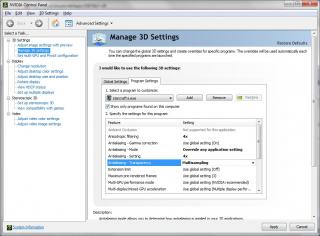
|
|
|
|
|
|
Aug 1 2010, 11:03 PM
|
|
Senior Member
3,809 posts Joined: Sep 2007 From: Jakarta
|
QUOTE(Vorador @ Aug 1 2010, 10:59 PM) hm.... must be global setting? game program specific can? Either way doesn't matter.mcm ini:
That way will do too. |
|
|
Aug 1 2010, 11:09 PM
|
|
Junior Member
378 posts Joined: Feb 2008 From: Kuching, Sarawak
|
Bloody hell. Now I find myself unable to start any AI games.
Fuuuuuuuuuuuuuuuuuuuuuuuuuuuuuuuu- I hope Blizzard fixes this soon. (Oh well, guess I can start collecting achievements first). |
|
|
Aug 1 2010, 11:10 PM
|
|
Senior Member
3,494 posts Joined: Jan 2003 From: Nosgoth
|
@kianweic,
Thx a lot  Added on August 1, 2010, 11:11 pm QUOTE(Grif @ Aug 1 2010, 11:09 PM) Bloody hell. Now I find myself unable to start any AI games. what's wrong? it might take a little while to load all the maps.Fuuuuuuuuuuuuuuuuuuuuuuuuuuuuuuuu- I hope Blizzard fixes this soon. (Oh well, guess I can start collecting achievements first). This post has been edited by Vorador: Aug 1 2010, 11:11 PM |
|
|
Aug 1 2010, 11:15 PM
|
|
Senior Member
3,809 posts Joined: Sep 2007 From: Jakarta
|
QUOTE(Vorador @ Aug 1 2010, 11:10 PM) @kianweic, Set it at 4x AA. I am not sure whether our GPU can handle 8x.Thx a lot Added on August 1, 2010, 11:11 pm what's wrong? it might take a little while to load all the maps. If can, let me know because I'll replay the game at that setting. |
|
|
Aug 1 2010, 11:15 PM
|
|
Junior Member
378 posts Joined: Feb 2008 From: Kuching, Sarawak
|
I can't download, no matter how long I leave it. So yeah, thats a problem alright.
|
|
|
Aug 1 2010, 11:35 PM
|

Senior Member
758 posts Joined: Jan 2003 From: Angel Heaven X
|
QUOTE(Grif @ Jul 31 2010, 12:06 PM) Anyone here experienced freezing after completing a mission? It's odd really. No harm done though as the game usually saves right before the game hangs. QUOTE(kianweic @ Jul 31 2010, 12:08 PM) Describe your freezing experience. Yup, alway crash after complete mission and while loadingCompletely crashes or just slow down during loading.  |
|
|
Aug 2 2010, 12:14 AM
|
|
Senior Member
3,494 posts Joined: Jan 2003 From: Nosgoth
|
hm... I neer exp such prob? game never crash or freeze, only thing is when open the versus AI it takes a little while to load all the maps.
@Kianweic, I tried just now, in the game I don't spot any different...  (using 1920*1080 res) |
| Change to: |  0.0136sec 0.0136sec
 0.49 0.49
 6 queries 6 queries
 GZIP Disabled GZIP Disabled
Time is now: 1st December 2025 - 05:37 PM |
 Quote
Quote