Welcome Guest ( Log In | Register )

113 Pages « < 71 72 73 74 75 > » Bottom

Outline · [ Standard ] · Linear+

Home Networking N Router By Asus RTN-66U / Asus RTN-16 / RT-N56U, Asus RT-N Series Supported Unifi

views
     
ASUSmy
post Jul 8 2013, 10:05 AM

Look at all my stars!!
*******
Senior Member
2,319 posts

Joined: Mar 2010
QUOTE(yeapch01 @ Jul 6 2013, 04:29 PM)
Hi ASUSmy
can Asus RT-AC66U support Time Fibre Broadband to replace the cisco router given by TIME

Thanks
*
Hi yeapch01,

May I know this TIME fiber is together with the Astro Beyond package? If yes, it will support.

If no do let me know what kind of TIME package are you using?

Thank you
yeapch01
post Jul 8 2013, 10:32 AM

Regular
******
Senior Member
1,916 posts

Joined: Mar 2008


QUOTE(ASUSmy @ Jul 8 2013, 11:05 AM)
Hi yeapch01,

May I know this TIME fiber is together with the Astro Beyond package? If yes, it will support.

If no do let me know what kind of TIME package are you using?

Thank you
*
Time Fibre Broadband(FTTH- Fibre To The Home)

http://www.time.com.my/consumer/time_fibre_broadband.asp


thanks for your help
ASUSmy
post Jul 8 2013, 10:48 AM

Look at all my stars!!
*******
Senior Member
2,319 posts

Joined: Mar 2010
QUOTE(yeapch01 @ Jul 8 2013, 10:32 AM)
Time Fibre Broadband(FTTH- Fibre To The Home)

http://www.time.com.my/consumer/time_fibre_broadband.asp
thanks for your help
*
Hi yeapch01,

Yes it can support biggrin.gif .

Thank you

This post has been edited by ASUSmy: Jul 8 2013, 10:49 AM
Hearm
post Jul 8 2013, 12:17 PM

Getting Started
**
Junior Member
53 posts

Joined: Apr 2008


Hi ASUSmy
Can I use 2 units RT-N66U , so 1 units as repeater to extend wifi signal ?
sleyer
post Jul 8 2013, 01:45 PM

Enthusiast
*****
Senior Member
829 posts

Joined: Apr 2007
helo,

i need advice . my company subscrib BIZ50 current still using stock router . stock router always heng .. so i wan to change other brand ..

what asus model support UNIFI and heavy duty (good performance) ?
ASUSmy
post Jul 8 2013, 01:57 PM

Look at all my stars!!
*******
Senior Member
2,319 posts

Joined: Mar 2010
QUOTE(Hearm @ Jul 8 2013, 12:17 PM)
Hi ASUSmy
Can I use 2 units RT-N66U , so 1 units as repeater to extend wifi signal ?
*
Hi Hearm,

RT-N66U don't have Repeater function, but it has AP function which require a LAN cable to connect between the 2 routers.

The following models are some of the routers that support repeater function.

EA-N66
RT-N15U
RT-N12U
RT-N12HP
RT-N10

Thank you
ASUSmy
post Jul 8 2013, 02:01 PM

Look at all my stars!!
*******
Senior Member
2,319 posts

Joined: Mar 2010
QUOTE(sleyer @ Jul 8 2013, 01:45 PM)
helo,

i need advice . my company subscrib BIZ50 current still using stock router . stock router always  heng ..  so i wan to change other brand .. 

what asus model support UNIFI and heavy duty (good performance) ?
*
Hi sleyer,

The following models all can support UNIFI or MAXIS Fiber. If you are looking for good performance one, I would recommend RT-AC66U, RT-N66U or RT-N65U.

RT-AC66U
RT-N66U
RT-N65U
RT-N56U
RT-N53
RT-N16
RT-N15U
RT-N14U
RT-N12HP
RT-N12

Thank you

ahpeace
post Jul 8 2013, 02:31 PM

New Member
*
Junior Member
23 posts

Joined: Dec 2008


Hi, i am using Asus RTN16 with latest beta firmware.
I am connected to the internet via Yes Go Dongle.
I noticed there are speed differences between wired & wireless.
When wired, I could get a stable 4-5mbps of speed.
But when wireless, the speed go down to 0.5mbps only.
Any tips to solve this problem?
Pls advice.
ASUSmy
post Jul 8 2013, 02:54 PM

Look at all my stars!!
*******
Senior Member
2,319 posts

Joined: Mar 2010
QUOTE(ahpeace @ Jul 8 2013, 02:31 PM)
Hi, i am using Asus RTN16 with latest beta firmware.
I am connected to the internet via Yes Go Dongle.
I noticed there are speed differences between wired & wireless.
When wired, I could get a stable 4-5mbps of speed.
But when wireless, the speed go down to 0.5mbps only.
Any tips to solve this problem?
Pls advice.
*
Hi ahpeace,

The speed reduction is caused by the wireless frequency between the 2 devices both are using the same 2.4GHz, you can try use a USB extender to separate them a part to reduce the interference of both the device.

Thank you
ahpeace
post Jul 8 2013, 03:30 PM

New Member
*
Junior Member
23 posts

Joined: Dec 2008


Ok, will try it & report the result later.
Any suggestion of how long the usb extender should be?
xelamil
post Jul 8 2013, 03:41 PM

Getting Started
**
Junior Member
166 posts

Joined: Sep 2011
QUOTE(ASUSmy @ Jul 8 2013, 10:48 AM)
Hi yeapch01,

Yes it can support  biggrin.gif .

Thank you
*
Hi ASUSmy,

is any difference to look for in the router with and without Astro Beyond?

In that case, which model(s) is recommended for Time Fiber with Astro Beyond;
with heavy duty downloading...

And 'backward' compatible to Streamyx 4MB...

Thanks.


ASUSmy
post Jul 8 2013, 05:39 PM

Look at all my stars!!
*******
Senior Member
2,319 posts

Joined: Mar 2010
QUOTE(xelamil @ Jul 8 2013, 03:41 PM)
Hi ASUSmy,

is any difference to look for in the router with and without Astro Beyond?

In that case, which model(s) is recommended for Time Fiber with Astro Beyond;
with heavy duty downloading...

And 'backward' compatible to Streamyx 4MB...

Thanks.
*
Hi xelamil,

The reason I ask is make sure I know about the Internet package before confirming whether it works or not.

And is you are looking for good performance router, and all this router also can use for streamyx with a modem attached.

Below here is router with Advanced Performance
RT-AC66U (Broadcom) - RM739
RT-N66U (Broadcom) - RM639
RT-N65U (Ralink) - RM539
RT-N56U (Ralink) - RM439
RT-N53 (Broadcom) - RM309

Here is the router for complete networking.
RT-N16 (Broadcom) - RM339
RT-N15U (Broadcom) - RM199
RT-N14U (Ralink) - RM185
RT-N12HP (Broadcom) - RM229
RT-N12 (Broadcom) - RM139

Thank you


romeo57
post Jul 8 2013, 05:45 PM

Casual
***
Junior Member
373 posts

Joined: Sep 2011


QUOTE(ASUSmy @ Jul 8 2013, 10:02 AM)
Hi romeo57,

You can have a try on this firmware. 3.0.0.4.364.

https://www.asuswebstorage.com/navigate/s/B...2BDF02F5B45D80Y

This firmware will change the GUI of this router, DO A FACTORY RESTORE BEFORE AND AFTER THE FIRMWARE UPDATE.

After done the factory restoration, redo the setting. Below is a link that will help you in setting up the router for UNIFI.

https://www.youtube.com/watch?v=TfEVAlxxjBY

Thank you
*
Thank you!
Updated and factory reset.
Now running smoothly! rclxm9.gif

A question though, which channel should i use?
20Mhz or 40Mhz?
I got Unifi 5Mpbs, it shouldn't make any difference right?
digilife
post Jul 8 2013, 05:49 PM

The MNP guy, its me yeah.
*******
Senior Member
8,025 posts

Joined: Feb 2005
From: Planet Boleland


Just to let you guys knoe,

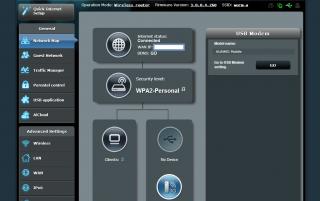
RT-N16 run fine with Maxis LTE on Huawei E398 Modem (LTE Modem)


Attached Image
ASUSmy
post Jul 8 2013, 05:49 PM

Look at all my stars!!
*******
Senior Member
2,319 posts

Joined: Mar 2010
QUOTE(ahpeace @ Jul 8 2013, 03:30 PM)
Ok, will try it & report the result later.
Any suggestion of how long the usb extender should be?
*
Hi ahpeace,

Maybe around 1-2 meters? As some USB device cannot work if the extender are too long.

Thank you
ASUSmy
post Jul 8 2013, 05:52 PM

Look at all my stars!!
*******
Senior Member
2,319 posts

Joined: Mar 2010
QUOTE(romeo57 @ Jul 8 2013, 05:45 PM)
Thank you!
Updated and factory reset.
Now running smoothly!  rclxm9.gif

A question though, which channel should i use?
20Mhz or 40Mhz?
I got Unifi 5Mpbs, it shouldn't make any difference right?
*
Hi romeo57,

You can try 40MHz if you don't want put 20/40MHZ. You can always change back if you felt like the wifi is not stable.

Thank you
ASUSmy
post Jul 8 2013, 05:53 PM

Look at all my stars!!
*******
Senior Member
2,319 posts

Joined: Mar 2010
QUOTE(digilife @ Jul 8 2013, 05:49 PM)
Just to let you guys knoe,

RT-N16 run fine with Maxis LTE on Huawei E398 Modem (LTE Modem)
Attached Image
*
Hi digilife,

Thank you for the information thumbup.gif

Thank you
digilife
post Jul 8 2013, 05:58 PM

The MNP guy, its me yeah.
*******
Senior Member
8,025 posts

Joined: Feb 2005
From: Planet Boleland


QUOTE(ASUSmy @ Jul 8 2013, 05:53 PM)
Hi digilife,

Thank you for the information  thumbup.gif

Thank you
*
Just doing my bit on this wonderful Router Asus

thumbup.gif


romeo57
post Jul 8 2013, 06:03 PM

Casual
***
Junior Member
373 posts

Joined: Sep 2011


QUOTE(ASUSmy @ Jul 8 2013, 05:52 PM)
Hi romeo57,

You can try 40MHz if you don't want put 20/40MHZ. You can always change back if you felt like the wifi is not stable.

Thank you
*
Got it.
Thanks!
ahpeace
post Jul 8 2013, 06:50 PM

New Member
*
Junior Member
23 posts

Joined: Dec 2008


Yippey yeayy the speed does improved
A 3 feet long extender does the job
TQVM ASUSmy...

113 Pages « < 71 72 73 74 75 > » Top
 

Change to:
| Lo-Fi Version
0.0254sec    0.44    6 queries    GZIP Disabled
Time is now: 8th December 2025 - 04:18 PM