Outline ·
[ Standard ] ·
Linear+
Home Networking N Router By Asus RTN-66U / Asus RTN-16 / RT-N56U, Asus RT-N Series Supported Unifi
|
digilife
|
 Jan 14 2013, 09:10 AM Jan 14 2013, 09:10 AM
|

|
My Asus RT N-16 adaptor dun seems to power up the router although the usb modem indicator LED that is connected to the usb port of the router lights up.
Is it that my adaptor is spoilt?
If its spoilt, where can i buy a replacement adaptor and how much it will cost me?
I noticed that the Output is 12V ~ 1.25A, can i buy a 12V ~ 1.5A or 2.0A as i feel that 1.25A is under power for a router that have 2 USB Ports. A TP Link TD-W8968 which have only 1 USB port is 12v~1.5A.
Thanks
|
|
|
|
|
|
digilife
|
Jan 14 2013, 03:06 PM
|
|
|
QUOTE(ASUSmy @ Jan 14 2013, 11:39 AM) Hi digilife, if your modem indicator LED got light up mean there is current going in to the router. Try unplug the USB modem see the device can power up or not. If still cannot it is advisable to send the unit for warranty claim. Our network device have 3 years warranty. You can try send back to the place you bought. Thank you We have created a new topic for networking supports, below is the topic title and the link to it. If you have any networking problem you can post on it.
ASUS Malaysia Networking User & Technical Support
http://forum.lowyat.net/topic/2651405/I just took the easy way, that is use my TP Link adaptor 12V ~ 1.5A and its working fine. I believe the Default Asus adaptor is spoilt. Can the adaptor claim warranty? If can, and if i dun have the receipt where can i claim it ? Thanks |
|
|
|
|
|
digilife
|
Jan 28 2013, 09:49 AM
|
|
|
QUOTE(BladeRider88 @ Jan 28 2013, 09:45 AM) Hi, I have successfully flash RT-N13U B1 with OpenWRT. You have downloaded the correct firmware "openwrt-ramips-rt305x-rt-n13u-squashfs-sysupgrade.bin"But you need to upload the firmware via ASUS Restoration Utility. If you read KLSeet instructions, he did mention about it. Anyway, can you tell me you stuck at which process so that i can assist you easily. ++ Another Flasholic onboard  |
|
|
|
|
|
digilife
|
Mar 18 2013, 07:20 PM
|
|
|
QUOTE(HiT-AbLe @ Mar 18 2013, 07:06 PM) Ok, how does dual band work btw? I don't know whether it's worth to pay more for this feature over RT-N16? Dual Band is future proof, like Iphone 5 If you have the budget, go for dual band as not many devices is hogging this "premium" bandwidth now. You wont get congested by others so easily for sure.  |
|
|
|
|
|
digilife
|
May 12 2013, 08:03 PM
|
|
|
QUOTE(joeboto @ May 12 2013, 07:59 PM) can anyone tell me the best bang for the bucks for modem + router combo, with high torrent capabilities + low ping options? my current combo which is given with 8mbps combo, cant handle too much torrent connections. even at low down/up torrent speed, online gaming suffers high ping due to too many tcp/udp connection by torrent app. RT N16 , Value for $$ with its RAM size |
|
|
|
|
|
digilife
|
May 28 2013, 08:15 PM
|
|
|
QUOTE(fixgd @ May 28 2013, 07:30 PM) whats the difference with RT-N15U? Go for the Legend, RT-N16 , you wont regret  |
|
|
|
|
|
digilife
|
Jun 11 2013, 10:02 AM
|
|
|
QUOTE(ASUSmy @ Jun 11 2013, 09:58 AM) Hi ppijat, Have you try our PPTP VPN Server on our router? Below is the link on how to do it. http://support.asus.com/search.aspx?SLangu...SUSWRT%20VPN%20 Thank you Does AsusWRT ( RT N16 ) support OpenVPN ? Thanks |
|
|
|
|
|
digilife
|
Jul 8 2013, 05:49 PM
|
|
|
Just to let you guys knoe, RT-N16 run fine with Maxis LTE on Huawei E398 Modem (LTE Modem) 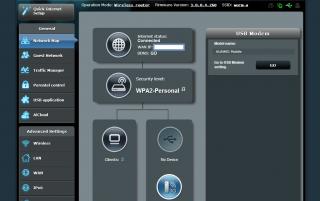
|
|
|
|
|
|
digilife
|
Jul 8 2013, 05:58 PM
|
|
|
QUOTE(ASUSmy @ Jul 8 2013, 05:53 PM) Hi digilife, Thank you for the information Thank you Just doing my bit on this wonderful Router Asus |
|
|
|
|
|
digilife
|
Aug 6 2013, 01:59 PM
|
|
|
RT N16 can be used with ZTE MF820D+ ( USB LTE Modem ) on Maxis LTE network FW version 3.0.0.4.260 |
|
|
|
|
|
digilife
|
Nov 17 2013, 06:58 PM
|
|
|
QUOTE(ahpeace @ Nov 17 2013, 06:52 PM) Hye all, My PC have internet connection from a USB dongle. I want to share the internet by wireless by connecting my PC to Asus RT N16 via cable. In simple, PC (internet) ---> RT N16 ---> laptop, handphone, tablet, etc. Can this be done? can someone give me the basic idea? I am using RT N16 too, just plug the modem into any of the 2 usb port, and you can get wifi or LAN the Internet onto your pc and other wifi devices. |
|
|
|
|



 Quote
Quote

 0.0475sec
 0.64
0.64
 7 queries
 GZIP Disabled