Welcome Guest ( Log In | Register )

Bump Topic Topic Closed RSS Feed
109 Pages « < 25 26 27 28 29 > » Bottom

Outline · [ Standard ] · Linear+

 AMD Radeon™ Discussion V3, Prepare Red! Green has attacked!

views
     
tuonn
post Aug 5 2010, 02:16 PM

El Phenomenon
*******
Senior Member
2,000 posts

Joined: Feb 2009
From: sec X


QUOTE(8tvt @ Aug 5 2010, 12:47 PM)
for the lowest temp of course..
if none of them are premade.. better still smack aftermarket cooler..
*
i think sapphire n gigabyte have lowest temp...
my gigabyte gc temp max at 63 celcius when playing game... tongue.gif
8tvt
post Aug 5 2010, 02:43 PM

Peace Lover
*******
Senior Member
8,753 posts

Joined: Jan 2003
wow <70c is nice..
heard gigabyte also can change voltage right..
swenv6
post Aug 5 2010, 05:43 PM

Getting Started
**
Junior Member
85 posts

Joined: Sep 2008


my EAH 5870 V2....got screen flickering issues when switch on the pc (when cold) on windows desktop screen...after sometime okey.....using 10.7 driver....weird after restart pc okey....never got this kind of issue using cheapo GPU before....is it normal or something wrong with the card?

This post has been edited by swenv6: Aug 5 2010, 06:11 PM
Nosferatu
post Aug 5 2010, 09:59 PM

Casual
***
Junior Member
308 posts

Joined: Dec 2004


QUOTE(tuonn @ Aug 5 2010, 02:16 PM)
i think sapphire n gigabyte have lowest temp...
my gigabyte gc temp max at 63 celcius when playing game... tongue.gif
*
hm from your sig, i think your gigabyte card is the same as mine.
This right?
user posted image

I didnt overclock this card (leaving it factory overclocked @ 765/1000) and at room temperature, idling sits at 46c mostly. Gaming, it hits 71c max.
how did you bring it down to 63c while gaming ? lol

Casing I use is Lancool K58. 2 front intakes, 1rear exhaust, 1top exhaust.

Unless...you are using aftermarket graphic card cooler, then nvm tongue.gif

This post has been edited by Nosferatu: Aug 5 2010, 10:01 PM
kahjye
post Aug 5 2010, 10:20 PM

Look at all my stars!!
*******
Senior Member
4,494 posts

Joined: Feb 2009

but why mine can hit 82c when full load Q_Q
DarkSilver
post Aug 5 2010, 10:24 PM

Idiosyncrasy
Group Icon
Elite
10,501 posts

Joined: Oct 2009
From: Tamriel


QUOTE(kahjye @ Aug 5 2010, 10:20 PM)
but why mine can hit 82c when full load Q_Q
*
8XC as maximal temperature for Radeon HD5800(Stock ATI HSF and it's on CCC AUTO FAN SPEED) is common and standard.

Now, I think ASUS Non-Reference PCB had very low quality because most users reported it to be problematic.
Sapphire Non-Reference PCB also problematic too but not as much as ASUS.
Gigabyte, PowerColor and MSI are less problematic currently.
speedhunter
post Aug 5 2010, 10:25 PM

!!!!!
*****
Senior Member
881 posts

Joined: Aug 2008
From: Johor Bahru & KL
QUOTE(Nosferatu @ Aug 5 2010, 09:59 PM)
hm from your sig, i think your gigabyte card is the same as mine.
This right?
user posted image

I didnt overclock this card (leaving it factory overclocked @ 765/1000) and at room temperature, idling sits at 46c mostly. Gaming, it hits 71c max.
how did you bring it down to 63c while gaming ? lol

Casing I use is Lancool K58. 2 front intakes, 1rear exhaust, 1top exhaust.

Unless...you are using aftermarket graphic card cooler, then nvm tongue.gif
*
i used to be playing with 5850, max gaming or with furmark test, the temp will go max on 73c @30% fan speed, increase the fan speed and the temp will go down up to 50c @100% fan speed sweat.gif

more than 80c then there is something wrong with your case maybe? hmm.gif

u need to experiment a bit with your card, true temp test is with furmark, while gaming itself do not proof 100% rite since there are some games dont push your card to 100%

p/s: sorry for too many '%' used tongue.gif
tuonn
post Aug 5 2010, 11:42 PM

El Phenomenon
*******
Senior Member
2,000 posts

Joined: Feb 2009
From: sec X


QUOTE(Nosferatu @ Aug 5 2010, 09:59 PM)
hm from your sig, i think your gigabyte card is the same as mine.
This right?
» Click to show Spoiler - click again to hide... «


I didnt overclock this card (leaving it factory overclocked @ 765/1000) and at room temperature, idling sits at 46c mostly. Gaming, it hits 71c max.
how did you bring it down to 63c while gaming ? lol

Casing I use is Lancool K58. 2 front intakes, 1rear exhaust, 1top exhaust.

Unless...you are using aftermarket graphic card cooler, then nvm tongue.gif
*
yup,my card is gigabyte hd5850 OC same with the picture taken...
i think maybe it's because of my casing lor..good airflow in my casing... tongue.gif
BTW that is at room temperature n no aircond...
FYI,i use 2 front intakes, 4 side panel intakes, 1 rear exhaust, 2 top exhaust... biggrin.gif


Added on August 5, 2010, 11:43 pm
QUOTE(8tvt @ Aug 5 2010, 02:43 PM)
wow <70c is nice..
heard gigabyte also can change voltage right..
*
nope,my card don't have voltage tweak i think... hmm.gif

This post has been edited by tuonn: Aug 5 2010, 11:43 PM
moshpit21
post Aug 6 2010, 12:14 AM

LYN Permanent Resident
******
Senior Member
1,205 posts

Joined: Jul 2008


QUOTE(yimingwuzere @ Aug 5 2010, 12:54 PM)
Asus and MSI non-reference boards also have good OC capabilities due to SmartDoctor and Afterburner software support. Not sure whether the custom cooler for the 5850 DirectCU is good enough though as HardOCP found it inadequate for the 5830 version.
*
Asus and MSI non-reference boards are good not only because they do have support from their good software. But its hardware also.

So i just want to share to everyone about what i read recently, non reference boards (except ASUS and MSI) are using a cheap voltage regulator, hence you cant do much with the voltage (cant do voltage tweaking).

And another thing i want to share for now about the Catalyst 10.7

Now i can reach 875 core with stock voltage, previously with Cat 10.6 i cant even reach 870 (crash when running 3dmark Vantage). So its an improvement there even tho i know it is a small amount.

I attached the screen shot.

Attached Image

This post has been edited by moshpit21: Aug 6 2010, 12:15 AM
Nosferatu
post Aug 6 2010, 12:21 AM

Casual
***
Junior Member
308 posts

Joined: Dec 2004


@speedhunter
I didnt manual set my graphic card fan speed. Just let it auto rev up/down depending on the card's temperature. Cant have it on high spin all the time. Sounds like a mini vacuum cleaner inside lol.

@tuonn
lol ok I think I get it. You got soo many intakes haha..i mean shieet 4 side intakes lol
moshpit21
post Aug 6 2010, 12:24 AM

LYN Permanent Resident
******
Senior Member
1,205 posts

Joined: Jul 2008


I forgot to upload the screen shot when its running stock clock on idle.

here it is:

Attached Image
Nosferatu
post Aug 6 2010, 12:45 AM

Casual
***
Junior Member
308 posts

Joined: Dec 2004


wow lol thats pretty cool. Are you using aftermarket coolers ?
moshpit21
post Aug 6 2010, 12:51 AM

LYN Permanent Resident
******
Senior Member
1,205 posts

Joined: Jul 2008


QUOTE(Nosferatu @ Aug 6 2010, 12:45 AM)
wow lol thats pretty cool. Are you using aftermarket coolers ?
*
If the question was for me, no i dont use aftermarket coolers.

It looks exactly like this:

http://www.vgadownload.com/wp-content/uplo...eon-HD-5850.jpg
Nosferatu
post Aug 6 2010, 12:57 AM

Casual
***
Junior Member
308 posts

Joined: Dec 2004


according to catalyst, my idle sits at 45c @ 46% fan speed lol (765/1000 default factory oc)
Room temperature not sure, but its summer now and night time outside now is 30c. No air con lol

lol your cards got good cooling!


This post has been edited by Nosferatu: Aug 6 2010, 12:58 AM
tuonn
post Aug 6 2010, 01:15 AM

El Phenomenon
*******
Senior Member
2,000 posts

Joined: Feb 2009
From: sec X


QUOTE(Nosferatu @ Aug 6 2010, 12:57 AM)
according to catalyst, my idle sits at 45c @ 46% fan speed lol (765/1000 default factory oc)
Room temperature not sure, but its summer now and night time outside now is 30c. No air con lol

lol your cards got good cooling!
*
that mean ur idle clock is 765/1000 rite???
if that so,that why ur idle temp is high bro.... smile.gif
moshpit21
post Aug 6 2010, 01:42 AM

LYN Permanent Resident
******
Senior Member
1,205 posts

Joined: Jul 2008


QUOTE(tuonn @ Aug 6 2010, 01:15 AM)
that mean ur idle clock is 765/1000 rite???
if that so,that why ur idle temp is high bro.... smile.gif
*
yeah that explained it, and makes me thinking IMO if this factory OC'ed card will not be automatically underclock on idle it is a disadvantage. Is every factory OC'ed card like that?

tuonn
post Aug 6 2010, 02:33 AM

El Phenomenon
*******
Senior Member
2,000 posts

Joined: Feb 2009
From: sec X


QUOTE(moshpit21 @ Aug 6 2010, 01:42 AM)
yeah that explained it, and makes me thinking IMO if this factory OC'ed card will not be automatically underclock on idle it is a disadvantage. Is every factory OC'ed card like that?
*
nope,this problem happen with gigabyte hd5850 OC only i think...
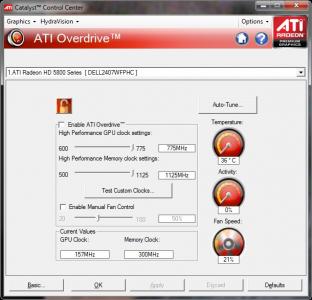
u need to flash the bios to able a 157/300 clock when idle... sweat.gif
faiz2036
post Aug 6 2010, 07:14 AM

Regular
******
Senior Member
1,384 posts

Joined: Mar 2010
From: Ampang,Selangor


Mine is 46C at idle cloak (157MHz/300Mhz)

max temperature is 70C when playing medal of honor beta and snier ghost worrior..

other game such as TF2 max 50C..

depend on game actually..

high demanding game range 70C

Low demanding game range 50C

tongue.gif
moshpit21
post Aug 6 2010, 07:43 AM

LYN Permanent Resident
******
Senior Member
1,205 posts

Joined: Jul 2008


QUOTE(faiz2036 @ Aug 6 2010, 07:14 AM)
Mine is 46C at idle cloak (157MHz/300Mhz)

max temperature is 70C when playing medal of honor beta and snier ghost worrior..

other game such as TF2 max 50C..

depend on game actually..

high demanding game range 70C

Low demanding game range 50C

tongue.gif
*
that's high hmm.gif
JoBigShow
post Aug 6 2010, 08:20 AM

Ω Ξ Ψ Σ Д Ӫ Ж Π ✿
*****
Senior Member
969 posts

Joined: Jul 2009
From: ɹndɯnן ɐןɐnʞ


QUOTE(swenv6 @ Aug 5 2010, 05:43 PM)
my EAH 5870 V2....got screen flickering issues when switch on the pc (when cold) on windows desktop screen...after sometime okey.....using 10.7 driver....weird after restart pc okey....never got this kind of issue using cheapo GPU before....is it normal or something wrong with the card?
*
ATi cards always flickers when startup, even the first time i used 4870 last year it flickers upon startup...having said, I think all the ATI cards I used within 3 years ago does flickers upon startup...
I think it's how CCC is commenced in the processing...

QUOTE(moshpit21 @ Aug 6 2010, 07:43 AM)
that's high  hmm.gif
*
Probably the airflow of the casing, because mine idles around 40c~42c @157/300 either day time of night time (and early wee morning), the room got no aircond., and it's freakin' hot in the daytime.. sweat.gif
Using ref. cooled PowerColor 5850. (replaced the thermal pasted with Tuniq TX-3) thumbup.gif

BTW, I'm using Lancool PC-K62 with 2 14cm fans in the front (intake), 2 14cm fans for top exhaust and2 12cm fans for rear exhaust.
Only drawback with much airflow in the casing is that you have to vacuum cleaned the casing once a month, too much dust... wacko.gif

Anyways, idle temps below 50c (@157/300) should be standard, above that is considered a bit warm..

109 Pages « < 25 26 27 28 29 > » Top
Topic ClosedOptions
 

Change to:
| Lo-Fi Version
0.0165sec    0.76    6 queries    GZIP Disabled
Time is now: 5th December 2025 - 06:08 PM