

QUOTE(hackcremo @ Jul 30 2010, 11:51 AM)
any1 ever face throttling issue in m15x with 260m??

ha been long time about this issue since M15x is out, but it doesnt happen suring gaming, just happened during stressing... or any graphic testingAlienware Mothership v5, Once you'd enter, you'll never leave...
|
|
 Jul 30 2010, 08:02 PM Jul 30 2010, 08:02 PM
Return to original view | Post
#101
|
 
Senior Member
1,496 posts Joined: Jul 2008 
|
QUOTE(hackcremo @ Jul 30 2010, 11:51 AM) any1 ever face throttling issue in m15x with 260m?? ha been long time about this issue since M15x is out, but it doesnt happen suring gaming, just happened during stressing... or any graphic testing |
|
|
|
|
|
Aug 2 2010, 09:14 PM
Return to original view | Post
#102
|
|
Senior Member
1,496 posts Joined: Jul 2008
|
QUOTE(Mr.Docter @ Aug 2 2010, 10:42 AM) yes, Alieware have that sticker but its stick on the CPU and mobo only. i don't really remember about GPU, but i do think there is none. i dont think there is a single sticker on the mobo or cpu or GPUto access CPU, mobo and GPU, you have to open the touch panel and keyboard, where the step are quite complicated. thats why Alienware separate the compartment of RAM and HDD so we can access easily without any hassle  |
|
|
Aug 3 2010, 02:46 PM
Return to original view | Post
#103
|
|
Senior Member
1,496 posts Joined: Jul 2008
|
QUOTE(Noodles @ Aug 3 2010, 11:16 AM) http://forum.lowyat.net/index.php?showtopi...ate+momentus+xt no matter how strong, or how u raid the HDD< even Sata3 raid 0, also cant win a single SSD, in terms of performce and access timeThe Momentus XT sound like a good deal ya. RM450 fo 500gb Wondering how is the performance compare to SSD.  |
|
|
Aug 3 2010, 03:47 PM
Return to original view | Post
#104
|
|
Senior Member
1,496 posts Joined: Jul 2008
|
QUOTE(kae7 @ Aug 3 2010, 03:41 PM) but at least HHD sure will win with older 7200RPM HDD ya, is quite a good option for those who wan a minor increase of performance.....but the improvement is not obvious like SSD.....^^ SSD has low capacity which is most of the people dont like, they will say "Wa!! 80GB, RM700++!!! |
|
|
Aug 3 2010, 05:01 PM
Return to original view | Post
#105
|
|
Senior Member
1,496 posts Joined: Jul 2008
|
QUOTE(MIVECburuk @ Aug 3 2010, 04:51 PM) Excuse me...i got a question here. How huge is the difference between i3-330UM & i5-520UM while running application & gaming? the different for this 2 proccessor is i3 dont have turbo boost while i5 have turbo boost(overclock itself)for the review and game tested, i5 520UM is still slow than SU7300 while gaming, but in rendering hyperthreading(Core i series) will take thier advantages. |
|
|
Aug 3 2010, 06:15 PM
Return to original view | Post
#106
|
|
Senior Member
1,496 posts Joined: Jul 2008
|
well, for gaming is not CPU depends, most of the game is GPU depends. as long as ur graphic card is strong enough, then would be nice d.
For game like star craft 2(real time stratergy), this will need CPU and GPU power, for M11x i dont think can handle nice while there is a lot of creep or units there..... |
|
|
|
|
|
Aug 23 2010, 06:43 PM
Return to original view | Post
#107
|
|
Senior Member
1,496 posts Joined: Jul 2008
|
QUOTE(jack jack sparrow @ Aug 23 2010, 12:47 AM) my m11x very slow while play startcraft 2 is because of the graphic driver, after update now i can play with ultra mode oredi. wao, ur M11x would be better that Asus G73JH or M17x d, i just recieve a M11x-R2. just tried it out, medium setting also sucks.... how come u can play at ultra?Thanks guys, now really enjoy my AW.  My friend M11x-R1 have better performance in gaming, but lower benchmark in 3d mark 06 Attached thumbnail(s) 
|
|
|
Aug 23 2010, 10:02 PM
Return to original view | Post
#108
|
|
Senior Member
1,496 posts Joined: Jul 2008
|
QUOTE(Jabberwocky @ Aug 23 2010, 09:54 PM) Glad i bought a M17x instead of M11x . . so ur M17x claimed warranty? if so im glad to heard that^^QUOTE(Eugene91 @ Aug 23 2010, 09:59 PM) What can you expect out of a dual-core 1.2GHz proc? well, i didnt expect anything, but seems a lot of people phrasing thier M11x can play a lot of games with High/Ultra high details(maybe in 800x600 resolution)? |
|
|
Aug 23 2010, 10:20 PM
Return to original view | Post
#109
|
|
Senior Member
1,496 posts Joined: Jul 2008
|
QUOTE(Jabberwocky @ Aug 23 2010, 10:16 PM) yeahh was claimed after all those hustle bustle . . * phew * well, i think u installed the beta driver provided from Dell, try to update it, have a look on google, which how they update it^^ I thought xfire 4870 was better than hd 5870 but i obtained a lower benchmark compared to hd 5870 . Just wondering why . .   overclocked it might give u reach around 12-14k benchmark for 5870 3d vatage only 8k, urs already 10k, win 5870 d^^ This post has been edited by putochip123: Aug 23 2010, 10:20 PM |
|
|
Aug 24 2010, 12:58 AM
Return to original view | Post
#110
|
|
Senior Member
1,496 posts Joined: Jul 2008
|
QUOTE(jack jack sparrow @ Aug 23 2010, 12:47 AM) my m11x very slow while play startcraft 2 is because of the graphic driver, after update now i can play with ultra mode oredi. below will be the FPS for M11x-R2 Core i7 640UM with 8GB DDR3-1333Mhz+ Crusial C300 256SSDThanks guys, now really enjoy my AW. The picture order will be: Ultra High Medium Low Resolution will at 1360x768 If u say can play at ultra, i wondering how u play it  Maybe u low down the resolution to 800x600? i trade 1280x800, also lagging^^ Attached thumbnail(s) 


|
|
|
Aug 24 2010, 01:17 AM
Return to original view | Post
#111
|
|
Senior Member
1,496 posts Joined: Jul 2008
|
my PC ^^ new build
M17x SOLD, miss it alot, left my m11x and m15x... Attached thumbnail(s) 
|
|
|
Aug 24 2010, 09:57 AM
Return to original view | Post
#112
|
|
Senior Member
1,496 posts Joined: Jul 2008
|
QUOTE(Noodles @ Aug 24 2010, 08:44 AM) Any safe tips in regards doing bios flash the best way to do is, download the latest M17x bios, then open the win flash provided inside the bios file. i have no idea how to do it  just in case later whole thing unable to turn on 2nd download ur m15x latest bios, extract it to the place where u familiar. using the win flash to flash ur M15x, then everything will done. while flashing, dont do anything. |
|
|
Aug 24 2010, 11:13 AM
Return to original view | Post
#113
|
|
Senior Member
1,496 posts Joined: Jul 2008
|
QUOTE(jack jack sparrow @ Aug 24 2010, 10:04 AM) Hi putochip123, haha, im using a better driver version than urs as well, 258.96 WHQL official versionthe first time i use my m11xr2 to play startcraft2 it lag like hell, but after i update the graphic driver from dell then everthing change and can play in ultra mode , it will only lag abit on cutscenes  . .so maybe you can check you driver ver. If you driver ver is 189.69, A00, this is just a beta ver of driver from nvidia. and starcraft2 only can detect the intel graphic card only. Now i am using ver 257.30 A01 from dell. hope this will help. For notebook gaming, for avarage not lagging is 40FPS above, 30FPS will be lag a bit, but playing at ultra with 19FPS only, it seems to be vry lagg... maybe ur term(i bolded) 19 is a bit lag, lagg will be cant play at all Added on August 24, 2010, 11:16 am QUOTE(deathbringer @ Aug 24 2010, 09:58 AM) i have absolutely no problems playing Starcraft 2 with mixed medium/high settings. no lag even with multiple units on screen. ultra might be a little too much to handle (i get less than 25 fps at most times). however, i'm using M11X-R1 and i heard that M11X-r2 has problems with its Optimus drivers, giving poor gaming results. +1 for u.medium/high setting would be fine as i had tested. and it is no lag when multiple unit as well. Ultra i get lower than 20FPS as well, picture posted, if multiple(30Unit) totally 2-5FPS only.Added on August 24, 2010, 11:19 am QUOTE(raven143 @ Aug 24 2010, 10:44 AM) yo guys, do you think dell covers the hinge prob? if they do, they'll replace the whole system or just the monitor? its my m11x Alienware warranty is "Complete Cover", so it is cover, just call dell, and service up for u. i think the next day, they will show up d. Call Now Bro, dont wait d .. its my right monitor hinge.. only happens when i close the laptop lid.. btw, i'm in Kch..so how long does it take for dell to service it? thx... .. its my right monitor hinge.. only happens when i close the laptop lid.. btw, i'm in Kch..so how long does it take for dell to service it? thx...This post has been edited by putochip123: Aug 24 2010, 11:19 AM |
|
|
|
|
|
Aug 24 2010, 05:03 PM
Return to original view | Post
#114
|
|
Senior Member
1,496 posts Joined: Jul 2008
|
QUOTE(Lil Kiasu @ Aug 24 2010, 04:59 PM) yeah... but it won't consume that much right? ya, now Win7 memory control DLL nicely, so wont consume a lot of ram and proccessing power. unlike Vista  |
|
|
Aug 25 2010, 11:29 PM
Return to original view | Post
#115
|
|
Senior Member
1,496 posts Joined: Jul 2008
|
QUOTE(Jabberwocky @ Aug 25 2010, 11:21 PM) With 500Gig Solid Sata it surely lives up to its name -> All Powerful 3rd party SSD will be better, compare to SSD available from Dell |
|
|
Aug 25 2010, 11:38 PM
Return to original view | Post
#116
|
|
Senior Member
1,496 posts Joined: Jul 2008
|
QUOTE(0d1N @ Aug 25 2010, 11:32 PM) I dont see the point of taking SS hdds right now, price will go down in a few, by than i can change the Hdd easily. of course the price will go down, since the SATA3 is coming out, 25NM SSD ^^ intel anounced that end of the year will release... |
|
|
Aug 26 2010, 09:47 AM
Return to original view | Post
#117
|
|
Senior Member
1,496 posts Joined: Jul 2008
|
QUOTE(0d1N @ Aug 26 2010, 09:45 AM) how about the touchpad, is it smooth? M11x touch [ad had no problem 1, vry nice |
|
|
Aug 26 2010, 09:26 PM
Return to original view | Post
#118
|
|
Senior Member
1,496 posts Joined: Jul 2008
|
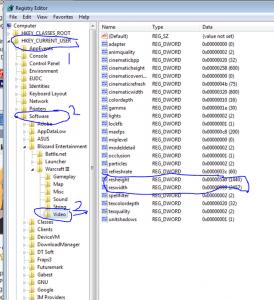
in the value of high u key in 400
in the value of wiidth u key in 556 then the resolution will be 1366x768 Attached thumbnail(s) 
|
|
|
Aug 26 2010, 11:41 PM
Return to original view | Post
#119
|
|
Senior Member
1,496 posts Joined: Jul 2008
|
QUOTE(raylee914 @ Aug 26 2010, 10:54 PM) u kena conned for 4870 instead of 5870?????? well, i will prefer u redownload everything from dell support web sit there, the resources CD is not reliable, which will make ur system hang |
|
|
Aug 28 2010, 10:01 AM
Return to original view | Post
#120
|
|
Senior Member
1,496 posts Joined: Jul 2008
|
QUOTE(Mr.Docter @ Aug 28 2010, 01:28 AM) for me its not a problems. its just new experience dealing with latest technology +1 for u doctor. Most of the people dont know how to handle, and then blame this and blame that. i know who u mention Doctor don't be like 'someone' who was once using ordinary laptop and suddenly brought nearly 5 figures priced Alienware and expect the same setting like his previous ordinary laptop. he'd even blaming and cursing Alienware in Garage Sales too. Added on August 28, 2010, 10:02 am QUOTE(Riggo @ Aug 28 2010, 08:40 AM) does anyone here have a m11x equipped with i5? I wanna know the gaming performance well, gaming performance is more depends on GPU, CPU wont carry any performance, unless like, GTA IV, SC2, and ETC will need CPU power to preccess units ^^ This post has been edited by putochip123: Aug 28 2010, 10:02 AM |
|
Topic ClosedOptions
|
| Change to: |  0.0340sec 0.0340sec
 0.53 0.53
 7 queries 7 queries
 GZIP Disabled GZIP Disabled
Time is now: 5th December 2025 - 04:45 AM |
 Quote
Quote