


Added on October 4, 2010, 1:27 ami forgot to mention this before but the U2311H uses 28W - 35W while idle,that's pretty much in the LED backlit territory
This post has been edited by Racerx: Oct 4 2010, 01:27 AM
Attached thumbnail(s)


CLOSED
|
|
 Oct 4 2010, 01:21 AM Oct 4 2010, 01:21 AM
Return to original view | Post
#41
|
 
Senior Member
8,461 posts Joined: Mar 2007 From: Kota Bharu,Kelantan   
|
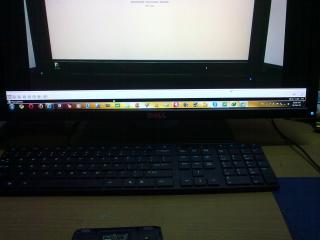
here's pics from my LCD,my eyes can't see the tinting but how about you guys?
Added on October 4, 2010, 1:27 ami forgot to mention this before but the U2311H uses 28W - 35W while idle,that's pretty much in the LED backlit territory This post has been edited by Racerx: Oct 4 2010, 01:27 AM Attached thumbnail(s)
|
|
|
|
|
|
Oct 5 2010, 03:55 AM
Return to original view | Post
#42
|
|
Senior Member
8,461 posts Joined: Mar 2007 From: Kota Bharu,Kelantan
|
QUOTE(hianboy @ Oct 4 2010, 09:39 PM) having my 3rd U2311H...the tinting issue is still there...im tried to ignore it...but the more i ignore..the more i get frustrated... looks like your eyes are sensitive to that.well,if that's your 3rd unit already then there's no helping it.Looks like LG's QC sucks real bad this time [they are pretty much the only company making eIPS panels]going to refund... this aint the monitor for design and photo editing...  But i really can't notice the tinting,but i can notice the difference in colour,on the spot. |
|
|
Oct 8 2010, 04:58 PM
Return to original view | Post
#43
|
|
Senior Member
8,461 posts Joined: Mar 2007 From: Kota Bharu,Kelantan
|
QUOTE(dk999 @ Oct 8 2010, 12:11 PM) I got my U2311H on wednesday and started testing for Dead pixle and color, can't seem to find any dead pixle yet. the brown color?that's IPS glow,it's visible if viewed off axis on some IPS panel LCDs.White color screen blue tint is unnoticeable or very faint.(cant tell if got lol) However when i test at stock setting(75/75 brightness/contrast), black color(using DPT) seem to have brown color emitting from the corner. Bottom left is bigger than bottom right and top corners barely visible. Is this a problem with the tinting? Will try post take picture at night.. Now using 30/75 |
|
|
Oct 9 2010, 12:33 AM
Return to original view | Post
#44
|
|
Senior Member
8,461 posts Joined: Mar 2007 From: Kota Bharu,Kelantan
|
QUOTE(hianboy @ Oct 8 2010, 05:21 PM) or they called it bleeding... izzit the same things? they aren't the same thingQUOTE(dk999 @ Oct 8 2010, 08:42 PM) Mine directly in front can see bottom left side got more brownish area.. but that's backlight bleeding [attachmentid=1824076] Here's the picture in a fully dark room at 30/75.. Cant really see anything because white balance totally wacked  |
|
|
Oct 9 2010, 12:54 AM
Return to original view | Post
#45
|
|
Senior Member
8,461 posts Joined: Mar 2007 From: Kota Bharu,Kelantan
|
QUOTE(Maxieos @ Oct 8 2010, 11:41 PM) sorry , want to ask , what's the few things need to check on the LCD ? the buttons,the stand?First is light bleeding , then dead/stuck pixel , what else after that ? Added on October 9, 2010, 1:00 am QUOTE(moonsault @ Oct 8 2010, 11:17 PM) How do you guys rate Viewsonic vx2739wm, vx2439wm and Dell u2410? if you're buying a monitor,you shouldnt give a damn about Dynamic Contrast ratios,heck,you shouldn't use the specs as guidlines.Try to find reviews for the LCD.I need a good monitor in colour display as i need to do video/graphic works, u2311H contrast ratio seems like is not that enough for me.. about the LCDs you mentioned,wihout a doubt the U2410 is the ebst among the three.It uses an IPS panel which is factory calibrated for accurate colours.BTW,actually even the U2311H might do the job fine IF you get a uniform panel,but that dpends on luck realy since a few people got ones with uneven colour panels [cooler on the left,warmer on the right] If you ahve the budget,get the U2410 then.If youw ant to save money yet still get a good enough LCD get the 2209WA [as far as i can tell it isn't plagued with colour uniformity issues of U2311H] This post has been edited by Racerx: Oct 9 2010, 01:00 AM |
|
|
Oct 12 2010, 12:46 AM
Return to original view | Post
#46
|
|
Senior Member
8,461 posts Joined: Mar 2007 From: Kota Bharu,Kelantan
|
QUOTE(fas29 @ Oct 11 2010, 11:25 PM) Hi , I'm thinking of changing to a new monitor . Currently I'm using Samsung 19" . your budget?Assuming your budget is around RM700,get the Dell U2311H from Dell Online.It doesn't have a HDMI port but you can use a DVI to HDMI converter for it.However it doesn't support 24p Blu-Ray playback [but iinm you can make it not play at 24p,right?]Primary : Full HD / HD Ready , Playstation 3 (mainly on gaming and Blu-ray movie) |
|
|
|
|
|
Oct 13 2010, 10:59 PM
Return to original view | Post
#47
|
|
Senior Member
8,461 posts Joined: Mar 2007 From: Kota Bharu,Kelantan
|
QUOTE(ActionKamen8 @ Oct 13 2010, 11:13 AM) imo RM350-400 would be reasonableQUOTE(yhluv21 @ Oct 13 2010, 08:51 PM) help~~ A is for analog input aka VGA slot.D is for digital input aka DVI.DVI/HDMI/Displayport is better since the digital images from the PC won't have to be converted to analog.Some quality is lost during such conversions.i would like to change a new monitor n i went lowyat 2 do some surveys n i found out there r many things i duno@@ wat's d different of A/D inputs?? wat's d meaning of response time?? n i found tat most of d monitors sold r 50k:1 but gt some until 2M:1 or even 5M:1?? budget rm400, 20'' normal movie showing n usage oni~~ p/s, i'm a xbox 360 user as well,can i play using d monitors?? tq for ur kind comments~ Response time is the time needed for the colours to change [still depends on how the LCD is rated like GTG ].Basically you don't have to mind this Those 5m:1 ratio is the contrast ration,and those figures are bullshit.Don't mind them.Such LCDs actually even struggle to get 1000:1 contrast ratio. If the LCD supports HDCP then you find a DVI to HDMI adapter then plug a HDMI cable from your Xbox to your LCD Basically try finding one that have a DVI slot and looks the best to your eyes |
|
|
Oct 21 2010, 08:50 PM
Return to original view | Post
#48
|
|
Senior Member
8,461 posts Joined: Mar 2007 From: Kota Bharu,Kelantan
|
QUOTE(darkskies @ Oct 21 2010, 07:45 PM) Juz notice that U2410 is unable to display 24p... have tried running it not at 24p?i'm curious.btw,where did you bought it,and what's the price for the disc?Received my U2410 today, unpacked it and hook it straight to my ps3. Runs ps3 gekijou macross hybrid blu-ray+game and tries to run the movie. It shows power save mode and no signal... Whereas my FP241VW display it wihout any problem at all.. =.="... |
|
|
Oct 21 2010, 09:48 PM
Return to original view | Post
#49
|
|
Senior Member
8,461 posts Joined: Mar 2007 From: Kota Bharu,Kelantan
|
QUOTE(darkskies @ Oct 21 2010, 08:01 PM) Bought the LCD through a Lyn Member. i'm curious whether you can run not at 24p for blu rays since i'm planning to get a ps3 too,btw,where did you bought the disc?does it have subs?5 yrs warranty with dell registered under my details. I've thought that VA are no match for IPS but i'm wrong.. FP241VW is really a masterpiece that benq had ever made. I tried comparing both U2410 and FP241VW side by side... FP241VW's color is more like LCD TV then like a normal lcd. For movie wise..... FP241VW seems to be unmatchable and it could display 24p. The disc i bought was RM260. |
|
|
Oct 28 2010, 03:52 PM
Return to original view | Post
#50
|
|
Senior Member
8,461 posts Joined: Mar 2007 From: Kota Bharu,Kelantan
|
QUOTE(MeToo @ Oct 28 2010, 02:48 PM) Kinda too late for me, as the shop will never refund, they will allow me to change to other models/items. But I already plunk 1k+ and if I order dell means I will be spending close to 2k for a monitor sigh. Also, dell, I dont think ALL-IT carry them instore. now you know why some people say samsung is highly overrated.  This post has been edited by Racerx: Oct 28 2010, 03:53 PM |
|
|
Oct 31 2010, 05:44 PM
Return to original view | Post
#51
|
|
Senior Member
8,461 posts Joined: Mar 2007 From: Kota Bharu,Kelantan
|
QUOTE(nutznutz @ Oct 30 2010, 10:02 PM) U2311H or P2370? cant decide, 1 with IPS which is a great LCD, another with high contrast and recommended for gaming.... help me decide pls..... those high contrast ratios are fake,they're dynamic contrast ratio which dims and brightens the LCD depending on the situation.Personally it hurts my eyes and freaking annoyingand tell me pros and cons thanks alot The U2311H is all dandy except it doesn't support 1:1 pixel scaling and 24p blu ray content playback.Other than that personally i can find no qualms about it. QUOTE(Smackers @ Oct 31 2010, 02:15 PM) I cant find any shops in LYN selling Dell LCDS.does anyone know? LYP [Lowyat Plaza] shops typically don't sell Dell LCDs,on LYN [Lowyat.net] there's tonnes of Dell LCD sellers.Or you can just buy at dell.com.my |
|
|
Oct 31 2010, 09:13 PM
Return to original view | Post
#52
|
|
Senior Member
8,461 posts Joined: Mar 2007 From: Kota Bharu,Kelantan
|
QUOTE(TechnoG @ Oct 31 2010, 07:19 PM)  nevermind, just write down those thin bezel monitors that are not available locally, I don't mind shipping them over here. any Dell Professional or Ultrasharp users here? wanna find out the thickness of the monitor bezel. best if both monitors come together, the bezel width must not be fatter than 1cm. Possible? most computer LCDs that i've seen have around the same thickness |
|
|
Nov 1 2010, 02:25 PM
Return to original view | Post
#53
|
|
Senior Member
8,461 posts Joined: Mar 2007 From: Kota Bharu,Kelantan
|
QUOTE(MicroBio @ Nov 1 2010, 12:07 PM) bro, I remember hearing about the u2311h blu-ray playback stuff in pfg youtube (great channel, rec. subscribe) it means that you can't play hd movies on blu ray discs using this lcd,ps3 gaming works fine.only bluray movies playback is affected.But i dont understand what it means including your mentioned 1:1 scaling and google not being frenly. Can explain a little here? 1:1 scaling is needed when you want to use programs and games that doesn't support 16:9 aspect ratio yet still want the picture to not be stretched.for example,old games like starcraft and warcraft doesn't support 16:9 aspect ratio so if you play those games the picture willbe stretched QUOTE(djmixxer @ Nov 1 2010, 12:19 PM) Anyone can give me opinion whether is this monitor ok? SAMSUNG 18.5in E1920NX LCD MONITOR the ST2010 is larger,plus the LED backlight doesn't really make a difference in picture quality.I've seen a E1920X on dislplay before and it's panel quality isn't good,even for a TN.Colours wash out quickly when you view it at an angle unlike itt's cousin the BX2350.You can also consider the Dell IN2020WM for rm410 in garage sales,i've seen my friends unit before and it has good viewing angles.Naturally the colours aren't that accurate but it's definitely better than the E1920Xor Dell ST Series ST2010-BLK 20'' HD?....or is any other recommendations?Budget below rm400 would like to know if there are better monitors for my budget...Please and Thanks. |
|
|
|
|
|
Nov 1 2010, 11:25 PM
Return to original view | Post
#54
|
|
Senior Member
8,461 posts Joined: Mar 2007 From: Kota Bharu,Kelantan
|
QUOTE(MicroBio @ Nov 1 2010, 05:48 PM) ic.. thx! i don't know about pirated blu ray movies though,do they run at 24p too?are those on blu ray as like the real stuff?just making sure, that includes j. sparrow blu ray files right? if yes, what a bummer  Added on November 1, 2010, 11:28 pm QUOTE(TechnoG @ Nov 1 2010, 08:50 PM) that would set me back around RM18k imo that LCD is not worth it,yes the bezel's thin but for 549 freaking usd you only get a 19" TN panel LCD.Plus since it uses TN you'll have problems with viewing angles as your eyes won't be perpendicular to all of the screens. hhmm, I thought of taking off the casing, but the problem is, when the dust settles down there, how are you gonna clean it? Added on November 1, 2010, 9:52 pm Mind providing the link for the stand for stacking one monitor on top the other? official Dell product? Added on November 1, 2010, 9:54 pmfound another video of another "eyefinity-friendly" monitors. I think I'll try to contact those heavy duty equipment manufacturer or AV shops to check out whether they do sell this kind of stuff. Added on November 1, 2010, 10:01 pmcheck the net already. 6 screens Samsung SyncMaster MD230 cost a whooping RM10k+  single screen cost $549 http://www.amazon.com/Samsung-MD230-23-Bla...88620083&sr=8-1 might consider this.. This post has been edited by Racerx: Nov 1 2010, 11:28 PM |
|
|
Nov 2 2010, 01:48 PM
Return to original view | Post
#55
|
|
Senior Member
8,461 posts Joined: Mar 2007 From: Kota Bharu,Kelantan
|
QUOTE(TechnoG @ Nov 2 2010, 08:24 AM) it's 23" shit,sorry man,i read the wrong product details,it isn't a 19" LCD and it doesn't use TN panel.seeing the [real] viewing angles and the fact that it's a samsung,it should be using a VA panel instead. shiat brix, I only realize it's TN panel now  I guess I'll settle for Dell Ultrasharp series. |
|
|
Nov 2 2010, 11:04 PM
Return to original view | Post
#56
|
|
Senior Member
8,461 posts Joined: Mar 2007 From: Kota Bharu,Kelantan
|
QUOTE(nonexno @ Nov 2 2010, 09:56 PM) What do you mean presentation attender is looking at the monitor or the content? iinm i saw that in garage sales,display section before.have you tried searching there?Also anyone know where you can get a dual monitor stand? like this? 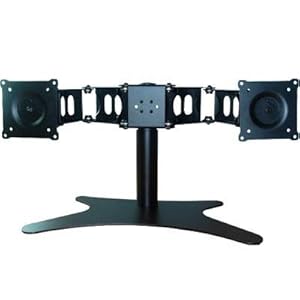 |
|
|
Nov 2 2010, 11:36 PM
Return to original view | Post
#57
|
|
Senior Member
8,461 posts Joined: Mar 2007 From: Kota Bharu,Kelantan
|
QUOTE(TechnoG @ Nov 2 2010, 10:18 PM) I'm fine with the brightness as long as the color and contrast remains pretty much the same. if you get the dell,it's much cheaper and you'll have dell's warranty for the LCD but the bezel's gonna be 3.4cm thick.for me that's really distracting.on the other hand the samsung has a thinner bezel but the cost and warranty issue is too much to swallow.it's also not like I'm going to put the 3 monitors at 90 degrees. Added on November 2, 2010, 11:21 pm hhhmm. in your opinion, Dell or Samsung monitors is better? tl;dr i can't tell which is better for your eyefinity setup |
|
|
Nov 2 2010, 11:46 PM
Return to original view | Post
#58
|
|
Senior Member
8,461 posts Joined: Mar 2007 From: Kota Bharu,Kelantan
|
QUOTE(nonexno @ Nov 2 2010, 10:44 PM) thanks will try there. you mean you're buying a pc with the GMA X4500?mind giving the model?btw, i'm buying a dell with Intel® GMA X4500 The dell person told me I can buy a PCIe adapter for RM35 and I can use 2 monitors - different display |
|
|
Nov 2 2010, 11:56 PM
Return to original view | Post
#59
|
|
Senior Member
8,461 posts Joined: Mar 2007 From: Kota Bharu,Kelantan
|
QUOTE(nonexno @ Nov 2 2010, 10:52 PM) dell vostro slim 230 it couldn't be a graphic card if it's that cheap.this is the first time i've heard of it.the option not on the site but the dell technician said when i order it they will include it in. any idea what adapter he's talking about? though based on your description i think it's an adapter that connects to the X4500 IGP adding another port for display.The X4500 should support two displays at once natively if you have the ports needed |
|
|
Nov 3 2010, 12:01 AM
Return to original view | Post
#60
|
|
Senior Member
8,461 posts Joined: Mar 2007 From: Kota Bharu,Kelantan
|
QUOTE(everling @ Nov 2 2010, 01:11 PM) I'm not an expert, but while it lacks HDMI connectivity, that LCD does supports HDCP. Iianm, HDCP is the main reason you can't play original blu-rays, so it might be possible to get original blu-ray support via a HDCP compatible HDMI to DVI-D adaptor. An expert might clear this up. HDCP support is there,that's why you can play PS3 games on it fine.Have you ever seen Blu Ray demos for LCDs in stores?Notice the super smooth lifelike motions?That's 24p playback.The LCD is supposed to be able to do 1920x1080/24Hz for 24p playback.Now,i'm not sure whether 24p is optional or mandatory for Blu Ray movies playback,but if you've bought the rather expensive discs you'll want it to display at it's best wouldn't you?As for home made editions, they should just work as there are no DRM to thwart you. Also, they tend to follow the frame rate of the source video, 24p videos will be kept as 24fps, as changing the frame rate tends to cause more trouble to get a good encode. Also, there are two ways to provide 1:1 scaling. One is that the monitor recognises the input needs to be adjusted to its supported screen resolutions. The second is the graphics card doing the transformation for you and then send the appropriately sized frames to the monitors. Again, somebody with more expertise might help with this issue. about the scaling,i prefer the LCD to be able to do it properly. Added on November 3, 2010, 12:33 am QUOTE(nonexno @ Nov 2 2010, 10:59 PM) can the x4500 support an additional port with 2 x 23inch monitor? 1920x1XXX (sorry cant remember the resolution) both monitors displaying different things? it should be able to support it,but i can't find the links to confirm this.the other guys might be able to helpdoes such a device exist? This post has been edited by Racerx: Nov 3 2010, 12:33 AM |
|
Topic ClosedOptions
|
| Change to: |  0.0570sec 0.0570sec
 0.29 0.29
 7 queries 7 queries
 GZIP Disabled GZIP Disabled
Time is now: 3rd December 2025 - 12:03 PM |
 Quote
Quote