Welcome Guest ( Log In | Register )

84 Pages « < 26 27 28 29 30 > » Bottom

Outline · [ Standard ] · Linear+

 VAIO Club V2.5, make.believe

views
     
kae7
post Sep 14 2010, 10:31 PM

10k VIP Club
********
All Stars
10,950 posts

Joined: Jan 2009
From: Hatton Cross


QUOTE(y_owez @ Sep 14 2010, 09:55 PM)
hi all,
i  have a sony s series and i think infected with virus and bla bla
so i wanna to reformat my pc
i've just created the recovery dvds( 4 of them right? )
so what should i do next?
backup all my stuff kan? lol
then which option should i choose?  at the vaio care option?
complete system or c drive or?

thanks!
ps: the recovery dvd does it include the other softwares? or just the window 7? thanks
*
the recovery dvd is including.. win7 only i guess..

well.. choose the complete system is better.. wink.gif
quest_5692
post Sep 14 2010, 11:09 PM

yo chick, im not buaya
*****
Senior Member
853 posts

Joined: Aug 2008
depends on you. do you have smtg impportant in computer? and not in C drive? etc D drive have ur precious pics and videos...den u can choose to recover C only...
TSMiyabi
post Sep 15 2010, 01:03 AM

馬鹿じゃない
******
Senior Member
1,592 posts

Joined: Jul 2005
From: Poland
i guess most of the question get answer already smile.gif

quest_5692
post Sep 15 2010, 03:18 AM

yo chick, im not buaya
*****
Senior Member
853 posts

Joined: Aug 2008
miyabi, i found your online time is as weird as mine haha
y_owez
post Sep 15 2010, 08:32 AM

* * * * * *
******
Senior Member
1,745 posts

Joined: Aug 2007
From: somEwhere out there!

thanks for the replies.
so my pc is infected with viruses, reformatting only the c drive will be ok? or the virus is everywhere now?

and therefore i have to go download all those softwares by sony ?
quest_5692
post Sep 15 2010, 01:27 PM

yo chick, im not buaya
*****
Senior Member
853 posts

Joined: Aug 2008
if you use recovery partition, you dont need to download all those softwares again because everything will be back to put. it should be ok but its not comfirmed. normally ppl recover C drive only because maybe they scrwed up their system32 or registry library. so they know exactly its system failure, nting to do wif backup storage. whereelse for virus, we dno if your virus had went to other places or not. if its really important to you, aint it btr to try recover C drive only? then take the items out as backup then see if its ok....if its not ok, then complete recover.
TSMiyabi
post Sep 15 2010, 05:53 PM

馬鹿じゃない
******
Senior Member
1,592 posts

Joined: Jul 2005
From: Poland
QUOTE(y_owez @ Sep 15 2010, 08:32 AM)
thanks for the replies.
so my pc is infected with viruses, reformatting only the c drive will be ok? or the virus is everywhere now?

and therefore i have to go download all those softwares by sony ?
*
i can say it's depend on virus behavior. some might spread to the other partition provided you copy the infected file into it.
if your system file have been screw up by the virus, you can pretty much recover the C:.
my only suggestion when copying the file for backup purpose, always have them scan by latest signature of av thoroughly just to ensure they are free from virus.


V12Kompressor
post Sep 15 2010, 07:47 PM

No carrots here
*******
Senior Member
2,141 posts

Joined: Sep 2008
From: Muddy Banks


the recovery cs inside contains all the drivers and softwares which will return the computer back to the state when you fist bought it.

After reinstalling the windows, remove McAfee and put in a proper antivirus.
RodaPanas
post Sep 15 2010, 11:39 PM

New Member
*
Newbie
0 posts

Joined: Aug 2010


QUOTE(V12Kompressor @ Sep 15 2010, 07:47 PM)
the recovery cs inside contains all the drivers and softwares which will return the computer back to the state when you fist bought it.

After reinstalling the windows, remove McAfee and put in a proper antivirus.
*
yup..choose top 3 antivirus like AVG Anti-Virus Free Edition, Avast Free Antivirus & Avira AntiVir Personal - Free Antivirus thumbup.gif
kae7
post Sep 15 2010, 11:47 PM

10k VIP Club
********
All Stars
10,950 posts

Joined: Jan 2009
From: Hatton Cross


QUOTE(RodaPanas @ Sep 15 2010, 11:39 PM)
yup..choose top 3 antivirus like AVG Anti-Virus Free Edition, Avast Free Antivirus & Avira AntiVir Personal - Free Antivirus  thumbup.gif
*
lol.. I will just choose Microsoft Security Essential.. --> it is free !!
RodaPanas
post Sep 16 2010, 03:13 AM

New Member
*
Newbie
0 posts

Joined: Aug 2010


QUOTE(kae7 @ Sep 15 2010, 11:47 PM)
lol.. I will just choose Microsoft Security Essential.. --> it is free !!
*
install once before.also quite good..
TSMiyabi
post Sep 16 2010, 04:19 AM

馬鹿じゃない
******
Senior Member
1,592 posts

Joined: Jul 2005
From: Poland
used to like AVG, but lately prefer more Avira. somehow more light than AVG biggrin.gif
and yeah, the Microsoft Security Essential pretty good too.

besides AV, get the Malware Scanner too like Malwarebyte. good tools smile.gif
RodaPanas
post Sep 16 2010, 06:12 AM

New Member
*
Newbie
0 posts

Joined: Aug 2010


QUOTE(Miyabi @ Sep 16 2010, 04:19 AM)
used to like AVG, but lately prefer more Avira. somehow more light than AVG biggrin.gif
and yeah, the Microsoft Security Essential pretty good too.

besides AV, get the Malware Scanner too like Malwarebyte. good tools smile.gif
*
What is your opinion on Advanced SystemCare? It is really removing spyware and adware, preventing security threats etc?

This post has been edited by RodaPanas: Sep 16 2010, 06:13 AM
TSMiyabi
post Sep 16 2010, 06:35 AM

馬鹿じゃない
******
Senior Member
1,592 posts

Joined: Jul 2005
From: Poland
QUOTE(RodaPanas @ Sep 16 2010, 06:12 AM)
What is your opinion on Advanced SystemCare? It is really removing spyware and adware, preventing security threats etc?
*
never try that. but ive been using Malwarebyte in cleaning the malware, its works. before scanning, just ensure its updated, then give it a run. it's one of tool use in cleaning up and diagnostic, beside AV.
Effaw995
post Sep 16 2010, 03:42 PM

New Member
*
Junior Member
43 posts

Joined: Sep 2010


Hi expert people..

I think all of you are great with experince on VAIO laptop. I have read a lots of review about VAIO laptop. Many of them saids sthat VAIO laptop have so many problems. Actually, I'm not expert in laptop and PC. I do not know which brands is better and worse.

My target laptop;
1. Small as 13'
2. Powerfull means great in performance
3. Thin, so I can easily travel
4. Price range, RM6000-RM8000.
5. Stylish design because it's makes me feel good.
6. Works for 4-5 years.
7. Warranty at least 2 years.

That's why I will go to new Z series. Normally, I will read all review about this model in order to get the info of it including problems and solution. Guys, how long you VAIO working pretty good especially new Z series?

And many of Z series user told their problems. So, it make me confuse to buy this laptop. So, I hope you all can share your experince with VAIO laptop and their problems.

Sorry, my English is poor.

Thanks.

This post has been edited by Effaw995: Sep 16 2010, 03:43 PM
quest_5692
post Sep 16 2010, 04:13 PM

yo chick, im not buaya
*****
Senior Member
853 posts

Joined: Aug 2008
problems with vaio Z?? none i guess.....nvr heard of any complain as thats one of the best laptop in the market now in its size and weight.
RodaPanas
post Sep 16 2010, 08:05 PM

New Member
*
Newbie
0 posts

Joined: Aug 2010


QUOTE(Effaw995 @ Sep 16 2010, 03:42 PM)
And many of Z series user told their problems. So, it make me confuse to buy this laptop. So, I hope you all can share your experince with VAIO laptop and their problems.

Sorry, my English is poor.

Thanks.
*
never heard any serious problem with Z series. its only the LCD which is one of complain are dead pixels on LCD. other wise nope.
Z series is pretty & stylish model. admire with this laptop
TSMiyabi
post Sep 16 2010, 10:43 PM

馬鹿じゃない
******
Senior Member
1,592 posts

Joined: Jul 2005
From: Poland
QUOTE(Effaw995 @ Sep 16 2010, 03:42 PM)
Hi expert people..

I think all of you are great with experince on VAIO laptop. I have read a lots of review about VAIO laptop. Many of them saids sthat VAIO laptop have so many problems. Actually, I'm not expert in laptop and PC. I do not know which brands is better and worse.

My target laptop;
1. Small as 13'
2. Powerfull means great in performance
3. Thin, so I can easily travel
4. Price range, RM6000-RM8000.
5. Stylish design because it's makes me feel good.
6. Works for 4-5 years.
7. Warranty at least 2 years.

That's why I will go to new Z series. Normally, I will read all review about this model in order to get the info of it including problems and solution. Guys, how long you VAIO working pretty good especially new Z series?

And many of Z series user told their problems. So, it make me confuse to buy this laptop. So, I hope you all can share your experince with VAIO laptop and their problems.

Sorry, my English is poor.

Thanks.
*
QUOTE(RodaPanas @ Sep 16 2010, 08:05 PM)
never heard any serious problem with Z series. its only the LCD which is one of complain are dead pixels on LCD. other wise nope.
Z series is pretty & stylish model. admire with this laptop
*
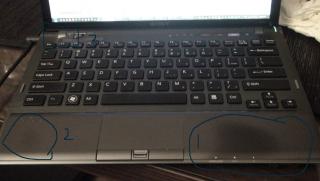
the dead pixel problem is rare case happen and having possibility to happen is way too small. factory defect i can say. actually its not really the dead pixel issue, its the backlighting issue, which the uneven backlighting which viewable when the screen are in black color. this problem been report on early gen Z especially the CTO unit, but as for current Z its none. the stock unit as in ready to sell product are problem free on this.

the other issue with new Z is the palmrest is somehow easily to wear out. only on black version, the aluminium color looking palmrest is none report so far.
i somehow agree with V12Kompressor, the current Z despite having decent spec, the way the new team design the exterior of Z is somehow degrading. it cant be help tho maybe they're cutting cost especially on the palmrest issue. they can just integrate it like the first gen, but i dont know.

you can check the photo as report by user below. photos credit to members at VAIO team at Notebookreview ( http://forum.notebookreview.com ) . most of the current black Z currently opt to use invisble cover to prevent this issue. until now, thats it.
* again, this issue is on black color palmrest. the silver color palmrest is having none issue.

Attached Image Attached Image

btw, im using first gen Z, so far ive none to complain about.
hope it helps for your decision buying the portable notebook.



oncogene10
post Sep 16 2010, 10:48 PM

New Member
*
Junior Member
21 posts

Joined: Sep 2010
hi all, im thinking of upgrading my vaio RAM..any special recommendation or specific brand for vaio Ram?thx ya..
TSMiyabi
post Sep 16 2010, 10:54 PM

馬鹿じゃない
******
Senior Member
1,592 posts

Joined: Jul 2005
From: Poland
QUOTE(oncogene10 @ Sep 16 2010, 10:48 PM)
hi all, im thinking of upgrading my vaio RAM..any special recommendation or specific brand for vaio Ram?thx ya..
*
any ram would do the job. the value ram like Kingston is fine also. just make sure the clock and type is same. smile.gif

84 Pages « < 26 27 28 29 30 > » Top
 

Change to:
| Lo-Fi Version
0.0321sec    0.29    6 queries    GZIP Disabled
Time is now: 8th December 2025 - 09:53 AM