Welcome Guest ( Log In | Register )

14 Pages « < 2 3 4 5 6 > » Bottom

Outline · [ Standard ] · Linear+

 Asus N82jv

views
     
astria
post May 17 2010, 10:05 PM

an apple a day keeps the doctor away
*********
Senior Member
22,158 posts

Joined: Aug 2008
From: Singapore


QUOTE(liverpool2020 @ May 17 2010, 09:43 PM)
tongue.gif what test u want ? i am newbie leh...

The street fighter if u put highest setting and AA in C16XQAA will lag, not that smooth
*
probably not benchmarks, since it's obvious that N82Jv has better hardware than N81Vp...

i was thinking perhaps a comparison on temperature, both idle and full load...
liverpool2020
post May 17 2010, 10:08 PM

Getting Started
**
Junior Member
90 posts

Joined: May 2010
QUOTE(haoz @ May 17 2010, 09:47 PM)
huh?? are there any serious problem in this lappy? n r u satisfied with it? how many scores will u give if total is 10??hehe biggrin.gif
*
so far so good .. the problem is the GC driver has minor bug but the problem can be solved by upgrding latest Nvidia driver and also the games problem i mention in post above but so far i only discover GTA 4 having this problem.


astria
post May 17 2010, 10:09 PM

an apple a day keeps the doctor away
*********
Senior Member
22,158 posts

Joined: Aug 2008
From: Singapore


QUOTE(haoz @ May 17 2010, 09:47 PM)
huh?? are there any serious problem in this lappy? n r u satisfied with it? how many scores will u give if total is 10??hehe biggrin.gif
*
depends on how u see, from the POV of a N81Vp owner, N82Jv is good, but some of the small small things that may prove irritating...

1) mainstream CPU, N81Vp has the top of the line dual core CPU of the time (namely Core 2 Duo T9550/T9600, equivalent to Core i7 620M now bas on class)
2) only 3 USB ports, while N81 and N80 have 5
3) no fingerprint scanners (subjective, but it's fun to ve one tongue.gif)
4) choice of GPU (expecting HD5650 since it has DX11, but not GT 335M)

liverpool2020
post May 17 2010, 10:10 PM

Getting Started
**
Junior Member
90 posts

Joined: May 2010
QUOTE(astria @ May 17 2010, 10:05 PM)
probably not benchmarks, since it's obvious that N82Jv has better hardware than N81Vp...

i was thinking perhaps a comparison on temperature, both idle and full load...
*
May i know how to test ?

Newbie in computer .....


Thank you laugh.gif


astria
post May 17 2010, 10:17 PM

an apple a day keeps the doctor away
*********
Senior Member
22,158 posts

Joined: Aug 2008
From: Singapore


take a screenshot when idle, CPU full load, and GPU full load...

at any time needs CPU-Z, GPU-Z and Hwmonitor shown...

for stressing apps, u can try StressCPU 2.0 or Orthos for CPU, and FurMark for GPU... these are the known most stressful tests on hardware...

i'll upload some pics soon...

now waiting for my laptop to cool down after some folding... laugh.gif

This post has been edited by astria: May 17 2010, 10:21 PM
liverpool2020
post May 17 2010, 10:35 PM

Getting Started
**
Junior Member
90 posts

Joined: May 2010
Once i open Hwmonitor... the GPU light keep on blinking...maybe the GC dun noe which to use tongue.gif
astria
post May 17 2010, 10:58 PM

an apple a day keeps the doctor away
*********
Senior Member
22,158 posts

Joined: Aug 2008
From: Singapore


Here we go, PK of Asus 14" N series...

Asus N81Vp - Intel Core 2 Duo T9550, ATi Mobility Radeon HD4650

Idle:
Attached Image

CPU full load (Orthos 10mins):
Attached Image

GPU full load (Furmark 10 mins):
Attached Image

granted, temperature in Australia over here is significantly lower than Malaysia, however the ambient environment of my test is my room, doors and windows closed, so it's still not that cold... u can simulate the environment easily with air con...

This post has been edited by astria: May 17 2010, 11:04 PM
liverpool2020
post May 17 2010, 11:11 PM

Getting Started
**
Junior Member
90 posts

Joined: May 2010
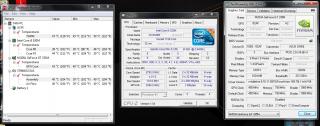
Idle (in air corn room, as u can c once open this 3 app it will auto switch to GT335M and overclock) :

Attached Image


Full Loading With Everest For 5 Minutes (Non air-corn) :

Max Temp : 69 to 70'C
Min: 43'C
Average: 67'C

Fan Speed Max:3600
Fan Speed Min: 3100
Fan Speed Average:3500
(not showing on pic)


Attached Image


Since I'm beginner in this type of testing, not dare to test so long and the result may be not so accurate.


This post has been edited by liverpool2020: May 18 2010, 03:15 AM
RX-78-2
post May 18 2010, 01:19 AM

Enthusiast
*****
Senior Member
790 posts

Joined: Jan 2003
have been Dingdong around which lappy to replace my aged Lenovo Y400 for daily works.
Almost get the Dell XPS16 at RM3899, but at the end turned to Asus N82JV for its USB3.0 and other features like lower heat and better battery life.
Today will place the order. Dunno when can get it in hand!!!
liverpool2020
post May 18 2010, 03:44 AM

Getting Started
**
Junior Member
90 posts

Joined: May 2010
QUOTE(liverpool2020 @ May 17 2010, 09:43 PM)
The street fighter if put highest setting with max Anti-Aliasing will not performing smooth

If highest setting without max Anti-Aliasing such as 8XAA will perform smooth with around 40 to 50 FPS

*
* How to delete this post ? i press wrongly , should press edit. rclxub.gif

This post has been edited by liverpool2020: May 18 2010, 03:47 AM
astria
post May 18 2010, 08:51 AM

an apple a day keeps the doctor away
*********
Senior Member
22,158 posts

Joined: Aug 2008
From: Singapore


juz edit, replace the words with "deleted" will do...

there's no delete function...
BlueBean
post May 18 2010, 01:04 PM

Getting Started
**
Junior Member
197 posts

Joined: Mar 2010
QUOTE(RX-78-2 @ May 17 2010, 02:26 AM)
You sure is RM3999 for Core i5 520M not RM4999??
According to the Asus catalog for PC fair offer, the price is RM4999.
Then RM3999 is a very good price, i will buy immediately!!!
*
QUOTE(holoman @ May 17 2010, 09:57 AM)
the actual price for this model is rm3999 right ? ..
might getting one soon smile.gif
*
yeah, price quote from hikari85
http://www.wikipedia.org/

QUOTE(liverpool2020 @ May 17 2010, 09:19 PM)
sponsor me  rclxm9.gif

btw i tested assasin's creed II , smooth and nice  thumbup.gif
*
wow, i'm a fan of assassin's creed! how's it in highest setting?
post some snaps maybe?

This post has been edited by BlueBean: May 18 2010, 01:04 PM
TShaoz
post May 18 2010, 10:02 PM

New Member
*
Junior Member
19 posts

Joined: Apr 2010
can someone teach how to switch gpu manually??? thx
liverpool2020
post May 18 2010, 10:18 PM

Getting Started
**
Junior Member
90 posts

Joined: May 2010
QUOTE(haoz @ May 18 2010, 10:02 PM)
can someone teach how to switch gpu manually??? thx
*
U mean the GC ?

So u also own a N82Jv ? If yes, come share your experience rclxms.gif
TShaoz
post May 18 2010, 10:50 PM

New Member
*
Junior Member
19 posts

Joined: Apr 2010
QUOTE(liverpool2020 @ May 18 2010, 10:18 PM)
U mean the GC ?

So u also own a N82Jv ? If yes, come share your experience  rclxms.gif
*
yup.... rclxms.gif i just get mine 2day....yes..i mean GC
Attached Image

This post has been edited by haoz: May 18 2010, 10:58 PM
liverpool2020
post May 18 2010, 11:02 PM

Getting Started
**
Junior Member
90 posts

Joined: May 2010
QUOTE(haoz @ May 18 2010, 10:50 PM)
yup.... rclxms.gif i just get mine 2day....yes..i mean GC
Attached Image
*
Good rclxm9.gif

Update your Nvidia Driver and intel GC driver to latest version to solve the minor bugs. If u didnt update u will find out your power LED will not change colour even u switch to GT335M.

This post has been edited by liverpool2020: May 18 2010, 11:03 PM
TShaoz
post May 18 2010, 11:09 PM

New Member
*
Junior Member
19 posts

Joined: Apr 2010
QUOTE(liverpool2020 @ May 18 2010, 11:02 PM)
Good  rclxm9.gif

Update your Nvidia Driver and intel GC driver to latest version to solve the minor bugs. If u didnt update u will find out your power LED will not change colour even u switch to  GT335M.
*
power LED??
ok thx...can u teach me how to switch gc manually plz??thx biggrin.gif

This post has been edited by haoz: May 18 2010, 11:11 PM
liverpool2020
post May 18 2010, 11:23 PM

Getting Started
**
Junior Member
90 posts

Joined: May 2010
Power LED will show what GC u using :

Blue---> Intel GC
White---->Nvidia GC

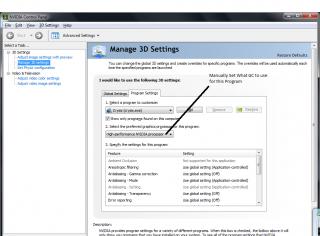
This is how u change the GC by Auto and Manual :

Prefer Which GC to Use ( Will auto change if it detect what the program need, but i think quite buggy since some program it will not auto change)

Attached Image


Manual Setting (Default) For Each Program

Attached Image


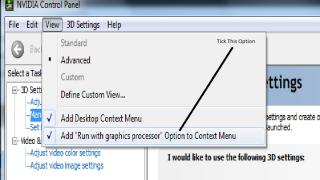
Another way, use this function:

Attached Image


Then , u will find out extra function to execute the program :

Attached Image


Hopefully this post will help u. cool2.gif


TShaoz
post May 18 2010, 11:25 PM

New Member
*
Junior Member
19 posts

Joined: Apr 2010
helpful....thx notworthy.gif

This post has been edited by haoz: May 18 2010, 11:25 PM
liverpool2020
post May 18 2010, 11:28 PM

Getting Started
**
Junior Member
90 posts

Joined: May 2010
QUOTE(haoz @ May 18 2010, 11:25 PM)
helpful....thx notworthy.gif
*
But u must update ur driver first so that the power LED work normal

14 Pages « < 2 3 4 5 6 > » Top
 

Change to:
| Lo-Fi Version
0.0216sec    0.59    6 queries    GZIP Disabled
Time is now: 11th December 2025 - 08:51 AM