Outline ·
[ Standard ] ·
Linear+
P2P Emule/ED2K Support Thread, current version: eMule v0.48a
|
fendii
|
  Apr 26 2005, 04:05 AM Apr 26 2005, 04:05 AM
|

|
Hi holyghost, i went thru your stats & i think your problem lies in here : QUOTE Transfer
Cumulative
Max Connection Limit Reached: 373 I have never seen mine show anything other than 0 Try re-configuring your bandwith setup correctly thru the Wizard and some suggested reading: http://forum.emule-project.net/index.php?s...opic=67923&st=0http://forum.emule-project.net/index.php?showtopic=44001http://forum.emule-project.net/index.php?showtopic=59931&hl=http://forum.emule-project.net/index.php?showtopic=57372&hl=This post has been edited by fendii: Apr 26 2005, 04:53 AM |
|
|
|
|
|
fendii
|
 Apr 27 2005, 02:17 AM Apr 27 2005, 02:17 AM
|
|
|
yuckz, A right click on any of your friends in Messages lets you give them a "friend upload slot". This upload slot will get active as soon as the next slot is free allowing your friend to download your files without having to wait in the queue.. You can enter your friend's ID manually by going to: Messages, right click anywhere on the left pane of the window, select "Add To Friends" & enter his IP Address & TCP Port number.. Next, right click on his nick, and enable the option "Establish Friend Slot". The friendslot won't be established the moment you add it, instead it will be given the next time the user asks for it/ slot is free. Make sure both sides are on High-ID More info here: http://www.emule-project.net/home/perl/hel...ic&topic_id=141This post has been edited by fendii: Apr 27 2005, 03:02 AM |
|
|
|
|
|
viNcee
|
Apr 27 2005, 05:23 AM
|
|
|
just wanted to thank all those who've contributed here  i just read through the whole thread and managed to solve my low id problem liao using 4242. uploading bout 10kb/s and downloading for bout 15kb/s. |
|
|
|
|
|
cyclone9
|
Apr 28 2005, 09:12 PM
|
|
|
y my emule plus like this?  This is the log connection to server QUOTE Your 4662 port is not reachable. Please review your network config. This post has been edited by cyclone9: Apr 28 2005, 09:23 PM |
|
|
|
|
|
HMMaster
|
Apr 28 2005, 09:27 PM
|
10K Club

|
QUOTE(cyclone9 @ Apr 28 2005, 09:12 PM) y my emule plus like this? This is the log connection to server becoz you are firewalled.... |
|
|
|
|
|
cyclone9
|
Apr 28 2005, 09:36 PM
|
|
|
QUOTE(HMMaster @ Apr 28 2005, 09:27 PM) becoz you are firewalled.... how to unblock it? plz guide me! i using router mode ... zte 831 |
|
|
|
|
|
HMMaster
|
Apr 29 2005, 12:00 AM
|
10K Club
|
QUOTE(cyclone9 @ Apr 28 2005, 09:36 PM) how to unblock it? plz guide me! i using router mode ... zte 831 this guide should be able to help u to solve the problem... http://www.portforward.com/zte/ZXDSL831-portforwarding.htm |
|
|
|
|
|
leo83
|
Apr 30 2005, 11:50 PM
|
Getting Started

|
my emule also same problem this few day...
just try change the TCP port to 4242,,it's realy works...now downloading going 61.6 lo...realy thanks for the infor to change the TCP port....
|
|
|
|
|
|
MoonlitBay
|
May 2 2005, 03:38 PM
|
|
|
Plz help me to solve my low D/L speed problem.  Streamyx package: 512 / 256 I'm a new eMule user. My D/L speed never goes more than 3kb/s.  Already forwarded the ports in my router. Connected as High ID. 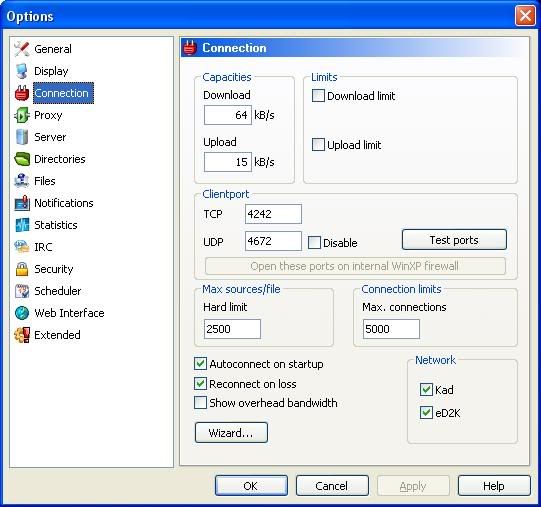  This post has been edited by MoonlitBay: May 2 2005, 03:39 PM This post has been edited by MoonlitBay: May 2 2005, 03:39 PM |
|
|
|
|
|
gn01117135
|
May 6 2005, 02:27 AM
|
|
|
i m dunno y my emule not working? my bt is running and online games are running oso, i keep having the port problem like it show warning and no speed at all?? what is this happen, i m using a router modem, is this effect but i don think so bcoz my bt oso running. really dunno y pls help //Topic merged This post has been edited by samuraiKidz: May 6 2005, 07:13 AM Attached thumbnail(s)

|
|
|
|
|
|
btfan
|
May 6 2005, 02:31 AM
|
|
|
|
|
|
|
|
|
tvcat
|
May 6 2005, 10:06 AM
|
|
|
QUOTE(gn01117135 @ May 6 2005, 02:27 AM) i m dunno y my emule not working? my bt is running and online games are running oso, i keep having the port problem like it show warning and no speed at all?? what is this happen, i m using a router modem, is this effect but i don think so bcoz my bt oso running. really dunno y pls help //Topic merged I strongly suggest u go read the online help and FAQ that avaiable on the official emule website. U can also DL the help file and put in the emule directory where u intalled it, or if u cant find the help file on the website then click the help icon at the emule toolbar, this will directly bring u to the help page. The help file is enough for u to slove all the problem and make u more understand how it work if u read it properly. Pay some time with the help file plz. |
|
|
|
|
|
gn01117135
|
May 6 2005, 04:38 PM
|
|
|
ok now i already clear the problem 1, which is warning ur port is unreachable, now it come to warning ur network setting is problem, i oledi off all my firewall but it still say i m in firewalled, what should i do, i m using dlink 500g router modem, i din install any firewall software, and the two firewall i hav disable it as winxp and the router firewall, any other thing???
|
|
|
|
|
|
anechoic
|
May 7 2005, 11:08 AM
|
|
|
hmm, any of u guys use emule plus? wonder if its better or the normal emule is better?
|
|
|
|
|
|
c9
|
May 8 2005, 07:20 AM
|
Look at all my stars!!

|
Oh gawd! I should have read this thread earlier.  Ive got a constant download now.. 50kbps. Thanks guys!! |
|
|
|
|
|
RangerRed
|
May 8 2005, 04:03 PM
|
Look at all my stars!!
|
your speed is really determined by how much ul speed the file/part owner is sending u. So if you have at the current time 20+ or so if u have sending u r gurantee of hitting ur 50k. Of course the more files u sent to immediately dl the more space u need. Someone want to donate me a 250 or 300gig sata? |
|
|
|
|
|
RangerRed
|
May 8 2005, 04:04 PM
|
Look at all my stars!!
|
20+ ppl ul to u that is.
|
|
|
|
|
|
anechoic
|
May 8 2005, 06:13 PM
|
|
|
oh yeah, thanks guys for the tips. Emules work really well.
Also,do u guys encounter streamyx disconnection while using Emule?
Not sure if its emule, maybe my line is bad these days.
|
|
|
|
|



 Quote
Quote








 0.0246sec
 0.29
0.29
 6 queries
 GZIP Disabled