Welcome Guest ( Log In | Register )

11 Pages < 1 2 3 4 > » Bottom

Outline · [ Standard ] · Linear+

 Astro byond spilts into 2 or 3 TVs

views
     
mlthum
post Jan 5 2010, 10:15 AM

Getting Started
**
Junior Member
73 posts

Joined: Apr 2007


[quote=viper1912,Jan 5 2010, 09:03 AM]
[quote=mlthum,Jan 4 2010, 10:21 PM]
u may bring ur tv to make a direct connect using RCA to TV RCA input see whether u got the same problem. If yes then proceed to contact Astro CS
else bring the transmitter back to the shop and ask for exchange may be the transmitter "koyak" that failed to transmit the signal.
for me the connectibity quite straigh forward,
Byond RCA out to AV Transmitter RCA in then AV transmitter TV out (coax) to bedroom TV in (coax) and do an auto tuning at the bedroom tv - DONE

After I replied you ...I go back n auto tunning the TV at last I got it. But the picture compare to earlier setting (not byond decoder) a bit jagger...on top of the image. Now currently using the stock yellow white red cable. Will change to RGB cable later tonite.

Which output you connected to the byond decoder? Y Pr Pb or the Video , L& R for audio?

Here is the picture of the AV-RF converter I got.
*

[/quote]

i'm using Video, L & R (Red / White / Yellow)

redza2k4
post Jan 23 2010, 12:18 AM

New Member
*
Junior Member
31 posts

Joined: Oct 2009
QUOTE(viper1912 @ Jan 4 2010, 10:02 PM)
Hi mlthum,

I just got the dawa AV-RF transmitter.

I able to connect to the byond decoder....but I got a problem.

There is pic, but the picture got no colour and there is noise.....I tried all the connector available at back of byond decoder. Unable to solve this problem.

This is how I connect, byond RCA out to AV-RF converter in ...and converter RF out to my bedroom TV.

Anyone can comment?
*
Just got dawa AV-RF transmitter. very dissapointed with the quality especially sound. Looking for better transmitter here ....... any idea especially wireless HD transmitter?

This post has been edited by redza2k4: Jan 23 2010, 12:22 AM
CapKapak
post Jan 23 2010, 05:38 AM

Getting Started
**
Junior Member
240 posts

Joined: Oct 2005
From: Around the World


QUOTE(ssyam @ Jan 4 2010, 02:07 PM)
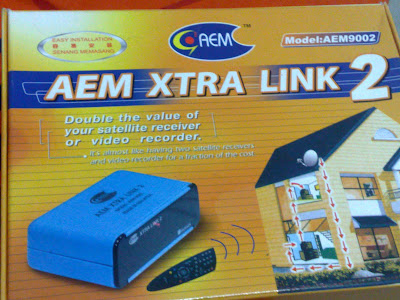
i'm using  AEM xtra link 2 to  view astro and change channel at 2nd tv in bedroom.
last time used this gadget for old astro decoder and now  use it to link  byond decoder.

user posted image
*
I am also using this at the moment with the old decoder but would like to know how it works with the beyond decoder. Please explain.

Thanks.
yeahh
post Jan 23 2010, 10:26 AM

Not enough stars :(
******
Senior Member
1,715 posts

Joined: Jan 2003
From: Selangor


how much does the AEM xtra link cost anyway?

thinking of getting it and i dont wanna get conned on the price
silbii
post Jan 23 2010, 01:02 PM

Enthusiast
*****
Senior Member
963 posts

Joined: Sep 2005


QUOTE(CapKapak @ Jan 23 2010, 05:38 AM)
I am also using this at the moment with the old decoder but would like to know how it works with the beyond decoder. Please explain.

Thanks.
*
same like the old decoder i guess, but connect it to beyod's composite and L&R audio analog channels only -

the connection will be from beyond's composite yellow video, analog L & R audio into the AV transmitter input...but you will just get SD channels for the other tv...the HD channels you can't get...
m_imrun
post Jan 24 2010, 06:25 AM

Getting Started
**
Junior Member
127 posts

Joined: Jun 2009


QUOTE(silbii @ Jan 23 2010, 01:02 PM)
same like the old decoder i guess, but connect it to beyod's composite and L&R audio analog channels only -

the connection will be from beyond's composite yellow video, analog L & R audio into the AV transmitter input...but you will just get SD channels for the other tv...the HD channels you can't get...
*
Correct me if i'm wrong, if i'm watching HD Channel in my LCD tv, the 2nd tv will get the HD channel in SD format right?
Or the 2nd tv will unable to watch anything?

This post has been edited by m_imrun: Jan 24 2010, 06:26 AM
doey
post Jan 24 2010, 11:30 PM

New Member
*
Junior Member
17 posts

Joined: Dec 2005


QUOTE(m_imrun @ Jan 24 2010, 06:25 AM)
Correct me if i'm wrong, if i'm watching HD Channel in my LCD tv, the 2nd tv will get the HD channel in SD format right?
Or the 2nd tv will unable to watch anything?
*
2nd TV will get HD channel in SD.
matrix88
post Jan 24 2010, 11:36 PM

Look at all my stars!!
*******
Senior Member
2,236 posts

Joined: Nov 2007
was told that if use wireless av box to connect to another tv set, the signal wont be hd anymore as there will be inteference and lost of signal. means it will be the same as yr previous norman decoder.
in order to fully use the hd signal, a hdmi cable is a must!
m_imrun
post Jan 25 2010, 04:19 AM

Getting Started
**
Junior Member
127 posts

Joined: Jun 2009


biggrin.gif

This post has been edited by m_imrun: Feb 17 2010, 03:46 AM
RAMChYLD
post Jan 25 2010, 11:47 AM

Regular
******
Senior Member
1,715 posts

Joined: May 2005
From: Klang


QUOTE(matrix88 @ Jan 24 2010, 11:36 PM)
was told that if use wireless av box to connect to another tv set, the signal wont be hd anymore as there will be inteference and lost of signal. means it will be the same as yr previous norman decoder.
in order to fully use the hd signal, a hdmi cable is a must!
*
Well, main TV use HDMI and bedroom TV use AV box. Yes, you cannot get HD through AV box, signal will downsample to SD and there might be interference depending on your setup. But that's the best one can come up with. Other way is to involve a few thousand ringgit in a HDMI splitter, a bunch of HDMI cables and repeaters, and wiring. Either that or a wireless HDMI transmitter and receiver kit which also costs a few thousand ringgit.

This post has been edited by RAMChYLD: Jan 25 2010, 11:48 AM
rayfoo
post Jan 25 2010, 12:12 PM

Look at all my stars!!
*******
Senior Member
2,562 posts

Joined: Jan 2003


wireless HD transmitter by Giraffe..RM5K above something like that ...

QUOTE(redza2k4 @ Jan 23 2010, 12:18 AM)
Just got dawa AV-RF transmitter. very dissapointed with the quality especially sound. Looking for better transmitter here ....... any idea especially wireless HD transmitter?
*

Added on January 25, 2010, 12:16 pmfor HD for 2 set of TV, u can get
1) 1 unit HD splitter ( 2port) about RM400 ATEN brand
2) 1 unit HDMI over CAT5E extender about RM700 ATEN brand
3) 2 unit of CAT5E cable (length depend) estimate RM100
Total about RM1200

all available locally

This post has been edited by rayfoo: Jan 26 2010, 07:50 PM


Attached image(s)
Attached Image
m_imrun
post Jan 26 2010, 02:59 PM

Getting Started
**
Junior Member
127 posts

Joined: Jun 2009


------------------

This post has been edited by m_imrun: Jan 26 2010, 06:24 PM
rattan
post Jan 26 2010, 07:29 PM

Droid
Group Icon
Trade Dispute
3,379 posts

Joined: Apr 2006
From: KL


I saw an electronic shop selling the HDMI splitter, this is if u got more then 1 hd capable tv and want to share. The splitter comes with 1 port input (from astro byond decoder) and 4 output. Cost around RM400+.
jacky5283
post Jan 26 2010, 10:36 PM

Getting Started
**
Junior Member
174 posts

Joined: Jun 2006
From: Kuala Lumpur


Hello guys, sorry but i need to ask something outside this topic...

I have a standard definition decoder now and is usable, what if i ordered astro byond, i will get another satellite dish, new decoder and a smart card right.

Okay, now, can i use that 2 decoders, to watch different channels simultaneously?
RAMChYLD
post Jan 27 2010, 01:12 AM

Regular
******
Senior Member
1,715 posts

Joined: May 2005
From: Klang


QUOTE(jacky5283 @ Jan 26 2010, 10:36 PM)
Hello guys, sorry but i need to ask something outside this topic...

I have a standard definition decoder now and is usable, what if i ordered astro byond, i will get another satellite dish, new decoder and a smart card right.

Okay, now, can i use that 2 decoders, to watch different channels simultaneously?
*
They will take back your SD decoder when you order Astro Byond. If you want to keep it, you must pay RM80. Even then they'll take away the smart card. Best you call Astro CS and see what you can do. Best way is to work out how to subscribe to supplementary line and then move the decoder to the sub line while putting the Byond as the new main line.
hoilok
post Jan 28 2010, 02:18 PM

Regular
******
Senior Member
1,165 posts

Joined: Apr 2007


Hi guys if single decoder how to split into LCD and transmitter ? do i need a RCA splitter to do it
RAMChYLD
post Jan 28 2010, 02:42 PM

Regular
******
Senior Member
1,715 posts

Joined: May 2005
From: Klang


QUOTE(hoilok @ Jan 28 2010, 02:18 PM)
Hi guys if single decoder how to split into LCD and transmitter ? do i need a RCA splitter to do it
*
I dun quite understand your question. But for byond, generally the most accepted answer is connect LCD TV via HDMI so it gets HD quality image, and second TV (which downscale HD to SD) use RCA direct or convert to RF using a RM15-RM50 RCA-to-RF converter.

More exotic setup discussed in the past requires RM600++ component-to-SVideo converter (because b.yond has no S-Video connector) or if you want HD on both TVs, RM1000++ in HDMI splitter plus various concoctions of HDMI repeaters or HDMI to Ethernet converters, or an uber-expensive RM5000++ HDMI wireless kit.

This post has been edited by RAMChYLD: Jan 28 2010, 02:42 PM
TSviper1912
post Jan 28 2010, 03:11 PM

New Member
*
Junior Member
44 posts

Joined: Sep 2007
I've encounter problem....for my 2nd TV, which I unable to change channel. I've placed the infra -red thigy at the byond channel area...it still unable to change channel.

Anyone care to tell which is the area on the byond decoder I shd put the INfra Red thingy.

eMKs
post Jan 28 2010, 04:43 PM

On my way
****
Senior Member
647 posts

Joined: Jan 2010
From: Klang
QUOTE(rayfoo @ Jan 25 2010, 12:12 PM)
wireless HD transmitter by Giraffe..RM5K above something like that ...

Added on January 25, 2010, 12:16 pmfor HD for 2 set of TV, u can get
1) 1 unit HD splitter ( 2port) about RM400 ATEN brand
2) 1 unit HDMI over CAT5E extender about RM700 ATEN brand
3) 2 unit of CAT5E cable (length depend) estimate RM100
Total about RM1200

all available locally
*
You have 2nd option if you only use for 1 year or 2 biggrin.gif

Subscribe to Astro, I don't know which is true

1) Free installation Fee for Min. package RM 37.95, Min 24 Month's subscription periods.
2) RM50 Installation Fee for Min. package RM54.95, Min 12 Month's subscription periods.
3) RM80 Installation Fee for Min. package RM37.95, Min 12 Month's subscription periods.

or

1) RM30 Installation Fee for Min. package RM54.95, Min 24 Month's subscription periods.
2) RM80 Installation Fee for Min. package RM37.95, Min 24 Month's subscription periods.
3) RM199 Installation Fee for Min. package RM37.95, Min 12 Month's subscription periods.

Subscribe to byond = Free

Monthly = RMxxx+RM20

You can watch different channel at 1 time, if astro still has 50% off monthly bill on 2nd decoder you can save summore hmm.gif
GMNIMan
post Jan 30 2010, 09:41 PM

New Member
*
Junior Member
6 posts

Joined: Dec 2007


QUOTE(viper1912 @ Jan 28 2010, 03:11 PM)
I've encounter problem....for my 2nd TV, which I unable to change channel. I've placed the infra -red thigy at the byond channel area...it still unable to change channel.

Anyone care to tell which is the area on the byond decoder I shd put the INfra Red thingy.
*
Tape the IR injector about 1" to 1.5" to the right of the LED display on the front. Works perfectly for me using the XTra Link 2.


Added on January 30, 2010, 9:49 pm
QUOTE(CapKapak @ Jan 23 2010, 05:38 AM)
I am also using this at the moment with the old decoder but would like to know how it works with the beyond decoder. Please explain.

Thanks.
*
Works perfectly well with the BYond decoder, except you need use an AV to RF converter. I use the Malaysian made AEM unit. It is cheap and the RF output quality is excellent. No image shearing, no distortion and colour is rich and vibrant.

This post has been edited by GMNIMan: Jan 30 2010, 09:49 PM

11 Pages < 1 2 3 4 > » Top
 

Change to:
| Lo-Fi Version
0.0294sec    0.34    6 queries    GZIP Disabled
Time is now: 1st December 2025 - 11:57 AM