Welcome Guest ( Log In | Register )

Outline · [ Standard ] · Linear+

 Astro byond spilts into 2 or 3 TVs

views
     
TSviper1912
post Jan 4 2010, 11:29 AM, updated 16y ago

New Member
*
Junior Member
44 posts

Joined: Sep 2007
Hi....

I've just got astro pple to install the byond decoder. According to the installer, this new decoder does not hv any output except component and HDMI. unlike d old decoder, they can hv another areal output. Where I used to run another line up to my bedroom as bedroom and living hall will be watching the same channel.

Any 1 watching 2 or 3 TV with byond decoder? Installer say it can only support 1? My fren was telling me to get d Coax Spilter 2-way satelite. before the astro cable goes into the decoder...spilt 1 out to my bedroom. Anyone has any solution for me, you guys out there already got a solution for this?

Thanx in advance

Attached Image

This post has been edited by viper1912: Jan 4 2010, 11:31 AM
TSviper1912
post Jan 4 2010, 11:51 AM

New Member
*
Junior Member
44 posts

Joined: Sep 2007
QUOTE(SiriuslyCold @ Jan 4 2010, 11:40 AM)
you'd need another decoder in the bedroom, won't you?
*
For earlier astro decoder...not decoder is needed. Only RF cable only directly into TV.
TSviper1912
post Jan 4 2010, 12:30 PM

New Member
*
Junior Member
44 posts

Joined: Sep 2007

Previous setup while using old Astro Decoder
Cabling: coaxial cable from living hall to bedroom
Connectivity: the above coaxial cable connect to the astro decoder coaxial output

New setup using Astro Byond setup box
Cabling: remain no change for your coaxial cable from living room to bedroom, but require additional RCA cable
Item require: AV transmitter
Connectivity:
RCA cable connect from setup box (Red/White/Yellow) > RCA input @ AV transmitter
Coaxial cable from bedroom connect to the AV transmitter coaxial output.
*

[/quote]

Thanx mlthum,

Now with your explanation I can understand better. Which means with this byond decoder all I need is a AV transmitter. This AV transmitter will transfer out via coaxial output. which works the same way like d old decoder.

byond decoder output via RCA to AV transmitter and AV transmitter coaxial output to RF cable to my bedroom.

Any recommendation, where I can get this AV transmitter? IT mall sell these ? Any brand particular you can recommend?.

Thanx...


TSviper1912
post Jan 4 2010, 02:16 PM

New Member
*
Junior Member
44 posts

Joined: Sep 2007
QUOTE(ssyam @ Jan 4 2010, 02:07 PM)
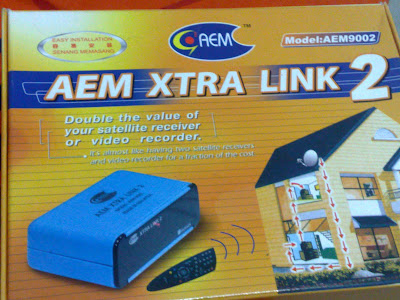
i'm using  AEM xtra link 2 to  view astro and change channel at 2nd tv in bedroom.
last time used this gadget for old astro decoder and now  use it to link  byond decoder.

user posted image
*
Can u elaborate a bit on how do u hook this AEM xtra link? How do u connect to byond decoder?


TSviper1912
post Jan 4 2010, 10:02 PM

New Member
*
Junior Member
44 posts

Joined: Sep 2007
Hi mlthum,

I just got the dawa AV-RF transmitter.

I able to connect to the byond decoder....but I got a problem.

There is pic, but the picture got no colour and there is noise.....I tried all the connector available at back of byond decoder. Unable to solve this problem.

This is how I connect, byond RCA out to AV-RF converter in ...and converter RF out to my bedroom TV.

Anyone can comment?

TSviper1912
post Jan 5 2010, 09:03 AM

New Member
*
Junior Member
44 posts

Joined: Sep 2007
[quote=mlthum,Jan 4 2010, 10:21 PM]
u may bring ur tv to make a direct connect using RCA to TV RCA input see whether u got the same problem. If yes then proceed to contact Astro CS
else bring the transmitter back to the shop and ask for exchange may be the transmitter "koyak" that failed to transmit the signal.
for me the connectibity quite straigh forward,
Byond RCA out to AV Transmitter RCA in then AV transmitter TV out (coax) to bedroom TV in (coax) and do an auto tuning at the bedroom tv - DONE

After I replied you ...I go back n auto tunning the TV at last I got it. But the picture compare to earlier setting (not byond decoder) a bit jagger...on top of the image. Now currently using the stock yellow white red cable. Will change to RGB cable later tonite.

Which output you connected to the byond decoder? Y Pr Pb or the Video , L& R for audio?

Here is the picture of the AV-RF converter I got.


Attached thumbnail(s)
Attached Image
TSviper1912
post Jan 28 2010, 03:11 PM

New Member
*
Junior Member
44 posts

Joined: Sep 2007
I've encounter problem....for my 2nd TV, which I unable to change channel. I've placed the infra -red thigy at the byond channel area...it still unable to change channel.

Anyone care to tell which is the area on the byond decoder I shd put the INfra Red thingy.

TSviper1912
post Apr 26 2010, 02:33 PM

New Member
*
Junior Member
44 posts

Joined: Sep 2007

Picture worth thousand words!!!!!!!!


Attached thumbnail(s)
Attached Image
TSviper1912
post Apr 27 2010, 12:31 PM

New Member
*
Junior Member
44 posts

Joined: Sep 2007
QUOTE(MyDevil @ Apr 26 2010, 02:58 PM)
thumbup.gif  How much is the AV-RF convertor?
*
Is posted at the begining of this post. pls go n read.

Available at ACE hardware as well.....different brand from mine Daiwa


Change to:
| Lo-Fi Version
0.0146sec    0.44    7 queries    GZIP Disabled
Time is now: 2nd December 2025 - 09:21 PM