

Have you check on disk management? Any partition for the recovery?
=-:~ TOSHIBA Club ~:-= V2, Leading Innovation >>>
=-:~ TOSHIBA Club ~:-= V2, Leading Innovation >>>
|
|
 Jun 22 2011, 03:19 PM Jun 22 2011, 03:19 PM
|
 
Elite
14,813 posts Joined: Nov 2006  
|
Have you check on disk management? Any partition for the recovery?
|
|
|
|
|
|
Jun 22 2011, 03:27 PM
|

Elite
24,193 posts Joined: Feb 2010 From: Perak
|
QUOTE(lee_what2004 @ Jun 22 2011, 03:19 PM) Have you check on disk management? Any partition for the recovery?   I din't check at all... I was a noob that time haha I din't check at all... I was a noob that time haha  But I know out of 120GB, I only get 100GB HDD, so the recovery partition should be there, just don't know which combination of buttons to activate it  Sifu you've been around for quite some time liao, so I was wondering whether you know or not |
|
|
Jun 22 2011, 03:45 PM
|
|
Elite
14,813 posts Joined: Nov 2006
|
Couldn't find anything useful on the user guide, just burning recovery disc...
The '0' button didn't work? |
|
|
Jun 22 2011, 03:51 PM
|
|
Elite
24,193 posts Joined: Feb 2010 From: Perak
|
QUOTE(lee_what2004 @ Jun 22 2011, 03:45 PM) Couldn't find anything useful on the user guide, just burning recovery disc... The laptop is not with me now haha... can only try when I go back to Penang The '0' button didn't work?  Anyway, thanks for your help, will come back when I try it~ Plan to re-apply thermal paste for the old M100 and reformat it, sure good as new  |
|
|
Jun 22 2011, 06:12 PM
|
 
Senior Member
930 posts Joined: Feb 2006 From: Kuching, Hornbill Land
|
Juz read my T210 manual, Its capable of coping up to 8GB RAM dual channel
 . .Since its running on W7HO 64bit os, hand little bit itchy. Feels like throw in ano 4GB first, later then ano 4GB. |
|
|
Jun 22 2011, 06:29 PM
|
|
Elite
14,813 posts Joined: Nov 2006
|
Upgrade upgrade
|
|
|
|
|
|
Jun 22 2011, 08:03 PM
|
|
Elite
24,193 posts Joined: Feb 2010 From: Perak
|
QUOTE(lee_what2004 @ Jun 22 2011, 06:29 PM) Upgrade upgrade LOL, poison @ekestima, considered putting in an SSD?  |
|
|
Jun 23 2011, 12:07 AM
|

Newbie
4 posts Joined: Oct 2010 From: Ipoh
|
bought a L745 white one. is it okay ah ? and do i need to do anything with it, or any accessories to be recommend ?
|
|
|
Jun 23 2011, 12:13 AM
|
|
Elite
24,193 posts Joined: Feb 2010 From: Perak
|
QUOTE(junnsiang @ Jun 23 2011, 12:07 AM) bought a L745 white one. is it okay ah ? and do i need to do anything with it, or any accessories to be recommend ? Grats on your purchase~ Nice lappy  You need to register your warranty here: http://www.toshiba-asia.com/portal/public/...rentTab=service And check your RAM (whether its 2GB or 4GB), and check your Windows OS version (32-bits or 64-bits). Depending on what you get, you may need to convert between 32/64-bit OS to better utilize the RAM you have  |
|
|
Jun 23 2011, 12:55 AM
|

Junior Member
28 posts Joined: May 2010
|
|
|
|
Jun 23 2011, 01:00 AM
|
|
Newbie
4 posts Joined: Oct 2010 From: Ipoh
|
Done. It's 4gb ram and 32 bit. so okay ah ? do i still need to do anything bout it ?
|
|
|
Jun 23 2011, 01:07 AM
|
|
Elite
24,193 posts Joined: Feb 2010 From: Perak
|
QUOTE(junnsiang @ Jun 23 2011, 01:00 AM) Done. It's 4gb ram and 32 bit. so okay ah ? do i still need to do anything bout it ? You'd noticed that you're just using around 2.98GB of RAM, meaning there's still 1GB RAM you're not using. You might wanna consider converting to 64-bit systems since the laptop is still new and there's not much data stored inside yet Oh ya, before you convert (which involves a reformatting-like procedure), its bests that you create your 4 recovery medias 1st (using the Recovery Media Creator) on the desktop Below is the procedure for conversion: QUOTE(PF TJ) Dear Toshiba users, It seems lately nearly all Toshiba notebooks are equipped with both 32-bit Operating systems (Windows for this case) as well as 64-bit Operating systems (which are installed into the hidden HDD partitions of each notebook). Notebook sellers prefer to start up the whole notebook with 32-bit OS , mostly because of the shorter time required to boot the whole system. Since 32-bit OS can only support around 2.98GB of RAM, those who bought Toshiba notebooks with RAM upgrades (to 4GB RAM- models include Satellite L510, Satellite Pro L510, M500, M300, T130, F60 etc.) will not be able to fully utilize the RAM. This can be settled by converting your 32-bit OS to 64-bit OS. You can do it via recovery from the Toshiba hidden partition itself, or via the 4 system recovery discs that you burnt when you 1st got your notebook The guide to Toshiba's HDD system recovery can be found here: cdgenp01.csd.toshiba.com/content/.../PMA500339010_web.pdf Generally, it would be easier to conduct the recovery from the Hidden partition than the recovery discs (noneed to keep on changing discs XD ) In general, the steps involved are: 1. Make sure you backup all important files, EVERYTHING will be reformatted (except the Hidden Partition) when you recover your system. Noneed to worry about drivers and Toshiba programs as they are included in the Hidden Partition/Recovery discs. 2. Plug in A/C adapter and if possible, plug in the battery just in case of blackouts (in Malaysia) XD 3. Shut down your notebook. 4. Press and hold the "0" and the "power" button. A window will appear asking you whether you want to load a 32-bit or 64-bit windows. The remaining will be easy, just choose the "recover to out-of-box state" (Actually noneed to change anything, as for the subsequent windows, the initial ticked box will be the recommended one) XD 5. Partition reformatting will commence. Initiate the next step. 6. After that, leave everything to your notebook, it will restart on its own for quite a few times (to install the drivers and programs), may take up to 1-2 hours depending on your system. You will be configuring your OS in no time. I guess that's all, hopefully this will help those who wanted to switched to 64-bit OS i.e. Eguy1314 ^_______^ ** Be warned, Toshiba's feather touch buttons may become unresponsive after switching, still looking for answers for that one, it seemed there are no drivers for these buttons zzzzzzzzzzzzzzzzzzzzzzzz Anyway, Do refer to the link above for more elaborated details Best of luck! Added on June 23, 2011, 1:14 am QUOTE(just_kiing @ Jun 23 2011, 12:55 AM) Nice find bro, thanks for sharing! Looks like we have worthy rivals from Toshiba for the RM1.6-RM2.3k range This post has been edited by [PF] T.J.: Jun 23 2011, 01:14 AM |
|
|
Jun 23 2011, 01:18 AM
|
|
Newbie
4 posts Joined: Oct 2010 From: Ipoh
|
the link cannot be found :/
|
|
|
|
|
|
Jun 23 2011, 01:28 AM
|
|
Elite
24,193 posts Joined: Feb 2010 From: Perak
|
QUOTE(junnsiang @ Jun 23 2011, 01:18 AM) the link cannot be found :/ Ops! Sorry i forgot that the link cannot be used directly  Google "Toshiba asia notebook" > 1st result > register notebook warranty |
|
|
Jun 23 2011, 01:39 AM
|
|
Newbie
4 posts Joined: Oct 2010 From: Ipoh
|
it's okay. er. i done it ady, what to do next ?
 This post has been edited by junnsiang: Jun 23 2011, 01:44 AM |
|
|
Jun 23 2011, 08:59 AM
|
|
Elite
24,193 posts Joined: Feb 2010 From: Perak
|
^ Backup all your data (only your files, not the ones that come with the computer since they'll be available again after reformatting
), create your recovery discs (via Recovery Media Creator; you'll need 4 DVD+Rs) and then follow the conversion procedure as mentioned in a few posts above.Just remember that: 1. Connect to socket with your battery intact 2. Let the laptop do everything, it'll take up to1-2 hours and the laptop will auto-restart for quite a number of times , DON'T SHUT IT DOWN WHILE ITS RUNNING like many Tosh users did LOL That's about all~ Not too hard |
|
|
Jun 23 2011, 11:01 AM
|
|
Junior Member
28 posts Joined: May 2010
|
QUOTE(PF T.J. @ Jun 20 2011, 11:43 PM) Edit: It has Full HD (120Hz) as shown by just_kiing 120Hz is 3D version right? |
|
|
Jun 23 2011, 12:33 PM
|
|
Elite
24,193 posts Joined: Feb 2010 From: Perak
|
QUOTE(just_kiing @ Jun 23 2011, 11:01 AM) 120Hz is 3D version right? Yup, but whether need 3D glasses or not I'm not sure haha |
|
|
Jun 23 2011, 01:08 PM
|
|
Junior Member
28 posts Joined: May 2010
|
QUOTE(PF T.J. @ Jun 23 2011, 12:33 PM) Yup, but whether need 3D glasses or not I'm not sure haha Refer this and you can see the 3D glasseshttp://us.toshiba.com/computers/laptops/qosmio/x770 |
|
|
Jun 23 2011, 01:12 PM
|
|
Elite
24,193 posts Joined: Feb 2010 From: Perak
|
QUOTE(just_kiing @ Jun 23 2011, 01:08 PM) Hard to say leh since it does't really say it comes with 3D glasses.... Hmm...But I guess non-3D glasses technology is abit too new to have in th x770... Anyway, the speaker grills are damn nice leh 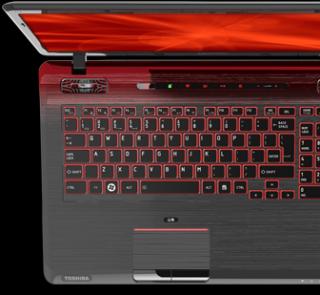
 Thanks for sharing the link~ This post has been edited by [PF] T.J.: Jun 23 2011, 01:12 PM |
| Change to: |  0.0207sec 0.0207sec
 0.54 0.54
 6 queries 6 queries
 GZIP Disabled GZIP Disabled
Time is now: 10th December 2025 - 08:17 PM |
 Quote
Quote