Welcome Guest ( Log In | Register )

Bump Topic Topic Closed RSS Feed
124 Pages « < 8 9 10 11 12 > » Bottom

Outline · [ Standard ] · Linear+

 iPhone Club v9 - iPhone related news & Questions , For questions, kindly use the template

views
     
huaipoh
post May 14 2009, 03:00 PM

Getting Started
**
Junior Member
118 posts

Joined: Dec 2008
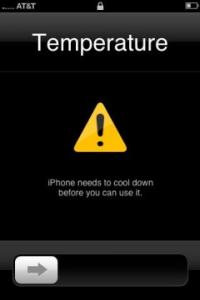
Attached Image

Have you ever got a warning message on your iPhone which says:“iPhone needs to cool down before you can use it”.

According to Apple’s knowledge base its for real:

“Operate iPhone 3G in a place where the temperature is between 0 and 35C (32 to 95F) … If the interior temperature of
iPhone 3G exceeds normal operating temperatures, you may experience [the] Temperature warning screen.”

The iPhone blog reader, Jeff got this error while he was sitting next to a pool in Scottsdale Arizona where the temperature was 104 degrees.
When I saw the screenshot for the first time, I thought it was fake but Apple’s Knowledge base confirms that its for real.

As per Apple’s Knowledge base:

This message appears when the operating temperature has become too hot. This is a safety mechanism that protects the components of your iPhone 3G. If this message appears, you should turn iPhone 3G off, move it to a cooler environment, and allow it to cool before resuming use.
Note: When this message appears, iPhone 3G may still be able to make emergency calls.

Some conditions and activities that may activate the Temperature warning message:

Leaving iPhone 3G in a car on a hot day.

Leaving it in direct sunlight for extended amounts of time.

Using certain applications in hot conditions or direct sunlight for long periods of time, such as GPS tracking in a car on a sunny day or listening to music while in direct sunlight.

Jeff’s figured out a neat way to fix the problem:

“I put the iPhone between 2 cold beers and it worked!”
It’s good to know that Apple has even thought of how to prevent the iPhone from overheating to protect its components from damage.

Have you seen this warning message on your iPhone?

Thanks Egypt for the tip! rclxms.gif

Check This Out!

This post has been edited by huaipoh: May 14 2009, 03:02 PM
michael9413
post May 14 2009, 05:13 PM

***@_@***
*******
Senior Member
6,986 posts

Joined: Jan 2003
From: E-Poh.../Pen-Nang.../Pee-Jay/S.Jaye


hey guys... i thought i wanna buy Iphone...
but my fren yesterday gives me a pool of links...
stating that every Iphone have dead pixels problem...
New unit have defective covers... there will be some minor black dots on the white cover...

do you guy face the same problem???
g3n0c1d3
post May 14 2009, 05:24 PM

hai hai... kazuma dayo....
*******
Senior Member
6,497 posts

Joined: Sep 2008


QUOTE(michael9413 @ May 14 2009, 05:13 PM)
hey guys... i thought i wanna buy Iphone...
but my fren yesterday gives me a pool of links...
stating that every Iphone have dead pixels problem...
New unit have defective covers... there will be some minor black dots on the white cover...

do you guy face the same problem???
*
ive use mine for about 7 months now... no dead pixel....
hihihehe
post May 14 2009, 05:39 PM

10k Club
********
All Stars
13,783 posts

Joined: Jan 2006
From: stress & confuse world


QUOTE(michael9413 @ May 14 2009, 07:13 PM)
hey guys... i thought i wanna buy Iphone...
but my fren yesterday gives me a pool of links...
stating that every Iphone have dead pixels problem...
New unit have defective covers... there will be some minor black dots on the white cover...

do you guy face the same problem???
*
if u said every then u must b wrong..mine don have dead pixel at all
or mayb ur fren just google dead pixel on iphone so it will come tons of links

btw is thr a way to prompt a message call me to input password once i check for mail?
clyder_mun
post May 14 2009, 06:59 PM

New Member
*
Junior Member
20 posts

Joined: Oct 2008


Sharing.. from one of my Colleague...

Hi Guys,

This is news to me, and scary news at that, but it seems as though firmware update 2.2.1 has been causing some problems with Wi-Fi for many iPhone users.

If you have been having issues, and were hoping for a quick software fix, it looks like you may be out of luck.

Some users have reportedly been told by Apple to have their hardware replaced, and to make sure that when they call for a replacement, they specifically ask for an iPhone that’s running firmware of a version earlier than 2.2.1. All of which would seem to indicate that for the moment, Apple doesn’t know how to undo what they did with 2.2.1.

Your only solution will be to wait for OS3.0 and update your FW then. At least for now! Or keep your finger crossed that someone will find a fix for it


For more info... http://www.theregister.co.uk/2009/04/08/iphone_wifi_again/

Cheers...
claxxion
post May 14 2009, 09:45 PM

Casual
***
Junior Member
465 posts

Joined: May 2005
From: Puchong, Selangor


QUOTE(clyder_mun @ May 14 2009, 06:59 PM)
Sharing.. from one of my Colleague...

Hi Guys,

This is news to me, and scary news at that, but it seems as though firmware update 2.2.1 has been causing some problems with Wi-Fi for many iPhone users.

If you have been having issues, and were hoping for a quick software fix, it looks like you may be out of luck.

Some users have reportedly been told by Apple to have their hardware replaced, and to make sure that when they call for a replacement, they specifically ask for an iPhone that’s running firmware of a version earlier than 2.2.1. All of which would seem to indicate that for the moment, Apple doesn’t know how to undo what they did with 2.2.1.

Your only solution will be to wait for OS3.0 and update your FW then. At least for now! Or keep your finger crossed that someone will find a fix for it
For more info... http://www.theregister.co.uk/2009/04/08/iphone_wifi_again/

Cheers...
*
Really? Does other 2.2.1 users encounter this?

I was about to upgrade mine to 2.2.1. Currently still on 2.2 and just realised i couldnt download some apps which require the 2.2.1 firmware thru appstore on the phone itself.
SHOfrE3zE
post May 14 2009, 10:36 PM

Drop It Like It's Hot
******
Senior Member
1,895 posts

Joined: Jan 2003
From: Shah Alam


i'm using an iphone 2g and the prob is that there's specks inside the glass screen around the home button. i suspect i cames from there. any1 knows how to remove them?
shumaky
post May 14 2009, 10:39 PM

PS what.?
*******
Senior Member
2,706 posts

Joined: Jan 2003
From: sunway @ middle earth


Any good sites to recommend for wallpaper downloads..?
Playboy21
post May 14 2009, 10:42 PM

Il Principino
******
Senior Member
1,023 posts

Joined: Aug 2008
QUOTE(shumaky @ May 14 2009, 10:39 PM)
Any good sites to recommend for wallpaper downloads..?
*
Download the app "Backgrounds" from the appstore. It's free of charge, and you would be able to save wallpapers directly to your iPhone, all using your wi-fi connection. Really simple and hassle free.
KUROsaki23
post May 14 2009, 11:53 PM

Casual
***
Junior Member
330 posts

Joined: Sep 2007
how i want to copy my music into iphone?huhuhu
TSnokia2003
post May 14 2009, 11:57 PM

Look at all my stars!!
*******
Senior Member
5,786 posts

Joined: Nov 2007
From: VIC - The Place To Be


QUOTE(KUROsaki23 @ May 14 2009, 11:53 PM)
how i want to copy my music into iphone?huhuhu
*
there is no need to huhuhu here. refer to SECTION B: ORGANISING YOUR MUSIC (AND ITS OWN RESPECTIVE ALBUM ARTWORK)
ken_z78
post May 15 2009, 12:31 AM

New Member
*
Junior Member
4 posts

Joined: May 2009


DiGi
APN: digimms
APN name: mms
APN password: mms
WAP gateway: 203.92.128.160
MMSC: http://mms.digi.com.my/servlets/mms[/spoiler]


I brought the iphone through maxis but wanted to use it with my digi line. I've tried setting up, steps as following:

setting>> general>> network>> cellular dadata network

it only shows

APN:
Usename:
Password:

I'm stuck
can anyone help??

thanks

shumaky
post May 15 2009, 12:37 AM

PS what.?
*******
Senior Member
2,706 posts

Joined: Jan 2003
From: sunway @ middle earth


APN is diginet
username n pw is blank
LaskarCinta
post May 15 2009, 12:21 PM

?
******
Senior Member
1,651 posts

Joined: Dec 2006
QUOTE(michael9413 @ May 14 2009, 05:13 PM)
hey guys... i thought i wanna buy Iphone...
but my fren yesterday gives me a pool of links...
stating that every Iphone have dead pixels problem...
New unit have defective covers... there will be some minor black dots on the white cover...

do you guy face the same problem???
*
previously owned 2 first gen iPhones. one got 1 dead pixel, but so far it's not that common on the iPhones around me.

but in case u r going to buy the first gen, some have tendency of having half the screen not responding to touch input (myb u'll have to refer with the manufacturing week to make sure u r safe). but again it's not that common for iPhones around me.

as for iPhone 3G, i dunno much bout it, but i haven't much heard the same probs that plague the first gen to be appear on the iPhone 3G. or myb at least it's only me. btw, u should know that ANY LCD PRODUCT can have potential of being affected by dead pixel (no matter it's LCD TV, PSP, Nokia phones, SE phones, Samsung phones, etc., and even iPhone). so that's why there's warranty. and yup, this kind of defect is covered under warranty as for the iPhone, so u should not worry much bout it.

so as for me, the statement of "Every iPhone Have Dead Pixel Problem" is not true. and even if yours is affected (in case u bought one) it's covered by warranty.


michael9413
post May 15 2009, 12:33 PM

***@_@***
*******
Senior Member
6,986 posts

Joined: Jan 2003
From: E-Poh.../Pen-Nang.../Pee-Jay/S.Jaye


true enough that every phone have dead pixels ...
ken_z78
post May 15 2009, 12:56 PM

New Member
*
Junior Member
4 posts

Joined: May 2009


thanks pal
is it possible to send mms via iphone 3G?


QUOTE(shumaky @ May 15 2009, 12:37 AM)
APN is diginet
username n pw is blank
*
davidgary73
post May 15 2009, 12:59 PM

Music Producer
Group Icon
VIP
4,903 posts

Joined: Jul 2008
QUOTE(ken_z78 @ May 15 2009, 12:56 PM)
thanks pal
is it possible to send mms via iphone 3G?
*
Please read this thread: http://forum.lowyat.net/topic/868281

Section 'B' : General Tweaks & Localising Your iPhone:

kueh karas
post May 15 2009, 02:55 PM

Getting Started
**
Junior Member
141 posts

Joined: Oct 2007


hi guys, i'm facing hardware problem and need a recommendation among forumers.
i'm using iphone 2g and lately i realize that my phone didn't vibrate anymore. already check the vibrate setup, and it is 'on'. i guess it is hardware problem.

who should i encounter to solve this probs?..
i really need help..
davidgary73
post May 15 2009, 03:02 PM

Music Producer
Group Icon
VIP
4,903 posts

Joined: Jul 2008
QUOTE(kueh karas @ May 15 2009, 02:55 PM)
hi guys, i'm facing hardware problem and need a recommendation among forumers.
i'm using iphone 2g and lately i realize that my phone didn't vibrate anymore. already check the vibrate setup, and it is 'on'. i guess it is hardware problem.

who should i encounter to solve this probs?..
i really need help..
*
You can refer to the hardware service providers: http://forum.lowyat.net/topic/868281

Section 'D' : Troubleshooting Common Problems: 2. iPhone HARDWARE Service Provider

LizStephenie
post May 15 2009, 06:18 PM

Casual
***
Junior Member
310 posts

Joined: Nov 2006
From: Bukit Mertajam


after i quit playing a game, then i do some stuffs like sms or listening to some songs then i open the game to play again then it always hang on the game startup screen...
i need to press the home button and the lock button to restart it...
may i know what is the problem to this?
sometimes when i'm halfway in my games, it just quit itself and went to the home screen...why is that so?

is there any application that can check whether how many memory or ram ur using and help to clear the ram that is used by an application that u already closed it?

btw, i'm using iphone 3g unlock by maxsi and still a virgin...

thanks in advance...^^

This post has been edited by LizStephenie: May 15 2009, 06:18 PM

124 Pages « < 8 9 10 11 12 > » Top
Topic ClosedOptions
 

Change to:
| Lo-Fi Version
0.0292sec    0.28    6 queries    GZIP Disabled
Time is now: 3rd December 2025 - 05:40 PM