

QUOTE(kuntawakaw @ May 9 2009, 01:17 AM)
higher fsb..what the exact num of the fsb then? mine a bit diffrent case..even the startup logo "tseries" will cacat...

245 is the max I can go...AMD® Socket AM2&AM3 Overclocking V17, The secret is yet to be unleashed...
|
|
 May 9 2009, 01:20 AM May 9 2009, 01:20 AM
|
 
Senior Member
9,436 posts Joined: Oct 2006 From: Oz    
|
QUOTE(kuntawakaw @ May 9 2009, 01:17 AM) higher fsb..what the exact num of the fsb then? mine a bit diffrent case..even the startup logo "tseries" will cacat... 245 is the max I can go... |
|
|
|
|
|
May 9 2009, 01:23 AM
|

Senior Member
3,795 posts Joined: Nov 2008 From: Varies....
|
QUOTE(XiuKeong @ May 9 2009, 01:20 AM) 245 is the max I can go... owh..even low multi bro? i have to use the onboard also for a while before can get another gc.. |
|
|
May 9 2009, 01:24 AM
|
|
Senior Member
9,436 posts Joined: Oct 2006 From: Oz
|
QUOTE(kuntawakaw @ May 9 2009, 01:23 AM) owh..even low multi bro? Multi is 10. But I don't know why lag only.i have to use the onboard also for a while before can get another gc.. |
|
|
May 9 2009, 01:31 AM
|
|
Senior Member
3,795 posts Joined: Nov 2008 From: Varies....
|
QUOTE(XiuKeong @ May 9 2009, 01:24 AM) Multi is 10. But I don't know why lag only. like xixo said earlier...shud be related to ht..i donno lai tot i set it lower edi...ill try again...btw this mobo max htt will be what ar? lazy to find myself. i wish all mobo with same model will be the same or more or less the same |
|
|
May 9 2009, 01:32 AM
|
|
Senior Member
9,436 posts Joined: Oct 2006 From: Oz
|
Oh btw, my pc cannot boot up when I lower down my ht link...Let say from 1800 to 1200.
|
|
|
May 9 2009, 01:55 AM
|
 
VIP
4,032 posts Joined: Jan 2003 From: MSR Headquaters
|
Test upload SS for crazy temps...test test test
 
Yessssss...tonite can upload./...yoohoooo  So, anyone want to do an cross reference investigation regarding which is which...   This post has been edited by antonio: May 9 2009, 01:56 AM |
|
|
|
|
|
May 9 2009, 02:01 AM
|
|
Senior Member
3,795 posts Joined: Nov 2008 From: Varies....
|
QUOTE(XiuKeong @ May 9 2009, 01:32 AM) Oh btw, my pc cannot boot up when I lower down my ht link...Let say from 1800 to 1200. if i lower ht also cant help...still the display cacat...hmmm... Added on May 9, 2009, 2:07 am QUOTE(antonio @ May 9 2009, 01:55 AM) Test upload SS for crazy temps...test test test my dear moderator...u facing the prob that i face while using on board?
Yessssss...tonite can upload./...yoohoooo So, anyone want to do an cross reference investigation regarding which is which... what will the max htt can u obtain with ur mobo ya?while testing the mobo only This post has been edited by kuntawakaw: May 9 2009, 02:07 AM |
|
|
May 9 2009, 02:16 AM
|
|
VIP
4,032 posts Joined: Jan 2003 From: MSR Headquaters
|
QUOTE(kuntawakaw @ May 9 2009, 02:01 AM) if i lower ht also cant help...still the display cacat... I dunno...never use the onboard GFX because I use a PCIe card.... hmmm... Added on May 9, 2009, 2:07 am my dear moderator...u facing the prob that i face while using on board? what will the max htt can u obtain with ur mobo ya?while testing the mobo only  |
|
|
May 9 2009, 02:20 AM
|
|
Senior Member
3,795 posts Joined: Nov 2008 From: Varies....
|
QUOTE(antonio @ May 9 2009, 02:16 AM) I dunno...never use the onboard GFX because I use a PCIe card.... what feature need to disable and enable ya?lazy abit..huhuuhh and bro, max htt obtained pls |
|
|
May 9 2009, 02:57 AM
|
|
Senior Member
9,436 posts Joined: Oct 2006 From: Oz
|
|
|
|
May 9 2009, 03:00 AM
|
|
VIP
4,032 posts Joined: Jan 2003 From: MSR Headquaters
|
QUOTE(kuntawakaw @ May 9 2009, 02:20 AM) what feature need to disable and enable ya?lazy abit.. This habit from my NF3/4 days...huhuuhh and bro, max htt obtained pls When I want to overclock, i usually start from the bios...overclock from windows is just fine tuning but after testing and getting the results, i will apply the settings to the Bios and save it...make sure you save the overclock Bios settings in the 10 memory banks provided...and don't forget to right down every settings to avoid confusion or forgetting when CMOS have to be cleared.. Disable: Floppy Serial, Printer, and other ports that you might use once every two years.... Onboard stuffs that you don't need, like me for instance, sound,vga,Lan, etc Disable any power saving features such as CnQ and other schnanigans that might interfere with your overclocking... After that manually input all the settings to default...Not by loading default settings, but by selecting or determining each and every value manually...such as CPU: Stock lets say 1.3v, so you put 1.3v Ram: Lets say you are running normal DDR2 667 rams, then set it to 1.8v NB/Chipset: I don't have the exact value so I put there 1.3v, although some might say that stock voltage is around 1.2v or 1.4v.... HT : The same with NB, I put 1.3v Set the HTT value to 200 Set HT to X4 or 1600Mhz Set NB also to 1600Mhz (Which you can change later after finding the limit... Set your rams.... Learn what chip and set it according to templates which can be found by googling around...although different rams may have different results. but similar chipsets don't vary that much...Like for instance last time a 3.3v BH5 chipset from windbond, some people need only 3.3v while others maybe needs 3.4 or 3.5v depending on the module manufacturer...All and all, they all reach around 250Mhz with 2-2-2-5 timings...some even 275mhz with 2-2-2-5 timings... Then after input all the timing values....now you can proceed with your overclocking....Depending on which you would like to start first, you can either start with raising CPU multi to look for your CPU limit at a voltage value that you set just now...lets say for me stock would be 2.7 and after raising the multi to reach 3.3, windows just will not boot...I lower it down to 3.2 and prime it to see if its stable, if not, lower down multi again till priming is stable...use small FFTs to allow the CPU to be tortured to the max...I find that 3.1 at 1.4 is stable, so when I raise the HTT, I will avoid exceeding 3.1Ghz..... then after you have found your highest Multi settings, time to lower it and play with HTT...this is in my opinion, the most challenging part in overclocking as it involves the PSU, CPU, Ram, NB, VRM and sometimes your hard drive.... Finding the highest HTT is another different story...the only reason people use HTT to overclock is to allow the rams to be push to a higher bandwidth....lets say a DDR2 800mhz will give around 7GB of bandwidth, so when we push to 850, 880 or 900, we increase the amount of bandwidth which allows more data transfer...yields better performance....to go to 900 you just need 25HTT increase.... Like me I'm at 940Mhz; » Click to show Spoiler - click again to hide... « This post has been edited by antonio: May 9 2009, 03:06 AM |
|
|
May 9 2009, 10:55 AM
|

Senior Member
8,524 posts Joined: Jan 2003 From: The Jungle Of Pahang
|
QUOTE(XiuKeong @ May 9 2009, 01:20 AM) 245 is the max I can go... QUOTE(kuntawakaw @ May 9 2009, 01:23 AM) owh..even low multi bro? Last time i use Biostar TA790GX 128M with my 9850 the highest HTT i can go was 250mhz, here's the SS:i have to use the onboard also for a while before can get another gc..  To me they are very good budget boards ah  Added on May 9, 2009, 10:58 amBy the way guys, new cpu's coming from AMD:  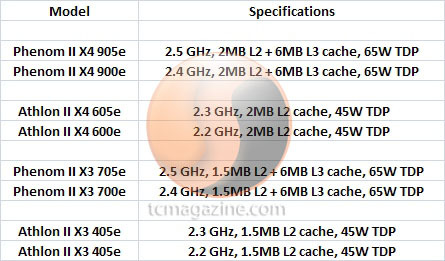 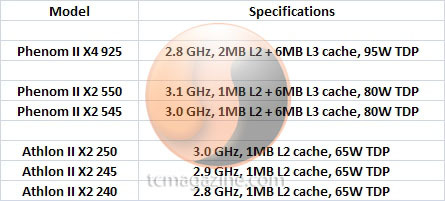 Sweet looking dual core's there, with 6mb L3 cache This post has been edited by cloudwan: May 9 2009, 10:58 AM |
|
|
May 9 2009, 11:32 AM
|

Senior Member
947 posts Joined: Nov 2005 From: Penang
|
Phenom II X4 925 is making me
|
|
|
|
|
|
May 9 2009, 11:52 AM
|

Senior Member
1,221 posts Joined: Mar 2006
|
sweet phenom x2
 |
|
|
May 9 2009, 12:07 PM
|

Senior Member
838 posts Joined: May 2008 From: Setiu, Terengganu
|
helo guys.
want to ask about mobo. i'm getting a crosshair II formula for my PII 940. but, theres someone offering me to trade with JW-790GX EXTREME. which one is better for OC? any of u can get above 3.5GHz using these mobo? |
|
|
May 9 2009, 01:00 PM
|
|
Senior Member
8,524 posts Joined: Jan 2003 From: The Jungle Of Pahang
|
QUOTE(azilazwa @ May 9 2009, 12:07 PM) helo guys. Well i heard nvidia chipset on d crosshair II isn't really a good combo with Phenom II ah,while the JW-790GX Extreme i heard is an ok oc'er mobo mostly in HK forums but here support is scarce coz not a lot of people are using it at the moment.. want to ask about mobo. i'm getting a crosshair II formula for my PII 940. but, theres someone offering me to trade with JW-790GX EXTREME. which one is better for OC? any of u can get above 3.5GHz using these mobo? Added on May 9, 2009, 1:02 pm QUOTE(byfc2010 @ May 9 2009, 11:32 AM) Phenom II X4 925 is making me Yup it's makin me tooThis post has been edited by cloudwan: May 9 2009, 01:02 PM |
|
|
May 9 2009, 01:15 PM
|
|
Senior Member
838 posts Joined: May 2008 From: Setiu, Terengganu
|
QUOTE(cloudwan @ May 9 2009, 01:00 PM) Well i heard nvidia chipset on d crosshair II isn't really a good combo with Phenom II ah,while the JW-790GX Extreme i heard is an ok oc'er mobo mostly in HK forums but here support is scarce coz not a lot of people are using it at the moment.. crosshair is not good combo & JW-790GX EXTREME just ok only?  too bad i oredi pay for the crosshair mobo. waiting for it to arrive only. then what mobo is good with PII 940? |
|
|
May 9 2009, 01:21 PM
|

Senior Member
1,070 posts Joined: Jan 2003 From: Ipoh
|
crosshair its not bad also.. my dream mobo bcoz of the SLI function.. but i prefer to wait till am3 board come out.
|
|
|
May 9 2009, 01:24 PM
|

Senior Member
944 posts Joined: Aug 2008 From: Planet Earth
|
hey everybody i just wanna find out what is the highest Ghz u have seen for 7850BE.. kinda curious..
|
|
|
May 9 2009, 01:26 PM
|
|
Senior Member
3,795 posts Joined: Nov 2008 From: Varies....
|
QUOTE(cloudwan @ May 9 2009, 10:55 AM) Last time i use Biostar TA790GX 128M with my 9850 the highest HTT i can go was 250mhz, here's the SS: owh..250 ya?» Click to show Spoiler - click again to hide... « To me they are very good budget boards ah Added on May 9, 2009, 10:58 amBy the way guys, new cpu's coming from AMD: » Click to show Spoiler - click again to hide... « Sweet looking dual core's there, with 6mb L3 cache i guess i will satisfy with my achievement... ckup la...bkn hardcore ocer pown sweet..hope will release fast..want 2cores...hope my mobo can support.. estimate price range will b wat a? This post has been edited by kuntawakaw: May 9 2009, 01:34 PM |
|
Topic ClosedOptions
|
| Change to: |  0.0312sec 0.0312sec
 0.33 0.33
 6 queries 6 queries
 GZIP Disabled GZIP Disabled
Time is now: 5th December 2025 - 12:31 AM |
 Quote
Quote
