Welcome Guest ( Log In | Register )

Bump Topic Topic Closed RSS Feed

Outline · [ Standard ] · Linear+

 AMD® Socket AM2&AM3 Overclocking V17, The secret is yet to be unleashed...

views
     
azilazwa
post May 9 2009, 12:07 PM

Enthusiast
*****
Senior Member
838 posts

Joined: May 2008
From: Setiu, Terengganu
helo guys.

want to ask about mobo. i'm getting a crosshair II formula for my PII 940. but, theres someone offering me to trade with JW-790GX EXTREME. which one is better for OC? any of u can get above 3.5GHz using these mobo?
azilazwa
post May 9 2009, 01:15 PM

Enthusiast
*****
Senior Member
838 posts

Joined: May 2008
From: Setiu, Terengganu
QUOTE(cloudwan @ May 9 2009, 01:00 PM)
Well i heard nvidia chipset on d crosshair II isn't really a good combo with Phenom II ah,while the JW-790GX Extreme i heard is an ok oc'er mobo mostly in HK forums but here support is scarce coz not a lot of people are using it at the moment.. sweat.gif
crosshair is not good combo & JW-790GX EXTREME just ok only? rclxub.gif
too bad i oredi pay for the crosshair mobo. waiting for it to arrive only. sad.gif then what mobo is good with PII 940?
azilazwa
post May 9 2009, 01:49 PM

Enthusiast
*****
Senior Member
838 posts

Joined: May 2008
From: Setiu, Terengganu
QUOTE(gamers maniac @ May 9 2009, 01:21 PM)
crosshair its not bad also.. my dream mobo bcoz of the SLI function.. but i prefer to wait till am3 board come out.
*
crosshair compare with JW-790GX extreme, which is better for oc?
azilazwa
post May 9 2009, 02:24 PM

Enthusiast
*****
Senior Member
838 posts

Joined: May 2008
From: Setiu, Terengganu
er,

what is "D"? n00b here. rclxub.gif
azilazwa
post May 9 2009, 02:38 PM

Enthusiast
*****
Senior Member
838 posts

Joined: May 2008
From: Setiu, Terengganu
QUOTE(mozact89 @ May 9 2009, 02:28 PM)
'D' is for DFI..
*
owh. d is for DFI. but, the price is out of my range edi. cry.gif
back to my question, crosshair @ jw 790gx extreme is better for oc?
azilazwa
post May 9 2009, 02:43 PM

Enthusiast
*****
Senior Member
838 posts

Joined: May 2008
From: Setiu, Terengganu
QUOTE(mozact89 @ May 9 2009, 02:40 PM)
i think the jw price oso around rm500++ rite..
*
retail price is 500+. but someone offer for 400+. i got my crosshair for 400+ also. thats why he want to trade with me. and i dont know which is better board for oc. help me guys.
azilazwa
post May 9 2009, 03:02 PM

Enthusiast
*****
Senior Member
838 posts

Joined: May 2008
From: Setiu, Terengganu
QUOTE(mozact89 @ May 9 2009, 02:48 PM)
from what i know, the 790 chipset is better for oc.. And the temp for nvdia chipset is higher than the 790 chipset.. This is from my experience.. Before this i use asus m2n68 which is nvidia chipset. using 9950be.. The temp for my cpu is around 50-60 at my asus.. but after change to biostar, the temp for cpu is around 39-45 ony..

Laen2 bleh tny sifu2 kat cni..
*
owh. thanx for da info. my temp now oso 50-60C using gigabyte 780 chipset. that y i want to change mobo. smile.gif
azilazwa
post May 9 2009, 03:08 PM

Enthusiast
*****
Senior Member
838 posts

Joined: May 2008
From: Setiu, Terengganu
QUOTE(XiuKeong @ May 9 2009, 03:04 PM)
So high meh? With custom cooler?
The last time I used this board along with my custom cooler, temp below 40 for full load.
*
ya lor. what bios r u using? i use F7. idle 52C and load can reach 70C. blink.gif
i'm using icewing 3. before this i use phenom 9550. temp around 40+ at load. huhu
azilazwa
post May 9 2009, 03:14 PM

Enthusiast
*****
Senior Member
838 posts

Joined: May 2008
From: Setiu, Terengganu
QUOTE(XiuKeong @ May 9 2009, 03:10 PM)
Iianm, should be F8 as it is the latest 1. Even when I use the default bios before update also not as high as yours.
*
F7 is enough to support PII 940 proc. F8a is to support AM3 proc. i dont know whats wrong. i tried change the paste, but the result is still same. then, i thought maybe my mobo cannot handle this proc. thats why i bought new mobo. sweat.gif
azilazwa
post May 9 2009, 04:13 PM

Enthusiast
*****
Senior Member
838 posts

Joined: May 2008
From: Setiu, Terengganu
QUOTE(mozact89 @ May 9 2009, 04:03 PM)
like me before.. when i use 9950be on biostar, the temp is good around 39-45.. but after changing to phenomII 940,  and using same mobo, the temp higher which is 50-55.. BUt when using Biostar Hadrware monitor, the temp is same like bios.. But if use 3rd party software, they show my temp so high..  Then bro ahkhoo said the mobo cant handle phenom II proc.. thats why i change to dfi..
*
owh. hopefully crosshair can handle PII 940. btw, whats ur temp after u change to dfi?
azilazwa
post May 9 2009, 04:19 PM

Enthusiast
*****
Senior Member
838 posts

Joined: May 2008
From: Setiu, Terengganu
QUOTE(mozact89 @ May 9 2009, 04:15 PM)
39-45.. around that..
*
nice temp. my temp rite now didnt allow me to oc this proc. when change mobo, hope can oc it. nod.gif
azilazwa
post May 16 2009, 11:29 AM

Enthusiast
*****
Senior Member
838 posts

Joined: May 2008
From: Setiu, Terengganu
helo,

wanna ask bout Vcore. which softwares give correct Vcore reading?

HW Monitor : 1.39V
CPU-Z : 1.325V

1 more. is it normal that PII temp idle 42C and load 53C? i'm using ccf and no OC yet.
azilazwa
post May 16 2009, 01:27 PM

Enthusiast
*****
Senior Member
838 posts

Joined: May 2008
From: Setiu, Terengganu
QUOTE(ktek @ May 16 2009, 12:32 PM)
in BIOS use AUTO or what value?
how about BIOS reading?
u running 3GHz, temperature is fine.
*
in bios i set all auto. dont have time to tweak it yet. huhu.
so, the temp is normal rite?
azilazwa
post May 17 2009, 11:04 AM

Enthusiast
*****
Senior Member
838 posts

Joined: May 2008
From: Setiu, Terengganu
guys,

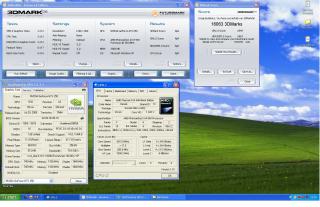
why do think my 3dmark06 score gets lower when i OC my proc?

@3.5GHz, 3dmark06 score: 12K+

@3.0GHz, 3dmark06 score: 14K+

i'm really confius now. rclxub.gif
azilazwa
post May 17 2009, 01:44 PM

Enthusiast
*****
Senior Member
838 posts

Joined: May 2008
From: Setiu, Terengganu
QUOTE(verdict @ May 17 2009, 11:18 AM)
Bro can you provide us with the SS...

CPU-Z SS before and after you oc your proc...

brows.gif  brows.gif  brows.gif
*
eh, when i OC it back to 3.5GHz and run 3dmark06, the score are higher. maybe my setting before was wrong. (still noob in OC) lol.

here are my result.

before:
Attached Image

after:
Attached Image

but, my temp during this program at load is 68C. kind da high is it? sweat.gif

This post has been edited by azilazwa: May 17 2009, 01:45 PM
azilazwa
post May 17 2009, 02:10 PM

Enthusiast
*****
Senior Member
838 posts

Joined: May 2008
From: Setiu, Terengganu
QUOTE(mozact89 @ May 17 2009, 02:02 PM)
bro, u try laa to oc it until 3.8.. and set the vcore to 1.425...

using my phenom x4 940, oc to 3.8ghz, using 9800gt, my score can get 14+++..

and then, u try to oc ur gc.. refer here..
http://forum.lowyat.net/topic/931444
*
whats ur temp when u able to get 3.8GHz?
my temp almost reach 70C. kind da scared to OC more. lol
azilazwa
post May 18 2009, 10:26 AM

Enthusiast
*****
Senior Member
838 posts

Joined: May 2008
From: Setiu, Terengganu
helo guys,

i used crosshair ii formula n i'm really new in OC. so i google how to oc my proc and found some setting. i used that setting n manage to get 3.5GHz stable. below are the setting.

(200 x 17.5) @ 1.425
VDDNB = +150mv
DDR2 = 2.1V
HT = 1.30V
k8 <-> NB = 1.8GHz
CPU - NB = mult 9

do i really need to set the VDDNB, HT, K8 <-> NB and CPU - NB value? as i know, we only need to adjust the multiplier and frequency.

i cant get 3.8GHz stable, although i increase the voltage up to 1.5V. any idea how to push my system more? or is it at limit? because my max temp during 3dmark06 is 66C. hmm.gif
azilazwa
post May 18 2009, 10:39 AM

Enthusiast
*****
Senior Member
838 posts

Joined: May 2008
From: Setiu, Terengganu
QUOTE(fuzore @ May 18 2009, 10:30 AM)
66c is kinda boiling to me... where did u get that temp is it from asus probe...
*
i used hardware monitor (HW monitor). yeah, i think its hot to. rclxub.gif

QUOTE(apis @ May 18 2009, 10:30 AM)
Ur cpu is quite hot.What's the max clock speed can u reach using default vcore?
*
er, i havent tried oc using default vcore. sweat.gif
azilazwa
post May 18 2009, 10:52 AM

Enthusiast
*****
Senior Member
838 posts

Joined: May 2008
From: Setiu, Terengganu
QUOTE(ah_khoo @ May 18 2009, 10:44 AM)
not mia, but down & out only... later make it to top 5 spammers not gud lor...  laugh.gif
got pc but w/ el cheapo spec, so can't post here bro, buat malu sajer...  blush.gif
what's d settin @ 3.8GHz? if still 19 * 200 then it mite not be ram realted, it's either temp/chip issue as d ram is hardly stressed if they were ran @ stock speed. 66'c onload won't do stability any gud, but still d capability of d chip and/or oc setting play bigger part in failure to achieve 3.8Ghz imo. sort out d temp issue 1st if possible.  smile.gif
66'c still ok for short bench i guess, but long term usage is a no-no for me...  nod.gif
*
yup, 200*19. so, is it because of the temp? i oredi used ccf + mx2. still not enough ka? lol. or maybe its the bios issue? i mean the bios version. i used the latest one oredi. hmm.gif

QUOTE(kuntawakaw @ May 18 2009, 10:47 AM)
sifu2..
is 3dmark really stress out cpu? if not...what will be the temp then if stress using prime...
if yes..ignore me.
*
er, i dont really know whether it stress the proc to the max or not. i used this because this is the only software i familiar with.

azilazwa
post May 18 2009, 11:25 AM

Enthusiast
*****
Senior Member
838 posts

Joined: May 2008
From: Setiu, Terengganu
QUOTE(-pWs- @ May 18 2009, 11:02 AM)
Use Prime95. smile.gif

-pWs-
*
how to use this software? just run and do the blend test? because when i run, the test seem stopping after about 5 minutes. "working thread stop".

QUOTE(ah_khoo @ May 18 2009, 11:04 AM)
no longer have d luxury to play w/ DFI bro sis...  cry.gif
can do a ss for 3.7GHz (prime) w/ all d details includin all d voltage & temp details?  smile.gif
*
will do for 3.5GHz and later for 3.7GHz.

QUOTE(fuzore @ May 18 2009, 11:17 AM)
well have u compare it with either bios temp or asus probe temp.... i dont trust other softwares other than asus own utilities programe such as asus suite or  probeII coz they dont give the right reading usually +5c of the actual temp....

like mine here look at the highlighted cpu temp diff....
[attachmentid=970434]
*
owh. i didnt even installed the asus ai suite. i thouht this HW monitor software give the correct value. will install the asus ai suite and check the temp. thanx bro notworthy.gif

2 Pages  1 2 >Top
Topic ClosedOptions
 

Change to:
| Lo-Fi Version
0.0390sec    0.61    7 queries    GZIP Disabled
Time is now: 11th December 2025 - 12:46 AM