Welcome Guest ( Log In | Register )

Bump Topic Topic Closed RSS Feed
123 Pages « < 22 23 24 25 26 > » Bottom

Outline · [ Standard ] · Linear+

 Pwnagetool/Redsn0w/Purple&Blackra1n Thread, 2G/3G/3GS Jailbreak[iPhone 3.1.2 is OUT]

views
     
windwong
post Jul 11 2009, 04:04 PM

Getting Started
**
Junior Member
196 posts

Joined: Nov 2008


QUOTE(teikwing @ Jul 11 2009, 12:39 AM)
are u using an officially-unlocked set?

for the bolded statement, yes you will need to redo the whole jailbreaking process and re-install Cydia apps. (if that's the "3rd party" that u meant)

just follow the guide provided on the first page. the whole restore/update and jailbreak process took me less than an hour. installing Cydia apps is an ease too if you have a stable/fast internet connection. smile.gif
*
yes im using a unlock set from Optus australia.

Thanks, will try to do the whole process again, thanks.

got problem guys.........jailbroken my 3G to OS3 today using redsnow. now try to put my celcom 3g simcard into the phone and trying to update things with Cydia but it shows no internet connection at all. it shows(Unable to Load, no internet connection)

The 3G signs and signal is there all time but just cannot connect to internet....last time when still in 2.2 everytime i need internet in iphone i just put my celcom 3G simcard and it work fine.......... what happen?!@!!!!!!
teikwing
post Jul 12 2009, 01:27 AM

Dah Macan?
*******
Senior Member
3,239 posts

Joined: Oct 2006
From: Sydney, NSW


QUOTE(windwong @ Jul 12 2009, 01:02 AM)
got problem guys.........jailbroken my 3G to OS3 today using redsnow. now try to put my celcom 3g simcard into the phone and trying to update things with Cydia but it shows no internet connection at all. it shows(Unable to Load, no internet connection)

The 3G  signs and signal is there all time but just cannot connect to internet....last time when still in 2.2 everytime i need internet in iphone i just put my celcom 3G simcard and it work fine.......... what happen?!@!!!!!!
*
tried with WiFi? make sure you get the APN settings for Celcom correctly.

ularsawa
post Jul 12 2009, 12:19 PM

New Member
*
Junior Member
28 posts

Joined: Nov 2008


aik...try to upgrade tonite but when press shift + restore can't find the firmware ipsw file ler. (2G)

when downloaded it, there is no extention but the icon showing it is an zip file. try to rename and add the .ipsw entention but still can't locate.

how come ah? tq for any feedback.

win XP SP3.

- after using different browser then I manage to download ipsw file @ 229 MB. will try JB the phone after finish dl.


AAAAARRRGGGHHHHH!!!! why it still in .rar format!!!!!!

Help needed.

i2G 2.2.1
WinXP
SP3
downloaded the firmware file from page 1 n iclarified oso = same result
last download, the size is 229MB. But when cut n paste to another folder 234MB (no changes made to the file)

huhuhuhu cry.gif

QUOTE(ularsawa @ Jul 11 2009, 10:01 PM)
aik...try to upgrade tonite but when press shift + restore can't find the firmware ipsw file ler. (2G)

when downloaded it, there is no extention but the icon showing it is an zip file. try to rename and add the .ipsw entention but still can't locate.

how come ah? tq for any feedback.

win XP SP3.

- after using different browser then I manage to download ipsw file @ 229 MB. will try JB the phone after finish dl.
AAAAARRRGGGHHHHH!!!!  why it still in .rar format!!!!!!

Help needed.

i2G 2.2.1
WinXP
SP3
downloaded the firmware file from page 1 n iclarified oso = same result
last download, the size is 229MB. But when cut n paste to another folder 234MB (no changes made to the file)

huhuhuhu cry.gif
*
where else can i get the ipsw file?
TSdavidgary73
post Jul 12 2009, 12:52 PM

Music Producer
Group Icon
VIP
4,903 posts

Joined: Jul 2008
@ularsawa

All you need to do is to delete the .rar and maintain the .ipsw extension.

Downloaded: iPhone1,2_3.0_7A341_Restore.ipsw.rar

After deleting the .rar: iPhone1,2_3.0_7A341_Restore.ipsw

Then proceed to restore.

ularsawa
post Jul 12 2009, 01:29 PM

New Member
*
Junior Member
28 posts

Joined: Nov 2008


QUOTE(davidgary73 @ Jul 12 2009, 12:52 PM)
@ularsawa

All you need to do is to delete the .rar and maintain the .ipsw extension.

Downloaded: iPhone1,2_3.0_7A341_Restore.ipsw.rar

After deleting the .rar: iPhone1,2_3.0_7A341_Restore.ipsw

Then proceed to restore.
*
sorry david,

but the downloaded file dun have any .rar ext nor .ipsw

it just simply iPhone1,2_3.0_7A341_Restore.

when i add .ipsw ext the file remain "winrar zip archive" format and not "Apple Device Software Update File"

howcome ahh? sigh!

downloaded and install from itunes. but now the problem on redsnowing it. the process still require this.
where itunes keep it downloaded file huh?

for those kind to e-mail me the file at zaharimr@gmail.com thank you bro. attempt several time edi download the file and the result still the same

This post has been edited by ularsawa: Jul 12 2009, 01:39 PM
ianho
post Jul 12 2009, 01:45 PM

Cucimangkoklife
Group Icon
VIP
15,705 posts

Joined: Mar 2005
From: Tg. Rambutan
Finally found some time to upgrade to V3 today. Wasted so much time trying to get redsnow to work with Vista Ultimate 64bit. Warghhhhhhhhhh!!!!!!!!!!!!!!!!

Whipped out the ol laptop with WinXp n everything got done within 5 minutes. DONT USE VISTA 64bit for redsnow! vmad.gif vmad.gif vmad.gif vmad.gif
teikwing
post Jul 12 2009, 01:52 PM

Dah Macan?
*******
Senior Member
3,239 posts

Joined: Oct 2006
From: Sydney, NSW


QUOTE(ularsawa @ Jul 12 2009, 01:29 PM)
sorry david,

but the downloaded file dun have any .rar ext nor .ipsw

it just simply iPhone1,2_3.0_7A341_Restore.

when i add .ipsw ext the file remain "winrar zip archive" format and not "Apple Device Software Update File"

howcome ahh? sigh!

downloaded and install from itunes. but now the problem on redsnowing it. the process still require this.
where itunes keep it downloaded file huh?

for those kind to e-mail me the file at zaharimr@gmail.com thank you bro. attempt several time edi download the file and the result still the same
*
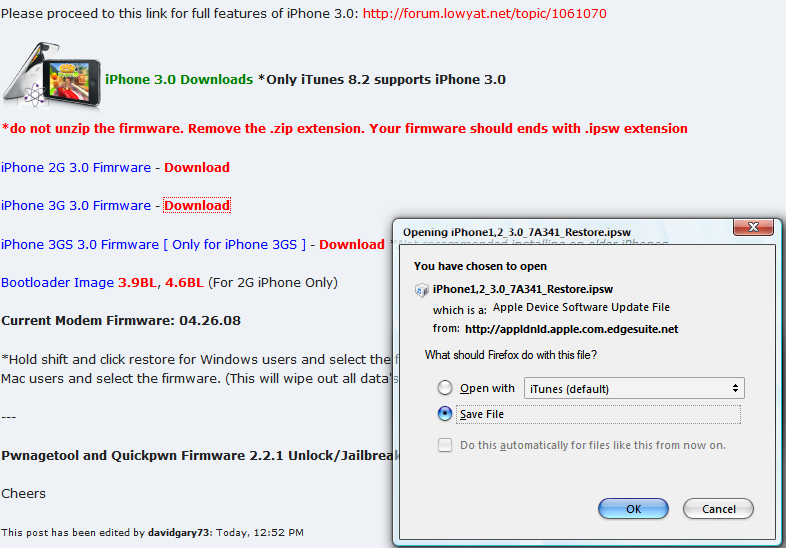
this link

QUOTE
iPhone 3G 3.0 Firmware  - Download


on the first post of http://forum.lowyat.net/topic/984406 should have worked. the original file extension is already in .ipsw. i don't have any problem using the file during the jailbreaking process previously.

This post has been edited by teikwing: Jul 12 2009, 01:59 PM
ularsawa
post Jul 12 2009, 01:57 PM

New Member
*
Junior Member
28 posts

Joined: Nov 2008


QUOTE(teikwing @ Jul 12 2009, 01:52 PM)
this link
on the first post of http://forum.lowyat.net/topic/984406 should have worked. the original file extension is already in .ipsw. i don't have any problem using the file during the jailbreaking process previously.
*
me oso confused now. just install chrome and try downloaded it using chrome. hmm.. the icon seems like the "itunes box" file and not in zip format. but just wait n see until it finish download. is it something to do with IE?

Thanx for the link but mine is i2G
teikwing
post Jul 12 2009, 01:59 PM

Dah Macan?
*******
Senior Member
3,239 posts

Joined: Oct 2006
From: Sydney, NSW


QUOTE(ularsawa @ Jul 12 2009, 01:57 PM)
me oso confused now. just install chrome and try downloaded it using chrome. hmm.. the icon seems like the "itunes box" file and not in zip format. but just wait n see until it finish download. is it something to do with IE?

Thanx for the link but mine is i2G
*
here's the screenshot:

» Click to show Spoiler - click again to hide... «


Note: if yours is i2G then the link should be the first one (iPhone 2G 3.0 - Download), iPhone1,1_3.0_7A341_Restore.ipsw

i'm on Firefox 3.0.11 btw.

This post has been edited by teikwing: Jul 12 2009, 02:06 PM
ularsawa
post Jul 12 2009, 02:04 PM

New Member
*
Junior Member
28 posts

Joined: Nov 2008


hmmm... i've downloaded it more than 5 times yesterday using that link. (the 2G instead)

maybe the issue is my IE browser. should use firefox instead....
Shoki
post Jul 12 2009, 03:24 PM

Look at all my stars!!
*******
Senior Member
2,139 posts

Joined: Oct 2007
Beware iPhone 3GS users that plan to use redsn0w to jb.. Many errors.. I suggest purplera1n.. Much more stable.. Now I'm from purplera1n > redsn0w > and now restoring back to purplera1n..

Redsn0w causes SB to crash.. Many other users also reported having errors using redsn0w at modmyi.com..
ularsawa
post Jul 12 2009, 07:30 PM

New Member
*
Junior Member
28 posts

Joined: Nov 2008


alas! 3.0!

darn you IE!!!

the ipsw file successfully downloaded using Chrome!

thanx all!
aliatome1
post Jul 13 2009, 07:29 PM

New Member
*
Junior Member
18 posts

Joined: Jan 2006


I just jailbreak my phone and unlocked my 3g phone using redsnow.At first it's ok can call & received call.But now I got a problem cause the other party sometimes can & cannot hear my voice.Is it because the jailbreak & software Ultrasnow or something wrong with my iPhone microphone.if something wrong with my phone where can I fix it.please really need ur help.Thanks
nokia2003
post Jul 13 2009, 07:53 PM

Look at all my stars!!
*******
Senior Member
5,786 posts

Joined: Nov 2007
From: VIC - The Place To Be


QUOTE(aliatome1 @ Jul 13 2009, 07:29 PM)
I just jailbreak my phone and unlocked my 3g phone using redsnow.At first it's ok can call & received call.But now I got a problem cause the other party sometimes can & cannot hear my voice.Is it because the jailbreak & software Ultrasnow or something wrong with my iPhone microphone.if something wrong with my phone where can I fix it.please really need ur help.Thanks
*
to eliminate that problem, simply try recording your own voice via apps (for example the native app, voice memos) and repeat this steo a few more times. if it works, then you can simply eliminate the prospects of a malfunction hardware.
Mickeyhon
post Jul 13 2009, 09:27 PM

Getting Started
**
Junior Member
122 posts

Joined: Oct 2008
From: Penang


i complete upgrade my iphone 2.2.1 to 3.0

i dint intend to upgrade my iphone 1...coz my iphone Stuck At Boot Logo

i hav no choice den restore n upgrade my iphone....
beavis68
post Jul 13 2009, 09:38 PM

I want my chicken Picata!! r u threatening me?
******
Senior Member
1,020 posts

Joined: Oct 2006
From: Lake Titicaca


QUOTE(Mickeyhon @ Jul 13 2009, 09:27 PM)
i complete upgrade my iphone 2.2.1 to 3.0

i dint intend to upgrade my iphone 1...coz my iphone Stuck At Boot Logo

i hav no choice den restore n upgrade my iphone....
*
after d upgrade anymore problem?
ularsawa
post Jul 13 2009, 10:10 PM

New Member
*
Junior Member
28 posts

Joined: Nov 2008


dear masters,

want to ask, how to attached any contact no. during sms? forgot to ask this thing from day 1.

tq
harmeet15
post Jul 13 2009, 10:13 PM

Winners don't make excuses
*******
Senior Member
2,729 posts

Joined: Oct 2005
From: Gotham City


QUOTE(ularsawa @ Jul 13 2009, 10:10 PM)
dear masters,

want to ask, how to attached any contact no. during sms? forgot to ask this thing from day 1.

tq
*
option one..copy paste
two, use bitesms and add contact..
three, mms da contact...:0
ularsawa
post Jul 13 2009, 10:15 PM

New Member
*
Junior Member
28 posts

Joined: Nov 2008


ooo... 3.0fw can... just found out


Added on July 13, 2009, 10:26 pmeh... option 1 can meh? copy/paste?

hold the number to copy ke? tried hold the no. but no copy command appear.

This post has been edited by ularsawa: Jul 13 2009, 10:26 PM
TSdavidgary73
post Jul 13 2009, 10:51 PM

Music Producer
Group Icon
VIP
4,903 posts

Joined: Jul 2008
QUOTE(ularsawa @ Jul 13 2009, 10:15 PM)
ooo... 3.0fw can... just found out


Added on July 13, 2009, 10:26 pmeh... option 1 can meh? copy/paste?

hold the number to copy ke? tried hold the no. but no copy command appear.
*
Go to the selected contact and select Edit. Select the number and then press hold. Select all and copy. Go to your Messages and then paste. Done.

Another way is to select your contact and look for "Share Contacts". This will send your contact via MMS.

123 Pages « < 22 23 24 25 26 > » Top
Topic ClosedOptions
 

Change to:
| Lo-Fi Version
0.0186sec    0.55    6 queries    GZIP Disabled
Time is now: 1st December 2025 - 03:28 PM