

whos the lucky damn bustard running the streamyx business??
Downtime The "extreme Screamyx slowdowns" Thread V3, Read 1st post to learn how to "post!"
Downtime The "extreme Screamyx slowdowns" Thread V3, Read 1st post to learn how to "post!"
|
|
 Apr 19 2009, 05:44 PM Apr 19 2009, 05:44 PM
|
 
Senior Member
1,930 posts Joined: Nov 2006 From: The Grid   
|
whos the lucky damn bustard running the streamyx business??
|
|
|
|
|
|
Apr 19 2009, 05:45 PM
|

Junior Member
476 posts Joined: Jan 2006 From: Batu Pahat
|
dunno y only torrent can run 90% of full speed then other all slow
wanna google also make me flip table wtf u f**king screamyx |
|
|
Apr 19 2009, 05:46 PM
|

Senior Member
2,330 posts Joined: Jan 2003 From: 192.168.1.2
|
QUOTE(andrew9292 @ Apr 19 2009, 05:14 PM) Pinging google.com.my [64.233.161.104] with 32 bytes of data: U can't get below 100ms to Australia !Reply from 64.233.161.104: bytes=32 time=265ms TTL=242 Reply from 64.233.161.104: bytes=32 time=253ms TTL=242 Reply from 64.233.161.104: bytes=32 time=255ms TTL=242 Reply from 64.233.161.104: bytes=32 time=251ms TTL=242 Ping statistics for 64.233.161.104: Packets: Sent = 4, Received = 4, Lost = 0 (0% loss), Approximate round trip times in milli-seconds: Minimum = 251ms, Maximum = 265ms, Average = 256ms C:\Documents and Settings\Andrew>ping google.com.au Pinging google.com.au [72.14.235.104] with 32 bytes of data: Reply from 72.14.235.104: bytes=32 time=66ms TTL=244 Reply from 72.14.235.104: bytes=32 time=65ms TTL=244 Reply from 72.14.235.104: bytes=32 time=67ms TTL=244 Reply from 72.14.235.104: bytes=32 time=69ms TTL=244 Ping statistics for 72.14.235.104: Packets: Sent = 4, Received = 4, Lost = 0 (0% loss), Approximate round trip times in milli-seconds: Minimum = 65ms, Maximum = 69ms, Average = 66ms as u can see from the address i ping (.my and .au) A PING TO GOOGLE MALAYSIA SLOWER THAN GOOGLE AUSTRALIA! LOL TMNUT...dioperasi oleh monyet yang mempunuyai otak saiz peNUT!  The lowest Australia site is around 110-130ms. as a result, 65ms maybe in HK or TW. 60.54.x.x getting 4Mb full speed in megaupload This post has been edited by Suk: Apr 19 2009, 05:47 PM |
|
|
Apr 19 2009, 05:50 PM
|

Senior Member
3,313 posts Joined: Jun 2008 From: Cheras ~ London WC1E 7HU~ Shenzhen
|
QUOTE(laguna1811 @ Apr 19 2009, 05:45 PM) dunno y only torrent can run 90% of full speed then other all slow same case, except that my google is fast wanna google also make me flip table wtf u f**king screamyx  Added on April 19, 2009, 5:51 pm QUOTE(jsc_tidus @ Apr 19 2009, 05:44 PM) whos the lucky damn bustard running the streamyx business?? u dunno ah? Prime Minister la..This post has been edited by KuzumiTaiga: Apr 19 2009, 05:51 PM |
|
|
Apr 19 2009, 05:54 PM
|

Junior Member
11 posts Joined: Apr 2009
|
QUOTE(jsc_tidus @ Apr 19 2009, 05:44 PM) whos the lucky damn bustard running the streamyx business?? I am, but since the routing for the entire infrastructure is overloaded, it is very slow.From what I can tell so far, there isn't much difference between business and non-business. We have the same DNS servers, the same Gateways, and I'm stuck in 115.x.x.x so it's not good. I miss my cable internet in US! |
|
|
Apr 19 2009, 05:58 PM
|
|
Senior Member
1,930 posts Joined: Nov 2006 From: The Grid
|
there must be a dude (or an old women) that handles those download/upload stuff for the whole m'sia..
|
|
|
|
|
|
Apr 19 2009, 06:15 PM
|

Senior Member
3,039 posts Joined: Jan 2003 From: Laputa
|
Welcome to the year of 1999.
Tarak Broadband, guna dial up. WE ARE ALWAYS 10 years behind. Aren't we? Added on April 19, 2009, 6:16 pmI would like to tell you all. My dial up more laju than broadband. WTF This post has been edited by wufei: Apr 19 2009, 06:16 PM |
|
|
Apr 19 2009, 06:17 PM
|

Senior Member
3,580 posts Joined: Oct 2007 From: everywhere in sabah
|
true.....realised opening google is slower than other website....it's super slow opening google lately
|
|
|
Apr 19 2009, 06:20 PM
|
|
Junior Member
11 posts Joined: Apr 2009
|
Looks to me like the main problem with Packet Loss / Low Throughput / High Ping is caused by overloaded gateways;
Tracing route to www.l.google.com [74.125.153.147] over a maximum of 30 hops: 1 <1 ms <1 ms <1 ms 192.168.1.1 2 * * 48 ms 219.93.218.176 3 58 ms 40 ms 15 ms 219.93.217.225 a 50ms ping to the first hop outside of my LAN is CRAZY! It should be more like 10ms or less. Having 2/3 packets dropped is CRAZY! as well. It's pretty obvious to me that the Switches / Routers are overloaded. This tells me that the entire infrastructure is overloaded. If only TMNuts would let me fix for them  |
|
|
Apr 19 2009, 06:54 PM
|
|
Senior Member
2,330 posts Joined: Jan 2003 From: 192.168.1.2
|
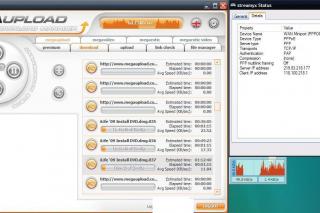
Below the is download result from megaupload.
Connection speed : 4Mbps streamyx package ( max speed 3.5Mbps aka 440kB/s) Test IP are 124.13 118.100 60.51 60.53 60.54 Please rate my post, if u think it is useful. This post has been edited by Suk: Apr 19 2009, 07:07 PM Attached thumbnail(s) 



|
|
|
Apr 19 2009, 07:25 PM
|

Senior Member
1,136 posts Joined: Jan 2009 
|
hey suk how u get those ip... u seems eazy to get wad ip u wan to..
|
|
|
Apr 19 2009, 07:32 PM
|

Junior Member
228 posts Joined: Mar 2008
|
u all more lucky, can surf, i cant connect today, im waiting 12 hour, damn
 |
|
|
Apr 19 2009, 08:27 PM
|

Senior Member
4,038 posts Joined: Aug 2005 From: Earth
|
My speed is dropping to half tonight at peak hours
|
|
|
|
|
|
Apr 19 2009, 08:32 PM
|

Junior Member
475 posts Joined: Apr 2007
|
QUOTE(Suk @ Apr 19 2009, 06:54 PM) Below the is download result from megaupload. Thanks, its quite useful. Sry can't vote, its disabled Connection speed : 4Mbps streamyx package ( max speed 3.5Mbps aka 440kB/s) Test IP are 124.13 118.100 60.51 60.53 60.54 Please rate my post, if u think it is useful.  |
|
|
Apr 19 2009, 08:32 PM
|

Senior Member
4,649 posts Joined: Aug 2008 From: Tāmaki Makaurau
|
QUOTE(ahpek26 @ Apr 19 2009, 08:32 PM) Thanks, its quite useful. Sry can't vote, its disabled Why cant?Just click 'good; or 'bad' on the right site. |
|
|
Apr 19 2009, 08:41 PM
|

Junior Member
298 posts Joined: Aug 2007 From: Port Dickson
|
QUOTE(Suk @ Apr 19 2009, 06:54 PM) Below the is download result from megaupload. i like ur post Connection speed : 4Mbps streamyx package ( max speed 3.5Mbps aka 440kB/s) Test IP are 124.13 118.100 60.51 60.53 60.54 Please rate my post, if u think it is useful. , hope other people like u not just show off their download speed  . . |
|
|
Apr 19 2009, 08:55 PM
|

Senior Member
955 posts Joined: Sep 2008 From: Petaling Jaya
|
QUOTE(piskin @ Apr 19 2009, 08:41 PM) i like ur post agreed, nice info there, but cant vote, it says; refining this tool, brb, haihz , hope other people like u not just show off their download speed .This post has been edited by andrew9292: Apr 19 2009, 08:59 PM |
|
|
Apr 19 2009, 09:03 PM
|

Junior Member
11 posts Joined: Mar 2009
|
streamyx not guarantee international speed,
people like me will switch from ddl to torrent and other p2p since we can connet to local peer for better speed, gateway or router or switch or whatever streamyx is using that is already overload become more overload, slower and slower web surfing. END. |
|
|
Apr 19 2009, 09:06 PM
|
|
Senior Member
955 posts Joined: Sep 2008 From: Petaling Jaya
|
QUOTE(Suk @ Apr 19 2009, 05:46 PM) U can't get below 100ms to Australia ! Appearantly i did. Now the pings to google.my and google.au same.The lowest Australia site is around 110-130ms. Ping to google around 60ms, to speedtest about 500ms. Altho these ping figures are bad, they will be good for torrents cause of 0% packet loss, in order for good torrenting u need an IP that give u international connection with almost no packet loss, pings up 600ms are acceptable. ***Packet Loss will determine your Top speed or overall speed....less packet loss = 100% transmission of data = full speed ***Ping Time will determine your Pick-up speed... higher ping = more time consumed for the data to get to your computer, so when u start torrent it will take some time to reach the max speed of your connection (providing the seeds are enough) (300 seeds and above) -Just imagine every packet of data is a public bus, more packet loss means when the bus leaves the station, it doesnt reach the next station. so u will get low speed, as the passenger (data) doesnt reach u. -And imagine ping as the time taken for a bus from one station to reach another station, the faster the ping, the faster the passenger (data) will reach you. -So, imagine a public bus (packet) carries 10kb of data, if the packet loss is high (100%), that 10kb of data will never reach you. if the packet loss is 0%, that 10kb of data will reach u. So, imagine 10 bus is fetching 100kb of data to your computer and your ip got no packet loss, jeng jeng jeng... 100kb of data of that in buses will reach u! -The ping determines how long it takes for the bus to go from your computer and come back. this affects pick up speed of torrent cos the higher the ping, the more time it is needed to initially connect to all your seeds/peers, thus making the first (insert a number here) minutes of your torrent rather slow speed. SO WHY IS YOUR WEBSITE DOWNLOAD SPEED STILL SLOW, This i still cant really find a layman's way of explaining...lemme think...  -U see, when u torrent, there are many seeds (other computers) sending u the data, so if u connect to 10 seeds, and each seed send u 10kb of data, u get 100kb of data. -With website, u get only one data source (like only 1 seed). Plus tmnet's ping is high. So it will take long time for that data to reach u. *If LOW ping, each data will reach u in this manner: (10kb).. 100ms delay...(10kb)....100ms delay....(5kb) 150ms delay.... total 350ms for 25kb of data to reach u *If HIGH ping: (10kb).. 600ms delay...(10kb)....600ms delay....(5kb) 600ms delay.... total 1.8 seconds for 25kb to reach u -Something like that lah...for torrent ping not really matter, if u got 10 seeds, each sending u 10kb, this is what it will look like: (10 x 10kb) ....600ms delay... (10 x 10kb) ...600ms delay.... total 200kb in 1.2 seconds... see the difference? hope this helps.... ; ) *my information/description is not 100% exact! nope, a packet doesnt carry 10kb of data, and no, the shape of a packet does not look like a bus! LOL. its just a really Malaysian way of explaining the internet. dont flame me ah ; ) peace. owh and please tell me if my info is wrong, thks This post has been edited by andrew9292: Apr 19 2009, 09:11 PM |
|
|
Apr 19 2009, 09:39 PM
|
|
Senior Member
3,313 posts Joined: Jun 2008 From: Cheras ~ London WC1E 7HU~ Shenzhen
|
I'm really into cursing streamyx now
|
|
Topic ClosedOptions
|
| Change to: |  0.0199sec 0.0199sec
 0.56 0.56
 6 queries 6 queries
 GZIP Disabled GZIP Disabled
Time is now: 4th December 2025 - 08:10 AM |
 Quote
Quote