

wah.... 18hours got 3 pages of Streamyx rants.
Downtime The "extreme Screamyx slowdowns" Thread V3, Read 1st post to learn how to "post!"
Downtime The "extreme Screamyx slowdowns" Thread V3, Read 1st post to learn how to "post!"
|
|
 Apr 8 2009, 03:47 PM Apr 8 2009, 03:47 PM
Return to original view | Post
#1
|
 
Senior Member
2,330 posts Joined: Jan 2003 From: 192.168.1.2   
|
wah.... 18hours got 3 pages of Streamyx rants.
|
|
|
|
|
|
Apr 8 2009, 03:51 PM
Return to original view | Post
#2
|
|
Senior Member
2,330 posts Joined: Jan 2003 From: 192.168.1.2
|
FYI,
Asia America Gateway is going to launch soon. It will give TM extra bandwidth. but... i think also no different one. |
|
|
Apr 10 2009, 12:25 PM
Return to original view | Post
#3
|
|
Senior Member
2,330 posts Joined: Jan 2003 From: 192.168.1.2
|
QUOTE(dplaya @ Apr 10 2009, 10:55 AM) By the way, does anyone of you doesn't requires to pay for the rental line if just using streamyx (without making calls out)? Yes, for my uncle Please exclude streamyx combo.  He applied for TM Home Prepaid which was during promotion about 1 month only. However, TM claim TM Home prepaid can not apply Streamyx, Just that TM doesn't want u to apply Home Prepaid just for streamyx. They force u to pay rent. |
|
|
Apr 15 2009, 07:00 PM
Return to original view | Post
#4
|
|
Senior Member
2,330 posts Joined: Jan 2003 From: 192.168.1.2
|
everything is extremely slow...........................................................
apply for broadband just for Email and Chat ? I can't stream youtube and other tubes. SLOW!~~~~ |
|
|
Apr 17 2009, 04:16 PM
Return to original view | Post
#5
|
|
Senior Member
2,330 posts Joined: Jan 2003 From: 192.168.1.2
|
QUOTE(ablack @ Apr 17 2009, 03:57 PM) damm i ve tried.... 124.xxx 60.50 , 60.51 , 60.54 ..... 118.xxx ip wah... 5Mbps connection.all still shit connections..... still gettin dl from RS at 4kb -10kb..... totally fark tup.... waste my money for RS acc n payin for screamyx... still tryin to connect to 60.49 ip which someone mention in the post earlier    |
|
|
Apr 18 2009, 03:14 AM
Return to original view | Post
#6
|
|
Senior Member
2,330 posts Joined: Jan 2003 From: 192.168.1.2
|
QUOTE(ander7724 @ Apr 18 2009, 12:23 AM) yup... you're right i also suspect something wrong with my line or the port see the print screen if u are using 4Mbps, please tell the Technician lower the DSLAM speed to 4096kbps[attachmentid=912383] i told the technician many time there's something wrong with the downstream margin as you can see in the pic... whenever the reading is high like this sure my connection sucks or got frequent disconnection unless i do a reboot of my modem. if u are using 1Mbps, pelase tell the technician to lower the DSLAM speed to 2048kbps.. then u will fix the problem.... |
|
|
|
|
|
Apr 18 2009, 11:25 AM
Return to original view | Post
#7
|
|
Senior Member
2,330 posts Joined: Jan 2003 From: 192.168.1.2
|
SLOW~~~
bek tahan.. |
|
|
Apr 18 2009, 12:44 PM
Return to original view | Post
#8
|
|
Senior Member
2,330 posts Joined: Jan 2003 From: 192.168.1.2
|
TM is going to offer FTTH
http://www.tmcareer.com.my/job_detailsnApply.asp?jobid=363 IPTV is launching soon : http://my.jobstreet.com/jobs/2009/4/defaul...805229.htm?fr=J |
|
|
Apr 19 2009, 08:25 AM
Return to original view | Post
#9
|
|
Senior Member
2,330 posts Joined: Jan 2003 From: 192.168.1.2
|
Pinging www.l.google.com [74.125.153.99] with 32 bytes of da
Reply from 74.125.153.99: bytes=32 time=110ms TTL=246 Reply from 74.125.153.99: bytes=32 time=73ms TTL=246 Reply from 74.125.153.99: bytes=32 time=141ms TTL=246 Reply from 74.125.153.99: bytes=32 time=246ms TTL=246 Reply from 74.125.153.99: bytes=32 time=110ms TTL=246 Reply from 74.125.153.99: bytes=32 time=88ms TTL=246 Reply from 74.125.153.99: bytes=32 time=80ms TTL=246 Reply from 74.125.153.99: bytes=32 time=80ms TTL=246 Reply from 74.125.153.99: bytes=32 time=68ms TTL=246 Reply from 74.125.153.99 reporting in KL connecting to cjb03: This post has been edited by Suk: Apr 19 2009, 08:25 AM |
|
|
Apr 19 2009, 05:46 PM
Return to original view | Post
#10
|
|
Senior Member
2,330 posts Joined: Jan 2003 From: 192.168.1.2
|
QUOTE(andrew9292 @ Apr 19 2009, 05:14 PM) Pinging google.com.my [64.233.161.104] with 32 bytes of data: U can't get below 100ms to Australia !Reply from 64.233.161.104: bytes=32 time=265ms TTL=242 Reply from 64.233.161.104: bytes=32 time=253ms TTL=242 Reply from 64.233.161.104: bytes=32 time=255ms TTL=242 Reply from 64.233.161.104: bytes=32 time=251ms TTL=242 Ping statistics for 64.233.161.104: Packets: Sent = 4, Received = 4, Lost = 0 (0% loss), Approximate round trip times in milli-seconds: Minimum = 251ms, Maximum = 265ms, Average = 256ms C:\Documents and Settings\Andrew>ping google.com.au Pinging google.com.au [72.14.235.104] with 32 bytes of data: Reply from 72.14.235.104: bytes=32 time=66ms TTL=244 Reply from 72.14.235.104: bytes=32 time=65ms TTL=244 Reply from 72.14.235.104: bytes=32 time=67ms TTL=244 Reply from 72.14.235.104: bytes=32 time=69ms TTL=244 Ping statistics for 72.14.235.104: Packets: Sent = 4, Received = 4, Lost = 0 (0% loss), Approximate round trip times in milli-seconds: Minimum = 65ms, Maximum = 69ms, Average = 66ms as u can see from the address i ping (.my and .au) A PING TO GOOGLE MALAYSIA SLOWER THAN GOOGLE AUSTRALIA! LOL TMNUT...dioperasi oleh monyet yang mempunuyai otak saiz peNUT! The lowest Australia site is around 110-130ms. as a result, 65ms maybe in HK or TW. 60.54.x.x getting 4Mb full speed in megaupload This post has been edited by Suk: Apr 19 2009, 05:47 PM |
|
|
Apr 19 2009, 06:54 PM
Return to original view | Post
#11
|
|
Senior Member
2,330 posts Joined: Jan 2003 From: 192.168.1.2
|
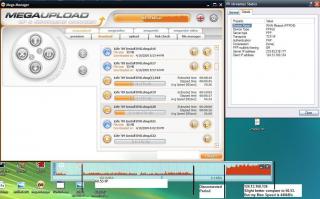
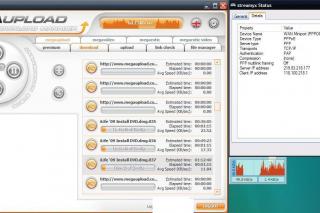
Below the is download result from megaupload.
Connection speed : 4Mbps streamyx package ( max speed 3.5Mbps aka 440kB/s) Test IP are 124.13 118.100 60.51 60.53 60.54 Please rate my post, if u think it is useful. This post has been edited by Suk: Apr 19 2009, 07:07 PM Attached thumbnail(s) 


|
|
|
Apr 19 2009, 10:47 PM
Return to original view | Post
#12
|
|
Senior Member
2,330 posts Joined: Jan 2003 From: 192.168.1.2
|
QUOTE(ablack @ Apr 19 2009, 10:39 PM) anyone here hav their RS n MU connections up ? or it is still slugish SLOW please read my post in # 972i am now on 60.51 ip which is ok for browsin.....youtube seems ok.... but RS still fark tup..... been tryin for 2 days to get the 60.48 ip.... but cant get... alwiz landed up wif 124.xx , 115.xx , 118.101 , 60.50 , 60.51 any ip seems to werk well wif RS pls let us know..... thanx..... |
|
|
Apr 21 2009, 12:21 AM
Return to original view | Post
#13
|
|
Senior Member
2,330 posts Joined: Jan 2003 From: 192.168.1.2
|
MY GOD..... SLOWWWWWW
|
|
|
|
|
|
Apr 22 2009, 08:41 AM
Return to original view | Post
#14
|
|
Senior Member
2,330 posts Joined: Jan 2003 From: 192.168.1.2
|
QUOTE(ablack @ Apr 21 2009, 11:01 PM) What is the problem: damm farkin slow download speed to RS , MU n etc use 60.54.x.x for Megaupload.IP Range:124.82 on a 4mb package.... Area: kelana jaya State: selangor When this problem started: since end of march.... n i tot my comp got hit by virus or worms....but it is not.... speed test show on 124.82.xx.xx  browsing ok....downloads from microsoft , google or even yahoo is superfast up to 700+kbps but others r damm slow to the extend of 2kbps or even lower....n some died half way thru dl.... unfinished dl .... SHIT !! |
|
|
Apr 22 2009, 08:58 AM
Return to original view | Post
#15
|
|
Senior Member
2,330 posts Joined: Jan 2003 From: 192.168.1.2
|
Any Leader wanted to organize
SLOW TM CONNECTION RALLY......... absolute i will join |
|
|
Apr 22 2009, 04:30 PM
Return to original view | Post
#16
|
|
Senior Member
2,330 posts Joined: Jan 2003 From: 192.168.1.2
|
spam their Network Operationg Centre who in charge of Network Bandwidth and Routing..
peering@tm.net.my route@tm.net.my ceo@tm.net.my |
|
|
Apr 22 2009, 05:12 PM
Return to original view | Post
#17
|
|
Senior Member
2,330 posts Joined: Jan 2003 From: 192.168.1.2
|
after 4.15- 4.40pm..
all so-called "best IP to Megaupload" is getting 50kB/s now testing all IP range again.. wTF TM I am going to spam their Network Department now.... ( NOC ) Guys please spam their email too.... At least show them we are very angry with their slow connect now... I bek tahan liao... going to C4 Menara TM now. peering@tm.net.my routing@tm.net.my hirule@tm.net.my anieayop@tm.net.my ceo@tm.net.my ainols@tm.net.my +603-8317 2500 come on guys, please spam their email address. Those ppl are incharge of international bandwidth. This post has been edited by Suk: Apr 22 2009, 05:45 PM |
|
|
Apr 22 2009, 05:30 PM
Return to original view | Post
#18
|
|
Senior Member
2,330 posts Joined: Jan 2003 From: 192.168.1.2
|
QUOTE(roy_pck @ Apr 22 2009, 05:26 PM) guys, i just got this reply from tm: that is auto generate email... I on medical leave today, 22/04/2009 and a limited access to e-mail. Kindly contact IP NOC at 1-800-88-2646 or +603-8317 2500 for network matters or my assistant Ms Nurulhusna Mustofa at +60 (13) 730 3070 for other matters or e-mail at nurulhusna@tm.com.my the number is stated there. so you know what to do now  SPAM KAO THEM!!!!!!!!!!!!!!!!!!!!!!!!!  when u send to peering@tm.net.my and routing@tm.net.my all the network engineer will got the emails.. so keep on spaming. let them aware they really need to upgrade now. Total bandwidth 150Gbps is not enough to serve 1.4million streamyx user. |
|
|
Apr 22 2009, 05:43 PM
Return to original view | Post
#19
|
|
Senior Member
2,330 posts Joined: Jan 2003 From: 192.168.1.2
|
QUOTE(roy_pck @ Apr 22 2009, 05:37 PM) i called to +603-8317 2500 and managed to shoot kao their NOC team. they said they cant do anything without report from CS system (despite i have made so many reports to them). this simply implies their 100 totally not efficient!!! WoW...... U shd tell them, to upgrade their international link.. Every streamyx user is suffering with slow speed boardband... It's very very slow..... ask them transfer the line to network manager. give them pressure and keeping calling and spamming their NOC. Force them to have meeting with financial department and allocate more fund into NOC department and upgrade their international link.. From the previous budget planned. TM is upgrading 50Gbps every year only. But we have to know, They are keep pushing their sales team and invite more users and offering 4Mbps connection.. As a result, 50Gbps is not sufficient.. QUOTE(oOB206 @ Apr 22 2009, 05:40 PM) im on 60.54.xxx.xxx Yeah, After 4pm+ now IP 60.54 is getting 50kB/s to megaupload.. i still got 1 file to download.... see my speed 50kB/s also no mood liao .megaupload has stop moving.... but im happy enough to get full speed since yesterday till just now. i got my 10GB for 24 hour  This post has been edited by Suk: Apr 22 2009, 05:46 PM |
|
|
Apr 22 2009, 06:57 PM
Return to original view | Post
#20
|
|
Senior Member
2,330 posts Joined: Jan 2003 From: 192.168.1.2
|
QUOTE(Omochao @ Apr 22 2009, 06:36 PM) *sighs* Well, Why I pay RM160 and I need to configure so many thing. You guys just rant and rant on.....can you guys do anything like reading other threads in how to fix(temporarily) the slowness????? Some users have posted like ...."use VPN"(unless you can pay for bolehVPN)....use proxy(free and some do need to pay) So here's my cookie to all of you.... Go to this site http://www.xroxy.com/proxylist.php NEXT, Choose the proxies (always use proxy serves closes to our country,eg.Thailand,Singapore,Vietnam,Indonesia or which ever closes.) Then set the proxies in your web browser,if you do not know how to,congrats...go and read a book or something before coming back here again to set up. Warning though,some proxies are not fully functioning,even though you can use, but they may not be able to load certain websites. So please use others. (for experts,you do know the advantage and disadvantage of proxies right? use at your own risks) AND ONE FINAL NOTE...don't ask which is the best proxies..there's no such thing! why? sometimes it may go down or up...it depends...so don't blame me for what Sh*t you faced during using it...use it at your own risk.. Now go and set it up...and you'll be having a nice day...you can even configured it in ur torrent programs to download at faster speeds. What I want is, a good international bandwidth provide by TM . |
|
Topic ClosedOptions
|
| Change to: |  0.0203sec 0.0203sec
 0.44 0.44
 7 queries 7 queries
 GZIP Disabled GZIP Disabled
Time is now: 3rd December 2025 - 06:19 PM |
 Quote
Quote