Welcome Guest ( Log In | Register )

Bump Topic Topic Closed RSS Feed
125 Pages « < 70 71 72 73 74 > » Bottom

Outline · [ Standard ] · Linear+

Downtime The "extreme Screamyx slowdowns" Thread V3, Read 1st post to learn how to "post!"

views
     
gsan
post Apr 25 2009, 04:55 PM

Electrical RF Engineer
*******
Senior Member
2,471 posts

Joined: Jan 2003

QUOTE(miahahaha @ Apr 25 2009, 02:58 PM)
What is the problem : none (just updating)
IP Range : 60.55.x.x
Area: Kuching
State: Sarawak
When this problem started: Yesterday night.

Just giving some update with my speed line...started last night, my speed seems to a bit fast than normal..can load international page very fast, just like it should..this morning & also the time i'm posting now the speed is still can be consider fast...maybe it just me but i think TM fixed my line already, mail them lots of complaint & this is the result.. rclxms.gif
*
60.55, new ip range?
Suk
post Apr 25 2009, 05:01 PM

Look at all my stars!!
*******
Senior Member
2,330 posts

Joined: Jan 2003
From: 192.168.1.2


Well the joy only last for a day ?
matt_rix
post Apr 25 2009, 05:06 PM

Regular
******
Senior Member
1,680 posts

Joined: Nov 2004

fast speed now...huhuhu
chayjoon
post Apr 25 2009, 05:36 PM

New Member
*
Junior Member
14 posts

Joined: Dec 2006
From: Puchong, Selangor.


Anyone playing World of Warcraft experiencing lag?
laguna1811
post Apr 25 2009, 05:37 PM

Casual
***
Junior Member
476 posts

Joined: Jan 2006
From: Batu Pahat


QUOTE(matt_rix @ Apr 25 2009, 05:06 PM)
fast speed now...huhuhu
*
what ip and which area r u?
speed damn slow today and often dc... after dc damn hard to connect back to internet
havent experienced any fast ip yet... damn screamyx
Chanwsan
post Apr 25 2009, 05:47 PM

सोहम
******
Senior Member
1,406 posts

Joined: Dec 2004
From: Living Hell


hang our appetite..dang
sohlican
post Apr 25 2009, 05:57 PM

Casual
***
Junior Member
340 posts

Joined: Jan 2003
From: Malaysia


After 3 weeks, my speed came back for the first time.

user posted image
shicky
post Apr 25 2009, 06:05 PM

Getting Started
**
Junior Member
61 posts

Joined: Dec 2004


internet speed, so far so good.
i hope it will stay this way for sometimes
sexy93
post Apr 25 2009, 06:51 PM

Casual
***
Junior Member
304 posts

Joined: May 2008
From: Here to there!


fast speed now...but connect to US a bit slow..

This post has been edited by sexy93: Apr 25 2009, 06:51 PM
shitmyx
post Apr 25 2009, 06:57 PM

Getting Started
**
Junior Member
185 posts

Joined: Apr 2009
From: Bolehland
today line ok lo. P2P@ 300KB/s++ brows.gif brows.gif
Afoxisko
post Apr 25 2009, 07:12 PM

New Member
*
Junior Member
26 posts

Joined: Dec 2005


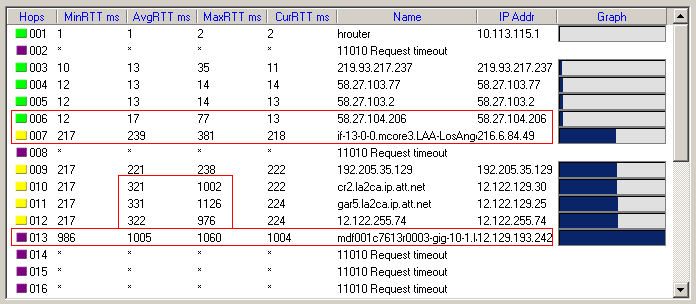
Guys it might not even be TM's fault this time.


Added on April 25, 2009, 7:22 pmTraceroute to World of Warcraft Dragonblight Realm:
user posted image

006 -> 007 = Malaysia to US. Looks like a minor jump to 200ms.

010 to 012 seemed to get one sample that was 1k ms latency, but seems to average just fine at 260ms after 100 or so pings.

012 to 013 Huge jump in latency here. <--- Problem lies here!

This post has been edited by Afoxisko: Apr 25 2009, 07:24 PM
chayjoon
post Apr 25 2009, 07:39 PM

New Member
*
Junior Member
14 posts

Joined: Dec 2006
From: Puchong, Selangor.


QUOTE(Afoxisko @ Apr 25 2009, 07:12 PM)
Guys it might not even be TM's fault this time.


Added on April 25, 2009, 7:22 pmTraceroute to World of Warcraft Dragonblight Realm:
user posted image

006 -> 007 = Malaysia to US. Looks like a minor jump to 200ms.

010 to 012 seemed to get one sample that was 1k ms latency, but seems to average just fine at 260ms after 100 or so pings.

012 to 013 Huge jump in latency here. <--- Problem lies here!
*
That's why i'm lagging badly in WoW.
reeyon
post Apr 25 2009, 08:46 PM

On my way
****
Senior Member
692 posts

Joined: Dec 2004
From: Johor Bahru


user posted image
andrew9292
post Apr 25 2009, 08:56 PM

-/Livin' On A Prayer/-
*****
Senior Member
955 posts

Joined: Sep 2008
From: Petaling Jaya


QUOTE(Afoxisko @ Apr 25 2009, 07:12 PM)
Guys it might not even be TM's fault this time.


Added on April 25, 2009, 7:22 pmTraceroute to World of Warcraft Dragonblight Realm:
user posted image

006 -> 007 = Malaysia to US. Looks like a minor jump to 200ms.

010 to 012 seemed to get one sample that was 1k ms latency, but seems to average just fine at 260ms after 100 or so pings.

012 to 013 Huge jump in latency here. <--- Problem lies here!
*
TRACEROUTE NOT ACCURATE WAN LA....

TraceRoute to 74.125.91.104 [google.com.my]
Hop (ms) (ms) (ms) IP Address Host name
1 25 7 7 72.249.134.177 -
2 7 6 6 8.9.232.73 xe-5-3-0.edge3.dallas1.level3.net
3 77 74 46 4.68.19.2 ge-0-3-0-69.bbr2.dallas1.level3.net
4 26 26 27 64.159.1.46 ae-0-0.bbr2.atlanta1.level3.net
5 8 27 29 4.68.103.34 ae-21-52.car1.atlanta1.level3.net
6 27 26 26 4.71.20.22 google-inc.car1.atlanta1.level3.net
7 27 27 32 72.14.239.137 -
8 35 35 34 209.85.254.226 -
9 34 34 34 209.85.254.239 -
10 44 39 51 209.85.240.25 -
11 34 34 44 74.125.91.104 qy-in-f104.google.com

Trace complete

--------------

C:\Documents and Settings\Andrew>ping www.google.com.my

Pinging www.google.com [64.233.189.104] with 32 bytes of data:

Reply from 64.233.189.104: bytes=32 time=40ms TTL=247
Reply from 64.233.189.104: bytes=32 time=41ms TTL=247

Ping statistics for 64.233.189.104:
Packets: Sent = 4, Received = 4, Lost = 0 (0% loss),
Approximate round trip times in milli-seconds:
Minimum = 40ms, Maximum = 41ms, Average = 40ms

See?... traceroute there supposed to mean i will take 400+ms to google... but ping says 40 only oni...

This post has been edited by andrew9292: Apr 25 2009, 08:59 PM
TSfabianz03
post Apr 25 2009, 09:00 PM

Look at all my stars!!
*******
Senior Member
4,649 posts

Joined: Aug 2008
From: Tāmaki Makaurau

CODE
C:\Documents and Settings\F@bi@n>ping google.com

Pinging google.com [209.85.171.100] with 32 bytes of data:

Reply from 209.85.171.100: bytes=32 time=236ms TTL=234
Reply from 209.85.171.100: bytes=32 time=263ms TTL=235
Reply from 209.85.171.100: bytes=32 time=216ms TTL=234
Reply from 209.85.171.100: bytes=32 time=234ms TTL=234

Ping statistics for 209.85.171.100:
   Packets: Sent = 4, Received = 4, Lost = 0 (0% loss),
Approximate round trip times in milli-seconds:
   Minimum = 216ms, Maximum = 263ms, Average = 237ms


andrew9292
post Apr 25 2009, 09:02 PM

-/Livin' On A Prayer/-
*****
Senior Member
955 posts

Joined: Sep 2008
From: Petaling Jaya


QUOTE(fabianz03 @ Apr 25 2009, 09:00 PM)
CODE
C:\Documents and Settings\F@bi@n>ping google.com

Pinging google.com [209.85.171.100] with 32 bytes of data:

Reply from 209.85.171.100: bytes=32 time=236ms TTL=234
Reply from 209.85.171.100: bytes=32 time=263ms TTL=235
Reply from 209.85.171.100: bytes=32 time=216ms TTL=234
Reply from 209.85.171.100: bytes=32 time=234ms TTL=234

Ping statistics for 209.85.171.100:
   Packets: Sent = 4, Received = 4, Lost = 0 (0% loss),
Approximate round trip times in milli-seconds:
   Minimum = 216ms, Maximum = 263ms, Average = 237ms

*
use google.com.MY to google, its faster, or u can use google.com.AU to google...should be faster also
sixfooter
post Apr 25 2009, 09:06 PM

Getting Started
**
Junior Member
247 posts

Joined: Oct 2005
From: Anywhere


I was playing WoW around 10:00am to 3:00pm and it lags suddenly. The latency reach up to 3,000ms from 600ms. That time I was connected at 60.48.x.x.

This post has been edited by sixfooter: Apr 25 2009, 09:07 PM
chayjoon
post Apr 25 2009, 09:08 PM

New Member
*
Junior Member
14 posts

Joined: Dec 2006
From: Puchong, Selangor.


QUOTE(sixfooter @ Apr 25 2009, 09:06 PM)
I was playing WoW around 10:00am to 3:00pm and it lags suddenly. The latency reach up to 3,000ms from 600ms. That time I was connected at 60.48.x.x.
*
Same here. Can't even play now. Keep getting disconnected.
TSfabianz03
post Apr 25 2009, 09:11 PM

Look at all my stars!!
*******
Senior Member
4,649 posts

Joined: Aug 2008
From: Tāmaki Makaurau
CODE

C:\Documents and Settings\F@bi@n>ping google.com.my

Pinging google.com.my [64.233.161.104] with 32 bytes of data:

Reply from 64.233.161.104: bytes=32 time=301ms TTL=237
Reply from 64.233.161.104: bytes=32 time=283ms TTL=236
Reply from 64.233.161.104: bytes=32 time=276ms TTL=237
Reply from 64.233.161.104: bytes=32 time=275ms TTL=237

Ping statistics for 64.233.161.104:
   Packets: Sent = 4, Received = 4, Lost = 0 (0% loss),
Approximate round trip times in milli-seconds:
   Minimum = 275ms, Maximum = 301ms, Average = 283ms


lol?

CODE

C:\Documents and Settings\F@bi@n>ping google.com.au

Pinging google.com.au [74.125.91.104] with 32 bytes of data:

Reply from 74.125.91.104: bytes=32 time=297ms TTL=234
Reply from 74.125.91.104: bytes=32 time=321ms TTL=233
Reply from 74.125.91.104: bytes=32 time=287ms TTL=234
Reply from 74.125.91.104: bytes=32 time=327ms TTL=234

Ping statistics for 74.125.91.104:
   Packets: Sent = 4, Received = 4, Lost = 0 (0% loss),
Approximate round trip times in milli-seconds:
   Minimum = 287ms, Maximum = 327ms, Average = 308ms


Different people, different IP, different IP, different line quality, different quality, different speed.
Thats what i think. =)


andrew9292
post Apr 25 2009, 09:15 PM

-/Livin' On A Prayer/-
*****
Senior Member
955 posts

Joined: Sep 2008
From: Petaling Jaya


QUOTE(fabianz03 @ Apr 25 2009, 09:11 PM)
CODE

C:\Documents and Settings\F@bi@n>ping google.com.my

Pinging google.com.my [64.233.161.104] with 32 bytes of data:

Reply from 64.233.161.104: bytes=32 time=301ms TTL=237
Reply from 64.233.161.104: bytes=32 time=283ms TTL=236
Reply from 64.233.161.104: bytes=32 time=276ms TTL=237
Reply from 64.233.161.104: bytes=32 time=275ms TTL=237

Ping statistics for 64.233.161.104:
   Packets: Sent = 4, Received = 4, Lost = 0 (0% loss),
Approximate round trip times in milli-seconds:
   Minimum = 275ms, Maximum = 301ms, Average = 283ms


lol?

CODE

C:\Documents and Settings\F@bi@n>ping google.com.au

Pinging google.com.au [74.125.91.104] with 32 bytes of data:

Reply from 74.125.91.104: bytes=32 time=297ms TTL=234
Reply from 74.125.91.104: bytes=32 time=321ms TTL=233
Reply from 74.125.91.104: bytes=32 time=287ms TTL=234
Reply from 74.125.91.104: bytes=32 time=327ms TTL=234

Ping statistics for 74.125.91.104:
   Packets: Sent = 4, Received = 4, Lost = 0 (0% loss),
Approximate round trip times in milli-seconds:
   Minimum = 287ms, Maximum = 327ms, Average = 308ms


Different people, different IP, different IP, different line quality, different quality, different speed.
Thats what i think. =)
*
-------------------------------------------

Microsoft Windows XP [Version 5.1.2600]
© Copyright 1985-2001 Microsoft Corp.

C:\Documents and Settings\Andrew>ping google.com

Pinging google.com [74.125.45.100] with 32 bytes of data:

Reply from 74.125.45.100: bytes=32 time=250ms TTL=242
Reply from 74.125.45.100: bytes=32 time=249ms TTL=242

Ping statistics for 74.125.45.100:
Packets: Sent = 4, Received = 4, Lost = 0 (0% loss),
Approximate round trip times in milli-seconds:
Minimum = 249ms, Maximum = 250ms, Average = 249ms

C:\Documents and Settings\Andrew>ping www.google.com

Pinging www.l.google.com [64.233.189.99] with 32 bytes of data:

Reply from 64.233.189.99: bytes=32 time=41ms TTL=247
Reply from 64.233.189.99: bytes=32 time=40ms TTL=247
Reply from 64.233.189.99: bytes=32 time=42ms TTL=247
Reply from 64.233.189.99: bytes=32 time=41ms TTL=247

Ping statistics for 64.233.189.99:
Packets: Sent = 4, Received = 4, Lost = 0 (0% loss),
Approximate round trip times in milli-seconds:
Minimum = 40ms, Maximum = 42ms, Average = 41ms

WTF...put WWW in front got so much different...haihz dono what to say .... tm is damn good in doing shit like this ==

This post has been edited by andrew9292: Apr 25 2009, 09:16 PM

125 Pages « < 70 71 72 73 74 > » Top
Topic ClosedOptions
 

Change to:
| Lo-Fi Version
0.0263sec    0.80    6 queries    GZIP Disabled
Time is now: 24th December 2025 - 02:34 PM