Welcome Guest ( Log In | Register )

Outline · [ Standard ] · Linear+

 Wireless Broadband Gamers, HSDPA & 3G online gaming

views
     
TSBorneo928
post Apr 6 2009, 11:22 PM, updated 15y ago

Casual
***
Junior Member
417 posts

Joined: May 2008


Let us unite together for those who have to/want to use wireless broadband for online gaming on 3rd gen console, share wit us all about what u have been through while using 3G or HSDPA network in online gaming. help others who have problem trying to get their 3rd gen console online wit wireless BB network.

this bellow is what i put together for those who need help in setting up their ps3 to play online with wireless BB network. i'm sorry i dont provide xbox setup cos i dont hv one to test it out hehe, maybe someone out there can contribute on the xbox set up? anyway here goes

------------------------------------------------------------------------------------------------------------------------------------------


method to do an internet connection sharing (ICS) on PlayStation3 for XP computers

First off u will need a cross cable for the connection

1. Connect the cross cable from ur pc to your ps3
2. Go to control panel > network connection > right click property on ur modem (this could be ur phone modem or USB modem)
3. Advance > click ICS option then click “allow other users to connect throught this computer
» Click to show Spoiler - click again to hide... «

4. Then after this click the setting button on the ICS option.
» Click to show Spoiler - click again to hide... «

5. Click these item in the box in the options
UDP
DNS
HDCP
HTTP
HTTPS
» Click to show Spoiler - click again to hide... «


That’s it! ur done on the computer side.

now for the ps3 part

1. Go to network setting
2. Then select internet connection setting
3. They will ask u to select a setting method, select custom
4. Next they will ask u to connect wired or wireless connection, select wired
5 from here, select these bellow:

Operation Mode: auto-detect
IP Adress: automatic
DHCP Host Name: Do not use
DNS: Automatic
MTU: Automatic
Proxy Server: Do not use
UPNP: enable

Once all this is done, there is nothing to do but to Sign IN and play online! hope it helps guys! biggrin.gif

------------------------------------------------------------------------------------------------------------------------------------------


List of wireless broadband gamers
» Click to show Spoiler - click again to hide... «


This post has been edited by Borneo928: Jun 20 2009, 06:53 PM
colt_508
post Apr 6 2009, 11:24 PM

Baru masuk darjah satu (^_^)Y
*******
Senior Member
8,194 posts

Joined: Jun 2008
From: Atas Pokok Jati


Nice guide Borneo thumbup.gif

hope it will help the other.. GAMER thumbup.gif
K-End
post Apr 6 2009, 11:48 PM

Final Justice!!!!!
*******
Senior Member
3,300 posts

Joined: Sep 2004
From: Airspace B7R aka "The Round Table"


nice job...actually i've been bombarded with lot of question on how to share the connection using the cross cable and now got a thread dedicated to it.


im also a Wireless BB user but im using Huawei B932 modem from maxis. This modem already have RJ-45 slot to plug and play with your ps3 laugh.gif
TSBorneo928
post Apr 6 2009, 11:59 PM

Casual
***
Junior Member
417 posts

Joined: May 2008


QUOTE(colt_508 @ Apr 6 2009, 11:24 PM)
Nice guide Borneo thumbup.gif

hope it will help the other.. GAMER thumbup.gif
*
hope so too biggrin.gif

QUOTE(K-End @ Apr 6 2009, 11:48 PM)
nice job...actually i've been bombarded with lot of question on how to share the connection using the cross cable and now got a thread dedicated to it.
im also a Wireless BB user but im using Huawei B932 modem from maxis. This modem already have RJ-45 slot to plug and play with your ps3 laugh.gif
*
right on! will add ur name to the list. thats a modem to drool for drool.gif... so with the slot ready, do u still have to do the ICS setup? hows maxis during gaming any good? what NAT type did u get?...i got NAT 3 for mine sad.gif
alpha_company
post Apr 7 2009, 12:47 AM

One Hand Punch Mega
*******
Senior Member
4,016 posts

Joined: Mar 2005
From: ★MALAYSIA★ Status: Photographing


the hsdpa connection is good enough for gaming? no lags?
TSBorneo928
post Apr 7 2009, 12:58 AM

Casual
***
Junior Member
417 posts

Joined: May 2008


well they are lags n what not, but they are few reports of ppl playing online without sudden disconnection during gameplay which is a plus. and from my experience, i did not encounter any problem playing around in the US playstation HOME but on the other hand some tmnet users could not even log in.

This post has been edited by Borneo928: Apr 7 2009, 12:59 AM
alpha_company
post Apr 7 2009, 01:09 AM

One Hand Punch Mega
*******
Senior Member
4,016 posts

Joined: Mar 2005
From: ★MALAYSIA★ Status: Photographing


maybe it depends on the 3g coverage in that area..

This post has been edited by alpha_company: Apr 7 2009, 01:09 AM
TSBorneo928
post Apr 7 2009, 01:11 AM

Casual
***
Junior Member
417 posts

Joined: May 2008


yup it always does
alpha_company
post Apr 7 2009, 01:22 AM

One Hand Punch Mega
*******
Senior Member
4,016 posts

Joined: Mar 2005
From: ★MALAYSIA★ Status: Photographing


maxis 3g and celcom 3g..which is better to use for online gaming and more reliable?
TSBorneo928
post Apr 7 2009, 01:31 AM

Casual
***
Junior Member
417 posts

Joined: May 2008


it all depends actually, right now i'm using a phone as a modem so u can imagine the restriction of data transfer through all the activity.

so far maxis seems to be ok, thats what i heard from other people, i'm using celcom 3g, and not HSDPA and yet i still can enjoy multiplayer in liberty city thumbup.gif but of cos wit minor lags and a few issue cos i'm on NAT type 3. planing to get a proper usb modem n upgrade to HSDPA and test it out myself biggrin.gif

This post has been edited by Borneo928: Apr 7 2009, 01:34 AM
uchiha_sauffie
post Apr 7 2009, 02:04 AM

Casual
***
Junior Member
316 posts

Joined: Jun 2008
From: In 1 Petabyte SSD


im also using maxisbb with my ps3. so far there is A LOT lagging issues with my maxisbb. doh.gif (maybe my area not much 3g coverage, it depends on the area)
but sumtimes the connection is really fast. brows.gif My package comes with ZTE mf600 modem that have only one RJ-45 cable and phone cable. And i use D-LINK 8-port Switch for my ps3 and other 6 pc as well.
No need extra setup just plug and play!! thumbup.gif about the NAT type usually get type 2 or 1. dont have type 3.

This post has been edited by uchiha_sauffie: Apr 7 2009, 02:07 AM
qudeenz360
post Apr 7 2009, 07:40 AM

Look at all my stars!!
*******
Senior Member
5,761 posts

Joined: Jun 2007
From: J the great


hok oloh

meksis berokben podowen.... smile.gif
chicano
post Apr 7 2009, 09:26 AM

chicanoMY
*****
Senior Member
854 posts

Joined: Feb 2007
From: Kajang


I am celcom bb user connect using USB modem. HSDPA signal in my area very good so i have no problem while gaming but to download patch/demo a little bit slow. And i am using router instead of cross cable.

This post has been edited by chicano: Apr 7 2009, 09:27 AM
qudeenz360
post Apr 7 2009, 09:35 AM

Look at all my stars!!
*******
Senior Member
5,761 posts

Joined: Jun 2007
From: J the great


sblom nih signal meksis aku warna biru gelap... kini sudah btukar ke wana biru cerah.. so maksudnye.. meksis da upgred...

nk gaming online xder masalah.. cuma dpend pd sever.. sever mcm p***.. maka p*** la gem tuu.. tongue.gif

biasa la.. mende free...

nak mantapo tukar la ke kotak360 smile.gif
cwl_ykh
post Apr 7 2009, 10:27 AM

Look at all my stars!!
*******
Senior Member
5,114 posts

Joined: May 2007


well im using a maxis huawei E960 that have wifi n 4 other lan port... atm so far so good just plug n play
TSBorneo928
post Apr 7 2009, 12:03 PM

Casual
***
Junior Member
417 posts

Joined: May 2008


list of WBB gamers has been updated guys biggrin.gif
K-End
post Apr 7 2009, 12:34 PM

Final Justice!!!!!
*******
Senior Member
3,300 posts

Joined: Sep 2004
From: Airspace B7R aka "The Round Table"


QUOTE(Borneo928 @ Apr 6 2009, 11:59 PM)
hope so too  biggrin.gif
right on! will add ur name to the list. thats a modem to drool for  drool.gif... so with the slot ready, do u still have to do the ICS setup? hows maxis during gaming any good? what NAT type did u get?...i got NAT 3 for mine  sad.gif
*
i dont need to do setup. all i need to do is configure the network on PS3 side. So far my online gaming is great. well, lagging and what not is depend on server, and the line condition. During rainy day, sometimes the connection deteriorate into an unplayable online session.

As for the NAT, i only got NAT 2
cwl_ykh
post Apr 7 2009, 12:35 PM

Look at all my stars!!
*******
Senior Member
5,114 posts

Joined: May 2007


QUOTE(K-End @ Apr 7 2009, 12:34 PM)
i dont need to do setup. all i need to do is configure the network on PS3 side. So far my online gaming is great. well, lagging and what not is depend on server, and the line condition. During rainy day, sometimes the connection deteriorate into an unplayable online session.

As for the NAT, i only got NAT 2
*
same to me... laugh.gif
qudeenz360
post Apr 7 2009, 01:55 PM

Look at all my stars!!
*******
Senior Member
5,761 posts

Joined: Jun 2007
From: J the great


QUOTE(cwl_ykh @ Apr 7 2009, 12:35 PM)
same to me... laugh.gif
*
me too
chicano
post Apr 7 2009, 04:54 PM

chicanoMY
*****
Senior Member
854 posts

Joined: Feb 2007
From: Kajang


i remember there is one time i got NAT3, got any problem or what? hmm.gif
cwl_ykh
post Apr 7 2009, 05:05 PM

Look at all my stars!!
*******
Senior Member
5,114 posts

Joined: May 2007


QUOTE(chicano @ Apr 7 2009, 04:54 PM)
i remember there is one time i got NAT3, got any problem or what?  hmm.gif
*
it will be difficult for u to use voice communication when u got nat3 sweat.gif
chicano
post Apr 7 2009, 05:30 PM

chicanoMY
*****
Senior Member
854 posts

Joined: Feb 2007
From: Kajang


QUOTE(cwl_ykh @ Apr 7 2009, 05:05 PM)
it will be difficult for u to use voice communication when u got nat3 sweat.gif
*
ic....thats why i cant hear clearly what other people talking while playing KZ2 sweat.gif
Kernkraft400
post Apr 7 2009, 05:36 PM

Master Chief
*******
Senior Member
2,978 posts

Joined: Sep 2006
From: 3°10'21.80"N , 101°43'17.20"E


NAT2 is the best you can get for any type of wireless connection. NAT1 is only for wired connections. Well Nat 3 means your connection has firewall and it sucks basically for connectivity purposes.

This post has been edited by Kernkraft400: Apr 7 2009, 05:38 PM
akeef
post Apr 7 2009, 09:05 PM

New Member
*
Junior Member
5 posts

Joined: Jan 2009
From: Sintouqe, Kedah


hello guys.using celcom bb wif 3g..managed to play online for gt5p..performance wise..satisfied as quite smooth during racing..but the opponents car..hahaha..quite funny though.the movements like tersekat2..but to get in sometimes need to retry (probably server problem).downloading and updates so far np..the ONLY problem..5gb quota..
TSBorneo928
post Apr 7 2009, 09:37 PM

Casual
***
Junior Member
417 posts

Joined: May 2008


QUOTE(akeef @ Apr 7 2009, 09:05 PM)
hello guys.using celcom bb wif 3g..managed to play online for  gt5p..performance wise..satisfied as quite smooth during racing..but the opponents car..hahaha..quite funny though.the movements like tersekat2..but to get in sometimes need to retry (probably server problem).downloading and updates so far np..the ONLY problem..5gb quota..
*
welcome to the club icon_rolleyes.gif

still waiting for digi 3g users to report in so we can learn more about their performance tongue.gif
chicano
post Apr 8 2009, 09:26 AM

chicanoMY
*****
Senior Member
854 posts

Joined: Feb 2007
From: Kajang


Does anyone have problem with the connection after reach the cap limit? I know for celcom bb is 5G, so far looks ok. How bout maxis?
qudeenz360
post Apr 8 2009, 09:30 AM

Look at all my stars!!
*******
Senior Member
5,761 posts

Joined: Jun 2007
From: J the great


QUOTE(chicano @ Apr 8 2009, 09:26 AM)
Does anyone have problem with the connection after reach the cap limit? I know for celcom bb is 5G, so far looks ok. How bout maxis?
*
3gig je.. aku bln nih nk blasah je dload...tp xtau la kalu mekses nk slowkan speed dlod aku.. sweat.gif
cwl_ykh
post Apr 8 2009, 10:40 AM

Look at all my stars!!
*******
Senior Member
5,114 posts

Joined: May 2007


QUOTE(chicano @ Apr 8 2009, 09:26 AM)
Does anyone have problem with the connection after reach the cap limit? I know for celcom bb is 5G, so far looks ok. How bout maxis?
*
so far aku tiap bulan donlod pon melebihi dr quota dan aku takder pon mcm kena cap speed aku pon?? sweat.gif
aiyish
post Apr 9 2009, 12:26 AM

Ryan Gosling
******
Senior Member
1,537 posts

Joined: Dec 2006
From: Nintendo-Land
Maxis BB user here!! podowin!!!

aku donlod kat ofis bapak aku, xde risau cap limit (ada cap limit ke maxis BB)
KZ2 in US server works great, but now cannot coz of the stupid KZ2 update!!

TSBorneo928
post Apr 12 2009, 07:10 PM

Casual
***
Junior Member
417 posts

Joined: May 2008


any one tried playing H.A.W.X online with WBB? how was it like?
Kaiser Wave
post Apr 12 2009, 07:18 PM

Casual
***
Junior Member
395 posts

Joined: Feb 2008
From: Tokyo


Thanks for the tutorial man..now i been able to online with my PS3 using celcom broadband prepaid.

Now i'm downloading Playstation Home 77MB total estimated time 20 mins.. biggrin.gif
TSBorneo928
post Apr 12 2009, 08:04 PM

Casual
***
Junior Member
417 posts

Joined: May 2008


QUOTE(Kaiser Wave @ Apr 12 2009, 07:18 PM)
Thanks for the tutorial man..now i been able to online with my PS3 using celcom broadband prepaid.

Now i'm downloading Playstation Home 77MB total estimated time 20 mins.. biggrin.gif
*
nice welcome on board. havent touch HOME yet in a while, not yet even update my FW tongue.gif
Kaiser Wave
post Apr 12 2009, 08:18 PM

Casual
***
Junior Member
395 posts

Joined: Feb 2008
From: Tokyo


QUOTE(Borneo928 @ Apr 12 2009, 08:04 PM)
nice welcome on board. havent touch HOME yet in a while, not yet even update my FW  tongue.gif
*
I'm using 3G coverage in my area still satisfy me..not to mention if i upgrade to HSDPA.Maybe next month will try Maxis 3.5G biggrin.gif
aiyish
post Apr 13 2009, 01:08 AM

Ryan Gosling
******
Senior Member
1,537 posts

Joined: Dec 2006
From: Nintendo-Land
go for HSDPA, it does wonders!!! for screamyx, go for HSDPA!!
akeef
post May 21 2009, 03:16 PM

New Member
*
Junior Member
5 posts

Joined: Jan 2009
From: Sintouqe, Kedah


hello guys..any idea how to get nat2 for celcom bband..tq
rhoyo
post May 22 2009, 09:48 AM

-
*******
Senior Member
2,800 posts

Joined: Mar 2005
From: -

i want to ask u guys here . do u guys use Huawei E220 . cause yesterday i can connect to XBOX LIVE but it is only for 2 minutes and then disconnect . or u guys here using some expensive router ?
TSBorneo928
post May 22 2009, 08:34 PM

Casual
***
Junior Member
417 posts

Joined: May 2008


QUOTE(rhoyo @ May 22 2009, 09:48 AM)
i want to ask u guys here . do u guys use Huawei E220 . cause yesterday i can connect to XBOX LIVE but it is only for 2 minutes and then disconnect . or u guys here using some expensive router ?
*
i use handphone brows.gif
DemonSeeder
post May 23 2009, 09:36 PM

New Member
*
Junior Member
28 posts

Joined: Dec 2008
""removed"" Sorry posted in the wrong topic .... blur me.

This post has been edited by DemonSeeder: May 24 2009, 12:59 AM
oyama
post May 24 2009, 09:16 AM

Enthusiast
*****
Senior Member
925 posts

Joined: Jan 2006
From: Penang


btw..bro borneo..nak tanya sket..

the cross cable can we use normal LAN cable? or need to find the computer to computer cable which is look exactly like LAN cable?
msn83235502
post May 24 2009, 12:22 PM

ผู้นิยม
*******
Senior Member
2,862 posts

Joined: Jan 2003
From: アメリカ


QUOTE(oyama @ May 24 2009, 09:16 AM)
btw..bro borneo..nak tanya sket..

the cross cable can we use normal LAN cable? or need to find the computer to computer cable which is look exactly like LAN cable?
*
its normal LAN cable.. the only different between normal and crossover is the arrangement of the wire at the end of each cable.
oyama
post May 25 2009, 09:14 AM

Enthusiast
*****
Senior Member
925 posts

Joined: Jan 2006
From: Penang


QUOTE(msn83235502 @ May 24 2009, 01:22 PM)
its normal LAN cable.. the only different between normal and crossover is the arrangement of the wire at the end of each cable.
*
ok2~ thanks~
bernardyong
post May 29 2009, 12:26 PM

Getting Started
**
Junior Member
80 posts

Joined: Jun 2008
From: Petaling Jaya


how's the speed? I'm using Maxis' HSPA wireless broadband and even for normal surfing, it's pretty slow.
Jasonkwk86
post Jun 1 2009, 05:05 PM

New Member
*
Junior Member
28 posts

Joined: Jun 2009


Hi all expert. I need help. I'm planning to get a D Link DIR-451 combine with my HuaWei E270 USB modem to gain Internet access for my PS3. Is that good enough? I wanted to play a lot of game, like street fighter 4 and so on. I'm using celcom D68. Will it lag? shakehead.gif


Added on June 1, 2009, 5:22 pmHi all expert,

I'm planning to get a D Link DIR-451 wireless router with huawei E270 USB modem to gain Internet access for my PS3. My current purpose is to play Street fighter 4 network battle. Is that fast enough? Will it be laggy? Please help me on this.


Added on June 1, 2009, 5:28 pmDir 451 with E270 for ps3 to play street fighter 4. Is that fast enough?


Added on June 1, 2009, 5:29 pmI need help

This post has been edited by Jasonkwk86: Jun 1 2009, 05:29 PM
chinsc
post Jun 2 2009, 11:29 AM

Enthusiast
*****
Senior Member
853 posts

Joined: Jan 2003
From: sarawak


great job dude! u doent looks like a it gadget ppl but ur result here is... WOW!
oyama
post Jun 2 2009, 12:45 PM

Enthusiast
*****
Senior Member
925 posts

Joined: Jan 2006
From: Penang


QUOTE(bernardyong @ May 29 2009, 01:26 PM)
how's the speed? I'm using Maxis' HSPA wireless broadband and even for normal surfing, it's pretty slow.
*
it depend on yours area coverage..something certain area is pretty slow..like my hometown..even now surfing quite slow..

but i manage to sign in PS Network..but not trying to play online..but at my hometown the result predicted will be bad..

if in my college the speed of broadband quite fast..so i think online gaming dunt have any problem..
watever77
post Jun 2 2009, 04:12 PM

Getting Started
**
Junior Member
93 posts

Joined: Nov 2008
From: GM
this is a GREATT threadd !! i have a ps3 and a laptop ... what should i do next ? plzz advice mee


Added on June 3, 2009, 8:22 amas far as i understand .. get a celcom bb -> usb into laptop - > connect using cable from laptop to ps3 - > setting2 follow the first page .. betul ke ?

what i dont understd is how to connect from laptop to ps3 ? which `hole` from laptop to which `hole` in ps3 ? is it the LAN `hole` in laptop to anything that fits the LAN cable in the ps3 ?

and as i surf more got thread about router la plak .. wat is that ? i need to buy that too ke?

This post has been edited by watever77: Jun 3 2009, 08:22 AM
TSBorneo928
post Jun 3 2009, 11:28 AM

Casual
***
Junior Member
417 posts

Joined: May 2008


QUOTE(Jasonkwk86 @ Jun 1 2009, 05:05 PM)
Hi all expert. I need help. I'm planning to get a D Link DIR-451 combine with my HuaWei E270 USB modem to gain Internet access for my PS3. Is that good enough? I wanted to play a lot of game, like street fighter 4 and so on. I'm using celcom D68. Will it lag? shakehead.gif


Added on June 1, 2009, 5:22 pmHi all expert,

I'm planning to get a D Link DIR-451 wireless router with huawei E270 USB modem to gain Internet access for my PS3. My current purpose is to play Street fighter 4 network battle. Is that fast enough? Will it be laggy? Please help me on this.


Added on June 1, 2009, 5:28 pmDir 451 with E270 for ps3 to play street fighter 4. Is that fast enough?


Added on June 1, 2009, 5:29 pmI need help
*
i already reply ur PM about this

QUOTE(chinsc @ Jun 2 2009, 11:29 AM)
great job dude! u doent looks like a it gadget ppl but ur result here is... WOW!
*
LOL dont judge a book by it's cover tongue.gif

QUOTE(watever77 @ Jun 2 2009, 04:12 PM)
this is a GREATT threadd !!  i have a ps3 and a laptop ... what should i do next ? plzz advice mee


Added on June 3, 2009, 8:22 amas far as i understand .. get a celcom bb -> usb into laptop - > connect using cable from laptop to ps3 - > setting2 follow the first page .. betul ke ?

what i dont understd is how to connect from laptop to ps3 ? which `hole` from laptop to which `hole` in ps3 ? is it the LAN `hole` in laptop to anything that fits the LAN cable in the ps3 ?

and as i surf more got thread about router la plak .. wat is that ? i need to buy that too ke?
*
all u need is a cross cable and your wireless broadband usb modem
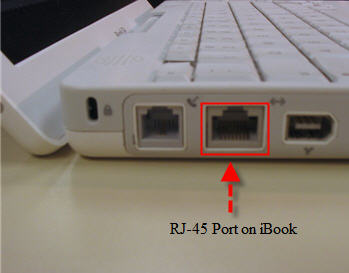
which "hole" to connect in ur ps3 n ur laptop, is a RJ45 'hole' the 'hole' for the cross cable to connect in

this is the cross cable (rj-45 cable)
» Click to show Spoiler - click again to hide... «


connect to this 'hole' in ur laptop/PC (rj45 socket)
» Click to show Spoiler - click again to hide... «


same goes to the ps3 connect the cable to the 'hole' that says LAN
» Click to show Spoiler - click again to hide... «


hope this is clear for you, cheers smile.gif

This post has been edited by Borneo928: Jun 3 2009, 11:47 AM
enserv
post Jun 3 2009, 11:54 AM

New Member
*
Newbie
1 posts

Joined: May 2008


add me to the list... using tmnut hotspot here. can play fifa 09 without any serious lag. havent tested any other games though.
watever77
post Jun 7 2009, 08:36 PM

Getting Started
**
Junior Member
93 posts

Joined: Nov 2008
From: GM
bro .. why the ics option dont appear in my modem advanced menu ? plzz advice .. the allow other computer to connect by this computer dont appear and no setting tab ... only firewall setting got there ... ..


Added on June 7, 2009, 10:09 pmmaybe im using wrong cable .. im trying my luck with the cable i got from office hehe .. will find that rj - 45 and report back ..

This post has been edited by watever77: Jun 7 2009, 10:12 PM
oyama
post Jun 8 2009, 12:19 PM

Enthusiast
*****
Senior Member
925 posts

Joined: Jan 2006
From: Penang


QUOTE(watever77 @ Jun 7 2009, 09:36 PM)
bro .. why the ics option dont appear in my  modem advanced menu ? plzz advice .. the allow other computer to connect by this computer dont appear and no setting tab ... only firewall  setting got there ... ..


Added on June 7, 2009, 10:09 pmmaybe im using wrong cable .. im trying my luck with the cable i got from office hehe .. will find that rj - 45 and report back ..
*
the option depend on kind of modem u use..i notice author using handphone and i'm using modem E220 usb modem..
and it gives same option as is 1st page..

but i try my sister modem which is quite latest..doesn't recall the model number..it doesn't have the option as in the 1st page..but stil can be connect without hassle..

TS: i'm celcom BB user..but on NAT3..aiyaa..anyone Celcom BB usb modem can get NAT2 or not? but coverage is my house area quite bad..does it give any effect?
watever77
post Jun 8 2009, 02:24 PM

Getting Started
**
Junior Member
93 posts

Joined: Nov 2008
From: GM
bro im using vodafone mobile connect mel k3565 hsdpa usb stick ... last night explore a bit and manage to get the ics option but then cant connect to internet pulak ..


Added on June 8, 2009, 3:36 pmmaybe my *ahem* window ke .. ok ill try connect to ori window ..


Added on June 8, 2009, 4:39 pmcannot also ... theres no ics option .. but when i enable back the LAN on the pc , it have that ics option .. well ..

This post has been edited by watever77: Jun 8 2009, 04:39 PM
TSBorneo928
post Jun 8 2009, 09:55 PM

Casual
***
Junior Member
417 posts

Joined: May 2008


QUOTE(watever77 @ Jun 8 2009, 02:24 PM)
bro im using vodafone mobile connect mel k3565 hsdpa usb stick ... last night explore a bit and manage to get the ics option but then cant connect to internet pulak ..


Added on June 8, 2009, 3:36 pmmaybe my *ahem* window ke .. ok ill try connect to ori window ..


Added on June 8, 2009, 4:39 pmcannot also ... theres no ics option .. but when i enable back the LAN on the pc ,  it have that ics option .. well ..
*
hey bro sorry to hear that, what seems to be the problem? any error notice? and what do u mean that u cant connect to the internet? in what way u are unable to connect?

QUOTE(oyama @ Jun 8 2009, 12:19 PM)
TS: i'm celcom BB user..but on NAT3..aiyaa..anyone Celcom BB usb modem can get NAT2 or not? but coverage is my house area quite bad..does it give any effect?
*
i haven't figure out a way to get NAT2 from NAT3, i never heard users having NAT2 by using ICS way to connect, with usb modem or phone sad.gif

This post has been edited by Borneo928: Jun 8 2009, 10:32 PM
watever77
post Jun 8 2009, 10:00 PM

Getting Started
**
Junior Member
93 posts

Joined: Nov 2008
From: GM
hey ... manage to connect ... but sometimes getting RAS error code


Added on June 8, 2009, 10:03 pmhehe yes .. got the ics option done .. my ps3 can go online now hee ..

This post has been edited by watever77: Jun 8 2009, 10:03 PM
TSBorneo928
post Jun 8 2009, 10:24 PM

Casual
***
Junior Member
417 posts

Joined: May 2008


QUOTE(watever77 @ Jun 8 2009, 10:00 PM)
hey ... manage to connect ... but sometimes getting RAS error code


Added on June 8, 2009, 10:03 pmhehe yes .. got the ics option done .. my ps3 can go online now hee ..
*
good to hear that bro, simple as 1 2 3 smile.gif will add you to the wireless BB gamers, enjoy! icon_rolleyes.gif
watever77
post Jun 9 2009, 11:18 AM

Getting Started
**
Junior Member
93 posts

Joined: Nov 2008
From: GM
noww im getting RAS error code 633 sometime 619 without even connecting ps 3 to the laptop .. cant even online using laptop .. it must be my `ehem` windows la .. frequently got this dr watson post mortem debugger error .. windows explorer error ... dan macam2 error lagi hehe .. antivirus if start it will jammed the laptop with mmmanyy pop up window ..

i tried using the usb bb to another pc and it was usable .. so confirmed my ehem windows la making the connection unstable somehow hehe ..

p/s : all of the problem happens after i tried to validate windows but failed
oyama
post Jun 11 2009, 01:07 PM

Enthusiast
*****
Senior Member
925 posts

Joined: Jan 2006
From: Penang


QUOTE(Borneo928 @ Jun 8 2009, 10:55 PM)
hey bro sorry to hear that, what seems to be the problem? any error notice? and what do u mean that u cant connect to the internet? in what way u are unable to connect?
i haven't figure out a way to get NAT2 from NAT3, i never heard users having NAT2 by using ICS way to connect, with usb modem or phone  sad.gif
*
oouh..so gamers that can have NAT2 must be using the modem that have LAN port isn't?

the modem so expensive..400+ waaa~ rclxub.gif

afaik, NAT3 gives prob for games such as LBP(PS3) as it has to connect to players..

btw..update my name as well..thanks~

This post has been edited by oyama: Jun 11 2009, 01:11 PM
watever77
post Jun 20 2009, 09:19 AM

Getting Started
**
Junior Member
93 posts

Joined: Nov 2008
From: GM
ok .. prblem solved after formatting .. im using celcom bb rm98 n constantly have hsdpa signal (only 2 bar)
so tested games so far are as followed ..
1. home - no problem .. been to central plaza , theater n bowling alley.. played pool no problem ..
2. pes 09 - cant connect .. tubik msj dns error ..
3. re5 - coop with some one from usa .. no lag problem evrythin is ok
4. soul calibur4 - no problem .. can play with others fine ... but sumtimes got lag
5. gta4 - cant connect ... bcos i dunno how hehe
6. internet - can browse , surf with speed depends on coverage ..
7. mgs online - got update shows 3300 minutes to download .. too long ...so i dont try this yet .. im on 1.00ver btw ..
6. psnnetwork - currenly downloding infamous .. 5 hours to finish ....
pel
post Jun 20 2009, 05:30 PM

Unker
******
Senior Member
1,057 posts

Joined: Sep 2004
From: Cyberjaya


Add me in the list. Been using celcom bb to play online with my ps3. Lucky the signal is quite good since im living near kl. The only drawback, no online for me usually in the middle of the month. Connection got capped already. doh.gif

Downloading new updates/game patches at home is a no no for me. I just bring my ps3 to the office to fully utilize the office bandwidth (of course when my boss is not around). laugh.gif

This post has been edited by pel: Jul 1 2009, 11:04 AM
S4PH
post Jun 21 2009, 10:39 AM

adam_s4ph
******
Senior Member
1,167 posts

Joined: Jan 2007
From: ..Tsukuba..


while updating at the office u can play game also hahaha
watever77
post Jun 21 2009, 11:22 AM

Getting Started
**
Junior Member
93 posts

Joined: Nov 2008
From: GM
lucky u !
Jasonkwk86
post Jun 30 2009, 05:04 AM

New Member
*
Junior Member
28 posts

Joined: Jun 2009


Hi all, anyone here tried before using celcom bb pared with DIR-451 router? If so, anyone getting Nat type 2?

I am using celcom bb with dir-451, i tried port forwarding and DMZ it, still the same. Any idea? sad.gif
TSBorneo928
post Jun 30 2009, 08:57 PM

Casual
***
Junior Member
417 posts

Joined: May 2008


QUOTE(Jasonkwk86 @ Jun 30 2009, 05:04 AM)
Hi all, anyone here tried before using celcom bb pared with DIR-451 router? If so, anyone getting Nat type 2?

I am using celcom bb with dir-451, i tried port forwarding and DMZ it, still the same. Any idea? sad.gif
*
i'm not sure, but correct me if i'm wrong, i think that method of connecting will still make u stay at NAT 3, because the source of the internet still needs to go through a router (all that data processing) then out again to the console itself. almost the same thing as using the ICS on ur laptop/desktop.

those who got NAT 2 using wireless BB are usually using direct modem connection, like the Huawei B932 modem that K-end is using. anyways are you using a USB modem to connect to that router?
Jasonkwk86
post Jun 30 2009, 09:13 PM

New Member
*
Junior Member
28 posts

Joined: Jun 2009


Yup, I am using Huawei E170 connect to DIR-451. I'd saw on some threads that teaching ppl Port forwarding and DMZ their static ip address for PS3.

They have to forward 6 ports:
TCP: 80, 443, 5223
UDP: 3478, 3479, 3658

Theards show this works for many people that getting NAT Type 2 from NAT Type 3.

Type 3 is ok, but sometimes will laggy when i play SF4 online. So i think if i am on NAT Type 2, will solve this "laggy" things...

So anyone know something i did wrong way or?

Thanks. =)

This post has been edited by Jasonkwk86: Jun 30 2009, 09:14 PM
TSBorneo928
post Jun 30 2009, 09:19 PM

Casual
***
Junior Member
417 posts

Joined: May 2008


QUOTE(Jasonkwk86 @ Jun 30 2009, 09:13 PM)
Yup, I am using Huawei E170 connect to DIR-451. I'd saw on some threads that teaching ppl Port forwarding and DMZ their static ip address for PS3.

They have to forward 6 ports:
TCP: 80, 443, 5223
UDP: 3478, 3479, 3658

Theards show this works for many people that getting NAT Type 2 from NAT Type 3.

Type 3 is ok, but sometimes will laggy when i play SF4 online. So i think if i am on NAT Type 2, will solve this "laggy" things...

So anyone know something i did wrong way or?

Thanks. =)
*
i see, but are they using wireless BB?
Jasonkwk86
post Jun 30 2009, 11:22 PM

New Member
*
Junior Member
28 posts

Joined: Jun 2009


QUOTE(Borneo928 @ Jun 30 2009, 09:19 PM)
i see, but are they using wireless BB?
*
Yup, they all using broadband. Some of them in US, using BB with a router, still getting NAT Type 3 after doing Port forwarding and DMZ their PS3 with Static IP address. Their routers are familiar too, e.g. Dlink, Linksys, Belkin etc...

For those who CAN'T get NAT 2 after doing Port forwarding and DMZ, They recommand to check with their ISP is it lock down something in the modem. BUT mine is Huawei USB modem, i can't even config it.

So i am asking anyone here get NAT 2 with a USB modem. =)

Thanks for replying Borneo.
aaron_15ryderz
post Jul 8 2009, 11:05 AM

Getting Started
**
Junior Member
276 posts

Joined: Sep 2008
From: Kuching, Sarawak


hi guys...if i'm using windows vista, izit the step same with xp?


Added on July 12, 2009, 10:01 pmi already watch video at youtube but my vista does not have sharing option...how come?


Added on July 13, 2009, 10:46 pmguys...help me out....my ps3 cannot detect the etehrnet cable

This post has been edited by aaron_15ryderz: Jul 13 2009, 10:46 PM
watever77
post Aug 3 2009, 11:33 PM

Getting Started
**
Junior Member
93 posts

Joined: Nov 2008
From: GM
bro .. help me how to connect using vista ? i manage to tick the ics option but when got into setting .. it was a whole lot different from xp .. no udp or tcp tickbox la ... aiyoo ..so i leave them uncheck and manage to surf the web but cant login to psn .. keep getting dns error ..

any idea ?


Added on August 4, 2009, 11:25 amah .. finally got it right , problem solved

This post has been edited by watever77: Aug 4 2009, 11:25 AM
shareal
post Aug 4 2009, 04:36 PM

Getting Started
**
Junior Member
179 posts

Joined: Jan 2003
From: on earth


QUOTE(Jasonkwk86 @ Jun 30 2009, 09:13 PM)
Yup, I am using Huawei E170 connect to DIR-451. I'd saw on some threads that teaching ppl Port forwarding and DMZ their static ip address for PS3.

They have to forward 6 ports:
TCP: 80, 443, 5223
UDP: 3478, 3479, 3658

Theards show this works for many people that getting NAT Type 2 from NAT Type 3.

Type 3 is ok, but sometimes will laggy when i play SF4 online. So i think if i am on NAT Type 2, will solve this "laggy" things...

So anyone know something i did wrong way or?

Thanks. =)
*
i think we have a same problem...im trying to connect to Xbox live using celcom vodafone modem

...now im stuck at open port 3074 using celcom vodafone usb modem, is there another way around?

wanna try port forward it but no list of the router...

anyone can help me cry.gif

for now i have changed the settings for internet connection setting to shared, but the xbox keeps telling me that my port 3074 needs to be open

does anyone know how to port forward my reuter? cos have check at portforward.com but no list for vodafone router...

thanks guys
watever77
post Aug 16 2009, 04:09 PM

Getting Started
**
Junior Member
93 posts

Joined: Nov 2008
From: GM
QUOTE(Borneo928 @ Jun 30 2009, 08:57 PM)
i'm not sure, but correct me if i'm wrong, i think that method of connecting will still make u stay at NAT 3, because the source of the internet still needs to go through a router (all that data processing) then out again to the console itself. almost the same thing as using the ICS on ur laptop/desktop.

those who got NAT 2 using wireless BB are usually using direct modem connection, like the Huawei B932 modem that K-end is using. anyways are you using a USB modem to connect to that router?
*
can we use celcom bb with that modem ? can anyone clear my thought on this , pls ? i really wants a nat 2 .. nod.gif
akeef
post Aug 18 2009, 01:22 PM

New Member
*
Junior Member
5 posts

Joined: Jan 2009
From: Sintouqe, Kedah


I'm using celcom bb..K3520i modem (vodafone)..no router..recently automatically got NAT 2 but sometimes NAT3..dunno any differences for the connecction..still got dced and lagged in NAT 2..nver try headset yet..
aaron_15ryderz
post Aug 26 2009, 10:44 AM

Getting Started
**
Junior Member
276 posts

Joined: Sep 2008
From: Kuching, Sarawak


anyone experiencing playing KZ2 or shooting any shoothing games with celcomBB? Got any lags..
pel
post Aug 26 2009, 11:13 PM

Unker
******
Senior Member
1,057 posts

Joined: Sep 2004
From: Cyberjaya


Played Killzone before with celcom BB. All I can say it is playable but i encountered frequent disconnection from the server. Not suitable for long game. But no problem playing COD4. Btw, my location is in KL.
rhoyo
post Aug 27 2009, 01:26 PM

-
*******
Senior Member
2,800 posts

Joined: Mar 2005
From: -

eh pel u pakai celcom broadband yang RM 99 ringgit ker main online ?
watever77
post Aug 30 2009, 10:07 AM

Getting Started
**
Junior Member
93 posts

Joined: Nov 2008
From: GM
planning to use k3565 + router d link dir 451 ... is it ok ?
el_nino09
post Aug 30 2009, 10:09 PM

New Member
*
Newbie
0 posts

Joined: Aug 2009
hello..can use a USB broadband celcom connect to x box360 for play online game?


Added on August 30, 2009, 10:11 pmhello..kalau kiter pakai celcom broadband yang 99 ringgit tu,bleh ke connect kat x box 360 tuk main online game?


Added on August 30, 2009, 10:15 pmhello..i got USB broadband celcom..how connect to xbox for play online game ya?????

This post has been edited by el_nino09: Aug 30 2009, 10:15 PM
oyama
post Sep 1 2009, 06:43 PM

Enthusiast
*****
Senior Member
925 posts

Joined: Jan 2006
From: Penang


got one problem here..tested with windows 7 and xp..but stil happen..

as FW 3.0 is out today..i try to online..as usual setting ip 192.168.0.1..n etc..

but in the connection test..ps3 failed to detect ip address..i thought because of windows 7 i'm using..then tested with windows xp also same problem happen..

why?
aaron_15ryderz
post Sep 1 2009, 06:56 PM

Getting Started
**
Junior Member
276 posts

Joined: Sep 2008
From: Kuching, Sarawak


i've have the same prob just now..
but after retry a couple of time, its ok..
i'm using vista anyway..
oyama
post Sep 1 2009, 07:25 PM

Enthusiast
*****
Senior Member
925 posts

Joined: Jan 2006
From: Penang


QUOTE(aaron_15ryderz @ Sep 1 2009, 07:56 PM)
i've have the same prob just now..
but after retry a couple of time, its ok..
i'm using vista anyway..
*
really..what is ur ip setting?


aaron_15ryderz
post Sep 1 2009, 08:48 PM

Getting Started
**
Junior Member
276 posts

Joined: Sep 2008
From: Kuching, Sarawak


dunno...i set it up automatic...on set up DNS manually to 4.2.2.1 and below is 4.2.2.2
oyama
post Sep 1 2009, 08:57 PM

Enthusiast
*****
Senior Member
925 posts

Joined: Jan 2006
From: Penang


QUOTE(aaron_15ryderz @ Sep 1 2009, 09:48 PM)
dunno...i set it up automatic...on set up DNS manually to 4.2.2.1 and below is 4.2.2.2
*
i see..my prob is..the ps3 does not detect any ip..then all below setting would be failed also..

haihz~ just when i want to online gaming and this happen~ sigh~

btw..did u update ur ps3 to firmware 3.0?

This post has been edited by oyama: Sep 1 2009, 08:58 PM
wandiana
post Sep 3 2009, 10:05 AM

Getting Started
**
Junior Member
85 posts

Joined: Aug 2005
im using DS300 P1 modem.. getting nat 3 but if using DV230 can get nat 2...

aaron_15ryderz
post Sep 3 2009, 03:21 PM

Getting Started
**
Junior Member
276 posts

Joined: Sep 2008
From: Kuching, Sarawak


QUOTE(oyama @ Sep 1 2009, 08:57 PM)
i see..my prob is..the ps3 does not detect any ip..then all below setting would be failed also..

haihz~ just when i want to online gaming and this happen~ sigh~

btw..did u update ur ps3 to firmware 3.0?
*
yup...updated to FW3.00...


Added on September 4, 2009, 1:00 pmguys..mind to share how to get NAT 2??


This post has been edited by aaron_15ryderz: Sep 4 2009, 01:00 PM
watever77
post Sep 8 2009, 10:36 AM

Getting Started
**
Junior Member
93 posts

Joined: Nov 2008
From: GM
QUOTE(aaron_15ryderz @ Sep 3 2009, 03:21 PM)
yup...updated to FW3.00...


Added on September 4, 2009, 1:00 pmguys..mind to share how to get NAT 2??
*
yo aaron thanks for the dns 4442 thing , it helps solving my dns error problems ..

about the NAT , i sometimes got a NAT 2 and sometimes 3 , i really dont know how .. and last nite , strangely ,

i manage to create a MGOnline room !! shocking.gif
aaron_15ryderz
post Sep 8 2009, 11:03 AM

Getting Started
**
Junior Member
276 posts

Joined: Sep 2008
From: Kuching, Sarawak


havent try to create shooting game room..
but i usually can create a private session on GRID game..
but just me and two of my fren..
so, does this mean i can create a room also..

haha, about the dns, youtube help me..
but i really want to get NAT 2 using broadband without router and just using modem..
wandiana
post Sep 8 2009, 12:45 PM

Getting Started
**
Junior Member
85 posts

Joined: Aug 2005
susah lah nat 3...
aaron_15ryderz
post Sep 8 2009, 02:37 PM

Getting Started
**
Junior Member
276 posts

Joined: Sep 2008
From: Kuching, Sarawak


yup....guess only using router can help....
myxery
post Sep 8 2009, 02:47 PM

Oro?!
*****
Senior Member
904 posts

Joined: Aug 2005
From: Tanjong Golden Ville
any digi broadband user?
sammesul81
post Sep 13 2009, 10:33 PM

Getting Started
**
Junior Member
67 posts

Joined: Apr 2009
From: Ipoh to Kulim


guys, i dont understand what is cross cable la
watever77
post Sep 14 2009, 08:54 AM

Getting Started
**
Junior Member
93 posts

Joined: Nov 2008
From: GM
me too .. dunno whats difference between lan cable and cross cable .. but anyway just go to computer shop and asks the seller you want a cross cable .. i did that way ..

This post has been edited by watever77: Sep 14 2009, 08:56 AM
aaron_15ryderz
post Sep 14 2009, 05:30 PM

Getting Started
**
Junior Member
276 posts

Joined: Sep 2008
From: Kuching, Sarawak


if i'm not mistaken, lan cable is to use from router to pc...
cross cable is like pc to ps3..means more like sharing internet connection..
hide88
post Sep 18 2009, 12:17 AM

New Member
*
Junior Member
22 posts

Joined: Jul 2009
i tried using cross cable but ps3 cant detect ip address..help anyone?
aaron_15ryderz
post Sep 18 2009, 08:19 AM

Getting Started
**
Junior Member
276 posts

Joined: Sep 2008
From: Kuching, Sarawak


does ur Internet Connection already set up as shared connection?
hide88
post Sep 19 2009, 07:02 PM

New Member
*
Junior Member
22 posts

Joined: Jul 2009
yeah. Problem solved. Thanks
aaron_15ryderz
post Sep 19 2009, 07:05 PM

Getting Started
**
Junior Member
276 posts

Joined: Sep 2008
From: Kuching, Sarawak


what nat type u get?
hide88
post Sep 20 2009, 02:32 AM

New Member
*
Junior Member
22 posts

Joined: Jul 2009
type 2. I using wimax wifi modem D230

This post has been edited by hide88: Sep 20 2009, 02:34 AM
enemyofgod
post Sep 22 2009, 05:21 PM

Blu-Ray™ Geek
******
Senior Member
1,431 posts

Joined: Mar 2007
From: Dark Side Of The Moon


Good guide, i struggled thru google and found my way to setup using Maxis long ago, but the guide is awesome..

Good work son..
aaron_15ryderz
post Sep 22 2009, 05:31 PM

Getting Started
**
Junior Member
276 posts

Joined: Sep 2008
From: Kuching, Sarawak


QUOTE(hide88 @ Sep 20 2009, 02:32 AM)
type 2. I using wimax wifi modem  D230
*
lucky you...nat 3 not so stable..
E-Punk LockHeart
post Sep 22 2009, 10:08 PM

Getting Started
**
Junior Member
92 posts

Joined: Apr 2007
erm anyone having difficulty in updating game? Update always failed when it is in installation process.....
oyama
post Sep 23 2009, 01:28 PM

Enthusiast
*****
Senior Member
925 posts

Joined: Jan 2006
From: Penang


QUOTE(aaron_15ryderz @ Sep 14 2009, 06:30 PM)
if i'm not mistaken, lan cable is to use from router to pc...
cross cable is like pc to ps3..means more like sharing internet connection..
*
normal LAN cable would do..i used normal LAN cable also can connect pc to ps3..


QUOTE(aaron_15ryderz @ Sep 22 2009, 06:31 PM)
lucky you...nat 3 not so stable..
*
celcom limited to NAT3 on wateva modem u use..but sometime it can opt til NAT2..but not consistent..

maxis and wimax can get NAT2 with no problem at all..
aaron_15ryderz
post Sep 23 2009, 01:52 PM

Getting Started
**
Junior Member
276 posts

Joined: Sep 2008
From: Kuching, Sarawak


ow...i've once got nat 2 but now never happens...
how bout digi users? havent heard report from digi users..
Amras of Nargothrond
post Sep 24 2009, 05:21 PM

New Member
*
Junior Member
25 posts

Joined: Jan 2003


I am using Maxis Wireless Broadband, and I always get NAT2.
So far playing Sacred 2 as Host, not much lagging, unless the maxis connection down...
Anyway, I am looking to increase the Maxis Wireless Connection, right now it seem like the speed is not up to 3.6Mbps, not even 1Mbps as well, is there anyway to speed it?

If I using a router to connect with maxis modem, will the speed increase?

If yes, any recommended router to use with maxis modem and PS3?
bigostoo
post Sep 29 2009, 01:49 AM

Getting Started
**
Junior Member
143 posts

Joined: Jan 2009
been trying the last 4 hours to get my PS3 Nat Type 2 but failed.

i'm on wimax with level 1 wbr 3408 wireless router. cant seem to get Type 2 at all.

any sifu can help? thx in advance
aaron_15ryderz
post Sep 29 2009, 08:15 AM

Getting Started
**
Junior Member
276 posts

Joined: Sep 2008
From: Kuching, Sarawak


if use celcom D98 package, can get Type 2 or not?
currently using D68 package and got Type 3 only...
izit the internet speed that makes us get Type 2?..
Noysan
post Sep 29 2009, 08:38 AM

Getting Started
**
Junior Member
156 posts

Joined: Sep 2008


QUOTE(aaron_15ryderz @ Sep 29 2009, 08:15 AM)
if use celcom D98 package, can get Type 2 or not?
currently using D68 package and got Type 3 only...
izit the internet speed that makes us get Type 2?..
*
I'm not sure if it's the speed.. sweat.gif
I'm using Celcom prepaid with router and I can get NAT2. My router is port forwarded.
But there's a time when I'm getting NAT failure so I just reset my 3G router together with USB dongle then it comes back to NAT2 again...really weird....

aaron_15ryderz
post Sep 29 2009, 09:00 AM

Getting Started
**
Junior Member
276 posts

Joined: Sep 2008
From: Kuching, Sarawak


QUOTE(Noysan @ Sep 29 2009, 08:38 AM)
I'm not sure if it's the speed.. sweat.gif
I'm using Celcom prepaid with router and I can get NAT2. My router is port forwarded.
But there's a time when I'm getting NAT failure so I just reset my 3G router together with USB dongle then it comes back to NAT2 again...really weird....
*
wat package u use and wat type of router? drool.gif
bigostoo
post Sep 29 2009, 09:06 AM

Getting Started
**
Junior Member
143 posts

Joined: Jan 2009
does anyone here using P1 for on9 gaming? i have no problem with torrent and my area coverage/speed is good. but not able to get Nat Type 2 with my ps3. do i need to change router model?

i'm on P1 2.4mb package.
Noysan
post Sep 29 2009, 09:10 AM

Getting Started
**
Junior Member
156 posts

Joined: Sep 2008


QUOTE(aaron_15ryderz @ Sep 29 2009, 09:00 AM)
wat package u use and wat type of router? drool.gif
*
It just the prepaid one, RM20/week unlimited. Bought my own USB dongle.
Router is Aztech HW550 3G.


wandiana
post Sep 29 2009, 09:56 AM

Getting Started
**
Junior Member
85 posts

Joined: Aug 2005
QUOTE(bigostoo @ Sep 29 2009, 09:06 AM)
does anyone here using P1 for on9 gaming? i have no problem with torrent and my area coverage/speed is good. but not able to get Nat Type 2 with my ps3. do i need to change router model?

i'm on P1 2.4mb package.
*
ur using cable or wireless bro?
bigostoo
post Sep 29 2009, 11:14 AM

Getting Started
**
Junior Member
143 posts

Joined: Jan 2009
QUOTE(wandiana @ Sep 29 2009, 09:56 AM)
ur using cable or wireless bro?
*
wireless la
aaron_15ryderz
post Sep 29 2009, 11:57 AM

Getting Started
**
Junior Member
276 posts

Joined: Sep 2008
From: Kuching, Sarawak


QUOTE(Noysan @ Sep 29 2009, 09:10 AM)
It just the prepaid one, RM20/week unlimited. Bought my own USB dongle.
Router is Aztech HW550 3G.
*
ow...isnt the speed same as D68 package? blink.gif
Noysan
post Sep 29 2009, 01:05 PM

Getting Started
**
Junior Member
156 posts

Joined: Sep 2008


QUOTE(aaron_15ryderz @ Sep 29 2009, 11:57 AM)
ow...isnt the speed same as D68 package? blink.gif
*
Not really sure what's the speed of D68 package. sweat.gif
Here's the speedtest. I'm using it at work now.
When I'm home, the speed is basically the same except the ping is around 150ms

user posted image
aaron_15ryderz
post Sep 29 2009, 01:33 PM

Getting Started
**
Junior Member
276 posts

Joined: Sep 2008
From: Kuching, Sarawak


ow...guess maybe router help u to get NAT Type 2..
Noysan
post Sep 29 2009, 01:59 PM

Getting Started
**
Junior Member
156 posts

Joined: Sep 2008


QUOTE(aaron_15ryderz @ Sep 29 2009, 01:33 PM)
ow...guess maybe router help u to get NAT Type 2..
*
It all comes down to router I guess. biggrin.gif

I tried Maxis prepaid BB one day pass for RM8/day just for curiosity.
Speed is definitely faster DL/UL than celcom but I can't join or host a game on PS3 even though I get NAT2... doh.gif

aaron_15ryderz
post Oct 2 2009, 04:06 PM

Getting Started
**
Junior Member
276 posts

Joined: Sep 2008
From: Kuching, Sarawak


QUOTE(Noysan @ Sep 29 2009, 01:59 PM)
It all comes down to router I guess. biggrin.gif

I tried Maxis prepaid BB one day pass for RM8/day just for curiosity.
Speed is definitely faster DL/UL than celcom but I can't join or host a game on PS3 even though I get NAT2... doh.gif
*
how bout laggyness especially shooting games, got any lag? blink.gif
Noysan
post Oct 3 2009, 08:24 AM

Getting Started
**
Junior Member
156 posts

Joined: Sep 2008


QUOTE(aaron_15ryderz @ Oct 2 2009, 04:06 PM)
how bout laggyness especially shooting games, got any lag? blink.gif
*
Never tried shooting games. sad.gif
Most of the time I played NBA2K9.. There is lag but it is still playable..

xaierin
post Oct 5 2009, 01:08 AM

New Member
*
Junior Member
7 posts

Joined: Sep 2008


how to connect using macbook? can anybody teach me the settings for macbook? i understand the connection from laptop to ps3 using cable but the setting dlm laptop mcmn plak? thank u ...

p/s : i'm using the E220 maxis broadband
ledfoot
post Oct 6 2009, 11:56 AM

Getting Started
**
Junior Member
115 posts

Joined: Oct 2008
Is it possible to connect my Izzipro direct to my ps3 or does it have to be via my pc?


Added on October 7, 2009, 5:19 pmAnybody still visit this thread?


Added on October 9, 2009, 12:12 pmHello?

This post has been edited by ledfoot: Oct 9 2009, 12:12 PM
ledfoot
post Oct 9 2009, 12:12 PM

Getting Started
**
Junior Member
115 posts

Joined: Oct 2008
sad.gif
aaron_15ryderz
post Oct 9 2009, 06:07 PM

Getting Started
**
Junior Member
276 posts

Joined: Sep 2008
From: Kuching, Sarawak


i dun think so..
u still need a router to connect from usb modem to ps3..
ledfoot
post Oct 14 2009, 02:13 PM

Getting Started
**
Junior Member
115 posts

Joined: Oct 2008
QUOTE(aaron_15ryderz @ Oct 9 2009, 06:07 PM)
i dun think so..
u still need a router to connect from usb modem to ps3..
*
So either I sit my pc right next to the ps3 and tv or I have to start a wireless network at home?
aaron_15ryderz
post Oct 14 2009, 02:41 PM

Getting Started
**
Junior Member
276 posts

Joined: Sep 2008
From: Kuching, Sarawak


QUOTE(ledfoot @ Oct 14 2009, 02:13 PM)
So either I sit my pc right next to the ps3 and tv or I have to start a wireless network at home?
*
u can try wireless but dunno how the speed result.
currenly i'm sharing my connection with ps3..and yea my lappy have to sit next to my ps3..
aiyish
post Oct 14 2009, 03:22 PM

Ryan Gosling
******
Senior Member
1,537 posts

Joined: Dec 2006
From: Nintendo-Land
how do i setup ISC using Vista? just got my new laptop, dun want to use my pc anymore to go online.
qudeenz360
post Oct 14 2009, 03:30 PM

Look at all my stars!!
*******
Senior Member
5,761 posts

Joined: Jun 2007
From: J the great


p1 podowin da skang ni sejak aku duk tingkat 6....
wandiana
post Oct 14 2009, 06:21 PM

Getting Started
**
Junior Member
85 posts

Joined: Aug 2005
QUOTE(qudeenz360 @ Oct 14 2009, 03:30 PM)
p1 podowin da skang ni sejak aku duk tingkat 6....
*
kalo ujan dah x podowin dah... laugh.gif
aaron_15ryderz
post Oct 14 2009, 07:06 PM

Getting Started
**
Junior Member
276 posts

Joined: Sep 2008
From: Kuching, Sarawak


QUOTE(aiyish @ Oct 14 2009, 03:22 PM)
how do i setup ISC using Vista? just got my new laptop, dun want to use my pc anymore to go online.
*
make sure ur vista is home and above coz vista starter dun hv ICS..
setup is same like xp..
aiyish
post Oct 14 2009, 11:44 PM

Ryan Gosling
******
Senior Member
1,537 posts

Joined: Dec 2006
From: Nintendo-Land
QUOTE(aaron_15ryderz @ Oct 14 2009, 07:06 PM)
make sure ur vista is home and above coz vista starter dun hv ICS..
setup is same like xp..
*
its home basic with service pack 2.
bvlagar
post Oct 20 2009, 06:49 PM

New Member
*
Junior Member
26 posts

Joined: Jun 2007
Been using P1 wireless with PS3 on line game, Good no problem. I'm at SS3 PJ.
mnsnazri
post Oct 21 2009, 12:38 AM

Getting Started
**
Junior Member
99 posts

Joined: Mar 2008


Hello guys...i'm using celcom bb for online gaming with my ps3...some method i change from what bro borneo give to us...

method to do an internet connection sharing (ICS) on PlayStation3 for XP computers

First off u will need a cross cable for the connection - i using straight cable for connection

1. Connect the cross cable from ur pc to your ps3
2. Go to control panel > network connection > right click property on ur modem (this could be ur phone modem or USB modem)
3. Advance > click ICS option then click “allow other users to connect throught this computer

4. Then after this click the drop down menu that give u choice which line do you want to sharing.
example: 1. Local Area Connection 3 (for ur usb modem)
2. Local Area Connection 2 (for Network Card)
3. Wireless Connection
then i click for Local Area Connection 2 as output from my laptop to ps3. its give you auto ip 192.168.0.1 and subnet 255.255.255.0 for ur Network Card.
When u connect ur Network cable to ps3, its give you auto ip for ur ps3 (DHCP).
i also disable my firewall that maybe give problem for ur connection.


5. Click these item in the box in the options
UDP
DNS
HDCP
HTTP
HTTPS
DHCP (for auto IP)


That’s it! ur done on the computer side.

now for the ps3 part

1. Go to network setting
2. Then select internet connection setting
3. They will ask u to select a setting method, select custom
4. Next they will ask u to connect wired or wireless connection, select wired
5 from here, select these bellow:

Operation Mode: auto-detect
IP Adress: automatic
DHCP Host Name: Do not use
DNS: Automatic - i using manual for open DNS 1. 268.67.222.222 and 2. 268.67.220.220
if i setting auto of coz it will be difficult to sign-in PSN (if you got this problem)

MTU: Automatic
Proxy Server: Do not use
UPNP: enable

Once all this is done, there is nothing to do but to Sign IN and play online! hope it helps guys! biggrin.gif

but you got NAT 3 for this connection...but seems my area no really okay with celcom bb so this the best method i try

anyway...the info bro borneo give really important and useful coz we can try many method in connection.


Added on October 21, 2009, 12:48 am
QUOTE(aiyish @ Oct 14 2009, 03:22 PM)
how do i setup ISC using Vista? just got my new laptop, dun want to use my pc anymore to go online.
*
vista is to complicated with many security and firewall setting that you need to close or disable it...its really hard for to setting it but i'm failed...so i change my lappy wit XP service pack 3


Added on October 21, 2009, 12:50 am
QUOTE(Noysan @ Sep 29 2009, 09:10 AM)
It just the prepaid one, RM20/week unlimited. Bought my own USB dongle.
Router is Aztech HW550 3G.
*
Aztech is really okay lah but if you got more money spend it to other brand like Belkin, D-Link and Link-sys

This post has been edited by mnsnazri: Oct 21 2009, 12:50 AM
wandiana
post Oct 21 2009, 10:56 AM

Getting Started
**
Junior Member
85 posts

Joined: Aug 2005
anyone try using Amax Wimax for PS3 connection..?
myxery
post Oct 21 2009, 03:44 PM

Oro?!
*****
Senior Member
904 posts

Joined: Aug 2005
From: Tanjong Golden Ville
anyone using umobile?
aaron_15ryderz
post Oct 21 2009, 06:38 PM

Getting Started
**
Junior Member
276 posts

Joined: Sep 2008
From: Kuching, Sarawak


i'm using vista ultimate now..
setting same as xp tho..
azhar1777
post Oct 22 2009, 12:59 AM

New Member
*
Newbie
0 posts

Joined: Aug 2007


using p1 wimax with ps3 online game. location equine park.
wandiana
post Oct 22 2009, 12:41 PM

Getting Started
**
Junior Member
85 posts

Joined: Aug 2005
QUOTE(azhar1777 @ Oct 22 2009, 12:59 AM)
using p1 wimax with ps3 online game. location equine park.
*
laju x bro? aku nye kul 3 pagi baru full speed.. gilakkss..
forestzi
post Oct 30 2009, 10:09 PM

New Member
*
Newbie
3 posts

Joined: May 2007


I got DNS error when connect, anyone can help me?
aaron_15ryderz
post Oct 30 2009, 10:54 PM

Getting Started
**
Junior Member
276 posts

Joined: Sep 2008
From: Kuching, Sarawak


QUOTE(forestzi @ Oct 30 2009, 10:09 PM)
I got DNS error when connect, anyone can help me?
*
use this dns

primary : 4.2.2.1
secondary : 4.2.2.2

rclxms.gif
forestzi
post Oct 30 2009, 11:02 PM

New Member
*
Newbie
3 posts

Joined: May 2007


QUOTE(aaron_15ryderz @ Oct 30 2009, 10:54 PM)
use this dns

primary : 4.2.2.1
secondary : 4.2.2.2

rclxms.gif
*
done! thank you biggrin.gif

but my celcom is too slow...
aaron_15ryderz
post Oct 31 2009, 11:05 AM

Getting Started
**
Junior Member
276 posts

Joined: Sep 2008
From: Kuching, Sarawak


QUOTE(forestzi @ Oct 30 2009, 11:02 PM)
done! thank you  biggrin.gif

but my celcom is too slow...
*
yea...me too..using D68 package but managed to get NAT type too recently...
the way is just turn off ur antivirus...thats all...try it.. icon_rolleyes.gif
nazgul
post Nov 2 2009, 11:45 AM

New Member
*
Junior Member
20 posts

Joined: Aug 2006


hi guyz...just got my new ps3 slim yesterday...and i already have huawei e160 usb modem (celcom)...
can i use this Sapido GR-1100 3.5g wifi router to connect to my ps3?...
need any cable or any other hardware or connection to pc...whats the setup...
really much appreciated since this is my first venture into online gaming...
yes i've been living in cave for the pass few years playing offline pc and ps2...sorry miskin...
just got salary increment recently and now think can afford original and online gaming (jangan tembak newbie hehe)...
should already been discuss please lead me to the thread...tq...
Noysan
post Nov 2 2009, 01:10 PM

Getting Started
**
Junior Member
156 posts

Joined: Sep 2008


QUOTE(azhar1777 @ Oct 22 2009, 12:59 AM)
using p1 wimax with ps3 online game. location equine park.
*
mind to share how the connection is?experience any lag? how about ping?
planning to get P1 too. Currently have D98 Celcom but the ping is really high,, too lag playing..Always loss online battle.


QUOTE(nazgul @ Nov 2 2009, 11:45 AM)
hi guyz...just got my new ps3 slim yesterday...and i already have huawei e160 usb modem (celcom)...
can i use this Sapido GR-1100 3.5g wifi router to connect to my ps3?...
need any cable or any other hardware or connection to pc...whats the setup...
really much appreciated since this is my first venture into online gaming...
yes i've been living in cave for the pass few years playing offline pc and ps2...sorry miskin...
just got salary increment recently and now think can afford original and online gaming (jangan tembak newbie hehe)...
should already been discuss please lead me to the thread...tq...
*
Since you have 3.5g router, it can be used (does it have the USB slot for the modem?). I'm currently using Aztech HW550 3.5G router, can connect to PSN and play online but my Celcom D98 has a very high latency, always lag online.

You can connect wired or wireless (if your router support it) no need to connect to PC or any other hardware except for router of course. Make sure you port forward your router. You need NAT2 connection.
For PS3 set-up you can refer to Playstation FAQ's forum.

nazgul
post Nov 2 2009, 01:37 PM

New Member
*
Junior Member
20 posts

Joined: Aug 2006


thanks noysan...
yes...it does come with usb slot for the modem...and yes it support wireless...
you might want to see this...

http://iglobe-phils.com/phpBB/viewtopic.php?t=229

its so convenient since no proxy to pc required...

thanks again...next learning how to port forward and what is NAT2...sorry networking noob here...
Noysan
post Nov 2 2009, 02:36 PM

Getting Started
**
Junior Member
156 posts

Joined: Sep 2008


I can't seem to open the link you gave but anyway,

NAT 3 behind firewall (incorrectly forwarded ports or firewall settings)** worse tongue.gif
NAT 2 open (behind correctly configured router)** 2nd best connection
NAT 1 comparable to being plugged directly to internet (direct modem connection)** best connection

back read a bit : biggrin.gif
QUOTE(Jasonkwk86 @ Jun 30 2009, 09:13 PM)
Yup, I am using Huawei E170 connect to DIR-451. I'd saw on some threads that teaching ppl Port forwarding and DMZ their static ip address for PS3.

They have to forward 6 ports:
TCP: 80, 443, 5223
UDP: 3478, 3479, 3658


Theards show this works for many people that getting NAT Type 2 from NAT Type 3.

Type 3 is ok, but sometimes will laggy when i play SF4 online. So i think if i am on NAT Type 2, will solve this "laggy" things...

So anyone know something i did wrong way or?

Thanks. =)
*
If you know your router this are the ports you need to open. It's in the port rule/port forward option of the router:


rhoyo
post Nov 4 2009, 07:53 AM

-
*******
Senior Member
2,800 posts

Joined: Mar 2005
From: -

thanks for the help noysan . notworthy.gif hopefully can connect by the time i come home from work can't wait to play ps3 online .

This post has been edited by rhoyo: Nov 4 2009, 12:00 PM
emperor_kiva
post Nov 10 2009, 10:36 PM

Getting Started
**
Junior Member
257 posts

Joined: Aug 2009


Hi everyone, newbie here needs help connecting to amax wireless netowrk on his ps3. Pls read my details here


Ok before i start,here's some details on my current ps3 set up.

1)Im using amax (subsidary of wimax) multi user package.Wireless connection
2)The PS3 is conencted via lan cable directly to the modem
3)Modem model is Seowon Intech SWC-1004
4)MY laptop and my 2 other friend's laptops are connected wirelessly
5)My psp can connect wireless no problem.
6)Already enable UPnP on modem virtual server settings

My probs :
1)Cant configure wireless network with ps3. When i try to use manual connections ettings,te ps3 crashes the entire network.
2)Alwys getting NAT 3.Never got any other NAT before
3)Cant connect to PS HOME.
4)long connections to uncharted 2 server.


Pls help me all the sifu here unsure.gif
Arsenal1980
post Nov 18 2009, 09:00 AM

New Member
*
Junior Member
14 posts

Joined: Sep 2009


I can online using sony ericsson C510 (ICS) and continue downloading the demo game (use direct wired connection b4 to start the downloading).
But but cant log in to PSNetwork. Tried to get help from PS3 website, manage to find the topic. Now my problem is how to enable TCP/UDP ports in BOTH directions and input the TCP and UDP port fields in modem??

Anyone can help on this? Thanks!
all blacks
post Dec 2 2009, 11:46 AM

On my way
****
Senior Member
565 posts

Joined: Oct 2005
From: Damansara


Im using DG broadband, haven't tried any online game yet... Downloading demo during nite is slow but after 12, its around 700kb - 900kb most of the time smile.gif ..
aiyish
post Dec 10 2009, 12:30 AM

Ryan Gosling
******
Senior Member
1,537 posts

Joined: Dec 2006
From: Nintendo-Land
wah! help! just update my maxis to 7.2 Mbps. But i can't get online my psn. Not Sg, not MY, nuthing. always DNS error. I did all the steps oredi and my psn was connecting flawlessly before this, now, after upgrade 7.2, kenot connect.
all blacks
post Dec 16 2009, 01:38 AM

On my way
****
Senior Member
565 posts

Joined: Oct 2005
From: Damansara


Tried playing killzone 2 with DG broadband and was very smooth..
el-mike
post Dec 19 2009, 03:05 AM

New Member
*
Junior Member
43 posts

Joined: Dec 2009
BUMP.


Hi, I have a Sapido GR 1100, and I have a problem. I don't seem to know how to change my NAT type from 3 to 2.

I've followed the guide from http://boardsus.playstation.com/playstatio...ge.uid=42580697

and this is what I've come up with.

user posted image

Any help is appreciated.
zahirani
post Dec 21 2009, 03:25 PM

New Member
*
Junior Member
44 posts

Joined: Dec 2009
From: Parit buntar, Perak


Hi All,

Bro Borneo, thnx for the steps, now i successfully can connect my PS3 for online play. currently playing metal gear online, experience few lag. However, when playing Uncharted 2: Among thieves no lag experienced. thnx!! anyway my ps3 id is zahirani, welcoming any friends to add!

p/s - same setting can be applied to get xbox360 online, just setup ur pc connection same like for ps3 and simply connect the cross cable to the xbox360. i tried and it was a success. however with a modded Xbox360, playing online is impossible.
TriggerTigrex
post Dec 23 2009, 09:33 PM

New Member
*
Junior Member
10 posts

Joined: Sep 2009
QUOTE(zahirani @ Dec 21 2009, 03:25 PM)
Hi All,

Bro Borneo, thnx for the steps, now i successfully can connect my PS3 for online play. currently playing metal gear online, experience few lag. However, when playing Uncharted 2: Among thieves no lag experienced. thnx!! anyway my ps3 id is zahirani, welcoming any friends to add!

p/s - same setting can be applied to get xbox360 online, just setup ur pc connection same like for ps3 and simply connect the cross cable to the xbox360. i tried and it was a success. however with a modded Xbox360, playing online is impossible.
*
why is it impossible to play online with a modded console?? because of the ban thing or there is a new prob??


Added on December 23, 2009, 9:34 pm
QUOTE(zahirani @ Dec 21 2009, 03:25 PM)
Hi All,

Bro Borneo, thnx for the steps, now i successfully can connect my PS3 for online play. currently playing metal gear online, experience few lag. However, when playing Uncharted 2: Among thieves no lag experienced. thnx!! anyway my ps3 id is zahirani, welcoming any friends to add!

p/s - same setting can be applied to get xbox360 online, just setup ur pc connection same like for ps3 and simply connect the cross cable to the xbox360. i tried and it was a success. however with a modded Xbox360, playing online is impossible.
*
hye, how to connect to xbox??? I already setup my pc but i don't know how to setup on xbox 360....

This post has been edited by TriggerTigrex: Dec 23 2009, 10:05 PM
aaron_15ryderz
post Dec 23 2009, 11:11 PM

Getting Started
**
Junior Member
276 posts

Joined: Sep 2008
From: Kuching, Sarawak


QUOTE(TriggerTigrex @ Dec 23 2009, 09:33 PM)
why is it impossible to play online with a modded console?? because of the ban thing or there is a new prob??


Added on December 23, 2009, 9:34 pm

hye, how to connect to xbox??? I already setup my pc but i don't know how to setup on xbox 360....
*
check ur cable, test ur connection on xbox n see how...
and make sure ur console is not banned.. tongue.gif
TriggerTigrex
post Dec 24 2009, 10:53 AM

New Member
*
Junior Member
10 posts

Joined: Sep 2009
QUOTE(aaron_15ryderz @ Dec 23 2009, 11:11 PM)
check ur cable, test ur connection on xbox n see how...
and make sure ur console is not banned.. tongue.gif
*
already did that but failed...and yup i'm pretty sure that mine is not banned yet....
oyama
post Dec 24 2009, 01:22 PM

Enthusiast
*****
Senior Member
925 posts

Joined: Jan 2006
From: Penang


QUOTE(TriggerTigrex @ Dec 24 2009, 11:53 AM)
already did that but failed...and yup i'm pretty sure that mine is not banned yet....
*
I think u need to setup ip address in the xbox setttup manually..like i did for my ps3.. i set as 192.168.0.3 make sure not the same as setting in ur pc (192.168.0.1)..
DNS i dunt remember..but the ip is important for you to make sure both of the device is connected.. hope this help you~
TriggerTigrex
post Dec 24 2009, 04:36 PM

New Member
*
Junior Member
10 posts

Joined: Sep 2009
QUOTE(oyama @ Dec 24 2009, 01:22 PM)
I think u need to setup ip address in the xbox setttup manually..like i did for my ps3.. i set as 192.168.0.3 make sure not the same as setting in ur pc (192.168.0.1)..
DNS i dunt remember..but the ip is important for you to make sure both of the device is connected.. hope this help you~
*
thanx good info. i will try it soon..
oyama
post Dec 24 2009, 08:44 PM

Enthusiast
*****
Senior Member
925 posts

Joined: Jan 2006
From: Penang


QUOTE(TriggerTigrex @ Dec 24 2009, 05:36 PM)
thanx good info. i will try it soon..
*
gudluck~ flex.gif
zahirani
post Dec 25 2009, 01:17 PM

New Member
*
Junior Member
44 posts

Joined: Dec 2009
From: Parit buntar, Perak


QUOTE(TriggerTigrex @ Dec 23 2009, 09:33 PM)
why is it impossible to play online with a modded console?? because of the ban thing or there is a new prob??


Added on December 23, 2009, 9:34 pm

hye, how to connect to xbox??? I already setup my pc but i don't know how to setup on xbox 360....
*
why cannot play online with modded console?
Microsoft have decided to banned all modded xbox360 console and i'm not bother to subscribe for xboxlive gold membership.

How to connect to xbox?
xbox360 doesn't need any setup, i just plug the lan cable at the xbox360 port and can connect to internet. try check ur setup on the pc side.
TriggerTigrex
post Dec 25 2009, 08:28 PM

New Member
*
Junior Member
10 posts

Joined: Sep 2009
QUOTE(zahirani @ Dec 25 2009, 01:17 PM)
xbox360 doesn't need any setup, i just plug the lan cable at the xbox360 port and can connect to internet. try check ur setup on the pc side.
*
ok will try dat also...thanx...


Added on December 25, 2009, 9:02 pmhey guys click here if you want to know How to get Xbox Live for your Xbox 360 through your computer's wireless internet connection - Vista..

and also click here if you want to know How to get Xbox Live for your Xbox 360 through your computer's wireless internet connection - XP......but neither of this can help me because i'm using win 7....

This post has been edited by TriggerTigrex: Dec 25 2009, 09:02 PM
Sesar unjur
post Dec 26 2009, 09:24 PM

Getting Started
**
Junior Member
118 posts

Joined: Dec 2009
From: ipoh


im using deconnexion here at sarawak as web service.
although its free(for now)its seem i cant download a large game file from PSN.unstable.always disconnected and the download will be corrupted.
oyama
post Dec 26 2009, 10:59 PM

Enthusiast
*****
Senior Member
925 posts

Joined: Jan 2006
From: Penang


QUOTE(TriggerTigrex @ Dec 25 2009, 09:28 PM)
ok will try dat also...thanx...


Added on December 25, 2009, 9:02 pmhey guys click here if you want to know How to get Xbox Live for your Xbox 360 through your computer's wireless internet connection - Vista..

and also click here if you want to know How to get Xbox Live for your Xbox 360 through your computer's wireless internet connection - XP......but neither of this can help me because i'm using win 7....
*
good info..btw..it is not much different in windows 7..i'm using it also..u need to setup ip manually IF automatic setting doesnt get you the job done..

open network and sharing center>change adapter settings>right click LAN Connection>click at internet protocol version 4..

If succeed..u shud find the same menu like in either xp or vista..
TriggerTigrex
post Dec 26 2009, 11:48 PM

New Member
*
Junior Member
10 posts

Joined: Sep 2009
QUOTE(oyama @ Dec 26 2009, 10:59 PM)
good info..btw..it is not much different in windows 7..i'm using it also..u need to setup ip manually IF automatic setting doesnt get you the job done..

open network and sharing center>change adapter settings>right click LAN Connection>click at internet protocol version 4..

If succeed..u shud find the same menu like in either xp or vista..
*
sorry man i'm such a noob to this kind of case....ok i have did what you said but i can't find the LAN connection...is it bcoz i'm using Belkin Wireless G USB Network Adapter or what?? rclxub.gif
oyama
post Dec 27 2009, 10:39 PM

Enthusiast
*****
Senior Member
925 posts

Joined: Jan 2006
From: Penang


QUOTE(TriggerTigrex @ Dec 27 2009, 12:48 AM)
sorry man i'm such a noob to this kind of case....ok i have did what you said but i can't find the LAN connection...is it bcoz i'm using Belkin Wireless G USB Network Adapter or what?? rclxub.gif
*
LAN (Local Area Network)... Every computer shud have one.. From what i read..u connect ur computer to the internet via WLAN (Wireless Locan Area Network) and u want to share it with ur xbox right?
TriggerTigrex
post Dec 28 2009, 11:16 AM

New Member
*
Junior Member
10 posts

Joined: Sep 2009
QUOTE(oyama @ Dec 27 2009, 10:39 PM)
LAN (Local Area Network)... Every computer shud have one.. From what i read..u connect ur computer to the internet via WLAN (Wireless Loca Area Network) and u want to share it with ur xbox right?
*
i can also see wireless network connection and LAN that's all and yes i want to share the wireless network connection with my xbox... cheers.gif
oyama
post Dec 28 2009, 01:23 PM

Enthusiast
*****
Senior Member
925 posts

Joined: Jan 2006
From: Penang


LAN>right click..properties > internet protocol version 4..

there u can setup ip and dns..
TriggerTigrex
post Dec 28 2009, 03:43 PM

New Member
*
Junior Member
10 posts

Joined: Sep 2009
QUOTE(oyama @ Dec 28 2009, 01:23 PM)
LAN>right click..properties > internet protocol version 4..

there u can setup ip and dns..
*
okay2 now i see it....thank u...
eross
post Jan 3 2010, 09:18 PM

New Member
*
Newbie
0 posts

Joined: Jan 2008
QUOTE(Borneo928 @ Apr 6 2009, 11:22 PM)
Let us unite together for those who have to/want to use wireless broadband for online gaming on 3rd gen console, share wit us all about what u have been through while using 3G or HSDPA network in online gaming. help others who have problem trying to get their 3rd gen console online wit wireless BB network.

this bellow is what i put together for those who need help in setting up their ps3 to play online with wireless BB network. i'm sorry i dont provide xbox setup cos i dont hv one to test it out hehe, maybe someone out there can contribute on the xbox set up? anyway here goes

------------------------------------------------------------------------------------------------------------------------------------------


method to do an internet connection sharing (ICS) on PlayStation3 for XP computers

First off u will need a cross cable for the connection

1. Connect the cross cable from ur pc to your ps3
2. Go to control panel > network connection > right click  property on ur modem (this could be ur phone modem or USB modem)
3. Advance > click ICS option then click “allow other users to connect throught this computer” 
» Click to show Spoiler - click again to hide... «
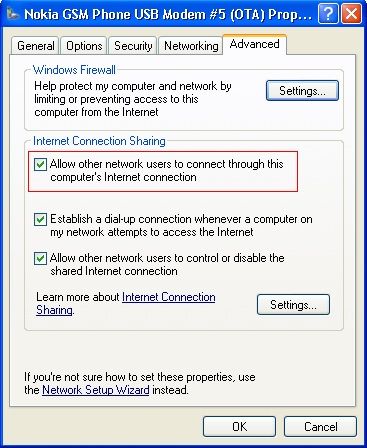
4. Then after this click the setting button on the ICS option.
» Click to show Spoiler - click again to hide... «
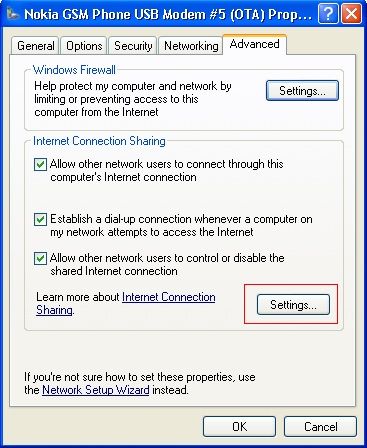
5. Click these item in the box in the options
UDP
DNS
HDCP
HTTP
HTTPS
» Click to show Spoiler - click again to hide... «
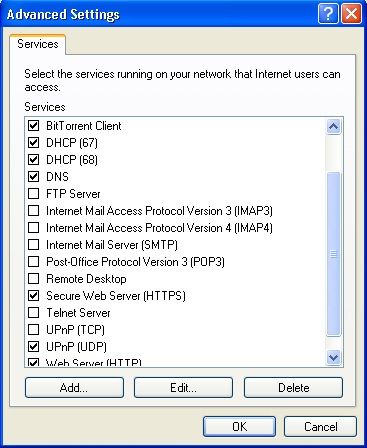

That’s it! ur done on the computer side.

For Step 5 (computer), mine only have HTTP & HTTPS only, UDP, DNS, HDCP are not avail..do i need to add? if yes, how?
great job btw..
cheers!

now for the ps3 part

1. Go to network setting
2. Then select internet connection setting
3. They will ask u to select a setting method, select custom
4. Next they will ask u to connect wired or wireless connection, select wired
5 from here, select these bellow:

Operation Mode: auto-detect
IP Adress: automatic
DHCP Host Name: Do not use
DNS: Automatic
MTU: Automatic
Proxy Server: Do not use
UPNP: enable

Once all this is done, there is nothing to do but to Sign IN and play online! hope it helps guys!  biggrin.gif

------------------------------------------------------------------------------------------------------------------------------------------


List of wireless broadband gamers
» Click to show Spoiler - click again to hide... «

*
For Step 5 (computer), mine only have HTTP & HTTPS only, UDP, DNS, HDCP are not avail..do i need to add? if yes, how?
great job btw..
cheers!


Added on January 5, 2010, 10:40 amsolved! now i need to figure out how to play online..wish me luck

This post has been edited by eross: Jan 5 2010, 10:40 AM
Sesar unjur
post Jan 27 2010, 12:17 PM

Getting Started
**
Junior Member
118 posts

Joined: Dec 2009
From: ipoh


Need help here.im using my hp as modem.i have done everything on the pc side,but on my ps3,it cant obtain the ip add when i try to do the connection test.i dont know bout the cable,it does fit n click.should be the correct cable right?
after i enable my lan network,i can obtain ip address but failed the internet connection.this mean that im using a correct cable to connect the ps3 with my pc right?
why is the internet connection failed?

This post has been edited by Sesar unjur: Jan 27 2010, 01:06 PM
h3ctor83
post Jan 27 2010, 03:22 PM

New Member
*
Junior Member
43 posts

Joined: Jan 2010
hi,

can anybody tell me.. if we use BB to connect to PSN or XboxLIVE.. lets say play 3-4hrs online per day.. no download etc, just play online oni.. will it exceed 3GB capacity provided by maxis?

im asking this becoz i use my phone to connect to XLIVE n after 2 weeks, my line got barred n when i check, my unbilled amount is rm303!?!?

personally i think its impossible that i exceed the 3GB. i use BB so long never exceed that quota (i dont download much). anyway for maxis now, its rm88 for 3GB and after exceed its rm0.5 per Kb.(or isit 0.05?)

faint. anybody knows?
TSBorneo928
post Jan 27 2010, 08:15 PM

Casual
***
Junior Member
417 posts

Joined: May 2008


QUOTE(Sesar unjur @ Jan 27 2010, 12:17 PM)
Need help here.im using my hp as modem.i have done everything on the pc side,but on my ps3,it cant obtain the ip add when i try to do the connection test.i dont know bout the cable,it does fit n click.should be the correct cable right?
after i enable my lan network,i can obtain ip address but failed the internet connection.this mean that im using a correct cable to connect the ps3 with my pc right?
why is the internet connection failed?
*
once ur able to connect to ur ip address, means that ur using the correct cable. its probably ur internet connection is to low to connect, try to place ur phone near a window for better 3g connection

QUOTE(h3ctor83 @ Jan 27 2010, 03:22 PM)
hi,

can anybody tell me.. if we use BB to connect to PSN or XboxLIVE.. lets say play 3-4hrs online per day.. no download etc, just play online oni.. will it exceed 3GB capacity provided by maxis?

im asking this becoz i use my phone to connect to XLIVE n after 2 weeks, my line got barred n when i check, my unbilled amount is rm303!?!?

personally i think its impossible that i exceed the 3GB. i use BB so long never exceed that quota (i dont download much). anyway for maxis now, its rm88 for 3GB and after exceed its rm0.5 per Kb.(or isit 0.05?)

faint. anybody knows?
*
sorry to hear that, but usually when i play online on PSN for like probably 5-6 hours during weekends and usually download 1 game demo per month (1gig+) but celcom never cap me by end of the month, but then again celcom limit is 5gig. maybe u can download bandwidth usage monitor software to keep track of ur usage
Sesar unjur
post Jan 28 2010, 06:38 PM

Getting Started
**
Junior Member
118 posts

Joined: Dec 2009
From: ipoh


hai guys,i stuck at the internet connection,everytime failed,manage only once to connect,if its mean my connection are poor but why the downloading speed of the broadband are above 30kb/s.the bittorrent speed is above 20kb/s all the time.i dont need to sign in to psn,just want to finish my download.need u guys help here.


Added on January 29, 2010, 5:37 pmproblem solved,my zone alarm r actually blocking the connection.


This post has been edited by Sesar unjur: Jan 29 2010, 05:37 PM
Arsenal1980
post Feb 4 2010, 08:37 AM

New Member
*
Junior Member
14 posts

Joined: Sep 2009


QUOTE(Borneo928 @ Apr 7 2009, 12:22 AM)
Let us unite together for those who have to/want to use wireless broadband for online gaming on 3rd gen console, share wit us all about what u have been through while using 3G or HSDPA network in online gaming. help others who have problem trying to get their 3rd gen console online wit wireless BB network.

this bellow is what i put together for those who need help in setting up their ps3 to play online with wireless BB network. i'm sorry i dont provide xbox setup cos i dont hv one to test it out hehe, maybe someone out there can contribute on the xbox set up? anyway here goes

------------------------------------------------------------------------------------------------------------------------------------------


method to do an internet connection sharing (ICS) on PlayStation3 for XP computers

First off u will need a cross cable for the connection

1. Connect the cross cable from ur pc to your ps3
2. Go to control panel > network connection > right click  property on ur modem (this could be ur phone modem or USB modem)
3. Advance > click ICS option then click “allow other users to connect throught this computer” 
» Click to show Spoiler - click again to hide... «

4. Then after this click the setting button on the ICS option.
» Click to show Spoiler - click again to hide... «

5. Click these item in the box in the options
UDP
DNS
HDCP
HTTP
HTTPS
» Click to show Spoiler - click again to hide... «


That’s it! ur done on the computer side.

now for the ps3 part

1. Go to network setting
2. Then select internet connection setting
3. They will ask u to select a setting method, select custom
4. Next they will ask u to connect wired or wireless connection, select wired
5 from here, select these bellow:

Operation Mode: auto-detect
IP Adress: automatic
DHCP Host Name: Do not use
DNS: Automatic
MTU: Automatic
Proxy Server: Do not use
UPNP: enable

Once all this is done, there is nothing to do but to Sign IN and play online! hope it helps guys!  biggrin.gif

------------------------------------------------------------------------------------------------------------------------------------------


List of wireless broadband gamers
» Click to show Spoiler - click again to hide... «

*
Am using Windows XP. Jus bought a crossover cable and after i hv done the above steps, the LAN icon in my laptop still shown a message "LAN cable is unplugged". And i have fail in the ps3 ip test also.

Anyone can help on this pls. icon_question.gif icon_question.gif icon_question.gif

Thanks in advance!
tashfinsheikh
post Feb 8 2010, 01:29 PM

Maxis Dealer
****
Senior Member
646 posts

Joined: Nov 2008
From: Malaysia


Add me to the list.
kokakopi
post Feb 9 2010, 11:02 AM

Getting Started
**
Junior Member
162 posts

Joined: Aug 2009


is VISTA setting same like XP setting???
oyama
post Feb 9 2010, 11:35 AM

Enthusiast
*****
Senior Member
925 posts

Joined: Jan 2006
From: Penang


QUOTE(Arsenal1980 @ Feb 4 2010, 09:37 AM)
Am using Windows XP. Jus bought a crossover cable and after i hv done the above steps, the LAN icon in my laptop still shown a message "LAN cable is unplugged". And i have fail in the ps3 ip test also.

Anyone can help on this pls. icon_question.gif icon_question.gif  icon_question.gif

Thanks in advance!
*
normally that would cause by ur port/wire..more to hardware caused..not by software caused..my 2 cents..

QUOTE(kokakopi @ Feb 9 2010, 12:02 PM)
is VISTA setting same like XP setting???
*
is the same thing..but to get urself to LAN setting menu will be different..i think i post to someone bout

the flow to access the menu.. vista setting will be the same as windows 7 setting..

Here's how u can access the menu like in the 1st post..

open network and sharing center>change adapter settings>right click LAN Connection..select properties>click at internet protocol version 4..click properties..

This post has been edited by oyama: Feb 9 2010, 11:35 AM
rhoyo
post Feb 9 2010, 11:56 AM

-
*******
Senior Member
2,800 posts

Joined: Mar 2005
From: -

man im getting nat 3 doh.gif . how to get nat2 . anyone sad.gif
ramz
post Feb 13 2010, 05:24 AM

20k VIP Club
*********
All Stars
21,370 posts

Joined: Jan 2009
I have a celcome broadband Huawei modem. i have the fastest plan. I hook it up my to my PC and use a cross cable to my PS3. Need to do some ICS configuration on your PC and u're online.

But warning, ping is really bad. on speedtest my ping average 400 ms, and seldom less then 200ms. upload is also bad, 0.06 Mbs average. download speed is fast average 1.0Mbs. so lag is really a problem. mw2 is unplayable, but if less demanding games it can play. downloading stuff online is what its best for.

This post has been edited by ramz: Feb 13 2010, 05:28 AM
Pendekar Awan
post Feb 13 2010, 06:43 PM

New Member
*
Junior Member
7 posts

Joined: Dec 2009
"I have a celcome broadband Huawei modem. i have the fastest plan. I hook it up my to my PC and use a cross cable to my PS3. Need to do some ICS configuration on your PC and u're online.[ramz]"

Bro ramz, can show me how u do it as i using Windows 7. Please if anyone can help me.


Added on February 13, 2010, 6:59 pmNever mind.....somehow managed to get it work. anyhow, the guide is help me much.


Added on February 15, 2010, 11:12 amAfter awhile, everything getting worse. Everytime PS3 test/want connect NAT type, my notebook restart. Arrkhhh.....anyone got idea?

- Notebook
- Celcom Broadband
- Cross Cable
- Windows 7
- PS3 Slim

This post has been edited by Pendekar Awan: Feb 15 2010, 11:12 AM
oyama
post Feb 22 2010, 09:50 AM

Enthusiast
*****
Senior Member
925 posts

Joined: Jan 2006
From: Penang


QUOTE(rhoyo @ Feb 9 2010, 12:56 PM)
man im getting nat 3 doh.gif . how to get nat2 . anyone sad.gif
*
NAT is somehow for the broadband cant get NAT2.. one thing is Celcom limited their customer to only get NAT3.. not NAT2..but i got few frens sometime luckily got NAT2..maybe it's just random.. about tweaking to get NAT2 i'm not sure..back then when i'm using celcom broadband, couldnt find any single setting that can help me to get NAT2..

QUOTE(ramz @ Feb 13 2010, 06:24 AM)
I have a celcome broadband Huawei modem. i have the fastest plan. I hook it up my to my PC and use a cross cable to my PS3. Need to do some ICS configuration on your PC and u're online.

But warning, ping is really bad. on speedtest my ping average 400 ms, and seldom less then 200ms. upload is also bad, 0.06 Mbs average. download speed is fast average 1.0Mbs. so lag is really a problem. mw2 is unplayable, but if less demanding games it can play. downloading stuff online is what its best for.
*
On peak time it's quite lag..but i think if in non peak time, like morning or early2 morning(2-3am)..i played Kz2 and Battlefield 1943 without any hassle..but that was back long time ago..not sure about these days since i change to streamyx for btter online gaming.. smile.gif

QUOTE(Pendekar Awan @ Feb 13 2010, 07:43 PM)
"I have a celcome broadband Huawei modem. i have the fastest plan. I hook it up my to my PC and use a cross cable to my PS3. Need to do some ICS configuration on your PC and u're online.[ramz]"

Bro ramz, can show me how u do it as i using Windows 7. Please if anyone can help me.


Added on February 13, 2010, 6:59 pmNever mind.....somehow managed to get it work. anyhow, the guide is help me much.


Added on February 15, 2010, 11:12 amAfter awhile, everything getting worse. Everytime PS3 test/want connect NAT type, my notebook restart. Arrkhhh.....anyone got idea?

- Notebook
- Celcom Broadband
- Cross Cable
- Windows 7
- PS3 Slim
*
I believe there are some settings that makes the computer to restart when it detects new device/new connection is connected to it.. Just imo..not sure where the settings are.. sorry~ sweat.gif
ramz
post Feb 22 2010, 03:21 PM

20k VIP Club
*********
All Stars
21,370 posts

Joined: Jan 2009
QUOTE(oyama @ Feb 22 2010, 09:50 AM)

On peak time it's quite lag..but i think if in non peak time, like morning or early2 morning(2-3am)..i played Kz2 and Battlefield 1943 without any hassle..but that was back long time ago..not sure about these days since i change to streamyx for btter online gaming.. smile.gif
*
i changed to streamyx for better online gaming too! Some people say it depends on location, but for me even early in the morning 2 am also the lag is bad. now that i am on streamyx i can online game nearly anytime of the day. i said "nearly" coz during prime time around 7pm to 10pm, i notice the lag, but still playable. unlike my wireless bd last time, which its never playable at all any time of the day! btw, i am referring to playing a highly demanding game like modern warfare 2.
tashfinsheikh
post Mar 8 2010, 12:50 AM

Maxis Dealer
****
Senior Member
646 posts

Joined: Nov 2008
From: Malaysia


I m using celcom BB but it lags alot. vmad.gif
LeoLilieno
post Mar 8 2010, 09:05 AM

On my way
****
Senior Member
542 posts

Joined: Oct 2008


I am using Maxis Broadband E1762 and the package comes with a cable (one side long USB head and one side shorted USB head). Can I connect it directly to my PS3 and online from there rather than through my PC? When you all said Crossover cable, is it the cable that we use to connect to LAN in the office? Pls advice as I am a noob here.
TSBorneo928
post Mar 8 2010, 09:12 AM

Casual
***
Junior Member
417 posts

Joined: May 2008


QUOTE(tashfinsheikh @ Mar 8 2010, 12:50 AM)
I m using celcom BB but it lags alot. vmad.gif
*
yes its getting kinda bad these days. i gonna try out DiGi BB n let u all know soon.

QUOTE(LeoLilieno @ Mar 8 2010, 09:05 AM)
I am using Maxis Broadband E1762 and the package comes with a cable (one side long USB head and one side shorted USB head). Can I connect it directly to my PS3 and online from there rather than through my PC? When you all said Crossover cable, is it the cable that we use to connect to LAN in the office? Pls advice as I am a noob here.
*
no it is not possible to do that, i wish it was that simple too. and yes its the LAN cable. you can go to page 3 to see a pic of the LAN cable
nescartel
post Mar 12 2010, 10:17 AM

New Member
*
Newbie
1 posts

Joined: Nov 2009
From: Malacca, Malaysia


does this thing work on Windows Vista computers? hmm.gif


tashfinsheikh
post Mar 22 2010, 10:01 PM

Maxis Dealer
****
Senior Member
646 posts

Joined: Nov 2008
From: Malaysia


I am using it on Windows 7
ON LAN .it's more easy just Open Network And Sharing Centre > Change Adapter Settings then bridge ur Local Area Connection with your Broadband connection(Select both of em and right click Bridge connection) then wait for it to finish then right click the bridged connection > Properties > click Internet protocol v4 TCP/IPv4 then properties then use manual IP address then 192.168.1.1 DNS 255.255.255.0 and on PS3 use wired connection and do a test and DONE.
LeoLilieno
post Mar 28 2010, 05:04 PM

On my way
****
Senior Member
542 posts

Joined: Oct 2008


I am using Vista 32 bit and Maxis Broadband. I bought crossover cable to connect it to my PS3. I then follow the instruction here but under ICS setting, there isn't any UDP, DNS, HDCP. I just ignore it and then go to setup my PS3 according to the instruction. When I test the IP. it failed. My Maxis broadband also cant connect anymore until I reset all setting back to original.

What have I done wrong here? Can anyone provide a detailed instruction on Vista? Appreciate it.
tashfinsheikh
post Apr 1 2010, 01:15 PM

Maxis Dealer
****
Senior Member
646 posts

Joined: Nov 2008
From: Malaysia


QUOTE(LeoLilieno @ Mar 28 2010, 05:04 PM)
I am using Vista 32 bit and Maxis Broadband. I bought crossover cable to connect it to my PS3. I then follow the instruction here but under ICS setting, there isn't any UDP, DNS, HDCP. I just ignore it and then go to setup my PS3 according to the instruction. When I test the IP. it failed. My Maxis broadband also cant connect anymore until I reset all setting back to original.

What have I done wrong here? Can anyone provide a detailed instruction on Vista? Appreciate it.
*
Follow my steps. blush.gif
LeoLilieno
post Apr 1 2010, 02:34 PM

On my way
****
Senior Member
542 posts

Joined: Oct 2008


QUOTE(tashfinsheikh @ Apr 1 2010, 01:15 PM)
Follow my steps.  blush.gif
*
Your steps? Where can I find it?
croomaniac
post May 6 2010, 09:42 AM

Getting Started
**
Junior Member
269 posts

Joined: Jan 2003


I'm done, successful, but not until I disabled the firewall settings in my PC.. the connection from my DiGi BB is very good, though sometimes it disconnected, and have to reconnect.. I think I'll have to update my firmware!~
Pendekar Awan
post May 6 2010, 03:40 PM

New Member
*
Junior Member
7 posts

Joined: Dec 2009
Hi everyone. Using computer that connected to Internet with firewall OFF is very dangerous actually. Someone can get into your computer and steal valued information. My question is, how can we still sign-in using broadband with firewall ON? what setting we need to configure?
Draken
post May 13 2010, 08:57 PM

Getting Started
**
Junior Member
192 posts

Joined: Sep 2006


Guys, in dire need of help.
I've tried both the following methods. My connection test manages to obtain IP add but the internet connection keeps getting "The connection to the server timed out.(80028E06)" message. Anyone here with the same situation but managed to fix it? Any help would be greatly appreciated.

» Click to show Spoiler - click again to hide... «


» Click to show Spoiler - click again to hide... «

Slekerz
post May 16 2010, 06:04 PM

Life is like a Box of Chocolate
*****
Senior Member
806 posts

Joined: Mar 2008
From: Kluang, Johor


I just bought my ps3, and i have successful internet sharing from my mac to ps3, my android phone as a modem and using airport to connect to my ps3.
ice666
post May 17 2010, 02:31 PM

Getting Started
**
Junior Member
211 posts

Joined: Nov 2008
guys, is P1 wimax any good for online gaming in term of lagging and disconnect?

please advise..thanx
nenemeia
post May 18 2010, 09:27 PM

Getting Started
**
Junior Member
89 posts

Joined: Feb 2007
From: there!


I've checked through the ICS. I don't have DNS and HDCP on my list. Is that OK? o.O

I'm using Vista btw.
PS3XCHANGE
post May 22 2010, 12:31 PM

New Member
*
Junior Member
5 posts

Joined: Mar 2010
From: Sabah


Guys need some help, problem starting.. Last 1 year my connection has been flawless, suddenly today after inserting heavy rain.. I can't connect my PS3 to PC at all, been trying since 5am this morning.. Any help would be good, Even reformatted my PC.. nothing works. Normally do the same thing as posted on Post#1 of this thread, now.. sad.gif thanks

IT'S OK NOW... Dunno what happened? But thanks neways...

This post has been edited by PS3XCHANGE: May 22 2010, 12:56 PM
SUSbeandy
post May 26 2010, 09:28 PM

New Member
*
Junior Member
18 posts

Joined: May 2008
From: Milan


HI can anyone guide for Vista??
tashfinsheikh
post May 26 2010, 09:31 PM

Maxis Dealer
****
Senior Member
646 posts

Joined: Nov 2008
From: Malaysia


QUOTE(LeoLilieno @ Apr 1 2010, 02:34 PM)
Your steps? Where can I find it?
*
QUOTE(beandy @ May 26 2010, 09:28 PM)
HI can anyone guide for Vista??
*
ON LAN .it's more easy just Open Network And Sharing Centre > Change Adapter Settings then bridge ur Local Area Connection with your Broadband connection(Select both of em and right click Bridge connection) then wait for it to finish then right click the bridged connection > Properties > click Internet protocol v4 TCP/IPv4 then properties then use manual IP address then 192.168.1.1 DNS 255.255.255.0 and on PS3 use wired connection and do a test and DONE.

syafickham
post May 29 2010, 03:56 AM

Getting Started
**
Junior Member
203 posts

Joined: Feb 2010
QUOTE(watever77 @ Aug 3 2009, 11:33 PM)
bro .. help me how to connect using vista ? i manage to tick the ics  option but when got into setting .. it was a whole lot different from xp .. no udp or tcp tickbox la ... aiyoo ..so i leave them uncheck and manage to surf the web but cant login to psn .. keep getting dns error ..

any idea ?


Added on August 4, 2009, 11:25 amah .. finally got it right , problem solved
*
how u solve it?
i got same prob too:(


Added on May 29, 2010, 4:29 amive got proble to connect my maxis broadband to ps3
im using windows vista home premium
hope someone can help me.

This post has been edited by syafickham: May 29 2010, 04:29 AM
skypie
post May 29 2010, 05:48 PM

New Member
*
Junior Member
34 posts

Joined: Dec 2008
From: Kuala Lumpur


WoW bought ps3 for almost 2 month and only can play offline.

Did not know there is a threat for broadband user to connect ps3

So the only items we need is the cross cable? and win Xp 100% can go? icon_question.gif icon_question.gif

This post has been edited by skypie: May 29 2010, 06:06 PM
tashfinsheikh
post May 29 2010, 09:07 PM

Maxis Dealer
****
Senior Member
646 posts

Joined: Nov 2008
From: Malaysia


QUOTE(skypie @ May 29 2010, 05:48 PM)
WoW bought ps3 for almost 2 month and only can play offline.

Did not know there is a threat for broadband user to connect ps3

So the only items we need is the cross cable? and win Xp 100% can go?  icon_question.gif  icon_question.gif
*
ON LAN connect the cable and go here and tick network sharing. icon_rolleyes.gif


Attached thumbnail(s)
Attached Image
tonystark
post May 29 2010, 09:23 PM

New Member
*
Newbie
0 posts

Joined: May 2010
i'll try it.. thx
skypie
post May 29 2010, 10:04 PM

New Member
*
Junior Member
34 posts

Joined: Dec 2008
From: Kuala Lumpur


err my options on step 5 has only 2 how are?

Using the maxis broadband - huawei 12gb caps

Or do i need to connect the cable only will have all the options to choose at step 5 icon_question.gif icon_question.gif

Attached Image

This post has been edited by skypie: May 30 2010, 07:56 AM
leyley
post May 31 2010, 08:35 PM

Look at all my stars!!
*******
Senior Member
2,096 posts

Joined: May 2008
which hw modem is that?
skypie
post Jun 1 2010, 06:10 PM

New Member
*
Junior Member
34 posts

Joined: Dec 2008
From: Kuala Lumpur


QUOTE(leyley @ May 31 2010, 08:35 PM)
which hw modem is that?
*
The size is like pen drive modem i manage to get the connection but keep dc can log into the PSN store cry.gif cry.gif
LeoLilieno
post Jun 7 2010, 05:56 PM

On my way
****
Senior Member
542 posts

Joined: Oct 2008


I am also using Cross Cable to link my PS3 to my PC and use Maxis Broadband to access Internet. Recently, the connection is bad and I keep having this 8002290B error code. I cant even sync my trophy to my PSN ID. I have no problem accessing PSN Store though. Anyone can help me out?
leyley
post Jun 7 2010, 10:03 PM

Look at all my stars!!
*******
Senior Member
2,096 posts

Joined: May 2008
QUOTE(skypie @ Jun 1 2010, 06:10 PM)
The size is like pen drive modem i manage to get the connection but keep dc can log into the PSN store  cry.gif  cry.gif
*
Throw it away get a new one rclxm9.gif
SecrET_of_RainBOw
post Jun 9 2010, 03:37 AM

Getting Started
**
Junior Member
201 posts

Joined: Mar 2009
From: lawl

follow instruction for vista not working sleep.gif
skypie
post Jun 13 2010, 06:17 AM

New Member
*
Junior Member
34 posts

Joined: Dec 2008
From: Kuala Lumpur


QUOTE(leyley @ Jun 7 2010, 10:03 PM)
Throw it away get a new one rclxm9.gif
*
LoL got it working but slow saja at least i can redeem DLC LOL cry.gif cry.gif
TSBorneo928
post Jun 13 2010, 11:15 AM

Casual
***
Junior Member
417 posts

Joined: May 2008


hey guys if u just cant be bothered to do the settings on the computer and have some money to burn to play online, i suggest u can get the Aztech hw550-3g modem. just plug in the usb modem into this router/modem n ur good to go, i got mine back in early 2009 for about rm300 n have been using it for a while and it's been good to me ever since. currently using it on the digi network, huawei E1150 usb modem which i got from digi.

http://www.sapath.com/prodimages/3g-routers-hw550-01G.jpg
http://www.comfortsurf.com/images/router/A..._HW550-3G_8.jpg
http://i2-images.tv2.dk/s/24/14327624-cf89...1d3be916e0.jpeg


ecs33
post Jun 13 2010, 04:03 PM

New Member
*
Junior Member
23 posts

Joined: Jun 2010
bro, will the router work wz p1 wimax?
farizshj
post Jun 13 2010, 04:29 PM

New Member
*
Junior Member
21 posts

Joined: Jun 2010
hey guys....how bout if the download speed is about 5 kb/s to 20 kb/s in my area, can it play online gaming at PS3?? is it enough???


Added on June 13, 2010, 4:54 pmhey guys....how bout if the download speed is about 5 kb/s to 20 kb/s in my area, can it play online gaming at PS3?? is it enough???

This post has been edited by farizshj: Jun 13 2010, 04:54 PM
skypie
post Jun 13 2010, 10:45 PM

New Member
*
Junior Member
34 posts

Joined: Dec 2008
From: Kuala Lumpur


QUOTE(Borneo928 @ Jun 13 2010, 11:15 AM)
hey guys if u just cant be bothered to do the settings on the computer and have some money to burn to play online, i suggest u can get the Aztech hw550-3g modem. just plug in the usb modem into this router/modem n ur good to go, i got mine back in early 2009 for about rm300 n have been using it for a while and it's been good to me ever since. currently using it on the digi network, huawei E1150 usb modem which i got from digi.

http://www.sapath.com/prodimages/3g-routers-hw550-01G.jpg
http://www.comfortsurf.com/images/router/A..._HW550-3G_8.jpg
http://i2-images.tv2.dk/s/24/14327624-cf89...1d3be916e0.jpeg
*
So we just plug in the BB into this Aztech hw550-3g modem. and run ps3 via wireless right?
TSBorneo928
post Jun 14 2010, 08:28 AM

Casual
***
Junior Member
417 posts

Joined: May 2008


QUOTE(skypie @ Jun 13 2010, 10:45 PM)
So we just plug in the BB into this Aztech hw550-3g modem. and run ps3 via wireless right?
*
yup u got that right biggrin.gif
skypie
post Jun 14 2010, 09:17 PM

New Member
*
Junior Member
34 posts

Joined: Dec 2008
From: Kuala Lumpur


QUOTE(Borneo928 @ Jun 14 2010, 08:28 AM)
yup u got that right  biggrin.gif
*
Thanks for the info, really bring hope to BB user via ps3 rclxms.gif rclxms.gif
all blacks
post Jun 18 2010, 11:58 AM

On my way
****
Senior Member
565 posts

Joined: Oct 2005
From: Damansara


Hi guyz, need some help here... Im using DG bb for quite sometime n recently I started to have a new problem since I started to play MW2 MP... Once in a while when I try to connect to the server to play MW2, my DG bb will automatically disconnected and it will say modem removed/disconnected and it doesn't detects my modem... So sometimes either after I restart my PC or quit MW2 or change the usb port it detects back the modem...

Anyone encountered similar problem or any idea what might be causing the problem? by the way my settings is the same as in the first page for windows xp... I am wandering is it caused by port conflict or something else...

This post has been edited by all blacks: Jun 18 2010, 12:00 PM
Noysan
post Jun 18 2010, 04:49 PM

Getting Started
**
Junior Member
156 posts

Joined: Sep 2008


QUOTE(skypie @ Jun 13 2010, 10:45 PM)
So we just plug in the BB into this Aztech hw550-3g modem. and run ps3 via wireless right?
*
You can do wired too.
You can also do port forwarding if you're getting NAT3.
I have this router for a year when my PS3 is still connected through celcom bb D98 package.
But sad to say most of the time I play online I always encounter lag. sad.gif

High PING + low upload speed = lag always..

aiyish
post Jun 19 2010, 07:23 PM

Ryan Gosling
******
Senior Member
1,537 posts

Joined: Dec 2006
From: Nintendo-Land
Okay, i just install Windows 7. I got no prob with XP for sharing with my ps3, but i dunno how to setup for the windows 7. Help please needed.
aaron_15ryderz
post Jun 19 2010, 07:33 PM

Getting Started
**
Junior Member
276 posts

Joined: Sep 2008
From: Kuching, Sarawak


QUOTE(aiyish @ Jun 19 2010, 07:23 PM)
Okay, i just install Windows 7. I got no prob with XP for sharing with my ps3, but i dunno how to setup for the windows 7. Help please needed.
*
i think its a same setup. try to go to network sharing centre and click your network. go to properties and find sharing. its a same setup.
Last time i setup this to play Adhoc PSP.

aiyish
post Jun 19 2010, 08:25 PM

Ryan Gosling
******
Senior Member
1,537 posts

Joined: Dec 2006
From: Nintendo-Land
QUOTE(aaron_15ryderz @ Jun 19 2010, 07:33 PM)
i think its a same setup. try to go to network sharing centre and click your network. go to properties and find sharing. its a same setup.
Last time i setup this to play Adhoc PSP.
*
aite, thnx, will try it. Because with vista, i can't connect at all. im scared it will be the same thing all over again.
utoi80
post Jun 21 2010, 04:50 PM

Getting Started
**
Junior Member
59 posts

Joined: Nov 2006


just went to the lowyat this afternoon...
the router modem which can use the usb modem would only cost u from rm14x ~ rm17x...somethin like that...
i just bought the crossed cable first & will try it tonight...
hope it would work...
wish me luck...hehehe biggrin.gif
afeeq
post Jun 21 2010, 05:46 PM

Getting Started
**
Junior Member
237 posts

Joined: Jun 2009
From: German Malaysian Institute


how about connecting psp-3000 using wireless bb.any idea?
utoi80
post Jun 22 2010, 01:15 AM

Getting Started
**
Junior Member
59 posts

Joined: Nov 2006


hahaha...i can get connected...
i'm using Celcom 3g broadband...then using crossed cable connect the ps3 console to the laptop...
but at first it cannot get connected...
then i remembered that my friends did edit something on the tcp/ip advanced setting...
this one was on the lan connection...
i set the setting back to the default...
walla...it can connect...
after i register on the playstation network...i can play my socom game...
but sadly...it needs to do some update on the games it self...

can some one help me on this...
how do i update games (not the console firmware, but the games software) without directly using ps3...
meaning, i download it into a thumb drive, then update it later using the usb into the ps3 console...
can this be done...
tq...
Noysan
post Jun 22 2010, 09:26 AM

Getting Started
**
Junior Member
156 posts

Joined: Sep 2008


QUOTE(utoi80 @ Jun 22 2010, 01:15 AM)
can some one help me on this...
how do i update games (not the console firmware, but the games software) without directly using ps3...
meaning, i download it into a thumb drive, then update it later using the usb into the ps3 console...
can this be done...
tq...
*
I don't think it can be done, you need the game running for it to detect if you needed the latest game update or not.

utoi80
post Jun 22 2010, 11:24 AM

Getting Started
**
Junior Member
59 posts

Joined: Nov 2006


it's so frustrating lor downloading on the console...
too damn slow bro...
erm...can ps3 connect to pc monitor...
if can, i just bring the console to office, then update it here.. biggrin.gif
Noysan
post Jun 22 2010, 01:22 PM

Getting Started
**
Junior Member
156 posts

Joined: Sep 2008


If your monitor has HDMI/DVI connection and HDCP complaint, then its completely fine.
Just make sure your boss doesn't see your console on top of your workstation. biggrin.gif
utoi80
post Jun 22 2010, 02:42 PM

Getting Started
**
Junior Member
59 posts

Joined: Nov 2006


yeah...need to buy that converter first...
i've seen the video on how to do it in youtube...
afeeq
post Jun 22 2010, 06:11 PM

Getting Started
**
Junior Member
237 posts

Joined: Jun 2009
From: German Malaysian Institute


only ps3 owner uses wireless huh..
huh,poor psp owner T.T
lilko
post Jun 23 2010, 12:24 AM

Getting Started
**
Junior Member
95 posts

Joined: Aug 2008
From: Gongaga
anyone use netgear??
utoi80
post Jun 23 2010, 10:40 AM

Getting Started
**
Junior Member
59 posts

Joined: Nov 2006


i've notice that the pc firewall must be disable right...
if not, it wont connect...

btw, anyone use usb headset with their ps3...
kindda want to play quietly during night time...
what brand & does any usb headset can do...?
skypie
post Jun 25 2010, 01:44 AM

New Member
*
Junior Member
34 posts

Joined: Dec 2008
From: Kuala Lumpur


hey there guys need some advise

i bought the modem/router that able to use for 3g broadband Aztech Hw550- 3g

And i am using E1762 broadband from maxis

and i check on this link
http://www.aztech.com/my/listofcompatible3...s.html#Malaysia

that my E1762 usable

i follow the step on the manual of the modem

1st step - plug adapter to wall

2nd - plug usb broadband

3rd- plug a lan cable to your pc-

after step 3 when i plug the lan cable to my pc i cant seem to connect my maxis but m local connection is auto connect

then when i go to the Web UI for azteh it cant load so i change my ip setting to auto detect ip and only able to load. so when i do all the set up and log into my ps3 i only able to obtain ip but connection keep time out. so need to get some advise.

or i dont need to connect the azteh hw550- 3g to the pc?


i cant log into psn for 5 days

This post has been edited by skypie: Jun 28 2010, 03:25 AM
menteri
post Jun 29 2010, 02:39 AM

New Member
*
Junior Member
18 posts

Joined: Feb 2008
From: Putrajaya But Origin Terengganu Of COZZ
i think ur local setting is ok, but internet setting problem. can u post the UI for internet setting?


Added on June 29, 2010, 2:55 am
QUOTE(utoi80 @ Jun 22 2010, 11:24 AM)
it's so frustrating lor downloading on the console...
too damn slow bro...
erm...can ps3 connect to pc monitor...
if can, i just bring the console to office, then update it here.. biggrin.gif
*
Have u try proxy? i just download and install psn games using it. i ask my fren who has unifi to download it for me, put it in external hard disk then i use my pc as proxy. ps3 will download the games/update from my pc. i think proxy guide can be found here http://forum.lowyat.net/index.php?showtopi...post&p=31844445


QUOTE(skypie @ Jun 25 2010, 01:44 AM)
hey there guys need some advise

i bought the modem/router that able to use for 3g broadband Aztech Hw550- 3g

And i am using E1762 broadband from maxis

and i check on this link
http://www.aztech.com/my/listofcompatible3...s.html#Malaysia

that my E1762 usable

i follow the step on the manual of the modem

1st step - plug adapter to wall

2nd - plug usb broadband

3rd- plug a lan cable to your pc-

after step 3 when i plug the lan cable to my pc i cant seem to connect my maxis but m local connection is auto connect

then when i go to the Web UI for azteh it cant load so i change my ip setting to auto detect ip and only able to load. so when i do all the set up and log into my ps3 i only able to obtain ip but connection keep time out. so need to get some advise.

or i dont need to connect the azteh hw550- 3g to the pc?
i cant log into psn for 5 days 
*
bro skypie, the modem has router also rite? in this case, u can use your ps3 without ur pc. ur ps3 got ip from that router. ur pc can go to internet? if not, ur internet setting maybe got problem. if yes, then maybe u need to change some setting specific for your ps3 like port forwarding. mind to post internet setting UI?

This post has been edited by menteri: Jun 29 2010, 02:55 AM
skypie
post Jun 29 2010, 04:45 AM

New Member
*
Junior Member
34 posts

Joined: Dec 2008
From: Kuala Lumpur


QUOTE(menteri @ Jun 29 2010, 02:39 AM)
i think ur local setting is ok, but internet setting problem. can u post the UI for internet setting?


Added on June 29, 2010, 2:55 am

Have u try proxy? i just download and install psn games using it. i ask my fren who has unifi to download it for me, put it in external hard disk then i use my pc as proxy. ps3 will download the games/update from my pc. i think proxy guide can be found here http://forum.lowyat.net/index.php?showtopi...post&p=31844445
bro skypie, the modem has router also rite? in this case, u can use your ps3 without ur pc. ur ps3 got ip from that router. ur pc can go to internet? if not, ur internet setting maybe got problem. if yes, then maybe u need to change some setting specific for your ps3 like port forwarding. mind to post internet setting UI?
*
Thanks to all the pro and stupid me i think due that need to upgrade the firmware rclxub.gif rclxub.gif

stupid of me siting for 12 hours but cant think of that rclxub.gif rclxub.gif
menteri
post Jun 29 2010, 09:01 AM

New Member
*
Junior Member
18 posts

Joined: Feb 2008
From: Putrajaya But Origin Terengganu Of COZZ
solved already? can login to PSN lah? good good.
syafickham
post Jul 5 2010, 06:44 PM

Getting Started
**
Junior Member
203 posts

Joined: Feb 2010
anyone know how to connect maxis wireless broadband to ps3 using vista?:/
LeoLilieno
post Jul 11 2010, 09:50 AM

On my way
****
Senior Member
542 posts

Joined: Oct 2008


I am using Cross Cable to connect my PS3 to my PC. However, line keep having problem and when I download game patches or upgrade firmware, it keep hang halfway saying connection error. What happen actually?
farizshj
post Jul 17 2010, 08:19 PM

New Member
*
Junior Member
21 posts

Joined: Jun 2010
guys....i have a problem.....i already got my laptop(using vista),maxis broadband(usb pendrive kinda modem,its huawei btw), n ethernet cable connected to the ps3.....the problem is i cant find the sharing tab or column or watever that enables it to LAN n sharing with others after i click properties (at view status) in network and sharing center.........i guess it already detect my ps3 (saying local only) but not connected to LAN......... please help me!!!! blush.gif
menteri
post Jul 19 2010, 11:24 PM

New Member
*
Junior Member
18 posts

Joined: Feb 2008
From: Putrajaya But Origin Terengganu Of COZZ
QUOTE(farizshj @ Jul 17 2010, 08:19 PM)
guys....i have a problem.....i already got my laptop(using vista),maxis broadband(usb pendrive kinda modem,its huawei btw), n ethernet cable connected to the ps3.....the problem is i cant find the sharing tab or column or watever that enables it to LAN n sharing with others after i click properties (at view status) in network and sharing center.........i guess it already detect my ps3 (saying local only) but not connected to LAN......... please help me!!!!  blush.gif
*
have u authenticate as a admin?

i dont have vista pc now, tomorrow ill try check at office for u.


skypie
post Jul 20 2010, 06:21 AM

New Member
*
Junior Member
34 posts

Joined: Dec 2008
From: Kuala Lumpur


Seem like the method works for Wind Xp only as vista not alot of ppl know how to use?

maybe Vista user can help help laugh.gif laugh.gif

or can use this router

modem/router that able to use for 3g broadband Aztech Hw550- 3g

Thanks to menteri for the advise also

This post has been edited by skypie: Jul 20 2010, 06:22 AM
ramz
post Jul 20 2010, 08:00 AM

20k VIP Club
*********
All Stars
21,370 posts

Joined: Jan 2009
QUOTE(farizshj @ Jul 17 2010, 08:19 PM)
guys....i have a problem.....i already got my laptop(using vista),maxis broadband(usb pendrive kinda modem,its huawei btw), n ethernet cable connected to the ps3.....the problem is i cant find the sharing tab or column or watever that enables it to LAN n sharing with others after i click properties (at view status) in network and sharing center.........i guess it already detect my ps3 (saying local only) but not connected to LAN......... please help me!!!!  blush.gif
*
i try to help, coz i have done it before on my vista laptop, but now i am on streamyx so may be a bit rusty. You can google the detailed instructions, but it is quite vague. anyway, just follow what they say, but the difference which took me a while to finally hook up is that u will need a fix IP address for your ps3. go to custom setup in your ps3 and assign an IP address that does not clash with the other IP devices in your house, like for example 192.168.0.1. then it should work.

i used this link i remember. but i remember took me about 45 minutes before i could finally establish connection

http://www.home-network-help.com/ics-host.html

This post has been edited by ramz: Jul 20 2010, 08:01 AM
LeoLilieno
post Jul 20 2010, 08:48 AM

On my way
****
Senior Member
542 posts

Joined: Oct 2008


What about those using cross cable to PC Vista? I can connect to internet but seems like now I will not be able to finish all types of download. Game patch also will stop halfway, download demo also stop halfway where it keep saying Connection Error and give me an error code that starts with 80. PLS!!!!! SIFU HERE HELP ME!!!!


ramz
post Jul 20 2010, 08:52 AM

20k VIP Club
*********
All Stars
21,370 posts

Joined: Jan 2009
i was using cross cable too. since u said got connection already to internet, then its not a setup problem. the question now is why the disconnection. if u browse using pc do u get the same disconnection? btw, the reason i changed to streamyx is coz is also get disconnection about every 30min of play. but the main reason is because of the lag. it lags so much is unplayable. but some people say it depends on location.
menteri
post Jul 20 2010, 08:53 AM

New Member
*
Junior Member
18 posts

Joined: Feb 2008
From: Putrajaya But Origin Terengganu Of COZZ
leo, i suggest u use proxy setting. then can download the patch using pc, that way u dont need ps3 to download the patches. ive done this to update firmware n game patches. only one game that i have couldnt use this way, Little Big Planet. other game so far no problem. download from PSN also use this way. very good.
LeoLilieno
post Jul 20 2010, 09:15 AM

On my way
****
Senior Member
542 posts

Joined: Oct 2008


QUOTE(ramz @ Jul 20 2010, 08:52 AM)
i was using cross cable too. since u said got connection already to internet, then its not a setup problem. the question now is why the disconnection. if u browse using pc do u get the same disconnection? btw, the reason i changed to streamyx is coz is also get disconnection about every 30min of play. but the main reason is because of the lag. it lags so much is unplayable. but some people say it depends on location.
*
If I browse using PC, no such problem. Only when downloading using PS3 on the game patches. cry.gif

QUOTE(menteri @ Jul 20 2010, 08:53 AM)
leo, i suggest u use proxy setting. then can download the patch using pc, that way u dont need ps3 to download the patches. ive done this to update firmware n game patches. only one game that i have couldnt use this way, Little Big Planet. other game so far no problem. download from PSN also use this way. very good.
*
Can teach me how to do this? I am a noob in this sort of stuff. Appreciate it very much. notworthy.gif
menteri
post Jul 21 2010, 11:06 AM

New Member
*
Junior Member
18 posts

Joined: Feb 2008
From: Putrajaya But Origin Terengganu Of COZZ
this i take from PS3 FAQ for beginner topic. for me i use 2nd proxy apps.


http://forum.lowyat.net/index.php?showtopi...post&p=31844445


U need;

1. .NET framework 1.1 - if this doesnt work, use latest like 2.0 or 3.5 - .net framework

2. proxyserver app - ps3 proxy app

tutorial for proxy

then set ur ps3 to use proxy. and do remember, u need to run the proxy app first before connecting the ps3 to internet.


try it first, if not clear, ill explain again.


LeoLilieno
post Jul 21 2010, 03:47 PM

On my way
****
Senior Member
542 posts

Joined: Oct 2008


Ok. I will try first although I dont really understand how this work. rclxub.gif
menteri
post Jul 22 2010, 11:29 AM

New Member
*
Junior Member
18 posts

Joined: Feb 2008
From: Putrajaya But Origin Terengganu Of COZZ
come back here if u got prob. ill try to help u k.
boneyM
post Jul 28 2010, 04:03 PM

Getting Started
**
Junior Member
148 posts

Joined: Mar 2009


can anyone show how this is gonna work for windows vista?
leyley
post Jul 30 2010, 03:28 PM

Look at all my stars!!
*******
Senior Member
2,096 posts

Joined: May 2008
I think other than proxy server, any VPN also can do the job right hmm.gif
BlOoDrIpZ
post Aug 4 2010, 02:25 AM

New Member
*
Junior Member
5 posts

Joined: Mar 2010
From: City of Blood, Sabah


did anyone here ever tried on Win 7? if there is, please tell me how sad.gif coz the method for win xp is not going to be the same here to win 7 sad.gif
rhoyo
post Aug 4 2010, 09:18 AM

-
*******
Senior Member
2,800 posts

Joined: Mar 2005
From: -

QUOTE(BlOoDrIpZ @ Aug 4 2010, 02:25 AM)
did anyone here ever tried on Win 7? if there is, please tell me how sad.gif coz the method for win xp is not going to be the same here to win 7 sad.gif
*
win 7 i try it liao .. but the speed is uber slow .. doh.gif
BlOoDrIpZ
post Aug 4 2010, 08:46 PM

New Member
*
Junior Member
5 posts

Joined: Mar 2010
From: City of Blood, Sabah


biar lambat, janji dapat....camna tu ah? apa yg mo di set?
farhannordin
post Aug 5 2010, 05:01 PM

Getting Started
**
Junior Member
74 posts

Joined: May 2008


i would like to ask why my ps3 always get nat 3 even do port forwarding oredi...
Dinghydoggy
post Aug 5 2010, 10:37 PM

Getting Started
**
Junior Member
83 posts

Joined: Sep 2007
From: Kuala Lumpur


I've successfully done it on Windows 7 using Maxis wireless broadband, connected to my PS3 via rj45 LAN cable. Initially I tried using my HSDPA phone, but that has a max speed of 3.6 mbps and I could not do any online gaming whatsoever although I could sign in to PSN. But then I borrowed my friend's Huawei E1762 modem (7.2 mbps) and I could play Warhawk and Fat Princess without any lag whatsoever. It played like a dream. Data downloaded during an online game was approximately at a rate of 0.01 mb per second, which would come up to about 36 mb per hour.
Hyperion
post Aug 11 2010, 10:26 AM

New Member
*
Junior Member
19 posts

Joined: Nov 2008
From: Down by Shady Thicket


I've been reading through this entire thread and noticed that some are having problem with NAT type 3 connection.

I recently bought a TP Link 3G router to connect my 3G USB Modem (CSL model provided by Celcom) for my PS3.

I've been trying DMZ to Port Forwarding methods (searched all over the net) to get Type 2 but lucked out.

Does this mean its ISP related? Would cross cable connection method to a Windows PC help?
Nawar
post Aug 13 2010, 01:56 AM

Getting Started
**
Junior Member
86 posts

Joined: May 2010
my wired Streamyx is giving me a hard time... i cannot auto connect to internet via PC.. i need to MANUALLY connect everytime i need to go online...

and my ps3 could not go online as well due to the MANUAL Connection problem... before this everything was as EASY as plug n play...

is there a solution to this or is there something wrong somewhere in my set up?
is there any other easy to use ISP compatible with ps3... please advise

This post has been edited by Nawar: Aug 13 2010, 01:58 AM
leyley
post Aug 13 2010, 02:30 PM

Look at all my stars!!
*******
Senior Member
2,096 posts

Joined: May 2008
QUOTE(Nawar @ Aug 13 2010, 01:56 AM)
my wired Streamyx is giving me a hard time... i cannot auto connect to internet via PC.. i need to MANUALLY connect everytime i need to go online...

and my ps3 could not go online as well due to the MANUAL Connection problem... before this everything was as EASY  as plug n play...

is there a solution to this or is there something wrong somewhere in my set up?
is there any other easy to use ISP compatible with ps3... please advise
*
About Streamyx auto-connect, you need to go into your modem settings page login as admin and configure it. Got nothing to do with the PS3.
afeeq
post Aug 22 2010, 06:39 AM

Getting Started
**
Junior Member
237 posts

Joined: Jun 2009
From: German Malaysian Institute


i'm gonna try this on raya festive.yeaa.
wish me luck.
mainbola
post Aug 23 2010, 04:40 PM

New Member
*
Junior Member
23 posts

Joined: Apr 2009


QUOTE(Slekerz @ May 16 2010, 06:04 PM)
I just bought my ps3, and i have successful internet sharing from my mac to ps3, my android phone as a modem and using airport to connect to my ps3.
*
Pls share your connection details on the Mac. I have tried using the macbook as airport base but to no avail. Thanks.
tanseehua
post Aug 26 2010, 03:01 PM

On my way
****
Senior Member
519 posts

Joined: Jan 2003
From: Kuala Krai, Kelantan


Im using Maxis Broadband for my PS3 to online also, but not yet online fight or game. only use PSN normally.
Im using Huawei E220 (upgrade to 7.2 mpbs firmware) with with Aztech w550-3G router.
I connect PS3 and router using wi fi bcoz my router on upstair near window (my home downstair cant get 3G coverage of maxis), my ps3 at downstair

this is what i tested yesterday night..............it give averange download speed of 2.3 to 2.9 for 3 time test.
upload quite slow i think
is this suitable for online gaming????

user posted image

hope all sifu here can enlighten me
ramz
post Aug 26 2010, 03:32 PM

20k VIP Club
*********
All Stars
21,370 posts

Joined: Jan 2009
what is important is your ping! Streamyx ping to its own server in Seri kembangan is about 50ms from east malaysia. from my experience with celcom broadband, the ping is >300ms on a good day. >400ms on a normal day. but fyi 125kbps upload speed is also slow. I played Bad company 2 on about 130kbps, and i get teleportation issues.

mobile broadband is not optimal for high demand online games.
afeeq
post Aug 27 2010, 06:54 AM

Getting Started
**
Junior Member
237 posts

Joined: Jun 2009
From: German Malaysian Institute


im using straight cable but no luck.
(streamyx modem to pc is straight cable right?)
maybe i should find cross cable tomorrow.


Added on August 28, 2010, 7:16 pmguys,i used cross cable also no luck.
i followed the instrucyion at page 1st.
no luck.

does the LAN connection has to be enabled?
because i only enable the modem and ics setting at the modem.

still cant get the ip.
anyhelp?

This post has been edited by afeeq: Aug 28 2010, 07:16 PM
menteri
post Sep 20 2010, 03:57 PM

New Member
*
Junior Member
18 posts

Joined: Feb 2008
From: Putrajaya But Origin Terengganu Of COZZ
afeeq, u use streamyx, then connect ps3 directly to modem la..no need to on pc.. unless ur modem configured as modem only and not as router..
leyley
post Sep 22 2010, 10:49 AM

Look at all my stars!!
*******
Senior Member
2,096 posts

Joined: May 2008
What modem is that you using? Mostly can connect directly to PS3.
console
post Sep 22 2010, 10:56 AM

Getting Started
**
Junior Member
123 posts

Joined: Oct 2005


QUOTE(leyley @ Sep 22 2010, 10:49 AM)
What modem is that you using? Mostly can connect directly to PS3.
*
http://forum.lowyat.net/index.php?showtopi...5&hl=maxis+b932 whistling.gif tongue.gif


Added on September 22, 2010, 11:01 am
QUOTE(tanseehua @ Aug 26 2010, 03:01 PM)
Im using Maxis Broadband for my PS3 to online also, but not yet online fight or game. only use PSN normally.
Im using Huawei E220 (upgrade to 7.2 mpbs firmware) with with Aztech w550-3G router.
I connect PS3 and router using wi fi bcoz my router on upstair near window (my home downstair cant get 3G coverage of maxis), my ps3 at downstair

this is what i tested yesterday night..............it give averange download speed of 2.3 to 2.9 for 3 time test.
upload quite slow i think
is this suitable for online gaming????

user posted image

hope all sifu here can enlighten me
*
me using maxis bb...look at my bf2 siggy..still can shooting people rite.. rclxms.gif

This post has been edited by console: Sep 22 2010, 11:01 AM
exia1220
post Sep 27 2010, 12:28 AM

New Member
*
Junior Member
19 posts

Joined: Dec 2008
From: Johor Bahru


Hi,

Has anyone used Blackberry tethering to play ps3 online? How's the speed like?
SkillsScrapper54
post Sep 28 2010, 02:56 PM

Getting Started
**
Junior Member
82 posts

Joined: Sep 2010
From: Carnegie Mellon Heinz Campus


QUOTE(tanseehua @ Aug 26 2010, 03:01 PM)
Im using Maxis Broadband for my PS3 to online also, but not yet online fight or game. only use PSN normally.
Im using Huawei E220 (upgrade to 7.2 mpbs firmware) with with Aztech w550-3G router.
I connect PS3 and router using wi fi bcoz my router on upstair near window (my home downstair cant get 3G coverage of maxis), my ps3 at downstair

this is what i tested yesterday night..............it give averange download speed of 2.3 to 2.9 for 3 time test.
upload quite slow i think
is this suitable for online gaming????

user posted image

hope all sifu here can enlighten me
*
its ok as long as u didnt host a match~ u can still join no problem. i can play kz2 with only 900kbps donload in public room without any lagging except for the 0.3 sec death lag. sweat.gif
streak
post Sep 29 2010, 09:56 PM

New Member
*
Newbie
0 posts

Joined: Sep 2010
hi ,i would like to know if i can play ps3 online with my vodafone k3565-z 3.6mbps usb modem via my pc withou any lag and does it take alot of data to play online. i would also like to know how fast your upload speed should be to play ps3 online if it affects online play, a reply would be much appreciated.

apetdcm
post Oct 3 2010, 08:50 AM

New Member
*
Junior Member
7 posts

Joined: Aug 2007
From: Sunway/Serendah


dear sifus.i'm planning to buy tp-link 3420 3g router paired with my huawei e1552 (maxis).izzit recommended?any1 use this router and modem?i aldy tried to connect my ps3 with e1552 thru my laptop but it didnt worked,but worked with my e220
wacomfreak
post Nov 6 2010, 06:17 PM

New Member
*
Junior Member
38 posts

Joined: Sep 2010
From: The Uncreative Genepool


I followed every steps from the OP and still yet able to connect my ps3. My ps3 always failed to obtained the IP address. What should I do?
nescartel
post Nov 10 2010, 05:42 PM

New Member
*
Newbie
1 posts

Joined: Nov 2009
From: Malacca, Malaysia


QUOTE
5. Click these item in the box in the options
UDP
DNS
HDCP
HTTP
HTTPS
Hello,

I have tried connecting my PS3 with my laptop running Windows Vista using this method before and it works fine.
But now I am using a new laptop running Windows 7 and somehow I cannot update my trophies to my facebook.

I suspect it is from the step 5 above, because in Windows 7,
I can only tick HTTP and also HTTPS.
I cannot tick UDP, DNS and HDCP because it's not there in the options.
How to do this? rclxub.gif
wacomfreak
post Nov 12 2010, 07:33 PM

New Member
*
Junior Member
38 posts

Joined: Sep 2010
From: The Uncreative Genepool


Right. So I finally connect my laptop to my ps3. (Laptop > straight LAN cable > router > straight LAN cable > PS3).
I manage to obtained the IP but now it won't connect. I got these message; An error occurred during communication with the server. This is DNS error.(80710102)

Anybody got a clue??
preluder84
post Nov 17 2010, 08:09 PM

Getting Started
**
Junior Member
200 posts

Joined: May 2009
From: penang


i need help here!!

i have;

1) enthernet caBLE
2) usb modem with celcom
3) laptop with win 7 os
4) ps3

how can i connect??

do i need crossover cable??

plz...i really really need help
4)
TSBorneo928
post Nov 17 2010, 10:43 PM

Casual
***
Junior Member
417 posts

Joined: May 2008


win 7

click on control panel > network and internet > network and sharing center

once u in there, clikc on celcome/digi/maxis broadband on the middle- right side of the menu. then click on propreties, click on the sharing tab on the top of menu, check on "allow other network....." then choose "local area connection" in the drop out box.

then also check the "allow other network users...." box then

click settings, then check all the box in that menu, then ur done.

for the ps3 part please refer to front post.

i will add a better guide to front post by end of this week. sorry for all the delays guy.


aaron_15ryderz
post Nov 18 2010, 08:28 AM

Getting Started
**
Junior Member
276 posts

Joined: Sep 2008
From: Kuching, Sarawak


QUOTE(console @ Sep 22 2010, 10:56 AM)
http://forum.lowyat.net/index.php?showtopi...5&hl=maxis+b932 whistling.gif  tongue.gif


Added on September 22, 2010, 11:01 am

me using maxis bb...look at my bf2 siggy..still can shooting people rite.. rclxms.gif
*
tp kete ko terlompat2..
same goes to borneo..

rclxs0.gif
console
post Nov 18 2010, 11:15 AM

Getting Started
**
Junior Member
123 posts

Joined: Oct 2005


Hehehe...what u xpect online guna wireless bb..lg pun skang ni, connect guna wifi, bertambah2 ping
aaron_15ryderz
post Nov 18 2010, 11:30 AM

Getting Started
**
Junior Member
276 posts

Joined: Sep 2008
From: Kuching, Sarawak


QUOTE(console @ Nov 18 2010, 11:15 AM)
Hehehe...what u xpect online guna wireless bb..lg pun skang ni, connect guna wifi, bertambah2 ping
*
ko dapat NAT TYPE ape gune meksisbb?
console
post Nov 18 2010, 01:26 PM

Getting Started
**
Junior Member
123 posts

Joined: Oct 2005


QUOTE(aaron_15ryderz @ Nov 18 2010, 11:30 AM)
ko dapat NAT TYPE ape gune meksisbb?
*
Type 2...tp kadang2, kalau trafic ok, better than 512kbps strimixx... tongue.gif
reed90
post Nov 20 2010, 09:46 PM

Road to the End
******
Senior Member
1,552 posts

Joined: Sep 2010
From: Grand Line


i followed ur steps but still cant connect.it says connection to server timed out.what to do?=(
preluder84
post Nov 21 2010, 04:41 AM

Getting Started
**
Junior Member
200 posts

Joined: May 2009
From: penang


bro borneo thanks!!!
u save my life man!!
now im on9!!! hahaa
thanks a lot bro!!


Added on November 21, 2010, 11:23 pm
QUOTE(reed90 @ Nov 20 2010, 09:46 PM)
i followed ur steps but still cant connect.it says connection to server timed out.what to do?=(
*
reed..what u need to do is change DNS setting..
same problem with u ..but after change DNS setting,,
now i can online...
using BB celcom 3++kpbs is suck..but im still can play online
testing with maxis broadband..so fast!!
can surfing internet with my ps3..

PRIMARY DNS: 208.67.222.222
SECONDARY: 208.67.220.220

only change this..let another setting set to automatic..

This post has been edited by preluder84: Nov 22 2010, 12:42 AM
Patchy
post Nov 22 2010, 11:31 AM

Getting Started
**
Junior Member
110 posts

Joined: Oct 2009


Hello all!

as most of u should know..YTL has launched the YES 4G internet thingie. i asked them how to connect PS3 using that and they told me i need to get the device to create wifi hotspot and then connect using wifi. my question is whether this will be better than a standard wired connection? anyone tried other 4G providers like wimax?
TSBorneo928
post Nov 22 2010, 02:32 PM

Casual
***
Junior Member
417 posts

Joined: May 2008


QUOTE(Patchy @ Nov 22 2010, 11:31 AM)
Hello all!

as most of u should know..YTL has launched the YES 4G internet thingie. i asked them how to connect PS3 using that and they told me i need to get the device to create wifi hotspot and then connect using wifi. my question is whether this will be better than a standard wired connection? anyone tried other 4G providers like wimax?
*
4g gaming will be slightly faster then the 3g cos u get more faster data speed..but will still have latency/ping issue like all 3g connection.

as for wireless(wifi) it all depends on ur router (the amout of data being transfered wirelessly) if i'm not mistaken all the new router now a days are pushing at 54mbps compared with the speed of LAN at which are usually 100mbps (also depending on ur networkcard)
reed90
post Nov 22 2010, 02:50 PM

Road to the End
******
Senior Member
1,552 posts

Joined: Sep 2010
From: Grand Line


QUOTE(preluder84 @ Nov 21 2010, 04:41 AM)
bro borneo thanks!!!
u save my life man!!
now im on9!!! hahaa
thanks a lot bro!!


Added on November 21, 2010, 11:23 pm
reed..what u need to do is change DNS setting..
same problem with u ..but after change DNS setting,,
now i can online...
using BB celcom 3++kpbs is suck..but im still can play online
testing with maxis broadband..so fast!!
can surfing internet with my ps3..

PRIMARY DNS:  208.67.222.222
SECONDARY: 208.67.220.220

only change this..let another setting set to automatic..
*
hey bro.i followed your steps,and yeah,it can online.but what baffles me is that when in the test connection in the ps3,everything suceeded except the connection speeds that are not counted by my ps3?there is a message saying that "the router in use may not support IP fragments,and the communication features of some games may be restricted."i can sign in,and go into playstation store,but thats it.i can't surf the web,i can't enter playstation home,and can't even play online.im really confused about this,please help...i followed all of the steps correctly ady...
TSBorneo928
post Nov 22 2010, 03:06 PM

Casual
***
Junior Member
417 posts

Joined: May 2008


QUOTE(reed90 @ Nov 22 2010, 02:50 PM)
hey bro.i followed your steps,and yeah,it can online.but what baffles me is that when in the test connection in the ps3,everything suceeded except the connection speeds that are not counted by my ps3?there is a message saying that "the router in use may not support IP fragments,and the communication features of some games may be restricted."i can sign in,and go into playstation store,but thats it.i can't surf the web,i can't enter playstation home,and can't even play online.im really confused about this,please help...i followed all of the steps correctly ady...
*
if the IP address and internet connection is successful, everything should be ok. if playstation network fail then it's the PS server problem. and for the connection speed, i too always get problem reading it, i usually just ignore it.

what nat type do u have?
preluder84
post Nov 22 2010, 03:37 PM

Getting Started
**
Junior Member
200 posts

Joined: May 2009
From: penang


QUOTE(reed90 @ Nov 22 2010, 02:50 PM)
hey bro.i followed your steps,and yeah,it can online.but what baffles me is that when in the test connection in the ps3,everything suceeded except the connection speeds that are not counted by my ps3?there is a message saying that "the router in use may not support IP fragments,and the communication features of some games may be restricted."i can sign in,and go into playstation store,but thats it.i can't surf the web,i can't enter playstation home,and can't even play online.im really confused about this,please help...i followed all of the steps correctly ady...
*
u are using LAN cable or router bro?
im using lan cable..
system not calculate my conection speed but im still can online,

try to add me bro..

jebat84

reed90
post Nov 22 2010, 08:09 PM

Road to the End
******
Senior Member
1,552 posts

Joined: Sep 2010
From: Grand Line


i use LAN cable,and the connection i get is NAT2.ok,i'll try to add you.to bro borneo,can u surf internet using ur ps3?mine always says that the page can't be displayed,technical problem,and etc..
TSBorneo928
post Nov 22 2010, 09:53 PM

Casual
***
Junior Member
417 posts

Joined: May 2008


QUOTE(reed90 @ Nov 22 2010, 08:09 PM)
i use LAN cable,and the connection i get is NAT2.ok,i'll try to add you.to bro borneo,can u surf internet using ur ps3?mine always says that the page can't be displayed,technical problem,and etc..
*
yes i can surf. it might be ur internet connection too slow, try to get a better signal, maybe it's running on edge or gprs. what telco are u using?
reed90
post Nov 23 2010, 02:34 PM

Road to the End
******
Senior Member
1,552 posts

Joined: Sep 2010
From: Grand Line


QUOTE(Borneo928 @ Nov 22 2010, 09:53 PM)
yes i can surf. it might be ur internet connection too slow, try to get a better signal, maybe it's running on edge or gprs. what telco are u using?
*
yeah,maybe the internet is too lousy.but it says the connection is HSDPA.i use maxis bb.
TSBorneo928
post Nov 23 2010, 04:07 PM

Casual
***
Junior Member
417 posts

Joined: May 2008


QUOTE(reed90 @ Nov 23 2010, 02:34 PM)
yeah,maybe the internet is too lousy.but it says the connection is HSDPA.i use maxis  bb.
*
hmm, thats very odd, HSDPA should be fine for gaming... did u check all the box in the PC settings? windows 7?
reed90
post Nov 23 2010, 10:17 PM

Road to the End
******
Senior Member
1,552 posts

Joined: Sep 2010
From: Grand Line


QUOTE(Borneo928 @ Nov 23 2010, 04:07 PM)
hmm, thats very odd, HSDPA should be fine for gaming... did u check all the box in the PC settings? windows 7?
*
yeah,im using win 7.i did check all box in the settings.i even shut down the firewall.thats why im confused.i dunno whats wrong..or maybe my ps3 have problems..
LimitEDition
post Dec 6 2010, 08:13 PM

Getting Started
**
Junior Member
273 posts

Joined: Feb 2010


QUOTE(Borneo928 @ Nov 17 2010, 10:43 PM)
win 7

click on control panel > network and internet > network and sharing center

once u in there, clikc on celcome/digi/maxis broadband on the middle- right side of the menu. then click on propreties, click on the sharing tab on the top of menu, check on "allow other network....." then choose "local area connection" in the drop out box.

then also check the "allow other network users...." box then

click settings, then check all the box in that menu, then ur done.

for the ps3 part please refer to front post.

i will add a better guide to front post by end of this week. sorry for all the delays guy.
*
hi, i tried these and i dont have a drop out box - its fixed to wireless connection, i cant change it to local area connection. some help pls. thanks


Added on December 6, 2010, 10:43 pm
QUOTE(LimitEDition @ Dec 6 2010, 08:13 PM)
hi, i tried these and i dont have a drop out box - its fixed to wireless connection, i cant change it to local area connection. some help pls. thanks
*
no need to reply, gave up already, windows kept bsod when figuring out NAT type or cant connect to internet at all after succeeded obtaining ip address.

This post has been edited by LimitEDition: Dec 6 2010, 10:43 PM
watever77
post Dec 13 2010, 07:37 PM

Getting Started
**
Junior Member
93 posts

Joined: Nov 2008
From: GM
QUOTE(Noysan @ Jun 18 2010, 04:49 PM)
You can do wired too.
You can also do port forwarding if you're getting NAT3.
I have this router for a year when my PS3 is still connected through celcom bb D98 package.
But sad to say most of the time I play online I always encounter lag. sad.gif

High PING + low upload speed = lag always..
*
im using this router but get nat 3 , can u share how your router setup .
a little bit details on my setting -
1. using celcom bb 98 plan , signal usually 3 bar hspda
2. router using latest firmware , DMZ and port forward done
3. ps3 setting manual , ip static ,dns etc same with router
4. tried changing dns 4221 and 4222 , still nat 3 ..
Hyperion
post Dec 17 2010, 11:21 PM

New Member
*
Junior Member
19 posts

Joined: Nov 2008
From: Down by Shady Thicket


QUOTE(Hyperion @ Aug 11 2010, 10:26 AM)
I've been reading through this entire thread and noticed that some are having problem with NAT type 3 connection.

I recently bought a TP Link 3G router to connect my 3G USB Modem (CSL model provided by Celcom) for my PS3.

I've been trying DMZ to Port Forwarding methods (searched all over the net) to get Type 2 but lucked out.

Does this mean its ISP related? Would cross cable connection method to a Windows PC help?
*
A while back, I posted I couldn't get a NAT type 2 connection even with all the settings changed. Apparently the culprit is just the service provider.

Canceled Celcom and went ahead with Maxis and now its Type 2.

This post has been edited by Hyperion: Dec 17 2010, 11:22 PM
moon*
post Dec 20 2010, 02:51 PM

Do you have a Honda?
********
All Stars
11,927 posts

Joined: Jan 2003
From: KL / PJ


QUOTE(Hyperion @ Dec 17 2010, 11:21 PM)
A while back, I posted I couldn't get a NAT type 2 connection even with all the settings changed. Apparently the culprit is just the service provider.

Canceled Celcom and went ahead with Maxis and now its Type 2.
*
hey hyperion, u went for the maxis broadband? which modem did u use??? n which package???

anyone got any idea is the below wifi modem can connect with ps3??

user posted image
console
post Dec 20 2010, 03:56 PM

Getting Started
**
Junior Member
123 posts

Joined: Oct 2005


QUOTE(moon* @ Dec 20 2010, 02:51 PM)
hey hyperion, u went for the maxis broadband? which modem did u use??? n which package???

anyone got any idea is the below wifi modem can connect with ps3??

user posted image
*
yup..aku connect guna modem ni la.. thumbup.gif
moon*
post Dec 20 2010, 04:33 PM

Do you have a Honda?
********
All Stars
11,927 posts

Joined: Jan 2003
From: KL / PJ


QUOTE(console @ Dec 20 2010, 03:56 PM)
yup..aku connect guna modem ni la.. thumbup.gif
*
so it does work with ps3???

today i call up the maxis centre.

ask them if ok with ps3 or not. they say not ok. cannot connect laugh.gif
console
post Dec 20 2010, 04:40 PM

Getting Started
**
Junior Member
123 posts

Joined: Oct 2005


QUOTE(moon* @ Dec 20 2010, 04:33 PM)
so it does work with ps3???

today i call up the maxis centre.

ask them if ok with ps3 or not. they say not ok. cannot connect laugh.gif
*
yup..working perfectly..but depend on the coverage la bro...aku dapat full bar...
But u know la...wireless bb, latency quite high but still playable..

This post has been edited by console: Dec 20 2010, 04:48 PM
Hyperion
post Dec 20 2010, 07:52 PM

New Member
*
Junior Member
19 posts

Joined: Nov 2008
From: Down by Shady Thicket


QUOTE(moon* @ Dec 20 2010, 02:51 PM)
hey hyperion, u went for the maxis broadband? which modem did u use??? n which package???

anyone got any idea is the below wifi modem can connect with ps3??

user posted image
*
I'm using Huawei E960. Package is the 6GB one.

No idea about the wifi modem you mentioned. Initially I was suggested to buy this, but went ahead with E960 since I prefer LAN connection.

This post has been edited by Hyperion: Dec 20 2010, 07:56 PM
radio_head
post Dec 21 2010, 05:52 PM

New Member
*
Junior Member
34 posts

Joined: Oct 2008
hi, can anyone help me out here....im feel like killing somebody atm.

problem is, im using unifi. speed wise, no complains, but for ps3, it ALWAYS dc after 30-45 mins for wireless, if u connect it using LAN cable, can last maybe max 1 hour before I sign out from PSN.

called unifi helpline, they were as helpful as getting cancer. useless. anyone else experiencing this problem? as far as i know, EVERYONE of my friends using unifi has this problem. is there any get around or fix for this?
leyley
post Dec 22 2010, 03:05 PM

Look at all my stars!!
*******
Senior Member
2,096 posts

Joined: May 2008
If coverage full bar can get how many download speed normally?
moon*
post Dec 23 2010, 08:39 PM

Do you have a Honda?
********
All Stars
11,927 posts

Joined: Jan 2003
From: KL / PJ


QUOTE(Hyperion @ Dec 20 2010, 07:52 PM)
I'm using Huawei E960. Package is the 6GB one.

No idea about the wifi modem you mentioned. Initially I was suggested to buy this, but went ahead with E960 since I prefer LAN connection.
*
update from me.

i m usign the wifi modem now which i earlier mention.

i can connect my ps3 with to the broadband, havnt tried playing online yet, but i can connect to psn n gt5 community n all tat.
bazet
post Dec 24 2010, 12:57 AM

Casual
***
Junior Member
469 posts

Joined: Oct 2004


i can download GT5 hd movies and watch it but can't play online mplayer at all...COD BO no problem

PS3 -> Win XP Internet Sharing -> Celcom BB
console
post Dec 24 2010, 03:39 PM

Getting Started
**
Junior Member
123 posts

Joined: Oct 2005


QUOTE(moon* @ Dec 23 2010, 08:39 PM)
update from me.

i m usign the wifi modem now which i earlier mention.

i can connect my ps3 with to the broadband, havnt tried playing online yet, but i can connect to psn n gt5 community n all tat.
*
COnfirm bro can play..i'm playing MP gt5, bfbc2 etc..but COD:BO cant connect at all.. sweat.gif
Jawn
post Dec 25 2010, 06:59 AM

New Member
*
Junior Member
12 posts

Joined: Nov 2006
QUOTE(console @ Dec 20 2010, 03:56 PM)
yup..aku connect guna modem ni la.. thumbup.gif
*
QUOTE(moon* @ Dec 23 2010, 08:39 PM)
update from me.

i m usign the wifi modem now which i earlier mention.

i can connect my ps3 with to the broadband, havnt tried playing online yet, but i can connect to psn n gt5 community n all tat.
*
Hi Bros,

I'm also using this wife modem. So far i'm able to browse the internet and even update my GT5 patches without fail. Since i'm using this modem, i was only able to sign in to PSN 3 or 4 times. The last time i was able to sign in to pSN was earrrrly in the morning (maybe server not busy).
Are u guys able to log in to PSN easily?

Did you set you Network setting manually or auto? Mind sharing with me......

J.
console
post Dec 27 2010, 08:43 AM

Getting Started
**
Junior Member
123 posts

Joined: Oct 2005


QUOTE(Jawn @ Dec 25 2010, 06:59 AM)
Hi Bros,

I'm also using this wife modem. So far i'm able to browse the internet and even update my GT5 patches without fail. Since i'm using this modem, i was only able to sign in to PSN 3 or 4 times. The last time i was able to sign in to pSN was earrrrly in the morning (maybe server not busy).
Are u guys able to log in to PSN easily?

Did you set you Network setting manually or auto? Mind sharing with me......

J.
*
better update around 5.00am... blush.gif
Btw, for DNS, i'm using google public DNS coz if i set to auto, always got dns error.. sweat.gif
Jawn
post Dec 27 2010, 11:12 PM

New Member
*
Junior Member
12 posts

Joined: Nov 2006
QUOTE(console @ Dec 27 2010, 08:43 AM)
better update around 5.00am... blush.gif
Btw, for DNS, i'm using google public DNS coz if i set to auto, always got dns error.. sweat.gif
*
bro console, mind sharing wats the DNS for 'google public'... bit noob about this :-)

p/s: surprisingly able to log in to PSN now, manage to sync my trophies :-P
but still failed to update GT5 v1.05 (600+ mb!!!) cry.gif
chibimort
post Dec 27 2010, 11:52 PM

Getting Started
**
Junior Member
58 posts

Joined: Nov 2008
From: Jempol


no guide for win7?
afeeq
post Jan 1 2011, 03:31 PM

Getting Started
**
Junior Member
237 posts

Joined: Jun 2009
From: German Malaysian Institute


if update use proxy method la.
download use your pc.
thenuse proxy,
mr_asrul
post Jan 3 2011, 10:52 AM

New Member
*
Newbie
0 posts

Joined: Dec 2010


hi...i try to setup my ics using DIGI internet via my phone as a modem... however it failed to assign the IP address for the local area network as it told the IP address has been used.. i have tried to manually config the ip but somehow it failed to connect to the internet

can somebody help me to solve this.. thanks
afeeq
post Jan 4 2011, 06:30 PM

Getting Started
**
Junior Member
237 posts

Joined: Jun 2009
From: German Malaysian Institute


change the ip address at the LAN,not your phone mode.
192.168.0.1 for pc.
then proceed with the step.
moon*
post Jan 6 2011, 12:05 PM

Do you have a Honda?
********
All Stars
11,927 posts

Joined: Jan 2003
From: KL / PJ


QUOTE(Jawn @ Dec 25 2010, 06:59 AM)
Hi Bros,

I'm also using this wife modem. So far i'm able to browse the internet and even update my GT5 patches without fail. Since i'm using this modem, i was only able to sign in to PSN 3 or 4 times. The last time i was able to sign in to pSN was earrrrly in the morning (maybe server not busy).
Are u guys able to log in to PSN easily?

Did you set you Network setting manually or auto? Mind sharing with me......

J.
*
ehm.. i've tried both auto/manual. both works fine.

normally i'll get better connection in the early morning. at nite, sometimes need few tries to connect to psn.

sometimes if it shows some error saying canot connect, i will switch off my ps3 n switch back on to connect. works sometimes sweat.gif
zzzallenzzz
post Jan 7 2011, 11:21 AM

New Member
*
Newbie
1 posts

Joined: Apr 2010
hi i wanna ask y my maxis properties dosen hv internet connection sharing list cry.gif cry.gif ??!!!anyone can help me ....my ps3 is waiting to fight on9 naruto...thx

This post has been edited by zzzallenzzz: Jan 7 2011, 11:22 AM
azlan78
post Jan 7 2011, 11:55 AM

New Member
*
Newbie
2 posts

Joined: Oct 2009
From: AMPANG/KUALA LUMPUR


How to use celcom broadband to connect ps3, want to ask
Using Window 7, buy new celcom BB 3.6mbps - cucuk at PC and then go to internet option click kat Celcom BB option tick on sharing
pastu click dekat semua dia punya connection (UDP,DNS,HDCP,HTTP,HTTPS ext..) than ok..
at PS3 follow as normal setting and after testing ...... IP: Failed


areev19
post Jan 7 2011, 03:07 PM

Getting Started
**
Junior Member
204 posts

Joined: Oct 2006
From: Taiping


anyone here try with YES 4G yet?
zzzallenzzz
post Jan 7 2011, 09:27 PM

New Member
*
Newbie
1 posts

Joined: Apr 2010
YES 4G maybe cannot be use like bb...waiting expert to try...
dasoulz
post Jan 10 2011, 06:37 PM

Getting Started
**
Junior Member
155 posts

Joined: Jan 2003
hi guys,

i am on Digi wireless broadband. Is there a way for me to:

1) connect the USB modem straight to Ps3?
2) make my PC as a wireless point where PS3 can access?

the guide on the first page seems to refer cross over using LAN cable only. can advise please? Many Thanks.
eekndot
post Jan 24 2011, 10:55 AM

New Member
*
Junior Member
8 posts

Joined: Apr 2006
Hi there. I'm using Maxis' Huawei E1552 and D'link Dir-412 router.

I can connect to PSN and play MW2 perfectly. However, when I try to connect to Black Ops server, it said "Server Unavailable". The server is fine as I have checked from the BO website. I know this is Maxis' problem because back in Sydney, I have no such problem using the same router.

Anybody knows how to fix this?

This post has been edited by eekndot: Jan 24 2011, 11:33 AM
heavy rain
post Jan 26 2011, 04:53 PM

Casual
***
Junior Member
351 posts

Joined: Jun 2010


i'm currently using celcom slowband 512 kbps,
can i change from NAT type 3 to NAT type 2 ? how ?
TSBorneo928
post Jan 26 2011, 07:13 PM

Casual
***
Junior Member
417 posts

Joined: May 2008


QUOTE(areev19 @ Jan 7 2011, 03:07 PM)
anyone here try with YES 4G yet?
*
QUOTE(zzzallenzzz @ Jan 7 2011, 09:27 PM)
YES 4G maybe cannot be use like bb...waiting expert to try...
*
give me few weeks to give the results, due to heavy assignment in uni. i got the package already the USB dongle, speed is fast but ping is about 100-300, which is kinda normal for wireless connection.
console
post Jan 27 2011, 04:37 PM

Getting Started
**
Junior Member
123 posts

Joined: Oct 2005


QUOTE(eekndot @ Jan 24 2011, 10:55 AM)
Hi there. I'm using Maxis' Huawei E1552 and D'link Dir-412 router.

I can connect to PSN and play MW2 perfectly. However, when I try to connect to Black Ops server, it said "Server Unavailable". The server is fine as I have checked from the BO website. I know this is Maxis' problem because back in Sydney, I have no such problem using the same router.

Anybody knows how to fix this?
*
Me oso having difficulty to connect COD:BO server using ps3..but, can connect wif xbox360.. thumbup.gif
TSBorneo928
post Feb 3 2011, 02:42 PM

Casual
***
Junior Member
417 posts

Joined: May 2008


hmm tried the yes 4g to connect to ps3, but seems to be having problem with the ip.
toothgnasher
post Feb 3 2011, 03:36 PM

Getting Started
**
Junior Member
204 posts

Joined: Nov 2007


hi. I tried to use my maxis wireless bb, connect from my PC, then my PS3 connects to the LAN port on the PC. Option on sharing for the PC to Internet is turn on.

I go to my PS3, it still fail to detect it. Anyone has been successful using maxis bb? I'm using Windows Vista and my modem is Huawei E1762. When i choose to share the connection, there's no option of the UDP TCP as mentioned in the first post either.

I've tried wired connection with streamyx, it works but I can't add any of my friends in games. Tried with LBP2 and Red Dead Redemption.
Kyl3
post Feb 26 2011, 06:59 PM

Newbie
******
Senior Member
1,221 posts

Joined: Mar 2006


Just got my ps3 today and i'm using umobile
was trying to set the internet sharing but the ps3 is unable to get the IP address, do i have to set the ip manually?
Rezuan78
post Feb 26 2011, 07:10 PM

Getting Started
**
Junior Member
144 posts

Joined: Jun 2007
From: Orbit


QUOTE(Kyl3 @ Feb 26 2011, 06:59 PM)
Just got my ps3 today and i'm using umobile
was trying to set the internet sharing but the ps3 is unable to get the IP address, do i have to set the ip manually?
*
what package of umobile u have there?
Kyl3
post Feb 26 2011, 07:34 PM

Newbie
******
Senior Member
1,221 posts

Joined: Mar 2006


umobile 68, does it matters?
_________________________
nvm, got it work using wifi virtual AP icon_idea.gif

This post has been edited by Kyl3: Feb 26 2011, 08:29 PM
afeeq
post Feb 26 2011, 10:54 PM

Getting Started
**
Junior Member
237 posts

Joined: Jun 2009
From: German Malaysian Institute


Important Note: If you failed to get the ip address,it means the computer/router and your ps3 is NOT connected via lan.Try to do LAN connection first before attempting connecting to your wireless modem.Your wireless modem has nothing to do with the error "unable to get ip address".

This post has been edited by afeeq: Feb 26 2011, 10:55 PM
puresoju
post Mar 8 2011, 05:35 PM

Getting Started
**
Junior Member
93 posts

Joined: May 2008


Hi guys I asked some question to 2 forumers here. but I already discovered something to obtain the IP address. this is about how To connect your PS3 using Cross LAN Cable with your laptop while your laptop connected using Wireless

My details

1 Streamyx using 3Com router and my laptop using windows XP
2 I just follow all the instruction on the front page
3 and here is the trick what I did to my PS3 settings
set up your ip address to this
IP address 192.168.0.5
subnet mask 255.255.255.0
default router 192.168.0.1
primary DNS 192.168.0.1

the rest setting : auto

and its done and worked properly instantly

hopefully it can help you guys..

This post has been edited by puresoju: Mar 8 2011, 05:37 PM
areev19
post Mar 14 2011, 11:46 AM

Getting Started
**
Junior Member
204 posts

Joined: Oct 2006
From: Taiping


im using digi bb. but i can't find the ICS option below the windows firewall in the modem's properties, so how? sweat.gif
leyley
post Mar 18 2011, 03:05 PM

Look at all my stars!!
*******
Senior Member
2,096 posts

Joined: May 2008
What is the average ping for Maxis BB?
adliazaddin
post Mar 25 2011, 10:43 AM

Casual
***
Junior Member
329 posts

Joined: Jun 2007
From: behind you


anybody have tried digi... ? i mean is it reliable compared to screamyx

This post has been edited by adliazaddin: Mar 25 2011, 10:44 AM
RAMChYLD
post Mar 28 2011, 02:01 PM

Regular
******
Senior Member
1,715 posts

Joined: May 2005
From: Klang


Over last few days my PS3, 360 and Wii have been set up to use Yes Huddle. Screamyx died again after heavy monsoon (and after TM fixed the line, I'm still too lazy to reconfigure my setup back to use Screamyx), still no news from UniFi installers, and decided that I want my Internet back immediately. So far so good, but should note that for some reason the 360 took a whole half an hour to download the Pinball FX2 demo. Same goes for full version of PvZ on the PS3 (ironically, PvZ is only 1/3 the size of Pinball FX2). The Wii, however, very funny one. Downloaded Sonic and Knuckles and Sonic 3 from Wii shop, first 75% slow (two coins per Mario pass), then last 25% suddenly go rocket speed and have dozens of coins stream towards a jumping Mario nonstop rclxms.gif .

This post has been edited by RAMChYLD: Mar 28 2011, 02:10 PM
adliazaddin
post Mar 28 2011, 11:25 PM

Casual
***
Junior Member
329 posts

Joined: Jun 2007
From: behind you


yeah.. manage to connect through digi using my handphone as my modem.... running for 1 week... not bad.... biggrin.gif
Rezuan78
post Mar 29 2011, 12:05 AM

Getting Started
**
Junior Member
144 posts

Joined: Jun 2007
From: Orbit


QUOTE(adliazaddin @ Mar 28 2011, 11:25 PM)
yeah.. manage to connect through digi using my handphone as my modem.... running for 1 week... not bad.... biggrin.gif
*
have u tried playing online game? any lag?
adliazaddin
post Mar 29 2011, 02:05 PM

Casual
***
Junior Member
329 posts

Joined: Jun 2007
From: behind you


QUOTE(Rezuan78 @ Mar 29 2011, 12:05 AM)
have u tried playing online game? any lag?
*
playing 1 week with killzone3... sometimes got lag.. especially if it on edge.. but if you r on hsdpa.. its awesome

so far never tried downloading demo from psn or updating any games yet
Rezuan78
post Mar 30 2011, 01:34 AM

Getting Started
**
Junior Member
144 posts

Joined: Jun 2007
From: Orbit


QUOTE(adliazaddin @ Mar 29 2011, 02:05 PM)
playing 1 week with killzone3... sometimes got lag.. especially if it on edge.. but if you r on hsdpa.. its awesome

so far never tried downloading demo from psn or updating any games yet
*
mind to share the download/upload speed on ur ps3 when using edge & hsdpa?
JasonKing
post Apr 6 2011, 03:08 PM

G-Unit
******
Senior Member
1,642 posts

Joined: Oct 2005


im using zoom modem from yes for my ps3.. current connection speeds and ping test is superb. the modem has a 1 rj-45 port which i use to connect directly with my PS3. currently im getting 15mbps down and 3 mbps up and ping test is 50ms-75ms.
adliazaddin
post Apr 6 2011, 03:29 PM

Casual
***
Junior Member
329 posts

Joined: Jun 2007
From: behind you


QUOTE(Rezuan78 @ Mar 30 2011, 01:34 AM)
mind to share the download/upload speed on ur ps3 when using edge & hsdpa?
*
havent tried yet.. will do later tonight
RAMChYLD
post Apr 6 2011, 03:58 PM

Regular
******
Senior Member
1,715 posts

Joined: May 2005
From: Klang


QUOTE(JasonKing @ Apr 6 2011, 03:08 PM)
im using zoom modem from yes for my ps3.. current connection speeds and ping test is superb. the modem has a 1 rj-45 port which i use to connect directly with my PS3. currently im getting 15mbps down and 3 mbps up and ping test is 50ms-75ms.
*
Ur lucky you can get 15mbps down and 3mbps up. My Huddle can only get 8mbps down and 3mbps up but I get 45ms ping according to SpeedTest using PC (real world test suggests it's a configuration problem somewhere, since I can hit 12-14mbps if I multi-segment a download using a PC). But on a PS3, it still felt slow when I bought Plants vs Zombies on PSN.

This post has been edited by RAMChYLD: Apr 6 2011, 04:02 PM
JasonKing
post Apr 6 2011, 05:51 PM

G-Unit
******
Senior Member
1,642 posts

Joined: Oct 2005


i thought of getting the huddle bro but i was advice that the zoom can pull in a better signal and since ur connecting directly to it using rj 45 cable, latency should be better. im using that port for the ps3

I did the test using my computer too and with speedtest. I play black ops currently and its not bad at all. really happy with the decision of going for YES.
RAMChYLD
post Apr 7 2011, 01:52 PM

Regular
******
Senior Member
1,715 posts

Joined: May 2005
From: Klang


QUOTE(JasonKing @ Apr 6 2011, 05:51 PM)
i thought of getting the huddle bro but i was advice that the zoom can pull in a better signal and since ur connecting directly to it using rj 45 cable, latency should be better. im using that port for the ps3

I did the test using my computer too and with speedtest. I play black ops currently and its not bad at all. really happy with the decision of going for YES.
*
Ah, nice. I was an "early adopter" tongue.gif Zoom not yet launch when I bough the Huddle last year. Also, I tend to carry my receiver around a lot since I need to go outstation for business trip much more often now. That will be a nightmare to do with the Zoom tongue.gif
JasonKing
post Apr 7 2011, 05:59 PM

G-Unit
******
Senior Member
1,642 posts

Joined: Oct 2005


yea its gonna be a nightmare to carry it around... but i have tried the huddle too and its really a nice looking device. but i ended up buying the zoom cause of advice and experience from 1 of my friends. for normal usage comfirm its the huddle but for gaming definately u need a better signal and less latency which is the zoom smile.gif
Kent3888
post May 30 2011, 04:53 PM

:+: ҜễЙΨ ™ © :+:
******
Senior Member
1,333 posts

Joined: May 2009
From: Denai Alam | Kota Damansara |TTDI


I'm using Celcom broadband, I plan to play GT5 with this, will it b very lag? Pls advise....
console
post May 30 2011, 07:43 PM

Getting Started
**
Junior Member
123 posts

Joined: Oct 2005


QUOTE(Kent3888 @ May 30 2011, 04:53 PM)
I'm using Celcom broadband, I plan to play GT5 with this, will it b very lag? Pls advise....
*
below 4 players should be ok (my experience with maxis bb)...but more than that ur friend will curse u! tongue.gif
Kent3888
post May 30 2011, 08:12 PM

:+: ҜễЙΨ ™ © :+:
******
Senior Member
1,333 posts

Joined: May 2009
From: Denai Alam | Kota Damansara |TTDI


I'm using windows 7 and Celcom mobile broadband, celcom usb modem. Anybody is kind enough to guide me for the network setup pls? I tried following the steps, but there is no

UDP
DNS
HDCP

from the ICS tick box list.
I tried but my PS shows Can't Obatin IP address, timeout.

PLS helpp..... cry.gif
EddieSE
post Jun 2 2011, 10:43 AM

New Member
*
Newbie
0 posts

Joined: Oct 2009
From: Kajang


QUOTE(Kent3888 @ May 30 2011, 08:12 PM)
I'm using windows 7 and Celcom mobile broadband, celcom usb modem. Anybody is kind enough to guide me for the network setup pls? I tried following the steps, but there is no

UDP
DNS
HDCP

from the ICS tick box list.
I tried but my PS shows Can't Obatin IP address, timeout.

PLS helpp..... cry.gif
*
yo kent,

i followed borneo's setting last nite...Im also the win7 user using celcom 3g bb... i just ignore those UDP, DNS, HDCP since it is not already there...then connect it....result is OK..no prob


Added on June 9, 2011, 11:58 amHi guys....

Just want to inform I am one of the PS3 gamers who used P1 WIMAX as my internet connection. It is awesome...finally easier to get top 3 in the list for MW2.

Package is 1.2MBps speed. Area UPM


This post has been edited by EddieSE: Jun 9 2011, 11:58 AM
keymind
post Aug 6 2011, 11:27 PM

New Member
*
Junior Member
9 posts

Joined: Oct 2009


hi all, i m using celcom broadband and getting NAT type 3, any idea how to change NAT type?
artman
post Aug 12 2011, 10:46 AM

Getting Started
**
Junior Member
145 posts

Joined: Nov 2005
Hi sifus,
I had tried port forwarding on Maxis FTTH (Thomson Router), seems getting NAT Type 3 only, please help.

Play WE2010 online got error, surfing no problem.
ronnie_kurosaki
post Aug 28 2011, 06:44 PM

New Member
*
Junior Member
13 posts

Joined: Nov 2010
From: Kota Kinabalu,Pitas,Kudat


halo...can i use Bro borneo setting on my xbox360?

asaku21
post Sep 18 2011, 12:31 AM

New Member
*
Junior Member
23 posts

Joined: Jul 2006
From: ipoh


anyone using celcom bb for playing winning11?
got lag?
rkoviper
post Sep 18 2011, 06:36 PM

Getting Started
**
Junior Member
151 posts

Joined: Dec 2010
From: behind you!!:D


Im using wireless huawei e??? Version..with celcom and sometimes maxis broadband sim inside it..theres a bit lagging when playing fifa11 with some of the players..but overall..its fine..u can get the lag only with some people..and if u wanna setup you connection using internet cable and broadband..u need to go to network setting and right click on your current connection..then propeties,than find share
ferrisLoL
post Sep 20 2011, 06:11 PM

New Member
*
Newbie
2 posts

Joined: Sep 2009


i cant imagine playing ps3 with 3g/hsdpa, even with my unifi got lag /dc here n there. props to you guys that manage to do it.
Caterpillar_3309
post Sep 23 2011, 08:42 AM

Getting Started
**
Junior Member
92 posts

Joined: Jun 2010


Hi guys.

I've did all the steps on page 1, put the result: Cannot find IP. Then, I did some modification during the setting on the PS3's side, like the one suggested by our bro here:

» Click to show Spoiler - click again to hide... «


This screen appers:
user posted image
Apparently, after the changes, I managed to get the IP but...why cannot connect to the internet? Am I missing other important steps during settings? And what the heck is DNS error 80710102?

Oh yeah, this is my hardware setup:
user posted image
I use LAN cable bought from PC Depot here.

And the broadband I use:
user posted image
ZTE model, but forgot the model code. Comes together with Celcom package (RM68) bought in 2008.

terryfu
post Sep 24 2011, 01:04 AM

On my way
****
Junior Member
514 posts

Joined: Jan 2006
Hi guys. Anyone here gaming using U mobile? So happens this is the only provider 3g for my area.

Want to get some feedback on speed, quality and which package I should try out.
afeeq
post Sep 24 2011, 05:33 PM

Getting Started
**
Junior Member
237 posts

Joined: Jun 2009
From: German Malaysian Institute


QUOTE(Caterpillar_3309 @ Sep 23 2011, 08:42 AM)
» Click to show Spoiler - click again to hide... «
Enable ICS on your pc. My setup are just like you.
Caterpillar_3309
post Sep 27 2011, 07:53 AM

Getting Started
**
Junior Member
92 posts

Joined: Jun 2010


QUOTE(afeeq @ Sep 24 2011, 05:33 PM)
Enable ICS on your pc. My setup are just like you.
*
Enabled the ICS eh? I think I've did that...but, donno lah, maybe sumthing wrong sumwhere.

rclxub.gif update rclxub.gif

Really need help guys. Instruction on page 1 only for XP. My one is windows 7. Quite different options i think. Been trying few nights la, but never succeed. Hope Mr. TS can update steps for windows 7 user.

And Mr. afeeq, since our setup is similar, could you elaborate more on enabling the ICS? Really stuck here la...aiyoh rclxub.gif


Added on September 29, 2011, 8:14 amNeed help icon_question.gif icon_question.gif icon_question.gif

Bored to hell playing games alone la...wuhuhu cry.gif

This post has been edited by Caterpillar_3309: Sep 29 2011, 08:14 AM
davinlicious
post Sep 30 2011, 10:20 AM

Casual
***
Junior Member
375 posts

Joined: Apr 2009
From: liverpool


buy this modem rclxms.gif

user posted image
afeeq
post Sep 30 2011, 11:25 AM

Getting Started
**
Junior Member
237 posts

Joined: Jun 2009
From: German Malaysian Institute


QUOTE(Caterpillar_3309 @ Sep 27 2011, 07:53 AM)
Enabled the ICS eh? I think I've did that...but, donno lah, maybe sumthing wrong sumwhere.

rclxub.gif update rclxub.gif

Really need help guys. Instruction on page 1 only for XP. My one is windows 7. Quite different options i think. Been trying few nights la, but never succeed. Hope Mr. TS can update steps for windows 7 user.

And Mr. afeeq, since our setup is similar, could you elaborate more on enabling the ICS? Really stuck here la...aiyoh rclxub.gif


Added on September 29, 2011, 8:14 amNeed help icon_question.gif  icon_question.gif  icon_question.gif

Bored to hell playing games alone la...wuhuhu cry.gif
*
IDK about windows 7, but on my Xp,i set my LAN connection pc by using manual ip address. 192.168.0.1 for pc,and set up manual ip for my ps3 too,192.168.0.2 for ps3. Then i enable ICS on the broadband connection,not on the LAN setting.
yagami05
post Oct 25 2011, 03:57 PM

Getting Started
**
Junior Member
122 posts

Joined: Feb 2009
just use this guys. no need cross cable or whatever. biggrin.gif

http://www.connectify.me/
abrak
post Oct 25 2011, 07:33 PM

Casual
***
Junior Member
408 posts

Joined: Jan 2005
My Celcom broadband doing fine playing FIFA & Gears of War 3 but had a hard time to play Forza 4! sad.gif
Naoki84
post Oct 26 2011, 10:33 PM

Getting Started
**
Junior Member
69 posts

Joined: Nov 2006
From: somwhere in this world


i am new on this thing i using maxis bb is that normal when then uploading speed and downloading speed is 0.00kpbs when not using it????but when i connect to ps3 okok....but this few days when connect to gt5 server always have code showing me and error connect server.but can connect and slow is that normal???and also download the v 2.0 the speed up to 2mbps to 3mbps only that time.the other time slowbai..........but still can surf....using 6gb lite
afeeq
post Oct 30 2011, 12:28 PM

Getting Started
**
Junior Member
237 posts

Joined: Jun 2009
From: German Malaysian Institute


QUOTE(yagami05 @ Oct 25 2011, 03:57 PM)
just use this guys. no need cross cable or whatever. biggrin.gif

http://www.connectify.me/
*
agreed,i am now using this. the easiest setup ever.
WatTehWong
post Nov 6 2011, 01:59 PM

New Member
*
Junior Member
4 posts

Joined: Feb 2009


QUOTE(afeeq @ Oct 30 2011, 12:28 PM)
agreed,i am now using this. the easiest setup ever.
*
will it work on Yes 4G?
azlan78
post Nov 10 2011, 12:04 PM

New Member
*
Newbie
2 posts

Joined: Oct 2009
From: AMPANG/KUALA LUMPUR


QUOTE(WatTehWong @ Nov 6 2011, 01:59 PM)
will it work on Yes 4G?
*
Hi,

you using YES 4g, how the speed? which one you use? try to get ones.
How to connect YES to PS3 sweat.gif


Added on November 10, 2011, 3:45 pmHi, anyone use YES4G for PS3 pls share

I email to them this their answer: (maybe ask the wrong way)

Thank you for contacting YesCare.

With reference to your inquiry, we would like to thank you for your interest in Yes.

We do note that PS3 stands for Playstation 3, however, our devices do not support this.

Please do not hesitate to contact us again if you have any further inquiries.


This post has been edited by azlan78: Nov 10 2011, 03:45 PM
jigon
post Nov 11 2011, 06:59 PM

Terbaik!!!
****
Senior Member
597 posts

Joined: Jan 2003
From: Kota Bharu


QUOTE(azlan78 @ Nov 10 2011, 12:04 PM)
Hi,

you using YES 4g, how the speed? which one you use? try to get ones.
How to connect YES to PS3 sweat.gif


Added on November 10, 2011, 3:45 pmHi, anyone use YES4G for PS3 pls share

I email to them this their answer: (maybe ask the wrong way)

Thank you for contacting YesCare.

With reference to your inquiry, we would like to thank you for your interest in Yes.

We do note that PS3 stands for Playstation 3, however, our devices do not support this.

Please do not hesitate to contact us again if you have any further inquiries.

*
of course can connect to yes 4g..but i only tried it with xbox360..should be the same with ps3 right?

cheers
Caterpillar_3309
post Dec 5 2011, 07:54 AM

Getting Started
**
Junior Member
92 posts

Joined: Jun 2010


QUOTE(yagami05 @ Oct 25 2011, 03:57 PM)
just use this guys. no need cross cable or whatever. biggrin.gif

http://www.connectify.me/
*
Bro, I gotta tell you, you are really a god among men notworthy.gif . That link you give up there, really gonna change my gaming life forever...
user posted image
user posted image
Above are the most beautiful screenshots I've ever laid my eyes upon.... lust.gif

Add me to the list of wireless broadband gamers... PakBelang icon_rolleyes.gif for tonight, we will dine in hellllll (que scene from 300 rclxm9.gif )
rkoviper
post Dec 12 2011, 07:36 PM

Getting Started
**
Junior Member
151 posts

Joined: Dec 2010
From: behind you!!:D


How to open my NAT ah?i got strict NAT when playing mw3..mine using the huawei wifi modem with celcom prepaid broadbnd sim card inside it..
spartasolid
post Dec 26 2011, 03:26 AM

New Member
*
Junior Member
34 posts

Joined: Oct 2011


what is the best broadband for gaming? Umobile?
ramz
post Jan 8 2012, 08:08 PM

20k VIP Club
*********
All Stars
21,370 posts

Joined: Jan 2009
i'm using celcom mobile broadband rm68/month around kuching area.

i did a speed test and here are the results:
Ping 115ms
Download 1Mb/s
Upload 0.388 Mb/s

and the ping test results:
Jitter 174ms
Line quality D

Now for the real test, i played Battlefield 3 multiplayer on PS3 on this line.

results: TERRIBLE. telporting everywhere. unplayable. Tried playing during evening and 4am in the morning. During mornings is much better, but still not acceptable.

Any solution to this other then changing to fixed line?

This post has been edited by ramz: Jan 8 2012, 08:08 PM
Naoki84
post Jan 13 2012, 10:48 PM

Getting Started
**
Junior Member
69 posts

Joined: Nov 2006
From: somwhere in this world


i got URGENT question...how to setup ZTE MF190 on Dlink dir 412 wireless router?? thx....plz help me plz....thx thx...urgent here.cant connect with the router...dun noe what happen.
jack45s
post Feb 9 2012, 11:04 AM

New Member
*
Newbie
2 posts

Joined: Apr 2010
I use yes 4g with my ps3..no lag at all..fast sign in to psn..battlefield 3 multiplayer awesome..better then sreamyx..but if use it for gaminv only..because yes 4g is pay per use..
ramz
post Feb 9 2012, 02:31 PM

20k VIP Club
*********
All Stars
21,370 posts

Joined: Jan 2009
when come to mobile broadband gaming, i think is not just about latency that we have to worry about. So even a good ping doesn't mean its good for gaming. We also have to worry about the jitter. This means that even if you have a 40ms ping average, sometimes it is only 10ms and sometimes it is 500ms. during the 500ms moments your game won't play well.

That's my thoughts base on my experience. maybe i am wrong. coz there isn't many articles out there that can explain clearly on what measurements to look for to conclude if your current mobile line is suitable for a particular game.

This post has been edited by ramz: Mar 5 2012, 06:56 AM
yagami05
post Mar 5 2012, 04:14 AM

Getting Started
**
Junior Member
122 posts

Joined: Feb 2009
QUOTE(ramz @ Jan 8 2012, 08:08 PM)
i'm using celcom mobile broadband rm68/month around kuching area.

i did a speed test and here are the results:
Ping 115ms
Download 1Mb/s
Upload 0.388 Mb/s

and the ping test results:
Jitter 174ms
Line quality D

Now for the real test, i played Battlefield 3 multiplayer on PS3 on this line.

results: TERRIBLE. telporting everywhere. unplayable. Tried playing during evening and 4am in the morning. During mornings is much better, but still not acceptable.

Any solution to this other then changing to fixed line?
*
can i know now what modem r u using now bro? some modem can change ur ping result. im using icon505m n this is my result with celcom prepaid.

user posted image

this modem can also get 40+ ping but depends on ur coverage too.
ramz
post Mar 5 2012, 06:26 AM

20k VIP Club
*********
All Stars
21,370 posts

Joined: Jan 2009
Your advice a bit too late. Actually i was using my samsung smartphone as the router. I did investigate about using a modem and router to replace my smartphone, but i am not prepared to experiment this trial and error method. The router will cost me 140rm and the modem also 140rm, so its about 280rm investment and i was not sure it would work. so what i did is get TMNET lor. so thanks anyway. funny even tmnet is not giving a very good ping :about 100ms, and the line quality is C, but the experience is damn good.

anyway, you can play online games with no prob with your setup?
QUOTE(yagami05 @ Mar 5 2012, 04:14 AM)
can i know now what modem r u using now bro? some modem can change ur ping result. im using icon505m n this is my result with celcom prepaid.

user posted image

this modem can also get 40+ ping but depends on ur coverage too.
*
Bl33D
post Mar 5 2012, 12:00 PM

New Member
*
Newbie
1 posts

Joined: Jul 2011


edited

This post has been edited by Bl33D: Mar 5 2012, 12:01 PM
yagami05
post Mar 5 2012, 12:02 PM

Getting Started
**
Junior Member
122 posts

Joined: Feb 2009
QUOTE(ramz @ Mar 5 2012, 06:26 AM)
Your advice a bit too late. Actually i was using my samsung smartphone as the router. I did investigate about using a modem and router to replace my smartphone, but i am not prepared to experiment this trial and error method. The router will cost me 140rm and the modem also 140rm, so its about 280rm  investment and i was not sure it would work. so what i did is get TMNET lor. so thanks anyway. funny even tmnet is not giving a very good ping :about 100ms, and the line quality is C, but the experience is damn good.

anyway, you can play online games with no prob with your setup?
*
no problem for now bro. but celcom line not always stable here so i cant get 50+ ping all the time. or for more info u can here http://forum.lowyat.net/NetworksandBroadband

p/s sell u modem n get a new one la biggrin.gif

ramz
post Mar 5 2012, 02:47 PM

20k VIP Club
*********
All Stars
21,370 posts

Joined: Jan 2009
QUOTE(yagami05 @ Mar 5 2012, 12:02 PM)
no problem for now bro. but celcom line not always stable here so i cant get 50+ ping all the time. or for more info u can here http://forum.lowyat.net/NetworksandBroadband

p/s sell u modem n get a new one la biggrin.gif
*
So I made a good decision to get tmnet. I love my modem like my wife
Naoki84
post Mar 5 2012, 08:02 PM

Getting Started
**
Junior Member
69 posts

Joined: Nov 2006
From: somwhere in this world


ramz for my advice change to maxis is better than celcom bro,i using maxis for gaming in bfbc2, gt5, bf3 and so on in kuching area. dint have any problem in play those game, celcom always is a bad bad telco. so my advice is change to streamyx or maxis that all bro.

now maxis got home wireless rm168 only download speed is 7.2mbps.

This post has been edited by Naoki84: Mar 5 2012, 08:05 PM
laughing man
post Apr 23 2012, 01:27 PM

Getting Started
**
Junior Member
95 posts

Joined: Aug 2010
P1 fiber ok ka?

gefuda23
post Apr 25 2012, 05:35 AM

New Member
*
Junior Member
24 posts

Joined: Apr 2012


[quote=Borneo928,Apr 6 2009, 11:22 PM]
Let us unite together for those who have to/want to use wireless broadband for online gaming on 3rd gen console, share wit us all about what u have been through while using 3G or HSDPA network in online gaming. help others who have problem trying to get their 3rd gen console online wit wireless BB network.

this bellow is what i put together for those who need help in setting up their ps3 to play online with wireless BB network. i'm sorry i dont provide xbox setup cos i dont hv one to test it out hehe, maybe someone out there can contribute on the xbox set up? anyway here goes

------------------------------------------------------------------------------------------------------------------------------------------


[size=7][color=red]method to do an internet connection sharing (ICS) on PlayStation3 for


nice job dude! keep it up
r0cky_balboa
post May 5 2012, 09:37 PM

Getting Started
**
Junior Member
105 posts

Joined: Nov 2011


umobile use NAT 3

very bad for PS3


Narako
post Aug 26 2012, 08:10 PM

what?
*****
Senior Member
705 posts

Joined: May 2009
From: The Stars above the sky


sorry u cant play after quota finish right? since the speed is only 64kbps

or it still works?
wyeth_10
post Sep 7 2012, 07:50 PM

New Member
*
Junior Member
6 posts

Joined: Aug 2012
i use streamyx..4mbps (promo student package) manage to dwl the PS home...after 4 repeated errors. took an hour just for 41mb file. xD. but after tht can log into Ps Home woh surprisingly. haven't tested for online gameplay yet tho.

This post has been edited by wyeth_10: Sep 7 2012, 07:50 PM
jellybean-fish
post Sep 13 2012, 12:36 PM

New Member
*
Junior Member
22 posts

Joined: Apr 2012
QUOTE(r0cky_balboa @ May 5 2012, 09:37 PM)
umobile use NAT 3

very bad for PS3
*
U mobile is very "dunno how to say" like it there but sometime it not there...

i also been using it for PC online gaming, the "ON and "off" is kinda unbearable....
for instance, normal it work fine, fighting normal monster , when mini boss appear like elite, from 300ms down to 900ms until the battle over back to 300ms
MyRedz
post Sep 27 2012, 11:51 AM

Enthusiast
*****
Senior Member
961 posts

Joined: Jan 2007


wat does NAT 3 means,so celcom is bad for online gaming?
only maxis or p1 ok?
Achmad
post Nov 17 2012, 05:31 PM

New Member
*
Junior Member
9 posts

Joined: Jul 2010
Want to ask about PS3 Online gaming on YES4G network. My friend and me tried to play against each other on FIFA13 PS3 but end up lost connection everytime the game loading. Both of us are on YES4G network. Both signal are good. We both using Huddle XS modem. However, if i try to match up with other friends (on streamyx) it seems no problem at all. Even on random match. Same situation with my friend (YES4G). Is this situation kind a relate to YES network or Playstation Network? Anybody hav solution for this?

Thanks
idoblu
post Aug 18 2013, 11:35 AM

stars for sale
********
All Stars
11,308 posts

Joined: Feb 2008
i just tried connecting ps3 to maxis 4g but playing MW3 still like very lag or no difference from my previous streamyx.

user posted imageuser posted image

This post has been edited by idoblu: Aug 18 2013, 11:35 AM
kwbaka
post Aug 23 2013, 12:19 PM

Getting Started
**
Junior Member
95 posts

Joined: Apr 2013


any idea for using broadband gaming. im going to ukm (kota kinabalu) for studies and i heard the internet there quite slow. any suggestion?
faisalmukhtarch
post Oct 11 2013, 12:17 PM

New Member
*
Junior Member
22 posts

Joined: Apr 2008


Help me put guys, i bought ps3 yesterday, i wanted to sign in to psn, when i try to sign in i got this error" an error occurred during communication with the server. dns problem this is the error code 8002AF02"
jellybean-fish
post Oct 11 2013, 07:56 PM

New Member
*
Junior Member
22 posts

Joined: Apr 2012
Hi anyone from puchong,
im using maxis wireless boardband, and do you get DC alot from PSN?

during night time, the maxis is unbearable.
braindeath
post Oct 13 2013, 12:14 AM

On my way
****
Senior Member
521 posts

Joined: Aug 2011
From: where errthing is a fantasy...


Location: melaka

Previously using celcom prepaid bb, played nfs hp and grid 2 flawlessly flex.gif

Recently got maxis postpaid bb, gotta try it later

Celcom ping is good, download and upload is quite slow, normal la for prepaid bb, don't let the quota finish earlier otherwise you can even connect to psn

Maxis ping is good, download and upload depends on coverage, got 3 to 4mbps


jellybean-fish
post Oct 14 2013, 10:38 PM

New Member
*
Junior Member
22 posts

Joined: Apr 2012
QUOTE(braindeath @ Oct 13 2013, 12:14 AM)
Location: melaka

Previously using celcom prepaid bb, played nfs hp and grid 2 flawlessly flex.gif

Recently got maxis postpaid bb, gotta try it later

Celcom ping is good, download and upload is quite slow, normal la for prepaid bb, don't let the quota finish earlier otherwise you can even connect to psn

Maxis ping is good, download and upload depends on coverage, got 3 to 4mbps
*
do u get alot of disconnection from maxis? PSN disconnected every hour
braindeath
post Oct 15 2013, 05:10 AM

On my way
****
Senior Member
521 posts

Joined: Aug 2011
From: where errthing is a fantasy...


QUOTE(jellybean-fish @ Oct 14 2013, 10:38 PM)
do u get alot of disconnection from maxis? PSN disconnected every hour
*
nope, tested and no dc

played bf3 last night, got a moment when you can't move, but happened 2 or 3 times only


hookz98
post Nov 8 2013, 09:49 PM

New Member
*
Junior Member
8 posts

Joined: May 2012


can someone tell me how to change nat type 3 to 2 ?
im on u mobile
Beat~
post Feb 8 2014, 09:54 PM

New Member
*
Junior Member
24 posts

Joined: Aug 2009
From: Kuching, Sarawak
i know this is thread seem dead,
but got to try anyway... i was able to connect to psn with maxis 4g, but after update ps3 4.55
now i cant even connect to psn, i'm thinking either the update is blocking me or something is up with my maxis4g bb or the line got problem
shinoxun
post Aug 18 2014, 10:17 AM

Getting Started
**
Junior Member
261 posts

Joined: Apr 2008
From: For me to know, For you to find out.


QUOTE(Beat~ @ Feb 8 2014, 09:54 PM)
i know this is thread seem dead,
but got to try anyway... i was able to connect to psn with maxis 4g, but after update ps3 4.55
now i cant even connect to psn, i'm thinking either the update is blocking me or something is up with my maxis4g bb or the line got problem
*
yes,i also encountered this problem last week when i updated my PS3.

It says NAT Type failed.

Anyone knows how to solve this problem? rclxub.gif

Im using YES 4G Huddle XS currently.

Previously able to play and no lag at all.
fragboomx10
post Nov 1 2014, 02:59 AM

New Member
*
Newbie
0 posts

Joined: Nov 2011
Anyone subscribes Maxis 4G LTE broadband for playing PS3? i stuck with shitty NAT TYPE 3.How to get NAT TYPE 2. I watched tutorial on how to get your NAT TYPE "OPEN" on youtube but it is not helping cuz they use different modems


Change to:
| Lo-Fi Version
0.1956sec    0.97    6 queries    GZIP Disabled
Time is now: 19th December 2025 - 01:59 AM