Welcome Guest ( Log In | Register )

Outline · [ Standard ] · Linear+

 Wireless Broadband Gamers, HSDPA & 3G online gaming

views
     
TSBorneo928
post Apr 6 2009, 11:22 PM, updated 15y ago

Casual
***
Junior Member
417 posts

Joined: May 2008


Let us unite together for those who have to/want to use wireless broadband for online gaming on 3rd gen console, share wit us all about what u have been through while using 3G or HSDPA network in online gaming. help others who have problem trying to get their 3rd gen console online wit wireless BB network.

this bellow is what i put together for those who need help in setting up their ps3 to play online with wireless BB network. i'm sorry i dont provide xbox setup cos i dont hv one to test it out hehe, maybe someone out there can contribute on the xbox set up? anyway here goes

------------------------------------------------------------------------------------------------------------------------------------------


method to do an internet connection sharing (ICS) on PlayStation3 for XP computers

First off u will need a cross cable for the connection

1. Connect the cross cable from ur pc to your ps3
2. Go to control panel > network connection > right click property on ur modem (this could be ur phone modem or USB modem)
3. Advance > click ICS option then click “allow other users to connect throught this computer
» Click to show Spoiler - click again to hide... «
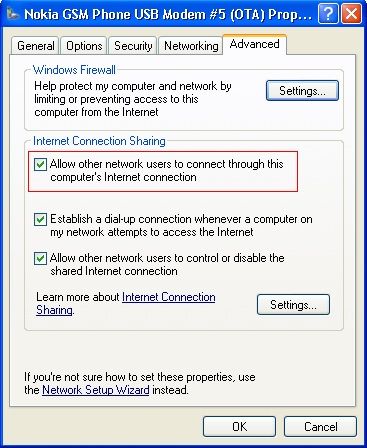
4. Then after this click the setting button on the ICS option.
» Click to show Spoiler - click again to hide... «
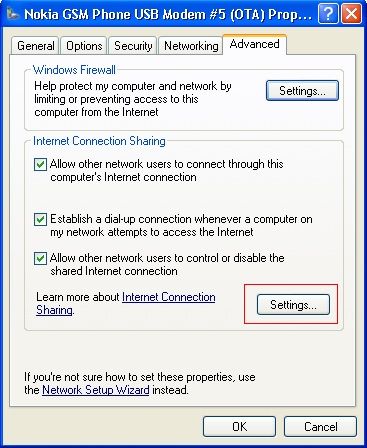
5. Click these item in the box in the options
UDP
DNS
HDCP
HTTP
HTTPS
» Click to show Spoiler - click again to hide... «
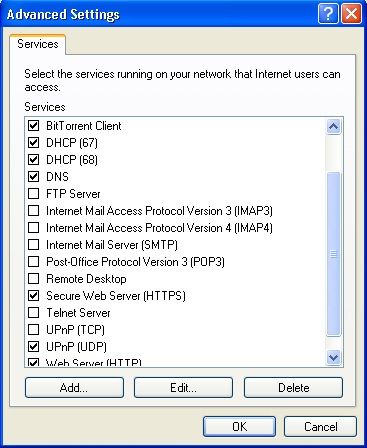

That’s it! ur done on the computer side.

now for the ps3 part

1. Go to network setting
2. Then select internet connection setting
3. They will ask u to select a setting method, select custom
4. Next they will ask u to connect wired or wireless connection, select wired
5 from here, select these bellow:

Operation Mode: auto-detect
IP Adress: automatic
DHCP Host Name: Do not use
DNS: Automatic
MTU: Automatic
Proxy Server: Do not use
UPNP: enable

Once all this is done, there is nothing to do but to Sign IN and play online! hope it helps guys! biggrin.gif

------------------------------------------------------------------------------------------------------------------------------------------


List of wireless broadband gamers
» Click to show Spoiler - click again to hide... «


This post has been edited by Borneo928: Jun 20 2009, 06:53 PM
TSBorneo928
post Apr 6 2009, 11:59 PM

Casual
***
Junior Member
417 posts

Joined: May 2008


QUOTE(colt_508 @ Apr 6 2009, 11:24 PM)
Nice guide Borneo thumbup.gif

hope it will help the other.. GAMER thumbup.gif
*
hope so too biggrin.gif

QUOTE(K-End @ Apr 6 2009, 11:48 PM)
nice job...actually i've been bombarded with lot of question on how to share the connection using the cross cable and now got a thread dedicated to it.
im also a Wireless BB user but im using Huawei B932 modem from maxis. This modem already have RJ-45 slot to plug and play with your ps3 laugh.gif
*
right on! will add ur name to the list. thats a modem to drool for drool.gif... so with the slot ready, do u still have to do the ICS setup? hows maxis during gaming any good? what NAT type did u get?...i got NAT 3 for mine sad.gif
TSBorneo928
post Apr 7 2009, 12:58 AM

Casual
***
Junior Member
417 posts

Joined: May 2008


well they are lags n what not, but they are few reports of ppl playing online without sudden disconnection during gameplay which is a plus. and from my experience, i did not encounter any problem playing around in the US playstation HOME but on the other hand some tmnet users could not even log in.

This post has been edited by Borneo928: Apr 7 2009, 12:59 AM
TSBorneo928
post Apr 7 2009, 01:11 AM

Casual
***
Junior Member
417 posts

Joined: May 2008


yup it always does
TSBorneo928
post Apr 7 2009, 01:31 AM

Casual
***
Junior Member
417 posts

Joined: May 2008


it all depends actually, right now i'm using a phone as a modem so u can imagine the restriction of data transfer through all the activity.

so far maxis seems to be ok, thats what i heard from other people, i'm using celcom 3g, and not HSDPA and yet i still can enjoy multiplayer in liberty city thumbup.gif but of cos wit minor lags and a few issue cos i'm on NAT type 3. planing to get a proper usb modem n upgrade to HSDPA and test it out myself biggrin.gif

This post has been edited by Borneo928: Apr 7 2009, 01:34 AM
TSBorneo928
post Apr 7 2009, 12:03 PM

Casual
***
Junior Member
417 posts

Joined: May 2008


list of WBB gamers has been updated guys biggrin.gif
TSBorneo928
post Apr 7 2009, 09:37 PM

Casual
***
Junior Member
417 posts

Joined: May 2008


QUOTE(akeef @ Apr 7 2009, 09:05 PM)
hello guys.using celcom bb wif 3g..managed to play online for  gt5p..performance wise..satisfied as quite smooth during racing..but the opponents car..hahaha..quite funny though.the movements like tersekat2..but to get in sometimes need to retry (probably server problem).downloading and updates so far np..the ONLY problem..5gb quota..
*
welcome to the club icon_rolleyes.gif

still waiting for digi 3g users to report in so we can learn more about their performance tongue.gif
TSBorneo928
post Apr 12 2009, 07:10 PM

Casual
***
Junior Member
417 posts

Joined: May 2008


any one tried playing H.A.W.X online with WBB? how was it like?
TSBorneo928
post Apr 12 2009, 08:04 PM

Casual
***
Junior Member
417 posts

Joined: May 2008


QUOTE(Kaiser Wave @ Apr 12 2009, 07:18 PM)
Thanks for the tutorial man..now i been able to online with my PS3 using celcom broadband prepaid.

Now i'm downloading Playstation Home 77MB total estimated time 20 mins.. biggrin.gif
*
nice welcome on board. havent touch HOME yet in a while, not yet even update my FW tongue.gif
TSBorneo928
post May 22 2009, 08:34 PM

Casual
***
Junior Member
417 posts

Joined: May 2008


QUOTE(rhoyo @ May 22 2009, 09:48 AM)
i want to ask u guys here . do u guys use Huawei E220 . cause yesterday i can connect to XBOX LIVE but it is only for 2 minutes and then disconnect . or u guys here using some expensive router ?
*
i use handphone brows.gif
TSBorneo928
post Jun 3 2009, 11:28 AM

Casual
***
Junior Member
417 posts

Joined: May 2008


QUOTE(Jasonkwk86 @ Jun 1 2009, 05:05 PM)
Hi all expert. I need help. I'm planning to get a D Link DIR-451 combine with my HuaWei E270 USB modem to gain Internet access for my PS3. Is that good enough? I wanted to play a lot of game, like street fighter 4 and so on. I'm using celcom D68. Will it lag? shakehead.gif


Added on June 1, 2009, 5:22 pmHi all expert,

I'm planning to get a D Link DIR-451 wireless router with huawei E270 USB modem to gain Internet access for my PS3. My current purpose is to play Street fighter 4 network battle. Is that fast enough? Will it be laggy? Please help me on this.


Added on June 1, 2009, 5:28 pmDir 451 with E270 for ps3 to play street fighter 4. Is that fast enough?


Added on June 1, 2009, 5:29 pmI need help
*
i already reply ur PM about this

QUOTE(chinsc @ Jun 2 2009, 11:29 AM)
great job dude! u doent looks like a it gadget ppl but ur result here is... WOW!
*
LOL dont judge a book by it's cover tongue.gif

QUOTE(watever77 @ Jun 2 2009, 04:12 PM)
this is a GREATT threadd !!  i have a ps3 and a laptop ... what should i do next ? plzz advice mee


Added on June 3, 2009, 8:22 amas far as i understand .. get a celcom bb -> usb into laptop - > connect using cable from laptop to ps3 - > setting2 follow the first page .. betul ke ?

what i dont understd is how to connect from laptop to ps3 ? which `hole` from laptop to which `hole` in ps3 ? is it the LAN `hole` in laptop to anything that fits the LAN cable in the ps3 ?

and as i surf more got thread about router la plak .. wat is that ? i need to buy that too ke?
*
all u need is a cross cable and your wireless broadband usb modem
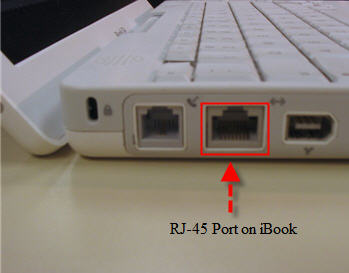
which "hole" to connect in ur ps3 n ur laptop, is a RJ45 'hole' the 'hole' for the cross cable to connect in

this is the cross cable (rj-45 cable)
» Click to show Spoiler - click again to hide... «


connect to this 'hole' in ur laptop/PC (rj45 socket)
» Click to show Spoiler - click again to hide... «


same goes to the ps3 connect the cable to the 'hole' that says LAN
» Click to show Spoiler - click again to hide... «


hope this is clear for you, cheers smile.gif

This post has been edited by Borneo928: Jun 3 2009, 11:47 AM
TSBorneo928
post Jun 8 2009, 09:55 PM

Casual
***
Junior Member
417 posts

Joined: May 2008


QUOTE(watever77 @ Jun 8 2009, 02:24 PM)
bro im using vodafone mobile connect mel k3565 hsdpa usb stick ... last night explore a bit and manage to get the ics option but then cant connect to internet pulak ..


Added on June 8, 2009, 3:36 pmmaybe my *ahem* window ke .. ok ill try connect to ori window ..


Added on June 8, 2009, 4:39 pmcannot also ... theres no ics option .. but when i enable back the LAN on the pc ,  it have that ics option .. well ..
*
hey bro sorry to hear that, what seems to be the problem? any error notice? and what do u mean that u cant connect to the internet? in what way u are unable to connect?

QUOTE(oyama @ Jun 8 2009, 12:19 PM)
TS: i'm celcom BB user..but on NAT3..aiyaa..anyone Celcom BB usb modem can get NAT2 or not? but coverage is my house area quite bad..does it give any effect?
*
i haven't figure out a way to get NAT2 from NAT3, i never heard users having NAT2 by using ICS way to connect, with usb modem or phone sad.gif

This post has been edited by Borneo928: Jun 8 2009, 10:32 PM
TSBorneo928
post Jun 8 2009, 10:24 PM

Casual
***
Junior Member
417 posts

Joined: May 2008


QUOTE(watever77 @ Jun 8 2009, 10:00 PM)
hey ... manage to connect ... but sometimes getting RAS error code


Added on June 8, 2009, 10:03 pmhehe yes .. got the ics option done .. my ps3 can go online now hee ..
*
good to hear that bro, simple as 1 2 3 smile.gif will add you to the wireless BB gamers, enjoy! icon_rolleyes.gif
TSBorneo928
post Jun 30 2009, 08:57 PM

Casual
***
Junior Member
417 posts

Joined: May 2008


QUOTE(Jasonkwk86 @ Jun 30 2009, 05:04 AM)
Hi all, anyone here tried before using celcom bb pared with DIR-451 router? If so, anyone getting Nat type 2?

I am using celcom bb with dir-451, i tried port forwarding and DMZ it, still the same. Any idea? sad.gif
*
i'm not sure, but correct me if i'm wrong, i think that method of connecting will still make u stay at NAT 3, because the source of the internet still needs to go through a router (all that data processing) then out again to the console itself. almost the same thing as using the ICS on ur laptop/desktop.

those who got NAT 2 using wireless BB are usually using direct modem connection, like the Huawei B932 modem that K-end is using. anyways are you using a USB modem to connect to that router?
TSBorneo928
post Jun 30 2009, 09:19 PM

Casual
***
Junior Member
417 posts

Joined: May 2008


QUOTE(Jasonkwk86 @ Jun 30 2009, 09:13 PM)
Yup, I am using Huawei E170 connect to DIR-451. I'd saw on some threads that teaching ppl Port forwarding and DMZ their static ip address for PS3.

They have to forward 6 ports:
TCP: 80, 443, 5223
UDP: 3478, 3479, 3658

Theards show this works for many people that getting NAT Type 2 from NAT Type 3.

Type 3 is ok, but sometimes will laggy when i play SF4 online. So i think if i am on NAT Type 2, will solve this "laggy" things...

So anyone know something i did wrong way or?

Thanks. =)
*
i see, but are they using wireless BB?
TSBorneo928
post Jan 27 2010, 08:15 PM

Casual
***
Junior Member
417 posts

Joined: May 2008


QUOTE(Sesar unjur @ Jan 27 2010, 12:17 PM)
Need help here.im using my hp as modem.i have done everything on the pc side,but on my ps3,it cant obtain the ip add when i try to do the connection test.i dont know bout the cable,it does fit n click.should be the correct cable right?
after i enable my lan network,i can obtain ip address but failed the internet connection.this mean that im using a correct cable to connect the ps3 with my pc right?
why is the internet connection failed?
*
once ur able to connect to ur ip address, means that ur using the correct cable. its probably ur internet connection is to low to connect, try to place ur phone near a window for better 3g connection

QUOTE(h3ctor83 @ Jan 27 2010, 03:22 PM)
hi,

can anybody tell me.. if we use BB to connect to PSN or XboxLIVE.. lets say play 3-4hrs online per day.. no download etc, just play online oni.. will it exceed 3GB capacity provided by maxis?

im asking this becoz i use my phone to connect to XLIVE n after 2 weeks, my line got barred n when i check, my unbilled amount is rm303!?!?

personally i think its impossible that i exceed the 3GB. i use BB so long never exceed that quota (i dont download much). anyway for maxis now, its rm88 for 3GB and after exceed its rm0.5 per Kb.(or isit 0.05?)

faint. anybody knows?
*
sorry to hear that, but usually when i play online on PSN for like probably 5-6 hours during weekends and usually download 1 game demo per month (1gig+) but celcom never cap me by end of the month, but then again celcom limit is 5gig. maybe u can download bandwidth usage monitor software to keep track of ur usage
TSBorneo928
post Mar 8 2010, 09:12 AM

Casual
***
Junior Member
417 posts

Joined: May 2008


QUOTE(tashfinsheikh @ Mar 8 2010, 12:50 AM)
I m using celcom BB but it lags alot. vmad.gif
*
yes its getting kinda bad these days. i gonna try out DiGi BB n let u all know soon.

QUOTE(LeoLilieno @ Mar 8 2010, 09:05 AM)
I am using Maxis Broadband E1762 and the package comes with a cable (one side long USB head and one side shorted USB head). Can I connect it directly to my PS3 and online from there rather than through my PC? When you all said Crossover cable, is it the cable that we use to connect to LAN in the office? Pls advice as I am a noob here.
*
no it is not possible to do that, i wish it was that simple too. and yes its the LAN cable. you can go to page 3 to see a pic of the LAN cable
TSBorneo928
post Jun 13 2010, 11:15 AM

Casual
***
Junior Member
417 posts

Joined: May 2008


hey guys if u just cant be bothered to do the settings on the computer and have some money to burn to play online, i suggest u can get the Aztech hw550-3g modem. just plug in the usb modem into this router/modem n ur good to go, i got mine back in early 2009 for about rm300 n have been using it for a while and it's been good to me ever since. currently using it on the digi network, huawei E1150 usb modem which i got from digi.

http://www.sapath.com/prodimages/3g-routers-hw550-01G.jpg
http://www.comfortsurf.com/images/router/A..._HW550-3G_8.jpg
http://i2-images.tv2.dk/s/24/14327624-cf89...1d3be916e0.jpeg


TSBorneo928
post Jun 14 2010, 08:28 AM

Casual
***
Junior Member
417 posts

Joined: May 2008


QUOTE(skypie @ Jun 13 2010, 10:45 PM)
So we just plug in the BB into this Aztech hw550-3g modem. and run ps3 via wireless right?
*
yup u got that right biggrin.gif
TSBorneo928
post Nov 17 2010, 10:43 PM

Casual
***
Junior Member
417 posts

Joined: May 2008


win 7

click on control panel > network and internet > network and sharing center

once u in there, clikc on celcome/digi/maxis broadband on the middle- right side of the menu. then click on propreties, click on the sharing tab on the top of menu, check on "allow other network....." then choose "local area connection" in the drop out box.

then also check the "allow other network users...." box then

click settings, then check all the box in that menu, then ur done.

for the ps3 part please refer to front post.

i will add a better guide to front post by end of this week. sorry for all the delays guy.


2 Pages  1 2 >Top
 

Change to:
| Lo-Fi Version
0.0281sec    0.36    7 queries    GZIP Disabled
Time is now: 10th December 2025 - 07:18 PM