

QUOTE(Radeon @ Jul 10 2009, 05:41 PM)
return b4 2013


I think I will snatch another HDD next month, copy all the files in there, and send the drive....when return will be use that for external storage backup 

Seagate 7200.11 hard drive firmware woes, Barracuda 7.11, FW:SD15, 1.5TB/1TB/500GB
|
|
 Jul 15 2009, 04:13 PM Jul 15 2009, 04:13 PM
|
 
VIP
4,032 posts Joined: Jan 2003 From: MSR Headquaters 
|
QUOTE(Radeon @ Jul 10 2009, 05:41 PM) return b4 2013 I think I will snatch another HDD next month, copy all the files in there, and send the drive....when return will be use that for external storage backup |
|
|
|
|
|
Jul 20 2009, 10:12 PM
|
 
Junior Member
202 posts Joined: May 2005 
|
Whooooohooooooo finally got all the tools required. T6... RS232... Guess what i get the chip from a PIC board that i am learning from. Mechatronic is the best! xD
|
|
|
Jul 27 2009, 10:04 AM
|

Senior Member
641 posts Joined: Dec 2007 
|
hi guys, sorry but i dont know much about computers. but im using this HDD and right now im facing this problem too, and the worst thing is all my work data is inside this HDD. is it possible to recover all the data and have it replace?
|
|
|
Jul 27 2009, 12:15 PM
|

Senior Member
1,111 posts Joined: Jan 2005 From: somewhere in the universe
|
If i would like to buy a seagate 3.5 ext.hdd... how to ensure i didn't get the problematic firmware one ?
Cause sometimes those staff dunno or wouldn't tell. |
|
|
Jul 27 2009, 09:24 PM
|

Junior Member
156 posts Joined: Jun 2008 From: Kuching, Sarawak
|
Guys i was booting my pc juz now and out of the blue my HDD cant be detected, not even in bios.
Here are the details: Seagate Barracuda 7200.11 Model: ST3750330AS Firmware: SD15 Is it a firmware problem? Is it possible to flash it to fix it? I have important data inside  |
|
|
Jul 27 2009, 10:13 PM
|

Senior Member
1,372 posts Joined: Dec 2007
|
hey guys..
@ghoster i do data recovery and i can recover the data for this kinda problem. if u're interested can contact me at fisherman10@gmail.com or msn - dwarling_90@hotmail.com There are some here who are saying that they send their drive back to seagate and they get free data recovery and stuffs like that but i have seen cases where seagate just gives you back a new drive with a message which states that they were unable to recover your data. @chiakm this is indeed a firmware problem. but unfortunately, it is already too late to update the firmware as it already cant be detected in the BIOS. anyway, i do data recovery, so feel free to contact me at fisherman10@gmail.com or msn - dwarling_90@hotmail.com if you're interested for more details. Thanks. |
|
|
|
|
|
Jul 28 2009, 06:36 PM
|
|
Senior Member
641 posts Joined: Dec 2007
|
fisherman10, sadly i have no backup HDD for u to transfer the data... i plan to ask seagate to copy my data into the new HDD replacement, but since u put it that way, means im in deep trouble...
 This post has been edited by ghoster: Jul 28 2009, 06:37 PM |
|
|
Jul 29 2009, 01:39 AM
|
|
Senior Member
1,372 posts Joined: Dec 2007
|
@ghoster
nowadays hdd's very cheap already mah. what i can do is, i can fix it for u then u can decide when or where u wanna transfer ur data out or i copy everything out into another of your hdd. the problem i said abt sending back to seagate might affect you but there's no 100%. u can try ur luck if you want but ones u send your hdd, you dunno what will happen to it. This post has been edited by fisherman10: Jul 29 2009, 01:40 AM |
|
|
Jul 29 2009, 09:24 PM
|

Senior Member
2,257 posts Joined: Jan 2003 
|
QUOTE(Foxngn @ Jul 27 2009, 12:15 PM) If i would like to buy a seagate 3.5 ext.hdd... how to ensure i didn't get the problematic firmware one ? avoid 500g 750g 1tbCause sometimes those staff dunno or wouldn't tell. or avoid seagate |
|
|
Aug 2 2009, 06:43 AM
|

Junior Member
45 posts Joined: Sep 2005
|
QUOTE(Radeon @ Jul 29 2009, 09:24 PM) avoid 500g 750g 1tb what about 1.5tb ?or avoid seagate |
|
|
Aug 6 2009, 09:42 AM
|
|
Senior Member
2,215 posts Joined: Nov 2007 From: Cheras, KL.
|
wta, does the seagate 7200.12 1tb still have firmware probleM?
|
|
|
Aug 11 2009, 10:16 AM
|

Senior Member
857 posts Joined: Feb 2007
|
Can i ask anyone using ST3500320AS with updated SD1A firmware is still running fine flawlessly?And how many case is after update firmware still have brick problem?
|
|
|
Aug 11 2009, 01:48 PM
|

Junior Member
409 posts Joined: May 2008 From: K-B
|
err
mine work ok flashed the firmware since it's release |
|
|
|
|
|
Aug 11 2009, 05:01 PM
|
 
Staff
10,459 posts Joined: Sep 2005 From: Puchong
|
QUOTE(Eng_Tat @ Aug 6 2009, 09:42 AM) wta, does the seagate 7200.12 1tb still have firmware probleM? No. Unless it's an old 7200.11 with just 7200.12 sticker stuck on it.This post has been edited by mengsuan: Aug 11 2009, 05:01 PM |
|
|
Aug 12 2009, 01:22 AM
|
|
Junior Member
149 posts Joined: Jun 2009
|
I think I'll just sum it up. Its simple really. If your hd is bricked (google for the symptoms) go n contact seagate and they will kindly upgrade the firmware and return the hd back to u with the data intact. If they are not able to resolve the problem (upgrade the firmware.. meaning ypur hd is actually facing another proble) they will still return the drive back to u and it is up to u to try to recover the date urself or to get a warranty.(brand new hard disk but your data is no longer intact)
Sending to the shop u bought it fr means u r lodging a warranty report >> new drive reporting to seagate means they will flash the firmware and upgrade it. Wat happen to mine was the latter. They upgraded the firmware and now the drive is OK plus all data are intact. Seagate was kind enuf to foot all the bills. They dispatched a courier to my house, sent the hd to their factory in singapore, repaired, and then courier it back to my house all of it FREE. Its safe Added on August 12, 2009, 1:25 amoh ya.. there is no need to avoid any hard disk. Just feel free to buy either western digital or seagate.. the current version of both are pretty stable. But my choice will be Western Digital Caviar Black the capacity doesn't matter lol 500gb/1tb/1.5tb all the same lar... This post has been edited by Xcal: Aug 12 2009, 01:25 AM |
|
|
Aug 18 2009, 06:19 PM
|

Senior Member
1,524 posts Joined: Apr 2008
|
the scary news is that many complaints and negative reviews pop up in foreign forum or online shop such as newegg.com, saying that thinking 7200.12 is problem-free, but the drive death after several months of use...
dare try 1? better bypass the 12th gen, and wait until 'brand new' 13th generation drive, not a rebadged 11th gen drive. no wonder seagate promote their drive hard in the recent pcfair with lower price tag....sweat... This post has been edited by coolstore: Aug 18 2009, 06:22 PM |
|
|
Aug 18 2009, 10:28 PM
|

Senior Member
3,593 posts Joined: Feb 2005 From: ***Penang***
|
QUOTE(mxploit @ Jul 4 2009, 02:11 AM) A tip to getting your HDD back with all your data untouched shall your Seagate 7200.11 brick: even for OEM HDD?1. Log on to Seagate's website. 2. Create a support case. 3. A support representative will contact you to confirm that your HDD is facing firmware issue. 4. Once confirmed, Seagate will arrange for UPS pickup to be delivered to Singapore for firmware upgrade. 5. After 10-20 working days, you'll receive your HDD at your doorstep with upgraded firmware and all your data in store. No more worries about sending your HDD back to local service centres or sending your HDD for Data Recovery services. Cheers! anyone sent warranty for OEM HDD ? |
|
|
Aug 19 2009, 11:57 PM
|
|
Senior Member
1,372 posts Joined: Dec 2007
|
hey guys? anyone needs data recovery? You can be sure that ur data remains confidential. Sending your harddisk for warranty means that u're actually sending your data to wonderland. Who knows what they'll be doing with your data once your hdd is with them? And then there's the problem of your hdd being lost during transportation, or being mishandled.
So, all is not lost. i used to have the same problem but i managed to fix it and recover all my data fully. I'm on a Seagate 750GB with S/N: ST3750330AS and i'm not worried at all. I'm sure all of you would be thinking of RMA in which you'll loose all your data. I'm also pretty sure that all of you want your precious data back. I almost cried when i tot i lost everything but i managed to recover everything. I know professional data recovery services would cost thousands. But i'm willing to do it at lower price. This is because, i'm not from a big company of wtv. I'm just soloing and doing this as my free time. So...yea..as long as its not physical problem but this firmware problem where harddisk cannot be detected in BIOS, i can help. I even do data recovery in the case the drive was accidently formatted. Provided its not overwritten by any new data. For more info and enquiries, contact me at : fisherman10@gmail.com also using this for skype. or just search my name - rfkwfoong MSN : dwarling_90@hotmail.com Phone number is 012 3 4 5 9 9 5 2. My phone is usually off during the day but u can leave me an sms with your details or just email me and i'll contact you back surely. Or you can just pm me. I have already successfully solved this problem for a few users who have saw my services here. So rest assured as no data, no charge. Thanks -- Email/Skype : fisherman10@gmail.com / rfkwfoong Windows Live Messenger : dwarling_90@hotmail.com This post has been edited by fisherman10: Sep 26 2009, 01:19 AM |
|
|
Aug 20 2009, 04:20 PM
|

Junior Member
85 posts Joined: Nov 2006
|
i jus update my SD15 firmware last month, hopefully dont have anything happen
|
|
|
Aug 20 2009, 10:41 PM
|

Junior Member
100 posts Joined: Dec 2008 From: Selangor Darul Ehsan Warn: (0%)
|
still survive..
 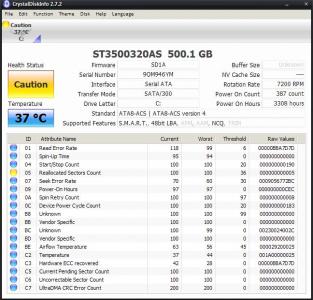
|
|
Topic ClosedOptions
|
| Change to: |  0.0718sec 0.0718sec
 0.55 0.55
 6 queries 6 queries
 GZIP Disabled GZIP Disabled
Time is now: 12th December 2025 - 11:38 AM |
 Quote
Quote