Outline ·
[ Standard ] ·
Linear+
Asus Eee PC Thread V3
|
havocx
|
 Apr 6 2009, 06:32 PM Apr 6 2009, 06:32 PM
|

|
QUOTE(justakid @ Apr 5 2009, 01:52 AM) anyone overlock their eeepc before if i overlock my eeepc from 630mhz to 900mhz does that make my eeepc smooth ??
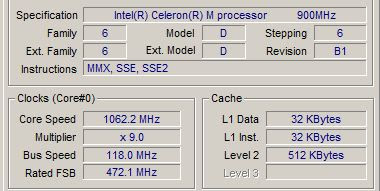
While Asus advertises the current generation Eee PC as having either a 900MHz or 800MHz Celeron processor, depending on which model you buy, the truth is Asus underclocks these chips to run at 630MHz and 570 MHz respectively. This makes sense given the Eee PC’s mediocre battery life. The faster the processor is running, the more electricity it uses and the sooner you run out of juice. But if you want a bit more oomph you might want to look into overclocking or right-clocking your device.
Of course, your battery life will suffer if you run at these higher speeds. And you run the risk of overheating your system. Fortunately Eeectl includes a built in temperature meter so you can keep track of just how hot your system is getting. If you start to approach 65C, it might be time to ramp down your clock speed a bit.
My take is, if youre using the 701 like what im using, Overclocking the Eee is the best way to improve its performance though battery life suffers a whole lot. Ie. Ive done it. Better way is just to slim down the OS. Itll run amazing fast even on 512mb Ram. If you feel you need to upgrade the Ram max you can go is about 2Gb though that has very little effect on the machine, 1gb is sufficient or even 512mb provided youve slimmed down your OS.
Currently one of my EEEPC 701 is running EEEBuntu introduced to me by Emino the threadstarter, I love the performance, though even on Linux running 1gb Ram, its still slower than my 512mb 701 running Slimmed down Windows XP. |
|
|
|
|
|
havocx
|
Apr 13 2009, 02:11 PM
|
|
|
QUOTE(naga_sakti @ Apr 13 2009, 12:14 PM) hi all...i'm kinda interested to get this eeepc.. the spec is just fine for me..and lightweight also.. just to ask a few question..besides doing ms office thing..can i run other apps. such as photoshop??flash work?? tq in advance...
Current Netbooks.
2 x EEEPc 701 - SSD 4GB - 2GB Ram, 16gb AData SDHC
2 x EEEPc 900 - SSD 8 GB - 2GB Ram, 16gb AData SDHC
Interchangeable Bluetooth Receiver, GPS Transmitter, 77whr Battery with the EEEPC 701
1 x EEEPc 901 - HDD 30Gb
1 x EEEPc 1000H - HDD 80 Gb
1 x EEEPc 901GO - HDD 20Gb with 3.5G built in.
I went with the EEEPC's for their lightweight and design and more importantly the SSD's. Now most Ultra Mobiles will pit SSD's ( which are small ) vs their larger capacity HDD's within. Even the 901 which I have uses the 1.8" Sata HDD which gives a space of 30gb vs the others which are all SSD's the largest being 12gb and the smallest being 4gb. Believe me, SSD's are the only way to go. Nothing beats that.
For size comparisons, from what I see the EEEPC takes about the smallest footprint as compared to its similar competitor of the same capacity and size. That being said, yes Im a fan of the EEEPC but not to say Ive nothing good to say about the rest. But if you are going for size, you will see that most the time the EEEPC will be much sleeker than the others. Have you seen how huge in comparison HP 2133 Mini Notebook is ? Or how fat MSI Wind is in comparison to the EEEPC ?
Design wise though I like the look of the Aspire One from Acer. That's just new but those lights at the side and the gloss they go really well together  EEEPC has gloss too on the 901 and 1001 but I still prefer the Aspire One look. Perhaps I may trade in one of the Laptops that I have for the Aspire One EEEPC has gloss too on the 901 and 1001 but I still prefer the Aspire One look. Perhaps I may trade in one of the Laptops that I have for the Aspire One
Earlier when purchasing my requirements were :
Running on / Can install Windows XP SP2 - Most if not all support that. In fact all my EEEPC's are running a small Modified version of XP SP3 which is taking only about 400mb in install footprint!
Net Surfing, (thus need Wifi and Ethernet support ) - The very essence of an Ultra Mobile PC, we can safely say for both requirements above any UMPC will fit that need.
Watch Movies, ( RMVB, Avi , moderate bitrate, maybe sometimes 720HD or 1080HD, rarely but possible) -
For this part yes most UMPC will be able to fulfill your needs but having the latest Atom Processor EEEPC in the 1001 I can play all movies except sadly for the movies running on 1080HD and 720HD, well they play but not often smooth. So yes they play but you wont get proper playback. Best stick to normal divx at the normal high resolution and not the super high ones.
Play Games, (old school game, Counter-strike 1.6 ) - Playing Warcraft 3 on my old skool EEEPC 701 with 512mb Ram ( All the other ones have been upgraded to 2gb Ram ), Warcraft 3 runs fine on it so safe to say you'd be fine, though playing CS on it may need you to squint a little 
Running Diablo 2 on mine now too.
Office works ( MS office) - This goes without saying In Fact MS Office 2007.
Running Garmin GPS on 2 of the UMPC's now. I have Ultra Big Screen GPS for cheap!
All my EEEPC's are running WinXP SP3 fine without problems. Speed is essential and other than my 901 which runs on 30gb SATA HDD all I can say about all of the UMPC that I have is that they run blazing fast. |
|
|
|
|
|
havocx
|
Apr 15 2009, 07:17 PM
|
|
|
QUOTE(setoyo @ Apr 15 2009, 12:36 PM) I really cant tahan this Netbook thing... The stylish of holding it.. oh.. btw, just search the latest netbook from asus.. the new one is EEE PC 1008HA Using N280 chipset.. More Details About Spec Is Here.. So thin...   |
|
|
|
|
|
havocx
|
Apr 15 2009, 07:45 PM
|
|
|
QUOTE(amunriel @ Apr 15 2009, 07:30 PM) I am very tempted to reformat my 1002HA to linux. Is there ASUS Power Management driver/software for Linux yet? ( the button that you could press to cycle through performance settings ) |
|
|
|
|
|
havocx
|
Apr 17 2009, 10:38 AM
|
|
|
QUOTE(setoyo @ Apr 15 2009, 11:05 PM) Woo... that is a company or what? Asus Eee Family.. Hehe.. 
See past posts in this same thread and youll see the donkey stuff i did with some of it 
QUOTE(picksickrick @ Apr 16 2009, 05:58 PM) guys i have a problem my sis''s asus eeepc wont login to windows xp, after i installed something and restarted.. it'll reach to the windows logon screen with the name when i press it, immediately it goes to log off and back to the same thing. what's wrong? Help please  |
|
|
|
|
|
havocx
|
Apr 28 2009, 10:19 PM
|
|
|
QUOTE(emino @ Apr 17 2009, 11:09 AM) havock, you know how to ghost current window installation (including all software and driver installed) to a cd so that we dont have to reinstall everything if something happens? Care to post step by step? 
Basically i use Acronis Disk Image. Its one im using for Vista since Norton Ghost does not work for Vista. Acronis works for XP too. Basically the instructions and the read out can be found on the site itself. Pretty simple and quick.
QUOTE(qwe65 @ Apr 25 2009, 01:07 AM) my fren bought asus eee pc last year....ram 1GB+8gb built in ..can upgrade the ram o not???
But then again, EEEPC's were designed earlier to only run Linux and for the kids so they never thought people would bother with XP in it anyway. That was, till when people discovered how awesome light and useful it was |
|
|
|
|
|
havocx
|
Apr 29 2009, 11:23 AM
|
|
|
QUOTE(-҉- @ Apr 29 2009, 01:41 AM) I'm about to buy S101H izit good???
Difference between the 2 ? Almost neglible. Let me go through them with you for you. Some of these taken of a review site.
Thinness : Both 1002Ha and S101H sports the same slim profile with perhaps the S101H winning by a teeny tiny bit. Yes teeny tiny. Not like how much difference a S101H vs a 1001HA is but teeny tiny.

Keyboard Spacing : S101H has chiclet keyboards, those keyboard with spaces in them like Vaio and Macs. Both netbooks have identical keyboard layouts with that pesky inconvenient shift key that some touch typists hate. The 1002HA has the same keyboard as on the 1000H while the S101H has a keyboard which feels slightly more mushy and the keys are darker and coated with some glittery substance.
Screen Estate :

The 1002HA lid is thicker than S101H but the 1002HA screen has a noticeably better vertical viewing angle with colors not washing out when not viewing at an optimal angle.
Webcam : The 1002HA has the higher 1.3 megapixel webcam. I don’t notice much of a difference between the 0.3MP and 1.3MP webcams anyway but I don’t use it often.
Performance:
They work the same.

In short if youre looking for style and have the cash to pay run to the S101. I wouldnt recommend it though, right now, there is still no 3rd party batteries available for it in case you wanna extend the battery life. You want value ? Go for the 1002HA, yes its keys are closer apart and its teenier tinier thicker than the S101H but thats about it. Everything else runs to it. Almost same weight ie 1182g for the S101 vs 1265g for the 1002HA, better webcam, even better Battery life, better viewing angle ah well..my opinion is better.
Its not as charming as the S101H with its colours, but Champange is the only extra colour the S101H has an advantage over the 1002HA, the other two colours in S101H the 1002HA also has. Heck, if someone brought out from afar a 1002HA i wouldnt know the difference between that and the S101H.
That though is only my opinion, other folks may have better ideas though This post has been edited by havocx: Apr 29 2009, 11:42 AM |
|
|
|
|
|
havocx
|
May 1 2009, 03:37 PM
|
|
|
QUOTE(phoenix @ Apr 29 2009, 04:10 PM) Anyone knows where to get the 1000HE with the N280 processor? I have asked Asus at Mid Valley but they only have the N270. Have yet to visit Lowyat though but any help here may be appreciated so I can just zoom to the shop straight. Thanks.
Youll be able to find plenty of it on the 4th floor Sunway Pyramid, in fact i counted 12 on display just now. Priced at RM1699. Almost all the shops that carries Asus laptops are carrying it : |
|
|
|
|
|
havocx
|
May 2 2009, 11:53 AM
|
|
|
QUOTE(phoenix @ May 1 2009, 05:51 PM) Thanks havocx. Since it's Labaour Day today, I dragged myself out of bed and managed to find a few units selling a Lowyat and at attractive price of RM1599 running on the N280. I didn't buy it though. Probably next week. WOOT!  |
|
|
|
|
|
havocx
|
May 2 2009, 03:07 PM
|
|
|
QUOTE(penyu3 @ May 2 2009, 01:13 PM) running 1GB at eeePC now....should I upgrade it to 2GB...major different?
If not just leave it at 512mb or 1gb and you wont feel the difference. Only time i find that my 2GB plays a major role is when im editing movies on the machine. Other than that all my other apps runs on lower resources. |
|
|
|
|
|
havocx
|
May 5 2009, 10:28 AM
|
|
|
QUOTE
Added on May 4, 2009, 4:22 pm
I am getting 8 hours with brightness 100% and wifi on. I have a problem though, I had a Lenovo S10 and comparing both, the wifi capture is quite weak on the 1000HE. Is this normal?'
Isnt the wifi supposed to be N? and very good?
Even though just 10 feet from the wifi router, the signal strength shows "low". Anyone can help?
From what I know though, The Wireless card or driver on the 1000HE does not appear to support the TKIP encryption method except in 802.11g. If youre using security mode WPA2-PSK with TKIP encryption (Passphrase ASCII) on your Wireless router you might only get your 1000HE to connect at most 802.11g (54Mbps) or having low strength signal. Try changing the Router and 1000HE to the AES encryption method (from TKIP) and everything should work itself out from what i know.This post has been edited by havocx: May 5 2009, 06:51 PM |
|
|
|
|
|
havocx
|
May 12 2009, 04:27 PM
|
|
|
QUOTE(michaeltan1943 @ May 12 2009, 02:45 PM) Anyone tried installing Windows 7 on their 1000HE? How to get the drivers?
But installed it on my 701, 900 and 901GO though. Oh and also on Aspire One.
Since all the drivers used in the EEEPC model are basically run of the mill default drivers, ie GMA from Intel, normal Mobo Sound Drivers and all that ( save for the Built in 3G Modem which is from Huawei ) they run just fine with all drivers detected. I find a higher success rate installing on a ready XP rather than a fresh install, although that was on the Aspire One. Otherwise works just fine.
A note on Dell Mini 12 though. Well i consider it a semi netbook in case one wonders why im mentioning it here.
Also since I did a video review of it before in the past few posts. The Mini 12 ships with Vista. Its darn awful slow.
I then installed Win 7 on it. Made it much much faster BUT still slower than my slowest Netbook the 701 EEEPC.
You'll have some space issues installing on 701 though since a minimum 5gb freespace is needed for the files to expand, otherwise on the other models all works just fine
To be fair though,ive since reverted back to XP on my 901GO and my 701. Space issue on the 701 and i need some special XP specific apps to run in my 901GO. My GPS software for instance This post has been edited by havocx: May 12 2009, 04:42 PM |
|
|
|
|
|
havocx
|
May 12 2009, 09:12 PM
|
|
|
QUOTE(michaeltan1943 @ May 12 2009, 05:41 PM) thanks havocx for your detailed advice. Appreciate your kind efforts explaining. Is Win 7 faster than XP then on your 901?
QUOTE(YO® @ May 12 2009, 07:48 PM) when can i get an 1000 he with installed win7 ultimate in malaysia though?
You'll be able to install Win 7 Ultimate ( if there is one ) when Microsoft officially releases it. Currently Win 7 as it is, it's still in Beta Release ( that's Release Candidate for you and not official ) |
|
|
|
|
|
havocx
|
May 13 2009, 08:09 AM
|
|
|
QUOTE(michaeltan1943 @ May 13 2009, 12:09 AM) The RC which we all downloaded, is it a full functioning version that can be updated?
If you've already taken the plunge with the Windows 7 Beta, chances are you don't really want to set everything up all over again when you install Windows 7 RC. Unfortunately for you, Microsoft recommends a fresh install over an upgrade, and in fact, if you want to upgrade rather than install from scratch, you'll need to perform a some tweaks on the system. Likewise, you'll have to perform an in-kind upgrade, meaning you can't go from 32-bit Vista to a 64-bit Windows 7 install without doing a clean install.
The information below has been taken off from Microsofts Windows 7 Frequently Asked Questions.
Are there risks to installing the RC?
Yes. While the RC is stable and has been thoroughly tested, it's not the finished product. Your computer could crash and you could lose important files. So please back up your data and please don't test the RC on your primary home or business PC.
Other problems you might encounter include:
Software that doesn't install or work correctly, including anti-virus or security programs
Printers, video cards, or other hardware that doesn't work
Problems accessing corporate or home networks
Files may become corrupted
Bottom line: Please carefully balance the risks and rewards for you of trying out the RC before you install. To see the kinds of risks we're talking about, review the known issues in the Release Notes before you install the Windows 7 RC.
How long can I test Windows 7?
This is a very important question, because Windows 7 Beta and Windows 7 RC each have an expiration date. To avoid interruption, you’ll need to rebuild your test machine using a valid version of Windows before the software expires. Windows will notify you that the expiration process is beginning and two weeks later your PC will begin shutting down every two hours. The Beta expires on August 1, 2009, and bi-hourly shutdowns will begin July 1, 2009. The RC will expire June 1, 2010, and the bi-hourly shutdowns will begin on March 1, 2010. In both cases, you’ll need to rebuild your test PC to replace the OS and reinstall all your programs and data. (Learn more about installing Windows.)
Can I upgrade directly from the Windows 7 Beta to the RC?
If you are running the Windows 7 Beta, you'll need to back up your data (preferably on an external device) and then do a clean installation of the Windows 7 Release Candidate. After installing Windows 7, you will need to reinstall applications and restore your files. If you need help with the installation process, please see the Installation Instructions.
Can I upgrade from the RC to the final version of Windows 7?
When you install the final version of Windows 7, you'll need to do a clean installation. So plan on backing up your data then reinstalling your applications and restoring your data.
Hope that helps with your answers.This post has been edited by havocx: May 13 2009, 08:10 AM |
|
|
|
|
|
havocx
|
May 15 2009, 12:58 PM
|
|
|
QUOTE(Gurdian @ May 15 2009, 08:25 AM) not the 1002HA the 1002H  C-zone price list listed it as RM1699 or did they mislabel and it's actually the 1002HA?
Realistically cleaner is about right, it should last about 3.5 -4 hours although if youve installed the Asus Proprietary power control it might well go for 4.5 hours too.
To know whether its been mislabelled do this.
Look for the processor within the machine.
The 1002H runs on N280 while the 1002HA runs on N270.
Since the N280 is newer and even more efficient that the Atom N270, the claim of 5 hours might actually run true and does not need you to install the Asus Power Control. |
|
|
|
|
|
havocx
|
May 16 2009, 06:35 PM
|
|
|
QUOTE(xelrix @ May 16 2009, 02:40 AM) Eee PC 1008HA when do u guys think this will come to malaysia? and how much u guys think it would cost here? |
|
|
|
|
|
havocx
|
May 16 2009, 08:08 PM
|
|
|
|
|
|
|
|
|
havocx
|
May 18 2009, 01:12 PM
|
|
|
QUOTE(YO® @ May 17 2009, 12:17 AM) wow, tat T91 beautiful! can compare it to 1000he? which 1 better. price of the T91 around??? TQ
It is going to be the slimmest 10inch touchscreen netbook around and I think thats gonna be the clincher in making the price. It might be released at the upper high end because of its screen size, slimness as well as being touch screen ie a tablet netbook. Probably around RM2299 or a little higher. Of course if it comes out at RM1899 then thats just sweet.
On another note, im hoping they really keep down the weight. Am currently backpacking in Rome right now, bought along the 701 and 901GO. Now while walking through coliseum, pantheon and the likes the 701 really shines for a netbook. It is the slowest and the grand daddy of netbooks but when backpacking, a difference between 735 grams for the 701 and 1.14Kg for the 901 really makes a difference. Im ditching the 901GO for now, for sporadic use the 701 is da bomb, im hoping the T91 can be made really light as the 701s are too. |
|
|
|
|
|
havocx
|
May 19 2009, 01:25 PM
|
|
|
QUOTE(Hico @ May 18 2009, 09:37 PM) i totally agree with u..at first i complained abt 2kg+ notebook's weight...then move to eee pc 1.3kg+ netbook..then now start to feel heavy also.. man will never satisfied with wat he has! 
QUOTE(-҉- @ May 19 2009, 12:15 AM) guys, I think running win7 on netbook such as 1000he is no good, cause winxp requirement is much less, I'm happy with my 1000he on winxp, relatively fast and batt usage very good...but if anyone got goo exp on win 7 please do tell...
QUOTE(redninja @ May 19 2009, 12:49 PM) Silly question but when is the right time to upgrade to another eeePC? I have an older model with 4GB SSD only and it suits my purposes fine but am still drooling over new models 
I have 2 of the 701models still and they run beautifully but some portions of my work need me to have a bigger screen to work with and longer battery life hence the reliance on Atom processors. But as you can see, the weight is not agreeable to me though yes 700grams vs 1.2kg may not sound like very much of a difference but hey, 1.2kg versus a normal 2kg laptop also doesnt sound any different but then try lugging a normal laptop around for 5 hours
In short you should upgrade when you feel that you need something better. The current one that you have im sure serves you a whole lot unless you have bigger needs |
|
|
|
|
|
havocx
|
May 20 2009, 05:20 AM
|
|
|
QUOTE(YO® @ May 19 2009, 03:26 PM) but i have no others pc/laptop im just own a dekstop by the way. does anyone used win7 on their netbook? may share experience? any disadvantages or advantages? faster or laggy like that vista.... TQ 
Also youre asking a redundant question, if youd look a few posts behind folks already have shared their views and experience. Please make an effort first to read through before striking in.  There are comments beyond the last 2 -3 posts and in fact was preceded by your Windows 7 Ultimate question. There are comments beyond the last 2 -3 posts and in fact was preceded by your Windows 7 Ultimate question.
Win 7 works beautifully with newer netbooks with faster processors. Nevertheless Win 7 is not yet official so the bugs you see may be because its still in its testing phase. For now its on par with Win XP in terms of speed, Win XP is not capable of using SSD write techniques as Win 7 can so performance on SSD machines once Win7 is out may be even better and faster. |
|
|
|
|



 Quote
Quote


 0.0511sec
 0.54
0.54
 7 queries
 GZIP Disabled