Outline ·
[ Standard ] ·
Linear+
Asus Eee PC Thread V3
|
havocx
|
 May 20 2009, 12:41 PM May 20 2009, 12:41 PM
|

|
QUOTE(redninja @ May 20 2009, 09:10 AM) Ha ha. Yep am definitely going to get another one once I save up. Am waiting on one receiving my book-like leather cover for it. Taking awhile to show up. Earlier someone mentioned they got Fabrix cases for their eeepc. I'm interested but the Fabrix website don't have many pictures. I want to see how it looks like inside (when open) and the underside. Anyone can show? 
Right since Im travelling right now resources to take up photos may not be available as quickly as id like them to but ill try and capture the insides for you. Remember they are custom made for your laptop and costs max at SGD60 depending on size, for a 701 with 7 inch screen itll cost a max of SGD 50. Minimum SGD40 which does not include shipping. Ill post some pics up later if and when possible.
QUOTE(michaelpaul @ May 20 2009, 11:01 AM) Any idea how much the Asus 1008 will be?  |
|
|
|
|
|
havocx
|
May 21 2009, 05:56 AM
|
|
|
QUOTE(oneeleven @ May 20 2009, 10:38 PM) OMG I messed up my password reset, now can't login. Reset everything, restored to factory settings, still NO ENTRY! Anyone know if service centre can help and how much will they charge? 111
If its Windows you meant here's What GOOGLE can do
If its Bios, if you know how to remove the battery for the motherboard, that should help you out.
If not its off to the Asus Royal Club for you.
QUOTE(michaelpaul @ May 21 2009, 01:06 AM) havocx, i have installed Win 7 on the 1000HE. So far, no problem. However, there is no Internet Security or Antivirus program for Win 7. Any recommendation? Also, Win 7 does not recognise the several Asus utility programs, how did you install the Lan Utility? ie the software that allows you to switch off the Wlan, webcam etc? Also cannot install the Super Hybrid Engine software? ie the software to contro cpu performance and battery?
I didnt install Lan Utility, i just went with the default install, you can turn all the functions off via Control Panel if you wanted. For more links perhaps this might help Its a link to EEEPC install on the 10 series.
Also for me personally i didnt go for the SHE software. I ran a very lightweight Win 7 install and that helped a lot.
redninja,
Fabrix for you. Background. Entrance to Rome's Sistine Chapel near the Vatican 
» Click to show Spoiler - click again to hide... « Front view 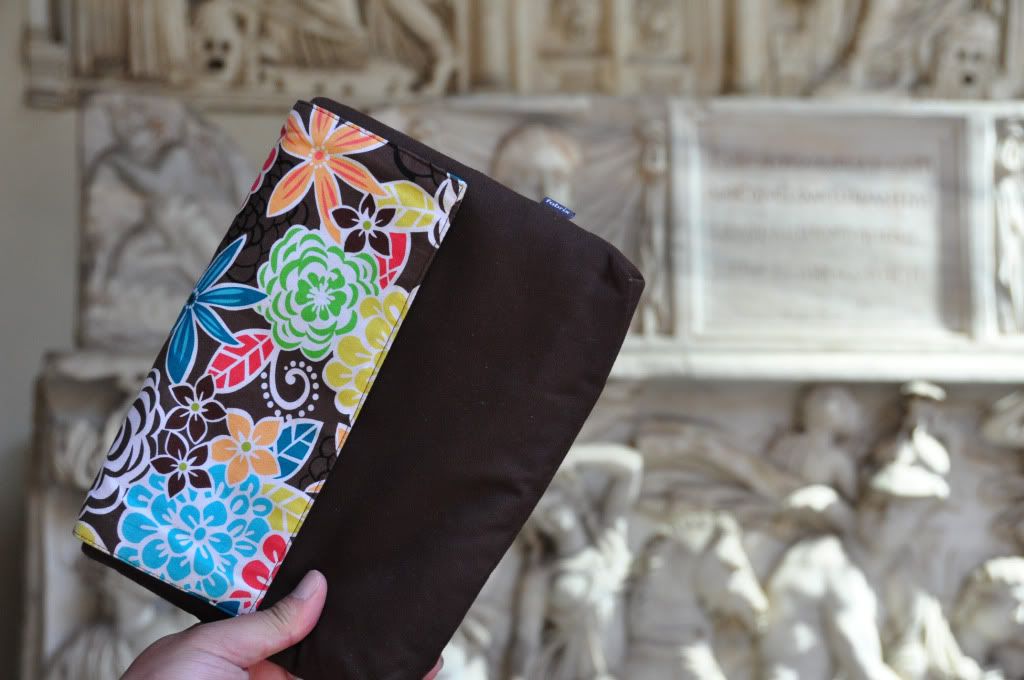 Back pocket 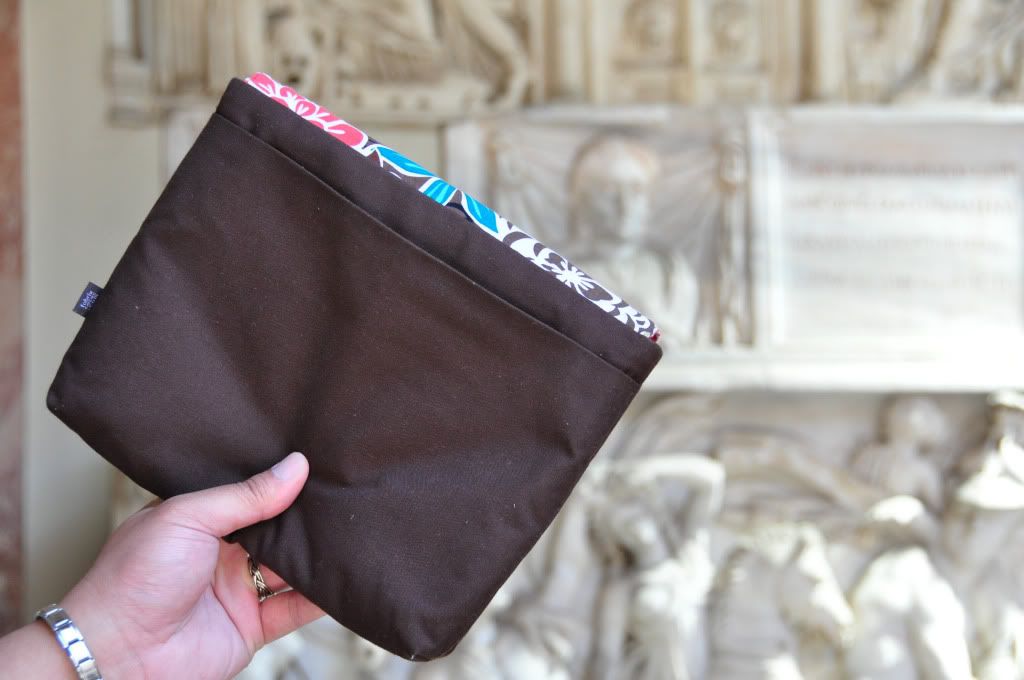 Inner back pocket lining, satin light cushion material. 3 smaller slots with one large slot.  Inner front, where main EEEPC goes in. Notice no zips to scratch your machine 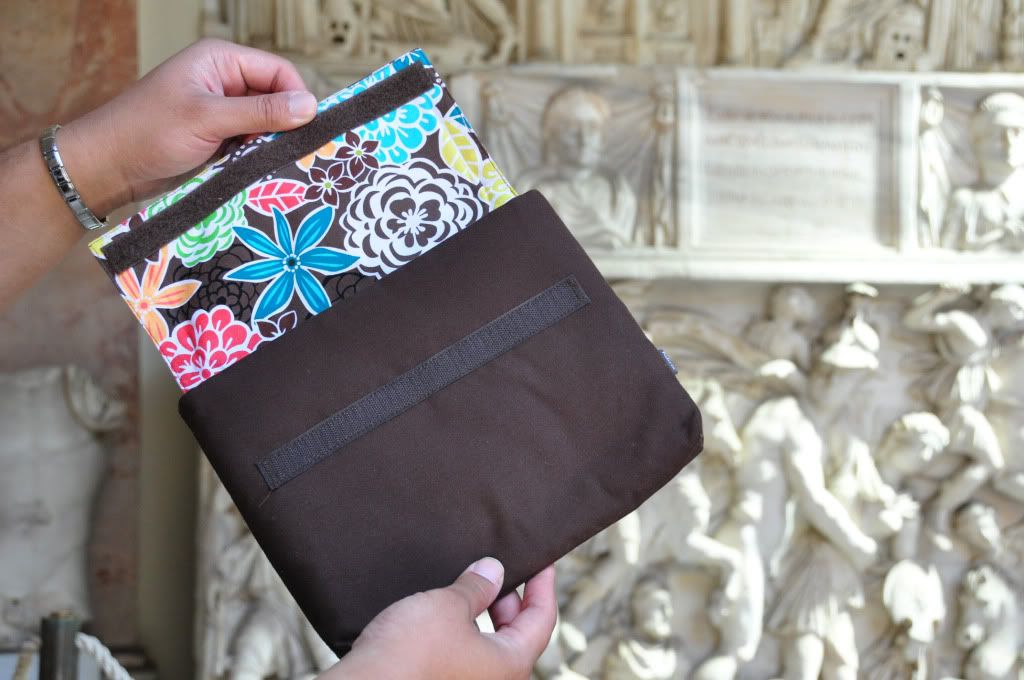 How pocket opens.  All pockets opened 
Heh,sorry buddy its not much but hope it helps Custom fitted for my 701 but its large enough to comfortably fit my 901.
|
|
|
|
|
|
havocx
|
May 21 2009, 12:39 PM
|
|
|
QUOTE(Gurdian @ May 21 2009, 09:20 AM) Although Win 7's power management is quite flexible for the 1000HE, SHE still allows you to squeeze out more from the battery. Below is a solution provided by a forummer @ eeeuser.com. It worked for me: As for AV, word around is that NOD32 v3 is lightweight and good. I personally use AVG8.5 Free, but might change to Nod for more batt life.
Thatll help me too, will get around to it once im back. For the antivirus, having tried them both Id go with NOD32 as well though nowadays i find usage of paid antivirus is better, for those try Kapersky Netbook edition ie Mobile PC edition, its the most lightweight of all the ones ive tried, heck even its full version of Kapersky Internet Security is lighter than any of the rest ive tried.
Ive tried Bitdefender, Norton 360 and Norton Internet Security, personally for me NOD 32 for freeware and Kapersky Internet Security Netbook Edition for paid works the best and lightest.
QUOTE(epyc @ May 21 2009, 10:36 AM) There are news saying that 1000HE going to be phased out. It has just been launched here in Malaysia and they wanted to phased out already.
The HE comes with N280 which is newer at 1.66Ghz vs the N270 you usually find in the other H series at 1.6Ghz.
Performance wise there would not be much difference between the two - the HE doesn't have the GN40 GPU yet. If you'd like to upgrade purely for gaming purposes there are notebooks with integrated nVidia or ATI solutions but a desktop is a far more economical solution for the latest games.
The benefits of upgrading to an HE are the chiclet keyboard, built in wifi-N and Bluetooth, along with the extended battery (which you already have in the other 1000H series). Wait a few months before upgrading in a decisive fashion... mayhaps a N280/GN40 netbook, or a T101H.
Biggest difference, Wifi N, Chiclet keyboards and longer battery life in power management terms in the HE.So its not actually a big difference, really, in real world usage. Did you know that you can actually replace normal H series machine with Chiclet keyboards already ? Wifi N just gives you a throughput of 108Mbps vs the normal 54mbps the G series gives you, besides its still buggy and not a lot of places would be through putting out at 108mbps ie N speeds. Only thing left is the battery, a nice 8 hours of use. My current battery on my 9 series gives me 6 hours with SHE turned on, my upgrade battery gives me 12 so again its not anything new the 1000HE presents to us.
The other thing is once you upgrade to an HE, the next month something better comes out and you'd have to fork out more $ to upgrade.. again.. and again.
For now, if youve not gotten a netbook already, the 1000HE is the best any newest that Asus has, if youre itching for an upgrade though, Why not wait for Asus to release their next trump card? 1004/8 anyone? 
|
|
|
|
|
|
havocx
|
May 22 2009, 02:01 AM
|
|
|
QUOTE(michaelpaul @ May 21 2009, 02:52 PM)
Added on May 21, 2009, 3:00 pmactually the 1004 and 1008 not much difference from 1000HE. It is just a marketing gimmick. The stress on lightweight and slimness. But if you really see the real weight with a 6 cell battery, it is more or less like the HE. The 1004 and 1005 with a 6 cell is abt 1.3 kg, not much difference from 1.45kg of the HE. Actually, the netbook community is getting fed up with Asus for releasing new models every other month with no real actual improvement. Like the 1002HAE. Lenovo S10 talks about their notebook being 1.29 kg and all that, but what they don't tell you is that 1.29 is the 3 cell. With the 6 cell, the weight is as heavy as the 1000HE. The 1008 also is in no match with the 1000HE in terms of battery life.
Point number 3 is that youll also need to be aware of the difference in size of batteries among the netbooks. The 9 series and the 10series as a rule uses the same size batteries throughout, nevertheless the S101 series uses a completely different battery altogether, one that is very much slimmer and thinner.
Also you'll need to understand how battery cells work versus how power is used, if its backlit LCD versus normal LCD, how cells are calculated as well as the end result how that is used in the end. The HE may claim 7-8 hours but how much is that in real world usage ? I have 701 claiming 4 hours but real world usage is only 2 hours plus, though with my 12 cell batteries the runtime of the machines go up to about 6 hours.
I agree though with you the 1008 is no match for the battery life but for now ill be happy with a slimmer lighter 5 hours machine. With 12 cell batteries ill be able to run perhaps up to 8 hours too! |
|
|
|
|
|
havocx
|
May 23 2009, 12:08 PM
|
|
|
QUOTE(ajay67 @ May 22 2009, 04:46 PM) my next dream netbook : 1. 1.2 kg max 2. 9" screen 3. touch screen, tablet style 4. <5 hrs bat is good enough 5. price <1.5k is fine
Since you didnt mention any Atom based processor, consider the 900HA.
1. Its 750grams and with additional long life battery it will be under 1.2kg
2. Already with 9 inch screen.
3. Mods for touchscreen which are very easy to do costing about RM300 already available.
4. A 12000mah battery will be about RM250, that battery will give you a runtime of 5.5 hours. Amazing considering the 900HA is running celeron which we know is not as efficient as the Atoms.
5. With 12000mah batts, touchscreen mod, it will be exactly RM1500 considering the 900HA is selling at RM899
Shall we then see your dream notebook actually becoming a reality anytime soon ? |
|
|
|
|
|
havocx
|
May 26 2009, 01:36 PM
|
|
|
QUOTE(michaelpaul @ May 23 2009, 02:53 PM) Where can i get the 900A for 899?
They dont have it anymore though last i checked.
QUOTE(half-free @ May 25 2009, 02:56 PM) hello, i need help....currently, i'm using eee pc 900 using intel celeron 900mb...now i have installed vista in my eee pc but i dont know how to install webcam driver since the original driver is not compatible with vista.anyone has the idea?
QUOTE(fhfoomelaka @ May 26 2009, 12:20 AM) Went to LY Plaza just now, everyone is selling 1000HE at RM1599 
QUOTE(kamen87 @ May 26 2009, 12:58 AM) hye.. is it anyone here know about Asus net book model N10Jc??? I wanna buy a netbook..but dont know what model suppose to choose... tq
Since youre in the EEEPC Thread, ill only be able to advise you from the EEEPC viewpoint.
First youll need to know what you need it for since most Netbooks are pretty much the same, so let us know here, but here's a summary. All are assumed to be running XP
1. For super light super fast super cheap computing at the cost of battery life - EEEPC 701, 7inch screen, 4gb SSD and 2 1/2 hours battery life.
2. For super long battery life bigger screen - EEEPC 1000HE, 10inch, 80gb HDD, 8 hours battery life.
3. Balance of both with an added 3G support for always on the go computing - EEEPC 901GO, 9 inch screen, 5 1/2 hours battery life. Not currently available in Malaysia though.
4. Super slim, big screen - EEEPC 1002, EEEPC S101, 10 inch screen, super thin, 4 1/2 hours battery life.
5. Money to burn - N10JC - 10 inch, Dedicated 256mb 9300GS NVidia Graphics Card, HDMI output, External DVDRW and the works. But its also the most expensive out of all the netbooks out there, so much so that its out from the netbook definition, well my definition at least in that its expensive. Netbooks should always be cheap in my opinion.
To help you further along here's a rough idea. Look especially at the 3D Mark result.
Notebook PCMark05 Score
ASUS N10 (1.60GHz Intel Atom, Intel GMA 950) 1,531 PCMarks
ASUS N10 (1.60GHz Intel Atom, NVIDIA 9300M 256MB) 1,851 PCMarks
ASUS Eee PC 1000HA (1.60GHz Intel Atom, Intel GMA 950) 1,527 PCMarks
ASUS Eee PC 901 (1.60GHz Intel Atom) 746 PCMarks
ASUS Eee PC 900 (900MHz Intel Celeron M ULV) 1,172 PCMarks
ASUS Eee PC 701 4G (900MHz Intel Celeron M ULV) 1,132 PCMarks
3DMark06 comparison results:
Notebook 3DMark06 Score
ASUS N10 (1.60GHz Intel Atom, Intel GMA 950) 73 3DMarks
ASUS N10 (1.60GHz Intel Atom, NVIDIA 9300M 256MB) 1,417 3DMarks
ASUS Eee PC 1000HA (1.60GHz Intel Atom, Intel GMA 950) 95 3DMarks
QUOTE(Gurdian @ May 26 2009, 08:58 AM) havocx, could you point to me where you got your 12-cell batt for RM250? would love to get one for my 1000HE. It fits right? Btw, 1000HE reviewed in In.Tech@The Star today.
QUOTE(ajay67 @ May 26 2009, 09:08 AM) good idea but i'm not into modding. ok la i wanna add atom processor to the list |
|
|
|
|
|
havocx
|
May 26 2009, 11:07 PM
|
|
|
QUOTE(blind&deaf @ May 26 2009, 07:36 PM) now i would prefer get old models, cheaper, and the linux kernel for older models is always present
Cant beat your statement on the price of the older models too 
QUOTE(michaelpaul @ May 26 2009, 07:47 PM) i have completely forgotten Asus and models like 1008 after seeing this http://portablemonkey.com/article/necs-new...0-inch-netbook/
Price - Same like Vaio P ? RM 3k plus ouch.
For that price built it GC - double ouch.
No output for graphics with USB adapter costing about RM350 plus ? Triple ouch.
1GB RAM (soldered on board, non-upgradable) - Ouch ouch ouch ouch ?
Only Wireless G, cmon all Asus newer models already running Wireless N
And so kesian, it gets to be more and more cumbersome having to carry both a wireless mouse and a webcam for it.
At the price of RM3K or cheapest RM2.8K, im sad to say its just out of my league.
I like the large capacity battery going for 8 hours but if it makes it as thick as the 1008 Eeepc then nyeh why bother
QUOTE(Maximp @ May 26 2009, 07:49 PM) 1002ha till today still got no extended battery sigh~~~ 5 hours juice tak cukup la  |
|
|
|
|
|
havocx
|
May 27 2009, 12:06 AM
|
|
|
Ooh buddy did you notice on the very same page ?
Asus Eee PC 1000HV with dedicated graphic card ? Even in SHE mode there exists the Super High Definition Mode. Currently only available in Italy.
Hey i was there just 2 days back, why didnt i hear of it.
Probably it was in Italian heh.
Anyways stuff for you guys to drool over. Comes with ATI Radeon HD 3450.
Folks at Eee PC Italy have already put it through it’s paces with the 1000HV, in super performance mode, yielding far superior scores for 3D performance. The Radeon HD 3450 pushed out a score of 10,564 where every other netbook don’t even manage to get up to 1,000

Higher values (except the last line, which covers the software Super PI Mod) mean better performance

And taken from EEEPC.it site.
Briefly the Eee PC 1000HV is identical to 'Eee PC 1000HE (ie keyboard island and 6-cell battery - 8700 mAh),
but instead of Intel integrated chips mounted an ATI Radeon HD 3450 with 256 MB of dedicated memory.
And taken from Slashgear.com
An unannounced ASUS netbook has turned up for pre-order online, packing discrete ATI graphics.
The ASUS Eee PC 1000HV pairs Intel’s Atom N280 1.66GHz processor with an ATI Radeon HD 3450 video card with 256MB of its own memory;
it also has a 10-inch 1024 x 600 display, 1GB of RAM and a 160GB hard-drive.
Connectivity includes VGA, three USB 2.0 ports, ethernet, audio in/out and an SD(SDHC)/MMC card reader, plus WiFi b/g/n and Bluetooth 2.0.
No sign of any HDMI or DVI output from the Radeon HD 3450. There’s also a 1.3-megapixel webcam, speakers and microphone.
The battery is a 6-cell pack good for five hours of runtime, and the whole thing measures 26.6 x 19.12 x 3.8 cm.
The Eee PC 1000HV seems basically to be a 1000HE but with a standalone graphics card; no official pricing,
but online it’s being listed (in blue, as the 1000HV-BLU007X) for between €304 ($423) and €449 ($624).
Update: ASUS Italy have apparently confirmed that the 1000HV will only be available through Computer Discount, priced at €449; the other stores are private affiliates.
Price 449 Euro. RM 2200. Alar....  This post has been edited by havocx: May 27 2009, 12:09 AM This post has been edited by havocx: May 27 2009, 12:09 AM
|
|
|
|
|
|
havocx
|
May 27 2009, 05:16 PM
|
|
|
QUOTE(Buffalo Soldier @ May 27 2009, 02:30 PM) Just bought an Asus EEEpc 1000HE a few hours ago from Low Yat Plaza (C-Zone). The display price was RM1599. After negotiation it was RM1550. Included was upgrade memory to 2GB RAM and extend warranty for 1 more year. The dude gave me the original 1GB memory. The dude at the shop was quite knowledgeable. He was comfortable talking about both the upcoming Windows and also Ubuntu GNU/Linux. Was professional and not pushy to make a sale. Tried the default Windows XP in it for a few seconds, but after 3 years using Ubuntu I have to say I am biased towards Ubuntu. Windows nowadays just feels "wrong". So will be installing Ubuntu on it after this. I think I'll go with 9.04 Ubuntu NetBook Remix (UNR). If not too busy, will update on how it goes. So far the keyboard flex is noticeable but it has not bothered me.
Some wrongs may make a right. Welcome to the Dark side buddy |
|
|
|
|
|
havocx
|
May 27 2009, 09:02 PM
|
|
|
QUOTE(armourone @ May 27 2009, 08:11 PM) what is the yellow logo for?
You mean this ?
Its called a smiley. It means 'peace'.
 |
|
|
|
|
|
havocx
|
May 28 2009, 11:17 AM
|
|
|
QUOTE(Maximp @ May 28 2009, 10:17 AM) but need separate charging very time consuming hehe bro how u nlite your xp for ssd? it seem that no matter how i nlite my xp, its still about 350 mb, works fine in my 1002ha without any problem occur ubuntu i wonder if all the driver supported for 1002ha or not
Personally i had problems myself with the Nlite. Every installation yielded different results. In the end i undertook the lazy mans way out, although the not so clever way, install and reinstall until the proper size came about for it.
On my current 901GO machine it took 3 installations of XP heh But if theres a better way id like to know about that too |
|
|
|
|
|
havocx
|
May 28 2009, 03:24 PM
|
|
|
QUOTE(MT-MT @ May 28 2009, 12:00 PM) Just wanna know..where i can find the docking system suit 1000HE? How much it cost? Just surfing net and find gigabyte had launched a new netbook M1022 with docking system. Real cools...hope my 1000HE can have tat too..
Unless of course you count those USB cooling pads with HDD storage and extra USB ports, but again those are not official docking stations per se
QUOTE(Maximp @ May 28 2009, 12:26 PM) i about 350mb..might do another till it become 200mb below like ronnie..but scare missing stability but boot time quite nice after removing everything, 45 seconds from pressing the power button till entering windows loading everything in task bar. been using 3 months this nlite version windows xp pro, now my bootup takes 1minutes ..i guess i installed too much thing haha
My 901 though is like yours used to be 45seconds now running at about 1 minute bootup times. Having 16gb SSD made me go a little wild at the cost of bootup times hehe |
|
|
|
|
|
havocx
|
May 31 2009, 03:17 PM
|
|
|
QUOTE(YO® @ May 31 2009, 01:20 PM) ???? bcoz it is an old stock,so the cost higher? old stock better then new stock???
I dont think so for the rest of the stocks though |
|
|
|
|
|
havocx
|
Jun 1 2009, 09:20 AM
|
|
|
QUOTE(xyzpace @ Jun 1 2009, 12:20 AM) hi eee pc owners, i was thinking to get s101h, my only concern is will it run autocad 2005 smoothly with max file size 5mb. currently using i7 desktop for my cad & max work. i was thinking to get it for some power point presentation & autocad work when i'm not in town.
Having used an i7 and going down on an atom you will feel that theres a major difference in processing powers.
Ive not had the chance to run autocad on any eeepc just yet but for comparison purposes why not you try running autocad 2005 on any of the celeron based notebooks around. If it runs well for you then the Atom in the Asus will be able to handle the autocad being more powerful than the celerons.
QUOTE(YO® @ Jun 1 2009, 12:21 AM) oooo haha rite i misunderstanding so sorry ya err, can any tell me about the colour? is the brushed-silver 1000 HE come out d? availabble in malaysia? |
|
|
|
|
|
havocx
|
Jun 2 2009, 01:46 AM
|
|
|
QUOTE(alvinddm @ Jun 1 2009, 02:12 PM) i'm about to purchase this 1000HE but before i buy it i want to confirm something... Cheapest so far reading from this thread is rm1499. does the unit come for malaysian distributor? Cause some comes from singapore and like previous model 1000H, there were 2 types of battery 5600mah and 6600mah. Where is the best place to buy with good after sales support? Thx for reading n replies...
First, note that all 1000HE machines need to come with the 8700mah battery. It is this battery that makes a difference of distinguishing this model from the other 10 series. Without this high capacity battery, youd then
not be able to attain the longetivity of the 1000HE. I'd like to work on your point on the Malaysian official distributor comment misconception you had up there on the batteries portion. Its just something id like to share.
Firstly, youve gotta know as a fact that most shops dont really know and or care to explain to their sales person of the difference in models and even of the battery capacities.
Sometimes the sales assistant will just claim the batteries in the machines are six cells when in fact they are not.
Secondly even in cases where the batteries are different, you will need to know how to read the details of the batteries to see if they make a difference . ( Ive posted up a way to read and understand how to actually confirm a battery is a six cell or a 3, 4, 5 cell battery in this thread. Do have a look if youre interested. ) In the case of the 1000H you'd be suprised to learn that both the 5600mah and the 6600mah batteries have the safe battery capacity and lifespan as both are also 6 cells. Where the 5600mah lacks in mah it triumphs the 6600mah in terms of volts which also matters in batteries for laptops.
Finally, as a last suprise, if youre someone who's fickle and would like to base judgement on batteries alone, Malaysia's battery for the 1000H officially for distribution in Malaysia is only 5600mah and Singapore has the 6600mah batteries. You would have been better off with the Singapore version if that was the base judgement for the 1000H.
Next note on Malaysian distributor. Again it does not really matter if you got from a Malaysian, Singapore or from Taiwan. What matters is how the warranty is executed. Asus machines have limited international warranty so even if the stuff was brought in by the shop from Taiwan, as long as there is International warranty, you could send it to the Official Asus service center without getting charged. Just think of yourself as an expat when sending the machine in. They will honor the warranty as long as its in the warranty period.
Last is the answer to your final question.
Trust the shop that knows their stuff. Ive found Evernew Notebooks ( Lowyat and Digital Mall PJ ) to be one of those. They know their stuff. ( Secretly i think someone also reads this very same thread ) For after sales support you cant hope from any of the shops you bought your stuff from. Simple reason, youre better off doing it yourself. Lets say you do buy your machine from Lowyat and it breaks down.
So you then send it back to the Laptop shop you bought it from. They will know nothing.
Suggests you to then send it to the Asus Royal Club.
Youre not happy. You demand they send it since you bought it from them. They say its better you send and you insist they do.
So they take your machine. And wait for the next warranty pickup delivery. ( Shops have a cycle in which they receive and send back stocks )
It can take up to 3 weeks your machine is parked at their shop for nothing. You only have a receipt claim.
You call, they say its still being repaired. After 3 weeks its finally sent to Asus Service Center, which by the way is just at Imbi Plaza, about 300metres away.
Takes about 3 days and its done. Itll be picked up from Asus Service Center in the next few weeks when their lorry passes by.
You call and they blame Asus Service Center takes its time. Youre now 2 months without a machine and only a receipt. You have now wished youve never bought an Asus.
The machine is finally back at the shop, and guess what they forgot to call you. You have to call them back to get a ..'wait aar, i check. Ah sir it just arrived yesterday, can come pickup already'
When you finally pick it up, youve just wasted 2 1/2 months waiting for nothing. Well maybe not 2 1/2 month for nothing but still.
So in short, best after sales service for ANY laptop ? Send it back yourself.
They have better staff and better after sales service. After all they are the official makers of the laptop itself and not just any 3rd party distributor
Hope that helps. Sorry for the rant. Im just bored This post has been edited by havocx: Jun 2 2009, 01:48 AM |
|
|
|
|
|
havocx
|
Jun 2 2009, 01:57 AM
|
|
|
QUOTE(sjn hassan @ Jun 2 2009, 01:49 AM) anyone can confirm either eee pc warranty can be extend?estimate price?
What is the standard warranty length?
All EeePC's come standard with a 1 year ASUS Limited Warranty.
Is there a warranty on the battery?
Yes. ASUS warranties the battery on the EeePC for 6 months.
Does it come with an accidental damage plan?
No. Because of the low cost of the EeePC line, ASUS has decided not to extend its 1 year Accidental Damage Warranty (ADW) to any EeePC laptops or desktops.
What is warrantied?
All hardware, software, and accessories that were included with your EeePC and that are required for regular operation are warrantied by ASUS. The warranty covers parts and labor.
Can I purchase an extended warranty?
Yes. ASUS calls it a “Warranty Extension Package”, or “WEP”2). You can obtain a WEP from your dealer. It adds 1 year to your existing ASUS Limited Wrranty. It must be purchased and activated within 30 days of purchasing your EeePC. This was available when the EEEPC 701 and 901 had an appearance in Malaysia, not anymore though.
However, you should weigh the cost of the extension with the price of the EeePC. WEP pricing was factored around more expensive laptops. There are also many third-party warranty extension services (but these do not extend your ASUS Limited Warranty, they simply provide a means of reimbursement for repairs/replacement during the period of coverage). If you purchased your EeePC with a credit card, you may be eligible for free warranty extension through your credit card company. Most credit cards offer at least a 1 year extended warranty, and some offer 2 years on electronics. A few will double the warranty up to a certain number of years. Most consumers are unaware of this feature. Check your cards terms and conditions, or call their customer service number and ask them for details.
Officially in Malaysia there is no purchase of extended warranty for the EEEPC machines though if youve bought yours from companies like Harvey Norman, SenQ and the likes, most likely they will offer an 'Extended Warranty' Service on the machines. In which case though, if you sent the machine to Asus Royal Club after 1 year, youd still have to pay for warranty. For the said warranty to work, ie the extra year, youll need to send it back to the very same shop you purchased it from.
Does ASUS have a policy on dead/stuck pixels?
Yes. It's called a Zero Bright Dot (ZBD) Warranty. Within 30 days of purchase, if there is any single dead or bright pixel on any model of EeePC, ASUS will replace the LCD panel free of charge.
Is the SSD covered on the warranty, even if I exceed the maximum read/writes that the SSD is capable of?
Yes. |
|
|
|
|
|
havocx
|
Jun 3 2009, 02:00 AM
|
|
|
QUOTE(michaelpaul @ Jun 2 2009, 02:43 PM) Always happy to read and tap your abundant knowledge on netbooks. So, if I buy from the US, can I still claim warranty here? Also, does this apply to MSI and Lenovo netbooks too?
1 ASUS GSM is only applicable to countries that have been authorized by ASUSTeK COMPUTER INC, The service we provide is based on Limited Warranty Service.
2 ASUS will bear the cost for labor and parts if the Notebook/ Eee PC is qualified for global warranty service, and the unit shows defects in materials or workmanship under normal usage (excludes handling errors) within the warranty period. However, please notice that not all Notebook/ Eee PC models are applicable in every country or with sufficient components (ie. foreign language keyboard) to serve the returned Notebook/ Eee PC every time.
3 Upon receiving your Notebook / Eee PC request by ASUS GSM, we will process it in the most rapid manner. However, the time taken will vary depending on the availability of component material stocked at that particular service site.
4 We apologize for not be able to provide service for individual components (such as hard disk or CPU).
5 If the Notebook / Eee PC is purchased with a recovery CD (depending on territory) and a driver CD, ASUS will guarantee that the OS (operating system) in the recovery CD is able to install successfully onto that Notebook / Eee PC with all hardware functioning. However, the warranty will be void if the user attempts to install other third-party software onto the Notebook / Eee PC. Please note that the bundled recovery CD is covered by copyright and uses the same ID as your Notebook / Eee PC. As a result, if it is lost, damaged or destroyed by any means, ASUS will be unable to replace it with a new piece or sell you a new one.
It gets confusing up there, so let me see if i can sum it up for you.
Unlike Toshiba, Asus Netbooks are not under International Warranty but rather International Limited Warranty. What that means is, as long as its registered or purchased in countries where there is an agreement between the Asus Centers, these Netbooks can be sent in for warranty repair. Reason ? Simply because they share the same database, ie Netbooks bought in Singapore for instance are registered online and on the Asus Asia Pacific Network so that you'll be able to claim warranty for the Netbooks in another country. From what I understand also, the Limited Warranty covers countries out from where it was purchased from for 3-6 months after purchase.
How does that work ?
Well lets say I buy a netbook from Singapore and its under International Limited Warranty.
In 3 months after taking it back from Taiwan or Singapore it breaks down in Malaysia ( my home country ).
I can send it to Asus Royal Club without any extra charges.
After that though Ill be liable to pay for repairs or troubleshooting even though its in its one year warranty period.
That one year warranty period is only valid in Singapore, country of purchase.
Netbooks from US and North America are not covered under this agreement and may need to be worked out differently.
Youll be glad to know though they on the other hand offer international and extended warranty at an extra price.
Im not familiar with MSI and Lenovo but I do know what Ive mentioned above covers both Acer and Asus netbooks as well as Notebooks unless its mentioned otherwise.
QUOTE(xyzpace @ Jun 2 2009, 03:20 PM) ssd is thin and nice but 16g, hdd is thick but 160g which one to go for? personally think to go for the thinest....
So it can be a round SSD and a triangular HDD, itll still not matter.
What matters though is the difference in access speeds for SSD as well as Disk Space for the HDD.
The weight difference is about 50grams to 100grams, hardly a cause for concern |
|
|
|
|
|
havocx
|
Jun 3 2009, 10:47 AM
|
|
|
QUOTE(xyzpace @ Jun 3 2009, 10:11 AM) SSD is suppose to be faster than HDD correct me if i'm wrong. http://www.youtube.com/watch?v=Pf_QS3mZsyU
My comment was made on your note and i quote again..
ssd is thin and nice but 16g, hdd is thick but 160g
which one to go for?
personally think to go for the thinest....
It does not mention anywhere that your interest in SSD comes fully from the fact that it is faster but only that its thinner.
Reviews on SSD does not lie, Ive done a review on the bootup speeds on SSD on this thread as well, you can find it here. It comes also complete with a Video Review.
Next is the misconception that all SSD's are fast. Note that there are 2 versions of SSD's. The MLC and the SLC. Ive provided an interesting read below.
References from where it was taken from has also been added.
Even in the current 901GO that I have from Asus 2 versions of SSD's are present in the 16GB capacity it has. The SSD's are divided into 2, installing Windows on the faster one only takes about 30 minutes ( about the same like when youre installing in a normal HDD while installing windows on the slower version takes more than 4 hours. Thus its not always true that SSD's are faster than HDD's.
What is Always True is that SSD is faster in their seek time which counts a lot if youre always reading data from the machine.
Onwards to a more enlightened understanding of whats SSD.
Introduction
This article is written to follow in the footsteps of an excellent review by Kevin O’Brien on the Memoright 128Gb solid state drive (SSD). His article provided many great benchmarks, to include HDTune, HDTach and ATTO Disk Benchmarking, which have gained a reputation of accuracy and reliability over the past few years.
This article is a MUST READ for anyone contemplating buying a SSD in the near future and will most likely hook many who are walking that line in the sand.
Every Little Bit Counts
The SSD, at its most basic level, is comprised of bits, lots and lots of bits. To try and build from the bit and explain how we reach a total of 128Gb SSD would scare most off. Understanding the bit, however, will bring us to an understanding of two different types of SSDs, the slc (single level cell), or the mlc (multi level cell) design. Our understanding of these two is crucial to our SSD purchase.
An slc SSD, such as the Memoright 128 GB SSD, is simply built where 1 bit rests within 1 cell of the SSD. Conversely, a mlc SSD means there are two bits within 1 cell of the SSD. The best way of understanding this is to compare a cell with a single bit to a single home whereas a cell with two bits would be a duplex. For those capable of using the slc SSD to its full potential, it is easily understood that they have much more control over the total SSD as each bit is within it’s own cell. Its much the same as trying to make alterations on your single family home, vice a duplex.
Where we need to pay attention, however, is with failure of the SSD as it occurs at the cell level. In a duplex, both sides are lost by fire vice only the one with a regular home. This is much the same as losing both bits in a mlc, vice the single bit of the slc. This directly affects the lifespan of the mlc compared to the slc which will be covered ‘in just a bit’.
Suffice it to say, we can form a basic understanding that the slc SSD, as with the Memoright 128Gb design, is much better than the mlc SSD.
How Fast is Fast?
Presently, the only SSD capable of reaching performance results in excess of 100MB/s read and write at the 128Gb capacity is the Memoright 128Gb SSD. This may remain as such because many consumer manufacturers seem to be experiencing a problem simply fitting 128Gb NAND into a 2.5” SATA SSD. Having spoken to several, they seem to agree on the simple fact that, in no time soon, can the slc design reach the average consumer at 128Gb or above, for the most part because it cannot be made at a cost effective price.
As a result, manufacturers are furiously testing and manufacturing mlc SSDs for consumer sales because they can reach higher capacities at a cost within the consumers reach. There are performance hits though. Most manufacturers admit that mlc SSDs will rest in the area estimated at a maximum of around 90MB/s read and 50MB/s write, this well below the slc design. Could this be good news for the Raptor? Read on!
The Performance Misconception
The true performance of an SSD cannot be understood unless one has had the opportunity to utilize one. Even watching a short demo is not a fair representation. We are so used to grading the performance of a HD by its read and write benchmarks that we instinctively look to this from the SSD as well.
The magic of the SSD comes less so from the read and write benchmarks and more so from the incredible access speed that it can achieve. An SSD searches similarly to that of your computer. It finds something by index and then retrieves it from NAND as the computer would from RAM.
There are no moving parts involved and this occurs as quickly as 0.1ms.
With the typical consumer owned hard drive, it takes 10-15ms, on average, to find information and retrieve it because of the disk spinning, arm pivoting above and having to find the information on each pass and so on. This is compounded by the fact that a large file on a HD can take several passes to retrieve, each pass being 10-15ms on average compared to the 0.1ms total time of the SSD. This is why so many programs seem to open instantly with an SSD vice the HD. This is the true guts of the SSD.
Writing on one or actions such as installation and writing data will vary in performance in SSD's.
How Long Will They Last
I am very close with many SSD manufacturers of both the enterprise and consumer arena. I have asked this question of many and must admit that the most frank response is “MLC lifespan is a little sensitive with manufacturers. Each is trying to cope with this answer very carefully.” The true answer to the question for both slc and mlc SSDs is this…
“The SSD will outlive the hardware for which it was built for.”
SLC ssds can be calculated, for the most part, to live anywhere between 49 years and 149 years, on average, by the best estimates. The Memoright testing can validate the 128Gb SSD having a write endurance lifespan in excess of 200 years with an average write of 100Gb per day.
This is where the mlc design falls short. Nobody has really examined what kind of life expectancy is assured with the mlc except that, it will be considerably lower. I have received several different beliefs which average out to a 10 to 1 lifespan in favour of the slc design. A conservative guess is that most lifespan estimates will come between 7 and 10 years, depending on the advancement of ‘wear leveling algorythms ’ within the controllers of each manufacturer.
To draw comparison by way of write cycles, a slc would have a lifetime of 100,000 complete write cycles in comparison to the mlc which has a lifetime of 10,000 write cycles. This could increase significantly depending on the design of ‘wear leveling’ utilized.
Conclusion
Through a very conservative general estimate, the sale of SSDs will go through the roof within the next few months, most resulting from the fury of mlc ssds which will hit the market any time now at a price well below half of the slc ssd. We can now see that, as with auto manufacturers, you will have the option of purchasing the Cadillac or the GM of the SSD.
As costly as it is, the Memoright 128Gb SSD is now and will remain the ultimate SSD to own, not only because it is the only 128Gb slc design SSD available to the consumer, but because it will outlive and outperform any other consumer SSD on the market. Somehow, Memoright has found a way to push in the capacity that many seek as well as finding the performance that many will pay the premium for.
We are now fully prepared for the onset of the SSD revolution as one can, not only differentiate between a slc and mlc SSD but also, understand the pricing, performance and lifespan considerations of each.
Added on June 3, 2009, 10:54 amQUOTE(ic3rock @ Jun 3 2009, 10:46 AM) If i heavy use on the batt, then wad u ppl think the batt can how long then spoil? Will more than 1 year?
What this means is that if youre always near a power source and always connects the laptop to the source leaving the battery charging it will not have a chance to discharge
hence leading to overcharging as its not disposing the charge correctly.
A simple observation is this. 2 persons both with the same laptop, ones always on the move while the other is office bound.
Being office bound he always uses the machine to connect directly to power source without removing the battery.
The other since he's on the go, fully charges and uses up the battery of the laptop. Within even a short span of 1 month, battery performance in the office bound machine will have dropped.
Tips to take care of any laptop battery.
1. Always charge fully. At the same time, ensure that its fully discharged whenever possible. Using it for 20 minutes then putting it back to power source is poor care of a battery.
2. If youre near to a power source and your batteries full, take it out while leaving your machine connected. Not only will you have a full powered battery ready for your trip, your battery will also have a chance to 'breathe' ie dispose of its charges properly.This post has been edited by havocx: Jun 3 2009, 10:54 AM |
|
|
|
|
|
havocx
|
Jun 3 2009, 09:43 PM
|
|
|
QUOTE(kamen87 @ Jun 3 2009, 03:56 PM) any opinion about Asus EEEpc 1008HA model?? I want to buy it...but still think about it..can anyone give some opinion to me.. thank you.
|
|
|
|
|



 Quote
Quote

 0.0442sec
 0.60
0.60
 7 queries
 GZIP Disabled