Welcome Guest ( Log In | Register )

Bump Topic Topic Closed RSS Feed
123 Pages « < 65 66 67 68 69 > » Bottom

Outline · [ Standard ] · Linear+

 CLOSED

views
     
aztechx
post Sep 9 2008, 05:10 PM

~Aviation Freak~
*******
Senior Member
3,854 posts

Joined: Mar 2006
QUOTE(Moogle Stiltzkin @ Sep 8 2008, 02:35 AM)
Unfortunately lcd monitors don't work like this. You need to properly calibrate them preferably with a calibrator hardware like mine, the X-rite Eye One Display 2.
*
erm..are there any other ways for me to calibrate?i notice that theres a very long step in online manual requirng me to download quite a number of things..will those improve the performance of my LCD drastically?

and another thing is,the contrast and brightness of my lcd is set rather low at the moment..any higher and it wud hurt my eyes..is this normal??

QUOTE(gsan @ Sep 8 2008, 04:14 PM)
CAA or CDA panel ?

btw, got backlight bleeding problem??
*
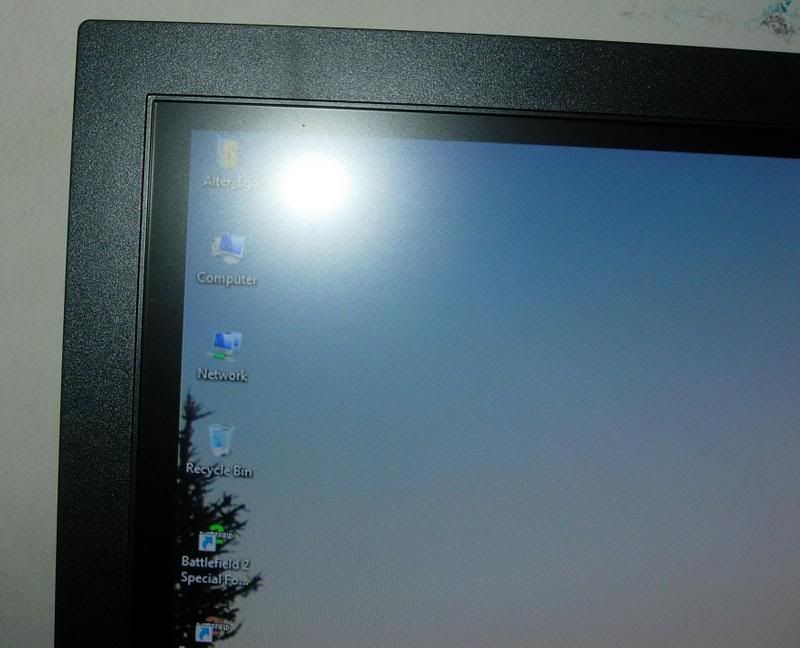
so far nope..ive read about this problem in the reviews but havent spotted anything yet so far..how do i determine the panels?
Fearless
post Sep 9 2008, 06:36 PM

Casual
***
Junior Member
390 posts

Joined: Mar 2005


QUOTE(Moogle Stiltzkin @ Sep 8 2008, 12:12 AM)
I find that hard to believe  shakehead.gif

Anyway price on site says rm3000 but when i asked they said it was Rm 2.4 K

Mine is arriving tomorrow. If you check the previous pages for this thread i posted a lot of information already  nod.gif
*
I got Philips 24" for RM1450 from Singapore Sim Lim. Its resolution is 1920 X 1200 and 60 Hz rate. The only problem is the unit I purchased come with not working speakers, I am lazy to send back for repair because I have never used them. Another issue is user has to get a third-party software to support screen rotate. Irotate software from Taiwan is free and work perfectly with Philips monitor and G-Force graphics card.

What is so special for HP 24" LCD minitor for asking such a steep price?

This post has been edited by Fearless: Sep 9 2008, 06:40 PM
xchoit
post Sep 9 2008, 06:47 PM

Getting Started
**
Junior Member
156 posts

Joined: Nov 2006
From: Edinburgh and Kelantan


diff type of panel i guess biggrin.gif
Fearless
post Sep 9 2008, 06:53 PM

Casual
***
Junior Member
390 posts

Joined: Mar 2005


QUOTE(dmm9394 @ Sep 8 2008, 02:12 PM)
heya all,

after taking a looking at my 2232GW, my dad's thinking of getting a 22 inch monitor for himself too as his eyes cant really take the small icons on his 15 inch monitor anymore.

thing is his computer is a really old Dell (like 6 years+). I hadnt been able to bring my monitor over to see if it works with his PC, but i've got a gut feeling that his old integrated graphics might not take the native resolution of a 22 inch (correct me if i'm wrong please).

if yes, then what's the bare minimum graphics card that would support a 1680x1050 resolution? I might end up having to build a new CPU for him, which only would be to use simple Microsoft Office tools and for surfing the internet.

thanks and hope for your feedback smile.gif
*
Don't falling into trap of believing wide LCD is good for viewing. To have sharp and clear font, LCD has to be set to its native resolution, higher resolution meaning the font size is smaller.

I am telling you this because I have 15" and 24" LCD monitors. For bigger font display for old man, I suggest you to buy a low native resolution LCD, 17" shall be ok.

Setting to low resolution in a wide high native resolution LCD to have bigger font is a bad idea, the font display is NOT sharp and clear.


Added on September 9, 2008, 6:58 pmI have seen many home users do not use ClearType font and native resolution settings for their LCD monitor. The font display is horrible poor.


Added on September 9, 2008, 7:06 pm
QUOTE(xchoit @ Sep 9 2008, 06:47 PM)
diff type of panel i guess biggrin.gif
*
Most likely LCD panel for HP, Dell and Philips are from same sources. blink.gif

This post has been edited by Fearless: Sep 9 2008, 07:06 PM
WilliamG
post Sep 9 2008, 07:30 PM

Getting Started
**
Junior Member
142 posts

Joined: Oct 2005


I need help ler, can anyone please help me compare hp w2207h and samsung 226bw? May i noe wat's the pros and cons? I read a lot of review and its most of them were not the same >.< kinda confuse and hard to make decision.

Need some advise from and some suggestion from forumers here >.<
linkinpark
post Sep 9 2008, 08:03 PM

Casual
***
Junior Member
454 posts

Joined: Jan 2003
From: KL


What different between BenQ G2400W AND G2400WD?
Onion-KiD
post Sep 9 2008, 08:18 PM

Enthusiast
*****
Senior Member
843 posts

Joined: May 2008
From: S'wak Kuching
QUOTE(WilliamG @ Sep 9 2008, 07:30 PM)
I need help ler, can anyone please help me compare hp w2207h and samsung 226bw? May i noe wat's the pros and cons? I read a lot of review and its most of them were not the same >.< kinda confuse and hard to make decision.

Need some advise from and some suggestion from forumers here >.<
*
Go compare with your own eyes. its is very big difference. read can't settle whole thing. best is look your self.

[fr33dom]
post Sep 9 2008, 09:35 PM

Getting Started
**
Junior Member
244 posts

Joined: Nov 2006
QUOTE(WilliamG @ Sep 9 2008, 07:30 PM)
I need help ler, can anyone please help me compare hp w2207h and samsung 226bw? May i noe wat's the pros and cons? I read a lot of review and its most of them were not the same >.< kinda confuse and hard to make decision.

Need some advise from and some suggestion from forumers here >.<
*
ya..u need go test wif ur own eye....

i oso compare both, but i take HP...cause HP screen really ROCK....so i like it so much if compare wif samsung...
but may b diff ppl have diff taste....so really go test/ see by ur own eye...no need see so much review... icon_idea.gif

btw, hp w2207h currently is out of stock if not wrong....i juz buy mine one wif new model w2228H last 2 week.... thumbup.gif
WilliamG
post Sep 9 2008, 10:04 PM

Getting Started
**
Junior Member
142 posts

Joined: Oct 2005


hmmm luckily both hav stock over here hehe and i onli manage see hp w2207h cuz they kinda promoting it. But 226bw is inside store and i don hav the chance to test >.<

Wat if they using "lousy" graphic card?It does effect the image quality rite? Cuz i saw them playing DMC 4 and the graphic and the colour is not as stunning as i tot even laggy @_@.

Sry for my poor ang mo ~~
gsan
post Sep 9 2008, 10:15 PM

Electrical RF Engineer
*******
Senior Member
2,471 posts

Joined: Jan 2003

QUOTE(aztechx @ Sep 9 2008, 05:10 PM)
erm..are there any other ways for me to calibrate?i notice that theres a very long step in online manual requirng me to download quite a number of things..will those improve the performance of my LCD drastically?

and another thing is,the contrast and brightness of my lcd is set rather low at the moment..any higher and it wud hurt my eyes..is this normal??
so far nope..ive read about this problem in the reviews but havent spotted anything yet so far..how do i determine the panels?
*
really no backlight bleeding? did you test it under no light condition?

btw, to show the service function, set both the brightness and contrast to 0, press source and hold for 5s.
franzcys
post Sep 9 2008, 11:02 PM

Casual
***
Junior Member
458 posts

Joined: Mar 2008
dear all taiko here , i m quite noob in com smile.gif

i m using cheap cheap pc specz only ...
possible to use widescreen monitor ar(19 inch)??? currently using 15inch LCD n my eyez kenot tahan jo too small zzzzzz

i m using cheap graphic card only geforce fx 5200 sad.gif pls help bro
wan to sell off my 15inch lcd jo

This post has been edited by franzcys: Sep 10 2008, 12:14 AM
Moogle Stiltzkin
post Sep 9 2008, 11:48 PM

Look at all my stars!!
*******
Senior Member
4,463 posts

Joined: Jan 2003
Fearless - A professional reviewer can explain it better. Check out the OFFICIAL REVIEW FOR THE HP LP2475W WHICH IS CONFIRMED TO BE THE LATEST NEWEST H-IPS PANEL !!

http://www.tftcentral.co.uk/reviews/hp_lp2475w.htm


Summary: No regrets having paid 2.4k for this baby biggrin.gif However it does need to be calibrated to get the best out of it. I paid Rm 1k for my Eye One Display 2 Calibrator. So in total i paid 3.4k for monitor + calibrator doh.gif well i see the monitor all the time so it was a good buy for me. I can sleep well knowing i have a good monitor for when Diablo 3 comes out biggrin.gif


I did my best calibration attempt today.


When i factory reset, i had left brightness at the default 90. I set color controls to custom but i left the values at the default for it which were RGB 255. Contrast was at the default 80. I used strictly Eye match and followed the order contrast > RGB > Luminance based on the program's step by step. At the end of all the calibration, i used basICColor to review the results.


Target settingsfor calibration were

D65

140 luminance

2.2 gamma


Contrast: left at default 80 since when i used the calibrator to check contrast it was already at the best point doh.gif seems odd ...


RGB:

R: 246

G: 226

B: 255


Brightness: then when i was calibrating to the target 140, i adjusted accordingly to reach the target. The default 90 was spot on 400 or so as the tft central review said it was on default.


user posted image


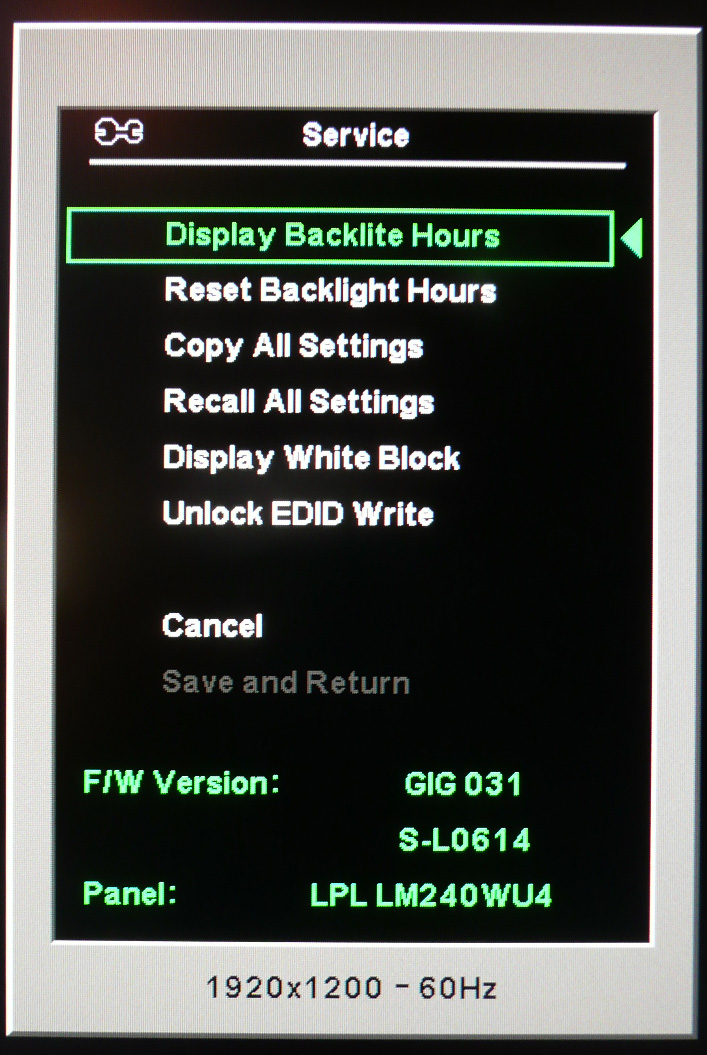
On TFT-Cntral, their service menu shows this

user posted image

HOWEVER mine shows below with a different firmware.

F/W: GIG 032
S-L0614

Panel: LPL LM240WU4

hmm.gif


Quenox - any updates ? Did you get yours yet ?


This post has been edited by Moogle Stiltzkin: Sep 9 2008, 11:53 PM
aztechx
post Sep 10 2008, 12:28 AM

~Aviation Freak~
*******
Senior Member
3,854 posts

Joined: Mar 2006
QUOTE(gsan @ Sep 9 2008, 10:15 PM)
really no backlight bleeding? did you test it under no light condition?

btw, to show the service function, set both the brightness and contrast to 0, press source and hold for 5s.
*
what do i check for in the service function?

what is backlight bleeding anyway?if its the colors seeping in to the frame..i think its minimal and doesnt affect much..

This post has been edited by aztechx: Sep 10 2008, 12:34 AM
Quenox
post Sep 10 2008, 12:40 AM

Getting Started
**
Junior Member
99 posts

Joined: May 2006


QUOTE(Moogle Stiltzkin @ Sep 9 2008, 11:48 PM)
Fearless - A professional reviewer can explain it better. Check out the OFFICIAL REVIEW FOR THE HP LP2475W WHICH IS CONFIRMED TO BE THE LATEST NEWEST H-IPS PANEL !!

http://www.tftcentral.co.uk/reviews/hp_lp2475w.htm
Summary: No regrets having paid 2.4k for this baby biggrin.gif However it does need to be calibrated to get the best out of it. I paid Rm 1k for my Eye One Display 2 Calibrator. So in total i paid 3.4k for monitor + calibrator doh.gif well i see the monitor all the time so it was a good buy for me. I can sleep well knowing i have a good monitor for when Diablo 3 comes out biggrin.gif
I did my best calibration attempt today.
When i factory reset, i had left brightness at the default 90. I set color controls to custom but i left the values at the default for it which were RGB 255. Contrast was at the default 80. I used strictly Eye match and followed the order contrast > RGB > Luminance based on the program's step by step. At the end of all the calibration, i used basICColor to review the results.
Target settingsfor calibration were

D65

140 luminance

2.2 gamma
Contrast: left at default 80 since when i used the calibrator to check contrast it was already at the best point doh.gif seems odd ...
RGB:

R: 246

G: 226

B: 255
Brightness: then when i was calibrating to the target 140, i adjusted accordingly to reach the target. The default 90 was spot on 400 or so as the tft central review said it was on default.
*Image Deleted*
On TFT-Cntral, their service menu shows this

*Image Deleted*

HOWEVER mine shows below with a different firmware.

F/W: GIG 032
S-L0614

Panel: LPL LM240WU4

hmm.gif
Quenox - any updates ? Did you get yours yet ?
*
Already placed in the order, awaiting them to ship the "Fella" to me.. hahaha...
Your calibration so high tech, I don't have such device to perform this sweat.gif

Moogle Stiltzkin
post Sep 10 2008, 08:23 AM

Look at all my stars!!
*******
Senior Member
4,463 posts

Joined: Jan 2003
QUOTE(Quenox @ Sep 10 2008, 12:40 AM)
Already placed in the order, awaiting them to ship the "Fella" to me.. hahaha...
Your calibration so high tech, I don't have such device to perform this sweat.gif
*
Where you live ? hmm.gif

When you get your monitor, press and hold the menu button and then press to turn on the monitor, when your screen displays let go of menu button. You now have access to the service option. Post what your firmware is.

This is mine,

user posted image
user posted image


Well i helped someone and they copied my RGB and brightness. They said it improved their color so it's better than nothing laugh.gif


This is my profile i had uploaded to rapidshare followed by the rgb and brightness setting i had put for it.

http://rapidshare.com/files/143595144/Moni...2008_1.icc.html


QUOTE
ITS HERE I GOT IT !!! SETTING IT UP NOW biggrin.gif WILL POST PICTURES SOON!


My first views.

Opening package its all neat inside and surprisingly lots of cables all well protected biggrin.gif

HDMI to HDMI, DVI to DVI, DVI to Analog, Display port to Display port cable wink.gif

Besides that there is the monitor, the stand and the installation disc.


Popping the monitor onto the stand was easy. It clicked into place. Removing it is easy also, you just flip the switch at the back and you can take it out :] My Dell 2405FPW has no such thing, which makes me appreciate this more especially if i want to install onto a vesa mounting later on biggrin.gif

My impressions of the stand compared to the Dell 2405FPW was that it wasn't as big as i had thought it would be. Compared to my Dell 2405 yes the base takes more space but nothing serious.

To adjust height you push down on the monitor from above lightly, then press the button at the front of the base to lift it up. It's very easy to do wink.gif no issues there.

Plugged in dvi to dvi cable, and the monitor fired up and auto detected the inputs :cool:

I noticed the colors looked more colorful instantly :eek: It is bright but to me not eye burning bright, but i may need to calibrate it in 30 minutes anyway wink.gif


Will update soon once i play with it more yawn.gif

*testing in Counter Strike 1.6

*update:

Ok playing this in counter strike has no ghosting or lag issues. Who said you needed a Tn panel only for gaming wink.gif I got the best of both worlds.


*calibration


Waited 30 minutes then used x-rite Eye One Display 2 to calibrate with Eye Match software. I didn't use the provided hp assistant calibration tool since i have no idea what to do with it unless someone want to give some tips biggrin.gif

target:

D65

2.2 gamma

120


So anyway reset to factory. Then checked contrast, it was ok by default, next was RGB.

R = 242

G =221

B = 255

Brightness = 2


I used basIIColor to verify the final result as shown in the screenshot. Contrast isn't the full 1000, i wonder if it can be improved any thoughts ?  :confused:

user posted image


Hm i don't see any grain by the way, someone asked this earlier :cool:


reviewing 1080P movie Ultra Violet encoded using H264 MKV.


According to phil, it didn't give an exact calibration which was as expected but it did improve some parts for him.

QUOTE(philjohn;1033004201)
Unfortunately not, our ambient light conditions must be very different, but thank you very much for posting it, the RGB values alone tone down the reds and greens to an acceptable level.

This however has made me speed up my purchase of an Eye One Display, will probably order sometime next week (when my supplier of choice should have them back in stock).



This post has been edited by Moogle Stiltzkin: Sep 10 2008, 08:26 AM
xchoit
post Sep 10 2008, 12:41 PM

Getting Started
**
Junior Member
156 posts

Joined: Nov 2006
From: Edinburgh and Kelantan


wow thx moogle.. i have ordered mine!! xD will let u know soon
s[H]sIkuA
post Sep 10 2008, 02:02 PM

live in the present
*******
Senior Member
2,162 posts

Joined: Sep 2004


QUOTE(xchoit @ Sep 10 2008, 12:41 PM)
wow thx moogle.. i have ordered mine!! xD will let u know soon
*
Wow you so fast ordered dy?
I plan to order next week

Hopefully they provide shipping to Penang laugh.gif
atreyuangel
post Sep 10 2008, 04:21 PM

Casual
***
Junior Member
406 posts

Joined: Jun 2007
From: 3°50'**.**"N - 103°16'**.**"E


Does this happen when we switch to hdmi cable
I am using BenQ 24" G2400W with HD4870

» Click to show Spoiler - click again to hide... «


the picture is not in fullscreen, there is a gap between around 1 to 2 cm
are this is natural?
engseng
post Sep 10 2008, 04:23 PM

Regular
******
Senior Member
1,981 posts

Joined: Jan 2003
From: Malaysia


QUOTE(Moogle Stiltzkin @ Sep 9 2008, 11:48 PM)
Summary: No regrets having paid 2.4k for this baby biggrin.gif However it does need to be calibrated to get the best out of it. I paid Rm 1k for my Eye One Display 2 Calibrator. So in total i paid 3.4k for monitor + calibrator doh.gif well i see the monitor all the time so it was a good buy for me. I can sleep well knowing i have a good monitor for when Diablo 3 comes out biggrin.gif
I did my best calibration attempt today.
Where did you buy your display calibrator? Did you order it online?
Moogle Stiltzkin
post Sep 10 2008, 06:33 PM

Look at all my stars!!
*******
Senior Member
4,463 posts

Joined: Jan 2003
I asked from the X-rite website and they directed me to a local reseller.

Rm 1000 doh.gif

I tried to find cheaper but unfortunately this is the best price i could find. Selling locally in the US is cheaper compared to Malaysia and Singapore i found.

I didn't want to get a calibrator that was worse then the Eye One DIsplay 2 because it had such good reviews and being the cheapest for balance between quality calibration and price. Yes RM 1000 is a lot even for a so called best cheap calibrator but to me it was worth it.

I'd spend money on the monitor first, then if i have change i will get a calibrator :]

I live in Mutiara Damansara if any of you nearby i don't mind coming over to use my calibrator heh.

123 Pages « < 65 66 67 68 69 > » Top
Topic ClosedOptions
 

Change to:
| Lo-Fi Version
0.0310sec    0.33    6 queries    GZIP Disabled
Time is now: 6th December 2025 - 10:48 PM