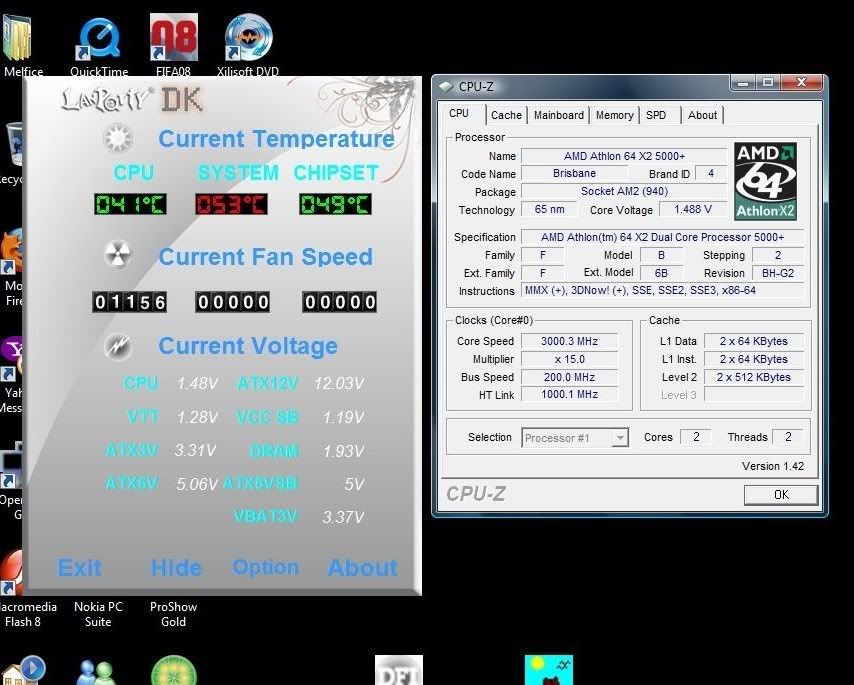
Orthos running stable at this config ( 3Hours )
» Click to show Spoiler - click again to hide... «
Type: Blend - stress CPU and RAM Min: 8 Max: 4096 InPlace: No Mem: 3838 Time: 15
CPU: 3000MHz FSB: 200MHz [200MHz x 15.0 est.]
1/1/2008 12:44 AM
Launching 2 threads...
1:Using CPU #0
2:Using CPU #1
1:Beginning a continuous self-test to check your computer.
1:Press Stop to end this test.
2:Beginning a continuous self-test to check your computer.
2:Press Stop to end this test.
1:Test 1, 4000 Lucas-Lehmer iterations of M19922945 using 1024K FFT length.
2:Test 1, 4000 Lucas-Lehmer iterations of M19922945 using 1024K FFT length.
1:Test 2, 4000 Lucas-Lehmer iterations of M19922943 using 1024K FFT length.
2:Test 2, 4000 Lucas-Lehmer iterations of M19922943 using 1024K FFT length.
1:Test 3, 4000 Lucas-Lehmer iterations of M19374367 using 1024K FFT length.
2:Test 3, 4000 Lucas-Lehmer iterations of M19374367 using 1024K FFT length.
1:Test 4, 4000 Lucas-Lehmer iterations of M19174369 using 1024K FFT length.
2:Test 4, 4000 Lucas-Lehmer iterations of M19174369 using 1024K FFT length.
1:Test 5, 4000 Lucas-Lehmer iterations of M18874369 using 1024K FFT length.
2:Test 5, 4000 Lucas-Lehmer iterations of M18874369 using 1024K FFT length.
1:Self-test 1024K passed!
1:Test 1, 800000 Lucas-Lehmer iterations of M172031 using 8K FFT length.
2:Self-test 1024K passed!
2:Test 1, 800000 Lucas-Lehmer iterations of M172031 using 8K FFT length.
1:Test 2, 800000 Lucas-Lehmer iterations of M163839 using 8K FFT length.
2:Test 2, 800000 Lucas-Lehmer iterations of M163839 using 8K FFT length.
1:Test 3, 800000 Lucas-Lehmer iterations of M159745 using 8K FFT length.
2:Test 3, 800000 Lucas-Lehmer iterations of M159745 using 8K FFT length.
1:Test 4, 800000 Lucas-Lehmer iterations of M157695 using 8K FFT length.
2:Test 4, 800000 Lucas-Lehmer iterations of M157695 using 8K FFT length.
1:2:Test 5, 800000 Lucas-Lehmer iterations of M155649 using 8K FFT length.
1:Self-test 8K passed!
1:Test 1, 560000 Lucas-Lehmer iterations of M212991 using 10K FFT length.
2:Self-test 8K passed!
2:Test 1, 560000 Lucas-Lehmer iterations of M212991 using 10K FFT length.
1:Test 2, 560000 Lucas-Lehmer iterations of M210415 using 10K FFT length.
2:Test 2, 560000 Lucas-Lehmer iterations of M210415 using 10K FFT length.
1:Test 3, 560000 Lucas-Lehmer iterations of M208897 using 10K FFT length.
2:Test 3, 560000 Lucas-Lehmer iterations of M208897 using 10K FFT length.
1:Test 4, 560000 Lucas-Lehmer iterations of M204799 using 10K FFT length.
2:Test 4, 560000 Lucas-Lehmer iterations of M204799 using 10K FFT length.
1:Test 5, 560000 Lucas-Lehmer iterations of M200705 using 10K FFT length.
2:Test 5, 560000 Lucas-Lehmer iterations of M200705 using 10K FFT length.
1:Test 6, 560000 Lucas-Lehmer iterations of M196607 using 10K FFT length.
2:Test 6, 560000 Lucas-Lehmer iterations of M196607 using 10K FFT length.
1:Self-test 10K passed!
1:Test 1, 4500 Lucas-Lehmer iterations of M17432577 using 896K FFT length.
2:Self-test 10K passed!
2:Test 1, 4500 Lucas-Lehmer iterations of M17432577 using 896K FFT length.
1:Test 2, 4500 Lucas-Lehmer iterations of M17432575 using 896K FFT length.
2:Test 2, 4500 Lucas-Lehmer iterations of M17432575 using 896K FFT length.
1:Test 3, 4500 Lucas-Lehmer iterations of M17115073 using 896K FFT length.
2:Test 3, 4500 Lucas-Lehmer iterations of M17115073 using 896K FFT length.
1:Test 4, 4500 Lucas-Lehmer iterations of M16815071 using 896K FFT length.
2:Test 4, 4500 Lucas-Lehmer iterations of M16815071 using 896K FFT length.
1:Test 5, 4500 Lucas-Lehmer iterations of M16515073 using 896K FFT length.
2:Test 5, 4500 Lucas-Lehmer iterations of M16515073 using 896K FFT length.
1:Self-test 896K passed!
1:Test 1, 5300 Lucas-Lehmer iterations of M14942209 using 768K FFT length.
2:Self-test 896K passed!
2:Test 1, 5300 Lucas-Lehmer iterations of M14942209 using 768K FFT length.
1:Test 2, 5300 Lucas-Lehmer iterations of M14942207 using 768K FFT length.
1:Test 3, 5300 Lucas-Lehmer iterations of M14155777 using 768K FFT length.
2:Test 2, 5300 Lucas-Lehmer iterations of M14942207 using 768K FFT length.
2:Test 3, 5300 Lucas-Lehmer iterations of M14155777 using 768K FFT length.
1:Test 4, 5300 Lucas-Lehmer iterations of M14155775 using 768K FFT length.
1:Test 5, 5300 Lucas-Lehmer iterations of M13969343 using 768K FFT length.
2:Test 4, 5300 Lucas-Lehmer iterations of M14155775 using 768K FFT length.
2:Test 5, 5300 Lucas-Lehmer iterations of M13969343 using 768K FFT length.
1:Self-test 768K passed!
1:Test 1, 460000 Lucas-Lehmer iterations of M250519 using 12K FFT length.
1:Test 2, 460000 Lucas-Lehmer iterations of M245759 using 12K FFT length.
2:Self-test 768K passed!
2:Test 1, 460000 Lucas-Lehmer iterations of M250519 using 12K FFT length.
1:Test 3, 460000 Lucas-Lehmer iterations of M245281 using 12K FFT length.
2:Test 2, 460000 Lucas-Lehmer iterations of M245759 using 12K FFT length.
1:Test 4, 460000 Lucas-Lehmer iterations of M243713 using 12K FFT length.
2:Test 3, 460000 Lucas-Lehmer iterations of M245281 using 12K FFT length.
1:Test 5, 460000 Lucas-Lehmer iterations of M235519 using 12K FFT length.
2:Test 4, 460000 Lucas-Lehmer iterations of M243713 using 12K FFT length.
1:Test 6, 460000 Lucas-Lehmer iterations of M233473 using 12K FFT length.
2:Test 5, 460000 Lucas-Lehmer iterations of M235519 using 12K FFT length.
1:Self-test 12K passed!
1:Test 1, 380000 Lucas-Lehmer iterations of M291913 using 14K FFT length.
2:Test 6, 460000 Lucas-Lehmer iterations of M233473 using 12K FFT length.
1:Test 2, 380000 Lucas-Lehmer iterations of M286719 using 14K FFT length.
2:Self-test 12K passed!
2:Test 1, 380000 Lucas-Lehmer iterations of M291913 using 14K FFT length.
1:Test 3, 380000 Lucas-Lehmer iterations of M282625 using 14K FFT length.
2:Test 2, 380000 Lucas-Lehmer iterations of M286719 using 14K FFT length.
1:Test 4, 380000 Lucas-Lehmer iterations of M280335 using 14K FFT length.
2:Test 3, 380000 Lucas-Lehmer iterations of M282625 using 14K FFT length.
1:Test 5, 380000 Lucas-Lehmer iterations of M278527 using 14K FFT length.
2:Test 4, 380000 Lucas-Lehmer iterations of M280335 using 14K FFT length.
1:Test 6, 380000 Lucas-Lehmer iterations of M274335 using 14K FFT length.
2:Test 5, 380000 Lucas-Lehmer iterations of M278527 using 14K FFT length.
1:Self-test 14K passed!
1:Test 1, 6500 Lucas-Lehmer iterations of M12451841 using 640K FFT length.
2:Test 6, 380000 Lucas-Lehmer iterations of M274335 using 14K FFT length.
1:Test 2, 6500 Lucas-Lehmer iterations of M12451839 using 640K FFT length.
2:Self-test 14K passed!
2:Test 1, 6500 Lucas-Lehmer iterations of M12451841 using 640K FFT length.
1:Test 3, 6500 Lucas-Lehmer iterations of M12196481 using 640K FFT length.
2:Test 2, 6500 Lucas-Lehmer iterations of M12451839 using 640K FFT length.
1:Test 4, 6500 Lucas-Lehmer iterations of M11796481 using 640K FFT length.
2:Test 3, 6500 Lucas-Lehmer iterations of M12196481 using 640K FFT length.
1:Test 5, 6500 Lucas-Lehmer iterations of M11796479 using 640K FFT length.
2:Test 4, 6500 Lucas-Lehmer iterations of M11796481 using 640K FFT length.
1:Self-test 640K passed!
1:Test 1, 7800 Lucas-Lehmer iterations of M9961473 using 512K FFT length.
2:Test 5, 6500 Lucas-Lehmer iterations of M11796479 using 640K FFT length.
1:Test 2, 7800 Lucas-Lehmer iterations of M9961471 using 512K FFT length.
2:Self-test 640K passed!
2:Test 1, 7800 Lucas-Lehmer iterations of M9961473 using 512K FFT length.
1:Test 3, 7800 Lucas-Lehmer iterations of M9837183 using 512K FFT length.
2:Test 2, 7800 Lucas-Lehmer iterations of M9961471 using 512K FFT length.
1:Test 4, 7800 Lucas-Lehmer iterations of M9737185 using 512K FFT length.
2:Test 3, 7800 Lucas-Lehmer iterations of M9837183 using 512K FFT length.
1:Test 5, 7800 Lucas-Lehmer iterations of M9537183 using 512K FFT length.
2:Test 4, 7800 Lucas-Lehmer iterations of M9737185 using 512K FFT length.
1:Test 6, 7800 Lucas-Lehmer iterations of M9437185 using 512K FFT length.
1:Self-test 512K passed!
1:Test 1, 340000 Lucas-Lehmer iterations of M339487 using 16K FFT length.
2:Test 5, 7800 Lucas-Lehmer iterations of M9537183 using 512K FFT length.
1:Test 2, 340000 Lucas-Lehmer iterations of M335393 using 16K FFT length.
2:Test 6, 7800 Lucas-Lehmer iterations of M9437185 using 512K FFT length.
1:Test 3, 340000 Lucas-Lehmer iterations of M331681 using 16K FFT length.
2:Self-test 512K passed!
2:Test 1, 340000 Lucas-Lehmer iterations of M339487 using 16K FFT length.
1:Test 4, 340000 Lucas-Lehmer iterations of M329727 using 16K FFT length.
2:Test 2, 340000 Lucas-Lehmer iterations of M335393 using 16K FFT length.
1:Test 5, 340000 Lucas-Lehmer iterations of M327681 using 16K FFT length.
2:Test 3, 340000 Lucas-Lehmer iterations of M331681 using 16K FFT length.
1:Test 6, 340000 Lucas-Lehmer iterations of M319487 using 16K FFT length.
2:Test 4, 340000 Lucas-Lehmer iterations of M329727 using 16K FFT length.
1:Self-test 16K passed!
1:Test 1, 270000 Lucas-Lehmer iterations of M420217 using 20K FFT length.
2:Test 5, 340000 Lucas-Lehmer iterations of M327681 using 16K FFT length.
1:Test 2, 270000 Lucas-Lehmer iterations of M409601 using 20K FFT length.
2:Test 6, 340000 Lucas-Lehmer iterations of M319487 using 16K FFT length.
1:Test 3, 270000 Lucas-Lehmer iterations of M401407 using 20K FFT length.
2:Self-test 16K passed!
2:Test 1, 270000 Lucas-Lehmer iterations of M420217 using 20K FFT length.
1:Test 4, 270000 Lucas-Lehmer iterations of M393217 using 20K FFT length.
2:Test 2, 270000 Lucas-Lehmer iterations of M409601 using 20K FFT length.
1:Test 5, 270000 Lucas-Lehmer iterations of M392119 using 20K FFT length.
2:Test 3, 270000 Lucas-Lehmer iterations of M401407 using 20K FFT length.
1:Test 6, 270000 Lucas-Lehmer iterations of M389119 using 20K FFT length.
2:Test 4, 270000 Lucas-Lehmer iterations of M393217 using 20K FFT length.
1:Self-test 20K passed!
1:Test 1, 9000 Lucas-Lehmer iterations of M8716289 using 448K FFT length.
2:Test 5, 270000 Lucas-Lehmer iterations of M392119 using 20K FFT length.
1:Test 2, 9000 Lucas-Lehmer iterations of M8716287 using 448K FFT length.
2:Test 6, 270000 Lucas-Lehmer iterations of M389119 using 20K FFT length.
1:Test 3, 9000 Lucas-Lehmer iterations of M8516289 using 448K FFT length.
2:Self-test 20K passed!
2:Test 1, 9000 Lucas-Lehmer iterations of M8716289 using 448K FFT length.
1:Test 4, 9000 Lucas-Lehmer iterations of M8316287 using 448K FFT length.
2:Test 2, 9000 Lucas-Lehmer iterations of M8716287 using 448K FFT length.
1:Test 5, 9000 Lucas-Lehmer iterations of M8257537 using 448K FFT length.
2:Test 3, 9000 Lucas-Lehmer iterations of M8516289 using 448K FFT length.
1:Test 6, 9000 Lucas-Lehmer iterations of M8257535 using 448K FFT length.
2:Test 4, 9000 Lucas-Lehmer iterations of M8316287 using 448K FFT length.
1:Self-test 448K passed!
1:Test 1, 11000 Lucas-Lehmer iterations of M7471105 using 384K FFT length.
2:Test 5, 9000 Lucas-Lehmer iterations of M8257537 using 448K FFT length.
1:Test 2, 11000 Lucas-Lehmer iterations of M7471103 using 384K FFT length.
2:Self-test 448K passed!
2:Test 1, 11000 Lucas-Lehmer iterations of M7471105 using 384K FFT length.
1:Test 3, 11000 Lucas-Lehmer iterations of M7377889 using 384K FFT length.
2:Test 2, 11000 Lucas-Lehmer iterations of M7471103 using 384K FFT length.
1:Test 4, 11000 Lucas-Lehmer iterations of M7277887 using 384K FFT length.
2:Test 3, 11000 Lucas-Lehmer iterations of M7377889 using 384K FFT length.
1:Test 5, 11000 Lucas-Lehmer iterations of M7077889 using 384K FFT length.
2:Test 4, 11000 Lucas-Lehmer iterations of M7277887 using 384K FFT length.
1:Test 6, 11000 Lucas-Lehmer iterations of M7077887 using 384K FFT length.
2:Test 5, 11000 Lucas-Lehmer iterations of M7077889 using 384K FFT length.
1:Self-test 384K passed!
1:Test 1, 210000 Lucas-Lehmer iterations of M501041 using 24K FFT length.
1:Test 2, 210000 Lucas-Lehmer iterations of M496943 using 24K FFT length.
2:Self-test 384K passed!
2:Test 1, 210000 Lucas-Lehmer iterations of M501041 using 24K FFT length.
1:Test 3, 210000 Lucas-Lehmer iterations of M487423 using 24K FFT length.
2:Test 2, 210000 Lucas-Lehmer iterations of M496943 using 24K FFT length.
1:Test 4, 210000 Lucas-Lehmer iterations of M471041 using 24K FFT length.
2:Test 3, 210000 Lucas-Lehmer iterations of M487423 using 24K FFT length.
1:Torture Test ran 3 hours, 40 minutes 36 seconds - 0 errors, 0 warnings.
2:Torture Test ran 3 hours, 40 minutes 36 seconds - 0 errors, 0 warnings.
1:Execution halted.
This post has been edited by Melfice: Jun 1 2008, 10:30 PM 

 Jun 1 2008, 03:59 PM




 Quote
Quote




 0.0198sec
 0.75
0.75
 6 queries
 GZIP Disabled