

 ... anyone mind to teach me ?? .. wanted to OC my BE to 3.0 or 3.2 ...
AMD� Socket-AM2/AM2+ Overclocking thread (V8), Phenom Phenom Phenom
AMD� Socket-AM2/AM2+ Overclocking thread (V8), Phenom Phenom Phenom
|
|
 Jun 1 2008, 02:38 PM Jun 1 2008, 02:38 PM
Return to original view | Post
#1
|
 
Junior Member
254 posts Joined: Jun 2006   
|
does anyone here using DFI Mobo with Genie Bios in it ?? .. damn i got hard time to understand every single thing of it
... anyone mind to teach me ?? .. wanted to OC my BE to 3.0 or 3.2 ... |
|
|
|
|
|
Jun 1 2008, 02:48 PM
Return to original view | Post
#2
|
|
Junior Member
254 posts Joined: Jun 2006
|
 that is pic of Genie Bios .. which 1 is Vcore ? .. CPU VID ? DRAM config page - we will leave this for its own subsection. LDT and PCI Bus control - defaults here are all you need PCI Device control - here you find the switch for ULI raid and SATA setup off the South Bridge.All sata controls and the onboard LAN's enable or disable. Overclocking features FSB Bus Frequency - Otherwise known as HTT Bus frequency, this is where we tweak up Bus speed. LDT/FSB Frequency Ratio- Here we set the LDT multiplier. Remember CPU speed is worked out from the LDT bus speed, CPU multiplier and the LDT ratio. CPU/FSB Frequency Ratio - commonly known as the CPU multiplier, here we usually down clock the multiplier so that we ran ramp up the HTT frequency. RD580 HT PLL speed - The RD580 chipset has 2 modes for setting the clock on the Hypertransport speed, normal(LOW) and High speed. Sub 250HTT running LOW speed is just fine, over 250 choose HIGH speed HT Bus NMOS Drive Strength, HT Bus PMOS Drive strength 0 to 31 - These options cover the drive for the send and recieve functions of the Hyper transport bus. For high LDT overclocking 25 or higher may be needed, I use 31 on both options when pushing 300X5LDT. If you are not interested in LDT overclocking remember the board will do around 1200HT easy so you should only ever need to set either 5X or 4X for the LDT multiplier and leave the drive strengths at the default of 5 HTBus Reciever Impedance 0 to 31 This option controls the impedance the board sets to counter signal reflection on the RD580 chipset. SO, as you clock higher you may need to increase the value higher. I have tested at 5 and it does seem ok for most overclocks, if you are ramping up the LDT you may find upping this value gets you a higher stable overclock. Between 5 and 10 seems to be the settings to test, 10 actually gets me the best clocks with 2gig kits. CPU HT Bus Drive strength Weak or Strong options. for high LDT Bus overclocking choose Strong K8 Cool n Quiet.....if overclocking best to leave this disabled. Voltage Controls CPU Vid Options here depend on the max VID your CPU will allow, its usually 2 options above the normal Vcore the CPU runs at. CPU VID Special Control Here you can set the over volt for the voltage you want to run on your CPU, remember to to keep this below 1.6V for most CPU's if you can, to much Vcore can damage your CPU. Dram Voltage control Here we find the finest Vdimm control seen on any motherboard. Dependant on the Powersupply voltages to your mothertboard you may see voltages actually measured on the board higher than you set in bios, as a rule the voltage on the board is usually 3 options higher than you set in bios, IE, 2.6 in bios will give 2.65V on the motherboard....try to keep this in mind SB PCIE Voltage - this option in reality is the SouthBridge Vcore voltage.A slight bump will allow for higher PCIE overclocks and can aid in getting your general overclocks stable NB Analogue Voltage - ??? LDT Bus voltage - when overclocking the LDT bus you will need to tweak this voltage higher, small jumps here, don't ram the voltage NB Core Voltage - vcore for the Northbridge, high LDT and PCIE overclocking gains from a bump in voltage here. taken from ocztechnologyforum.com This post has been edited by Melfice: Jun 1 2008, 02:51 PM |
|
|
Jun 1 2008, 02:53 PM
Return to original view | Post
#3
|
|
Junior Member
254 posts Joined: Jun 2006
|
QUOTE(Shah_15 @ Jun 1 2008, 02:50 PM) increase the CPU/FSB Frequency ratio to X 16 and lower the FSB Bus Frequency to 200MhZ. You will get 3.2GhZ. Your Vcore already enough. wow thank .. goin to try it now   QUOTE(sarahlah @ Jun 1 2008, 02:51 PM) wah the bios.. interesting and pening.. haha ya ... that why i had very tough time understanding it ... bought BE almost a month nvr OC it ...  |
|
|
Jun 1 2008, 03:02 PM
Return to original view | Post
#4
|
|
Junior Member
254 posts Joined: Jun 2006
|
QUOTE(Shah_15 @ Jun 1 2008, 02:57 PM) the Vcore already fine. 1.4V can run 3.2GhZ pretty stable. sorry to say that screenshot is not same as my Genie Bios ... ==" got many version oo .. wait i find new screenshotAdded on June 1, 2008, 2:58 pmBTW, Melfice, try at your own risk. I just suggest you from my knowledge. QUOTE(digswell @ Jun 1 2008, 02:59 PM) hey Dram voltage 2.78V ....what ram is da ?? DDR 1 ?? ekk that jz a example ... |
|
|
Jun 1 2008, 03:04 PM
Return to original view | Post
#5
|
|
Junior Member
254 posts Joined: Jun 2006
|
 there you go !! ... wont be any mistake coz i find using " Genie Bios 790FX " keyword .. |
|
|
Jun 1 2008, 03:08 PM
Return to original view | Post
#6
|
|
Junior Member
254 posts Joined: Jun 2006
|
QUOTE(sarahlah @ Jun 1 2008, 03:02 PM) from his siggy he using ballistix tracer.. haha , itz not my bios .. sorry edited : i thought that is ur bios..   QUOTE(Shah_15 @ Jun 1 2008, 03:07 PM) Your Vcore already fine. Just increase the CPU Clock Ration to 16x. Try at your own risk. errr , already did that jz now .. but turn out got BSOD on my booting screen to my windows ... |
|
|
|
|
|
Jun 1 2008, 03:18 PM
Return to original view | Post
#7
|
|
Junior Member
254 posts Joined: Jun 2006
|
>HT Link Control:
HT Link Width......................... - 16 bit HT Frequency.......................... - 800 MHz IH Flow Control Mode.................. - Disabled HT Link Tristate...................... - Disabled 2x LCLK Mode.......................... - Disabled Unit Id Clumping...................... - Disabled >CPU Feature: NPT Fid Control....................... - x10 Virtualization........................ - Enabled AMD K8 Cool&Quiet Control............. - Disabled >DRAM Configuration: MCT Memory Timing.................... - Manual Maximum Latency...................... - 8ns 2T Mode.............................. - Auto Cas Latency Time..................... - 5 Pre Charge Delay (tRAS).............. - 12 DRAM RAS# Precharge.................. - 5 DRAN RAS# to CAS# Delay.............. - 5 Bank to Bank Cmd (TRRD).............. - Auto DRAM RAS# to CAS# Delay.............. - Auto TRTP................................. - Auto Write Recovery (TWR)................. - Auto Write-Read Command (TWTR)............ - Auto TRFC0................................ - Auto TRFC1................................ - Auto TRFC2................................ - Auto TRFC3................................ - Auto Trdrd................................ - Auto TrwtT0............................... - Auto Twrrd................................ - Auto Twrwr................................ - Auto CS/ODT Pin Fine Delay................ - Enabled Bank Swizzle Mode.................... - Enabled Auto Tweak Performance............... - Enabled Optimal Performance Mode............. - Enabled >PWM Settings: PWM Control.......................... - Enabled CPU VID Control...................... - 1.40625v CPU Vid Special Add.................. - Auto CPU NB Vlotage Control............... - Auto CPU NB Vid Special Add............... - Auto DRAM Voltage Control................. - 2.12v SB PLL 1.2V Voltage.................. - 1.20v NB Core Voltage...................... - 1.20v NB PCI-E Voltage..................... - 1.250v NB HT Voltage........................ - 1.20v Genie BIOS Settings: Spread Spectrum................ - Disabled CPU Host/HTT Clock................... - 340MHZ CPU Host/HTT Boot Up Clock.............. - 280MHZ CPU Host/HTT Adjust Gap..................... - 5 PCI-E Clock.................... - 100MHZ [/code] Example wad inside the Bios ! i think i nid to bring my laptop upstairs ... ==" using 1 computer is pain in da ass ... This post has been edited by Melfice: Jun 1 2008, 03:19 PM |
|
|
Jun 1 2008, 03:27 PM
Return to original view | Post
#8
|
|
Junior Member
254 posts Joined: Jun 2006
|
weh dun quarrel le
... ok now using lappie .. i turn my desktop to BIOS .. easier to answer all ur quess ...CPU Core Voltage 1.31V ( I hav no idea whr to change it ) DRAM Voltage 1.93V CPU HOST/HTT Clock 200mhz CPU HOST/HTT Boot Up Clock 200mhz |
|
|
Jun 1 2008, 03:29 PM
Return to original view | Post
#9
|
|
Junior Member
254 posts Joined: Jun 2006
|
QUOTE(sarahlah @ Jun 1 2008, 03:27 PM) the performance of the proc depends on its batch too bro.. ermm .. i think BE 5000+ is all the same ..  Zzz now dam confused  CPU CLOCK Ratio ?? ... set to Auto lol This post has been edited by Melfice: Jun 1 2008, 03:30 PM |
|
|
Jun 1 2008, 03:49 PM
Return to original view | Post
#10
|
|
Junior Member
254 posts Joined: Jun 2006
|
QUOTE(sarahlah @ Jun 1 2008, 03:44 PM) haha.. aiya why fight2 here.. here i am .. i watching u guyz quarrel lol ... chill chill.. wheres malfice anyway ? suddenly silent.. 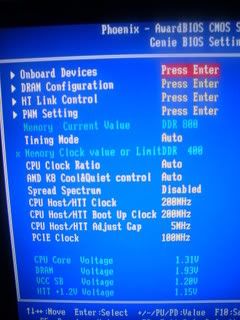 aaa there Added on June 1, 2008, 3:49 pmthat mine own bios config okay .. not example This post has been edited by Melfice: Jun 1 2008, 03:49 PM |
|
|
Jun 1 2008, 04:04 PM
Return to original view | Post
#11
|
|
Junior Member
254 posts Joined: Jun 2006
|
QUOTE(digswell @ Jun 1 2008, 03:59 PM) Why so hard to oc Black Edition ????????????????? i know .. i got see Multipier and Vcore on other bios mobo .. but not this one ... DFI Genie is abit confusing ler Black Edition is design for eazy overclock So juz increase the multipier to 16x and vcore around 1.4 to 1.45 and disbale CnQ ,,,thats all other thing like HT link mutipier or wat else thing leave it to auto or default setting maybe they change the original meaning . ? i cant find place to change vcore ... |
|
|
Jun 1 2008, 04:31 PM
Return to original view | Post
#12
|
|
Junior Member
254 posts Joined: Jun 2006
|
QUOTE(digswell @ Jun 1 2008, 04:17 PM) enter inside the PWN setting there PWM Setting got CPU VID Special Addshould got CPU VID control ..change it to 1.4 or 1.45 it using "mV" + 25.0mV + 50.0.mV + 75.0mV and so on ==" |
|
|
Jun 1 2008, 04:48 PM
Return to original view | Post
#13
|
|
Junior Member
254 posts Joined: Jun 2006
|
QUOTE(mr_habuk @ Jun 1 2008, 04:39 PM) dude, try multiplier 12x250 ermm i add the CPU VID Special ADD ( 175.0mV )boot up clock left at 200.. CPU VID special add..the ori will come with phenom.. with X2 u need to plus it with current vcore... example: 1.29V + 0.05v = 1.34v.. Dram left it at 2.2v then CPU CLOCK RATIO x15 now it be 3.0ghz already .. SYSTEM 54'C CPU 45'C CHIPSET 48'C system temp is Mobo or proc ? |
|
|
|
|
|
Jun 1 2008, 05:03 PM
Return to original view | Post
#14
|
|
Junior Member
254 posts Joined: Jun 2006
|
QUOTE(mr_habuk @ Jun 1 2008, 04:55 PM) nah...u don't need that high... hw many mV i wan to add for the CPU Special ADD ? ... waaa all tis thing sooo pening .. @_@try my setting..u'll see the different.. increasing ur multiplier will effect ur ram performance.. see the table on the 1st page... ermm .. u said (CPUCLOCKRATIO ) Multpier 12x250 ? 250 is CPU HOST/HTT Clock ?? |
|
|
Jun 1 2008, 10:11 PM
Return to original view | Post
#15
|
|
Junior Member
254 posts Joined: Jun 2006
|
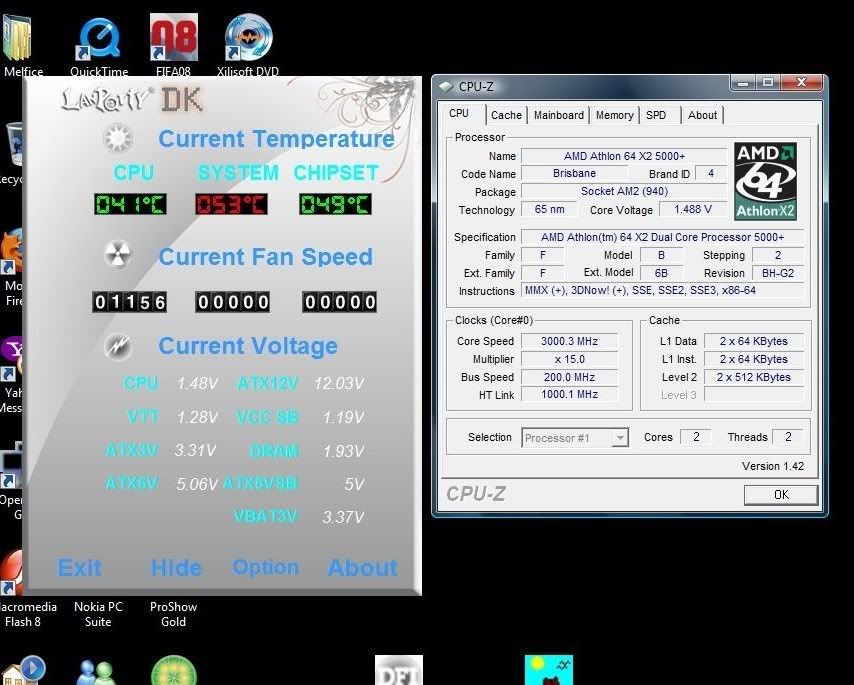 Orthos running stable at this config ( 3Hours ) » Click to show Spoiler - click again to hide... « This post has been edited by Melfice: Jun 1 2008, 10:30 PM |
|
|
Jun 1 2008, 10:31 PM
Return to original view | Post
#16
|
|
Junior Member
254 posts Joined: Jun 2006
|
QUOTE(Lacus @ Jun 1 2008, 10:20 PM) screenshot too small lar bro =.=" so 3.0 so far no problem..wanna try 3.2Ghz? picture updated ~ ~ ... sorry |
|
|
Jun 2 2008, 02:39 PM
Return to original view | Post
#17
|
|
Junior Member
254 posts Joined: Jun 2006
|
QUOTE(casperito @ Jun 2 2008, 04:52 AM) *off topic* seems that ur using CF... mind sharing ur 3DMark score with me?? 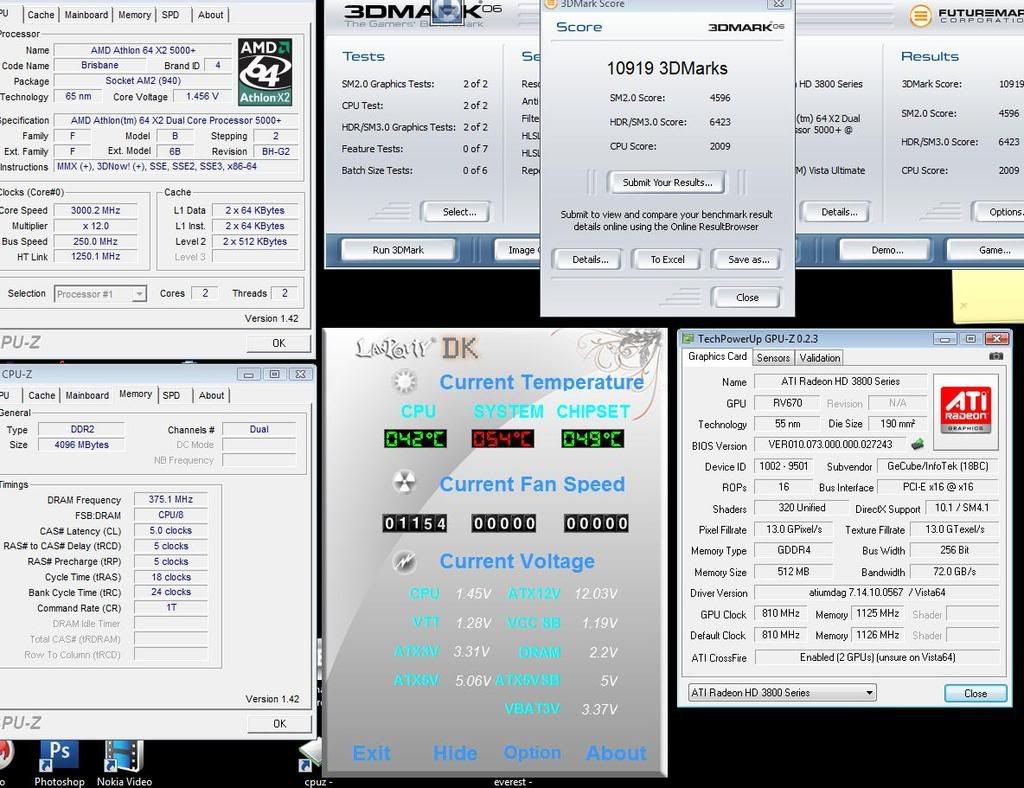 there you go .. quite low oo .. |
|
|
Jun 3 2008, 01:45 AM
Return to original view | Post
#18
|
|
Junior Member
254 posts Joined: Jun 2006
|
QUOTE(casperito @ Jun 3 2008, 01:42 AM) hehehe.. i dun believe also... haha .. im not satisified le .. why other with same hardware can get higher scores .. ==" jz wondering too ... just for fun onli... i rather test on games... but when u tried it and ur score is kinda low, at least u can try to find out wat make the score low... in my case, i found out that my proc bottleneck my CF... but at least, in games it doesn't show any signs of bottlenecking so i dun care much la.. ehehehe... juz wondering onli.. ehehehe  |
|
|
Jun 3 2008, 01:53 AM
Return to original view | Post
#19
|
|
Junior Member
254 posts Joined: Jun 2006
|
QUOTE(casperito @ Jun 3 2008, 01:52 AM) since x2 5000+ BE can OC to 3.3ghz... haha , nid to wait for proper cooling now using NucleaTec only ... waiting my money to grab San Ace or Sunon ... and some ram cooler ...try it out... and see whether proc @ 3.3 still bottleneck the CF.... |
|
|
Jun 3 2008, 02:18 AM
Return to original view | Post
#20
|
|
Junior Member
254 posts Joined: Jun 2006
|
QUOTE(casperito @ Jun 3 2008, 01:57 AM) skip the ram cooler... crucial non tracer one are not that hot... u'll be wasting ur money onli... unless u want to go crazy ram speed @ crazy vdimm... u can get that one later on... mine are unuseable coz my hsf block the rams... T_T... using TR120E ... no proper 120MM FAN le ==" .... Crucial Tracer Ballistix .. the LED 1 la .. dam hot -__- and im using it rite nowget the TRUE 120 that lehteck selling la... dang cheap... free suscool fan summore.... ehehehe... Added on June 3, 2008, 1:59 am err... i dun understand???  |
|
Topic ClosedOptions
|
| Change to: |  0.4827sec 0.4827sec
 0.60 0.60
 7 queries 7 queries
 GZIP Disabled GZIP Disabled
Time is now: 12th December 2025 - 08:41 AM |
 Quote
Quote