Welcome Guest ( Log In | Register )

33 Pages  1 2 3 > » Bottom

Outline · [ Standard ] · Linear+

 ASUS motherboard overclocking discussion, ASUS mb owners come to discuss here.

views
     
TSahsiah
post Mar 22 2008, 05:40 PM, updated 16y ago

Asus ROG Fan
*****
Senior Member
875 posts

Joined: Oct 2004
From: Selayang, Selangor


ASUS Motherboard Overclocking Discussion

Motherboard List
Intel Platform - Socket 1366
Intel X58 chipset motherboards
1. Asus Rampage II Extreme
2. Asus Rampage II GENE
3. Asus P6T Deluxe

Intel Platform - Socket 775
Intel X48 chipset motherboards
1. Asus Rampage Formula
2. Asus P5E Deluxe
3. Asus P5E 64 Evolution
4. Asus P5E3 Premium/WIFI-AP

Intel X38 chipset motherboards
1. Asus Maximus Formula SE
2. Asus Maximus Formula

Intel P45 chipset motherboards
1. Asus P5Q3 Deluxe/WIFI-AP
2. Asus P5Q Pro
3. Asus P5Q-E
4. Asus P5Q Deluxe
5. Asus P5Q
6. Asus Maximus II Formula

Intel P35 chipset motherboards
1. Asus P5K Premium Black Pearl WIFI-AP
2. Asus P5K Deluxe WIFI-AP
3. Asus P5K Pro
4. Asus Blitz Formula
5. Asus P5K R
6. Asus P5K
7. Asus P5K-SE
8. Asus P5K/EPU
9. Asus P5K-SE/EPU

Intel P965 chipset motherboards
1. Asus Commando
2. Asus P5B Deluxe

nVidia 790i chipset motherboards
1. Asus P5N64 WS Professional (With Ultra SLi)
2. Asus Striker II Extreme (With Ultra SLi)
3. Asus Striker II NSE (Without Ultra SLi)

AMD Platform - AM2+ Socket
nVidia 780i chipset motherboards
1. Asus Crosshair II Formula

(Please update me that I am not list out in the list above).

Overclocking Utilities
1. Memtest86+ For DOS
2. Memtest for Windows
3. LinX 0.5.8
4. OCCT 3.1.0b04 -> LowYat.net Forum
5. SuperPI
6. Memset 4.x -> LowYat.net Forum
7. Prime95
8. CPU-Z 1.51
9. Asus Probe II -> LowYat.net Forum

This post has been edited by ahsiah: May 13 2009, 01:18 PM
TSahsiah
post Mar 22 2008, 05:41 PM

Asus ROG Fan
*****
Senior Member
875 posts

Joined: Oct 2004
From: Selayang, Selangor


BIOS Details

Asus P5K Series
- Asus P5K Deluxe

QUOTE
BIOS Options (Listed in Tree)
» Click to show Spoiler - click again to hide... «


Explanation/Description

» Click to show Spoiler - click again to hide... «

Take Note: You guys want to take initiative on your own motherboard's overclocking bios explanation, please feel free to let me know.

This post has been edited by ahsiah: Mar 25 2008, 08:38 PM
TSahsiah
post Mar 22 2008, 05:44 PM

Asus ROG Fan
*****
Senior Member
875 posts

Joined: Oct 2004
From: Selayang, Selangor


Reserved for other motherboards.

This post has been edited by ahsiah: Mar 25 2008, 08:38 PM
TSahsiah
post Mar 22 2008, 06:06 PM

Asus ROG Fan
*****
Senior Member
875 posts

Joined: Oct 2004
From: Selayang, Selangor


Test setup and Benchmark

System Configuration 1
1. CPU: Intel Q6600 G0 Stepping.
2. Motherboard: Asus P5K Deluxe WIFI
3. RAM: Crucial Ballistix DDR800 x 4
4. Display Card: Sapphire 3870 Crossfire (2 units)
5. HDD: Western Raptor 8MB version x 2 (RAID 0)
6. HDD: Western Digital 250GB SATA HDD
7. Optical Drive: Panasonic SATA DVD RW
8. Monitor: Samsung 931BW
9. Mouse: Logitech G5
10. Casing: Lian Li V1200B-Plus II
11. Keyboard: A4Tech Gaming Keyboard G700
12. CPU Cooler: Xigmatek HDT-1283
13. PSU: Enermax Infinity 650W

Below is the VID that I taken from CoreTemp. Many people believe the Lower VID value represent the CPU is gem or not. I am using a not gem CPU for this benchmark, I guess my result would represent a lot people's result.

user posted image

Motherboard BIOS settings 1 - BIOS 0809

AI Overclocking: Manual
CPU ratio Control: Manual
- Ratio CMOS Setting: 9
FSB Strap to Northbridge: Auto
FSB frequency: 400
PCI-E Frequency: 110
DRAM Frequency: 961Mhz
DRAM Command Rate: 2T
DRAM Timing Control: Manual
CAS# Latency: 4
RAS# to CAS# Delay: 4
RAS# Precharge: 4
RAS# Activate to Precharge: 12
TWR: 3
TRFC: 30
TWTR: 3
TRRD: 3
TRTP: 8
DRAM Static Read Control: Disabled

Transaction Booster: Auto
Boost Level: 3
Clock Over-Charging Mode: Auto

CPU Spread Spectrum: Disabled
PCI-E Spread Spectrum: Disabled

CPU Voltage: 1.5250v
CPU Voltage Reference: Auto
CPU Voltage Damper: Enabled
CPU PLL Voltage: 1.6
DRAM Voltage: 2.25v
FSB Termination Voltage: 1.40v
NorthBridge Voltage: 1.55v
NorthBridge Voltage Reference: Auto
SouthBridge Voltage: 1.05v

Advance CPU Settings
CPU Ratio Control: Manual
- Ratios CMOS Setting: 9
C1E Support: Enabled
Max CPUID Value Limit: Disabled
Vanderpool Technology: Enabled
CPU TM Function: Enabled
Execute Disable Bit: Enabled

BenchMark Result for System Configuration 1
Memset86+ Memory Bandwidth table
user posted image

Will upload soon.

This post has been edited by ahsiah: Apr 4 2008, 12:44 PM
TSahsiah
post Mar 22 2008, 10:18 PM

Asus ROG Fan
*****
Senior Member
875 posts

Joined: Oct 2004
From: Selayang, Selangor


Existing User
Asus Rampage Formula
1. ahsiah
2. dixon102

Asus P5Q Deluxe
1. TristanX
2. TehWateva
3. reileong88
4. kaiser_falco
5. bOoEsT
6. VentureLKW
7. AceCombat
8. zuhair

Asus P5Q Pro
1. samlee860407
2. lim5659

Asus P5Q
1. safone

Asus Commando
1. KerryKing

Asus P5K Deluxe
1. QiW
2. AceCombat

Asus P5K Premium
1. AceCombat

Asus P5K-R
1. tnhafiz

Asus Maximus Formula
1. LExus65
2. glock88
3. AceCombat

Asus P5K Pro
1. msyafiq_m

Asus Blitz Formula
1. lichyetan

Asus P5K-SE
1. safone

Asus Striker II Formula
1. naTTan

Asus Maximus II Formula
1. roa85
2. AceCombat

Overclocking result
Super PI result (1M)

Asus P5K Deluxe
1. QiW - 375x8 - 17.781s

This post has been edited by ahsiah: Mar 6 2009, 02:39 PM
QiW
post Mar 24 2008, 08:50 AM

Casual
***
Junior Member
354 posts

Joined: Sep 2006
From: KL
me oso using p5k deluxe wifi
now facing some probs with it .. BIOS prob .. flashed it to the latest BIOS version 0809 (dated Feb 08) from ASUS site .. now totally screwed .. now trying to contact ASUS to try and rectify the prob

anyways .. heres my 1M superPi shot .. q6600@3.0 daily use + 2gb team elite ram

» Click to show Spoiler - click again to hide... «


This post has been edited by QiW: Mar 24 2008, 08:51 AM
kerryking
post Mar 25 2008, 01:07 AM

On my way
****
Senior Member
553 posts

Joined: Apr 2006
TS how about chg the topic to Asus mobo OC thread..
so more ppl can join and share their exp.
TSahsiah
post Mar 25 2008, 08:40 PM

Asus ROG Fan
*****
Senior Member
875 posts

Joined: Oct 2004
From: Selayang, Selangor


QUOTE(QiW @ Mar 24 2008, 08:50 AM)
me oso using p5k deluxe wifi
now facing some probs with it .. BIOS prob .. flashed it to the latest BIOS version 0809 (dated Feb 08) from ASUS site .. now totally screwed .. now trying to contact ASUS to try and rectify the prob

anyways .. heres my 1M superPi shot .. q6600@3.0 daily use + 2gb team elite ram

» Click to show Spoiler - click again to hide... «

*
Mind to elaborate more on your case? Why you say it is screwed?
QiW
post Mar 26 2008, 01:25 AM

Casual
***
Junior Member
354 posts

Joined: Sep 2006
From: KL
QUOTE(ahsiah @ Mar 25 2008, 08:40 PM)
Mind to elaborate more on your case? Why you say it is screwed?
*
the very 1st day i got this P5K deluxe wifi .. the bios didnt detect 1 of my HDD
but i left the assembling of the rig to complete till the next day coz too late at nite liauu .. the next day it worked .. dunno why oso rclxub.gif

then few days ago i removed mobo from casing to fit in new cooler .. unplugged all cables etc etc
then when fixed everything back .. it didnt detect one of my HDD and 1 sata optical .. plug and unplugged at least 5-6 times but it couldnt detect

so i tot might as well have a flash at the BIOS .. from 0603 to 0809 versions .. then all the trouble starts coming
it could detect my 2 troubled sata devices .. but not all the time
then it wont boot up from cd/dvd/thumbdrive
cannot OC without doing manual F8 select to boot
optical go crazee on off by itself when using windows but no cd/dvd inside

now ok liauu ... duno why suddenly ok .. but still buggy laa .. cry.gif
can boot up and OC as usual but temp readings very different from previous BIOS ... the settings in BIOS oso different .. maybe just a matter of taste

now still ok ... tomoro dunno laa .. i already written to ASUS and ask them whats the prob .. they have not replied yet
i spoke to my fren in ASUS .. i might get it RMA-ed then maybe go get the P5E laaa .. drool.gif

edit .. the best BIOs version to stick with is still the 0603 version laa IMO .. stable and logical OC functions .. hehehehe

This post has been edited by QiW: Mar 26 2008, 01:27 AM
tnhafiz
post Mar 26 2008, 03:16 AM

Getting Started
**
Junior Member
276 posts

Joined: Dec 2007
From: GOMBAK


hi to all asus mobo user.... biggrin.gif

im using asus P5KR.this is d detail:-

1)fsb=320
2)multiplier=10
3)vcore=1.424
4)ram mix1Gbx2(kingston 667 n ocz gold 800)=320mhzx2
5)vdimm=2.0

so,how to increase d oc?
temp:-idle=37
-100% load=70


This post has been edited by tnhafiz: Mar 26 2008, 09:21 AM
TSahsiah
post Mar 26 2008, 06:01 AM

Asus ROG Fan
*****
Senior Member
875 posts

Joined: Oct 2004
From: Selayang, Selangor


QUOTE(QiW @ Mar 26 2008, 01:25 AM)
the very 1st day i got this P5K deluxe wifi .. the bios didnt detect 1 of my HDD
but i left the assembling of the rig to complete till the next day coz too late at nite liauu .. the next day it worked .. dunno why oso  rclxub.gif

then few days ago i removed mobo from casing to fit in new cooler .. unplugged all cables etc etc
then when fixed everything back .. it didnt detect one of my HDD and 1 sata optical .. plug and unplugged at least 5-6 times but it couldnt detect

so i tot might as well have a flash at the BIOS .. from 0603 to 0809 versions .. then all the trouble starts coming
it could detect my 2 troubled sata devices .. but not all the time
then it wont boot up from cd/dvd/thumbdrive
cannot OC without doing manual F8 select to boot
optical go crazee on off by itself when using windows but no cd/dvd inside

now ok liauu ... duno why suddenly ok .. but still buggy laa ..  cry.gif
can boot up and OC as usual but temp readings very different from previous BIOS ... the settings in BIOS oso different .. maybe just a matter of taste

now still ok ... tomoro dunno laa .. i already written to ASUS and ask them whats the prob .. they have not replied yet
i spoke to my fren in ASUS .. i might get it RMA-ed then maybe go get the P5E laaa ..  drool.gif

edit .. the best BIOs version to stick with is still the 0603 version laa IMO .. stable and logical OC functions .. hehehehe
*
I came agross from other forum that people saying the temperature reporting is not correct for bios 0603. Either causing Core Temp or PC Probe reading the wrong tempearture. Not sure you notice this or not. I will try it when I am free.
QiW
post Mar 26 2008, 07:41 AM

Casual
***
Junior Member
354 posts

Joined: Sep 2006
From: KL
QUOTE(tnhafiz @ Mar 26 2008, 03:16 AM)
hi to all asus mobo user.... biggrin.gif

im using asus P5KR.this is d detail:-

1)fsb=320
2)multiplier=10
3)vcore=1.424
4)ram mix1Gbx2(kingston 667 n ocz gold 800)=320mhzx2
5)vdimm=2.0

so,how to increase d oc?
temp:-idle=37
        -100% load=70


Added on March 26, 2008, 3:17 amhi to all asus mobo user.... biggrin.gif

im using asus P5KR.this is d detail:-

1)fsb=320
2)multiplier=10
3)vcore=1.424
4)ram mix1Gbx2(kingston 667 n ocz gold 800)=320mhzx2
5)vdimm=2.0

so,how to increase d oc?
temp:-idle=37
        -100% load=70
*
load oso already 70C .. wanna UP you OC sommo ah ??
there is only ONE WAY to go higher .. that is increase vcore to supplement your FSB or multiplier increase .. and oso more vdimm laa for your DIMMs .. hehehe
that being said .. everything is increase VOLTAGE .. more voltage = more heat ... can u handle it ??? hehehehe
QiW
post Mar 26 2008, 07:51 AM

Casual
***
Junior Member
354 posts

Joined: Sep 2006
From: KL
QUOTE(ahsiah @ Mar 26 2008, 06:01 AM)
I came agross from other forum that people saying the temperature reporting is not correct for bios 0603. Either causing Core Temp or PC Probe reading the wrong tempearture. Not sure you notice this or not. I will try it when I am free.
*
using 0603 bios .. temp reading of CPU (using everest) is almost always 4-5C higher than the individual cores (everest/coretemp)
using 0809 bios .. temp reading of CPU (everest) is about 12C lower than the highest individual cores (everest/coretemp)

which one is the actual correct one ?? hehehehe .. unless u got laser temp measurement device .. there is no way to ascertain the real temp
i dont use the ASUS software provided .. ie. probe and intelligent suite tongue.gif

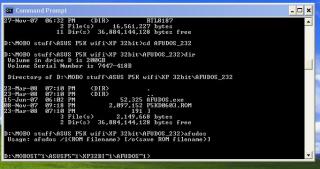
one more thing about ASUS EZ FLASH BIOS .. it will not let u flash your BIOS back to an older version than the current one .. so THINK CAREFULLY b4 u flash .. hahaha
the UPDATE TOOL oso doesnt work in order to flash older bios

however there is one thing that might work but i couldnt get it to work as it should .. any ideas or tips guys ???
i booted from 3.5inch (borrowed) MS-DOS and oso couldnt get it to work ...

Attached Image
tnhafiz
post Mar 26 2008, 09:29 AM

Getting Started
**
Junior Member
276 posts

Joined: Dec 2007
From: GOMBAK


hehe....bcoz many people said that my oc is just mild oc.what bout my ram setting?im not using dual cahhnel since my ram is not pair?
msyafiq_m
post Mar 26 2008, 11:32 AM

Getting Started
**
Junior Member
112 posts

Joined: Jan 2007
From: Johorean studying in Gombak


Hi.User of Asus P5K Pro here. Been using both E8400 and E2160 on this mobo. Performance is quite good, with a good range of voltage control.

Here's the performance of my mobo running an E8400 :

CPU : Core2Duo E8400
CPU clockspeed : 4.250 MHz (500 x 8.5)
Motherboard : Asus P5K Pro (Bios rev 0806)
RAM model : Crucial Ballistix Tracer PC6400
RAM capacity : 1GB X 2
RAM speed : 500 MHz, CL4-5-4-12
RAM mode : Dual channel
Voltage detail :
VCore : 1.375V
VDimm : 2.2V
PLL Voltage : 1.6V
FSB Termination Voltage : 1.32V
NB Voltage : 1.47V
PSU : FSP Epsilon 600W, and currently using Mushkin Enhanced 580W modular

Idle temp : 42C
Full load test (running Orthos) : 57C
Temp reading taken using CoreTemp, bu dont think that the temp reading is correct coz touched my heatsink, and its not even warm. Proc cooled using Silent Knight II

have yet to play e2160 on this mobo.no time ler with exam coming.
will post more result later.


Attached thumbnail(s)
Attached Image
bryanyeo87
post Mar 26 2008, 12:15 PM

Below the Belt
*******
Senior Member
3,175 posts

Joined: May 2006
QUOTE(tnhafiz @ Mar 26 2008, 03:16 AM)
hi to all asus mobo user.... biggrin.gif

im using asus P5KR.this is d detail:-

1)fsb=320
2)multiplier=10
3)vcore=1.424
4)ram mix1Gbx2(kingston 667 n ocz gold 800)=320mhzx2
5)vdimm=2.0

so,how to increase d oc?
temp:-idle=37
        -100% load=70
*
you stated everything except the crucial part, which is the cpu smile.gif

so what is it?


Added on March 26, 2008, 12:20 pm
QUOTE(msyafiq_m @ Mar 26 2008, 11:32 AM)
» Click to show Spoiler - click again to hide... «

Temp reading taken using CoreTemp, bu dont think that the temp reading is correct coz touched my heatsink, and its not even warm. Proc cooled using Silent Knight II

have yet to play e2160 on this mobo.no time ler with exam coming.
will post more result later.
*
you see, the hsf needs time to conduct the heat for it to start to feel warm, maybe after a prime stress test for about 10~15 mins would let the hsf warm up enough.

but then again, e8xxx series DTS is bugged, some read it below temps and some read it above what it is actually is, and some are just dead on the spot accurate, so which do you think is yours?

This post has been edited by bryanyeo87: Mar 26 2008, 12:20 PM
msyafiq_m
post Mar 26 2008, 12:26 PM

Getting Started
**
Junior Member
112 posts

Joined: Jan 2007
From: Johorean studying in Gombak


i think mine read above,coz i touched the heatsink only after the 2nd hour of stress. :-)

haven't tested using RealTemp tho..some penryn user suggested using RealTemp as the reading is the most accurate for the time being..
tnhafiz
post Mar 26 2008, 01:01 PM

Getting Started
**
Junior Member
276 posts

Joined: Dec 2007
From: GOMBAK


hehe.soory...my cpu is e45002.2ghz @3.2.
LExus65
post Mar 26 2008, 01:12 PM

Old Gezzer.....
******
Senior Member
1,995 posts

Joined: May 2005


maximus user report in, spec as my sig.......OC result still in progress...... just got my e2220 2 weeks ago, still in progress of tweaking but this proc is a real hot Babe..... super hot
bryanyeo87
post Mar 26 2008, 01:43 PM

Below the Belt
*******
Senior Member
3,175 posts

Joined: May 2006
QUOTE(tnhafiz @ Mar 26 2008, 01:01 PM)
hehe.soory...my cpu is e45002.2ghz @3.2.
*
e4xxx series doh.gif

most of them are bad, bad ocers :S

anyway, you can try lowering the multi to 9x and try push again.

alternatively, you can do a bsel pad mod, which does in some cases have a better ocing headroom, but you need to check if your cpu will boot or/is stable at 266fsb x10 or 333fsbx10, depending on whichever is more stable

33 Pages  1 2 3 > » Top
 

Change to:
| Lo-Fi Version
0.0182sec    0.29    6 queries    GZIP Disabled
Time is now: 2nd December 2025 - 04:38 AM