Welcome Guest ( Log In | Register )

Outline · [ Standard ] · Linear+

 ASUS motherboard overclocking discussion, ASUS mb owners come to discuss here.

views
     
QiW
post Mar 24 2008, 08:50 AM

Casual
***
Junior Member
354 posts

Joined: Sep 2006
From: KL
me oso using p5k deluxe wifi
now facing some probs with it .. BIOS prob .. flashed it to the latest BIOS version 0809 (dated Feb 08) from ASUS site .. now totally screwed .. now trying to contact ASUS to try and rectify the prob

anyways .. heres my 1M superPi shot .. q6600@3.0 daily use + 2gb team elite ram

» Click to show Spoiler - click again to hide... «


This post has been edited by QiW: Mar 24 2008, 08:51 AM
QiW
post Mar 26 2008, 01:25 AM

Casual
***
Junior Member
354 posts

Joined: Sep 2006
From: KL
QUOTE(ahsiah @ Mar 25 2008, 08:40 PM)
Mind to elaborate more on your case? Why you say it is screwed?
*
the very 1st day i got this P5K deluxe wifi .. the bios didnt detect 1 of my HDD
but i left the assembling of the rig to complete till the next day coz too late at nite liauu .. the next day it worked .. dunno why oso rclxub.gif

then few days ago i removed mobo from casing to fit in new cooler .. unplugged all cables etc etc
then when fixed everything back .. it didnt detect one of my HDD and 1 sata optical .. plug and unplugged at least 5-6 times but it couldnt detect

so i tot might as well have a flash at the BIOS .. from 0603 to 0809 versions .. then all the trouble starts coming
it could detect my 2 troubled sata devices .. but not all the time
then it wont boot up from cd/dvd/thumbdrive
cannot OC without doing manual F8 select to boot
optical go crazee on off by itself when using windows but no cd/dvd inside

now ok liauu ... duno why suddenly ok .. but still buggy laa .. cry.gif
can boot up and OC as usual but temp readings very different from previous BIOS ... the settings in BIOS oso different .. maybe just a matter of taste

now still ok ... tomoro dunno laa .. i already written to ASUS and ask them whats the prob .. they have not replied yet
i spoke to my fren in ASUS .. i might get it RMA-ed then maybe go get the P5E laaa .. drool.gif

edit .. the best BIOs version to stick with is still the 0603 version laa IMO .. stable and logical OC functions .. hehehehe

This post has been edited by QiW: Mar 26 2008, 01:27 AM

QiW
post Mar 26 2008, 07:41 AM

Casual
***
Junior Member
354 posts

Joined: Sep 2006
From: KL
QUOTE(tnhafiz @ Mar 26 2008, 03:16 AM)
hi to all asus mobo user.... biggrin.gif

im using asus P5KR.this is d detail:-

1)fsb=320
2)multiplier=10
3)vcore=1.424
4)ram mix1Gbx2(kingston 667 n ocz gold 800)=320mhzx2
5)vdimm=2.0

so,how to increase d oc?
temp:-idle=37
        -100% load=70


Added on March 26, 2008, 3:17 amhi to all asus mobo user.... biggrin.gif

im using asus P5KR.this is d detail:-

1)fsb=320
2)multiplier=10
3)vcore=1.424
4)ram mix1Gbx2(kingston 667 n ocz gold 800)=320mhzx2
5)vdimm=2.0

so,how to increase d oc?
temp:-idle=37
        -100% load=70
*
load oso already 70C .. wanna UP you OC sommo ah ??
there is only ONE WAY to go higher .. that is increase vcore to supplement your FSB or multiplier increase .. and oso more vdimm laa for your DIMMs .. hehehe
that being said .. everything is increase VOLTAGE .. more voltage = more heat ... can u handle it ??? hehehehe
QiW
post Mar 26 2008, 07:51 AM

Casual
***
Junior Member
354 posts

Joined: Sep 2006
From: KL
QUOTE(ahsiah @ Mar 26 2008, 06:01 AM)
I came agross from other forum that people saying the temperature reporting is not correct for bios 0603. Either causing Core Temp or PC Probe reading the wrong tempearture. Not sure you notice this or not. I will try it when I am free.
*
using 0603 bios .. temp reading of CPU (using everest) is almost always 4-5C higher than the individual cores (everest/coretemp)
using 0809 bios .. temp reading of CPU (everest) is about 12C lower than the highest individual cores (everest/coretemp)

which one is the actual correct one ?? hehehehe .. unless u got laser temp measurement device .. there is no way to ascertain the real temp
i dont use the ASUS software provided .. ie. probe and intelligent suite tongue.gif

one more thing about ASUS EZ FLASH BIOS .. it will not let u flash your BIOS back to an older version than the current one .. so THINK CAREFULLY b4 u flash .. hahaha
the UPDATE TOOL oso doesnt work in order to flash older bios

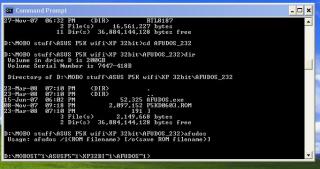
however there is one thing that might work but i couldnt get it to work as it should .. any ideas or tips guys ???
i booted from 3.5inch (borrowed) MS-DOS and oso couldnt get it to work ...

Attached Image
QiW
post Mar 27 2008, 12:41 PM

Casual
***
Junior Member
354 posts

Joined: Sep 2006
From: KL
QUOTE(ahsiah @ Mar 27 2008, 07:07 AM)
Anyone manage to use AFUDOS revert the motherboard into older version?
*
if anyone manage to do it .. please teach me how .. hehehe
i oso wanna flash back to older version BIOS firmware laa
QiW
post Mar 28 2008, 10:49 AM

Casual
***
Junior Member
354 posts

Joined: Sep 2006
From: KL
QUOTE(graphicp @ Mar 27 2008, 09:13 PM)
Asus P5KR user here. Very satisfied with this board. Manage to OC Q6600@3.7Ghz easily. 1.52v at idle No BSOD appear until right now.Huhu.....

For 24/7 use @ 3.38Ghz succesful prime more than 12 hour. Screenshot

Stacker 832|Q6600|Asus P5KR|Gigabyte Odin Pro 550W|Thermalright Ultra 120 Extreme|Crucial Ballistix 6400 4GB Kit|MSI 8800GT 512MB|Logitech X-540|Logitech MX3200|WLCD Samsung 19"|Samsung DVDRW|

Bold=New added Hardware
*
whats your load temp for the Q6600 ?? u use which software to stress test ??
QiW
post Mar 28 2008, 01:10 PM

Casual
***
Junior Member
354 posts

Joined: Sep 2006
From: KL
QUOTE(bryanyeo87 @ Mar 28 2008, 12:46 PM)
its stated in the SC link, and as well as his post. what more clearer? :S
@graphicp
nice oc biggrin.gif, cannot get it stable at 3.7?
you're using a xigmatek HDT or TRUE 120?
and room air-cond or not during the tests?
*
i wanted to ask for the 3.7 OC one la ... 3.4 one is there la i can see tongue.gif
QiW
post Mar 31 2008, 11:13 AM

Casual
***
Junior Member
354 posts

Joined: Sep 2006
From: KL
anybody wanna mail me their copy of ENGINEERING AFUDOS for back flashing ?? hehehehe tongue.gif
QiW
post Mar 31 2008, 04:08 PM

Casual
***
Junior Member
354 posts

Joined: Sep 2006
From: KL
QUOTE(cstkl1 @ Mar 31 2008, 02:25 PM)
look at iriz posting in the quads..
he just flashed to rampage..
now 3.2ghz at 0.01v+ on stock voltages..
heck his nb voltage and fsb voltage also ridiculously low with the rampage bios.

best of all it was done with his mem at maximum bandwidth at trd 7.. which is easier to set on rampage bios.

so its definitely the way to go..


Added on March 31, 2008, 2:26 pm
http://www.tyan.com/tech/matrix_flashUtility.aspx
*
ok .. thanks ... will try and see what happens .. tongue.gif
QiW
post Apr 2 2008, 11:38 AM

Casual
***
Junior Member
354 posts

Joined: Sep 2006
From: KL
QUOTE(ahsiah @ Apr 1 2008, 10:10 PM)
@QiW,

    I managed to revert back my motherboard BIOS with a tool called AMIFLASH.COM and it must be executed in Dos environment. Please PM me your email address and I can email that program to you.

@All,

    I reflashed my P5K Deluxe to 0404. Compare to 0809. 0404 is more OCable. I managed to push my memory higher compare to 0809.

    I did use MemTest86+ to test the bandwidth for Transaction Booster and Boost Level or Relax Level. I will update the result in the first post.
*
thanks .. u got PM smile.gif


Change to:
| Lo-Fi Version
0.0248sec    0.37    7 queries    GZIP Disabled
Time is now: 1st December 2025 - 11:50 PM