Welcome Guest ( Log In | Register )

48 Pages « < 17 18 19 20 21 > » Bottom

Outline · [ Standard ] · Linear+

 DFI LANPARTY DK P35-T2RS, Discussions and Results

views
     
cschun86
post Feb 20 2008, 10:10 PM

Heading towards 2000~
******
Senior Member
1,972 posts

Joined: Oct 2006
From: Seberang Perai


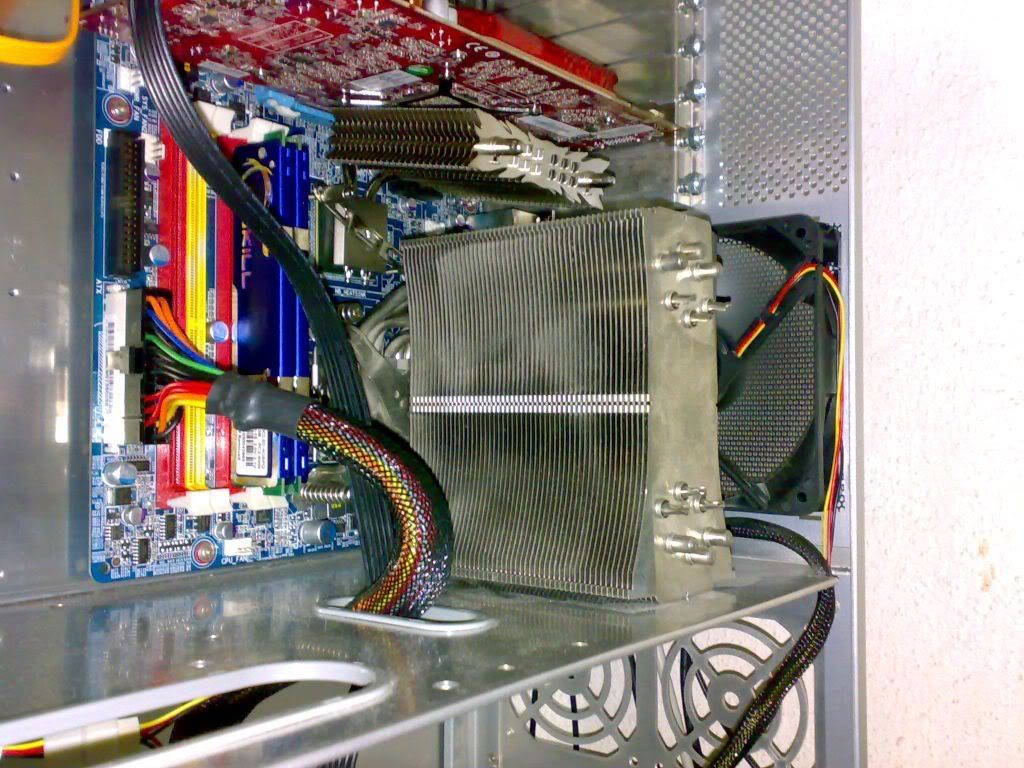
user posted image

this is the HR-05 SLI/IFX on the DS3,
abt same with u all mobo coz the location of it abt the same...
but have to bend a bit coz might touch the gc,

dun wana bend also can, have to put and isulation rubber or btw them...

i did put a sponge btw them,
but at last decide to bend a bit smile.gif
sniper69
post Feb 20 2008, 10:56 PM

.: One Shot One Kill :. .+|Level 9 Type Shit|+.
*******
Senior Member
7,173 posts

Joined: Jan 2003
From: PCH


QUOTE(AceCombat @ Feb 20 2008, 09:06 PM)
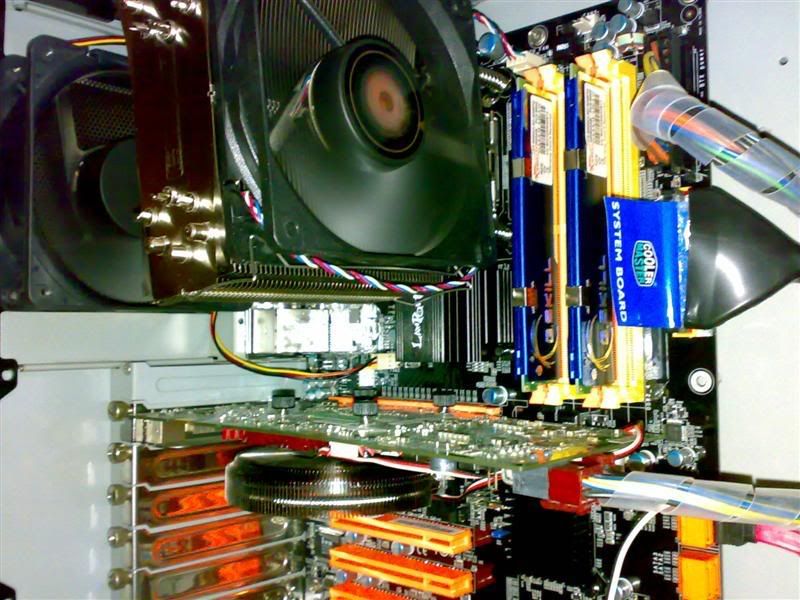
you guys no g00d,told me that TRUE cant install vertically on the DK. vmad.gif tongue.gif
but look at mine!!!! rclxms.gif

anyway,i hate this mobo anyway,using only 4 layers PCB,the bios cannot undervolt the processor vcore,and sometime cannot boot up,stuck at the Dark logo screen there,have to reset and only can POST cry.gif
have some vdrop on quaddie,will try to prime and see the exact vdrop tonight.

and one thing,how u guys update bios?

user posted image
i didn't tell anything... whistling.gif tongue.gif
so... why some TRUE user said that can't install vertically...? hmm.gif
AceCombat
post Feb 20 2008, 11:30 PM


Group Icon
Elite
5,434 posts

Joined: Dec 2006


@sniper

laugh.gif
actually....
it's magic for mine to be installed so nice. brows.gif
sniper69
post Feb 20 2008, 11:39 PM

.: One Shot One Kill :. .+|Level 9 Type Shit|+.
*******
Senior Member
7,173 posts

Joined: Jan 2003
From: PCH


QUOTE(AceCombat @ Feb 20 2008, 11:30 PM)
@sniper

laugh.gif
actually....
it's magic for mine to be installed so nice. brows.gif
*
drool.gif, apa black magic you use aaa? brows.gif
anyway... what's the issue installing this TRUE le? unsure.gif? the heatpipe hiting the NB sink? the fins?
vearn27
post Feb 21 2008, 12:01 AM

Doink! Doink! Doink!
*******
Senior Member
7,284 posts

Joined: Jan 2003
From: Hong Kong / Malaysia


A little out of topic here... anyone experiencing problem with the ICH9R controller or the SATA cable? unsure.gif

At the moment, my rig is having this major problem: http://forum.lowyat.net/topic/634995

So in the end, I ditched out the new Seagate 500GB HDD from my rig suspecting it's a faulty HDD. Windows installation with the old Samsung 120GB HDD is alright, till at just now I'm experiencing BSOD and in the latter mentioning something such as... Beginning physical dump. It mentioned if this is the first time I'm experiencing this problem, try restart... if problem persist... check new hardware installation... etc. etc. (I guess most of you know the content well smile.gif)

I tried to restart the system and it happen that the loading taking a long time at BIOS and latter disk error doh.gif. I thought my ram having the problem and thus going into BIOS again to set the RAM to 5-5-5-18 @ 1.8V. In my horror, the BIOS couldn't detect my HDD when I checked at the setting shocking.gif. I tried to restart and it remain hang at the DFI DK logo screen shakehead.gif. In the end, I switched to another SATA cable at another SATA port, voila ~ the system successfully booted into Windows sweat.gif.

Any comment on my severe problem? I couldn't afford system down any longer or my assignment will be screwed doh.gif doh.gif doh.gif
cschun86
post Feb 21 2008, 12:18 AM

Heading towards 2000~
******
Senior Member
1,972 posts

Joined: Oct 2006
From: Seberang Perai


QUOTE(vearn27 @ Feb 21 2008, 12:01 AM)
A little out of topic here... anyone experiencing problem with the ICH9R controller or the SATA cable? unsure.gif

At the moment, my rig is having this major problem: http://forum.lowyat.net/topic/634995

So in the end, I ditched out the new Seagate 500GB HDD from my rig suspecting it's a faulty HDD. Windows installation with the old Samsung 120GB HDD is alright, till at just now I'm experiencing BSOD and in the latter mentioning something such as... Beginning physical dump. It mentioned if this is the first time I'm experiencing this problem, try restart... if problem persist... check new hardware installation... etc. etc. (I guess most of you know the content well smile.gif)

I tried to restart the system and it happen that the loading taking a long time at BIOS and latter disk error doh.gif. I thought my ram having the problem and thus going into BIOS again to set the RAM to 5-5-5-18 @ 1.8V. In my horror, the BIOS couldn't detect my HDD when I checked at the setting shocking.gif. I tried to restart and it remain hang at the DFI DK logo screen shakehead.gif. In the end, I switched to another SATA cable at another SATA port, voila ~ the system successfully booted into Windows sweat.gif.

Any comment on my severe problem? I couldn't afford system down any longer or my assignment will be screwed doh.gif doh.gif doh.gif
*
hmm, last time i faced similiar problem with u,
at last is the graphic card problem and mobo,
last time mistaken got a modded gc,
and the soldering not good,
sometimes touch and sometimes dun...

and it make the mobo went crazy,
then i change new mobo,
and resolder back the gc,
it went good....

vearn27
post Feb 21 2008, 12:36 AM

Doink! Doink! Doink!
*******
Senior Member
7,284 posts

Joined: Jan 2003
From: Hong Kong / Malaysia


QUOTE(cschun86 @ Feb 21 2008, 12:18 AM)
hmm, last time i faced similiar problem with u,
at last is the graphic card problem and mobo,
last time mistaken got a modded gc,
and the soldering not good,
sometimes touch and sometimes dun...

and it make the mobo went crazy,
then i change new mobo,
and resolder back the gc,
it went good....
*
Now even the graphic card could lead to my problem. Anyway, replied to your post in my thread. Hope we can continue there sweat.gif.
moderno
post Feb 21 2008, 01:36 AM

*Thanks for all the memories & supports! @ LYN**
******
Senior Member
1,924 posts

Joined: Jan 2005
From: Subang Jaya

guys...may i know why the CPU-Z shown the wrong multiplier ek? i set it at 8 x 400 as shown at BIOS startup...but cpu z shown 6 x 400...waduh... sad.gif

This post has been edited by moderno: Feb 21 2008, 01:36 AM
vearn27
post Feb 21 2008, 01:42 AM

Doink! Doink! Doink!
*******
Senior Member
7,284 posts

Joined: Jan 2003
From: Hong Kong / Malaysia


QUOTE(moderno @ Feb 21 2008, 01:36 AM)
guys...may i know why the CPU-Z shown the wrong multiplier ek? i set it at 8 x 400 as shown at BIOS startup...but cpu z shown 6 x 400...waduh... sad.gif
*
You didn't disable the C1E and EIST in the BIOS option smile.gif. Read kmarc's overclocking guide and you'll get it wink.gif.
moderno
post Feb 21 2008, 01:45 AM

*Thanks for all the memories & supports! @ LYN**
******
Senior Member
1,924 posts

Joined: Jan 2005
From: Subang Jaya

QUOTE(vearn27 @ Feb 21 2008, 01:42 AM)
You didn't disable the C1E and EIST in the BIOS option smile.gif. Read kmarc's overclocking guide and you'll get it wink.gif.
*
ahaha..super noob here when OC'ing an Intel tongue.gif

which part in the bios to disable this C1E & EIST? laugh.gif
sniper69
post Feb 21 2008, 01:59 AM

.: One Shot One Kill :. .+|Level 9 Type Shit|+.
*******
Senior Member
7,173 posts

Joined: Jan 2003
From: PCH


QUOTE(moderno @ Feb 21 2008, 01:45 AM)
ahaha..super noob here when OC'ing an Intel tongue.gif

which part in the bios to disable this C1E & EIST?  laugh.gif

here dude... brows.gif

user posted image
moderno
post Feb 21 2008, 01:59 AM

*Thanks for all the memories & supports! @ LYN**
******
Senior Member
1,924 posts

Joined: Jan 2005
From: Subang Jaya

ahaha..done oledi... tongue.gif

managed to get good temps on the NB with MCW30...but the CPU reading when up kaw kaw from 29c idle to 60 only at VID 1.4v...aiyak....dunno if it's accurate reading or not from the smart guardian...

user posted image

This post has been edited by moderno: Feb 21 2008, 02:00 AM
sniper69
post Feb 21 2008, 02:02 AM

.: One Shot One Kill :. .+|Level 9 Type Shit|+.
*******
Senior Member
7,173 posts

Joined: Jan 2003
From: PCH


damn... 410MHz? nice clock dude... what about other settings can share, me wanted too to get 410MHz FSB brows.gif
moderno
post Feb 21 2008, 02:09 AM

*Thanks for all the memories & supports! @ LYN**
******
Senior Member
1,924 posts

Joined: Jan 2005
From: Subang Jaya

QUOTE(sniper69 @ Feb 21 2008, 02:02 AM)
damn... 410MHz? nice clock dude... what about other settings can share, me wanted too to get 410MHz FSB brows.gif
*
dunno loh bro...just test it only at 5 minutes...ehehe...all settings are pretty much as the same as urs...just my cpu temp there puzzling me a bit as i'm on WC...should be lower than that...hurmmm...

owh now at 50-52c...pulak dah..ahahaha... doh.gif doh.gif
tapirus
post Feb 21 2008, 02:33 AM

(︶ε︶メ)╭∩╮ a�tE(R)isk
******
Senior Member
1,237 posts

Joined: Jul 2006
From: espie-prai


which 1 is vcore..

- cpu vid special
- cpu vtt voltage

EDIT : Moderno u got my pm right???

This post has been edited by tapirus: Feb 21 2008, 02:33 AM
mfcm
post Feb 21 2008, 05:50 AM

Look at all my stars!!
*******
Senior Member
2,765 posts

Joined: Nov 2005
From: **Hornbills**


cpu vcore is vid special
emilz
post Feb 21 2008, 06:29 AM

Regular
******
Senior Member
1,377 posts

Joined: Jan 2003
From: Nothing special


QUOTE(moderno @ Feb 21 2008, 02:09 AM)
dunno loh bro...just test it only at 5 minutes...ehehe...all settings are pretty much as the same as urs...just my cpu temp there puzzling me a bit as i'm on WC...should be lower than that...hurmmm...

owh now at 50-52c...pulak dah..ahahaha... doh.gif  doh.gif
*
uiks ur water block not properly contact ka bro hmm.gif
gsan
post Feb 21 2008, 07:35 AM

Electrical RF Engineer
*******
Senior Member
2,471 posts

Joined: Jan 2003

@AceCombat

try disable the logo screen and see which part got problem when it is hang. maybe it is the oc fail, and you either need to press F1 or Del to continue.
AceCombat
post Feb 21 2008, 08:49 AM


Group Icon
Elite
5,434 posts

Joined: Dec 2006


QUOTE(sniper69 @ Feb 20 2008, 11:39 PM)
drool.gif, apa black magic you use aaa? brows.gif
anyway... what's the issue installing this TRUE le? unsure.gif? the heatpipe hiting the NB sink? the fins?
*
well,the NB heat sink and the upper PWM heat sink did blocked the heat pipe of TRUE vmad.gif
today i upload a pic again and u guys know how i install.

QUOTE(vearn27 @ Feb 21 2008, 12:01 AM)
A little out of topic here... anyone experiencing problem with the ICH9R controller or the SATA cable? unsure.gif

At the moment, my rig is having this major problem: http://forum.lowyat.net/topic/634995

So in the end, I ditched out the new Seagate 500GB HDD from my rig suspecting it's a faulty HDD. Windows installation with the old Samsung 120GB HDD is alright, till at just now I'm experiencing BSOD and in the latter mentioning something such as... Beginning physical dump. It mentioned if this is the first time I'm experiencing this problem, try restart... if problem persist... check new hardware installation... etc. etc. (I guess most of you know the content well smile.gif)

I tried to restart the system and it happen that the loading taking a long time at BIOS and latter disk error doh.gif. I thought my ram having the problem and thus going into BIOS again to set the RAM to 5-5-5-18 @ 1.8V. In my horror, the BIOS couldn't detect my HDD when I checked at the setting shocking.gif. I tried to restart and it remain hang at the DFI DK logo screen shakehead.gif. In the end, I switched to another SATA cable at another SATA port, voila ~ the system successfully booted into Windows sweat.gif.

Any comment on my severe problem? I couldn't afford system down any longer or my assignment will be screwed doh.gif doh.gif doh.gif
*
i got this problme too,when I RAID 0 my raptor,it hang at the POST screen there,CTRL+ALT+DEL and make it restart but it keep on stuck at the Dark logo screen.
Clear CMOS and set back all the setting will make it POST successfully sweat.gif

QUOTE(gsan @ Feb 21 2008, 07:35 AM)
@AceCombat

try disable the logo screen and see which part got problem when it is hang. maybe it is the oc fail, and you either need to press F1 or Del to continue.
*
nope,not oc fail,luckily i managed to press Tab button and look at the POST,it hangs when it detecting HDD and DRAM laugh.gif
i guess is Intel RAID 0 problem,know why?cause it uses only ICH9R and when i raid 0 my raptor,there is 4 port left,i use 2 port to put my DVD-RW,so i think there is the problem.
when i use my Asus,i always put those DVD-RW into JMicron controller in order to prevent some conflict.
right now i running raid 0 in my raptor and both of my DVDRW also in ICH9R,but i change the port and everything seems ok sweat.gif
Raptor in SATA 0 and SATA 1 while DVDRW in SATA 4 and SATA 5.


This mobo only 4 layer PCB..... cry.gif
mfcm
post Feb 21 2008, 10:02 AM

Look at all my stars!!
*******
Senior Member
2,765 posts

Joined: Nov 2005
From: **Hornbills**


yeaah the upper hsf will black..not jus 120xtreme..mine tuniq oso block with it n NB hsf..but the NB hsf jus crash with fan not hsf..so wont b proc coz i make abit spacer for the fan..but the upper hsf crash with hsf fin..so no more choise ..plug it out..replace wit ramsink tongue.gif waaa ace regret getting this mobo yeah?coz its oni 4pcb layers?

48 Pages « < 17 18 19 20 21 > » Top
 

Change to:
| Lo-Fi Version
0.0277sec    1.14    6 queries    GZIP Disabled
Time is now: 21st December 2025 - 01:23 AM