Welcome Guest ( Log In | Register )

Bump Topic Topic Closed RSS Feed
100 Pages « < 92 93 94 95 96 > » Bottom

Outline · [ Standard ] · Linear+

 AMD® Socket-AM2/AM2+ Overclocking thread (V5), FTW...

views
     
E-J@1
post Feb 15 2008, 09:51 PM

Capital Eâ„¢
*******
Senior Member
2,603 posts

Joined: Sep 2006
Processor: AMD Athlon 64 X2 4800+ (2.5GHz)
Motherboard: Biostar TA770 A2+
RAM: OCZ DDR2 PC2-6400 Gold Series
PSU: SilverStone ST50F (500W)
VGA: Gigabyte GeForce 8800 GT TurboForce Edition

user posted image

managed to OC till 3.0GHz (240HTT × 12.5)

more info in table below:

user posted image

for multiplier ×12.5 --> HTT = 240 max
no matter what voltage i use (cpu, memory, ht, & nb/sb) still can't boot if htt were to be increased
no matter what memory divider i use still can't boot if htt were to be increased

for multiplier ×11-8 --> HTT = 267 max
same no matter what voltage i use (cpu, memory, ht, & nb/sb) still can't boot if htt were to be increased
no matter what memory divider i use still can't boot if htt were to be increased

for multplier ×6 --> HTT = 280 max
same no matter what voltage i use (cpu, memory, ht, & nb/sb) still can't boot if htt were to be increased
memory divider on DDR 400 --> 267 max
memory divider changed to DDR 533 --> 280 max
memory divider on DDR 800 --> failed

so, anything i'm missing? icon_question.gif

seen one review by BCCHardware

OCed X2 4800+ (2.5GHz):
  • up to 380 (HTT) on ×8 multiplier
    user posted image

  • up to 240 (HTT) on ×12.5 multiplier
    user posted image

btw, for AMD, which is better:
  • Higher HTT × Lower Multiplier, or
  • Lower HTT× Higher Multiplier?

TS-pWs-
post Feb 15 2008, 10:05 PM

Look at all my stars!!
Group Icon
Elite
8,545 posts

Joined: Aug 2006
From: 224.0.0.6


Keep to Higher Multi & Lower HTT.
No performance increase if you use higher HTT.

Correct me if I am wrong smile.gif

-pWs-
ah_khoo
post Feb 15 2008, 10:08 PM

- No Action Talk Only -
Group Icon
Elite
8,103 posts

Joined: Jan 2003
From: Tanah Lot @ Dungun, Terengganu.


QUOTE(-pWs- @ Feb 15 2008, 10:05 PM)
Keep to Higher Multi & Lower HTT.
No performance increase if you use higher HTT.

Correct me if I am wrong smile.gif

-pWs-
*
yup, highest speed is d best. higher htt will limit oc, so highest multi + low htt will definitely goes further... smile.gif

correct me if i'm wrong too... wink.gif
dblooi
post Feb 15 2008, 10:14 PM

......
******
Senior Member
1,404 posts

Joined: Apr 2006
From: ......


QUOTE(E-J@1 @ Feb 15 2008, 09:51 PM)
Processor: AMD Athlon 64 X2 4800+ (2.5GHz)
Motherboard: Biostar TA770 A2+
RAM: OCZ DDR2 PC2-6400 Gold Series
PSU: SilverStone ST50F (500W)
VGA: Gigabyte GeForce 8800 GT TurboForce Edition
» Click to show Spoiler - click again to hide... «

btw, for AMD, which is better:

  • Higher HTT × Lower Multiplier, or
  • Lower HTT× Higher Multiplier?

*
pws is right. high/low HTT but same clockspeed make not much difference in AMD platform.
the only reason to use higher HTT is to overclock the HT link icon_rolleyes.gif
also, bear in mind that higher HTT= more vcore needed.
you might not be able to oc to same clockspeed with same vcore, but higher HTT lower multiplier notworthy.gif

digswell
post Feb 15 2008, 10:15 PM

Look at all my stars!!
*******
Senior Member
2,484 posts

Joined: Nov 2007
From: Nilai,N.S.D.K

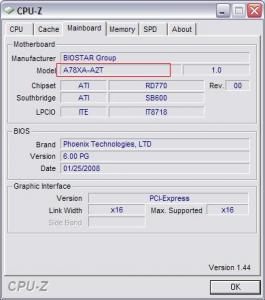
Why the CPU-Z detect my TA770 A2+ Like tis ?? rclxub.gif rclxub.gif

Attached Image

This post has been edited by digswell: Feb 15 2008, 10:16 PM
E-J@1
post Feb 15 2008, 10:23 PM

Capital Eâ„¢
*******
Senior Member
2,603 posts

Joined: Sep 2006
QUOTE(-pWs- @ Feb 15 2008, 10:05 PM)
Keep to Higher Multi & Lower HTT.
No performance increase if you use higher HTT.

Correct me if I am wrong smile.gif

-pWs-
*
QUOTE(ah_khoo @ Feb 15 2008, 10:08 PM)
yup, highest speed is d best. higher htt will limit oc, so highest multi + low htt will definitely goes further...  smile.gif

correct me if i'm wrong too...  wink.gif
*
so no point for me to OC further anymore

at first wanna try on every multi, see which multi yield the highest htt

guess have to stay on "high multi × low htt"

ok, thanx dudes icon_rolleyes.gif

QUOTE(dblooi @ Feb 15 2008, 10:14 PM)
pws is right. high/low HTT but same clockspeed make not much difference in AMD platform.
the only reason to use higher HTT is to overclock the HT link  icon_rolleyes.gif
also, bear in mind that higher HTT= more vcore needed.
you might not be able to oc to same clockspeed with same vcore, but higher HTT lower multiplier  notworthy.gif
*
ya, that's keep bugging me today

which is better rclxub.gif

250 × 10 = 2.5 Ghz, or
200 × 12.5 = 2.5 GHz

thanx bro for the clarification icon_rolleyes.gif

QUOTE(digswell @ Feb 15 2008, 10:15 PM)
Why the CPU-Z detect my TA770 A2+ Like tis ?? rclxub.gif  rclxub.gif

http://s.lowyat.net/uploads//post-136777-1203084897_thumb.jpg
*
that's weird blink.gif

when u bought it?

how's this possible? driver? bios?

how bout other TA770 user here? unsure.gif
dblooi
post Feb 15 2008, 10:25 PM

......
******
Senior Member
1,404 posts

Joined: Apr 2006
From: ......


QUOTE(digswell @ Feb 15 2008, 10:15 PM)
Why the CPU-Z detect my TA770 A2+ Like tis ?? rclxub.gif  rclxub.gif

Attached Image
*
770 chipset is codenamed as RX780 smile.gif

http://en.wikipedia.org/wiki/AMD_700_chipset_series
digswell
post Feb 15 2008, 10:32 PM

Look at all my stars!!
*******
Senior Member
2,484 posts

Joined: Nov 2007
From: Nilai,N.S.D.K
QUOTE(E-J@1 @ Feb 15 2008, 10:23 PM)
that's weird blink.gif

when u bought it?

how's this possible? driver? bios?

how bout other TA770 user here? unsure.gif
*
I also no know will like tis.. rclxub.gif rclxub.gif
I no think is bios coz ur bios date oso 01/25/2008
i bought tis 2 mobo at 12/1/2008
maybe will ask XIXO bout tis

@ xixo
can u post ur TA770A2+ mobo CPU-Z ss
dblooi
post Feb 15 2008, 10:32 PM

......
******
Senior Member
1,404 posts

Joined: Apr 2006
From: ......


QUOTE(E-J@1 @ Feb 15 2008, 10:23 PM)
so no point for me to OC further anymore

at first wanna try on every multi, see which multi yield the highest htt

guess have to stay on "high multi × low htt"

ok, thanx dudes icon_rolleyes.gif
ya, that's keep bugging me today

which is better rclxub.gif

250 × 10 = 2.5 Ghz, or
200 × 12.5 = 2.5 GHz

thanx bro for the clarification icon_rolleyes.gif
that's weird blink.gif

when u bought it?

how's this possible? driver? bios?

how bout other TA770 user here? unsure.gif
*
It's depends, for me i prefer 11x multiplier
when we choose 11x multiplier with 667 divider.
we are actually using /7 divider.
It's the best divider that can be used in extremely high clockspeed ( > 3.9GHz)
depend on the ram and proc ocability , we decide which divider to be used notworthy.gif
You have to study the divider table then you'll know which one is suitable for you icon_rolleyes.gif

E-J@1
post Feb 15 2008, 10:39 PM

Capital Eâ„¢
*******
Senior Member
2,603 posts

Joined: Sep 2006
@ all Biostar TA770 A2+ user

u guys facing the slow boot up problem?

any setting can be change to solve it?

QUOTE(dblooi @ Feb 15 2008, 10:25 PM)
770 chipset is codenamed as RX780 smile.gif

http://en.wikipedia.org/wiki/AMD_700_chipset_series
*
QUOTE(digswell @ Feb 15 2008, 10:32 PM)
I also no know will like tis.. rclxub.gif  rclxub.gif
I no think is bios coz ur bios date oso 01/25/2008
i bought tis 2 mobo at 12/1/2008
maybe will ask XIXO bout tis

@ xixo
can u post ur TA770A2+ mobo CPU-Z ss
*
i just googled A78XA-A2T

dblooi is rite, A78XA-A2T is the code name

but why the difference?

nothing serious actually laugh.gif

i bought mine 4~5 days b4 CNY, can't remember sweat.gif

QUOTE(dblooi @ Feb 15 2008, 10:32 PM)
It's depends, for me i prefer 11x multiplier
when we choose 11x multiplier with 667 divider.
we are actually using /7 divider.
It's the best divider that can be used in extremely high clockspeed ( > 3.9GHz)
depend on the ram and proc ocability , we decide which divider to be used  notworthy.gif
You have to study the divider table then you'll know which one is suitable for you  icon_rolleyes.gif
*
interesting

will try it tonite, see what happens rclxms.gif
digswell
post Feb 15 2008, 10:48 PM

Look at all my stars!!
*******
Senior Member
2,484 posts

Joined: Nov 2007
From: Nilai,N.S.D.K
QUOTE(E-J@1 @ Feb 15 2008, 10:39 PM)
@ all Biostar TA770 A2+ user

u guys facing the slow boot up problem?

any setting can be change to solve it?
i just googled A78XA-A2T

dblooi is rite, A78XA-A2T is the code name

but why the difference?

nothing serious actually laugh.gif

i bought mine 4~5 days b4 CNY, can't remember sweat.gif
interesting

will try it tonite, see what happens rclxms.gif
*
a bit slow bios boot up but no slow boot windows hmm.gif
A78XA-A2T is code name nod.gif
TA770 A2 is model name nod.gif

This post has been edited by digswell: Feb 15 2008, 10:49 PM
ocz
post Feb 15 2008, 10:55 PM

Cinematographer
*******
Senior Member
2,827 posts

Joined: Mar 2007
From: MALAYSIA


I seen that the ta690g is out of user.. cry.gif
Well,is there any uodates for the bios??
MangKoK^ayon
post Feb 15 2008, 11:01 PM

look at my stars
*****
Senior Member
859 posts

Joined: Jun 2005
From: anywhere


QUOTE(ocz @ Feb 15 2008, 10:55 PM)
I seen that the ta690g is out of user.. cry.gif
Well,is there any uodates for the bios??
*
all upgrade already...gaji in drool.gif
dblooi
post Feb 15 2008, 11:24 PM

......
******
Senior Member
1,404 posts

Joined: Apr 2006
From: ......


QUOTE(ocz @ Feb 15 2008, 10:55 PM)
I seen that the ta690g is out of user.. cry.gif
Well,is there any uodates for the bios??
*
i'm still using TA690G what laugh.gif
ocz
post Feb 15 2008, 11:28 PM

Cinematographer
*******
Senior Member
2,827 posts

Joined: Mar 2007
From: MALAYSIA


QUOTE(MangKoK^ayon @ Feb 15 2008, 11:01 PM)
all upgrade already...gaji in  drool.gif
*
No lah bro,Still using old stuffs here. tongue.gif
Wait till early march.Maybe i will upgrade and start posting results again. brows.gif

QUOTE(dblooi @ Feb 15 2008, 11:24 PM)
i'm still using TA690G what laugh.gif
*
Haha,i got a TA690G leader.Bro,you still using the old bios??
SUSjoe_star
post Feb 15 2008, 11:29 PM

Serving the Servants
******
Senior Member
1,810 posts

Joined: Mar 2007
QUOTE(joe_star @ Feb 15 2008, 11:42 AM)
Hmm........wanna consult the sifu's here or any1 with experience. I'm using biostar's T560 A2+ with brisby 3600+. Today i decided to try n find my max fsb. Most ppl say they got 350 for this board. To my suprise....i only managed to get 300 sad.gif. The comp just wudnt boot. Its not the proc or memory holding me back as I have lowered the multiplier to 5X, set HTT to 3X, loosened all the ram timings and set the mem to ddr400, and i also pumped the chipsetvoltage to 1.3v. Ok......so then i tried using my usual OC setting of 2.9ghz with the fsb at 320, and it worked! So i tried again, this time I left the cpu voltage at oc levels and tried. It worked!! But I had to keep increasing cpu voltage as i increased the fsb speed even though my cpu was running at low speeds rclxub.gif Finally i reached a max fsb of 340. Anyone know if its just generally like this or smths wrong with my system? For me its damn weird as I dont understand why the cpu voltage has also got to be increased when the speed is so low rclxub.gif
*
Bump my question again for others to see. Someone recommended earlier to update bios, which I have done earlier and I'm using 0803 bios atm. Although there is a newer 1 by biostar but the only change i think is to support phenom procs. Any other ideas?
dblooi
post Feb 15 2008, 11:31 PM

......
******
Senior Member
1,404 posts

Joined: Apr 2006
From: ......


QUOTE(ocz @ Feb 15 2008, 11:28 PM)
No lah bro,Still using old stuffs here. tongue.gif
Wait till early march.Maybe i will upgrade and start posting results again. brows.gif
Haha,i got a TA690G leader.Bro,you still using the old bios??
*
yaya, that 605 bios is just nice icon_rolleyes.gif
recommended to stick to it when oc brows.gif
alive88
post Feb 16 2008, 03:25 AM

Pata Pata Pon! Pon Pon Pata Pon!!
******
Senior Member
1,406 posts

Joined: Jun 2007


guys,suddenly i cant boot my pc after restart..the number on the board dah gila...why?i suspect its mobo problem,or any hardware...the led for hdd and my dvd just keep on flashing non stop..what shud i do? cry.gif
SUSjoe_star
post Feb 16 2008, 04:01 AM

Serving the Servants
******
Senior Member
1,810 posts

Joined: Mar 2007
Erm what do you mean by cant boot? cant boot into windows or mmg cant POST as well?
ongbs
post Feb 16 2008, 04:02 AM

Who am I ?
******
Senior Member
1,083 posts

Joined: Sep 2004
QUOTE(alive88 @ Feb 16 2008, 03:25 AM)
guys,suddenly i cant boot my pc after restart..the number on the board dah gila...why?i suspect its mobo problem,or any hardware...the led for hdd and my dvd just keep on flashing non stop..what shud i do? cry.gif
*
aiyo bro...why so bad?
What did you do before this problem? Flashing BIOS?

Try clear CMOS (with jumper position change) and install with minimum hardware, even without HDD/DVD see can POST normally?

Look like a corrupted BIOS to me....what is the debug LED number?

This post has been edited by ongbs: Feb 16 2008, 04:05 AM

100 Pages « < 92 93 94 95 96 > » Top
Topic ClosedOptions
 

Change to:
| Lo-Fi Version
0.0157sec    0.25    6 queries    GZIP Disabled
Time is now: 6th December 2025 - 01:27 PM