Welcome Guest ( Log In | Register )

Bump Topic Topic Closed RSS Feed
100 Pages « < 20 21 22 23 24 > » Bottom

Outline · [ Standard ] · Linear+

 AMD® Socket-AM2/AM2+ Overclocking thread (V4), Cockcroach AMD :P

views
     
TS-pWs-
post Dec 25 2007, 12:43 PM

Look at all my stars!!
Group Icon
Elite
8,545 posts

Joined: Aug 2006
From: 224.0.0.6


QUOTE(alive88 @ Dec 25 2007, 12:28 PM)
dfi packaging is the best ive ever seen..looks technical..and modern..
btw,bro,do u know the retail price?any review?
u planning to get one ah?
*
1k + I think. doh.gif doh.gif

QUOTE(ocz @ Dec 25 2007, 12:34 PM)
It can use 3 gpu...Is it all 16X if use at one time?
*
Should 4 right? 790FX chipset drool.gif drool.gif

-pWs-
tachlio
post Dec 25 2007, 01:54 PM

de~sign "ing"
*******
Senior Member
3,102 posts

Joined: May 2005
From: Penang *̡͌l̡*̡̡
All sift here i got one question regarding the 8 pin ~

My new GC need 8 pin to support it~

but i have check my PSU it has 8 pin but manual write it is a 8pin Processor Power Connector..

I do check pic for GC 8 pin the pic show same as what i having nw~

My question is do i can use this 8pin Processor Power connector on my GC?

Do it is same?
yupihas
post Dec 25 2007, 02:06 PM

Getting Started
**
Junior Member
171 posts

Joined: Jan 2003


Here's mine
user posted image


X2 3600+ Brisbane GI|yupihas|Abit nf-m2s|Kingston Value ddr2 667 1gb X 2|773mhz|4-4-4-12-17|stock

my mobo's sux like hell !! Cant change vcore n vdimm at all !! Argghhh!! I've OCZ platinum ddr2 8000 but I cant use them coz they need 2.1V >.>

pls recommend me a good non-sli mobo for oc under rm350 ... hopefully pci-e 2.0 rclxms.gif

edit:

PS: Im desperate to use dat ram LOL

This post has been edited by yupihas: Dec 25 2007, 02:09 PM
dblooi
post Dec 25 2007, 02:18 PM

......
******
Senior Member
1,404 posts

Joined: Apr 2006
From: ......


QUOTE(yupihas @ Dec 25 2007, 02:06 PM)
Here's mine
user posted image
X2 3600+ Brisbane GI|yupihas|Abit nf-m2s|Kingston Value ddr2 667 1gb X 2|773mhz|4-4-4-12-17|stock

my mobo's sux like hell !! Cant change vcore n vdimm at all !! Argghhh!! I've OCZ platinum ddr2 8000 but I cant use them coz they need 2.1V >.>

pls recommend me a good non-sli mobo for oc under rm350 ... hopefully pci-e 2.0  rclxms.gif

edit:

PS: Im desperate to use dat ram LOL
*
PCIE 2.0? i doubt that u can get any at the price below 350 laugh.gif
if u were asking me which mobo is nice,
definitely i will tell u to go for biostar TA690G brows.gif
check this out brows.gif
result achieved by using biostar TA690G
price for TA690G is around RM250-RM265

This post has been edited by dblooi: Dec 25 2007, 02:20 PM


Attached thumbnail(s)
Attached Image
DevilMan
post Dec 25 2007, 02:19 PM

==[ Hardware Swinger ]==
****
Senior Member
653 posts

Joined: Jan 2007
From: Originated From Hell. Status: Lazy.


QUOTE(dblooi @ Dec 25 2007, 02:18 PM)
PCIE 2.0? i doubt that u can get any at the price below 350  laugh.gif
if u were asking me which mobo is nice,
definitely i will tell u go for boistar TA690G  brows.gif
check this out  brows.gif
result achieved by using biostar TA690G
price for TA690G is around RM250-RM265
*
Biostar TA770. Pcie 2.0. RM320 nod.gif

This post has been edited by DevilMan: Dec 25 2007, 02:20 PM
dblooi
post Dec 25 2007, 02:21 PM

......
******
Senior Member
1,404 posts

Joined: Apr 2006
From: ......


QUOTE(DevilMan @ Dec 25 2007, 02:19 PM)
Biostar TA770. Pcie 2.0. RM320 nod.gif
*
ha ic ..... my bad tongue.gif
didn't know they are selling it so cheap laugh.gif
DevilMan
post Dec 25 2007, 02:23 PM

==[ Hardware Swinger ]==
****
Senior Member
653 posts

Joined: Jan 2007
From: Originated From Hell. Status: Lazy.


QUOTE(dblooi @ Dec 25 2007, 02:21 PM)
ha ic ..... my bad  tongue.gif
didn't know they are selling it so cheap  laugh.gif
*
AM2+ support. Wanted to get this before. brows.gif
CV6149
post Dec 25 2007, 04:43 PM

La Furia Roja!!
******
Senior Member
1,347 posts

Joined: Jan 2003


QUOTE(-pWs- @ Dec 25 2007, 12:06 PM)
Nope I think.
I think my mobo is the real culprit. laugh.gif
Need higher Vcore if compared w other boards. hmm.gif

-pWs-
*
agreed with you here bro.....I realise this issue quite sometime already..when compare with Abit Kn9....
dunno how to explain this sad.gif
lohwenli
post Dec 25 2007, 05:13 PM

Penang Overclockers Club
*****
Senior Member
971 posts

Joined: Aug 2006
From: Penang


QUOTE(ocz @ Dec 25 2007, 12:34 PM)
It can use 3 gpu...Is it all 16X if use at one time?
*
No. Its 16x only if there are 2 GPUs or less, if more then it will split one or both of the 16x lines into 2 8x lines.

Kind of sayang very few 790FX mobos actually have slots for 4 GPUs. But then again, very few games can make use of even 3 GPUs. There's an interesting article in anandtech

QUOTE(tachlio @ Dec 25 2007, 01:54 PM)
All sift here i got one question regarding the 8 pin ~

My new GC need 8 pin to support it~

but i have check my PSU it has 8 pin but manual write it is a 8pin Processor Power Connector..

I do check pic for GC 8 pin the pic show same as what i having nw~

My question is do i can use this 8pin Processor Power connector on my GC?

Do it is same?
*
The 8-pin CPU power connector is different from the 8-pin PCI-E connector, you won't be able to force it in even. However it is possible to rewire it to be useable for PCI-E. Just change the CPU plastic plug with the PCI-E plug.
Oxburg
post Dec 25 2007, 05:14 PM

Enthusiast
*****
Senior Member
857 posts

Joined: Feb 2007


I duno is wether my brisby problem or my board i cant stable in window at 3.0Ghz.
TS-pWs-
post Dec 25 2007, 07:33 PM

Look at all my stars!!
Group Icon
Elite
8,545 posts

Joined: Aug 2006
From: 224.0.0.6


QUOTE(Oxburg @ Dec 25 2007, 05:14 PM)
I duno is wether my brisby problem or my board i cant stable in window at 3.0Ghz.
*
Request for some screenies. Please include CPU-z [CPU & Memory] and Memset. wink.gif

-pWs-

tachlio
post Dec 25 2007, 08:29 PM

de~sign "ing"
*******
Senior Member
3,102 posts

Joined: May 2005
From: Penang *̡͌l̡*̡̡
QUOTE(lohwenli @ Dec 25 2007, 05:13 PM)
The 8-pin CPU power connector is different from the 8-pin PCI-E connector, you won't be able to force it in even. However it is possible to rewire it to be useable for PCI-E. Just change the CPU plastic plug with the PCI-E plug.
*
Bro can v chat more detail on this ~

Dont wan OT too much

my msn : tachlio@hotmail.com


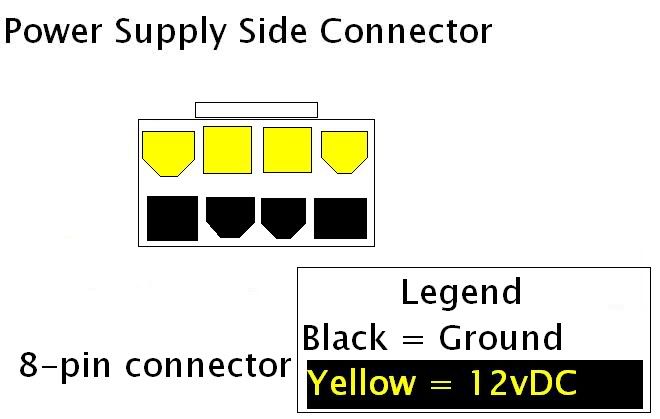
I'm trying to get a pin-out of the 8-Pin PCI-E connector for those of us who would rather make one than buy one, or who can't find one to buy (if anyone knows where to buy one, that would be good too).

So far, I have the original 6-pin pin-out thanks to our own W1zzard!
here's my more in-depth version, albeit made in paint...
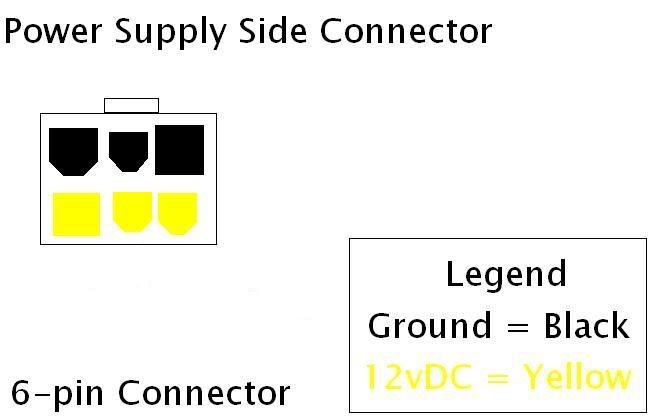
user posted image

Here's what I have on 8-pin so far, I don't know what the rails are, but the shape of the pins is a start...
user posted image


After further research and ample time of the cards that require these being released, the diagram I made was found to be wrong. I used a picture of a 6 to 8 pin adapter, and that company must have color coded the wires incorrectly. Thanks to KennyT772 we have an up-to-date, CORRECT diagram.
user posted image
user posted image
Source

Have anyone try ground the another 2pin using the 6pin Power connector ?

This post has been edited by tachlio: Dec 26 2007, 12:54 AM

Oxburg
post Dec 25 2007, 08:43 PM

Enthusiast
*****
Senior Member
857 posts

Joined: Feb 2007


QUOTE(-pWs- @ Dec 25 2007, 07:33 PM)
Request for some screenies. Please include CPU-z [CPU & Memory] and Memsetwink.gif

-pWs-
*
actually problem is i duno how to screen shot in window.That why i din post up any pic. = =
TS-pWs-
post Dec 25 2007, 08:45 PM

Look at all my stars!!
Group Icon
Elite
8,545 posts

Joined: Aug 2006
From: 224.0.0.6


1. Press PrintScreen on your keyboard.
2. Then paste it to Paint.
3. Save it in JPEG format.

-pWs-

Oxburg
post Dec 25 2007, 09:13 PM

Enthusiast
*****
Senior Member
857 posts

Joined: Feb 2007


QUOTE(-pWs- @ Dec 25 2007, 08:45 PM)
1. Press PrintScreen on your keyboard.
2. Then paste it to Paint.
3. Save it in JPEG format.

-pWs-
*
THANK YOU ALOT !
When i back my house i will post up ASAP.Currently on vacation.Still cant run off from forum lolz.Poisonous. = =
DevilMan
post Dec 25 2007, 10:30 PM

==[ Hardware Swinger ]==
****
Senior Member
653 posts

Joined: Jan 2007
From: Originated From Hell. Status: Lazy.


QUOTE(lohwenli @ Dec 25 2007, 05:13 PM)
No. Its 16x only if there are 2 GPUs or less, if more then it will split one or both of the 16x lines into 2 8x lines.

Kind of sayang very few 790FX mobos actually have slots for 4 GPUs. But then again, very few games can make use of even 3 GPUs. There's an interesting article in anandtech
The 8-pin CPU power connector is different from the 8-pin PCI-E connector, you won't be able to force it in even. However it is possible to rewire it to be useable for PCI-E. Just change the CPU plastic plug with the PCI-E plug.
*
8x at pcie 2.0 is equally pcie 1.0 16x. so it will be running 16x 8x 16x 8x pcie 2.0. icon_rolleyes.gif
black^demon
post Dec 26 2007, 12:26 AM

Manchester United No.1 Fan
******
Senior Member
1,417 posts

Joined: Jan 2003
From: MMU


Guys, i have a Q here.

Brisbane 2.3GHz = Windsor 2.3GHz ?
tachlio
post Dec 26 2007, 12:33 AM

de~sign "ing"
*******
Senior Member
3,102 posts

Joined: May 2005
From: Penang *̡͌l̡*̡̡
QUOTE(black^demon @ Dec 26 2007, 12:26 AM)
Guys, i have a Q here.

Brisbane 2.3GHz = Windsor 2.3GHz ?
*
For your answer : No

This post has been edited by tachlio: Dec 26 2007, 12:33 AM
CV6149
post Dec 26 2007, 01:09 AM

La Furia Roja!!
******
Senior Member
1,347 posts

Joined: Jan 2003


emm maybe 2.3g windsy=2.4-2.5g Brisby??
cyberloner
post Dec 26 2007, 01:23 AM

Regular
******
Senior Member
1,560 posts

Joined: May 2005
From: Penang


http://www.matbe.com/articles/lire/366/ath...90nm/page13.php

that's the different...
real time using... i would say windsor is faster compare using brisbane...
use both before...

This post has been edited by cyberloner: Dec 26 2007, 01:26 AM

100 Pages « < 20 21 22 23 24 > » Top
Topic ClosedOptions
 

Change to:
| Lo-Fi Version
0.0246sec    0.55    6 queries    GZIP Disabled
Time is now: 6th December 2025 - 08:51 PM
