Welcome Guest ( Log In | Register )

12 Pages « < 4 5 6 7 8 > » Bottom

Outline · [ Standard ] · Linear+

 Time and Maxis started to hijack dns query

views
     
PRSXFENG
post Aug 17 2024, 05:03 PM

Look at all my stars!!
*******
Senior Member
2,608 posts

Joined: Nov 2020


QUOTE(Singh93 @ Aug 17 2024, 04:56 PM)
are they even hijacking ? don't see the ip being routed
*
depends on ISP and also if you are using their devices (router)
and it's still in testing, I've observed it happening sometimes and not happening other times

Still, for safety and peace of mind, just avoid using plaintext port 53 dns
BladeRider88
post Aug 17 2024, 06:04 PM

On my way
****
Junior Member
554 posts

Joined: Nov 2006


QUOTE(The.Lucas.DaY @ Aug 17 2024, 02:56 PM)
Actually can i use openwrt in my unused router, let say a Dlink dir842 stock router, to configure DoH in it?  hmm.gif
*
Can, just make sure your router has enough CPU & RAM to process
The.Lucas.DaY
post Aug 19 2024, 09:15 PM

On my way
****
Junior Member
670 posts

Joined: May 2019

Is that mean i have DoH? But i use only cloudflare 1.1.1.1 dns in router, without DoH setting hmm.gif

user posted image
PRSXFENG
post Aug 19 2024, 09:30 PM

Look at all my stars!!
*******
Senior Member
2,608 posts

Joined: Nov 2020


QUOTE(The.Lucas.DaY @ Aug 19 2024, 09:15 PM)
Is that mean i have DoH? But i use only cloudflare 1.1.1.1 dns in router, without DoH setting hmm.gif

user posted image
*
your browser may automatically upgrade the connection to DoH, check for Secure DNS settings inside the browser, and ideally set it to always on instead of Auto
The.Lucas.DaY
post Aug 19 2024, 09:42 PM

On my way
****
Junior Member
670 posts

Joined: May 2019

Thanks, i set to cf secure dns for my browser

QUOTE(PRSXFENG @ Aug 19 2024, 09:30 PM)
your browser may automatically upgrade the connection to DoH, check for Secure DNS settings inside the browser, and ideally set it to always on instead of Auto
*
iCare
post Aug 26 2024, 09:40 PM

Getting Started
**
Junior Member
67 posts

Joined: May 2015
Don't trust any big corps like google , cloudflare etc. when you want privacy. They are just like gov lol. Even Quad9 is sketchy nowadays by looking at their sponsors laugh.gif


sadlyfalways
post Aug 29 2024, 12:06 PM

Regular
******
Senior Member
1,185 posts

Joined: Nov 2020
Hello, I am having issues with my Netflix and need someone with more knowledge to help me

I am using cloudflare family dns for protection from adults sites and malware

I am on maxis fibre with public ip. The ip doesn’t seem to change, even when reset it’s always the same

Today when I logged into my Netflix I noticed I could only watch Netflix original content

I contacted Netflix and they said it’s because I’m on a vpn or proxy and my ip has been flagged

The other profiles seem to be okay even on this flagged ip but for my ip, I can only watch other content if I use mobile data or use an actual vpn to access Netflix

May I know if this can be caused be either cloudflare or this dns hijack thing? Why would my ip ever be flagged as a proxy by Netflix if there is something else going on

How can I check this?
sadlyfalways
post Aug 29 2024, 12:15 PM

Regular
******
Senior Member
1,185 posts

Joined: Nov 2020
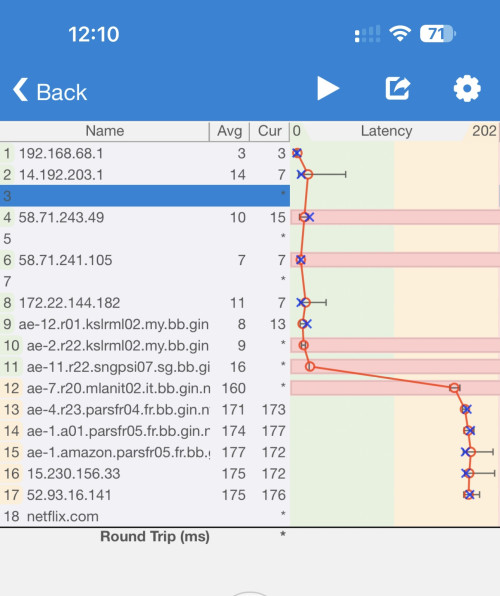
Also noticed on ping plotter that my public ip is not the second node, more like its connected to a node router. Everything except the last 3 are correct and same as my puclic ip
BladeRider88
post Aug 29 2024, 12:19 PM

On my way
****
Junior Member
554 posts

Joined: Nov 2006


QUOTE(sadlyfalways @ Aug 29 2024, 12:06 PM)
Hello, I am having issues with my Netflix and need someone with more knowledge to help me

I am using cloudflare family dns for protection from adults sites and malware

I am on maxis fibre with public ip. The ip doesn’t seem to change, even when reset it’s always the same

Today when I logged into my Netflix I noticed I could only watch Netflix original content

I contacted Netflix and they said it’s because I’m on a vpn or proxy and my ip has been flagged

The other profiles seem to be okay even on this flagged ip but for my ip, I can only watch other content if I use mobile data or use an actual vpn to access Netflix

May I know if this can be caused be either cloudflare or this dns hijack thing? Why would my ip ever be flagged as a proxy by Netflix if there is something else going on

How can I check this?
*
Are you sure that your Maxis fibre is in Public IP?


sadlyfalways
post Aug 29 2024, 12:27 PM

Regular
******
Senior Member
1,185 posts

Joined: Nov 2020
QUOTE(BladeRider88 @ Aug 29 2024, 12:19 PM)
Are you sure that your Maxis fibre is in Public IP?
*
My ip right now is 14.192.203.192

I’ve never had issues accessing my NAS from outside or even Plex
BladeRider88
post Aug 29 2024, 12:42 PM

On my way
****
Junior Member
554 posts

Joined: Nov 2006


QUOTE(sadlyfalways @ Aug 29 2024, 12:27 PM)
My ip right now is 14.192.203.192

I’ve never had issues accessing my NAS from outside or even Plex
*
I see, but not changing IP address after reboot seems a bit weird.
Usually i restart my ONU & router, i will get brand new IP address

Have you complaint this issue to Maxis?

But i see your issue is no related to DNS Hijack
sadlyfalways
post Aug 29 2024, 01:03 PM

Regular
******
Senior Member
1,185 posts

Joined: Nov 2020
QUOTE(BladeRider88 @ Aug 29 2024, 12:42 PM)
I see, but not changing IP address after reboot seems a bit weird.
Usually i restart my ONU & router, i will get brand new IP address

Have you complaint this issue to Maxis?

But i see your issue is no related to DNS Hijack
*
Yes seems weird to me too.

I’m going to try turn it off for 5 minutes and see if I can change it then

The reason I brought up dns hijack was because one of the criteria for Netflix to flag an ip is if it thinks it’s a proxy. So if my requests or data are going through another server to be filtered or scanned then maybe they could see this as being proxy

I don’t have anything on my network besides the NAS that I’ve only accessed from outside the network once this month and not for streaming

Don’t think that can constitute as vpn, and I don’t think anything else will cause that error too
sadlyfalways
post Aug 29 2024, 01:05 PM

Regular
******
Senior Member
1,185 posts

Joined: Nov 2020
QUOTE(BladeRider88 @ Aug 29 2024, 12:42 PM)
I see, but not changing IP address after reboot seems a bit weird.
Usually i restart my ONU & router, i will get brand new IP address

Have you complaint this issue to Maxis?

But i see your issue is no related to DNS Hijack
*
Also, is it normal for my second node not to be my public ip address? I am .192 and not .1 for the last 3 digits

user posted image
ChenKaiWen
post Aug 29 2024, 01:40 PM

Casual
***
Junior Member
364 posts

Joined: May 2019


QUOTE(sadlyfalways @ Aug 29 2024, 01:05 PM)
Also, is it normal for my second node not to be my public ip address? I am .192 and not .1 for the last 3 digits

user posted image
*
That should be the gateway ip for Maxis. My TIME traceroute do it too
sadlyfalways
post Aug 29 2024, 05:01 PM

Regular
******
Senior Member
1,185 posts

Joined: Nov 2020
QUOTE(ChenKaiWen @ Aug 29 2024, 01:40 PM)
That should be the gateway ip for Maxis. My TIME traceroute do it too
*
thank you haha

guess i was just stuck with an ip with bad reputation

turned the modem off for an hour and finally got a new ip and netflix is working again
QuantumEdge
post Aug 30 2024, 12:08 PM

Regular
******
Senior Member
1,595 posts

Joined: Jan 2016


I think for the past 2 days Adguard is having some issues? Websites are slow to load. Meanwhile cloudflare is 100% normal
If I host my own Adguard DNS, would it be affected by routing issues on adguard's side?
BladeRider88
post Aug 30 2024, 12:26 PM

On my way
****
Junior Member
554 posts

Joined: Nov 2006


QUOTE(QuantumEdge @ Aug 30 2024, 12:08 PM)
I think for the past 2 days Adguard is having some issues? Websites are slow to load. Meanwhile cloudflare is 100% normal
If I host my own Adguard DNS, would it be affected by routing issues on adguard's side?
*
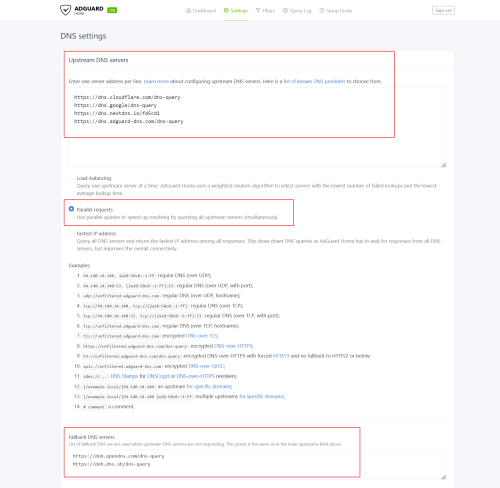
you can do like mine

user posted image

I set a few DNS services that is fast for my line ( you can do the DNS speed test over here: https://dnsspeedtest.online/)

Then i set Parallel Requests and also Fall Back DNS servers as backup

So far I did not feel any slowness and still under DoH protection as well

Hope this helps

GameSky
post Sep 1 2024, 07:02 PM

Nyancat too much
*******
Senior Member
6,381 posts

Joined: Jun 2005
From: meow meow
any good router that can support adguard home?
i got mi4a gigabit but can only run dns over https proxy due to limited storage
dev/numb
post Sep 1 2024, 07:55 PM

On my way
****
Junior Member
691 posts

Joined: Nov 2021
QUOTE(GameSky @ Sep 1 2024, 07:02 PM)
any good router that can support adguard home?
i got mi4a gigabit but can only run dns over https proxy due to limited storage
*
Any newer (AX or later) Asus router that is supported by Merlin should be able to run AdGuard Home. You can do a web search for “AdGuard Home Asus Merlin” to find relevant projects/instructions on Github and discussions on SmallNetBuilder forums. Not really needed though since Asus Merlin has amtm which lets you use Diversion and Skynet, which do an equally good job but are much lighter on resources.

A couple of GL.iNet routers (Flint and Flint2) come installed with AdGuard Home, but buying them in MY is a bit of a hassle. I don’t know of any local resellers in MY. Shopee and Lazada stores will ship them from Hong Kong or Taiwan, so your delivery might be held by customs due to the Sirim requirements and whatnot.

Probably any OpenWRT compatible router with sufficient RAM can also install AdGuard Home via opkg and LuCi quite easily. The hard part would be getting OpenWRT installed on that router in the first place.

Mikrotik routers probably compatible also, likely via containers (I have zero experience with this brand so just an assumption here, please don’t quote me on this).

This post has been edited by dev/numb: Sep 1 2024, 07:57 PM
PRSXFENG
post Sep 1 2024, 10:24 PM

Look at all my stars!!
*******
Senior Member
2,608 posts

Joined: Nov 2020


QUOTE(dev/numb @ Sep 1 2024, 07:55 PM)
Any newer (AX or later) Asus router that is supported by Merlin should be able to run AdGuard Home. You can do a web search for “AdGuard Home Asus Merlin” to find relevant projects/instructions on Github and discussions on SmallNetBuilder forums. Not really needed though since Asus Merlin has amtm which lets you use Diversion and Skynet, which do an equally good job but are much lighter on resources.

A couple of GL.iNet routers (Flint and Flint2) come installed with AdGuard Home, but buying them in MY is a bit of a hassle. I don’t know of any local resellers in MY. Shopee and Lazada stores will ship them from Hong Kong or Taiwan, so your delivery might be held by customs due to the Sirim requirements and whatnot.

Probably any OpenWRT compatible router with sufficient RAM can also install AdGuard Home via opkg and LuCi quite easily. The hard part would be getting OpenWRT installed on that router in the first place.

Mikrotik routers probably compatible also, likely via containers (I have zero experience with this brand so just an assumption here, please don’t quote me on this).
*
I have purchased a GL-iNet Router directly from their official shopee before, no issues with customs
https://shopee.com.my/glinet.my
(I purchased Mango)

For OpenWRT supported routers, personally I like Xiaomi AX3200/ Redmi AX6s for its cheap price at CeX (used 2nd hand shop)
https://my.webuy.com/product-detail?id=6934177754951

RM70 for it, CN version that is somewhat easy to hack to get OpenWRT running on it

Mikrotik has support on some models, the ones with Arm SoCs

Personally, I still prefer running these on another device, like a Raspberry Pi, or clones, or a x86 mini pc, or any old laptop/netbook can run it as well

12 Pages « < 4 5 6 7 8 > » Top
 

Change to:
| Lo-Fi Version
0.0224sec    0.21    6 queries    GZIP Disabled
Time is now: 3rd December 2025 - 06:45 PM