Welcome Guest ( Log In | Register )

3 Pages  1 2 3 >Bottom

Outline · [ Standard ] · Linear+

 Time and Maxis started to hijack dns query

views
     
PRSXFENG
post Aug 8 2024, 09:11 PM

Look at all my stars!!
*******
Senior Member
2,608 posts

Joined: Nov 2020


MCMC Statment

https://x.com/Soya_Cincau/status/1821520438973116758

So, they say it's for "safety"

But the thing is

Ok, sure, feel free to block on TM/Maxis/TIME DNS

But if the user has made a conscious effort to CHANGE their DNS to CF/Google/etc
DON'T HIJACK IT BACK
PRSXFENG
post Aug 8 2024, 09:25 PM

Look at all my stars!!
*******
Senior Member
2,608 posts

Joined: Nov 2020


QUOTE(annoymous1234 @ Aug 8 2024, 09:17 PM)
For windows must install software? Can it be done in settings or something?
*
If windows 11, yes, can enter DNS Over HTTPS address into the DNS settings

If older, then installing YogaDNS is a good choice
PRSXFENG
post Aug 9 2024, 04:25 PM

Look at all my stars!!
*******
Senior Member
2,608 posts

Joined: Nov 2020


QUOTE(QuantumEdge @ Aug 9 2024, 02:50 PM)
user posted image
Lets go, but I think most Tplink router users wont have such luck?
*
Suprisingly, TP-Link does have DoH/DoT

But only on an extremely limited selection of models
1 AX model and a few AC models

https://community.tp-link.com/en/home/forum/topic/617138


PRSXFENG
post Aug 13 2024, 04:48 PM

Look at all my stars!!
*******
Senior Member
2,608 posts

Joined: Nov 2020


For those using Quad9, Quad9 has provided a few ways to check what protocol you're using and check for hijacks

https://docs.quad9.net/FAQs/
PRSXFENG
post Aug 13 2024, 08:14 PM

Look at all my stars!!
*******
Senior Member
2,608 posts

Joined: Nov 2020


QUOTE(ChenKaiWen @ Aug 13 2024, 07:55 PM)
I use quad9 DoH and DoT on adguard.
Just now it stopped working, sites fail to resolve. I see a bunch of timeout in the logs using 443. After removing DoH, it started working again. Adding back DoH did not break it.
Checking on ipleak, Global Transit (TIME) shows up for ipv4 while Woodynet(Quad9) shows up for ipv6.
Something is not right
*
Hey uhh, that was me who was responsible for that

Global Transit is one of the host for Quad9's Presence in Malaysia
They are related to time, but they are neutral, they're just the host
you can confirm this by connecting to Quad9 on other ISPs like Maxis and see that your DNS goes to them as well

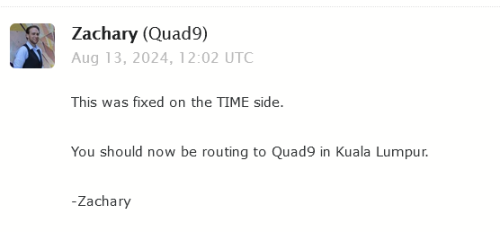
I noticed that TM and TIME don't send to Quad9 KUL, and route to SIN which has a slightly higher latency

Now, TM refuses to peer with them
But TIME is supposed to when I asked Quad9
Quad9 said they'll check with TIME
so, seems like TIME fixed that, and you get lower latency

user posted image
user posted image

But uhh, no issues detected on my side, but I use DNSCrypt protocol sweat.gif

you can confirm it's not a hijack with
https://docs.quad9.net/FAQs/#detecting-dns-...rection-hijacks

This post has been edited by PRSXFENG: Aug 13 2024, 08:28 PM

PRSXFENG
post Aug 13 2024, 08:45 PM

Look at all my stars!!
*******
Senior Member
2,608 posts

Joined: Nov 2020


QUOTE(ChenKaiWen @ Aug 13 2024, 08:26 PM)
Thanks for informing. Did a trace route on ipv6, seems to go to Singapore still, ipv4 goes to myix
*
Maybe the server only has ipv4 connectivity

I check with https://www.dnscheck.tools/ and notice

IPv4 MY - Global Transit
IPv4 SG - WoodyNet
IPv6 MY - WoodyNet
IPv4 SG - WoodyNet

Quad9 does have a total of 3 MY locations and 2 SG locations
(Don't trust the map 100%, at one point in time they listed Johor's country as Singapore shakehead.gif, and they say they don't update it that often )
My guess is MyIX KUL would be TIME's Global Transit
and the DE-CIX KL is the PCH/WoodyNet one?

DE-CIX does peer with PCH/WoodyNet

PRSXFENG
post Aug 13 2024, 10:09 PM

Look at all my stars!!
*******
Senior Member
2,608 posts

Joined: Nov 2020


QUOTE(Kadaj @ Aug 13 2024, 09:51 PM)
I tested with AS10030 Celcom but it doesn't implement transparent proxy DNS and doesn't block anything.
You can view the reports here:
1.1.1.1:
https://explorer.ooni.org/m/20240813131113....4706209241c200c
8.8.8.8:
https://explorer.ooni.org/m/20240813131135....aa74995ad507bf9
9.9.9.9:
https://explorer.ooni.org/m/20240813131158....27ecfbf61a2bcb0

I tested with XOX which is MVNO riding on Celcom.
*
Feels like they're still testing out this system and has it on and off

For me, I noticed my U Mobile isn't hijacking anymore at this time
PRSXFENG
post Aug 14 2024, 07:46 AM

Look at all my stars!!
*******
Senior Member
2,608 posts

Joined: Nov 2020


QUOTE(ChenKaiWen @ Aug 14 2024, 06:41 AM)
SNIP
Unable to resolve that domain but traceroute shows !X
*
Might just be some firewall config on Quad9's side?

Based on this forum post
https://www.linuxquestions.org/questions/li...ine-4175635996/


PRSXFENG
post Aug 15 2024, 08:37 AM

Look at all my stars!!
*******
Senior Member
2,608 posts

Joined: Nov 2020


QUOTE(haya @ Aug 15 2024, 08:29 AM)
https://forum.lowyat.net/index.php?showtopi...ost&p=110240779

It has always bugged me that AS4788 would rather send AS42 bound packets to Singapore/international transit rather than use it on MyIX. At least now I have a explanation, but man it goes back to the "good old days" when packets between ISP's/ASN's would go around the world because AS4788 refused to peer with, well, anyone.
*
For your reference, the answer was shared by them here
https://www.reddit.com/r/Quad9/comments/13e...comment/jjpx60w
PRSXFENG
post Aug 15 2024, 08:45 AM

Look at all my stars!!
*******
Senior Member
2,608 posts

Joined: Nov 2020


QUOTE(haya @ Aug 15 2024, 08:24 AM)
Interesting that TIME (AS9930) is not hijacking all DNS53 packets at least?

Given that it is a AUTHORITY: 0 reply, suggests that it is blocked by Quad9, instead of non-existent domain, with the NXDOMAIN response: https://docs.quad9.net/FAQs/

Thus it looks like DNS53 packets to Quad9 DNS are still being untampered with (for now?)
*
From what I observed over the years
TIME's DNS Hijacking appears to be on the router side

The old WiFi 5 combo ONT, HG8145V5 has DNS settings greyed out in the router, and hijacks port 53
I've heard you can get TIME CS to remotely change to a DNS provider of your choosing but don't quote me on that

The rest of their devices, don't seem to hijack in my experience


PRSXFENG
post Aug 15 2024, 08:59 AM

Look at all my stars!!
*******
Senior Member
2,608 posts

Joined: Nov 2020


QUOTE(haya @ Aug 15 2024, 08:52 AM)
That's why people have the option to use their own/buy their own router. ISP's locking down routers is not limited to Malaysian ISP's: plenty of cases in other countries if Reddit posts are any indication.

What is problematic is hijacking DNS53 at the network level. Ie. What Celcom(Digi) seems to be doing. (And what Indonesia is doing) Using own router (notwithstanding DoT/DoH) for alternate DNS providers will fail when the ISP hijacks DNS53 at their network level/side.

The MSC Bill of Guarantees died with the Najib administration.
*
But you see, the ISPs are moving to "all in one" ont routers

TM with their (not great) D-Link or Skyworth or FiberHome all in ones
Maxis with their Huawei all in ones (a bit rare, I think maybe on their own infra only, the usual TP-Link/Kaon is more common)
TIME has fully commited to Huawei all in ones for a long time

All it takes is for then to pull a Indonesia and say "no bridging" and then we're in trouble
PRSXFENG
post Aug 17 2024, 04:55 PM

Look at all my stars!!
*******
Senior Member
2,608 posts

Joined: Nov 2020


QUOTE(The.Lucas.DaY @ Aug 17 2024, 02:56 PM)
Actually can i use openwrt in my unused router, let say a Dlink dir842 stock router, to configure DoH in it?  hmm.gif
*
seems like only one variant of that dlink is supported
if it was, then yeah, there are packages you can install for that
PRSXFENG
post Aug 17 2024, 05:03 PM

Look at all my stars!!
*******
Senior Member
2,608 posts

Joined: Nov 2020


QUOTE(Singh93 @ Aug 17 2024, 04:56 PM)
are they even hijacking ? don't see the ip being routed
*
depends on ISP and also if you are using their devices (router)
and it's still in testing, I've observed it happening sometimes and not happening other times

Still, for safety and peace of mind, just avoid using plaintext port 53 dns
PRSXFENG
post Aug 19 2024, 09:30 PM

Look at all my stars!!
*******
Senior Member
2,608 posts

Joined: Nov 2020


QUOTE(The.Lucas.DaY @ Aug 19 2024, 09:15 PM)
Is that mean i have DoH? But i use only cloudflare 1.1.1.1 dns in router, without DoH setting hmm.gif

user posted image
*
your browser may automatically upgrade the connection to DoH, check for Secure DNS settings inside the browser, and ideally set it to always on instead of Auto
PRSXFENG
post Sep 1 2024, 10:24 PM

Look at all my stars!!
*******
Senior Member
2,608 posts

Joined: Nov 2020


QUOTE(dev/numb @ Sep 1 2024, 07:55 PM)
Any newer (AX or later) Asus router that is supported by Merlin should be able to run AdGuard Home. You can do a web search for “AdGuard Home Asus Merlin” to find relevant projects/instructions on Github and discussions on SmallNetBuilder forums. Not really needed though since Asus Merlin has amtm which lets you use Diversion and Skynet, which do an equally good job but are much lighter on resources.

A couple of GL.iNet routers (Flint and Flint2) come installed with AdGuard Home, but buying them in MY is a bit of a hassle. I don’t know of any local resellers in MY. Shopee and Lazada stores will ship them from Hong Kong or Taiwan, so your delivery might be held by customs due to the Sirim requirements and whatnot.

Probably any OpenWRT compatible router with sufficient RAM can also install AdGuard Home via opkg and LuCi quite easily. The hard part would be getting OpenWRT installed on that router in the first place.

Mikrotik routers probably compatible also, likely via containers (I have zero experience with this brand so just an assumption here, please don’t quote me on this).
*
I have purchased a GL-iNet Router directly from their official shopee before, no issues with customs
https://shopee.com.my/glinet.my
(I purchased Mango)

For OpenWRT supported routers, personally I like Xiaomi AX3200/ Redmi AX6s for its cheap price at CeX (used 2nd hand shop)
https://my.webuy.com/product-detail?id=6934177754951

RM70 for it, CN version that is somewhat easy to hack to get OpenWRT running on it

Mikrotik has support on some models, the ones with Arm SoCs

Personally, I still prefer running these on another device, like a Raspberry Pi, or clones, or a x86 mini pc, or any old laptop/netbook can run it as well
PRSXFENG
post Sep 4 2024, 10:11 PM

Look at all my stars!!
*******
Senior Member
2,608 posts

Joined: Nov 2020


So, the Maxis Business doc has quite some info

https://www.business.maxis.com.my/en/faq/da...ns-redirection/

Maxis will only hijack plain old port 53 DNS, so those using DoH/DoT should be safe, it's what they tell you to use even

All services (mobile, fixed) are affected

The deadline is the end of this month, 30 Sept 2024


PRSXFENG
post Sep 5 2024, 07:23 AM

Look at all my stars!!
*******
Senior Member
2,608 posts

Joined: Nov 2020


QUOTE(corad @ Sep 4 2024, 10:23 PM)
just to check, if I use something like NordVPN would I still need to mess around with DNS settings ?

travel quite alot, and noticed when in public wifi (airports, hotels etc) especially those with network login page, sometimes don't work if I've changed the DNS settings. so it's a hassle to delete and re-add.
*
yes because usually these public wifi rely on hijacking all dns queries to redirect to their login page
PRSXFENG
post Sep 5 2024, 07:56 AM

Look at all my stars!!
*******
Senior Member
2,608 posts

Joined: Nov 2020


QUOTE(GameSky @ Sep 5 2024, 07:50 AM)
windows 11 does support dns encryption... just need to manually enabled in network settings and use the desired dns service..
*
Yeah uhh... TM is blocking that
PRSXFENG
post Sep 5 2024, 08:05 AM

Look at all my stars!!
*******
Senior Member
2,608 posts

Joined: Nov 2020


QUOTE(GameSky @ Sep 5 2024, 07:58 AM)
remember enable dns over https... not the plain dns
example, adguard dns
*
Ah Adguard may still work fine, but the big names like Cloudflare Google OpenDNS Quad9 all have their DoH/DoT blocked, you can try, it doesn't work
PRSXFENG
post Sep 6 2024, 11:29 AM

Look at all my stars!!
*******
Senior Member
2,608 posts

Joined: Nov 2020


QUOTE(ChenKaiWen @ Sep 6 2024, 11:26 AM)
Works fine on TIME in Penang. So far, here not even blocking plaintext yet.
*
TIME so far still seems safe for now... It's TM that's implementing all the blocks right now

(unless you are on the old TIME Huawei EchoLife HG8145V5, that one hijacks port 53 at the router side)

3 Pages  1 2 3 >Top
 

Change to:
| Lo-Fi Version
0.0283sec    0.74    7 queries    GZIP Disabled
Time is now: 4th December 2025 - 12:13 AM