Welcome Guest ( Log In | Register )

Outline · [ Standard ] · Linear+

 Time and Maxis started to hijack dns query

views
     
sadlyfalways
post Aug 15 2024, 08:47 AM

Regular
******
Senior Member
1,185 posts

Joined: Nov 2020
QUOTE(PRSXFENG @ Aug 15 2024, 08:45 AM)
From what I observed over the years
TIME's DNS Hijacking appears to be on the router side

The old WiFi 5 combo ONT, HG8145V5 has DNS settings greyed out in the router, and hijacks port 53
I've heard you can get TIME CS to remotely change to a DNS provider of your choosing but don't quote me on that

The rest of their devices, don't seem to hijack in my experience
*
maxis router also same thing.

it is why it is in the dustbin
sadlyfalways
post Aug 15 2024, 01:51 PM

Regular
******
Senior Member
1,185 posts

Joined: Nov 2020
QUOTE(haya @ Aug 15 2024, 08:52 AM)
That's why people have the option to use their own/buy their own router. ISP's locking down routers is not limited to Malaysian ISP's: plenty of cases in other countries if Reddit posts are any indication.

What is problematic is hijacking DNS53 at the network level. Ie. What Celcom(Digi) seems to be doing. (And what Indonesia is doing) Using own router (notwithstanding DoT/DoH) for alternate DNS providers will fail when the ISP hijacks DNS53 at their network level/side.

The MSC Bill of Guarantees died with the Najib administration.
*
I understand, but we didn't vote Najib in on reformation

Right now I am planning on getting a firewalla and just use my surfshark account to wireguard the whole connection
sadlyfalways
post Aug 29 2024, 12:06 PM

Regular
******
Senior Member
1,185 posts

Joined: Nov 2020
Hello, I am having issues with my Netflix and need someone with more knowledge to help me

I am using cloudflare family dns for protection from adults sites and malware

I am on maxis fibre with public ip. The ip doesn’t seem to change, even when reset it’s always the same

Today when I logged into my Netflix I noticed I could only watch Netflix original content

I contacted Netflix and they said it’s because I’m on a vpn or proxy and my ip has been flagged

The other profiles seem to be okay even on this flagged ip but for my ip, I can only watch other content if I use mobile data or use an actual vpn to access Netflix

May I know if this can be caused be either cloudflare or this dns hijack thing? Why would my ip ever be flagged as a proxy by Netflix if there is something else going on

How can I check this?
sadlyfalways
post Aug 29 2024, 12:15 PM

Regular
******
Senior Member
1,185 posts

Joined: Nov 2020
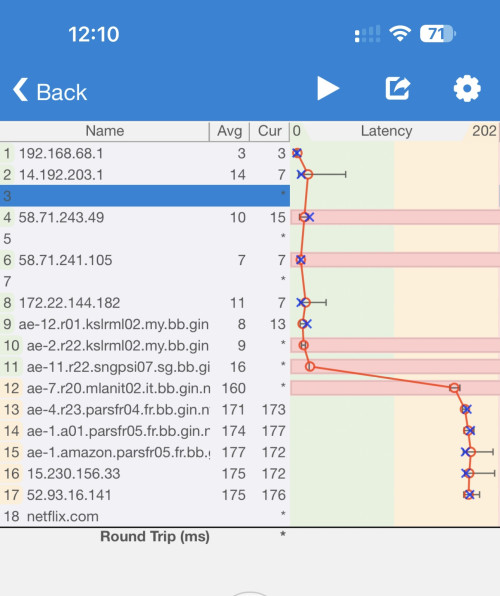
Also noticed on ping plotter that my public ip is not the second node, more like its connected to a node router. Everything except the last 3 are correct and same as my puclic ip
sadlyfalways
post Aug 29 2024, 12:27 PM

Regular
******
Senior Member
1,185 posts

Joined: Nov 2020
QUOTE(BladeRider88 @ Aug 29 2024, 12:19 PM)
Are you sure that your Maxis fibre is in Public IP?
*
My ip right now is 14.192.203.192

I’ve never had issues accessing my NAS from outside or even Plex
sadlyfalways
post Aug 29 2024, 01:03 PM

Regular
******
Senior Member
1,185 posts

Joined: Nov 2020
QUOTE(BladeRider88 @ Aug 29 2024, 12:42 PM)
I see, but not changing IP address after reboot seems a bit weird.
Usually i restart my ONU & router, i will get brand new IP address

Have you complaint this issue to Maxis?

But i see your issue is no related to DNS Hijack
*
Yes seems weird to me too.

I’m going to try turn it off for 5 minutes and see if I can change it then

The reason I brought up dns hijack was because one of the criteria for Netflix to flag an ip is if it thinks it’s a proxy. So if my requests or data are going through another server to be filtered or scanned then maybe they could see this as being proxy

I don’t have anything on my network besides the NAS that I’ve only accessed from outside the network once this month and not for streaming

Don’t think that can constitute as vpn, and I don’t think anything else will cause that error too
sadlyfalways
post Aug 29 2024, 01:05 PM

Regular
******
Senior Member
1,185 posts

Joined: Nov 2020
QUOTE(BladeRider88 @ Aug 29 2024, 12:42 PM)
I see, but not changing IP address after reboot seems a bit weird.
Usually i restart my ONU & router, i will get brand new IP address

Have you complaint this issue to Maxis?

But i see your issue is no related to DNS Hijack
*
Also, is it normal for my second node not to be my public ip address? I am .192 and not .1 for the last 3 digits

user posted image
sadlyfalways
post Aug 29 2024, 05:01 PM

Regular
******
Senior Member
1,185 posts

Joined: Nov 2020
QUOTE(ChenKaiWen @ Aug 29 2024, 01:40 PM)
That should be the gateway ip for Maxis. My TIME traceroute do it too
*
thank you haha

guess i was just stuck with an ip with bad reputation

turned the modem off for an hour and finally got a new ip and netflix is working again
sadlyfalways
post Sep 6 2024, 11:37 PM

Regular
******
Senior Member
1,185 posts

Joined: Nov 2020
QUOTE(PRSXFENG @ Sep 6 2024, 04:50 PM)
I'm guessing the bare minimum is blocking people from using other DNS servers and force usage of ISP servers

Maxis gently nudge you in the direction to use DoH/DoT

Time just "kindly request" you to change, not "demand"

But based on Maxis thread, it seems like home users will not be treated so kindly, and DoH/DoT May be blocked

So far on my side... Things are still ok.
It remains to be seen how does time implement their block
*
I’m on maxis and still able to doh and even normal google dns works on public ip


Change to:
| Lo-Fi Version
0.0242sec    0.17    7 queries    GZIP Disabled
Time is now: 2nd December 2025 - 12:53 PM